Host Group Appointments Online in Zoho Bookings

Host Group Appointments Online in Zoho Bookings

Greetings from the Zoho Bookings team!

We’re excited to announce a new enhancement to Group Booking that makes hosting online group events smoother and more professional than ever. You can now conduct online group events with auto-generated meeting links and calendar invites, ensuring everyone joins at the right time, without any manual follow-ups.

What’s new in Online Group Booking?  

Online meeting mode for group events: You can now choose Online as the meeting mode while creating a group event. When selected, Zoho Bookings lists all the video conferencing tools integrated with your workspace, allowing you to pick the one that best fits your needs.
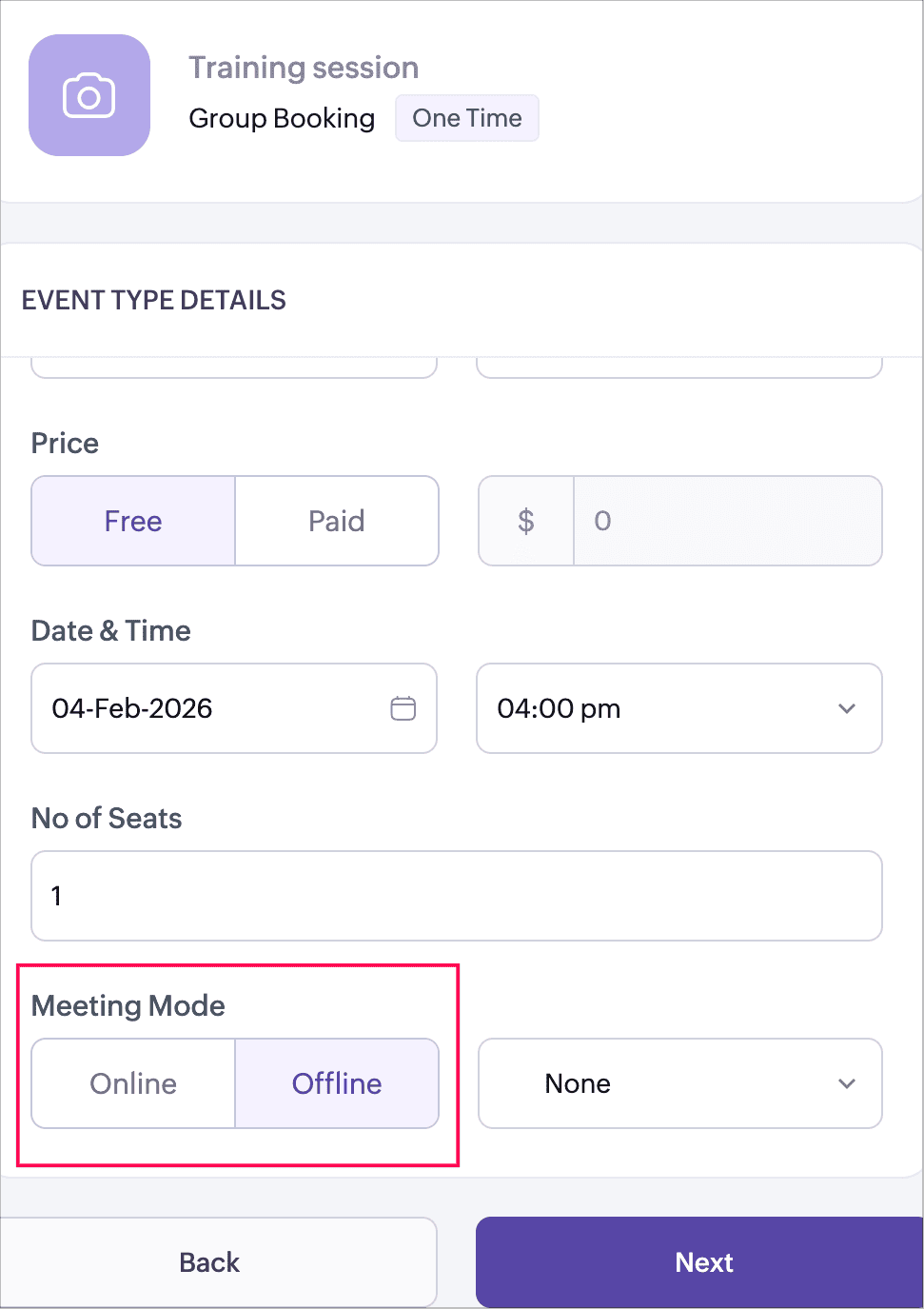


Automatic meeting link generation: Once an online meeting platform is selected, Zoho Bookings automatically generates the meeting link based on the event and session type. There’s no need to create or manage meeting links manually.

The meeting link behavior varies based on the group booking type:
  • One-time group booking: A single meeting link is created and shared with all participants for the session.
  • Recurring drop-in group booking: A unique meeting link is generated for each session. Participants receive the corresponding meeting link for the session they book.
  • Recurring series group booking: A single meeting link is created and shared across all sessions in the series.
This ensures the right meeting link is always shared, based on how the group event is structured.

Calendar invites for host and participants: 
Calendar invites are automatically sent when a booking is confirmed:
  • For host (booking users): Calendar invites include the meeting link and the list of participants.
  • For customers: Calendar invites include the meeting link along with their booking details.
This ensures everyone has instant access to the session details and can join the meeting on time.

Offline meetings continue to work as before: If you choose Offline as the meeting mode, Zoho Bookings will list the in-person locations added under your workspace. You can select an existing location or add a new one using the + New Location option.

Why this matters  
  • Perfect for webinars, training sessions, demos, and online classes
  • Eliminates manual meeting link sharing
  • Keeps hosts and participants aligned with automatic calendar reminders
  • Offers a consistent and professional booking experience for group events
Help documentation: For detailed steps and configuration options, refer to the help document.

We believe this enhancement will make managing online group events simpler, faster, and more reliable. As always, we’d love to hear your feedback. Kindly drop a comment below or reach out to us anytime. Stay tuned for more exciting updates!

Regards,
The Zoho Bookings Team


    • Sticky Posts

    • New feature: Invite additional guests for your bookings

      Hello everyone, Greetings from Zoho Bookings! We are happy to announce the much-awaited feature Guest Invite, which enhances your booking experience like never before. This feature allows additional participants to be invited for the bookings to make
    • 📣📣 Zoho Bookings Schedulathon 2025 is here!

      Hey Zoho Bookings fam, We're excited to invite you to our first-ever hackathon: Yes, Zoho Bookings Schedulathon 2025 is live now. This is a virtual event and you can participate anywhere from the world. Businesses should be able to set up meetings from
    • 📣 [Webinar] Spikra shows how businesses leverage Zoho Bookings to increase revenue

      [Webinar] Spikra shows how businesses leverage Zoho Bookings to increase revenue Hi all, Service-based businesses need to be on top of their client experience game to stay ahead. Spikra, one of our Advanced Zoho Partners, has been helping businesses deliver
    • 📣📣 Zoho Bookings - Feature Roadmap 2024

      Hi Everyone, Thank you for all the support you have been showing Zoho Bookings. We had a fabulous 2023, with a bunch of new features and over 60K new users. In 2024, our prime focus will be on user experience, and we have a few vital features coming in
    • Attention: Important updates to the payment gateway integrations

      Greetings from the Zoho Bookings team! We have a few important updates to the payment gateway integrations that allow you to collect online payments for your appointments. The following payment gateways will be updated, and we encourage you to make the
    • Recent Topics

    • Publishing an Application with a Student Account

      Dear Zoho Creator Team, I hope this message finds you well. I would like to know if I can publish the application I built using my Zoho Creator account, which is currently a student account. If it is possible, could you please guide me on how to go about
    • How to skip weekends and public holidays in a scheduled workflow using Deluge in Zoho Creator?

      Hi, I have a scheduled workflow in Zoho Creator that runs daily at a fixed time. I want it to execute only on working days skipping weekends and public holidays. Could anyone please help me with how to achieve this?
    • Workflows being applied and the Large unwanted popup

      When a workflow is being applied do to an action, then the Agent is left with a large Window asking if they would like the see the changes this workflow did. Is there any way to disable this prompt from appearing?
    • Automation Series: Assign Subsequent Task Owner on Completion

      When a project progresses, tasks get piled up over time. As new tasks are created, tracking ownership and assigning them can become time consuming. In a pharmaceutical manufacturing unit, the procurement phase involves a set of tasks such as raw material
    • What's New in Zoho Billing | March 2026

      March is here with a fresh wave of updates to Zoho Billing. From making compliance easier, reporting more flexible, to making day-to-day workflows smoother across the board. Here's everything that's new this month. Introducing Usage-Based Billing Reports
    • Business Day Logic Update: More Accurate Scheduling for Your Workflows

      Hello everyone, We’re improving how business-day calculations work in workflows, especially when triggers happen on weekends. This update ensures that offsets like +0, +1, and +2 business days behave exactly as intended, giving you clearer and more predictable
    • How to add a filter

      Hi Team, How can I set a filter like excel, instead of adding a new button.
    • A POS solution to complete the business solution for SME businesses

      For such a long time one aspect of SME business completely ignored has been a suitable POS solution native to Zoho and integrated with all the usual and necessary applications such as Inventory, Books, Commerce and CRM. The first and generally only option
    • Introducing SlyteUI : From Idea to a Working Interface in Minutes

      Hello everyone! Are you spending hours building basic UIs? Does even the smallest customization feel like a major task? CRM customization should feel intuitive and straightforward, not time consuming or exhausting. SlyteUI makes this possible by simplifying
    • Zoho Form not synching with Zoho CRM in CRM email template

      I have in the past successfully created an email template that has access to a Zoho Form in the url link to Forms in the email template. I am in the Contact Module of the CRM and I have created a Form for contacts and mapped the two. I am using the upsert
    • Using Zoho CRM to manage NBI Clearance applicants – need workflow advice

      Hi everyone, I’m currently helping manage applications related to NBI Clearance services (appointments, document tracking, and status updates). Right now, everything is being handled manually and it’s getting confusing when multiple applicants are involved.
    • Bulk upload images and specifications to products

      Hi, Many users have asked this over the years and I am also asking the same. Is there any way in which we can bulk upload product (variant) images and product specifications. The current way to upload/select image for every variant is too cumbersome.
    • Super Admin Logging in as another User

      How can a Super Admin login as another user. For example, I have a sales rep that is having issues with their Accounts and I want to view their Zoho Account with out having to do a GTM and sharing screens. Moderation Update (8th Aug 2025): We are working
    • Schedule Timeout 5 minutes vs. stated 15 minutes

      I am running into a function run timeout error after 5 minutes for my schedules. The Functions - Limits documents states it should be 15 minutes: Functions - Limits | Online Help - Zoho CRM. What should it actually be? Due to the 5 minute timeout, I'm
    • Coupon Codes and Cancelling Subscriptions

      We have two Zoho One organizations, one we use for dev/testing. In Zoho Billing when we cancel a subscription, we are getting two different behaviors with regards to coupons. In one environment, the coupon is removed upon cancellation. In the other, the
    • Zoho Books | Product updates | April 2026

      Hello users, Welcome to our April 2026 product updates roundup! Highlights include profit margin for sales transactions, insights in reports, recording deposits from undeposited funds in banking, and faster production workflows with improved assembly
    • Journal Entries Do Not Show Multiple Entries to the Same Account

      Another basic accounting function that Books ... Accountants sometimes write journal entries, debiting and/or crediting the same account in the same entry. This is due to the need to record specific activity in an account when we pull reports especially
    • Bulk Writer Export

      Pardon me if this has already been discussed (I can't find anything about it in these forums and my last attempt to start a thread seems to have failed). Is it possible to export more than one document at once? I would be really great to be able to burn OpenOffice.Org files of all my Zoho documents once a month to a CDR. If that feature is available/were created, this would be my main word processor. Without being able to do my own bulk backups I'm leery to count on Zoho's servers (which are robust
    • Sites API

      Is there a Sites API and if so where can we find documentation
    • Extracting phone number from variable

      Hi. I've created a flow between Calendly and Zoho CRM. So when someone schedules a meeting in Calendly, there is a lead created in Zoho CRM. However, I am not able to fill in the phone number field in Zoho CRM, because the phone number is included in
    • I can't fetch Calendly Fields

      Hello, I have set up a flow to connect Calendly with Zoho CRM, A few days ago I have mentioned that I should update the Calendly app connection and I have done, After Calendly has been updated I have some issues such as Event location missing I can map
    • Edit a previous reconciliation

      I realized that during my March bank reconciliation, I chose the wrong check to reconcile (they were for the same amount on the same date, I just chose the wrong check to reconcile). So now, the incorrect check is showing as un-reconciled. Is there any way I can edit a previous reconciliation (this is 7 months ago) so I can adjust the check that was reconciled? The amounts are exactly the same and it won't change my ending balance.
    • FSM- are we getting there

      We have now tried the FSM a couple of times. We have been defeated on the offline access. As you can imagine the enginner needs to know the customers details, the job and the equipment. This needs to be cache. Is it yet? Plus Our engineers do multiple
    • Canvas and calendar

      Is it possible to have a canvas view that shows say a contacts details with the meetings calendar on the same page?
    • What's new in Zoho Social - Q1 recap

      Hello everyone, We’ve rolled out a bunch of updates in Q1, and we’re excited to walk you through them. To help you explore these features in detail, we’re hosting a Q1 recap webinar where we’ll show you how to make the most of each update. Q1 recap webinar
    • Ignore Auto Sales Order number generation not working

      Hi, My Flow has broken and I'm no longer able to use the Ignore auto number generation function and instead use the field that came from the trigger (via Jotform) when creating a new Sales Order in Books. Any suggestions how to fix this?
    • Split Bills/Expsense between multiple projects and/or clients

      I need to be able to split vendor invoices/ expenses between multiple clients. Entering the bill multiple times is not only time consuming, it defeats the purpose of having a unquie identifity bill number and will allow for possible duplicated entry.  Below is an example from Quickbooks Desktop. Splitting costs over various projects is a common job costing function that I am very sad and surprised is not an option in Zoho Books. Unless I am missing it somewhere? Thanks for your help!
    • Vendor bills cannot be assigned to a customer or a customer project?

      I'm confused on how to handle outsourced contractor expenses on a customer project.  Between my business and the contractor, the invoice they send me fits obviously into Zoho Books as a Bill. However, I need to be able record those expenses to the client
    • Anyone using Books to track Project Profitability? If so, I could use some guidance

      Hello Zoho Community. I am a recent subscriber to Zoho, and its part of an ongoing evaluation.  My company (and my clients) have extensive project-tracking needs.  The Projects module seems to be good from a project management standpoint, but I am perplexed
    • Introducing parent-child ticketing in Zoho Desk [Early access]

      Hello Zoho Desk users! We have introduced the parent-child ticketing system to help customer service teams ensure efficient resolution of issues involving multiple, related tickets. You can now combine repetitive and interconnected tickets into parent-child
    • Problem in usage zoho

      Difficulty to submit the from in my training to handle ticket on your free trial
    • In-House, Non-Billable Projects

      I use Zoho Projects solely for in-house projects with fixed cost budgets.  Only bills and expenses need to be charged against the budget.  There are no customers to be billed or invoices to be created. How can such a non-billable project be set up?   As
    • [Webinar] What's New in Zoho Analytics: Q1, 2026

      To all the data enthusiasts out there, we're back again with another power-packed webinar in the What's New series! This last quarter was marked by exciting new features and product updates focused on offering you top-notch solutions. With new data connectors,
    • Ask The Expert: Deep Dive into Zoho CRM, Desk, SalesIQ, and Campaigns!

      Are you using Zoho to power your sales, support, and marketing, and have questions about configuration, automation, or best practices? We have great news: the “Ask The Expert” session is coming to the Zoho Benelux Community! This session is specifically
    • Users I've shared the sheet with cannot use the Custom Functions

      Hi, I have a Zoho Sheet worksheet that I shared to 2 colleagues, giving them full access: In that worksheet, I created a button with a custom Deluge function and it works flawlessly for me: For those I shared the worksheet to, when they click the button,
    • Limiting the form - Zoho People

      Hi Team, I would like to limit the number of form/request submissions for employees within a given month. For example, if an employee has already submitted 3 requests in the current month, they should not be allowed to submit any further requests. An
    • Zoho Analytics: Clarification on Email Schedule Limits in Basic Plan

      Hi Team, I have a question regarding the email scheduling limits in the Zoho Analytics Basic Plan. The plan shows that I can create 4 email schedules. However, I understand that schedule consumption is calculated based on recipients (i.e., 1 schedule
    • Standardize your booking forms with Centralized Customer Form

      We’re excited to introduce Centralized Customer Form, a new way to manage and standardize how customer information is collected across your event types. With this feature, you can define a common set of booking form fields once and apply them across your
    • Zoho Creator In-App Notification

      Hi Team, I have implemented an in-app notification using code, as it required some customization. I followed the example in the link below: https://www.zoho.com/deluge/help/pushnotify-using-deluge.html#Example I have a couple of questions regarding this
    • Add Flexible Recurrence Options for Meeting Scheduling in Zoho Cliq (e.g., Every 2 Weeks)

      Hello Zoho Cliq Team, We hope you are doing well. Currently, when scheduling a meeting inside Zoho Cliq, the recurrence options are limited to Daily, Weekly, Monthly, and Yearly. There is no ability to set a meeting to occur every X weeks — for example,
    • Next Page