Improved configuration experience for Zia AI features
Hello everyone,
Zia, the AI assistant built in to Zoho Creator, powers a range of capabilities—from generating forms and suggesting fields to writing Deluge scripts and running AI agents—that help you build applications faster. Until now, configuring Zia meant selecting a single LLM provider that applied uniformly across all these features.
We have now enhanced the Zia configuration experience to give administrators greater flexibility in choosing and managing AI providers and granular control right down to the individual feature level.
What's new
Multiple API keys per provider
You can now add up to five API keys per LLM provider using BYOK (bring your own key). This gives you greater control over how AI capabilities are accessed and managed across your account, making it easier to organize keys by team, project, or purpose.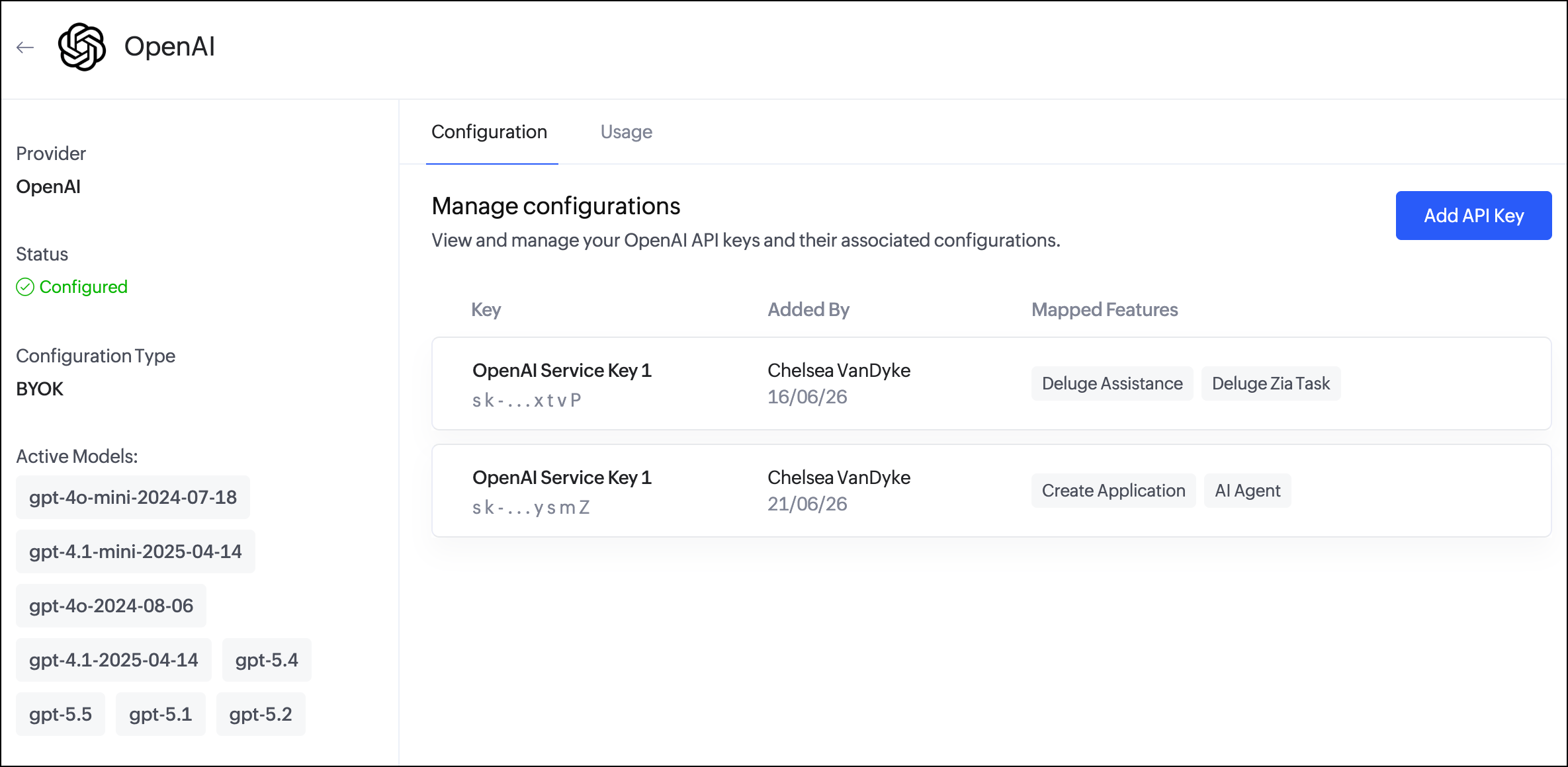
Per-feature provider mapping
Each Zia feature can now be mapped to a specific provider and API key combination. This means different features can run on different providers based on your needs, independently of one another. For example, you can use one provider for application generation and another for Deluge assistance.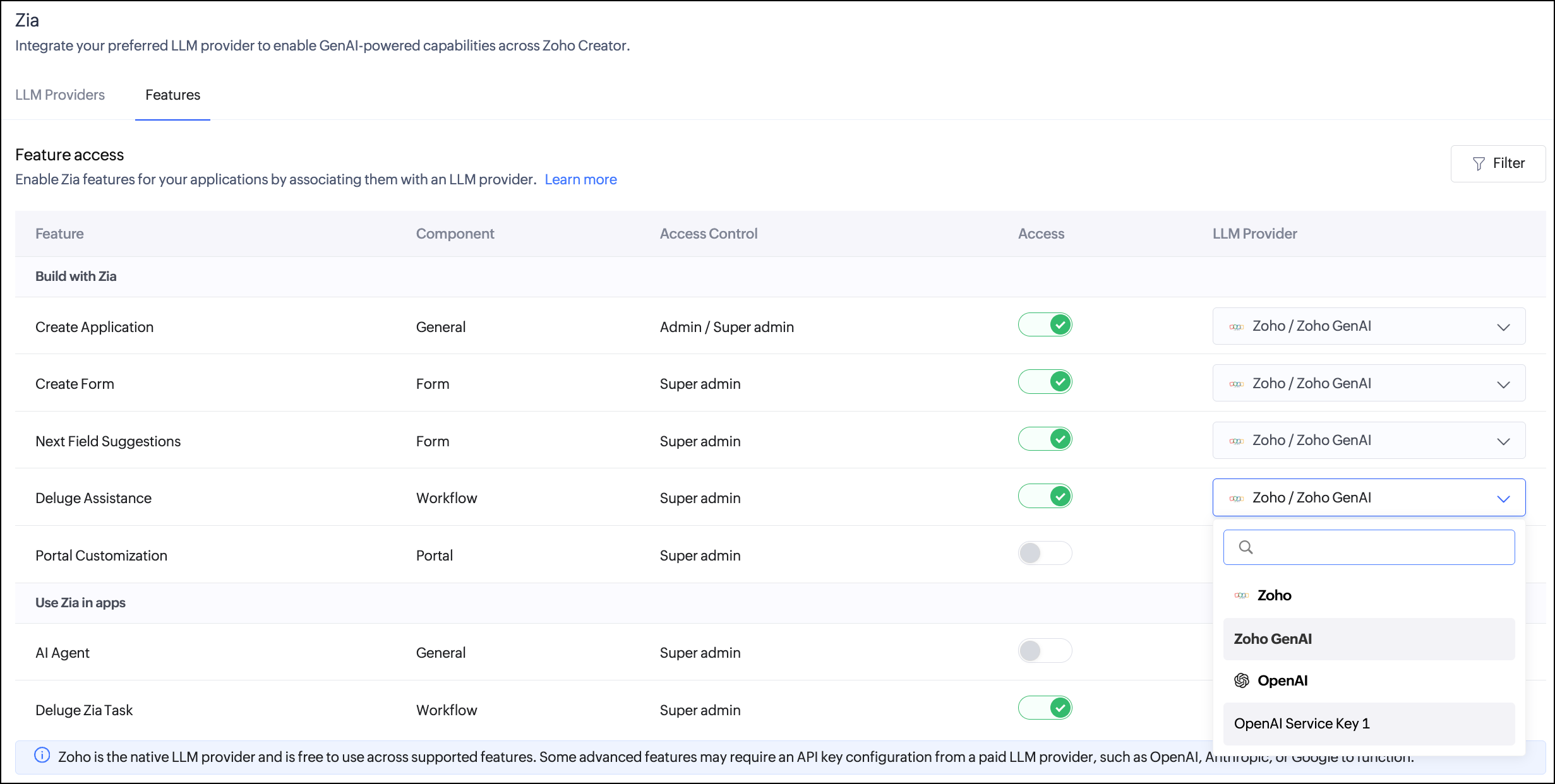
Refreshed Zia landing page
The Zia page under Operations has been updated to reflect these changes. The available AI providers (Zoho, OpenAI, Google, and Anthropic) are now displayed as cards. 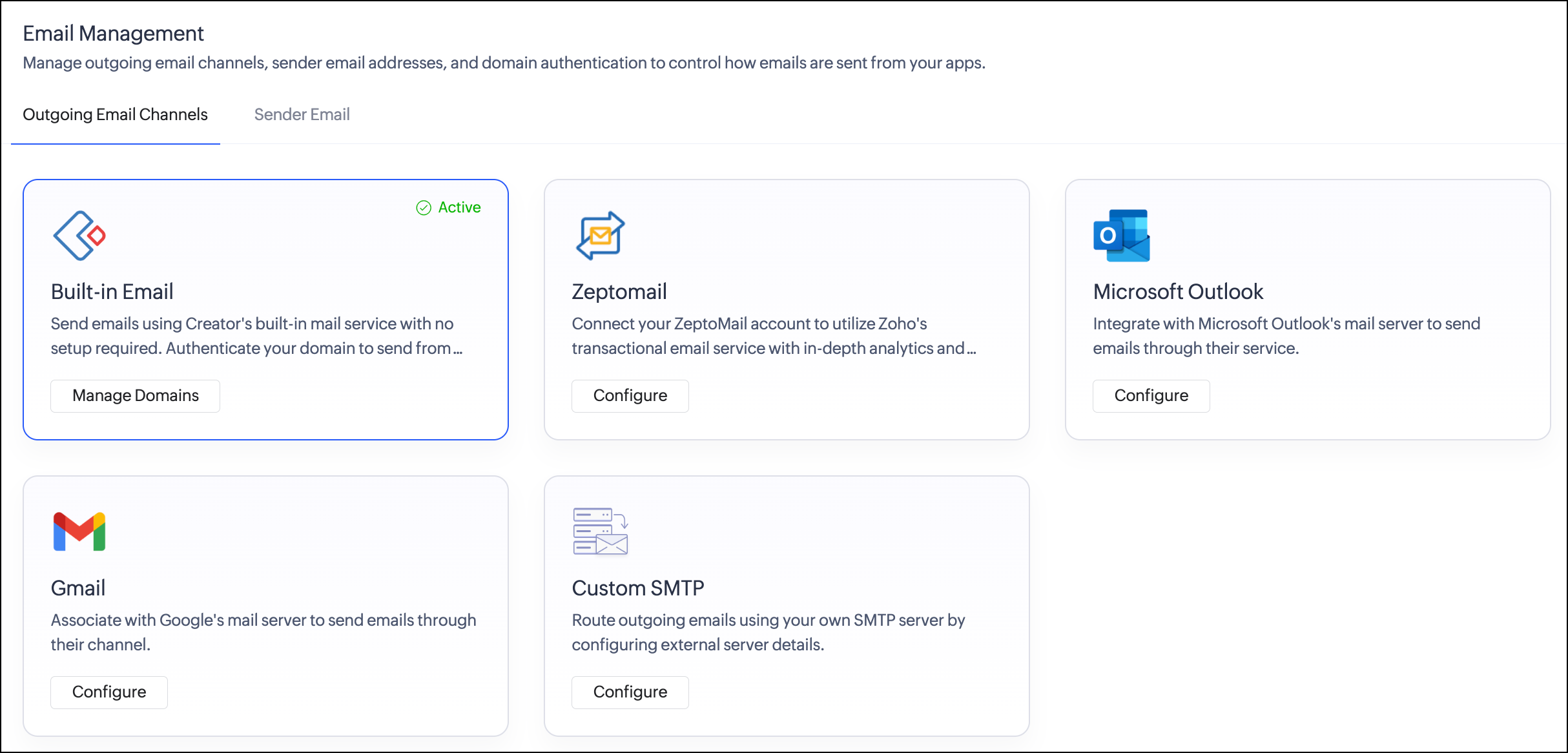
Clicking any provider takes you to a detailed configuration page where you can add API keys, map features, and track usage.
Please note the following:
Zoho remains the default LLM provider and requires no additional configuration. It is free to use.
When no external key is mapped to a feature, Zoho GenAI is used by default for supported features.
If you disable a feature, the LLM provider mapping will not be retained, and the feature will need to be remapped when re-enabled.
Why this matters
Organizations using Zia across multiple workflows often have varying AI requirements for different tasks. A team might prefer one provider's capabilities for code generation while relying on another for natural language tasks. Previously, this was not possible, as one provider served all features. With per-feature mapping, administrators can now make more deliberate, optimized choices about which AI model powers which capability, without being locked into a single configuration for the entire account.
How to get started
Navigate to Zia under Operations in your Creator account.
Select your preferred LLM provider from the provider cards displayed.
Add your API key and assign a key name to help differentiate between keys.
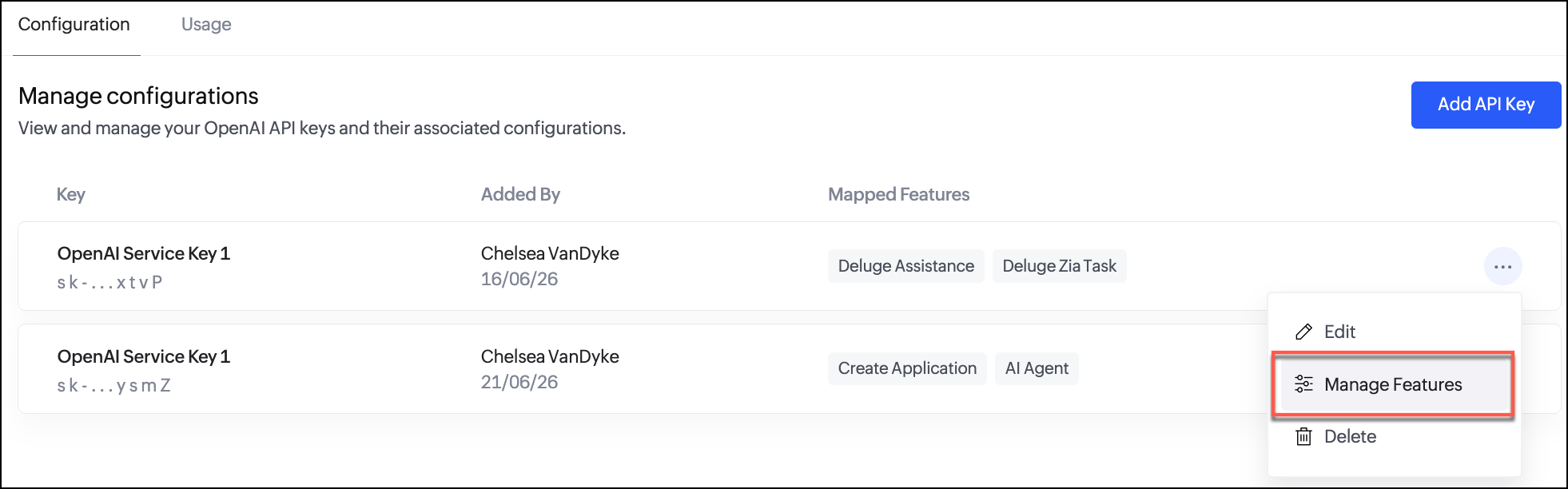
Click the Manage Features option in the meatball menu and map each feature to a specific provider and API key.
For more information, visit the Understanding Zia features in Creator help documentation.
Things to note
This feature is available for Creator 6 (C6) users on paid plans only.
It can be configured by super admins and admins.
For external LLM providers (OpenAI, Google, and Anthropic), API keys must be generated from the respective provider accounts. Any charges applicable for API usage are to be managed directly by the user with the respective provider.
Google, Anthropic, and OpenAI are available in all data centers except CN. Zoho GenAI is available in all data centers except CN, UAE, and SA.
As always, feel free to share your questions or feedback in the comments below.
We'll be back soon with more exciting updates!
Regards,
The Zoho Creator Team
Topic Participants
Ashwin Vishal R
Vivek Rai
Ben Norman
Sticky Posts
Zoho Creator + LLMs using Zoho MCP: Bring contextual AI into your apps
Hello everyone, We're excited to share that Zoho Creator can now be integrated with leading AI models(like Claude) using Zoho MCP. As you know, Zoho Creator has been a pioneering low-code platform with a razor-sharp focus on making it easy to build businessIntroducing Zoho Creator's 2025 Release Projection 2
Hello Creators! I'm Prakash, from the Creator product management team, and today I'm delighted to unveil our next set of features as part of Release Projection 2 for 2025. With thoughtful analysis and planning, we've curated powerful new capabilitiesZoho Creator - 2023 Release Projection 1
Hello everyone! A very Happy New Year to you and your family. Hope you're all good and having a great time using Zoho Creator to make your lives easier and your businesses prosper. 2022 was an action-packed year for us at Creator, and we hope to continueZoho Creator User Group meetups in a city near you! - Oct - Nov, 2023
Greetings from the Zoho Creator team! We're hosting a series of Zoho Creator meetups in various cities across the globe, and we'd love to meet you there! Our meetups are a great opportunity to network with industry peers, exchange ideas and best practices,Zoho Creator - 2023 Release Projection 2
Hello everyone! Time truly flies when you're having an incredible journey, and today we mark the completion of an eventful and action-packed six months. It feels like just yesterday when we embarked on this adventure together with the launch of our new
Recent Topics
Kaizen #229: Email-Deal Associations in Zoho CRM
Hi All, Welcome back to another week of Kaizen! Emails are a core channel for customer communication in any CRM system. In Zoho CRM, emails can be associated with records across multiple modules. In this post, we will focus on email associations withThis user is not allowed to add in Zoho. Please contact support-as@zohocorp.com for further details
Hello, Just signed up to ZOHO on a friend's recommendation. Got the TXT part (verified my domain), but whenever I try to add ANY user, I get the error: This user is not allowed to add in Zoho. Please contact support-as@zohocorp.com for further details I have emailed as well and writing here as well because when I searched, I saw many people faced the same issue and instead of email, they got a faster response here. My domain is: raisingreaderspk . com Hope this can be resolved. Thank youSalesInbox attach e-mail to deal
Hello, I have setup and started using the SalesInbox feature in Zoho. I could not figure how to attach an e-mail to a deal in the SalesInbox. Our company is dealing with a lot of partners, and I will for example receive in the same day 5 e-mails from the same contacts but that should be associated with 5 different deals, how would I go about that? At the moment, it seems that the only solution is to use the Outlook Plugin in Outlook to attach those e-mails.Problem with currency field in Zoho CRM
Hi Guys Zoho Books has a feature in currency fields that automatically converts decimal numbers with commas ( , ) to period format ( . ) when pasting them. For example: R$ 2,50 --> R$ 2.50 Is this behavior available in Zoho CRM? I couldn't find any configurationEmail-Data Synchronization with Zoho Analytics
Hello, Enterprise Support Community! We're excited to announce the availability of Email Data Synchronization with Zoho Analytics! This highly requested enhancement allows you to sync email data from Zoho CRM into Zoho Analytics, making it easier to analyzeAction Required: Allowlist New IP Ranges for the EU Data Center
Dear Users, We are adding new IP ranges for the Zoho Analytics EU data center (https://analytics.zoho.eu). These ranges will come into effect in the last week of December 2026. If you connect Zoho Analytics to cloud databases (both Live Connect and Import),Workflows failing / fields not updating by function or action
Any one else having issues like this? All was working fine last week, now all of a sudden the system doesn't like 3 fields in one of my (most important) forms, and won't update these by workflow / deluge / action. Only by manually editing, or bulk edits.Mass Update Option for Changing Work Order Owner
Hello FSM Team/Mr. Abid, We would like to inquire if there is an option to mass update or bulk change the Owner of Work Orders in Zoho FSM. Current Situation: At the moment, the Owner of a Work Order can only be changed individually, which becomes time-consumingZoho Projects - Auto Populate Project on Project Invoices
Hi Projects team, I noticed that when creating an invoice from a Project in Zoho Projects, the project is not selected on the invoice. Is this something which you would consider as a feature request? It seems silly that when you create an invoice fromCloud to cloud folder migration from Sharepoint to Workdrive
I am aware of OneDrive migration: https://help.zoho.com/portal/en/kb/workdrive/migrations/microsoft/articles/migrate-from-onedrive-to-zoho-workdrive#Whats_migrated would this cover a Sharepoint migration meaning I can move a whole Sharepoint (team) folderDYK 16: Set Approval Rules for Timesheet
Did you know you can decide who approves timesheets based on criteria? Yes, enable Time log or Timesheet approval from Set up to create approval rules that govern their approval processes. Approval rules for Time logs and Timesheet help avoid errors inWhatsApp Business Calling API
Dear Zoho SalesIQ Team, I would like to request a feature that allows users to call WhatsApp numbers directly via Zoho SalesIQ. This integration would enable sending and receiving calls to and from WhatsApp numbers over the internet, without the needEuropäische Zeichen: Komma "," anstatt Punkt "." möglich?
In alle Betragsfelder müssen wir mit dem Punkt "." die Beträge erfassen wie 123.34 EUR. Das müssen wir nur in Zoho so machen, weil in anderen Applikationen wird in "Europa" mit dem Komma 123,34 EUR gearbeitet. Das Datumsformat kann kann in Books eingestelltIntroducing Seek Profile & Seek Ad Sync in Zoho Recruit
Hiring on SEEK usually means working in two places. You check a candidate's SEEK Profile in one tab to confirm their work history and credentials, then switch back to Zoho Recruit to move them forward. When you post a new role, you rebuild the ad forZoho Bookings 1.0 is being retired – Switch to Bookings 2.0 by December 2, 2026
Hello everyone! Zoho Bookings 2.0 was launched on April 17, 2025, introducing a simpler, workspace-based interface for managing appointments and scheduling activities. As part of the transition to the new version, Zoho Bookings 1.0 is being retired. If[Webinar] AI-powered writing and automation in Zoho Writer
Live webinar on November 12, 2026 | Time: 2 PM IST | 2 PM EST Hi, When organizations create documents, they often start from scratch. Then they need to proofread and translate them. Doing all of this manually takes time, and errors and hard-to-read writingFeature Request - Ability to Customise Contact Info Card on Ticket Details View
Hi Desk Team, I've added a "Contact Priority" and "Account Prioirty" field and it would be very useful to agents if they could see that information in the Contact Info card on the Ticket Details view. It would be great if we could choose some fields toChatGPT Plugin / MCP Server auth error
Hi all I'm trying to connect the ChatGPT plugin for Zoho CRM but after username stage of the auth process, I get this error from the URL https://mcp.zoho.eu/mcp-client/ {"error_description":"Invalid request url, Request is not as per defined in oauthCriteria-based follow-ups , and additional email response signals in Cadences
Hello all, We've got a couple of updates for Cadences. Until now, the next follow-up in a Cadence was triggered based on the response to the previous follow-up. With this update, when the previous step is a call or a task, you can now also trigger theIntroducing Vibe in CRM: Turn Your Ideas to Live Experience
Hello Partners! AI is changing the way we work and build things every day. Everyone is using AI to build widgets and front-end apps, turning their ideas and requirements into working experiences faster than ever. Imagine simply describing what you wantCan Zoho CRM Emails be used in Zoho Analytics in any capacity?
We're wanting to display details about Lead Activity in regular reports through Zoho Analytics but we're having difficulty integrating Emails at all. We'd like to be able to note when an email is received and when it is sent somewhere other than justShow discounted amount on sales order / invoice against MRP when using Price List
Zoho has this great feature of having different Price Lists. The only thing missing perhaps is that MRP isn't shown when a price list is selected and discounted amount isn't shown on Sales Order / Invoice. This simple feature could be a great tool forTitle: How Are You Managing Sales Order Stock Allocation, Backorders, and Purchase Orders for Multiple Sales Orders in Zoho Inventory?
Title: How Are You Managing Sales Order Stock Allocation, Backorders, and Purchase Orders for Multiple Sales Orders in Zoho Inventory? Hi Zoho Community, We are using Zoho Inventory under our Zoho One subscription, and we are facing challenges with managingZoho CRM mobile updates: Display field settings, query support for kiosks, quick navigation button, and more
Hello everyone, We've made a few updates to the Zoho CRM mobile app to enhance your mobile CRM experience and efficiency. Here's a quick look at what's new: Display field customization (Android) Query support in Kiosk (Android) Quick navigation buttonZoho Inventory – Stock Allocation and Warehouse ManagementAs we implement Zoho One in our organization, we are currently facing a challenge with stock allocation and warehouse management. While the wa
As we implement Zoho One in our organization, we are currently facing a challenge with stock allocation and warehouse management. While the warehouse management part can be handled in Zoho Inventory, our main requirement is the customer-wise stock allocationZoho Desk MCP doesn't expose all functions
Hello, I'd like to be able to draft (rather than send) ticket replies using Claude Cowork. However, the Zoho Desk MCP doesn't currently offer that, despite it being available in the API (https://desk.zoho.com/DeskAPIDocument#Threads#Threads_DraftEmailReply).Total Outstanding via Whatsapp?
Is there a way to Send an automated WhatsApp message to all the customers (for whom outstanding is above 0) on daily basis from Zoho Books directly??Important update regarding public wikis
Hello everyone, We would like to share an important update regarding public access to wikis created under the Zoho Wiki Free plan. Public access was initially available as part of the Zoho Wiki Free plan. Over time, to improve and optimize our services,【開催報告】大阪 Zoho ユーザー交流会 2026 NEXUS|少人数でマーケティング・営業を回すZoho×AI活用
Zoho ユーザーの皆さん、こんにちは。 ゾーホージャパンの中野です。 11月12日(木)、AP大阪にて「大阪 Zoho ユーザー交流会 2026 NEXUS」を開催しました。 今回は、ZohoとAIを活用して、少人数でもマーケティング・営業・顧客対応を回していくための実践例を中心にご紹介しました。 ご登壇いただいた小園さん、アダルシさん、そしてご参加いただいた皆さん、ありがとうございました! ユーザー活用事例 聞き直さない、追いかけない、思い出さない 〜ZohoとAIで一人営業を回す方法〜 登壇者:株式会社ジーニアスウェブHiding old CRM Contacts in Desk
I have an issue with contacts in Desk. We sync contacts from CRM with DESK and we have old contacts, eg staff members that have left businesses. The issue is when adding a ticket (most of our tickets are raised over the phone), staff sometimes pickAction Request - Zia Agents - Get Agent API
It would be great if there was a "Fetch Agent" action for Zia Agents. The main use case here is getting the latest version of the Agent to populate the "Trigger Agent Execution" action. That action requires one to specify which version of the Agent isCalendar Reminders unavailable
For some received meeting invitations, Zoho Calendar’s web interface provides no option to add or edit a reminder. However, I can add a reminder to the same event through the phone app. That reminder then appears in the browser, but still cannot be editedKeeping phone number text format exporting from Books to Sheet
We have a custom function that copies data from our customers in Books to Sheets. In the process the customers' phone numbers (unless they contain a space) get treated as numeric values, so leading zeros get stripped off, and in some cases scientific#22 I Sent It to the Wrong Person
Meera was sending an invoice to a client when she mistyped the email address. She noticed the mistake a week later, when the payment had not come in. She corrected the email address on the customer record and waited for the payment to arrive. But nothingNew Search Function
Hey Team, The search function updated in our CRM about a week ago, so I assume it was an automated update across Zoho. It no longer displays leads/deals etc in Chronological order so that the most recently created or updated is the first to display whichBuild a historical inventory snapshot in Google BigQuery using Zoho DataPrep
Businesses using Zoho Inventory may want to transfer their inventory data to Google BigQuery to maintain an up-to-date data warehouse. While scheduled pipelines help keep BigQuery updated with the latest inventory data, businesses that also need to trackZoho writer tabs
I'm trying to post a list of actions for my team to share online. For this I need to set tabs -- can't find a way of setting tabs anywhere. Would prefer not to go to the formality of a table. Can anyone tell me how to set tabs? greiggAbility to Set Text Direction for Individual Cells in Zoho Sheet
Dear Zoho Sheet Team, We hope you are doing well. We would like to request an enhancement in Zoho Sheet that allows users to set the text direction (right-to-left or left-to-right) for individual cells, similar to what is available in Google Sheets. UseKeep Zoho Books data in sync with Google BigQuery
Businesses using Zoho Books may need to transfer their financial data to a data warehouse like Google BigQuery for reporting and analysis. Zoho DataPrep helps automate this process by preparing Zoho Books data and syncing it with BigQuery at scheduledWhat's New - October 2026 | Zoho Backstage
Hello everyone, The last few months of the year are usually the busiest for events, with more people to reach and more details to manage. This month, we’ve made a few changes that should save you some time and back-and-forth along the way. Here’s what’sNext Page