Introducing Connected Workflows in Zoho CRM for Everyone : Free Your Teams to Focus on What Matters

Introducing Connected Workflows in Zoho CRM for Everyone : Free Your Teams to Focus on What Matters

Hello Everyone,

We’re thrilled to introduce the next big evolution in Zoho CRM for Everyone -- Connected Workflows. This new feature builds on our commitment to deliver a CRM that’s truly inclusive, adaptable, and designed for consistent collaboration across your entire organization and not just your sales team.

With the launch of Connected Records, we enabled teams to share contextual information and stay aligned through record connections across modules. Now, with Connected Workflows, we’re taking it one step further by enabling Zoho CRM to coordinate work across teams and enable them to deliver their best for customers.

What are Connected Workflows? 

While Connected Records make it easy to share customer context across your customer journey, however, many of the processes involved in your customer's journey need to be consistently carried out. That’s where Connected Workflows come in.

Connected workflows help free your teams from manual coordination by enhancing coordination across multiple teams and improving customer relationship management. They allow you to automate your entire customer journey that spans across multiple customer-facing teams.

With Connected Workflows, you can build smooth coordination between departments like Sales, Marketing, Legal, Onboarding, and Training  so that each step in the customer journey is coordinated without manual follow-ups or miscommunication.


How to create Connected workflows? 

"Users should have the Connected Workflows permission enabled in their profile settings."

Every connected workflow begins with a primary module, either an organization module or a team module, depending on your customer journey.

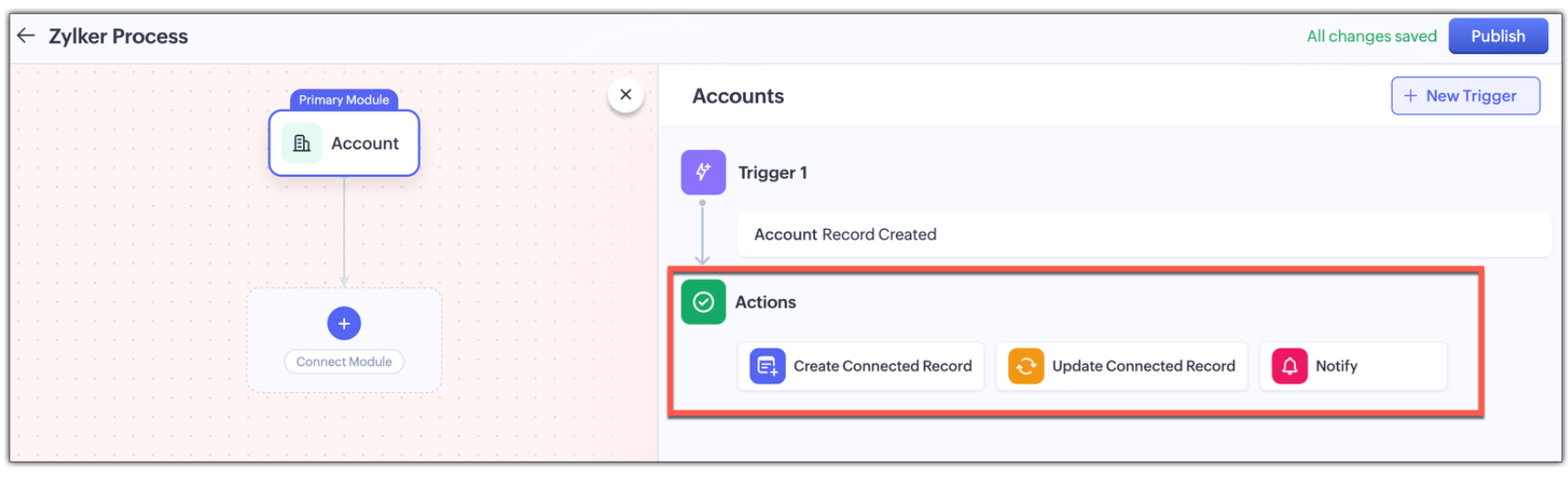
Triggers : Initiate by setting up triggers by configuring either a single trigger or multiple triggers for a module. The triggers are :
  • when a record is created in the module
  • When a record is edited record in the module,
  • When a record is created or edited in the module, or
  • When a field in the record is edited in the module.
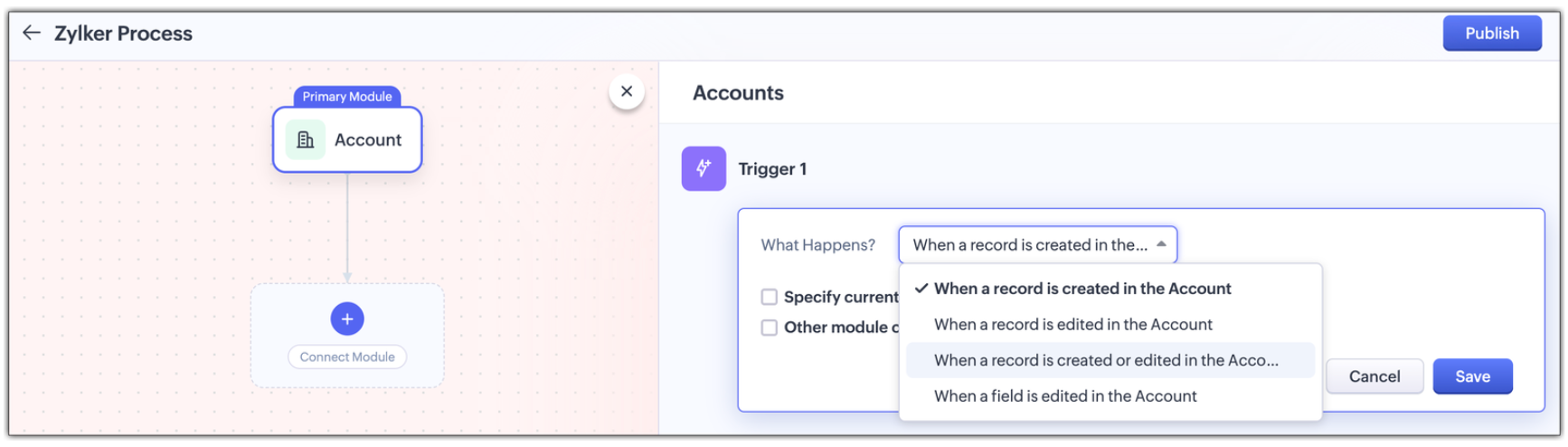
Multi-module criteria for Triggers : You can configure multiple criteria for triggers to execute actions in any other related modules; Enable other module criteria option for this. This ensures actions run when related modules are updated with values matching the trigger.
 
Actions : Assign one or more actions for each trigger . The actions are :
  • Creating a new connected record in the associated module
  • Updating an existing connected record in the associate module, or
  • Notifying users via email. 

Use Case: Automating the customer journey from a sales enquiry  to customer success

A typical customer journey goes through four stages, and we know that even though the sales team is the initial point of contact, multiple teams are involved and will support the sales team to win the customer.                                                        

Involved Teams
Initial Evaluation
Sales Team is the point of contact
Marketing team supports with customer-facing content in the Case Study Module
Demo Request
Sales Team schedules a product demo
Pre-sales team provides product demos in the Product demo module
Customer Onboarding
Sales Team updates the sale cycle stage to 'Closed Won'
Onboarding team helps the customer get started post-sale in the Onboarding Assistance module
Product Training
Sales Team arranges for training sessions
Training team helps the customer to be fully equipped to use the product in the Training module
 
Here's how Connected Workflows can automate the sales process and achieve coordination between the multiple teams involved.  

We’ll create a connected workflow with Deals as the primary module and configure three triggers:

Trigger 1: When a new record is created → Create a connected Case Study record for Marketing (Action)

Trigger 2: When Lead Status is "Qualified" → Create a Product Demo record and notify the Pre-sales Team(Action)

Trigger 3: When Deal Stage is "Closed Won" → Create an Onboarding record for handoff prep(Action)

This sets up three connected modules: Case Study, Demo Request, and Onboarding, as shown in the image below.

 Now we will configure the associated modules.
  • Case Study
    Trigger : When status is "Completed" → Notify Sales Team about availability(Action)

  • Demo Request 
    Trigger : When status is "Completed" → Notify Sales Team that demo was given(Action)

  • Feedbacks (manually created from Demo Request)
    Trigger : When new record is created  → Email lead with feedback form(Action)

  • Onboarding 
    Trigger :
    When status is "Completed" → Notify Training Team to start sessions and Sales Team of onboarding completion; also create a Training record(Action)

  • Training (automatically created from Onboarding)
    Trigger :
    When new record is created → Update Account type to "Customer" and notify Sales Team of training completion(Action


Now let's look at how all these modules have been connected to carry out a customer journey in the GIF below.


In this entire customer journey, there is no loss of customer context, no repeated back-and-forth between teams, and no delays due to miscommunication. Each team receives a connected record with all the relevant data they need to execute their part of the process.
Here is another video with a detailed explanation on how connected workflows works :

How Are Connected Workflows Different from Traditional Workflows?     

  • Connected Workflows go beyond one module; they’re designed to coordinate across team boundaries and hence use multiple modules to build a workflow.
  • Connected workflows trigger follow-up tasks/actions in both org and team modules.
  • Connected Workflows generate connected records as part of the process, so new requests are automatically created in modules, and those teams will have full context from day one. Users can save the time they take to create requests from the Request tab with this feature.

Why use connected workflows for your business? 

  • No more manual follow-ups because of automating cross-team coordination and reducing dependency on reminders or emails.
  • Achieving consistent execution across your customer's journey.
  • Providing end-to-end visibility where teams see the full customer journey, not just their part in the entire journey.
  • Above all, providing contextual coordination among multiple teams by minimizing delays between hand-offs.
 

We believe Connected Workflows will be a game-changer in how you deliver exceptional customer experience. We’re excited for you to start building your first Connected Workflow. Let us know in the comments if you have any queries.

Availability :
  • This enhancement is available only in Zoho CRM's new UI.
  • The number of connected workflows that can be created edition-wise are :
    • Standard Edition.      : 2
    • Professional Edition : 2
    • Enterprise Edition    : 10
    • Ultimate Edition.      : 10
    • Click here to learn about others limitations for this feature.

Early Access for Connected Workflows

We are in the process of opening out connected workflows for our customers, however, if you’d like early access to explore and use this feature, we’ve got you covered!

Fill out this form to get early access.

We’d love for you to try it out and share your feedback.


Regards,
Serena Woolridge
Zoho CRM Marketing Team


    • Recent Topics

    • SalesIQ Chat Owner to CRM Lead Owner Mapping

      There is no proper mapping between the SalesIQ chat owner and the CRM lead owner. When a chat is assigned to an agent, the lead created in CRM is often assigned to a different user, forcing admins to manually change ownership every time. This creates
    • Automatic Email Alerts for Errors in Zoho Creator Logs

      Hello, We would like to request a feature enhancement in Zoho Creator regarding error notifications. Currently, Zoho Creator allows users to view logs and errors for each application by navigating to Zoho Creator > Operations > Logs. However, there is
    • [Webinar] Agentic AI and its influence on analytics and autonomous decision-making

      Analytics is evolving from passive reporting to proactive, intelligent systems. Agentic AI is at the center of this shift, bringing context-aware reasoning, continuous learning, and the ability to act on data in real time. Join this webinar with Michael
    • Zoho One: books and inventory working together

      Hi, I was very pleased when I saw that in Zoho Inventory can now pull the orders from Woocommerce. They are now fed in Inventory as Sales order and with choosing convert invoice as Instant Invoice I am getting the exact data as they appear in Woocommerce.
    • Zoho Forms - Form Availability Redirect Option

      Hi Forms Team, It would be great if there was a redirect URL option on the Form Availability settings. For example, I would like to create a support form which is only available outside business hours and if the current data and time is not Mon-Fri 9-5
    • VAT and Taxes option not available

      Dear ZOHO Team , The VAT and Taxes options in my ZOHO books account not available,I tried to find how to enable or check the way to use this option but unfortunately couldn't find it anywhere ,I'm in UAE ,kindly let me know what to do to solve this issue
    • Syncing zoho books into zoho crm

      I was wondering how I can use zoho books in crm as I have been using them separately and would like to sync the two. Is this possible and if so, how? Thanks
    • Client requests I submit invoices using bill.com

      The title states it all. I have a reoccurring invoice setup for this client who has been manually paying by credit card. We are both experiencing merchant costs/fees. The use of bill.com's direct deposit is not far removed from Zoho's, only the client
    • Zoho Inventory Feature Roadmap Visible To All

      Hello, please consider making your feature roadmap visible to us users so that we know what to expect in future. This may appease current users who are seeking clarification on feature implementation dates, so that they can make an informed decision whether
    • Can't Remove Payment Gateway

      I am getting the error "Settings cannot be cleared as some of the transactions are still in progress." when trying to remove the PayGate payment gateway which I was unable to get working. I am now using paystack and I want to remove Paygate.
    • Improve Zoho Vault search

      Hello, we started using Zoho Vault and we really appreciate the app. At the moment, when searching passwords, the search query only targets the password name. I think having the query search among Name, User name, URL, Notes and Tag would be a better
    • New in WorkDrive: Personalize your file system with Labels

      Data is the driving force behind every decision made by businesses today. We at WorkDrive know every employee needs reliable access to their information and be able to locate the data they need at the right time.  Introducing Labels: organize your files in a way that's personal to you.  While WorkDrive's Data Templates feature focuses on adding structure to your organization's data, Labels help your team members classify files based on their preference. The Labels created will appear only to the
    • Custom Buttons & Links Now Supported in Portals

      We’ve just made portals in Zoho Recruit more powerful and customizable than ever! You can now bring the power of Custom Buttons and Links to your Candidate, Client, Vendor, and Custom Portals, enabling portal users to take direct action without recruiter
    • Work Type Section in Field Service Settings

      Hello Team, We are trying to understand how skills are managed in the system. During our review, we found an article mentioning a section called Work Type, which is used to manage skill assignment. According to the documentation, this section should be
    • Mirror Component in Zoho CRM: Access real-time related data without leaving your record

      Hi everyone, This feature is now available for the JP, CA, SA, UAE, and AU DCs. We're excited to bring to you Zoho CRM's mirror component, which presents relevant data on a record's details page and keeps everything users need in one place without having
    • Clone a Module??

      I am giong to repurpose the Vendors module but would like to have a separate but very similar module for another group of contacts called Buyers. I have already repurposed Contacts to Sellers. Is it possible to clone (make a duplicate) module of Vendors
    • Is there lead tracking in Bigin? There should be.

      Is there a way to track leads before they are ready to be added to Pipelines? I'm afraid we're going to lose opportunities. Example: We're sending out small batches of 25 emails to those we collected at tradeshows. They are all qualified leads. Out of
    • How to get static reports via Desk API

      Hello, we are hoping to use the Desk API to automatically export the default static reports in Zoho Desk, or reconstruct them via other API calls. What's the best way to do this? For example, if I want to recreate the Response Time static report via the
    • Product updates in Zoho Workplace applications | April 2026

      Hello Workplace Community, Let’s take a look at the new features and enhancements that went live across all Workplace applications for the month of April. Zoho Mail Enhance group member exports with additional data fields Customize your group member exports
    • Billing Status Update

      Hello Latha, I’m working on a new automation (deluge) to fulfill one of our requirements. In this automation, there is a step to update the Work Order billing status from “Not Yet Invoiced” to “Non-Billable.” I tried to find the API information relevant
    • Zoho Projects Coming to CRM Teamspaces

      Availability: The US DC Standard Edition is now available. It will be rolled out to customer accounts in all DCs in phased manner. Hello all, You are probably already familiar with Teamspaces, the dedicated workspaces where teams organize the CRM modules
    • Customise Lead Source and Sub Lead Source per webinar

      We have an integration between Zoho Meeting and Zoho CRM. New leads are imported into CRM but now they all have the source "Zoho Webinar". Can I change this source? Can I add a sub source? And can I customize these fields per webinar? (So different webinars
    • Zoho Projects Roadshows 2026 - APAC

      Dear Users, Building on the amazing response to our roadshows in 2025, we are excited to announce our next set of roadshows in the APAC region. To start with, our team of experts will conduct these events in Singapore and Manila. They will walk you through
    • how do i add more than one google my business location?

      they are connected to one account, but while connecting social channels it makes me pick one location. I have 3 and growing.
    • Notes - Reaction Buttons

      Using the native notes option within CRM is fine, it works and the RTF features are great, however, would it be possible - if there isnt already something in place, where we can add a reactions button, similar to teams/whatsapp to show that its been read
    • Zoho Analytics: Clarification on Email Schedule Limits in Basic Plan

      Hi Team, I have a question regarding the email scheduling limits in the Zoho Analytics Basic Plan. The plan shows that I can create 4 email schedules. However, I understand that schedule consumption is calculated based on recipients (i.e., 1 schedule
    • Zoho → ShipStation Integration – Sales Order–Driven Fulfilment Workflow

      Hello All, I’m reaching out to explore the best way to integrate a shipping tool into our inventory which will speed our process up. We are looking to integrate ShipStation into our existing order-to-fulfilment workflow, as we’re keen to standardise on
    • Updating Sales orders on hold

      Surely updating irrelevant fields such as shipping date should be allowed when sales orders are awaiting back orders? Maybe the PO is going to be late arriving so we have to change the shipment date of the Sales order ! Not even allowed through the api - {"code":36014,"message":"Sales orders that have been shipped or on hold cannot be updated."}
    • Custom button for list page

      Why is my 'List Page - Bulk Action Menu' button in the Packages module not autopopulating the List argument with selected record IDs?
    • Exclude Email or Domain From New Ticket Notification

      Hi, we utilize the new ticket notification feature in Zoho Desk. However, it would be great if there was a way to exclude certain email addresses or domains from receiving the automatic notification. This would be particularly helpful for automated alerts
    • Anyone have a working connection with CRM and shipstation via Flow

      Just wondering if anyone has successfully integrated shipstation and Zoho CRM.  I know there’s code to do it but am hoping to find out all the pitfalls before I jump on!! Scenario: SalesOrder gets created in CRM with multiple line items. I want this pushed to shipstation. On shipping via shipstation I want to push the tracking # back to CRM.  Many thanks in advance
    • ShipStation and Zoho Inventory

      Hello, I am looking to sync zoho inventory with shipstation ZOHO INVENTORY           SHIP STATION Sales Order  ==>  create ORDERS INVOICE  <==    Shipments What exactly does BETA mean on the Shipstation connector?  This is required for me to sign-on in the next month. Thanks in advance for your efforts
    • Connect to Shipstation's API

      Shipstation is a very big service, with lots of users, tons of order data.....and poor un-customizable reporting. This is perfect for Zoho analytics.  The Shipstation API is modern and efficient.  Today I think many people pay Zapier to get Shipstation data into Reports/CRM/Books - why not have  a direct connection?  -can pull in shipments via webhook or polling.  -also nice to pull in order data along with shipment data
    • What’s the Correct Integration Flow Between Zoho Inventory, ShipStation, and Multi-Channel Sales Platforms?

      Hi Zoho Community, I’m currently implementing Zoho One to manage all of my business processes, and I’d appreciate some guidance on the correct integration flow for the tools I’m using. Here’s my current setup: Zoho Inventory is my central system for managing
    • Remove Zoho Header from Portals

      I have a portal page with custom domain. But when I print directly from a webpage, the Zoho CRM header shows. It kind of kills the branding aspect. Is there a way to get rid of this?
    • Setting defaults for "Find and Merge Duplicate for..."

      To remove some of the extreme tedium from Zoho's poorly implemented merge function, I would like to set defaults.  Currently I am defaulted to match "ANY" when I would never do that, so I always have to click "ALL". Then it makes me click on several totally irrelevant drop boxes to turn off phone, mobile and other useless match criteria. Is there a way I can set: Match to default as "ALL" Firstname to default to "IS" Lastname to default to "IS" every other match field default to "-NONE-" This will
    • Let's bring Manufacturing Resource Planning (MRP), Material Requirement Planning (MRP), and Production Planning/Management module / feature in Zohobooks

      Let's bring Manufacturing Resource Planning (MRP), Material Requirement Planning (MRP), and Production Planning/Management module / feature in Zohobooks
    • CLIENT PORTAL (If clients can place orders directly on the portal)

      Zoho client portal is excellent. Everything is there except one thing. Client should be able to place orders directly on the portal. This would enhance the portal and end users will be extremely happy. This suggestion infact came from one of our client.
    • アナリティクスで商談中のパイプライン(ステージ)の件数比較

      アナリティクスで商談中のパイプライン(ステージ)の件数を前週と前々週で比較したい。前々週の件数が更新することで変動してしまう。対象方法をご教授ください。
    • How do I remove a data source from Zoho Analytics?

      I am unable to find a delte option on a datasource that i put in the system as an error. On teh web it refers to a setup icon but I do not see that on my interface?
    • Next Page