Hello everyone,
Bigin's web forms just got a makeover!
We are excited to introduce Forms: an online form builder designed to meet all your data collection need. This revamp was inspired by your feedback, resulting in an upgraded and versatile version of web forms.
So, what has changed?
Forms for Pipelines and Contacts
So far Web forms in Bigin were limited to only the Contacts module which limited their scope to contact forms, registration forms, newsletter subscription forms etc.
With this revamp, you can build forms using fields from the Pipelines, Contacts, and Companies modules. You can create records from the data collected, and add them automatically to any Team Pipeline, Contacts module, and Companies module. This makes Forms more than a tool just for contact collection. Now, it is a tool for lead generation, customer support, feedback collection, and much more.
Share forms with your customers
Web forms were limited to embedding code snippet on a website and this limited their adoption to customers with websites and a basic knowledge of coding.
With this revamp, we are introducing two additional sharing options:
- Share as a Link - You will get a shareable URL unique to each form and you can directly share it with your customers via email or any other ways.
- Share as a QR code - A QR code unique to each form will be generated in this method. Users can download it, print and paste it anyplace. For instance you can paste these QR codes at an event venue to simplify registrations – attendees simply has to scan the code on their device and fill it out.
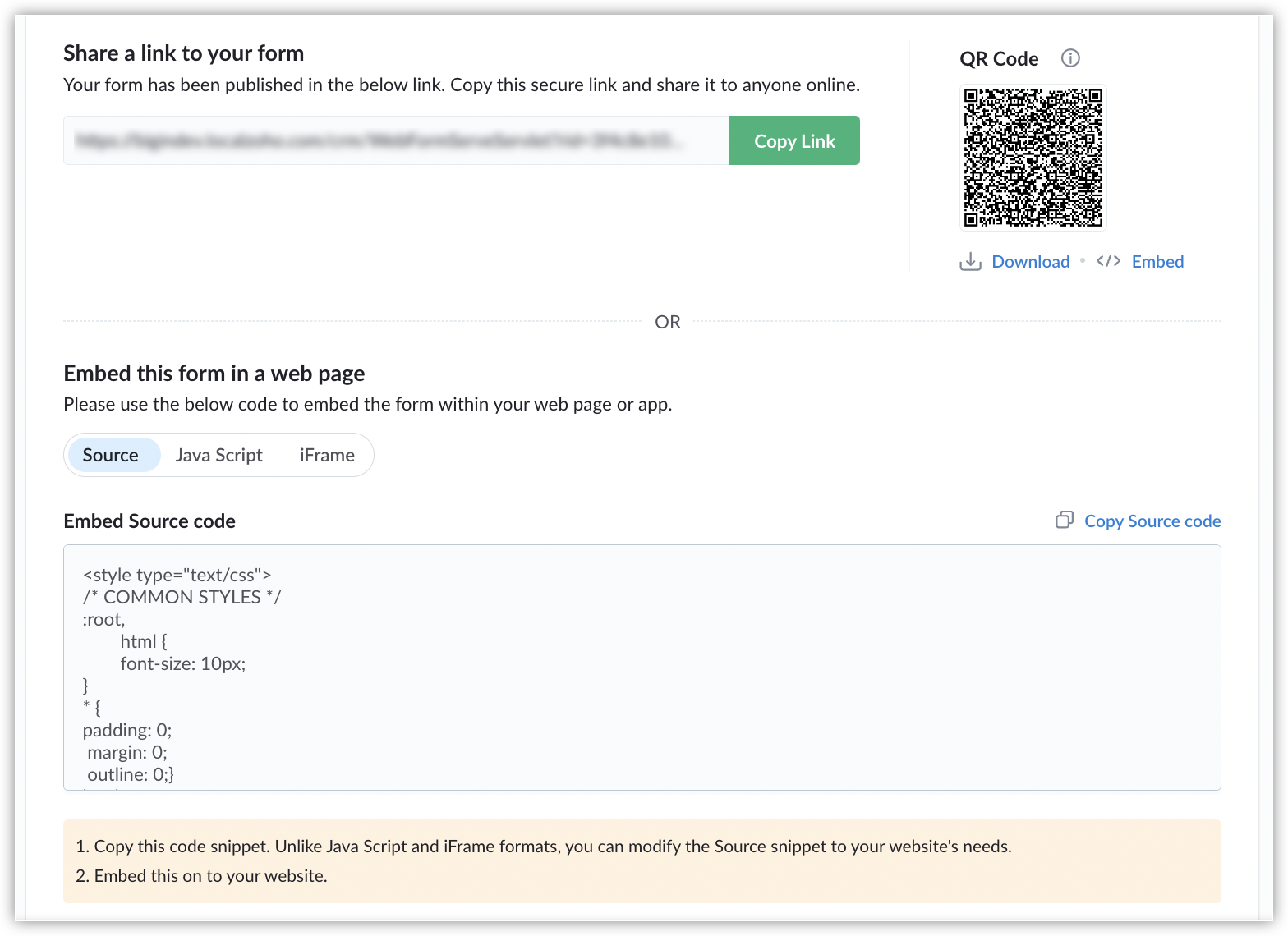
And, that brings us to the name change. With these sharing options, our forms are no longer limited to just websites and that is why we have renamed them as Forms from Web Forms.
Thank you Message
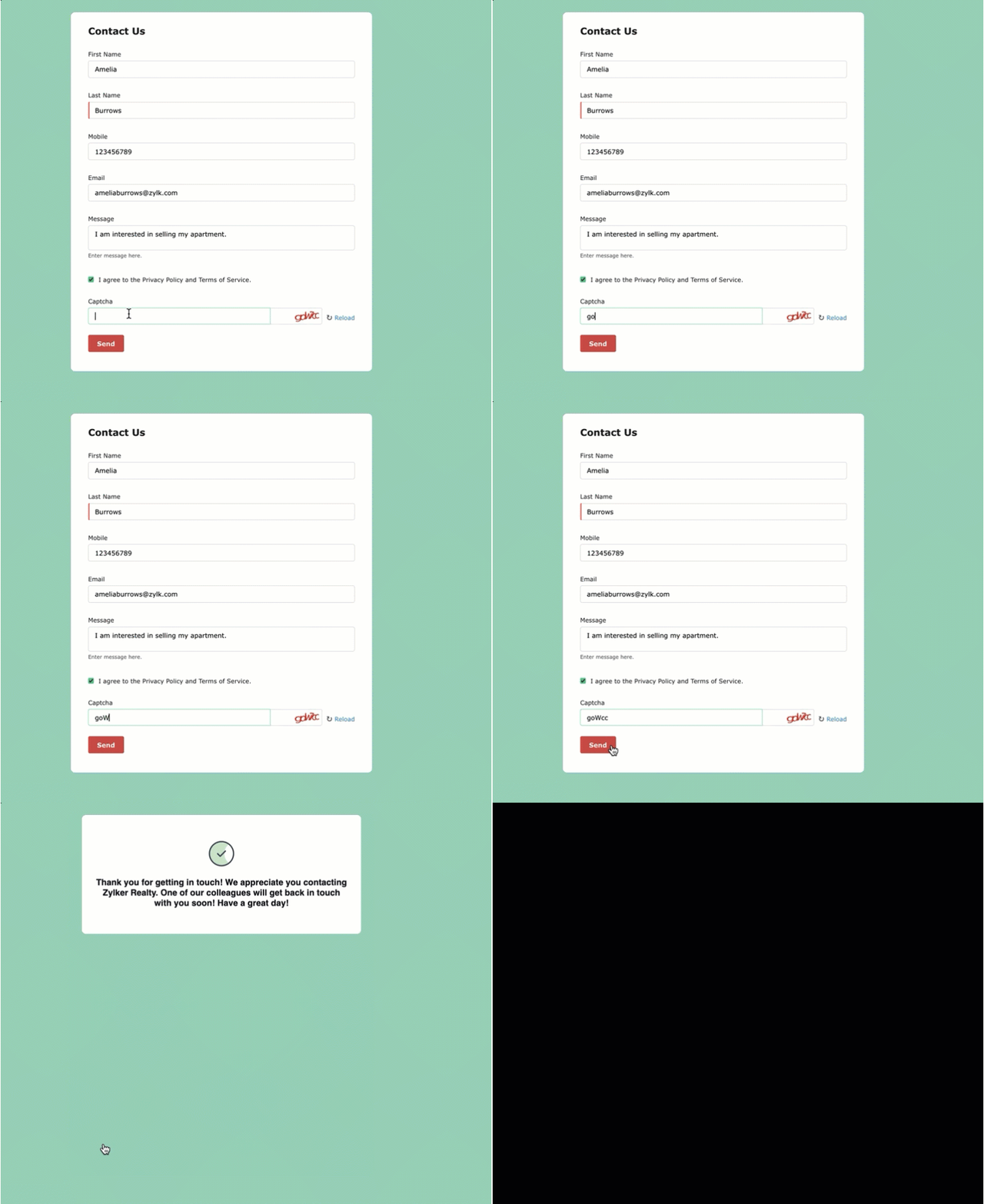
With the older version, users had to redirect website visitors to a landing page after they submitted a form. Now, they have the option to display a Thank You message to customers upon form submission.
Preview forms across devices
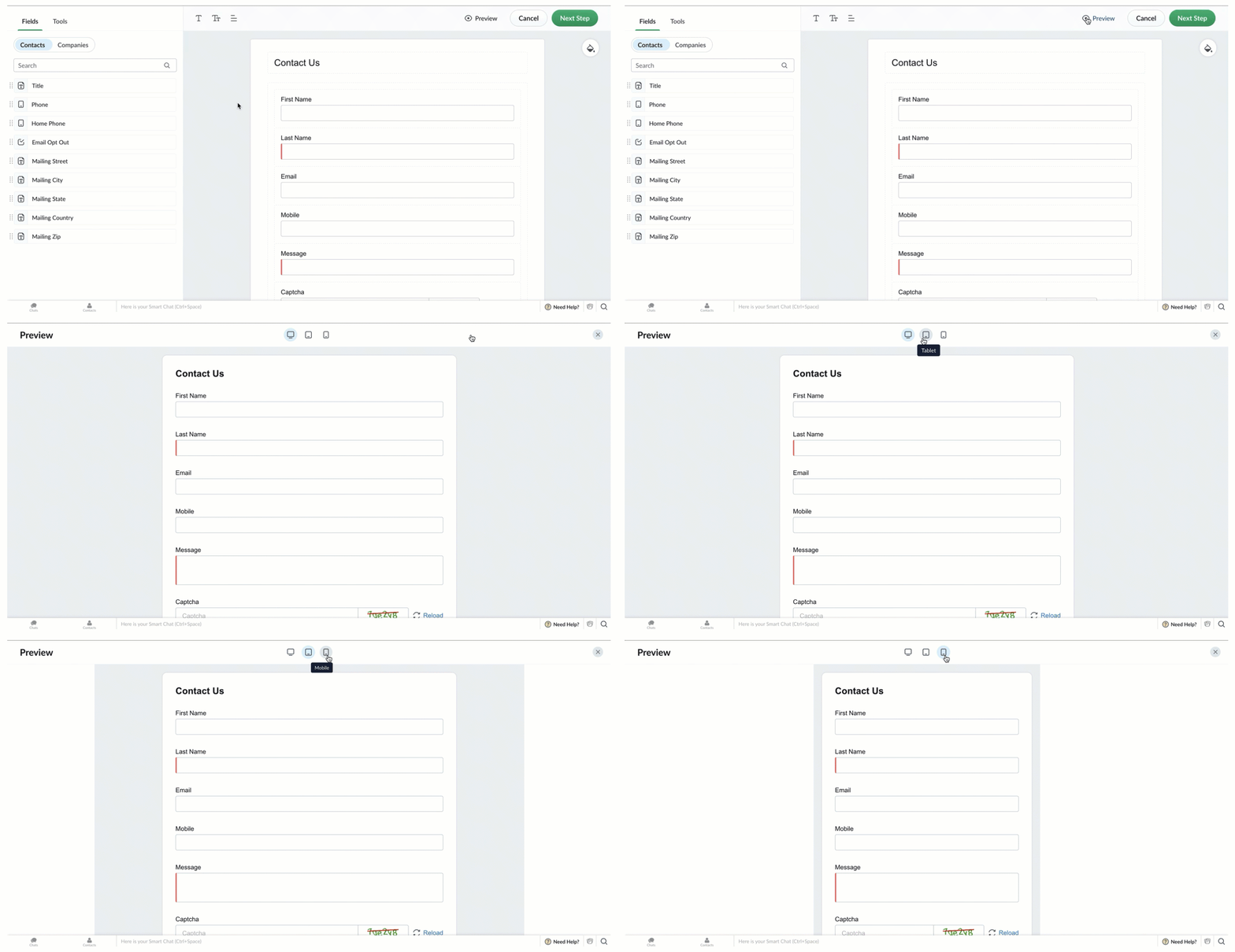
Switch between the Desktop, Tablet, and Mobile icons to see how the form will appear on different devices.
Mobile-friendly forms
We know our web forms were outdated and had glitches when opened in mobile browsers and with this revamp, our forms open seamlessly in mobile browsers.
What happens to your existing web forms?
Your existing web forms will continue to work seamlessly and when you edit your existing web forms, you can use the new enhancements listed above.
Refer to our help document on
Forms for detailed instructions for configuring forms for your business.
Forms Availability: Free Plan: 1 | Express Plan: 3 | Premier Plan: 5
Additional forms can be purchased as add-ons.
What's next?
We have more enhancements planned for Forms, such as support for Google reCAPTCHA, customizable form URLs, and an option to display your company logo in the form header. We don't have a release date for these enhancements to share, but rest assured our team is working hard to roll them out soon.
We also have new features and enhancements planned for Bigin. Watch this space for more information. As always, we love hearing your feedback, so please try the new form builder and let us know how it goes in the comments!
Thank you,
Aayisha
Bigin User Education
Recent Topics
Perfomance Management - Zoho People
Hi team, I am looking for performance management data such as KRA, goals, feedback, appraisals, etc., in Zoho Analytics. However, I am unable to find these metrics while editing the setup. Could you please confirm whether these fields are available in
Deprecation of the Zoho OAuth connector
Hello everyone, At Zoho, we continuously evaluate our integrations to ensure they meet the highest standards of security, reliability, and compliance. As part of these ongoing efforts, we've made the decision to deprecate the Zoho OAuth default connector
Good news! Calendar in Zoho CRM gets a face lift
Dear Customers, We are delighted to unveil the revamped calendar UI in Zoho CRM. With a complete visual overhaul aligned with CRM for Everyone, the calendar now offers a more intuitive and flexible scheduling experience. What’s new? Distinguish activities
Mobile phone version not working well
I am working on the Zoho Site Builder. In the preview the desktop version looks okay, but in the mobile phone preview many words are cut off in the weirdest (wrong) way. How can I fix that?
Zoho Mail iOS app update: Display recipient's nickname on contact suggestion
Hello everyone! In the most recent version(v3.3.1) of the Zoho Mail iOS app update we have brought in support to display recipient's nickname in contacts suggestion. Please update the app to the latest version directly from the App Store or using the
Increase Round Robin Scheduler Frequency in Zoho Desk
Dear Zoho Desk Team, We hope this message finds you well. We would like to request an enhancement to the Round Robin Scheduler in Zoho Desk to better address ticket assignment efficiency. Current Behavior At present, the Round Robin Scheduler operates
Digest Février - Un résumé de ce qui s'est passé le mois dernier sur Community
Bonjour chers utilisateurs, Le 26 février, nous avons organisé notre première session Ask the Expert de 2026. Nous sommes heureux de partager que ce fut une session très interactive, avec de nombreuses questions intéressantes posées par nos clients. Si
Zoho CRM Case Notes - Share to Customer
Hi team does anyone know the Api to set a note, against a case, to shared with customer? i cant seem to find it cheers
Zoho Forms - Feature Request - Year Field
Hi Zoho Forms Team, You currently have the following date and time fields: Date Time Date and Time Year and Month It would be useful if you could include a "Year" field For example a recent application I completed said "What year was your house built?"
Zoho Forms - Feature Request - Past Into Scanning/OCR Field
Hi Zoho Forms Team, You recently introduced the OCR/Scanning field which I have found great use for with one client who receives work orders as a screenshot from one customer. I want to raise a feature request here which would make that field even more
Synching changes to Stripe when changes are made in Zoho Billing
We have a situation where we have merged customers in Zoho BIlling and then found out later that the payment in Stripe was not updated and still associated with the old customer record. The card gets updated and billed, but that payment is still associated
Send out follow-up email in the same thread (threaded conversations in individual emails) from Zoho CRM
Hi, I'm new to Zoho. I'm trying to send individual emails to my leads one by one. And I'll send out follow up email if I don't hear back from them later. However, instead of sending a new email, I want to reply in the same email thread so that the recipients
Depositing funds to account
Hello, I have been using Quickbooks for many years but am considering moving to Zoho Books so I am currently running through various workflows and am working on the Invoicing aspect. In QB, the process is to create an invoice, receive payment and then
Is Zoho Sites still actively being developed?
Hello, Is Zoho Sites still actively being developed as part of the Zoho ecosystem? I noticed that the What's New page (https://www.zoho.com/sites/whats-new.html) does not show any updates since Q1 2025. We were considering migrating our website from Squarespace
FSM integration with Books
Hi, I have spent a few months working with FSM and have come across a critical gap in the functionality, which I find almost shocking....either that, or I am an idiot. The lack of bi-directional sync between Books and FSM on Sales Orders/ Work Orders
web to lead
Can anyone help me how to create web to lead from zoho marketing automation
Introducing Workqueue: your all-in-one view to manage daily work
Hello all, We’re excited to introduce a major productivity boost to your CRM experience: Workqueue, a dynamic, all-in-one workspace that brings every important sales activity, approval, and follow-up right to your fingertips. What is Workqueue? Sales
UI issue with Organize Tabs
When looking at the organize Tabs window (bellow) you can see that some tabs are grayed out. there is also a "Add Module/Web Tab" button. When looking at this screen it's clear that the grayed out tabs can not be removed from the portal user's screen
I created a signup form in Zoho Marketing Automation with the correct field mapping, but the data is not being reflected under Leads in Zoho CRM.
web to lead from zoho marketing automation
Pasted Images not being embedded in custom mail
Hi, I'm making a custom report by email based on commentaries. I have the email ready, all working great except for images that are being pasted in the commentaries. Zoho deals with them as temp images and so it requires authentication to view them, something
Kaizen #232 - Building a Ticket Escalation Mechanism from Zoho CRM
Howdy, Tech Wizards! Picking up the thread from last week, we will continue our Zoho CRM and Zoho Desk integration. In Kaizen #231 - Embedding Zoho Desk Tickets in Zoho CRM, we built a Related List widget that displays open Zoho Desk tickets within the
Inactive License for free account.
I recently upgraded my Cliq subscription not my team (on the free version), are unable to login to their accounts. The error message received is Inactive License Looks like you have not been covered under the current free plan of users. Please contact
Deluge scripts
Why is there not a search function to make it easier to find the script of interest when modifications are required.
Zoho Sheet for Desktop
Does Zoho plans to develop a Desktop version of Sheet that installs on the computer like was done with Writer?
Zoho Books (and other Finance Suite Apps) - Clickable Item Name on Invoices and Reports
Hi Zoho Books team, It would be really helpful if the Item Name on Reports were clicable to take me to the item. The same on Invoices, often I am looking at an invoice and I want to look at the deails of a product. A link here would be helpful to jump
Zoho Books - Payment Gateway - Revolut
Hi Books Team, My feature request if to include the popular platform Revolut as a payment collection option on invoices in Zoho Books. Please upvote if you are also looking for this option.
Searching for an item from within an invoice should show any item containing the string, not just those that begin with the string.
Hello, I've found myself becoming increasingly frustrated with the limited line-item seach when adding new items to an invoice. The problem is that the characters being typed are only being matched from the beginning of the item name. This might be usable
How to Rank Tables by Row Count in Descending Order
I am trying to understand the consume of lines that grow up so fast in the last week. Is there any way to create a pivot table or query to get TABLE NAME LINES in descending order?
Dealing With One-Time Customers on Zoho Books
Hello there! I am trying to figure out a way to handle One-Time customers without having to create multiple accounts for every single one on Zoho Books. I understand that I can create a placeholder account called "Walk-In Customer", for example, but I
Marking a meeting 'done'.
I would like to somehow mark a meeting 'done' and placed under the contact's page rather than deleting it and having no record of it. Am I missing a button that does this?
Feature Request: Render Markdown (.md) files in Zoho Cliq
Hi, We regularly share Markdown (.md) files in Zoho Cliq. However, when we open these files in Cliq, the content does not render as Markdown—it displays as plain text. This forces us to copy/paste the content into an external Markdown viewer to read it
Zoho Desk EU slow/unresponsive
Has anyone else got issues with ZohoDesk today in the EU? It takes an age to come back and if you do start typing something and try and send or save it looks like it times out. We are also getting this pic. ot I can't see anything on https://status.zoho.eu/
EU DC Partial Outage Resolved: A Detailed RCA
Incident Summary Due to an overload on one of the nodes in the EU DC for Zoho Desk, the system was unable to handle the heavy load, causing a slowdown in requests and resulting in a partial outage for customers with data residing in that node. On May
CRM Percent custom fields: When will it show the % symbol and behave like %?
1. Actually Percent custom fields fail to show the % symbol. 2. When in formulas Percent fields work like number: 100 x 5% = 5 ideal world 100 x 5% = 500 what happens actually 3. When importing Percent fields the % symbol has to be removed and the data
How to use OR when filtering using two fields
I want to create return a list of Account Names by filtering on Field1 = "yes" OR Field 2 = "no" I can't see how to use the OR in the filter.
Subforms and automation
If a user updates a field how do we create an automation etc. We have a field for returned parts and i want to get an email when that field is ticked. How please as Zoho tells me no automation on subforms. The Reason- Why having waited for ever for FSM
Xero Billing Data (22 instances) - Zoho (CRM) - Single Source of Truth For Client Data & Notes
Hi - I’m trying to build out a CRM for a Single Source of Truth Currently I have 22 Instances of Xero (for legal entity purposes - can’t consolidate to one) How would I be best placed to do this? Is it possible to have all the Xero instances (22) → Consolidated
Select CRM Custom Module in Zoho Creator
I have a custom module added in Zoho CRM that I would like to link in Zoho creator. When I add the Zoho CRM field it does not show the new module. Is this possible? Do i need to change something in CRM to make it accesible in Creator?
New 2026 Application Themes
Love the new themes - shame you can't get a little more granular with the colours, ie 3 different colours so one for the dropdown menu background. Also, I did have our logo above the application name but it appears you can't change logo placement position
Zoho Expense - Bi-Weekly Report Automation
Hi Zoho Expense Team, My feature request is to please include an option to automate creation of reports bi-weekly (every 2 weeks)
Next Page