Kaizen #157: Flyouts in Client Script

Hello everyone!
Welcome back to another exciting edition of our Kaizen series, where we explore fresh insights and innovative ideas to help you discover more and expand your knowledge!In this post, we'll walk through how to display Flyouts in Client Script and break down the key differences between Flyouts and pop-ups in Client Script, including when to use each one.
In this Kaizen post,
1. What are Flyouts in Client Script?2. Flyout- ZDKs and functions in Client Script3. Use Case4. Solution4.a. Create a Widget for EMI Calculator.4.b. Create a Client Script to render the Widget as Flyout.5. Difference between flyout and popup in Client Script6. Summary7. Related links
1. What are Flyouts in Client Script?
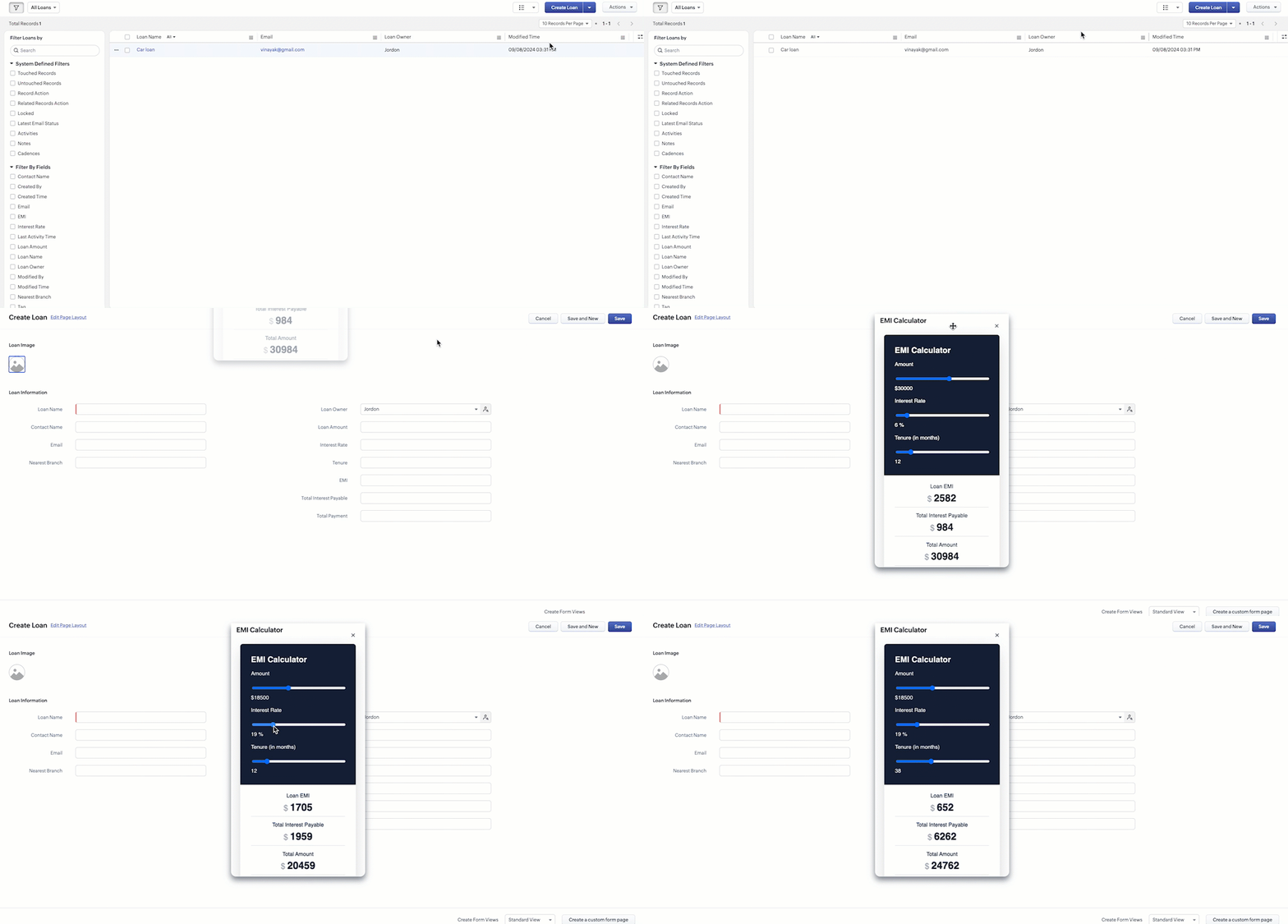
Flyouts are floating User Interface that can be moved around and controlled using Client Script. Widgets can be used to render a flyout. The flyout can run independently, and any Client Script can communicate with it.
2. Flyout- ZDKs and functions in Client Script :
- createFlyout(name, config) - Creates a flyout. You can specify the heading, dimensions, and animation type using the config parameter.
- getFlyout(name) - To Fetch the details of a flyout.
- open(config, data) - Opens the created flyout.
- notify(data, options) - Notifies and waits for data in a flyout. The options can be wait: true (Client Script execution will wait for a response from the widget) or wait: false - (Client Script execution will not wait for a response from the widget)
- close() - Closes the active flyout.
Click here for more details about the ZDKs and functions related to flyouts.
3. Use Case :
Sales Advisors in a Finance Consulting Company regularly rely on an EMI calculator to help customers with loan queries. To improve their efficiency and eliminate the need to switch between different windows, the admin manager intends to integrate the calculator directly into CRM. The EMI calculator should appear on the Create Page of the Loans module and remain active until the user closes it.
4. Solution:
To achieve this in Zoho CRM, we can use Widgets to create an EMI calculator and render them using flyouts in client script whenever the create Page of Loan page loads.
4.a. Create a Widget for EMI Calculator
Install Zoho CLI, and follow the steps given in this document to create the Widget app folder. Then update the html, javascript, and css code as per your requirement.
index.html
- <!DOCTYPE html>
- <html lang="en">
- <head>
- <meta charset="UTF-8" />
- <meta http-equiv="X-UA-Compatible" content="IE=edge" />
- <meta name="viewport" content="width=device-width, initial-scale=1.0" />
- <title>Document</title>
- <link rel="stylesheet" href="style.css" />
- </head>
- <body>
- <div class="loan-calculator">
- <div class="top">
- <h2>EMI Calculator</h2>
- <form action="#">
- <div class="group">
- <div class="title">Amount</div>
- <input type="range" min="1000" value="30000" max="50000" step="500" class="loan-amount" id="loanAmount" />
- <div class="slider-label">$<span id="loanAmountValue"></span></div>
- </div>
- <div class="group">
- <div class="title">Interest Rate</div>
- <input type="range" min="5" value="6" max="100" step="1" class="interest-rate" id="interesRate" />
- <div class="slider-label"><span id="interesRateValue"></span></div>
- </div>
- <div class="group">
- <div class="title">Tenure (in months)</div>
- <input type="range" min="6" max="100" step="1" value="12" class="loan-tenure" id="tenureMonth" />
- <div class="slider-label"><span id="tenureMonthValue"></span></div>
- </div>
- </form>
- </div>
- <div class="result">
- <div class="left">
- <div class="loan-emi">
- <h3>Loan EMI</h3>
- <div class="value">123</div>
- </div>
- <div class="total-interest">
- <h3>Total Interest Payable</h3>
- <div class="value">1234</div>
- </div>
- <div class="total-amount">
- <h3>Total Amount</h3>
- <div class="value">12345</div>
- <div class="right">
- <canvas id="myChart" width="400" height="400"></canvas>
- </div>
- </div>
- </div>
- <script src="https://cdn.jsdelivr.net/npm/chart.js@3.6.2/dist/chart.min.js"></script>
- <script src="https://live.zwidgets.com/js-sdk/1.2/ZohoEmbededAppSDK.min.js"></script>
- <script src="main.js"></script>
- </body>
- </html>
- Click here to view the complete code.
- Once you have added the code, upload the zip file by following the below steps.
- Go to Setup > Developer Space > Widgets.
- Click Create New Widget and Fill in the details.
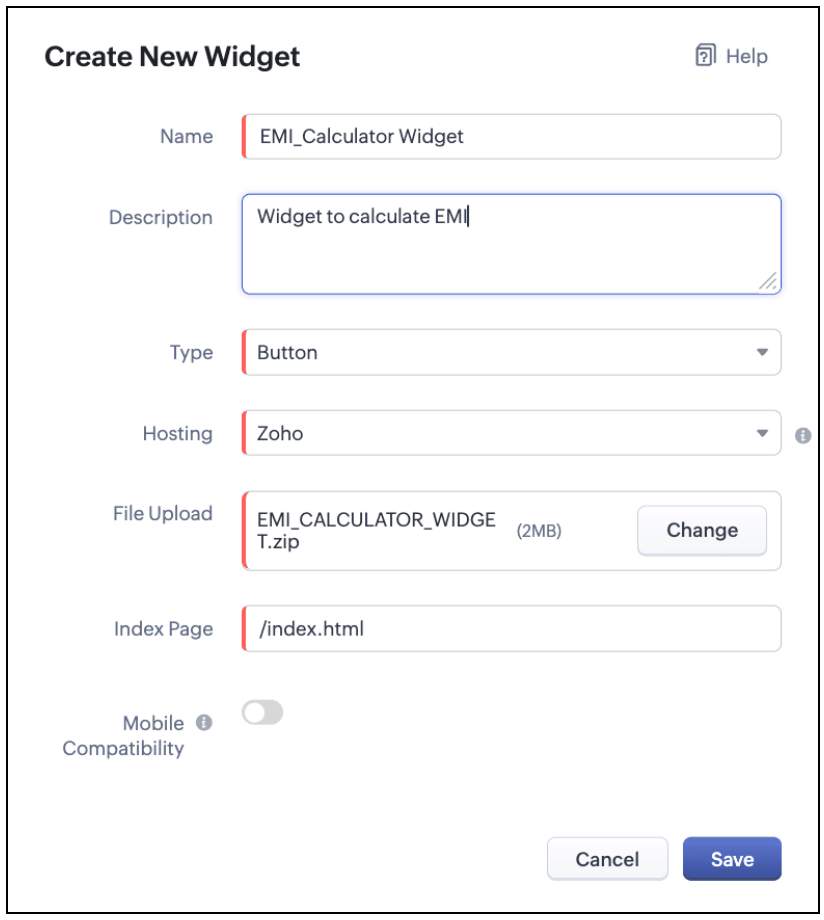
The Hosting should be "Zoho" and mention the html page of the app folder that you uploaded.

Note:
The widget should be of "button" type in order to render through a Client Script.
4.b. Create a Client Script to render the Widget as Flyout
Configure a Client Script for Create Page(Standard) Loans module, that triggers during onLoad event as shown below. Click Next. Click here to know how to configure a Client Script.

Enter the following script and click Save.
- ZDK.Client.createFlyout('EMIFlyout', {
- header: 'EMI Calculator',
- animation_type: 1,
- height: '400px',
- width: '450px',
- close_on_exit: false
- });
- ZDK.Client.getFlyout('EMIlyout').open(
- { api_name: 'EMI_CALCULATOR_WIDGET', type: 'widget' },
- { data: loanDetails }
- );
In the above script, createFlyout() will create a new flyout with header.
Below is the syntax and parameter detail.

Now Open the flyout and render the Widget in the flyout using open() method and specify the api_name of the widget.

Here is how the Client Script renders the flyout.
5. Difference between flyout and popup in Client Script
Flyout | Pop up |
A flyout can be moved around the page. | A pop-up cannot be moved anywhere on the page. |
It can run independently in a separate thread. The user can interact with the background interface without closing the flyout. | The user cannot interact with the background without closing the pop up. |
Use flyouts, when you need to exchange data to and fro between a Widget and Client Script. You can use ZDK.Client.sendResponse() to pass data from a widget rendered as a flyout to the Client Script. | Use popup, when you need to interrupt the screen to gather input from the user or display a message before proceeding. Use $Client.close() to pass data to the Client Script, which will also close the popup. |
In the scenario discussed in this post, if you want to make it mandatory for the user to read or interact with the EMI Calculator before entering any value in the create Page(Standard), then you can use pop-up instead of Flyout. Both pop up and flyout can be used to display widgets, and their dimensions can be altered.
Refer to this post to know how to render widgets as pop up using Client Script.
6. Summary
- In this post, we have seen,
- Flyouts in Zoho CRM.
- ZDKs and methods to render a Flyout(Widget) using Client Script.
- When to use a Flyout and when to use a pop up.
7. Related Links
 Previous Post: Kaizen #156 -Enhancing Mass Communication in Zoho CRM with a Custom Button Widget | Kaizen Collection: Home
Topic Participants
Maadhari M
Jeremy Nagel - www.smooth.tel
Kava Li
Jeganprabhu S
Ishwarya SG
Sticky Posts
Kaizen #198: Using Client Script for Custom Validation in Blueprint
Nearing 200th Kaizen Post – 1 More to the Big Two-Oh-Oh! Do you have any questions, suggestions, or topics you would like us to cover in future posts? Your insights and suggestions help us shape future content and make this series better for everyone.Kaizen #226: Using ZRC in Client Script
Hello everyone! Welcome to another week of Kaizen. In today's post, lets see what is ZRC (Zoho Request Client) and how we can use ZRC methods in Client Script to get inputs from a Salesperson and update the Lead status with a single button click. In thisKaizen #222 - Client Script Support for Notes Related List
Hello everyone! Welcome to another week of Kaizen. The final Kaizen post of the year 2025 is here! With the new Client Script support for the Notes Related List, you can validate, enrich, and manage notes across modules. In this post, we’ll explore howKaizen #217 - Actions APIs : Tasks
Welcome to another week of Kaizen! In last week's post we discussed Email Notifications APIs which act as the link between your Workflow automations and you. We have discussed how Zylker Cloud Services uses Email Notifications API in their custom dashboard.Kaizen #216 - Actions APIs : Email Notifications
Welcome to another week of Kaizen! For the last three weeks, we have been discussing Zylker's workflows. We successfully updated a dormant workflow, built a new one from the ground up and more. But our work is not finished—these automated processes are
Recent Topics
Arquitetura de Aplicações no Zoho Creator: Por que pensar nisso desde o início
Muitas empresas começam a utilizar o Zoho Creator criando formulários simples para automatizar processos internos. Isso é natural — a plataforma é extremamente acessível e permite construir aplicações rapidamente. O problema começa a aparecer quando aDark Mode - Font Colors Don't Work
When editing a document in Dark Mode and selecting font colors, they don't show up on screen. Viewing/editing the same document in Light Mode shows them just fine.How to Customize & Reorder Spaces in Zoho One 25 (Spaces UI) — Admin Tips Not in the Docs
Hey Zoho Community, After digging around in the new Spaces UI, I found a couple of admin features that aren't well documented yet but are really useful. Sharing here in case others are looking for the same things. 🔁 How to Change the Default Space UsersSystem Components menu not available for Tablet to select language
I have attached a screenshot of my desktop, mobile, and tablet menu builder options. I am using 2 languages in my application. Language Selection is an option under the System Components part of the menu, but only for my desktop and phone(mobile). MyApprovals in Zoho Creator
Hi, This is Surya, in one of my creator application I have a form called job posting, and I created an approval process for that form. When a user submits that form the record directly adding to that form's report, even it is in the review for approval.Function #9: Copy attachments of Sales Order to Purchase Order on conversion
This week, we have written a custom function that automatically copies the attachments uploaded for a sales order to the corresponding purchase order after you convert it. Here's how to configure it in your Zoho Books organization. Custom Function: HitHow Zoho Desk contributes to the art of savings
Remember the first time your grandmother gave you cash for a birthday or New Year's gift, Christmas gift, or any special day? You probably tucked that money safely into a piggy bank, waiting for the day you could buy something precious or something youEstimate PDF Templates - logo too large
Hello, I cloned a standard estimate template, but my logo is showing up much larger than intended. This doesn’t happen with the standard invoice template, where the logo displays correctly. How can I adjust the logo size in the estimate template? ThankSelect CRM Custom Module in Zoho Creator
I have a custom module added in Zoho CRM that I would like to link in Zoho creator. When I add the Zoho CRM field it does not show the new module. Is this possible? Do i need to change something in CRM to make it accesible in Creator?Invoice emails not sending but reminders are
I am a new user. I have been creating some dummy invoices before I go live and have struck a block. Emails for the invoice are not being recieved by the recipient, however, when I send a reminder for the same invoice the email is sent. NOTE: I have checkedDeleted account recovery
I ended up accidentally deleting our Zoho invoice account while trying to work something out. Emailed support for recovery and restoration of the deleted account, if possible, but they responded by saying they can't find an account associated with thatDevis et factures multipage coupées
Bonjour, je suis sur Zoho invoice et je rencontre un problème sur mes devis et factures lorsqu'ils dépassent 1 page. je me retrouve souvent avec des lignes coupées ou le sous total page 1 et le total page 2. j'aimerai savoir s'il existe une possibilitéCustom Related List Inside Zoho Books
Hello, We can create the Related list inside the zoho books by the deluge code, I am sharing the reference code Please have a look may be it will help you. //..........Get Org Details organizationID = organization.get("organization_id"); Recordid = cm_g_a_data.get("module_record_id");Zoho Meeting - Feature Request - Introduce an option to use local date and time formating
Hi Zoho Meeting Team, My feature request is to add an option for dates to be displayed in the users local format. This is common practice across Zoho applications and particularly relevant to an application like Zoho Meeting which revolves around dateCRM Client Portal mobile App?
Hello Just checking back in on this... I was wondering if a mobile CRM client Portal app is on the develop pipeline? Some of the other Zoho apps have them (Creator and Connect), but we love the CRM and our clients and vendors use their phone almost exclusivelyCannot give public access to Html Snippet in Zoho Creator Page
Hi, I created a form in Zoho Creator and published it. The permalink works but I want to override the css of the form. (style based URL parameters is not good enough) So I created a page and added an Html snippet. I can now override the css, which isHow can Outlook 365 link back into Zoho Projects so meetings and events in Outlook calendar show in Zoho?
We use Outlook 365 for our emails and diaries and have integrated Zoho Projects with Office 365. One challenge we face is getting Zoho Projects to recognise when we have meetings and events in Outlook and not allow project managers to assign tasks over that period. Is there a way to resolve this? ThanksOn Edit Validation Blueprint
Hello, I have a notes field and a signature field. When the Approve button is clicked, the Signature field will appear and must be filled in. When the Reject button is clicked, the Notes field will appear and must be filled in. Question: Blueprint willZoho Invoice en Navarra (Spain)
Hola, ¿Alguien usa Zoho Invoice en la Comunidad Foral de Navarra? En Navarra tenemos un sistema tributario diferente y no aplica Verifactu (la Hacienda Foral de Navarra ha anunciado su alternativa, NaTicket, pero no ha informado cuándo entrará en vigor).Emails from Zoho are getting blocked due to Zoho IP address being blacklisted
This is the info I got from my hosting provider – please address this issue immediately. I don’t expect this from such a big household name. Every single invoice I have sernt it not being received by my clients, all being blocked. All of a sudden. Asagentid : Where to find?
I've been looking around for this agenId to check for the total ticket assigned on a specific agent url :"https://desk.zoho.com/api/v1/ticketsCountByFieldValues?departmentId=351081000000155331&agentId=35108xxxxxx132009&field=statusType,status" type :GETZoho DataPrep integration with OpenAI (beta)
We are thrilled to announce Zoho DataPrep's integration with OpenAI. The public beta roll-out opens up three features. Users who configure their OpenAI Organizational ID and ChatGPT API key (Find out how) will be able access the features. The featuresAI Bot and Advanced Automation for WhatsApp
Most small businesses "live" on WhatsApp, and while Bigin’s current integration is helpful, users need more automation to keep up with volume. We are requesting features based on our customer Feedbacks AI Bot: For auto-replying to FAQs. Keyword Triggers:Setting total budget hours for a specific project
Hi there, I work on a lot of projects that have fixed budget hours. Is there a way to enter the total budgeted hours so i can track progress and identify when hours have been exceeded. I see in the projects dashboard there is a greyed out text sayingClone entire dashboards
If users want to customize a dashboard that is used by other team members, they can't clone it in order to customize the copy. Instead they have to create the same dashboard again manually from scratch. Suggestion: Let users copy the entire dashboardIntroducing Formula Fields for performing dynamic calculations
Greetings, With the Formula Field, you can generate numerical calculations using provided functions and available fields, enabling you to derive dynamic data. You can utilize mathematical formulas to populate results based on the provided inputs. ThisGetting started with Zoho PDF Editor
Hello users, If you are new to Zoho PDF Editor or aren't sure of its full potential, then this article is for you. Zoho PDF Editor is a free online PDF editing tool, that allows you to upload and edit PDFs, insert text and images, add fillable and e-signatureMercury Bank Integration
Mercury Bank is a fintech company in the US that is quite popular with startups, e-com companies, and other businesses. https://docs.mercury.com/reference/welcome-to-mercury-api Unlike most traditional banks, they have a full-featured API that allowsZoho Projects - Cloning a task does not trigger task workflow when created
Hello! I have a Project where my team uses a set of tasks from a tasklist as templates, so we could simply clone it and drag it to another list in kanban view to avoid creating a new one from scratch. The process works well, but after cloning it the newPurchase Orders not in sequence
I am unable to sort by Purchase Order Numbers. I can only sort by date; however, the PO numbers aren't in the order they were entered. This was not the case prior to today.Date/time displayed in ZohoCRM does not match date/time of entries in ZohoForm
Hello there, we use a ZohoForm as a worksheet, i.e. users use it to track start time, break and stop time for every working day. The ZohoCRM org time zone is set on GM -4, so is the Time Zone in the Date&Time section in ZohoForm (see attachment). DespiteUpdate Existing Records greyed out in Free Version
Trying to update records from an Excel sheet, and not getting the option to update. Only option is to add as new accounts. All documentation I can see says update should be an option! Accounts, Leads, Contacts, all the same.Dynamically Populate Picklist Values from Another Module Using Client Script
I am working in Zoho CRM and trying to dynamically populate a picklist field in the Partners module using values stored in another custom module. I have two modules: 1. Partners Module Field: Partner_Type_Pick Field Type: Picklist 2. Partners_Type ModuleAdd zoho calendar to google calendar
Hi I keep seeing instructions on how to sync Zoho CRM calendar with google calendar but no instructions on how to view Zoho calendar in my google calendar.Zoho Community Digest : Jan 2026 | Part 1
Hello Everyone! Staying in the loop with Zoho's latest product updates and features across the vast Zoho Community Forums can be a real challenge. We get it. With over 50+ applications, each with its dedicated forum, it's easy to miss out on importantWorld date & time format
Hello, Is there a timeline to get the worldwide used date and time format ? I mean not the american one... I mean day month year, and 24 hours clock. RegardsConditional layouts - support for multi-select picklists
Hi, The documentation for conditional layouts says the following: "Layout Rules cannot be used on the following field types: Auto Number Lookup Multi Select Lookup User Lookup Formula File Upload Multi Line" I have a custom module with a multi-pick listClient Script Not Working When Field is Set by Workflow
Problem Context: I have implemented a client script in the Cases module that automatically assigns commands based on the value of the Priority field. The script functions correctly when the Priority field is manually set by a user through the form. ObservedIntegration of CRM and Recruit
hi team, Is it possible to sync deals <> job openings from only 1 pipeline? My configuration of CRM has pipeline for each business unit, so I will have all data in the CRM system. body leasing and recruitment is one BU (hence 1 pipeline) - can I syncintegrating Zoho CRM vendors with Zoho projects
In most of our projects we collaborate with our Vendors. Being able to integrate only Accounts and not Vendors from CRM, is a huge limitation for our perspective and needs. We would really love to see this feature in the CRM-Projects integration.Next Page