Kaizen #199: FAQs on Multi-Select Lookup (MxN) Field in Zoho CRM

Kaizen #199: FAQs on Multi-Select Lookup (MxN) Field in Zoho CRM

 Nearing 200th Kaizen Post – We want to hear from you!
Do you have any questions, suggestions, or topics you would like us to cover in future posts? Your insights and suggestions help us shape future content and make this series better for everyone. 

Hey everybody!!!
Welcome back to another post in the Kaizen series!
In this post, we will address some of the most frequently asked questions about the Multi-Select Lookup(MxN) field from the Zoho CRM developer community forum.

1. What is a Multi-select lookup field?

A multi-select lookup field in Zoho CRM lets you create a many-to-many relationship between two modules. This means a record in one module can be linked to multiple records in another module and vice versa.
For example, using an multi-select lookup field, you can associate multiple skills with an employee.

2. How does the Mutli-Select Lookup relationship work?

When you create a Multi-Select Lookup between two modules, for example, Employees and Skills, Zoho CRM automatically creates a hidden linking module, which is also known as an MxN module. This module stores the associations between records in the two modules, enabling you to track and manage many-to-many relationships.

For instance, if you link Employees and Skills, a linking module named EmpXSkills will be created.

This linking module is accessible only via API.

Backend Flow of multi-select lookup Relationship
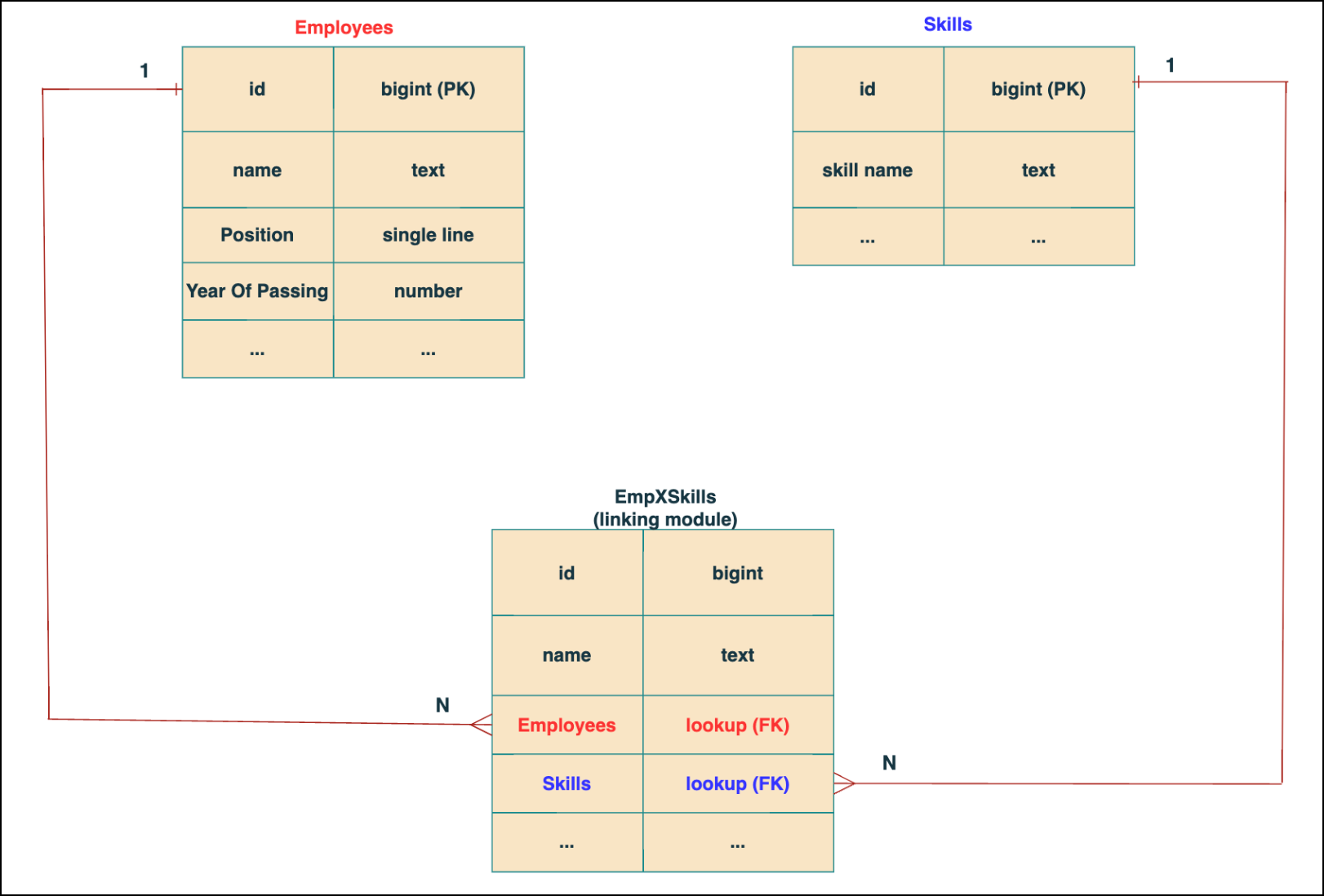


In the linking module, two lookup fields (lookup fields with api names - Employees and Skills) will be created. The lookup fields, one pointing to Employees and the other pointing to Skills from the linking module, establish a connection between the linking module and its associated module.

Why you cannot use a lookup field for this use case? 
In Zoho CRM, a lookup field creates a one-to-many relationship between two modules i.e. one record in the source module can be linked to only one record in the target module.

Example :
If you create a lookup field for Skills in the Employees module, each employee can be linked to only one skill. So, use a multi-select lookup field instead of a lookup field when you need to represent complex relationships like one employee - many skills and one skill - many employees.

3. How to create a multi-select Lookup field using Zoho CRM APIs?

To create a Multi-Select lookup field between two modules using Zoho CRM APIs, follow these steps:

Step 1: Identify the Module API Name
Before creating the field, you should know the API names of the Employees and Skills modules. For that, use the Get Module Metadata API.  

Request URL  : {{api-domain}}/crm/v8/settings/modules
Request method : GET
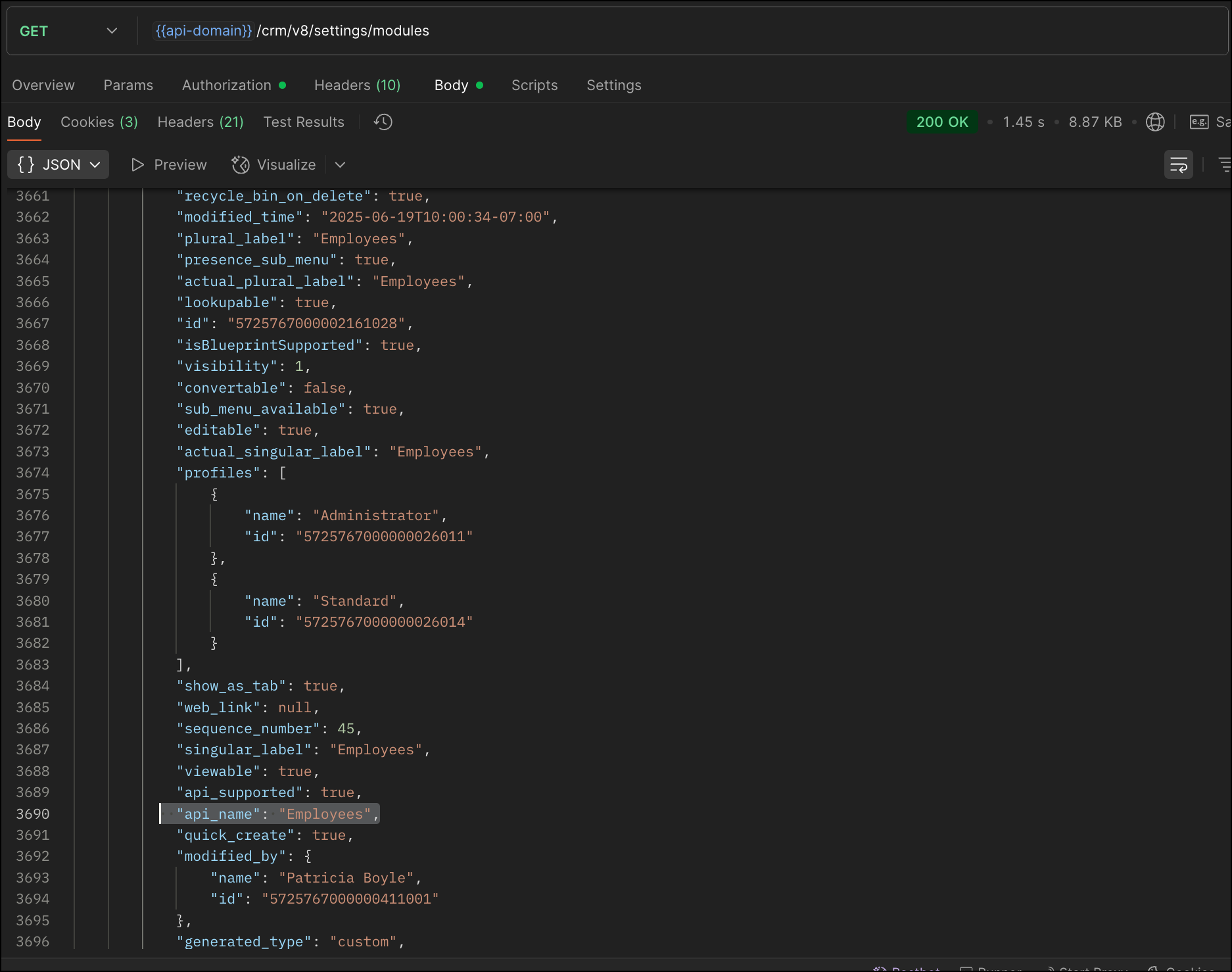


Now, search for the Employees module in the response and note its API name.

Step 2: Use the Create Custom Fields API

To establish a many-to-many relationship between two modules, in our case, Employees and Skills, you need to create a custom field of type multi-select lookup in the Employees module (parent module).  Here, we will associate multiple skills to an employee.

This custom field requires:
  • The related module you want to link to - Skills.
  • A display field from the related module
  • The linking module (EmpXSkills), which stores the actual associations.
Use the Create Custom Fields API to create custom fields.

Request URL : {{api_domain}}/crm/v8/settings/fields?module=Employees
Request method : POST

Sample input :


{
    "fields": [
        {
            "field_label": "Skills", //Name of the field in your module
            "data_type": "multiselectlookup", //Type of the field
            "multiselectlookup": { //This JSON object contains the multi-select lookup relationship details

                "connected_details": { //Details about the module and field you want to link
                    "module": {
                        "api_name": "Skills" //API name of the related module
                    },
                    "field": {
                        "field_label": "Skills" //The field in the related module to display
                    }
                },
                "linking_details": { //Details about the junction or linking module that manages the many-to-many relationship
                    "module": {
                        "plural_label": "EmpXSkills" //Plural label of the junction module
                    }
                }
            }
        }
    ]
}


4. How Do You Find the Linking Module and Field API Names?

To know the API name of the linking module:
Use the Get Modules API and search for "generated_type" : "linking" in the response to identify MxN modules. In our case, EmpXSkills.

Request URL : {{api_domain}}/crm/v8/settings/modules
Request method : GET
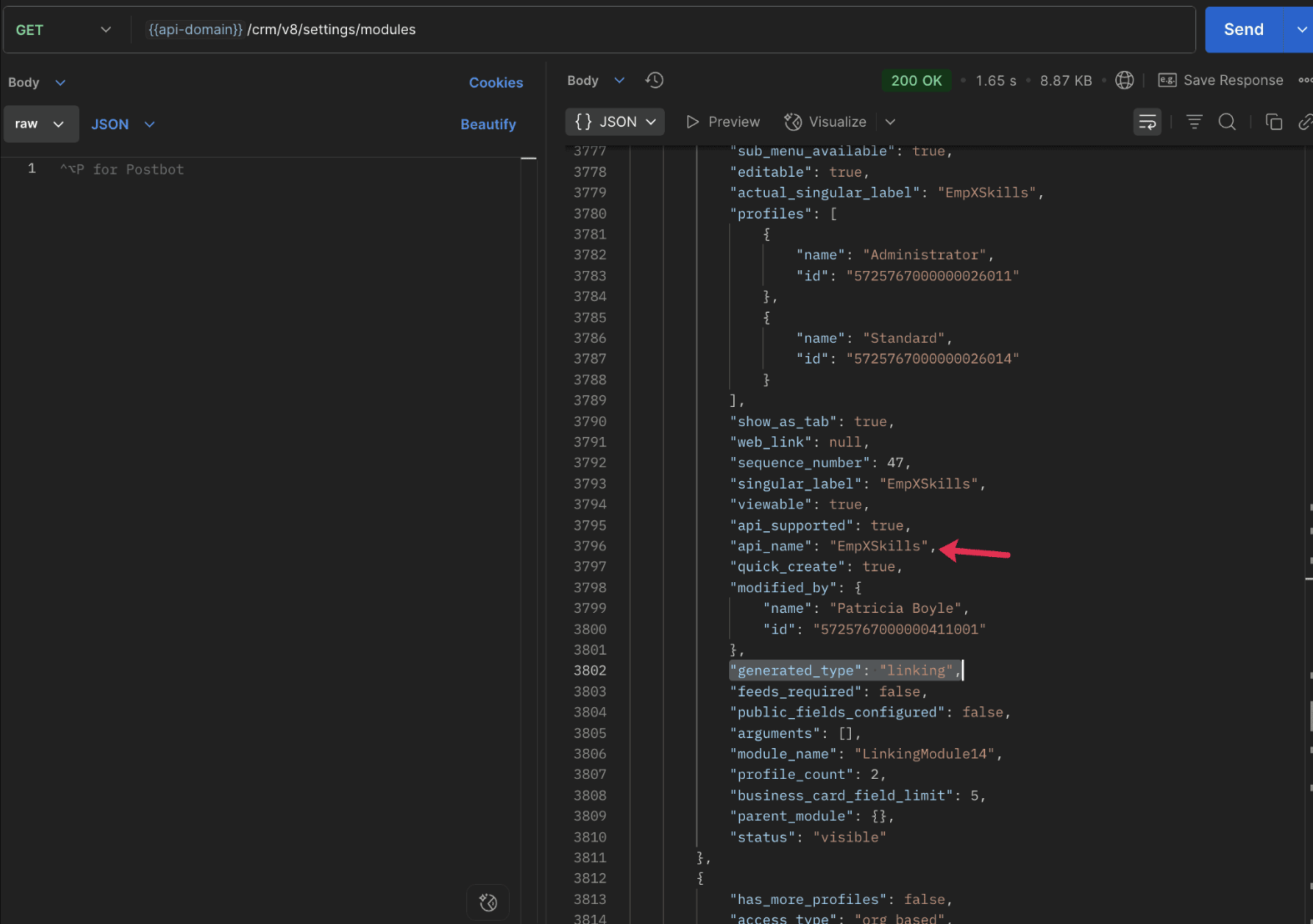


To know the field API names in the linking module:
Use the Get Fields Metadata API to retrieve the API names of lookup fields within the linking module.

Request URL : {{api_domain}}/crm/v8/settings/fields?module=EmpXSkills
Request method : GET

5. How do I associate records via a multi-select lookup field using the Insert Records API in Zoho CRM?

To associate records using a multi-select lookup field, you must provide the record IDs from the related module. The association is made through the linking module.

Example :
Associating multiple skills with an employee using the multi-select lookup field.

Request URL : {{api-domain}}/crm/v8/Employees
Request method : POST

Sample input :


{
  "data": [
    {
      "Name": "Patricia",
      "Email": "patricia@mail.com",
      "Position": "Marketing Specialist",
      "Year_of_Experience": 5,
      "Skills": [   // API name of the multi-select lookup field in the Employees module
        {
          "Skills": { // API name of the lookup field in the linking module pointing to the Skills module
            "name": "Marketing",
            "id": "5725767000002149427"  //ID from the Skills module are mandatory to establish the link
          }
        },
        {
          "Skills": {
            "name": "Social Media Marketing",
            "id": "5725767000002149476"
          }
        }
      ]
    }
  ]
}


6. How do I associate an Employee's skills using the linking module in Zoho CRM?

To establish a relationship between the Employees and Skills modules through the linking module, use the Insert Records API to create a record in the linking module, EmpXSkills.

To do this,
  • Use the appropriate lookup field API names to reference the parent module.
  • You must need the record IDs from both the Employees and Skills modules to create the associations.
Request URL : {{api-domain}}/crm/v8/EmpXSkills
Request method : POST

Sample input :


{
  "data": [
    {
      "Name": "Patricia",
      "Employees": {
        "id": "5725767000002161001"  // Record ID from the Employees module
      },
      "Skills": {
        "id": "5725767000002149476"  // Record ID from the Skills module
      }
    }
  ]
}


7. When should I use create/update operations in the Employees module vs the EmpXSkills module?

                Employees Module

               EmpXSkills (linking) Module

Use when you want to create or update an Employee and associate Skills using the Multi-select Lookup field.

Use when you want to create or remove associations between existing Employee and Skill records without modifying the actual Employee or Skill data.

Creating a new employee and assigning their skills at once.

Managing relationships between existing records i.e., linking and unlinking skills to employees.


8. How to update a record in the linking module?

To update a record in the linking module, use the Update Records API.
Request URL : {{api-domain}}/crm/v8/EmpXSkills/5725767000006269044
Request method : PUT

Sample input :


{
    "data": [
        {
            "Skills": {
                "name": "Marketing",
                "id": "5725767000002170035" //Associating another skill with the employee 
            }
        }
    ]
}

In the above sample, we have replaced an existing skill associated with an employee with another Skill in the linking module.This is done by updating the Skills lookup field in the EmpXSkills record.

Please note that in the linking module, Skills is a lookup field, so you can associate only one skill per linking record. But in the Employees module, Skills is a multi-select lookup field, so an employee can be associated with multiple skills.

9. How to unlink records from the parent module as well as the linking module?

Unlink the associated records from the parent module:

Using the Update records API, you can remove an associated skill from an employee, use the "_delete": null key within the multi-select lookup field in the Employee record update.

Request URL : {{api-domain}}/crm/v8/Employees/5725767000006269044
Request method : PUT

Sample input :

{
"data": [
        {
            "Skills": [
               {
                    "Skills": {
                        "name": "Marketing", 
                        "id": "5725767000002170035" // The Skill record you want to unlink
                    },
                    "id": "5725767000007228047", //record ID - The record created in the linking module for the employee with the Marketing skill
                    "_delete" : null 
                }
            ]
        }
    ]
}


Replace an associated record from the linking module:

Use the Update Records API to replace an existing association in the linking module.

Request URL : {{api-domain}}/crm/v8/EmpXSkills/5725767000007228035
Request method : PUT

Sample input :


{
    "data": [
        {
            "Skills": {
                "name": "Java",
                "id": "5725767000005259075" //replacing a new skill 
            }
        }
    ]
}

In the above sample, we have replaced the existing skill with Java.

10. Why am I seeing the error "DUPLICATE_LINKING_DATA"  in the Update Records API

This error occurs when you try to associate records with the parent record that are already linked with the Multi-select lookup field. To resolve this, check the records you are trying to link and make sure your association is only with records that are not already linked.

Know your existing linked records:

Before the Update Records API, use the Get Related Records Data API and search for the multi-select lookup field. In our case, Skills is the multi-select lookup field created in the Employees module. This will return all records already associated.

Example :
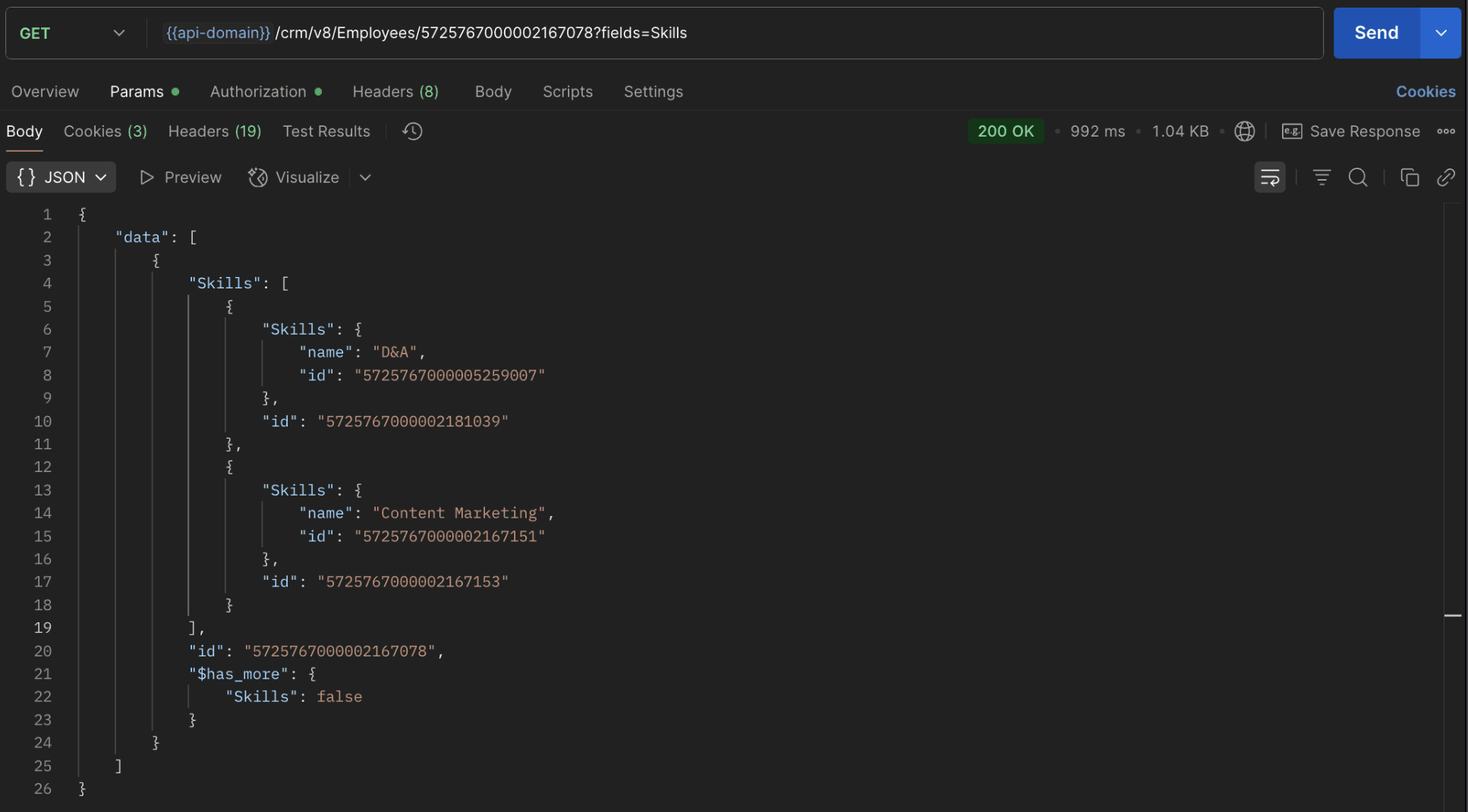

The response returns all Skills already linked with that Employee.

Using this way, compare the IDs from the API response with the new records you are about to link, and only proceed with non-duplicate IDs. This avoids duplicate entries and prevents the "DUPLICATE_LINKING_DATA" error.

11. What happens if I delete a record in the linking module?

When you delete a record in the linking module, it only removes the association between the related records in the Employees and Skills modules.

Note :
  • Deleting a linking module record removes only the relationship between two records from the Employees and Skills modules.
  • Deleting an Employee or Skill record deletes all corresponding entries in the linking module as well.

12. How do I query linked records?

Use the COQL API to query multi-select lookup data by specifying the corresponding linking module's API name directly in your query. The linking module is treated as a separate module in Zoho CRM, so you can retrieve associated records by querying it like any other module.

Sample query :


{
  "select_query": "select Skills.Name as skill, Employees.Name as employee from EmpXSkills where Skills.Name like '%Marketing%'"
}


Use the Get Module Metadata API to know the linking module's API name.

13. How do I export multi-select lookup records using the Bulk Read API?

To export multi-select lookup data, linking module records efficiently, use the Bulk Read API with the linking module’s API name.

Request method : POST

Sample Request :


{
    "callback": {
        "method": "post"
    },
    "query": {
        "module": {
            "api_name": "EmpXSkills" //API name of the linking module
        },
        "fields": [
            "Employees.Name",
            "Employees.Year_of_Experience",
            "Skills.Name"
        ],
        "criteria": {
            "group": [
                {
                    "field": {
                        "api_name": "Employees.Year_of_Experience" 
                    },
                    "comparator": "greater_than",
                    "value": "4"
                },
                {
                    "field": {
                        "api_name": "Skills.Name"
                    },
                    "comparator": "contains",
                    "value": "Social"
                }
            ],
            "group_operator": "AND"
        }
    }
}


14. Can I import my linking module's data using the Bulk Write API?

Yes. Like the Leads and Contacts modules, you can also import linking module's data into Zoho CRM using the Bulk Write API by directly specifying the linking module’s API name.

If you are importing data that involves both a parent module, Employees and its associated MxN linking module, follow these steps:

1. Create separate CSV files:
  • One for the parent module - Employees
  • One for the linking module - EmpXSkills
2. Zip the files into a single ZIP file.
3. Upload the ZIP in a single Bulk Write API request.
4. Ensure accurate field mappings are provided in the API request body.

Refer to Kaizen #131 - Bulk Write for parent-child records using Scala SDK for more details on handling parent-child records.


15. Can I receive notifications if a multi-select lookup field in a module is modified or updated?

Yes, you can receive notifications when a MxN field is updated using the Notification API. To enable instant notifications for actions performed in a module, use the respective API names of the linking module in the input body.

Request method : POST

Sample input :


{
    "watch": [
        {
            "channel_id": "10000",
            "events": [
                "EmpXSkills.all"  //EmpXSkills represents the API name of the linking module
            ],
            "return_affected_field_values": true  
        }
    ]
}


16. Can I use criteria-based filtering when accessing multi-select lookup data using the Search API?

Yes, you can filter multi-select lookup data using the criteria parameter in the Search API's URL.

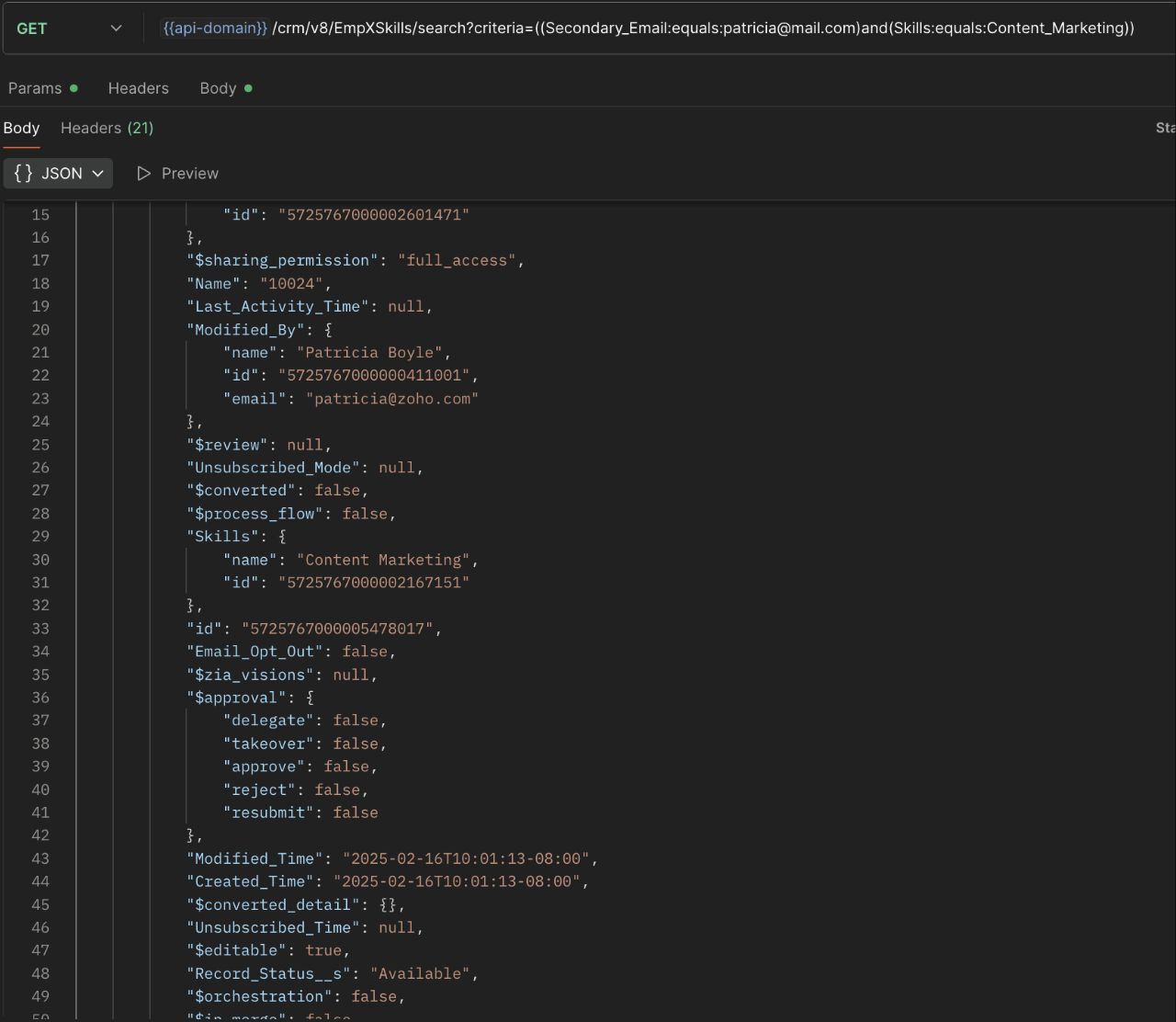
Here is an example that fetches records from the EmpXSkills linking module.

Request URL : {{api-name}}/crm/v8/EmpXSkills/search?criteria=((Secondary_Email:equals:patricia@mail.com)and(Skills:equals:Content_Marketing))
Request method : GET

Sample response :


                                                                                                                               x-----------------------------x


We trust that this post meets your needs and is helpful. Let us know your thoughts in the comment section or reach out to us at support@zohocrm.com 

Stay tuned for more insights in our upcoming Kaizen posts!


Other FAQs in the Kaizen series :


    • Sticky Posts

    • Kaizen #222 - Client Script Support for Notes Related List

      Hello everyone! Welcome to another week of Kaizen. The final Kaizen post of the year 2025 is here! With the new Client Script support for the Notes Related List, you can validate, enrich, and manage notes across modules. In this post, we’ll explore how
    • Kaizen #217 - Actions APIs : Tasks

      Welcome to another week of Kaizen! In last week's post we discussed Email Notifications APIs which act as the link between your Workflow automations and you. We have discussed how Zylker Cloud Services uses Email Notifications API in their custom dashboard.
    • Kaizen #216 - Actions APIs : Email Notifications

      Welcome to another week of Kaizen! For the last three weeks, we have been discussing Zylker's workflows. We successfully updated a dormant workflow, built a new one from the ground up and more. But our work is not finished—these automated processes are
    • Kaizen #152 - Client Script Support for the new Canvas Record Forms

      Hello everyone! Have you ever wanted to trigger actions on click of a canvas button, icon, or text mandatory forms in Create/Edit and Clone Pages? Have you ever wanted to control how elements behave on the new Canvas Record Forms? This can be achieved
    • Kaizen #142: How to Navigate to Another Page in Zoho CRM using Client Script

      Hello everyone! Welcome back to another exciting Kaizen post. In this post, let us see how you can you navigate to different Pages using Client Script. In this Kaizen post, Need to Navigate to different Pages Client Script ZDKs related to navigation A.
    • Recent Topics

    • The reason I switched away from Zoho Notebook

      My main reason for switching to Zoho was driven by three core principles: moving away from US-based products, keeping my data within India as much as possible, and supporting Indian companies. With that intent, I’ve been actively de-Googling my digital
    • Pro Lite Upgrade - Quick Access Tray

      Hello, I was going to upgrade to Pro Lite but the Quick Access Tray feature isn't available for Windows. Of the four features not available for Windows, the QAT is what I'm most interested in. Are there plans to add this feature for Windows anytime soon?
    • Add RTL and Hebrew Support for Candidate Portal (and Other Zoho Recruit Portals)

      Dear Zoho Recruit Team, I hope you're doing well. We would like to request the ability to set the Candidate Portal to be Right-to-Left (RTL) and in Hebrew, similar to the existing functionality for the Career Site. Currently, when we set the Career Site
    • How to set page defaults in zoho writer?

      hi, everytime i open the zoho writer i have to change the default page settings to - A4 from letter, margins to narrow and header and footer to 0. I cannot set this as default as that option is grayed out! so I am unable to click it. I saved the document
    • Boost your CRM communication with new font types, sizes, and default reply-to options while composing emails

      Hello Everyone, We’re excited to introduce a series of impactful enhancements to the email composer settings in Zoho CRM. These updates enable you to personalize and optimize your customer interactions with greater efficiency. So what's new? Add custom
    • Unable to Send Different Email Templates for Different Documents in Zoho Sign

      Hello Zoho Community, I am facing a limitation with Zoho Sign regarding email notifications sent to customers when a document is sent for signing. Currently, whenever I send any template/document for signing, the email notification that goes to the customer
    • Auto tracking URL generation based on Carrier

      Hi, While creating a shipment order for a package in Zoho Books, I have a requirement that for example, if the carrier is Delhivery and tracking number is 1234, then can automatically the tracking link/URL be generated as www.delhivery.com/1234. Similary,
    • Notes badge as a quick action in the list view

      Hello all, We are introducing the Notes badge in the list view of all modules as a quick action you can perform for each record, in addition to the existing Activity badge. With this enhancement, users will have quick visibility into the notes associated
    • Webtabs for Mobile App

      We let our users strictly use CRM and use webtabs to integrate other applications like Zoho Desk. We need these webtabs in the mobile app as well. Otherwise our approach of using CRM as an entry point for our system does not work anymore. Update: It would
    • Zoho Books' 2025 Wrapped

      Before we turn the page to a new year, it’s time to revisit the updates that made financial management simpler and more intuitive. This annual roundup brings together the most impactful features and enhancements we delivered in 2025, offering a clear
    • Restrict Users access to login into CRM?

      I’m wanting my employees to be able to utilize the Zoho CRM Lookup field within Zoho Forms. For them to use lookup field in Zoho Forms it is my understanding that they need to be licensed for Forms and the CRM. However, I don’t want them to be able to
    • How do people handle using Outlook and Zoho Project calendar at the same time?

      We have an ongoing problem in our organisation where we use Zoho Projects to plan all of our projects tasks and that also allows us to look forward using the workload report to see which of our consultants are overstretched etc and which are available.
    • 3 year sick leave cycle

      How do you set up a sick leave cycle for South Africa? In SA the sick works like this for the first 6 months you get 0.83 paid sick days a month, then after 6 months you sick leave balance is reset to 30 days that can be used over a 36 month cycle.  This
    • WorkDrive and CRM not in sync

      1/ There is a CRM file upload field with WorkDrive file set as the source: 2/ Then the file is renamed in WorkDrive (outside CRM): 3/ The File in CRM is not synced after the change in WorkDrive; the file name (reference) in CRM record is not updated (here
    • Introducing Connected Records to bring business context to every aspect of your work in Zoho CRM for Everyone

      Hello Everyone, We are excited to unveil phase one of a powerful enhancement to CRM for Everyone - Connected Records, available only in CRM's Nextgen UI. With CRM for Everyone, businesses can onboard all customer-facing teams onto the CRM platform to
    • Is Zoho Communityspaces now part of Zoho One?

      Is Zoho Communityspaces now part of Zoho One?
    • How to update "Lead Status" to more than 100 records

      Hello Zoho CRM, How do I update "Lead Status" to more than 100 records at once? To give you a background, these leads were uploaded or Imported at once but the lead status record was incorrectly chosen. So since there was a way to quickly add records in the system no matter how many they are, we are also wondering if there is a quicker way to update these records to the correct "Lead Status". I hope our concern makes sense and that there will be a fix for it. All the best, Jonathan
    • Bigin’s 2025 Evolution: Highlights from 2025 and What’s Ahead in 2026

      Dear Biginners, Wishing you a very happy New Year! As we stand at the cusp of endless possibilities in 2026, we would like to take a moment to reflect on what we achieved together in 2025. Your continued support, thoughtful feedback, and kind words of
    • Automatically CC an address using Zoho CRM Email Templates

      Hi all - have searched but can't see a definitive answer. We have built multiple email templates in CRM. Every time we send this we want it to CC a particular address (the same address for every email sent) so that it populates the reply back into our
    • Send Supervisor Rule Emails Within Ticket Context in Zoho Desk

      Dear Zoho Desk Team, I hope this message finds you well. Currently, emails sent via Supervisor Rules in Zoho Desk are sent outside of the ticket context. As a result, if a client replies to such emails, their response creates a new ticket instead of appending
    • Zoho Desk - Change Time Zone for all users and set default for new user

      Hi,   Is there a way to set a default time zone so that when user creates an account via the Zoho Desk invitation, they don't need to select the time zone via the hundreds of choice?   And, for already created users, can we edit the incorrect time zone selected by the user at the account creation ?   Thanks ! Fred
    • Introducing WhatsApp integration in Bigin

      Greetings! In today's business landscape, messaging apps play a significant role in customer operations. Customers can engage with businesses, seek support, ask questions, receive personalized recommendations, read reviews, and even make purchases—all
    • Why is Zoho Meeting quality so poor?

      I've just moved from Office 365 to Zoho Workplace and have been generally really positive about the new platform -- nicely integrated, nice GUI, good and easy-to-understand control and customisation, and at a reasonable price. However, what is going on
    • Allow Manual Popup Canvas Size Control

      Hello Zoho PageSense Team, We hope you're doing well. We would like to request an enhancement to the PageSense popup editor regarding popup sizing. Current Limitation: Currently, the size (width and height) of a popup is strictly controlled by the selected
    • Why does Zoho’s diff viewer highlight parts of unchanged lines?

      Hi everyone, I’ve noticed something odd in the Zoho editor’s diff view. When I delete a single line, the diff doesn’t just mark that line as removed. Instead, it highlights parts of the next line as if they changed, even though they are identical. Example:
    • All new Address Field in Zoho CRM: maintain structured and accurate address inputs

      The address field will be available exclusively for IN DC users. We'll keep you updated on the DC-specific rollout soon. It's currently available for all new sign-ups and for existing Zoho CRM orgs which are in the Professional edition. Latest update
    • CRM x WorkDrive: File storage for new CRM signups is now powered by WorkDrive

      Availability Editions: All DCs: All Release plan: Released for new signups in all DCs. It will be enabled for existing users in a phased manner in the upcoming months. Help documentation: Documents in Zoho CRM Manage folders in Documents tab Manage files
    • Wrapping up 2025 on a high note: CRM Release Highlights of the year

      Dear Customers, 2025 was an eventful year for us at Zoho CRM. We’ve had releases of all sizes and impact, and we are excited to look back, break it down, and rediscover them with you! Before we rewind—we’d like to take a minute and sincerely thank you
    • Passing the CRM

      Hi, I am hoping someone can help. I have a zoho form that has a CRM lookup field. I was hoping to send this to my publicly to clients via a text message and the form then attaches the signed form back to the custom module. This work absolutely fine when
    • Where can we specify custom CSS in Zoho Forms custom theme ?

      I'm using a form with a dark theme. The OTP popup window is unreadable, because for some reason, the OTP popup background fixes color to white, but still takes the font color specified in the custom theme. This ends up as white on white for me, rendering
    • Automating Employee Birthday Notifications in Zoho Cliq

      Have you ever missed a birthday and felt like the office Grinch? Fear not, the Cliq Developer Platform has got your back! With Zoho Cliq's Schedulers, you can be the office party-cipant who never forgets a single cake, balloon, or awkward rendition of
    • Drop Down Value

      Hi, May I know why Zoho Flow treat this drop down as number and not as string. If so, how can I fetch the right value for filtering. This field is from Creator, in Creator upon checking by default it is a string since it's not a lookup field.
    • Create PO from an invoice

      We are a hardware and software sales company which receives orders over the internet. We drop ship most of our products from a warehouse outside of our company. Our orders get sync'd into Zoho from our store via onesaas as invoices. It would be great
    • SMS to customers from within Bigin

      Hi All, Is there anyone else crying out for Bigin SMS capability to send an SMS to customers directly from the Bigin interface? We have inbuilt telephony already with call recordings which works well. What's lacking is the ability to send and receive
    • Zoho Survey reminder settings are extremely confusing

      Hi, I just want to set 3 reminders, one week apart from the first email out. Your form is too confusing and I don't understand. Can you simplify and be more specific regarding the language used on the form ?
    • Add deluge function to shorten URLs

      Zoho Social contains a nice feature to shorten URLs using zurl.co. It would be really helpful to have similar functionality in a Deluge call please, either as an inbuilt function or a standard integration. My Creator app sends an email with a personalised
    • Add specific field value to URL

      Hi Everyone. I have the following code which is set to run from a subform when the user selects a value from a lookup field "Plant_Key" the URL opens a report but i want the report to be filtered on the matching field/value. so in the report there is
    • form data load issue when saving as duplicate record is made

      Hello. I have a form with a lookup when a value is selected the data from the corresponding record is filled into all of the fields in the form. But the form is loaded in such a state that if any value is changed it will take all of the values pre loaded
    • Recurring Tasks and Reminders in Projects

      Recurring tasks are tasks that are created once, and then recreated automatically after a designated time period. For example, the invoice for your billable tasks is due every week. You can set that task to recreate itself every week. Also, the future
    • Unable to remove the “Automatically Assigned” territory from existing records

      Hello Zoho Community Team, We are currently using Territory Management in Zoho CRM and have encountered an issue with automatically assigned territories on Account records. Once any account is created the territory is assigned automatically, the Automatically
    • Next Page