Kaizen 208 - Answering your Questions | Functions, AI and Extensions

Hello Developers!
Welcome back to a fresh week of Kaizen!
We are grateful for your active participation in sharing feedback and queries for our 200th milestone. This week, we will answer the queries related to Functions and Extensions in Zoho CRM.
1. Default value in parameter, also instant return must capable to do in deluge and also capable to use closure in deluge function.
Based on the query, we are assuming that by default value, the user is referring to using
placeholder values during testing or debugging. In Deluge, such defaults are provided at the browser level.

For instant returns and closure, we need a few more details to give you the right guidance. We recommend reaching out to our support team with additional context so they can assist you further.
2. Please provide asynchronous script support or at least an option to increase the timeout limit for heavy processes.
Please increase the file size limit for invokeUrl tasks or introduce a more robust file streaming capability.
Based on overall runtime statistics, most functions complete within 5 minutes of runtime. Assuming your requirement involves longer-running processes, we recommend using Circuits or Schedules to handle such cases effectively.
Regarding file size limits for invokeUrl tasks, we assume your use case requires
handling larger payloads. In this case, we need more details to evaluate and provide a suitable solution, so we recommend reaching out to Zoho CRM Support.
3. I will be happy if I will can search on the Function list if some filed is exist on a function.
So if I change the API name I will be easy update the fields.
We understand that your use case is about quickly identifying functions that reference a particular field, especially when API names are updated. At the moment, this support is not directly available.
We are working on a feature revamp that will allow you to assign tags to functions for quicker access. For example, you’ll be able to tag functions with relevant keywords and then create custom views based on those keywords to easily locate them.
We have planned to roll out the feature revamp by early 2026.
4. I would love to hear more about Zoho CRM and its connection/setup/integration with AI and some use cases on how to currently improve business processes within the Deals Pipelines, and Sales.
We understand your interest in learning more about how Zoho CRM can connect with AI to improve business processes. Refer to this Smart Prompt help document to configure Zia and Open AI within Zoho CRM.
We have also recently introduced several AI-driven capabilities in Zoho CRM to help you work smarter and faster. These include workflow creation to automate routine tasks, record summaries for quick insights, image-to-canvas to seamlessly convert visuals into Canvas, and AI-assisted email creation for more effective communication.
Check out Zia’s Next Best Experience help page to understand how to effectively use Zia to enhance your business processes with real-time use cases.
These features are being rolled out across all data centers in a phased manner.
5. Bulk Data Enrichment: Script-based enrichment from services like Clearbit or internal ERPs.
As of now, bulk data enrichment is not natively supported in Zoho CRM. If you could share more details about your requirements with our support team, we will be glad to suggest a suitable workaround for your use case.
However, we offer a pre-built Clearbit extension that lets you quickly configure data enrichment without any need to write any scripts.
Install the Extension
1. Log in to your Zoho CRM account.
2. Navigate to Setup > Marketplace > All.
3. In the All Extensions tab, search for Clearbit Extension for Zoho CRM and click Install.
4. Agree to the terms and conditions, then click Install.

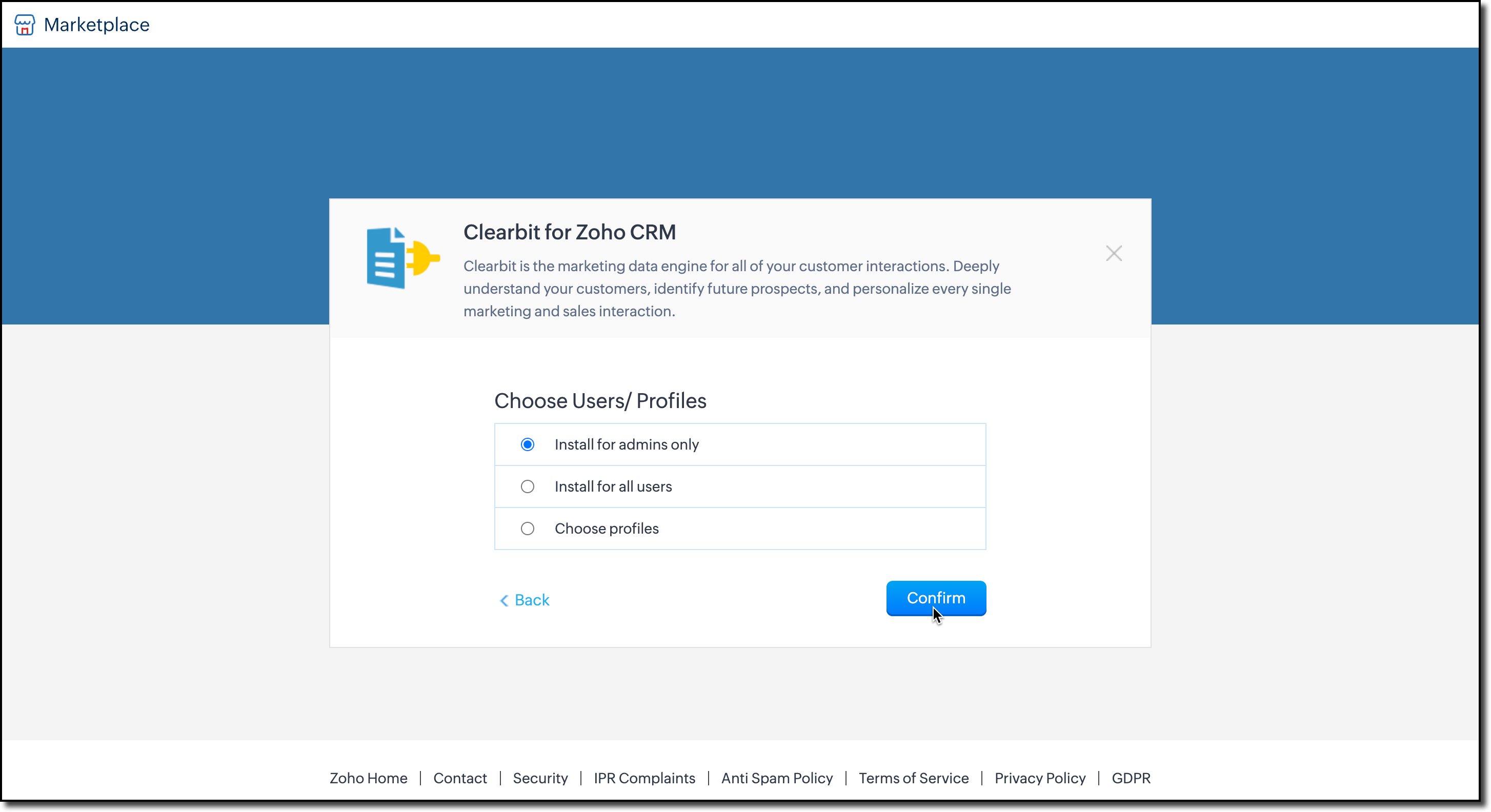
5. A pop-up will appear asking you to Choose Users/Profiles. Select who can enrich data, and click Confirm to install the extension.
6. You’ll then be prompted to enter your Clearbit account API key. This key allows Zoho CRM to fetch data from Clearbit and update your records.
Enter the key and click Save.

7. Next, choose the modules where you want data enrichment. The extension currently supports Leads, Contacts, and Accounts.

You can change these configurations anytime by clicking Settings in the extension detail page.

You can also access the settings from Extensions list view as shown here.

Enrich your Data
The extension pulls enriched data from Clearbit using the email address on the record. Once installed, a business card will automatically appear on the record’s detail view page.

Note: The email field is mandatory for data enrichment.

To update your CRM fields with Clearbit data:
1. Click Add to CRM at the top-right corner of the business card.
2. A field mapping iframe will open, where you can map Clearbit fields to your CRM fields.

3. After mapping, click Update to add the details to the record.
We hope we answered your questions and you found this useful. For the queries we mentioned that we require more details and if we assumed it the other way around, please reach out to us at support@zohocrm.com.
We would be happy to connect and help you!
Cheers!
--------------------------------------------------------------------------------------------------

Previous Post: Kaizen 207 - Advanced Queries using COQL API | Kaizen Directory: Home
Topic Participants
Kiruthiga G
Sticky Posts
Kaizen #198: Using Client Script for Custom Validation in Blueprint
Nearing 200th Kaizen Post – 1 More to the Big Two-Oh-Oh! Do you have any questions, suggestions, or topics you would like us to cover in future posts? Your insights and suggestions help us shape future content and make this series better for everyone.Kaizen #226: Using ZRC in Client Script
Hello everyone! Welcome to another week of Kaizen. In today's post, lets see what is ZRC (Zoho Request Client) and how we can use ZRC methods in Client Script to get inputs from a Salesperson and update the Lead status with a single button click. In thisKaizen #222 - Client Script Support for Notes Related List
Hello everyone! Welcome to another week of Kaizen. The final Kaizen post of the year 2025 is here! With the new Client Script support for the Notes Related List, you can validate, enrich, and manage notes across modules. In this post, we’ll explore howKaizen #217 - Actions APIs : Tasks
Welcome to another week of Kaizen! In last week's post we discussed Email Notifications APIs which act as the link between your Workflow automations and you. We have discussed how Zylker Cloud Services uses Email Notifications API in their custom dashboard.Kaizen #216 - Actions APIs : Email Notifications
Welcome to another week of Kaizen! For the last three weeks, we have been discussing Zylker's workflows. We successfully updated a dormant workflow, built a new one from the ground up and more. But our work is not finished—these automated processes are
Recent Topics
Will Zoho Search work with Zoho Learn
Currently, Zoho Search only works with Zoho Wiki which will be phased out. Moving forward, will Zoho Search be enabled for Zoho Learn? Thanks.How to use filters on all products page? Or even a category page?
Hello, I am trying to create some filters so users can use filters to find products they are looking for. So what i am trying is to create a filter according to price lets say. So if i define it this way i am expecting to see this filter option on categoryaudio and video comments in tasks in zoho projects
Hi, is it planned to have the ability to post audio and video comments? the whatsapp wechat format of communicating is a reality... tools like zoho project would facilitate a lot teamwork by facilitating the way in which we can give feedback in audio and video rather than only text. thx!Zoho Projects app update: Voice notes for Tasks and Bugs module
Hello everyone! In the latest version(v3.9.37) of the Zoho Projects Android app update, we have introduced voice notes for the Tasks and Bugs module. The voice notes can be added as an attachment or can be transcribed into text. Recording and attachingBoas práticas de desenvolvimento em Deluge
O Deluge (Data Enriched Language for the Universal Grid Environment) é a linguagem de script utilizada em diversas aplicações do ecossistema Zoho, como Zoho Creator, Zoho CRM, Zoho Books e Zoho Flow. Ela foi projetada para permitir automações rápidasSeeking a WhatsApp Business App (not API) Zoho CRM integration
We have a business need to integrated WhatsApp Business App (not API) into Zoho CRM to centrally manage communications between our Sales team and Leads & Contact. Is there a reputable integration available for this scenario of ours? Core features we wouldZoho Sign 2025–2026: What's new and what's next
Hello! Every year at Zoho Sign, we work hard to make document signing and agreement execution easy for all users. This year we sat down with our head of product, Mr. Subramanian Thayumanasamy, to discuss what we delivered in 2025 and our goals for 2026.Creditos API
Queria saber se alguém poderia me ajudar a resolver um problema na compra e utilização de créditos de mensagens API do WhatsApp. ja tentei todos o tutoriais porem não consegui realizar a compre, pois ao clicar no botão de comprar créditos aparece a mensagemIntergrating multi location Square account with Zoho Books
Hi, I have one Square account but has multiple locations. I would like to integrate that account and show aggregated sales in zoho books. How can I do that? thanks.Emails being blocked / spamcop
Hello, I am unablr to send any single email during the whole time due to the Zoho IP 136.143.188.16 being blocked by SpamCop.net Please help on this.Zoho IP blocked by SpamCop 136.143.188.16
Hello, I am unble to send any single email during the whole time due to the Zoho IP 136.143.188.16 being blocjed by SpamCop.net Please help on this.Is there a way to configure dark mode for Campaigns emails that go out to customers?
I've found a lot of information on how to configure dark mode for my (The user) personal Zoho workspace and email, but is there any way to edit dark mode settings on emails that we send out to customers via campaigns? We sent out a test email the otherCan I hide empty Contact fields from view?
Some contacts have a lot of empty fields, others are mostly filled. Is there a way I can hide/show empty fields without changing the actual Layout? I would like to de-clutter my view, and also be able to add information later as I am able. I would beAuto-publish job openings on my Zoho Recruit Careers Website
I have developed a script using the Zoho Recruit API that successfully inserts new jobOpening records to my Zoho Recruit website, but my goal is to auto-publish to the Careers Website. The jobOpening field data shows two possible candidates to make thisCredit Card Terminal for Zoho Books
Hello, Instead of punching the credit card number manually for customer payment, do you have a third-party hardware credit card reader that works with Braintree? Thank YouHow do you print out the invoices comments
I have some invoices where i need to print out the comments that show when reminders and etc were sent how do we print those out in Zoho Books.Feature Request: Enable Custom PDF Layout Editor for All Modules (Including Package Slips)
Hello Zoho Community and Product Team, I am writing to share a suggestion that would significantly enhance the customization capabilities within Zoho Books. We all appreciate the power of the Custom PDF Layouts (the "New" template engine) that allowsNeed advice for product/item search functionality when adding invoices.
My client uses "Catalog or Vendor" name and Product code to search for his items. But Zoho only allow to search by product name and SKU when adding items to Invoices/Estimates. Clients product codes are not unique as they may overlap from different catalogs/vendors.How to dynamically pass IDs from one API response to a second API call in Zoho DataPrep?
Hi Team, I am setting up a global consolidated reporting pipeline in Zoho Analytics (India) using Zoho DataPrep as the ETL engine. I am pulling data from multiple Zoho Books Data Centers (US, Singapore, India) thats why i used the URL Source (OAuth 2.0)Feature Request: "Send Invitation" Toggle for Events
I am writing to request a critical "Quality of Life" update for the Activities module. Currently, adding people to the Participants field in an Event triggers an automatic email invitation/acceptance tracking with no way to opt-out. For general eventsAccount Review Pending - Daily Limit 100
Hi ZeptoMail Team, I'm writing to request a manual review of my account. I am currently stuck on the 100-email daily limit and cannot purchase credits. Status: My domain is already verified (DKIM/CNAME). Issue: The "Customer Validation" option is no longerAutomation Series: Move Tasks to a different Task List on Status Change
In Zoho Projects, you can automatically move a task from one task list to another when its status is updated. This keeps your tasks organised and ensures better visibility while reducing manual work. For instance, during a product launch, the marketingIntroducing Bigin's all new integration with Microsoft Teams
Picture this: You are on call with your team to discuss some important deals that need to be closed soon. While discussing each deal, your team has to switch back and forth between your Teams account and Bigin account to refer to details about the deal.Scaling the customer journey: What's new in CommandCenter
Dear Customers, The last time we connected about CommandCenter, it was about the tool's new controls and revamped UI. Personally, the overhaul of the UI from the last update, still excites me. Today, we're here with news about its scalability and addedAdjusting Physical Inventory
Not getting very far with support on this one, they say they are going to fix it but nothings happened since November. Please give this a thumbs up if you would like to see this feature or comment if you have some insight. Use Case: Inventory set to beDynamic Remaining Quantity in Lookup During Allocation
Hi everyone, From what I understand in Zoho Creator, lookup fields only display the stored value from the source record and do not dynamically update while a form is being filled. Because of this, showing a real-time updated remaining quantity insideIs it possible to use HTML formatting in SMS messages sent from Zoho?
Hi everyone, I have a question regarding sending SMS from Zoho When we send emails from Zoho, we can include HTML code to format the message (like adding links, styling, etc.). Is it possible to do something similar when sending SMS messages through ZohoImportant update: Migrate to the new SalesIQ live chat widget before April 14, 2026
The old SalesIQ live chat widget will be deprecated on April 14, 2026. This is a final reminder to migrate to the new SalesIQ live chat widget before this date. After April 14, 2026, the old widget will no longer be maintained, which can lead to slowerIf your IM chats aren’t auto-assigning, here’s what to check
Hey everyone! We’ve been seeing quite a few questions around Instant Messaging (IM) Chat Routing in Zoho Desk, especially around how it actually behaves in real time. So I thought I’d share a practical breakdown of what’s happening behind the scenes.connect zoho creator with google drive
Hello everyone, I need to connect to a folder drive. The idea, is that google drive loads a text document with some data, I must read that text document to be able to autofill a form that I have in zoho creator with that data. I also attach PDFs and placeUploaded files are not included when using "Include user submitted data" in Email Notification
In Send Email notification workflow in Zoho Creator, there is an option called "Include user submitted data" which allows the email to contain all the form submission details. However, when this option is enabled, files or images uploaded through FileExtend Zoho Canvas Customization to Zoho Creator Forms and Reports
Currently, Zoho Canvas allows users to design and customize the UI of Zoho CRM modules with a much better visual experience. This helps organizations create cleaner layouts, improve usability, and design interfaces that match their workflows. However,Kanban View for Projects.
At our organization, we describe active projects with various statuses like "In Proofing" or "Printing" or "Mailing". In the Projects view, one can set these project statuses by selecting from the appropriate drop-down. While this works, it's difficult to view and comprehend the progress of all of your projects relative to each other in a table. Creating a Kanban view for projects where I can move them from one status to another allows me to see where each project is in the order of our workflow.Button ''I'm Interested'' won't translate
Since our main platform is in French, I would like to get this ''I'm Interested'' button translated to French ''Je suis intéressé''. We managed to translate the whole carreer site in French, except the button. How come ? We have a standard subscription,Feature request - image resizing on sales orders
I need to be able to show the items on the sales orders, currently the item image shows really small and no way to resize it, need the ability to make the image larger to showcase the product on the pdfsEmail Parser Not Extracting Fields Correctly with Certain Label Formats
I’ve been testing the Email Parser functionality in Zoho CRM to automatically extract data from incoming emails and map it to CRM fields. During testing, I noticed that parsing sometimes fails when the email contains field labels formatted like this:Zoho CRM Community Digest - February 2026 | Part 1
Hello Everyone! February has been off to a productive start in the Zoho CRM Community, with several thoughtful product enhancements and helpful technical discussions making their way into the forums. To help you stay up to speed, we’ve rounded up theNouvelle fonctionnalité : donnez du style à vos pages avec le Branding
Que vous prépariez un webinaire important. Vous avez investi du temps dans votre contenu, invité des intervenants de qualité, et les inscriptions commencent à affluer. Mais votre page d’inscription ? Elle ressemble à toutes les autres : générique, sansHow to sync Zoho CRM Quotes with Zoho Books/Finance Estimates or Quotes
Hi everyone, We’re building quotes in the Zoho CRM Quotes module because of its strong CPQ features and better communication options (multiple contacts, email customization, etc.). However, these don’t sync directly with Zoho Books/Finance for invoicing.Marketing Tip #24: Encourage customers to leave reviews
Reviews are one of the strongest trust signals in ecommerce. When shoppers see real feedback from other customers, they feel more confident about buying, especially when they’re choosing a brand for the first time. Not all reviews are equal. DetailedNext Page