Let customers reach you easily with the Zoho SalesIQ - Telegram IM Channel Integration

Let customers reach you easily with the Zoho SalesIQ - Telegram IM Channel Integration

We are now living in the era of instant messaging where every single person around us will have at least two instant messaging apps on their mobile phones. And that very well includes your customers. It is important for businesses to be able to communicate with and assist customers, on the platforms that they are most likely to use.
In this post, we will be discussing about the benefits of Zoho SalesIQ's integration with one such instant messaging app, Telegram. We have made a few changes to our Telegram Channel configurations recently. Let's take a look.

How does the Telegram integration in SalesIQ work?

The Channels feature of SalesIQ allows for seamless integration of your SalesIQ with Telegram.
  • It removes the hassle of your operators, switching between various apps to assist your website visitors.
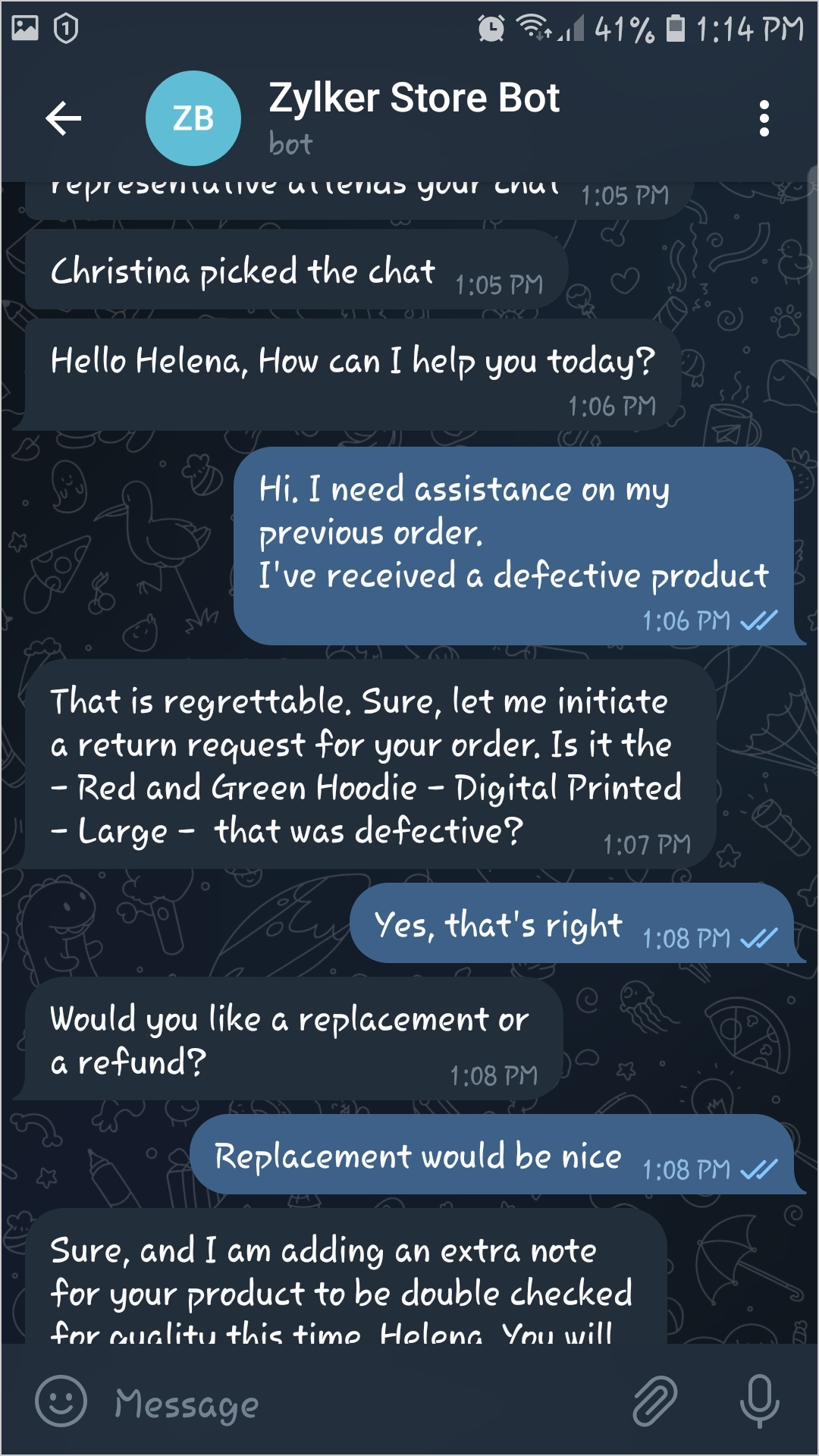
  • When a visitor sends a message on the particular business' telegram bot, the operator will be notified on their SalesIQ dashboard directly, and can reply to the visitor immediately.
  • Connecting and communicating with a business' telegram bot will connect the telegram user to a SalesIQ operator for immediate assistance.
  • Through this integration, telegram users can easily locate your business' telegram bot, using the telegram search bar.

Recent configuration changes made to the Telegram Channel on SalesIQ

We have made a few changes in the Telegram channel configurations recently. While our old configurations had multiple steps to sync your business' Telegram bot to SalesIQ, the new and refined method of integration cuts down a lot of the steps from the previous process.

New and simplified Configuration steps

Our new, streamlined process does not call for a mobile number as the the key aspect of linking Telegram with SalesIQ.
  • The new configuration requires businesses to have a bot on Telegram already.
  • Now, users just need to enter their business telegram bot's API Key directly on the Channels page of SalesIQ.
  • This will get their SalesIQ integrated with Telegram directly, eliminating all the other steps that was previously done.
Please visit our user guide for more details on the configurations.


Benefits of integrating Telegram to SalesIQ

Now let's get to know some of the advantages of integrating your SalesIQ with Telegram.
  • Your operators can straightaway take up incoming telegram chats within their SalesIQ dashboard and wouldn't need to log on to any other device or app for assisting customers.
  • Operators will have the option to reopen conversations that were missed and can respond to visitors even when the visitors are offline. Unlike on the website, here the visitors need not be online to receive assistance via telegram.
  • The Operators will be able to use the widget functionalities for the Telegram visitors i.e., their details can be easily pushed to Zoho CRM, they can be added to the required campaigns with Zoho Campaigns and their tickets can also be managed on Zoho Desk.
  • SalesIQ admins can use the Channel filter in the chats section to filter out the telegram chats alone, for further analysis.
  • Your visitors, leads and customers who are telegram users, wouldn't have to log on to your website and then initiate a chat via the chat widget for support. They can simply connect with your SalesIQ operators directly from their Telegram inbox.
  • All the chats with Telegram visitors will be safely saved on telegram and can be accessed anytime in the future.
  • Visitors and operators can use the voice notes option and also share images, videos and other files for better communication and understanding.
Thank you for reading through. We hope you found this post helpful. For more details on the Telegram channel configurations, please check out our updated help guide here.

Webinar Alert! - We are hosting a free webinar exclusively on the various instant messaging channels on SalesIQ on 24th Aug 2022. Book your slots here

    • Recent Topics

    • アナリティクスで商談中のパイプライン(ステージ)の件数比較

      アナリティクスで商談中のパイプライン(ステージ)の件数を前週と前々週で比較したい。前々週の件数が更新することで変動してしまう。対象方法をご教授ください。
    • How do I remove a data source from Zoho Analytics?

      I am unable to find a delte option on a datasource that i put in the system as an error. On teh web it refers to a setup icon but I do not see that on my interface?
    • Exclude Email or Domain From New Ticket Notification

      Hi, we utilize the new ticket notification feature in Zoho Desk. However, it would be great if there was a way to exclude certain email addresses or domains from receiving the automatic notification. This would be particularly helpful for automated alerts
    • Identify and clean hard bounce lists in Automation 2.0

      Hello. 1. I want to know how I can identify hard bounces in the lists I created to clean them before sending an email, given that the bounce rate has increased and it is necessary to clean the lists. 2. How can I exclude hard bounces and invalid emails
    • Trigger workflows from SLA escalations in Zoho Desk?

      Hey everyone, I’m currently working with SLA escalation rules in Zoho Desk and ran into a limitation that I’m hoping someone here has solved more elegantly. As far as I can tell, SLA escalations only support fairly limited actions (like changing the ticket
    • Delete a department or category

      How do I delete a Department? Also, how do I delete a Category? This is pretty basic stuff here and it's impossible to find.
    • Zoho Webinar - Sharing System Audio (NOT AVAILABLE)

      Hi, We are having a serious problem with Zoho Webinar. In the webinars we run, we very often share the audio from a video we are streaming directly from YouTube or other applications. Until recently we were using Zoom, but as we use other Zoho applications
    • Lost the ability to sort by ticket owner

      Hi all, in the last week or so, we have lost the ability to sort tickets by Ticket Owner. Unlike the other columns which we can hover over and click on to sort, Ticket Owner is no longer clickable. Is it just us, or are other customers seeing this too?
    • Cancellation Fees

      Hi, It really would be good if Billing could take subscription management further with cancellations & being able to apply or set a cancellation fee for a plan that is either fixed or prorated. It is not uncommon in subscriptions for cancellation fees
    • Custom Field for Subscription

      Hi, I can't find a way to add a custom field (to contain a license key generated from our software) against a subscription? Is the only place to add this information in the Invoice module (as custom field for invoice)? When a customer views his subscription
    • Zoho CRM Meetings Module Issues

      We have a use-case that is very common in today's world, but won't work in Zoho CRM. We have an SDR (Sales Development Rep) who makes many calls per day to Leads and Contacts, and schedules meetings for our primary Sales Reps. He does this by logging
    • Notes - Reaction Buttons

      Using the native notes option within CRM is fine, it works and the RTF features are great, however, would it be possible - if there isnt already something in place, where we can add a reactions button, similar to teams/whatsapp to show that its been read
    • How to get the campaingns key?

      Reading the documentations of the API, I see that is necessary have the campaign key, but I don't see how can I get it. For example to get the campaign details we need to do the request: https://campaigns.zoho.com/api/getcampaigndetails?authtoken=[API Authentication Token]&scope=CampaignsAPI&campaignkey=[campaignkey] I have the API Authentication Token but I don`t see how to generate the campaignkey
    • Unable to switch existing AWS RDS connection to DataBridge after moving RDS behind VPN

      Unable to switch existing AWS RDS connection to DataBridge after moving RDS behind VPN Hi everyone, I’m facing a problem with an existing Zoho Analytics setup and would like to know the best migration path. Originally, my Zoho Analytics connection to
    • [Bug] WebAuthn passkey registration blocked on rpIds with TLDs longer than 6 characters (.accountant, .technology, etc.) — isValidDomain regex too strict

      Hi, Filing on behalf of an enterprise customer where Zoho Vault is deployed across the company. The Chrome extension blocks WebAuthn passkey registration on legitimate sites whose Relying Party ID (rpId) has a TLD longer than 6 letters. This affects every
    • Native QuickBooks integration for Zoho CRM: Connecting sales and finance

      Greetings, I hope all of you are doing well. We're excited to announce Zoho CRM's integration with QuickBooks Web, which is designed to synchronize your CRM data with your QuickBooks accounting records and bridge the gap between sales and finance. This
    • Syncing zoho books into zoho crm

      I was wondering how I can use zoho books in crm as I have been using them separately and would like to sync the two. Is this possible and if so, how? Thanks
    • ZohoBooks_add_expense_attachment Fails

      I'm working MCP in Claude to automate bookkeeping. Claude cannot seem to attach and reciept to an expense. The 'add expense attachment' tool is added to the server and enabled in Claude. I asked Claude to give me the calls he performed and this is what
    • ZohoBooks_create_chart_of_account

      I'm setting up Claude to do my bookkeeping workflows using a Zoho MPC server I setup. He does not seem to be able to create a chart of account. The 'create chart of account' tool is added to the server and enabled in Claude. I asked Claude to give me
    • Zoho Books Product Road Map

      I am planning to look into Zoho Books to maintain my Company's Account Books. Is the roadmap of Zoho Books Development available online? What happens if you product dies, without an export feature to other popular Accounting softwares like Tally or Quickbook. Are we going to be left in lurch? Do you have a product road map? Regards, Vishal.
    • I want to delete the email but I can't.

      I want to delete emails but I can't, please help me. Thanks!
    • Error while creating new user

    • Zoho Mail is blacklisted on magicspam.com and spamauditor.org

      As of today, the same problem with the IP addresses 136.143.188.51 and 136.143.188.52 How long does it take them to clear their IP addresses? I've read on this forum that these IP addresses have been blacklisted for years. //////////////////////// This
    • Unable to send emails from the delegated mailbox

      currently it's not possible to send emails from our delegated mailbox (just in our own name, our own mail-accounts) The permissions granted include "Send as," and we are also unable to delete delegated employees or add new ones. We can only add employees
    • Change Password

      How can I reset OR Change the Passwords for the Whole Organization at Once as Administrator using Admin Console?
    • Zoho Books bill pay option not available with zoho one

      Why isn't Zoho Books bill pay add-on not available for Zoho one customers not even as a purchasable option. I think this is very inconvenient for companies wanting to use this feature all in one system
    • Support - what am I doing wrong?

      Hi Everyone - I'm a new user and looking particularly for a replacement mail service. I'm just a home user not a professional but I do look after half a dozen domains. Zoho looks lovely and I'd like to switch but just want to get answers to a few 'easy'
    • Zoho Forms - Form Availability Redirect Option

      Hi Forms Team, It would be great if there was a redirect URL option on the Form Availability settings. For example, I would like to create a support form which is only available outside business hours and if the current data and time is not Mon-Fri 9-5
    • Consider Making Printing Easier (UI)

      I'm using Zoho Analytics in much the way that it was intended when it was "Zoho Reports" - as a way to pull together information across several apps in the ecosystem. I have a dashboard that I need to run each week for every employee (change the filter
    • Email Routing to Zoho from Cloudflare

      Hello, I'm new to Cloudflare, having had my domain hosted on Fasthosts and just used it for email forwarding. I'm looking for a little help to configure my email routing/hosting. I've looked at the documentation but haven't found exactly what I need to
    • Emails

      Good Morning, Is anyone else experiencing emails bouncing back? Thanks,
    • Secondary Reporting Manager permission level

      Hi, same time last year I was speaking to Zoho about the use of a Secondary Reporting Manager and certain challenges that I was facing. at the time, I was told that this functionality did not exist. I am still facing challenges, so I would like to ask
    • why is my folder list is gone?

      Hi, All my email folders are gone, i cant found any email. could you please check it?
    • Our ZOHO mail is not working

      ZOHO mail is not working for any of our company's employees. All are able to access it in mobile. But not in laptops as a app or in webpage. please help asap.
    • Request to Release Email Aliases for Our Domain

      Dear Zoho Support Team, Greetings, We are currently configuring the email system for our organization in Zoho Mail and encountered an issue while creating several email aliases. When attempting to create these aliases, we receive the following error message:
    • Changing Base Currency to USD (we are based in the UAE)

      Hello everyone, Good day. We are based on the UAE and our bookkeeping is in USD. I followed the online resource that I select the country first where the currency I want as base is native then later on changed the country once the whole setup is done.
    • Error "The domain pinakajewels.com appears to be already in use in another organization. Learn More"

      Hi Team, I have the following account with zoho mail Organization ID: 644368849 This zoho mail account was earlier mapped to www.senacareese.com I no longer own the domain www.senacareese.com I wish to map www.pinakajewels.com to the same zoho mail account.
    • Add personal Facebook to Zoho Social

      Hi. is there any way i can post to my business and personal Facebook and Instagram at the same time when I make or schedule a post?
    • Option to Delete Chats in IM

      Currently, there is no option to delete any chats in IM, regardless of their source.
    • Billing Status Update

      Hello Latha, I’m working on a new automation (deluge) to fulfill one of our requirements. In this automation, there is a step to update the Work Order billing status from “Not Yet Invoiced” to “Non-Billable.” I tried to find the API information relevant
    • Next Page