Spotlight #10: Collect files securely

Spotlight #10: Collect files securely

Hello everyone!

As part of our monthly Spotlight series, we are going to highlight another WorkDrive feature: Collect Files.


Collecting files from people, whether within a team or from external stakeholders, is often a tedious task.

File collection usually includes these primary tasks: requesting users to submit files, downloading the files to your computer, and uploading the collected files to a folder. Additionally, we may need to organize these files and keep track of who has submitted and who has not submitted yet.

The complexity increases if multiple people communicate and submit files via different apps, such as email, messaging apps, and different cloud storage services.

The Collect Files feature could be useful in many different cases, such as:
  • A college professor asks students to submit their assignments before a deadline.
  • A print media company asks their editors to submit feature articles for the upcoming monthly edition.
  • A venture capitalist firm invites users to submit business ideas and research papers on artificial intelligence.  
With the Collect Files feature, WorkDrive users can create custom collection links to allow any number of people to upload their files easily. Once they upload their files, you can view their submissions and easily manage their files from your WorkDrive account.

With this feature, you can easily collect files from anyone, regardless of whether they have a WorkDrive account or not. You can create collection links for internal (team members) or external collaborators (anyone on the internet) with custom link settings.

Receive files in your selected folder

No need to manually sort the submitted files once you get them: when you create the collection link, you can choose the destination folder where all the submitted files will be uploaded.

Set an appropriate file-size limit

If you need to ensure the submitted files are under a maximum size limit, you can set limits for both the number of files upload and the file size while creating the link. You can then update the limits of any active collection link later.

Set an expiration date for the file submission

The creator of the collection link can set submissions deadlines by adding an expiration date to the link. The link will not be accessible past the specified expiration date.
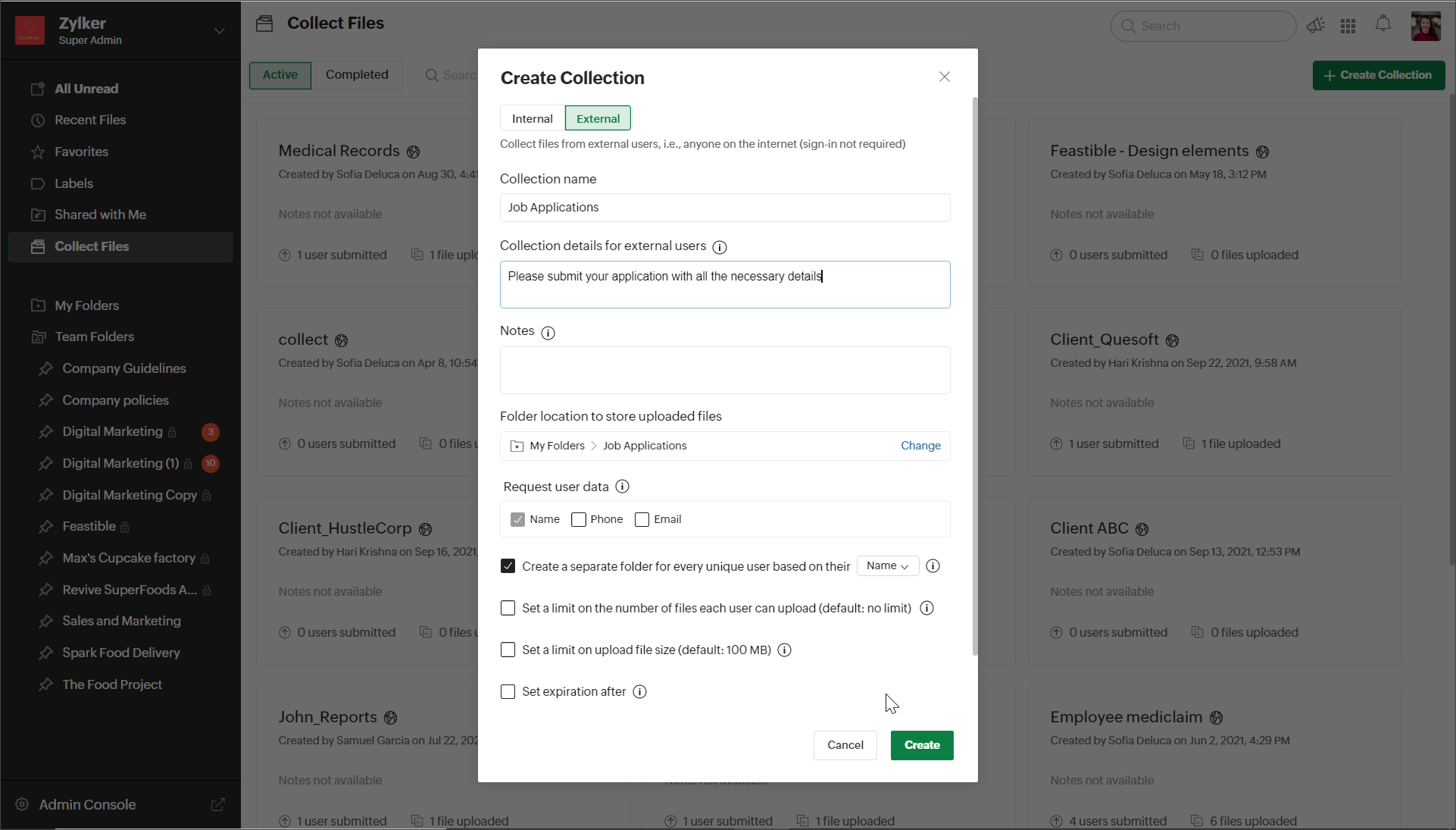


Here are the  steps to create a collection link: 
  1. In the left panel of your WorkDrive account, click Collect Files.
  2. Click the + NEW COLLECTION button in the top-right corner. A New Collection dialog will open.
  3. Select the Internal or External tab based on the type of collection link you want to create. Enter a collection name and add collection details.
  4. Choose a folder location to store all files uploaded through this link.
  5. Under Request user data, Name will be selected by default. You can also request phone number and email address, if needed.
  6. To create a separate folder for each user, mark the respective checkbox. The uploader's name will be the default folder name. Note: You can also choose the uploader's email address or phone number as the folder name if you've enabled those options in the Request user data field.
  7. Set the file upload limit, file size limit, expiration date, and notification alerts if needed, and click CREATE.
  8. Now, copy the collection link and share it with your collaborators.
  9. To send the collection link via email, you can add email addresses and a message under Email collection link, then select SEND EMAIL.

Managing your collections

From the Collect Files tab on the left panel of your account you can view and manage all the files collected. Here you can see all the active collections and the completed ones. You can view submission details, such as the list of users submitted, their details, and uploaded files.

We hope you found this article helpful! Watch out for this space for more interesting product updates, tips and tricks, and more.
    • Recent Topics

    • Desk DMARC forwarding failure for some senders

      I am not receiving important emails into Desk, because of DMARC errors. Here's what's happening: 1. email is sent from customer e.g. john@doe.com, to my email address, e.g info@acme.com 2. email is delivered successfully to info@acme.com (a shared inbox
    • Ticket layout based on field or contact

      Hi! I want to support the following use-case: we are delivering custom IT solutions to different accounts we have, thus our ticket layouts, fields and languages (priority, status field values should be Hungarian) will be different. How should I setup
    • Deactivated Zoho One account can sign in

      I am concerned by the fact that deactivated users in Zoho One have the ability to sign in even after their account has been deactivated (not deleted). these inactive identities have no access to individual Zoho apps or data. based on my experience they
    • SAML in Zoho One vs Zoho Accounts

      What is the difference between setting up SAML in Zoho Accounts: https://help.zoho.com/portal/en/kb/accounts/manage-your-organization/saml/articles/configure-saml-in-zoho-accounts ... vs SAML in Zoho One?: https://help.zoho.com/portal/en/kb/one/admin-guide/custom-authentication/setting-up-custom-authentication-with-popular-idps/articles/zohoone-customauthentication-azure
    • How can I reset the password for a user in Zoho Projects

      We need to reset the password for a user in Zoho Projects. I am the admin portal owner and there was nothing to be found to do this. very confusing.
    • No funcionan correctamente el calculo de las horas laborales para informe de tickets

      Hola, estoy intentando sacar estadísticas de tiempo de primera respuesta y resolución en horario laboral de mis tickets, pero el calculo de horas en horario laboral no funciona correctamente cree los horarios con los feriados : Ajusté los acuerdos de
    • How can I add a comment to an existing ticket via API?

      I need to add comments/notes to the history of an existing ticket using the API without overwriting the original ticket description. Thanks!
    • Notification to customers when I use a Zoho function

      Hi all, I tried searching the community but couldn't find anything about it. I noticed that the customer receives the notification of reopening the old ticket but does not receive the notification of opening a new ticket when I use the function: "separate
    • Internal Error When Accessing Team Inbox.

      All our users are seeing this error in teaminbox. Because its a critical tool kindly resolve this issue ASAP.
    • Marketer's Space: Proven tips to improve open rates – Part III

      Hello Marketers! Welcome back to another post in Marketer's Space! This is the final post in the "open rate series". In the first and second parts, we discussed topics ranging from sender domains to pre-headers—but we're not done yet. A few more important
    • MCP no longer works with Claude

      Anyone else notice Zoho MCP no longer works with Claude? I'm unable to turn this on in the claude chat. When I try to toggle it on, it just does nothing at all. I've tried in incognito, new browsers, etc. - nothing seems to work.
    • Change Number Field to Decimal Field

      Hi, It would be nice to be able to change the field type without having to delete it and create a new one, messing up the database and history. Thanks Dan
    • Allow Text within a Formula

      Hi, I would like to be able to use this for others things like taking an existing Date Field and copying its value, so by entering getDay(Date)&"-"&getMonth(Date)&"-"&getYear(Date) it results in 01-02-2026. And then when the Date is changed so is this
    • Zoho Social - Feature Request - Reviewer Role

      Hi Social Team, I've come across this with a couple of clients, where they need a role which can review and comment on posts but who has no access to create content. This is a kind of reviewer role. They just need to be able to see what content is scheduled
    • Zoho Books/Inventory - Update Marketplace Sales Order via API

      Hi everyone, Does anyone know if there is a way to update Sales Orders created from a marketplace intigration (Shopify in this case) via API? I'm trying to cover a scenario where an order is changed on the Shopify end and the changes must be reflected
    • Zoho Inventory / Finance Suite - Add feature to prevent duplicate values in Item Unit field

      I've noticed that a client has 2 values the same in the Unit field on edit/create Items. This surprised me as why would you have 2 units with the same name. Please consider adding a feature which prevents this as it seems to serve no purpose.
    • Zoho CRM for Everyone's NextGen UI Gets an Upgrade

      Hello Everyone We've made improvements to Zoho CRM for Everyone's Nextgen UI. These changes are the result of valuable feedback from you where we’ve focused on improving usability, providing wider screen space, and making navigation smoother so everything
    • Kaizen #224 - Quote-driven Deal Reconciliation Using Zoho CRM Functions and Automation

      Hello everyone! Welcome back to another instalment in the Kaizen series. This post covers quote-driven deal reconciliation, emphasizing Functions and Automation to address practical sales challenges. Business Challenge Sales organizations often mark deals
    • CRM gets location smart with the all new Map View: visualize records, locate records within any radius, and more

      Hello all, We've introduced a new way to work with location data in Zoho CRM: the Map View. Instead of scrolling through endless lists, your records now appear as pins on a map. Built on top of the all-new address field and powered by Mappls (MapMyIndia),
    • Dependent / Dynamic DropDown in ZohoSheets

      Has anyone figured out a way to create a Dropdown, the values of which is dependent on Values entered in the other cell ?
    • Zoho Inventory - Composite Items - Assembly - Single Line Item Quantity of One

      Hi Zoho Inventory Team, Please consider relaxing the system rules which prevent an assembly items from consisting of a single line item and outputting a quantity of 1. A client I'm currently working with sells cosmetics and offers testers of their products
    • Directly Edit, Filter, and Sort Subforms on the Details Page

      Hello everyone, As you know, subforms allow you to associate multiple line items with a single record, greatly enhancing your data organization. For example, a sales order subform neatly lists all products, their quantities, amounts, and other relevant
    • BARCODE PICKLIST

      Hello! Does anyone know how the Picklist module works? I tried scanning the barcode using the UPC and EAN codes I added to the item, but it doesn’t work. Which barcode format does this module use for scanning?
    • Zoho Inventory - Allow Update of Marketplace Generated Sales Orders via API

      Hi Inventory Team, I was recently asked by a client to create an automation which updated a Zoho Inventory Sales Order if a Shopify Order was updated. I have created the script but I found that the request is blocked as the Sales Order was generated by
    • How do I create an update to the Cost Price from landed costs?

      Hi fellow Zoho Inventory battlers, I am new to Zoho inventory and was completely baffled to find that the cost price of products does not update when a new purchase order is received. The cost price is just made up numbers I start with when the product
    • Manage control over Microsoft Office 365 integrations with profile-based sync permissions

      Greetings all, Previously, all users in Zoho CRM had access to enable Microsoft integrations (Calendar, Contacts, and Tasks) in their accounts, regardless of their profile type. Users with administrator profiles can now manage profile-based permissions
    • Zoho OAuth Connector Deprecation and Its Impact on Zoho Desk

      Hello everyone, Zoho believes in continuously refining its integrations to uphold the highest standards of security, reliability, and compliance. As part of this ongoing improvement, the Zoho OAuth default connector will be deprecated for all Zoho services
    • VoC in Zoho CRM is now data savvy: Explore response drilldown, summary components and participation in CRM criteria

      VoC has all the goods when it comes to customer intelligence—which is why we're constantly enhancing it. We recently added the following: A customer drilldown component that shows you the list of prospects and customers behind a chart's attribute Expanded
    • How do I bulk archive my projects in ZOHO projects

      Hi, I want to archive 50 Projects in one go. Can you please help me out , How can I do this? Thanks kapil
    • Error 0x800CCC0F Outlook

      Hello, i cannot send or receive email in outlook. can you please help. 'Sending' reported error (0x800CCC0F) : 'The connection to the server was interrupted. If this problem continues, contact your server administrator or Internet service provider (ISP).'
    • Passing the CRM

      Hi, I am hoping someone can help. I have a zoho form that has a CRM lookup field. I was hoping to send this to my publicly to clients via a text message and the form then attaches the signed form back to the custom module. This work absolutely fine when
    • Can I add Conditional merge tags on my Templates?

      Hi I was wondering if I can use Conditional Mail Merge tags inside my Email templates/Quotes etc within the CRM? In spanish and in our business we use gender and academic degree salutations , ie: Dr., Dra., Sr., Srta., so the beginning of an email / letter
    • Zoho vault instal on windows

      I am trying to use Zoho Vault Desktop for Windows, but I am unable to complete the sign-in process. Problem description After logging in to my Zoho account and clicking Accept on the authorization page, nothing happens. The application does not proceed
    • Zoho Browser??

      hai guys, this sounds awkward but can v get a ZOHO BROWSER same as zoho writer, etc. where i can browse websites @ home and continue browsing the same websites @ my office, as v have the option in Firefox, once i save and close the browser and again when i open it i will be getting the same sites. If u people r not clear with my explanation, plz let me know. Thanks, Sandeep  
    • Let’s Talk Recruit: LinkedIn Cheatsheet

      Welcome to the first edition of Let’s Talk Recruit for 2026. We are kicking off the year by revisiting one of the most asked about topics in Zoho Recruit. How our LinkedIn integrations actually work and how recruiters can get the most value from them.
    • Zoho Forms API

      Is there any way to get all form entry list using API? Looking forward to hear from you
    • Creating a Chart from a Report

      In Zoho Analytics, is it possible to create a chart from a Pivot View report? We are looking to use Zoho Analytics to replace Excel for Sales reports and would like to be able to show both the table and the chart together.
    • Ability to Set Client Name During Portal Invitation

      Hi Zoho Team, We would like to suggest an important enhancement to the Zoho Creator Client Portal functionality. Zoho Creator recently introduced the option to set a client’s display name in the Client Portal settings, which is very helpful for creating
    • Move email between inboxes?

      Is it possible to move emails from one team inbox to another? We would like to be able to have a single "catch-all" inbox for incoming requests, and then move the email to the appropriate department inbox. I was hoping we would be able to accomplish this
    • PDF Attachment Option for Service Reports

      Hello Team, I would like to check with you all if there is an option to attach PDF documents to the service reports. When I try to attach a file, the system only allows the following formats: JPEG, JPG, and PNG. Could you please confirm whether PDF attachments
    • Next Page