What's New in Zoho Inventory | January - March 2025
Hello users,
We are back with exciting new enhancements in Zoho Inventory to make managing your inventory smoother than ever! Check out the latest features for the first quarter of 2025. Watch out for this space for even more updates.
Email Insights for Sales Orders
We have introduced the Email Insights feature for Sales Orders in Zoho Inventory. With this feature, you can track emails sent for Sales Orders and view when the email was opened. The 'Client Viewed' filter allows you to find Sales Orders that have been viewed via email by the recipient.

Stock Availability Filter in Stock Counts
We have added a Stock Availability Filter to Stock Counts. This filter allows you to filter and add items to a stock count based on their stock availability, making the counting process more efficient.
View and Customize Stock Status in Transactions
When creating a transaction, you can now see both the Stock on Hand and the Available for Sale quantity for each item. The displayed quantity will depend on the selected View option.

Export Bin Locations Report
You can now export the Bin Locations Details Report and Bin Location Transaction Summary Report in your preferred format such as PDF, XLS, or XLSX. This enhancement makes it easier to analyze your bin-level inventory data.
To export a bin locations report, go to Reports > Bin Locations Details Report under Inventory
Add Dropshipping Address in Sales Orders
You can now add a dropship address in your Sales Orders. This address is used exclusively for the specific transaction and will not be saved to the customer's additional address list. You can also view and copy addresses from existing customers when setting the dropship address.
To add a dropshipping address, go to Sales > Sales Orders, edit/create a sales order, and click + Dropshipping Address.

New & Improved Zoho Inventory Reports
Introducing enhancements to Inventory reports for better control and visibility. The Stock Summary Report now supports custom reports, amount columns, and a stock tracking mode filter. Bulk export is available for up to 500,000 records (based on your plan) for key reports like Inventory Summary and FIFO Cost Lot Tracking. Purchase Order Reports now offer detailed columns such as Quantity Ordered, Received, In Transit, and Late By Date. Custom reports, Show/Hide Columns, and advanced filters are now supported across various reports including Inventory Aging, ABC Classification, Committed Stock, Product Sales, Valuation, Landed Cost, and Active Purchase Orders. The Sales by Item Report adds a Report Basis filter, while the Sales Return History Report gets a complete revamp with status tracking, return reasons, grouping, customizations, and scheduled exports. The Inventory Valuation Summary includes a new Stock Account column with filters, and you can now exclude transfer orders in Inventory and Stock Summary reports. These changes will provide a more flexible and insightful reporting experience.
Display Type for Lookup Custom Fields
We now support different display types for lookup custom fields. You can choose between a List view and a Dropdown view. This feature is currently available for specific lookup modules, like items, vendors, purchase orders, and customers.
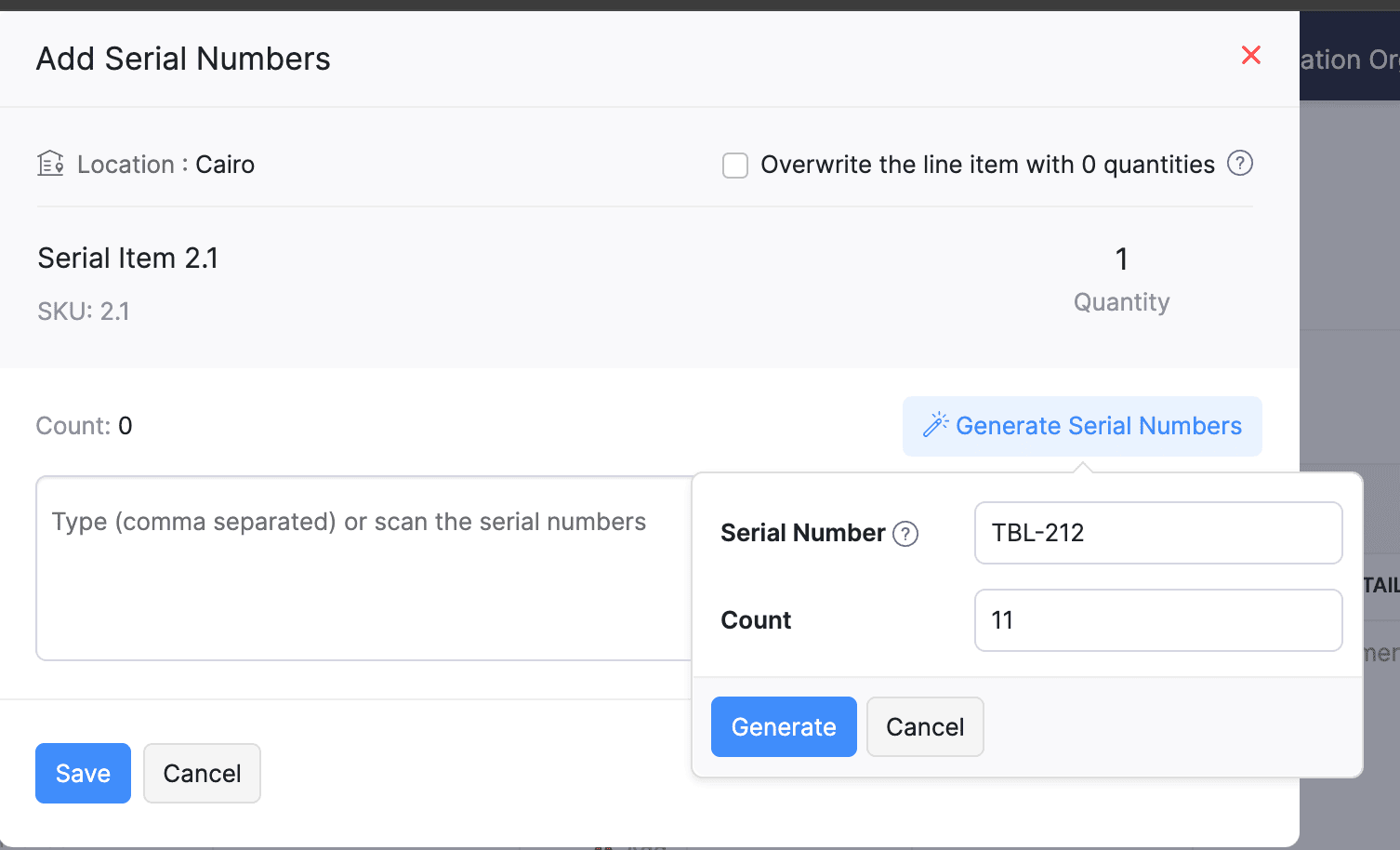
Generate Serial Numbers in Inward Transactions
Introducing support serial number generation for inward transactions. You can set a starting serial number and specify the required count to ensure precise inventory tracking and save time.
Note: The starting serial number must always end with a numeric value.
To generate serial numbers, select an item from the item table, click Add Serial Numbers, then select Generate Serial Numbers. Enter the starting value and count, then click Generate.
Note: The starting serial number must always end with a numeric value.
To generate serial numbers, select an item from the item table, click Add Serial Numbers, then select Generate Serial Numbers. Enter the starting value and count, then click Generate.
Batch Tracking Enhancements
Batch Tracking just got more powerful and flexible with some major enhancements. You can now create and edit batches directly from the item details page, making management easier. A new return option allows items to be returned to the same sold batch, improving stock accuracy. You can also use the same batch across multiple line items in purchase transactions. Batch status control lets you mark batches as Inactive, keeping them out of transactions while retaining them for reports. Plus, all batch activity including creation, edits, restocks, and transfers is now visible in the Audit Trail report.
Item Description for UPS Line Items
We have improved the UPS Paperless Invoice feature by introducing the ability to add and edit item descriptions and unit prices individually for each line item within a package. Previously, a single description was applied to all items in a package, limiting the level of detail you could provide. With this update, you now have more control and flexibility.

Enhanced Shopify Integration
We have improved the shopify integration. You can now set sync frequency and mapping options for each store separately. Item sync runs every 24 hours by default, but you can also set it up manually if needed. Non-taxable items are now created with the correct tax exemption. When setting up Sales Order sync, you’ll pick a start date and can set how often it runs. Each store can now sync independently. You can also decide if sales orders should be fetched to Zoho Inventory under a single customer or create new customers using fields like email or name. Now, sync history includes filters for sync type and status, making it easier to show both successful and failed sync.
To integrate Shopify with Zoho Inventory, go to Settings > Integrations & Marketplaces > Shopify
Pin Columns in Transaction List Page
You can now pin up to two columns in the transaction list page in both default and custom views to keep key information visible while scrolling. This feature is available when a view contains more than eight columns.
To pin columns, go to any module, click the Customize Columns icon, hover over the fields, click the Pin icon, and then click Save.

Edit Etsy Orders
You can now edit orders fetched from Etsy with ease. Previously, Etsy orders were imported with non-editable details and tax. Now, you can edit these orders and override the tax applied based on the tax rate configured at your organization level.
To integrate Etsy, go to Settings > Integrations & Marketplaces > Etsy
Clone Delivery Challans
You can now duplicate delivery challans by cloning the existing ones, thereby saving time.
To clone a delivery challan, go to Delivery Challans, select a challan, click the More icon, and select Clone from the dropdown.

Enhanced Export and Print Preferences for Reports
We have added new customization options for report exports and print preferences. You can now set custom file names for exported reports, display column headers on each PDF page, and organize report data into separate pages based on the group by field.
Multi-Factor Authentication (MFA) for Portals
We are improving security by adding Multi-Factor Authentication (MFA) to both Customer and Vendor Portals. This extra security step requires users to enter a Time-Based One-Time Password (TOTP) along with their login credentials.
Admins can turn on MFA in the Customer Portal settings, making it mandatory for customers and vendors to set it up using an authenticator app. Once enabled, users will need to enter a TOTP code each time they log in. If needed, admins can reset MFA for users.
Note that even if MFA is disabled later, users that have already set it up will still need to enter the TOTP code. If they lose access to their authenticator app, they should contact an admin for a reset.
To enable multi-factor authentication for your customers and vendors, go to Settings > Preferences > Customer Portal. Check the Enable multi-factor authentication (MFA) option.

Import Move Orders and Putaways
We have introduced import option for the Move Orders and PutAway modules. You can now seamlessly import data for these, making bulk updates and record creation faster and more efficient.
To import move orders and putaways, go to Transfer Orders/Putaways under Inventory > Click More in the top right corner > Import Transfer Orders/Putaways.
Attach Documents in Purchase Receives
You can now upload, attach, and manage documents directly from the Purchase Receive creation and edit page.
To attach a document in purchase receive, go to Purchases > Purchase Receives > + New > Upload File.

Print & PDF Support for Purchase Receives
You can now generate and print or download your purchase receives. We have also supported a standard template with which you can view the PDF of your purchase receives to simplify record-keeping.
To print or download a purchase receive, go to Purchases > Purchase Receives. Select the purchase receive and click PDF/Print.
To view the PDF of a purchase receive, go to Purchases > Purchase Receives. Select the purchase receive and enable the Show PDF View option on its details page.

Filter Lookup Custom Fields
You can now filter your lookup custom fields by using custom views and setting criteria. The records will be shown based on the chosen custom view and the rules set by you, making sure all the conditions are met.

Leave Organization Option
We have introduced the option to leave an organization from the Manage Organizations page. However, if you are the admin who created the organization or the only admin, you will need to delete the organization instead. Additionally, before you leave, ensure the integrations are disabled, if any.

That's all for now, folks! Try these new features and share your feedback. If you need assistance, reach out to us at support@zohoinventory.com.
Best Regards,
The Zoho Inventory Team
Topic Participants
Akshin Eniyavel S
Jahmonesalmon
Roshin Uchakavil
Marie Sharps Canada
Tocayah
Recent Topics
Zoho one web page are not available
Why I am not able to enter to zoho one web page?Zoho People > Onboarding > Candidate do not view all the data field on the Employee Onboarding
Hello In my onboarding portal I do not see all the fields that i want the candidate to fill in In my Employee Onboarding Form These details i can see In the work information, i have enable the Company View but in the Employee Portal i do not see I haveHas anyone implemented a ""switch"" to redirect emails in production for testing?
Hi everyone, In our production Zoho CRM we have a fairly complex setup with multiple Blueprints and Deluge functions that send emails automatically — to managers and internal staff — triggered by workflows. We’re looking for a way to *test changes safely*,Restrict Access/Shared Access
Sometimes access to documents that go out from Zoho Sign need to be restricted or shared. For example: 1) HR department send out employment contracts. Any Zoho Sign admin can view them. Access should be restricted to those that HR would allow to viewTip#44: Integrate with Xero to manage your financial operations
Managing your project finances becomes more efficient with Xero integration in Zoho Sprints. With this integration, you can sync your Zoho Sprints data with Xero. Once you sync them to Xero, you can easily create invoices in Xero. This feature significantlyZoho People Onboarding Unable to Convert to User
Hello All I need help in this onboarding of candidate Currently at this stage the candidate is just being offered and we are filling in his details however not all information are fill up. The candidate is still using his/her personal email When i tryIntegration with SharePoint Online
Is there an integration where we can add a Zoho Sign link to the context menu of a document in the SharePoint document library. Then, we could directly initiate a workflow of sending a document for signature from a document library in SharePoint onlWhite screen when connecting Zoho Cliq and Zoho People for birthday notifications
Hi everyone, I'm new to Zoho and I'm trying to set up the employee birthday notifications, following this guide: Automating Employee Birthday Notifications in Zoho Cliq But when I try to connect Zoho Cliq with Zoho People, I just get a white screen andWord file is messed up when i upload it to zoho sign
Hi. I am trying to upload a word file to zoho sign and when i do that it ruins the file, It adds spaces and images are on top of each other. What can i do? Thanks.Annotate widget?
Is there something in creator or any zoho app that allows me to have an image markup field item in the form? I need to be able to complete a form that also allows the user to mark up a preloaded image. Other compay's call this an image markup field orDashboards / Home Page - Logged In User
Lots of the dashboards that we use reference the Logged In User. We also set up Home Pages for specific roles, where the Logged In User is referenced within the custom view. As an admin, that means that these views are often blank when customizing andI'm pissed as fuck
What the hell Zoho! Always the same goddam problem. It takes time because the simplest things just don't fucking work. Today it just took me 3 hours to complete and send a 1page privacy letter to a client. And you know what 99% of the document was alreadyConfigure Notifications for API Limit
Hello developers, APIs are essential for businesses today as they enable seamless integration between different software systems, automate workflows, and ensure real-time data sync. To ensure that admins are notified well in advance before APIs reachIntroducing Blueprints for Custom Modules!
Hello developers, We've added a new feature called Blueprints in Custom Modules. Blueprints are the online representation of a business process. In Zoho Books, you can use Blueprints to design a process flow using states and transitions. Developers canCampaign Links Blocked as Phishing- Help!
We sent a Campaign out yesterday. We tested all of the links beforehand. One of the links is to our own website. After the fact, when we open up the Campaign in our browser, the links work fine. The links in the emails received, however, opened in a newZoho Tables July 2025 Update: Smart Creation, Smarter Automation
We’re excited to introduce a powerful set of updates across Web, Android and iOS/iPad apps. From AI-assisted base creation to advanced automations and mobile enhancements, this release is packed with features to help you build faster, automate better,Zoho Voice est désormais en France !
Nous avons des nouveautés très intéressantes qui vont transformer la façon dont vous communiquez avec vos clients. Zoho Voice, la solution de téléphonie d'entreprise et de centre de contact basée sur le cloud est arrivée en France ! Vous pouvez enfinNumbers in MA
I have an issue rationalising the various numbers around MA2. Not convinced that any are truly accurate. However have a specific problem in that i have a list with 1301 records in the list view. When i come to email there is only 1289 Then have anotherAndroid mobile app unable to log in
When I open the mobile up for zoho mail it asks me to sign in, but when i push the sign in button nothing happens. Tried uninstalling and reinstalling still not workingPie chart in Zoho Analytics shows ridicoulous numer of decimals of a percentage.
Is there a way to set the number of decimals of a percentage value in the Pie chart? Now it displays 15 decimals instead of a round-off value. The value is a count and percentage calculated in the chart, so there is no number of decimals that can be specifiedZoho People > Leave Management > Unable to import balance leave
Hello Zoho I am unable to import balance leave into the system I have follow the steps It show only 5 fields - the date field i am unable to select from date and to date Error Date in excelsheetNarrative 4: Exploring the support channels
Behind the scenes of a successful ticketing system - BTS Series Narrative 4 - Exploring the support channels Support channels in a ticketing system refer to the various communication methods that customers use to contact a business for assistance. TheseTip of the Week #65– Share email drafts with your team for quick feedback.
Whether you're replying to a tricky customer question or sharing a campaign update, finding the right words—and the right tone—can be tough. You just wish your teammates could take a quick look and give their suggestions before you send it. Sometimes,How to Initiate WhatsApp Message on SalesIQ?
I've just activated a Business WhatsApp phone number through SalesIQ because of its touted omnichannel chat approach. Sounds exciting. I understand that when a customer sends me a WA message, I can reply to it on SalesIQ and keep the chat going, perfect.Episode IV:Handling User Inputs in custom functions
Hi Everyone, We've been exploring custom functions which help in performing advanced automation tasks. Custom functions enable you to achieve possibilities based on your organization's requirements. Custom functions require user inputs that allow theSet a lead as non-marketing if they opt out of email marketing
I'm gathering Lead data via an enquiry form and wish to give them the option to opt out of marketing emails (which we send from Marketing Automation) whilst retaining the ability to send them non-marketing emails - so the email opt-out field doesn't work.Set up multiple IMAP email addresses
Hi, I just started using CRM and its great, but I just found out I can only add one imap email address for incoming mail in the included salesinbox ...this is ridiculous. All companies have different email such as sales@domain, info@domain , personal@domainZoho Recruit to Zoho People integration
In the mapping of field from Zoho Recruit to Zoho People i am unable to map all fields What can i doZoho Recruit > Career Site > Customisation
Hi All I have created multiple career site to represent my different organization In my Quanta Media career site > I set it with the with Quanta Malta view In my job opening : Quanta Malta view 2 job opening In my URL for quanta media https://lri.zohorecruit.eu/jobs/Quanta-MaltaFormatting Blueprint Stages (buttons)
Is there a way to format Blueprint transition buttons in Creator like background colour, text colour etc.Disable Default Value in Multi-Select field
Hello, Is there a way to disable the default value feature when setting up a custom Multi-Select field? When creating tickets I would like it so there isn't a value pre-selected in the multi-select custom field that was created.How to set custom business hours for different teams in Zoho Desk?
Hi Zoho Team and Community, I’m trying to set different business hours for multiple departments in Zoho Desk. For example, our tech support team works 24/7, while our billing team is only available from 9 AM to 5 PM (Mon–Fri). Is there a way to assignZia Auto Tag Keyword Clusters
Is there a way to remove a keyword from a keyword cluster? We're finding that Zia auto-tag is tagging things incorrectly based on some words that don't really make sense.Centralized Domain Verification in Zoho CRM Plus
Hi Team, I have a suggestion regarding Zoho CRM Plus. It's quite frustrating to verify the same domain separately for each application within the suite. It would be really helpful if you could introduce a centralized admin console—similar to what's availableHOw do I make a refund?
I have a client that needs a refund. I see a refund history in the Report area... but where do I go to make a refund?Creating a work order for dispatch
We currently uses ZOHO for CRM and Intuit Field Service for creating Work orders and dispatching. This is causing double entry and is not efficient use of time. I would like to use ZOHO for all customer related activities so can you tell me if you can : Create a work order that we could manipulate to meet our needs. Also if you could then dispatch that would be ideal. Thank youResidual Formatting in Text Boxes After Undoing Pasting of Formatted Text
Hi, guys! I have another problem to report. Actually, I have been aware of this for many months, possibly years, but I have been too lazy to report it to you. My apologies! Let's say you've pasted a formatted string into a text box. You change your mindFeature Request: Stripe Terminal Integration
I would like to request the addition of Stripe Terminal integration to Zoho Books, which will help process in-person payments. While Zoho Books already supports online payments through Stripe, extending this functionality to include Stripe Terminal wouldImproved Security in SAML/OIDC Sign-in Redirection Flow
To enhance the security of our authentication system, we’ve made a change to how SAML and OIDC sign-in redirections are handled. This update resolves a potential open redirection vulnerability and adds an extra layer of protection during the sign-in process.GA4 data
Hi, I have data being pulled from GA4 into numerous tables. There are a few major errors in the source data. Eg for a period of time GA4 reported ecommerce sales that were $98 as $9,800 and $42 as $4,200. It's not happening now but my historical dataNext Page