What's New in Zoho Inventory | January - March 2025
Hello users,
We are back with exciting new enhancements in Zoho Inventory to make managing your inventory smoother than ever! Check out the latest features for the first quarter of 2025. Watch out for this space for even more updates.
Email Insights for Sales Orders
We have introduced the Email Insights feature for Sales Orders in Zoho Inventory. With this feature, you can track emails sent for Sales Orders and view when the email was opened. The 'Client Viewed' filter allows you to find Sales Orders that have been viewed via email by the recipient.

Stock Availability Filter in Stock Counts
We have added a Stock Availability Filter to Stock Counts. This filter allows you to filter and add items to a stock count based on their stock availability, making the counting process more efficient.
View and Customize Stock Status in Transactions
When creating a transaction, you can now see both the Stock on Hand and the Available for Sale quantity for each item. The displayed quantity will depend on the selected View option.

Export Bin Locations Report
You can now export the Bin Locations Details Report and Bin Location Transaction Summary Report in your preferred format such as PDF, XLS, or XLSX. This enhancement makes it easier to analyze your bin-level inventory data.
To export a bin locations report, go to Reports > Bin Locations Details Report under Inventory
Add Dropshipping Address in Sales Orders
You can now add a dropship address in your Sales Orders. This address is used exclusively for the specific transaction and will not be saved to the customer's additional address list. You can also view and copy addresses from existing customers when setting the dropship address.
To add a dropshipping address, go to Sales > Sales Orders, edit/create a sales order, and click + Dropshipping Address.

New & Improved Zoho Inventory Reports
Introducing enhancements to Inventory reports for better control and visibility. The Stock Summary Report now supports custom reports, amount columns, and a stock tracking mode filter. Bulk export is available for up to 500,000 records (based on your plan) for key reports like Inventory Summary and FIFO Cost Lot Tracking. Purchase Order Reports now offer detailed columns such as Quantity Ordered, Received, In Transit, and Late By Date. Custom reports, Show/Hide Columns, and advanced filters are now supported across various reports including Inventory Aging, ABC Classification, Committed Stock, Product Sales, Valuation, Landed Cost, and Active Purchase Orders. The Sales by Item Report adds a Report Basis filter, while the Sales Return History Report gets a complete revamp with status tracking, return reasons, grouping, customizations, and scheduled exports. The Inventory Valuation Summary includes a new Stock Account column with filters, and you can now exclude transfer orders in Inventory and Stock Summary reports. These changes will provide a more flexible and insightful reporting experience.
Display Type for Lookup Custom Fields
We now support different display types for lookup custom fields. You can choose between a List view and a Dropdown view. This feature is currently available for specific lookup modules, like items, vendors, purchase orders, and customers.
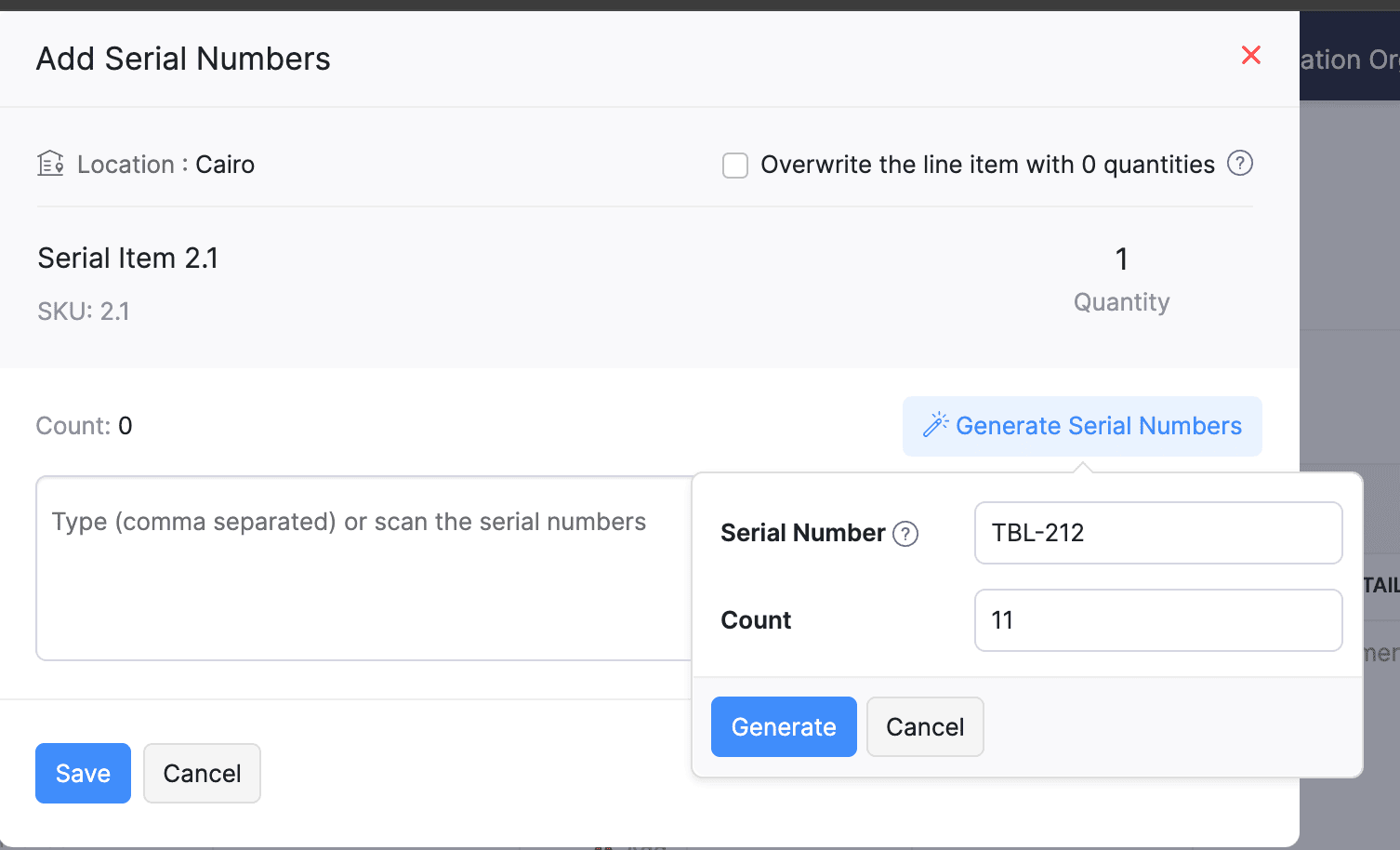
Generate Serial Numbers in Inward Transactions
Introducing support serial number generation for inward transactions. You can set a starting serial number and specify the required count to ensure precise inventory tracking and save time.
Note: The starting serial number must always end with a numeric value.
To generate serial numbers, select an item from the item table, click Add Serial Numbers, then select Generate Serial Numbers. Enter the starting value and count, then click Generate.
Note: The starting serial number must always end with a numeric value.
To generate serial numbers, select an item from the item table, click Add Serial Numbers, then select Generate Serial Numbers. Enter the starting value and count, then click Generate.
Batch Tracking Enhancements
Batch Tracking just got more powerful and flexible with some major enhancements. You can now create and edit batches directly from the item details page, making management easier. A new return option allows items to be returned to the same sold batch, improving stock accuracy. You can also use the same batch across multiple line items in purchase transactions. Batch status control lets you mark batches as Inactive, keeping them out of transactions while retaining them for reports. Plus, all batch activity including creation, edits, restocks, and transfers is now visible in the Audit Trail report.
Item Description for UPS Line Items
We have improved the UPS Paperless Invoice feature by introducing the ability to add and edit item descriptions and unit prices individually for each line item within a package. Previously, a single description was applied to all items in a package, limiting the level of detail you could provide. With this update, you now have more control and flexibility.

Enhanced Shopify Integration
We have improved the shopify integration. You can now set sync frequency and mapping options for each store separately. Item sync runs every 24 hours by default, but you can also set it up manually if needed. Non-taxable items are now created with the correct tax exemption. When setting up Sales Order sync, you’ll pick a start date and can set how often it runs. Each store can now sync independently. You can also decide if sales orders should be fetched to Zoho Inventory under a single customer or create new customers using fields like email or name. Now, sync history includes filters for sync type and status, making it easier to show both successful and failed sync.
To integrate Shopify with Zoho Inventory, go to Settings > Integrations & Marketplaces > Shopify
Pin Columns in Transaction List Page
You can now pin up to two columns in the transaction list page in both default and custom views to keep key information visible while scrolling. This feature is available when a view contains more than eight columns.
To pin columns, go to any module, click the Customize Columns icon, hover over the fields, click the Pin icon, and then click Save.

Edit Etsy Orders
You can now edit orders fetched from Etsy with ease. Previously, Etsy orders were imported with non-editable details and tax. Now, you can edit these orders and override the tax applied based on the tax rate configured at your organization level.
To integrate Etsy, go to Settings > Integrations & Marketplaces > Etsy
Clone Delivery Challans
You can now duplicate delivery challans by cloning the existing ones, thereby saving time.
To clone a delivery challan, go to Delivery Challans, select a challan, click the More icon, and select Clone from the dropdown.

Enhanced Export and Print Preferences for Reports
We have added new customization options for report exports and print preferences. You can now set custom file names for exported reports, display column headers on each PDF page, and organize report data into separate pages based on the group by field.
Multi-Factor Authentication (MFA) for Portals
We are improving security by adding Multi-Factor Authentication (MFA) to both Customer and Vendor Portals. This extra security step requires users to enter a Time-Based One-Time Password (TOTP) along with their login credentials.
Admins can turn on MFA in the Customer Portal settings, making it mandatory for customers and vendors to set it up using an authenticator app. Once enabled, users will need to enter a TOTP code each time they log in. If needed, admins can reset MFA for users.
Note that even if MFA is disabled later, users that have already set it up will still need to enter the TOTP code. If they lose access to their authenticator app, they should contact an admin for a reset.
To enable multi-factor authentication for your customers and vendors, go to Settings > Preferences > Customer Portal. Check the Enable multi-factor authentication (MFA) option.

Import Move Orders and Putaways
We have introduced import option for the Move Orders and PutAway modules. You can now seamlessly import data for these, making bulk updates and record creation faster and more efficient.
To import move orders and putaways, go to Transfer Orders/Putaways under Inventory > Click More in the top right corner > Import Transfer Orders/Putaways.
Attach Documents in Purchase Receives
You can now upload, attach, and manage documents directly from the Purchase Receive creation and edit page.
To attach a document in purchase receive, go to Purchases > Purchase Receives > + New > Upload File.

Print & PDF Support for Purchase Receives
You can now generate and print or download your purchase receives. We have also supported a standard template with which you can view the PDF of your purchase receives to simplify record-keeping.
To print or download a purchase receive, go to Purchases > Purchase Receives. Select the purchase receive and click PDF/Print.
To view the PDF of a purchase receive, go to Purchases > Purchase Receives. Select the purchase receive and enable the Show PDF View option on its details page.

Filter Lookup Custom Fields
You can now filter your lookup custom fields by using custom views and setting criteria. The records will be shown based on the chosen custom view and the rules set by you, making sure all the conditions are met.

Leave Organization Option
We have introduced the option to leave an organization from the Manage Organizations page. However, if you are the admin who created the organization or the only admin, you will need to delete the organization instead. Additionally, before you leave, ensure the integrations are disabled, if any.

That's all for now, folks! Try these new features and share your feedback. If you need assistance, reach out to us at support@zohoinventory.com.
Best Regards,
The Zoho Inventory Team
Topic Participants
Akshin Eniyavel S
Jahmonesalmon
Roshin Uchakavil
Marie Sharps Canada
Tocayah
Recent Topics
Dealing With One-Time Customers on Zoho Books
Hello there! I am trying to figure out a way to handle One-Time customers without having to create multiple accounts for every single one on Zoho Books. I understand that I can create a placeholder account called "Walk-In Customer", for example, but IZoho Flow - Add to Google Calendar from trigger in Zoho Creator App
Hello! New to Zoho Flow, but I believe I have everything setup the way it should be however getting an error saying "Google Calendar says "Bad Request". Any idea where I should start looking? Essentially some background: Zoho Creator app has a triggerEmail authentication
أريد التحقق من البريد الإلكترونيWhat’s New in Zoho Analytics – December 2025
December is a special time of the year to celebrate progress, reflect on what we have achieved, and prepare for what’s ahead! As we wrap up the year, this month’s updates focus on refining experiences, strengthening analytics workflows, and setting theMarketing Tip #12: Earn trust with payment badges and clear policies
Online shoppers want to know they can trust your store. Displaying trust signals such as SSL-secure payment badges, return and refund policies, and verified reviews shows visitors that your store is reliable. These visual cues can turn hesitation intoThe improved portal experience: Introducing the template view for inventory modules, enhanced configurations, and PDF export support
Availability: Open for all DCs. Editions: All Hello everyone, You can now achieve a seamless, brand-aligned portal experience with our enhanced configuration options and the new template view for inventory modules. Your clients will now be able to viewZoho Analytics Bulk Api Import json Data
HI, I’m trying to bulk-update rows in Zoho Analytics, and below are the request and response details. I’d like to understand the required parameters for constructing a bulk API request to import or update data in a table using Deluge. Any guidance onProject Management Bulletin: December, 2025
The holiday cheer is in the air and it’s time to reflect on the year that was. At Zoho PM Suite, we've been working behind the scenes on something huge and exciting all year and now we are almost ready—with just a bit of confetti—for our grand releaseInventory batch details
Hi there, I'm trying to get the batch details of an item, here's what I've done so far. I've sent cUrl request to the below endpoint and I get a successful response. Within in the response I find the "warehouses" property which correctly lists all theAuto check out after shift complete
i'm just stuck here right now, i wanna know how to do this thing, now tell me, how can i configure a custom function that runs after complete shift time if employee forget to check-out ?How to create a flow that creates tickets automaticaly everyday based on specific times
Hi guys Does anyone know how to create a flow that will create tickets automaticaly in ZOHO Desk when a certain time is reached. Im havin a hard time configuring a flow that will create tickets automaticaly everyday during specific hours of the day ForZOHO FLOW - ZOHO CREATOR - ZOHO WRITER : Get Related records
Bonjour, J'ai besoin que vous m'ajoutiez la solution "Get related Records" dans la liste de choix de zoho creator (sous Zoho flow). En effet, j'ai besoin de récupérer les champs d'un sous formulaire pour l'ajouter à l'impression de mon document. MerWill zoho thrive be integrated with Zoho Books?
titleConnecting email for each department in ZohoDesk
Hi! Could someone help me to go through connecting emails for each department?How do I trigger a Flow based on a campaign response?
Is there a way to trgiider a Zoho Flow based upon a lead opening an email sent via Zoho Campaigns? I see that the data is recorded in the 'Campaigns' section of Zoho CRM under 'Member Status' and I want to trgigger a flow based upon that record changing.All Zoho Flows are filtered
My two flows operate perfectly when I run them as a test, but when they're activated each run ends with a status of neither success, nor fail, but filtered. I haven't set up any filters. I don't see where to turn off filters. When I test run on a sequenceCreating Multiple Items on Sales Order
Hi, I’m trying to automate some processes using Zoho Flow, specifically the creation of sales orders in my Zoho Inventory. However, Zoho Flow's Create Sales Order function can only add one item. I would like to include multiple items in a single salesProblem Connection from Zoho Flow and Gravity Form
I obtained my API key from Gravity Forms via WordPress. However, when I enter my Zoho Flow, it states: Gravity Forms says, 'You are not authorised to access the API." I tried recreating a new API key, but it is still not working.Eventbrite Email Field in Zoho Flow Returns "Info Requested" Instead of Actual Email
Hi Zoho team, I'm using Zoho Flow to connect Eventbrite with Zoho CRM. My goal is to automatically add event attendees as leads in Zoho CRM. I’ve set up the flow and mapped the ${trigger.profile_email}} field to the Email field in CRM. However, I'm running"Invalid value passed for Product ID" Error in Zoho Flow "Create Sales Order" Node
Hello Zoho Community, I’m facing an issue with Zoho Flow while trying to create a sales order in Zoho Inventory using the "Create Sales Order" node. Here’s a detailed explanation of my setup and the problem: What I’m Trying to Achieve I’m building anAssociating Project with an Account via Flow
I'm using flow to create a Project based on a Deal status update using flow. The fields exist to pass the Account Name through properly, but when you view the Projects module in a CRM Account Record it doesn't automatically associate the new Project RecordHow to follow up a member in a meeting?
Hello, I make weekly meeting online with a lot of people. I want(I've been using calendly to do it). I want to do a follow-up to it. I want to send messages via Zoho-flow to all the member that participated in the meeting. How can I do it?Setting Delays in Invoice Reminder Flow
I am currently working on a flow that sends reminders for unpaid invoices. The flow is designed to delay actions until specific intervals before the due date: A reminder should be sent 7 days before the due date. A second reminder should be sent 3 daysGet Sales Orders Related to Inventory Item
Dear Team, I'm just wondering if there is a way to get a list of all Sales Orders related to a specific Inventory Item. I did search all articles but couldn't find any article that could help.Endpoint Central Cloud Asset Update from Fresh Service
All, Does anyone use the asset management feature in Fresh Service? I'd like some help on building a flow to update asset attributes in Endpoint Central Cloud based off of an update to that same asset in Fresh Service. The trigger is "asset is updated"Zoho Flow Export to Deluge
It would be great to take a user built zoho flow and export the entire flow as a deluge script including having multiple connected applications (showing the API connections and webhooks) and different functionality in the other applications interactingAction Iteration/Loop using Zoho Flow
Trying to use Zoho Flow for automating following Context - A zoho form entry which has image upload field with upto 5 images setting and files are saved into Workdrive. After form is submitted need to create folder based on some fields and move filesZoho Flow - Unable to evaluate formatDate with Zoho Invoice Date Field for Calendar Integration
Hello Community, I'm trying to automate the creation of all-day events in Zoho Calendar whenever a new invoice is created in Zoho Invoice. I'm using Zoho Flow for this automation. My Goal: When an invoice is created with a specific "Event Date," I wantZoho Inventory Sales Order Items
I'm trying to build automation using Zoho Flow to add items to a Sales Order. In the automation options for both "create sales order" and "update sales order", The item ID is required. However, when I update the Sales Order, it's just replacing the itemPermissions for Azure Devops connection
I am trying to set up a connection with our Azure DevOps org but it keeps giving me this error. On Azure I should be able to have admin-level access to everything. Can you please point me to which permission this is checking for so I can enable it?Best way to start zoho inventory with bulk openning stock
We are already using zoho book since long time for cars trading company. Now to streamline more, would like to import the excel data of closing stock of inventory to zoho inventory and to start on. Since we need to track each VIN (unique vehicle id number)My IMAP mail suddenly stopped working
On my iPhone and iPad, IMAP stopped working for my Zoho account with the error "User name or password incorrect" and "Invalid credentials failure" however I was able to access via web with the same credentials. Also stopped working on Apple Mail client.Confused by the distiction between matched and categorized when reconciling a bank statement an how to
I used to use quickbooks. In quickbooks, it was possible to use the check writing feature to add an expense that was on the bank statement that did not go through the AP and check writing process. I would write a check, assign it a number like etf (forNot Receiving OTP • https://voters.eci.gov.in/home/family
Hello Customer, Greetings from Zoho Mail. Upon a detailed review of our delivery logs, we can confirm that other Zoho Mail users are successfully receiving OTP emails from eci.gov.in. However, in your specific case, it appears that the OTP emails areWorkDrive for Excel Add on
Dear Sir/Madam Have installed Workdrive for Microsoft add on But unable to view the same added in ExcelSplitting Transactions in Zoho Books
I have read in past forum posts that the ability to split bank transactions would likely be implemented - it's definitely a typical accounting program feature. I'm new to Zoho and thought I'd found nirvana until I realized this feature doesn't seem toZoho Calendar s’enrichit avec une intégration à Zoho People et Zoho Cliq
Les journées de travail ne se déroulent jamais exactement comme prévu. Une conversation informelle devient une séance d’échange d'idées, une absence modifie un planning, et votre agenda se retrouve vite décalé par rapport à la réalité. Chez Zoho Calendar,Holidays
Hi; For defining Holidays, you need to add logic to handle the year as well as the month & day. We need to be able to enter Holidays for the next year. I need to add a holiday for January 2, 2017, but I can't until January 1st, which is a Sunday and weZoho public comments are confusing and unnecessary
Hi, we use zoho desk and have issues with public comments. We started using them because the "Reply" option just seemed very clumsy because of the following reasons: - the top "Reply" button starts what seems to be a regular email, showing the entireZoho API - ticket creation - Validation failed for the condition : Ticket Status Info should not be empty
Hi ! I'm trying to create ticket through Zoho API, and I'm getting a 422 response : "Validation failed for the condition : Ticket Status Info should not be empty" My request looks like this : curl --location 'https://desk.zoho.eu/api/v1/tickets' \ --headerNext Page