What's New - September 2025 | Zoho Backstage
September has been a different month for Zoho Backstage. Instead of rolling out a long list of new features, we focused on something just as important:
Performance, reliability, and stability
The event season is in full swing, and organizers are running larger and more complex events. Our goal this month was simple: make your experience faster, smoother, and more intuitive.
That said, we do have a few updates to share with you.
Tax Rules – South Africa
Accurate tax calculation is vital for ensuring compliance and transparency in event management. With the new Tax Rules feature for South Africa, you can now automatically apply the correct VAT rates to your events, making tax management simpler and more efficient. Zoho Backstage automatically configures tax rules based on your organization and event location, ensuring compliance with the South African Revenue Service (SARS) regulations.

This feature supports in-person, hybrid, and virtual events, helping organizers stay compliant while reducing manual tax management.
How do taxes work on South African events?
VAT registration thresholds
- Businesses must register for VAT if their annual taxable sales exceed ZAR 1 million.
- Businesses may choose to register voluntarily if their taxable sales are above ZAR 50,000.
VAT rates
- Standard rate: 15%
- Zero rate: 0%
VAT terms
- VAT: Value-Added Tax
- VAT Registration Number Label: TIN (Tax Identification Number)
- VAT Registration Number Format: 10-digit number
In-person and hybrid events
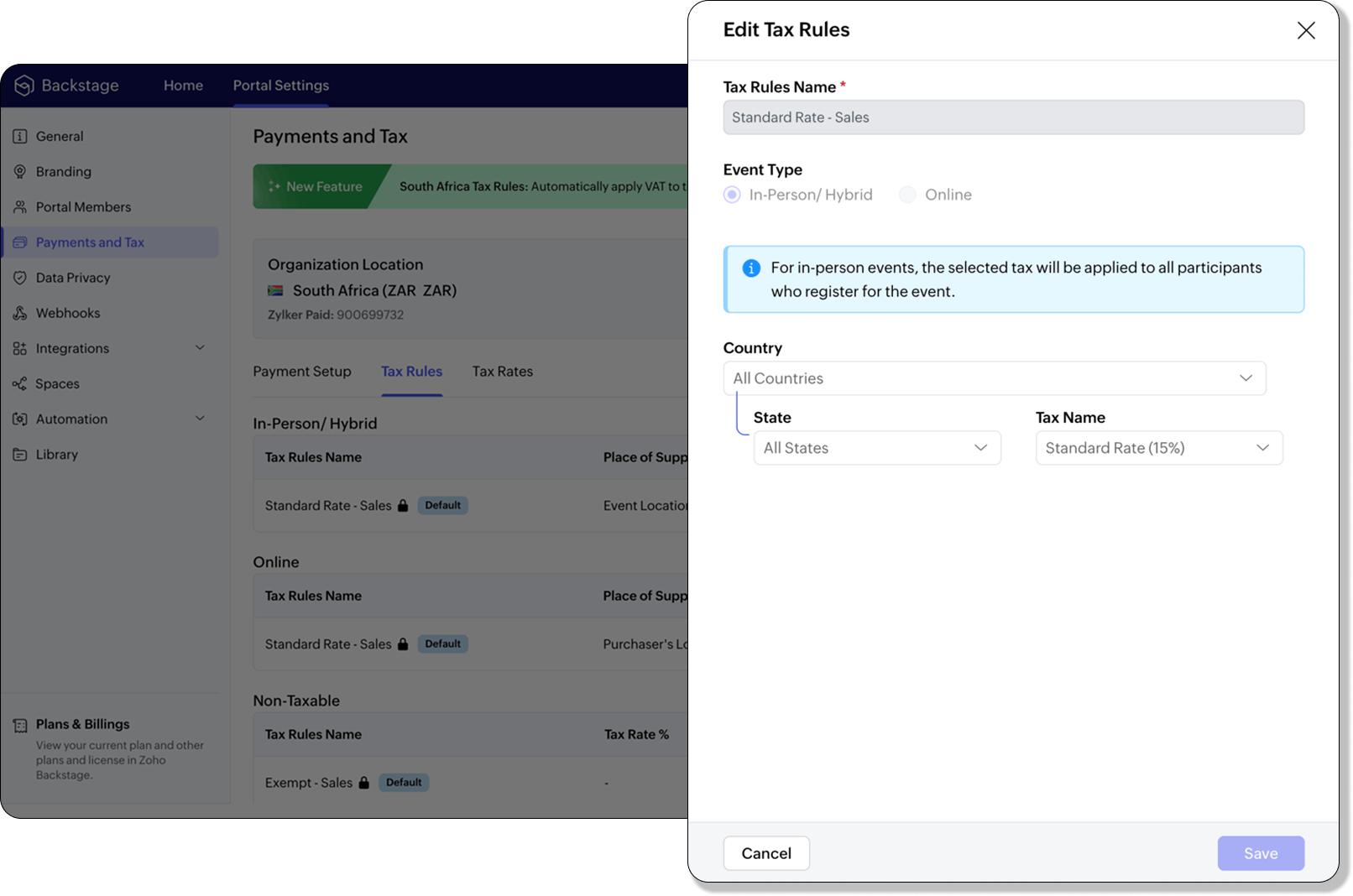
If an event is held in South Africa, the place of supply is considered within South Africa, and 15% VAT must be charged on ticket sales (unless exempt or zero-rated).
Virtual events
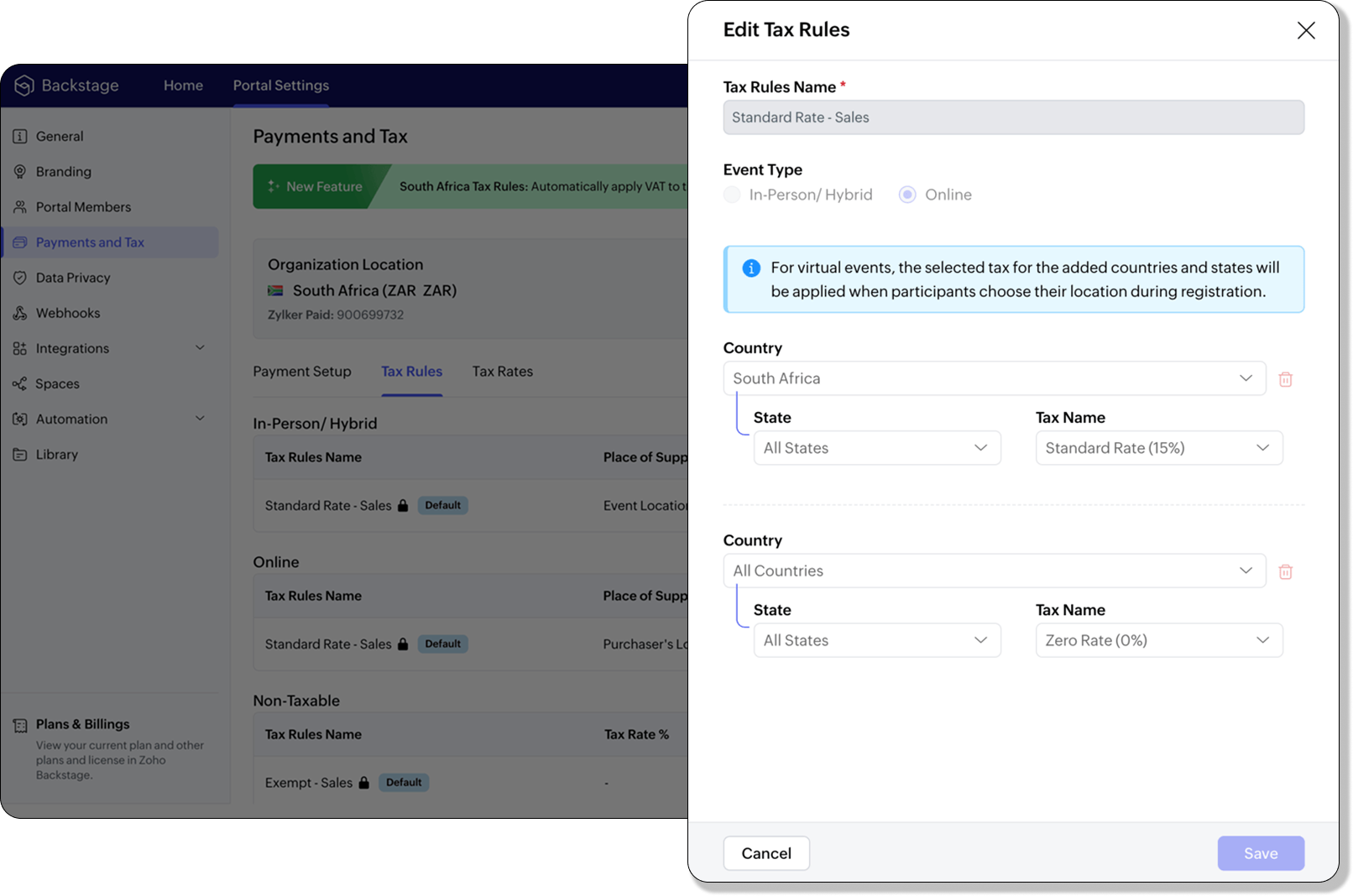
For virtual events, the attendee’s location determines the place of supply. For foreign attendees, the transaction is treated as an export of service and is zero-rated.
How to use
To enable South Africa tax rules, configure your organization’s location:
- Navigate to Portal Settings > Payments and Tax.
- Select South Africa as the organization location.
- The system automatically populates:
- 2 default tax rates (15% and 0%).
- 4 tax rules (in-person/hybrid, virtual, and two non-taxable rules).
Unlike other countries, South Africa Tax Rules are predefined. You can't edit existing rules or add new ones.
Applying Tax Rules to in-person and hybrid events
When South Africa is selected as the organization location, Zoho Backstage automatically applies the correct VAT (15%) to in-person and hybrid events. This ensures compliance with SARS requirements. A preview of the tax to be applied is shown during event publishing, so organizers know exactly what their attendees will be charged.
Applying Tax Rules to virtual events
For virtual events, Zoho Backstage automatically applies the zero-rated VAT rule for foreign attendees. South African attendees are charged the standard 15% VAT. This setup ensures accurate handling of local and international transactions without manual intervention.

- Tax rules in Zoho Backstage are fixed for South Africa. They can't be edited or expanded.
- Organizers can change the applied rule during event setup, but updates only affect new transactions. Existing transactions retain their original tax rule.
- If the event location is set to any country other than South Africa, South African VAT won't be applied.
Plan availability: Included in the Essentials, Premium, and Ultimate plans
Full page floor plan
We’ve taken the exhibitor experience to a whole new level with the introduction of the full page floor plan. This enhanced layout gives everyone including organizers, exhibitors, and attendees a more immersive and detailed view of the event venue.

For organizers, the full-page view provides better visibility and control when managing booth layouts and exhibitor placements. Whether you’re reviewing space allocation or showcasing your setup, the new Fit to Screen option lets you adjust the view instantly, making it ideal for large displays and on-site monitors.

Visitors can explore the floor plan in full-screen mode, view the exhibitor list, and discover details about each exhibitor. Signed-in attendees can further filter exhibitors by category and mark their favorites to plan their visit efficiently. Exhibitors can browse the directory or register directly from the same page, making navigation and engagement effortless.
Plan Availability: All plans that include the Exhibitor management module
Date & Time form field
We’ve enhanced the existing Date field to support time preferences, giving you more flexibility when collecting scheduling details. By enabling the Include Time toggle, you can now capture both date and time within a single field.
Similar to the standalone Time field, organizers can configure properties to accept entries in either 12-hour or 24-hour format and even set restrictions within a specific time range. A default date and time value can also be defined to simplify form submissions.
The default time format for this field automatically aligns with your event’s configuration under Manage > Event Info, ensuring consistent formatting across your forms.
Plan availability: Included in the Ultimate plans
With the event season in full swing, we’re focused on making your experience with Zoho Backstage faster, more reliable, and ready for every challenge. We look forward to bringing you more updates next month.
All the features and enhancements mentioned in this article are available across all Zoho Backstage-supported data centers.
If you need further assistance with our features, please contact support@zohobackstage.com.
Topic Participants
Jithan Raghuraj
Recent Topics
[Need help] Form closed. Please contact your form administrator for further assistance.
https://forms.zohopublic.com/cceinfoifly1/form/CCE2025CCEFocusGroupRegistrationForm2025Fall/formperma/s_8XcLETTbFxZ_TAS4r_W6W5UBl8o5oxEnIX35IBKg4 I checked we didn't exceed the usage limit and form availability is enabled, Please help us enable this formZoho People. Updating TabularData
I am trying to update tabular data in the record. I always have the same response. I have checked many times. Section ID is correct. May be something wrong with request structure itself. Can someone help me. Body content type: form urlencoded query paramsAutomatically CC an address using Zoho CRM Email Templates
Hi all - have searched but can't see a definitive answer. We have built multiple email templates in CRM. Every time we send this we want it to CC a particular address (the same address for every email sent) so that it populates the reply back into ourUnable to Send Different Email Templates for Different Documents in Zoho Sign
Hello Zoho Community, I am facing a limitation with Zoho Sign regarding email notifications sent to customers when a document is sent for signing. Currently, whenever I send any template/document for signing, the email notification that goes to the customerIntroducing real-time document commenting and collaboration in Zoho Sign
Hi, there! We are delighted to introduce Document commenting, a feature that helps you communicate with your recipients more efficiently for a streamlined document signing process. Some key benefits include: Collaborate with your recipients easily withoutCustomer ticket creation via Microsoft Teams
Hi all, I'm looking to see if someone could point me in the right direction. I'd love to make it so my customers/ end users can make tickets, see responses and respond within microsoft teams. As Admin and an Agent i've installed the zoho assist app withinIs there a way to update all the start and end dates of tasks of a project after a calendar change?
Hi! Here's my situation. I've built a complete project planning. All its tasks have start dates and due dates. After completing the planning, I've realized that the project calendar was not the right one. So I changed the project calendar. I now haveHow to update task start date when project start date changes?
Hi there, When the start date of a project changes, it's important to update the start dates of the tasks associated with that project to reflect the new timeline. Is there a way to shift the start date of all project tasks when the start date of a projectIssue with Picklist Dropdown Not Opening on Mobile
Hello I am experiencing an issue with picklist values on mobile. While the arrow is visible, the dropdown to scroll through the available values often does not open. This issue occurs sporadically, it has worked occasionally, but it is very rare and quiteusing the client script based on the look up filed i wnat to fetch the record details like service number , service rate
based on selected service look up field iwant to fetch the service serial number in the serice form how i achive using client script also how i get the current date in the date field in the on load of the formZoho Books/Square integration, using 2 Square 'locations' with new Books 'locations'?
Hello! I saw some old threads about this but wasn't sure if there were any updates. Is there a way to integrate the Square locations feature with the Books locations feature? As in, transactions from separate Books locations go to separate Square locationsZoho Commerce - How To Change Blog Published Date and Author
Hi Commerce Team, I'm discussing a project with a client who wants to move from Woo Commerce / Wordpress to Zoho Commerce. They have around 620 blog posts which will need to be migrated. I am now aware of the blog import feature and I have run some tests.Does zoho inventory need Enterprise or Premium subsrciption to make Widgets.
We have Zoho One Enterprise and yet we can't create widgets on inventory.Writing by Hand in "Write" Notes
Hi there! I just downloaded this app a few moments ago, and I was wondering if there was a way to write things by hand in "Write" mode instead of just typing in the keyboard. It would make things a bit more efficient for me in this moment. Thanks!Remove the “One Migration Per User” Limitation in Zoho WorkDrive
Hi Zoho WorkDrive Team, Hope you are doing well. We would like to raise a critical feature request regarding the Google Drive → Zoho WorkDrive migration process. Current Limitation: Zoho WorkDrive currently enforces a hard limitation: A Zoho WorkDriveHandling Agent Transfer from Marketing Automation Journey to SalesIQ WhatsApp
We are currently using Marketing Automation for WhatsApp marketing, and the features are great so far We have a scenario where, during a campaign or journey, we give customers an option to chat with our sales team. For this, we are using SalesIQ WhatsAppComment to DM Automation
Comment to DM automation feature in Zoho Marketing Automation, similar to what tools like ManyChat offer. Use case: When a user comments on a social media post (Instagram / Facebook), the system should automatically: Send a private DM to the user CaptureZMA shows as already connected to Zoho CRM, but integration not working
When I try to connect ZMA with Zoho CRM, it shows as already connected, but the integration doesn’t seem to be working. I’ve attached the screen recording for reference.Automatic Email Alerts for Errors in Zoho Creator Logs
Hello, We would like to request a feature enhancement in Zoho Creator regarding error notifications. Currently, Zoho Creator allows users to view logs and errors for each application by navigating to Zoho Creator > Operations > Logs. However, there isCan you default reports/charts to report the current week?
Our data table maintains two years of data. Management wants certain report to automatically filter the report to the latest calendar week. I know I can do this manually with filters but I want the report to automatically default to the latest calendarRecurring Automated Reminders
Hi, The reminders feature in Zoho Books is a really helpful feature to automate reminders for invoices. However, currently we can set reminders based on number of days before/after the invoice date. It would be really helpful if a recurring reminder featureWorkflow Rule - Field Updates: Ability to use Placeholders
It will be great if you can use placeholder tags to update fields. For example if we want to update a custom field with the client name we can use ${CONTACT.CONTACT_FIRSTNAME}${CONTACT.CONTACT_LASTNAME}, etcZobot Execution Logs & Run History (Similar to Zoho Flow)
Dear Zoho SalesIQ Team, We would like to request an enhancement for Zoho SalesIQ Zobot: adding an execution log / run history, similar to what already exists in Zoho Flow. Reference: Zoho Flow In Zoho Flow, every execution is recorded in the History tab,Password Assessment Reports for all users
I'm the super admin and looking at the reporting available for Zoho Vault. I can see that there is a Password Assessment report available showing the passwords/weak and security score by user. However I'm confused at the 'report generated on' value. MonitorCan't change form's original name in URL
Hi all, I have been duplicating + editing forms for jobs regarding the same department to maintain formatting + styling. The issue I've not run into is because I've duplicated it from an existing form, the URL doesn't seem to want to update with the newSetting certian items to be pickup only
How do we have some items that are pickup only? I have several items in my item's list that I do not ship. But they need to be on the website to be sold, and picked up in store. Need to be able to do this as one of these products is a major seller forUsing gift vouchers
We would like to be able to offer a limited number of gift vouchers, of varying values, to our customers, and are looking for the best way to do this. We have looked at Coupons and Gift Certificates, but neither seem to fit the bill perfectly. Coupons:Automatically updating field(s) of lookup module
I have a lookup field, which also pulls through the Status field from the linked record. When the lookup is first done, the Status is pulled through - this works perfectly. If that Status is later updated, the lookup field does not update as well. AsZoho Commerce and Third-party shipping (MachShip) API integration
We are implementing a third-party shipping (MachShip) API integration for our Zoho Commerce store and have made significant progress. However, we need guidance on a specific technical challenge. Current Challenge: We need to get the customer input toAdding custom "lookup" fields in Zoho Customization
How can I add a second “lookup” field in Zoho? I’m trying to create another lookup that pulls from my Contacts, but the option doesn’t appear in the module customization sidebar. In many cases, a single work order involves multiple contacts. Ideally,Can you import projects into Zoho Projects yet?
I see some very old posts asking about importing project records into Zoho Projects. But I can't find anything up to date about the topic. Has this functionality been added? Importing tasks is helpful. But we do have a project where importing projectsAllocating inventory to specific SO's
Is there a way that allocate inventory to a specific sales order? For example, let's say we have 90 items in stock. Customer 1 orders 100 items. This allocates all 90 items to their order, and they have a back order for the remaining 10 items which couldZoho Inventory. Preventing Negative Stock in Sales Orders – Best Practices?
Dear Zoho Inventory Community, We’re a small business using Zoho Inventory with a team of sales managers. Unfortunately, some employees occasionally overlook stock levels during order processing, leading to negative inventory issues. Is there a way toAutomation #10 - Auto Assign Ticket based on Keywords
This is a monthly series designed to help you get the best out of Desk. We take our cue from what's being discussed or asked about the most in our community. Then we find the right use cases that specifically highlight solutions, ideas and tips on optimizingAutomate attendance tracking with Zoho Cliq Developer Platform
I wish remote work were permanently mandated so we could join work calls from a movie theatre or even while skydiving! But wait, it's time to wake up! The alarm has snoozed twice, and your team has already logged on for the day. Keeping tabs on attendanceReusable Custom Functions Across Department Workflows
Dear Zoho Desk Team, We appreciate the powerful workflow automation capabilities in Zoho Desk, particularly the ability to create and use custom functions within workflows. However, we have encountered a limitation that impacts efficiency and maintainability.Feature Request - Gift Cards or Gift Voucher Capability in Zoho Commerce
Hi Zoho Commerce team, I'm comming accross more and more retail businesses who sell gift cards. As there is currently no way to manage this in Zoho Commerce, it is a blocker to addoption. This is particularly popular in Europe and North America. I recentlyDon't Allow Customer to Edit Values After Submitting Ticket
After a customer submits a ticket through the customer portal, they can go into the ticket and see some of the values from the questions they answered in the sidebar. Currently, a customer can edit these values even after they submitted them. This makes no sense. We ask very specific questions that we don't want customers to later change! Please disable the ability for customers to edit the values to their submission questions in the portal. Screenshot attached.Analytics <-> Invoice Connection DELETED by Zoho
Hi All, I am reaching out today because of a big issue we have at the moment with Zoho Analytics and Zoho Invoice. Our organization relies on Zoho Analytics for most of our reporting (operationnal teams). A few days ago we observed a sync issue with thetext length in list report mobile/tablet
Is there a way to make the full text of a text field appear in the list report on mobile and tablet? With custom layouts, the text is always truncated after a certain number of characters.Next Page