Zoho CRM connector's export functionality enables end-to-end CRM data pipeline
We're thrilled to announce an update to our Zoho CRM connector that will enable you to create data pipelines to Zoho CRM.
The public beta of "export to Zoho CRM" is now available, and can be enabled for users requesting it via email.
Using the feature, you’ll be able to build a data pipeline: Zoho CRM (schedule data import) > Zoho DataPrep (prepare data) > Zoho CRM (schedule prepared data export).
An end-to-end data pipeline creates multiple advantages.
Eliminating invalid/duplicate entries
Blending data from different sources
Standardizing data
Optimizing data for downstream processes like analytics
On eliminating erroneous/duplicate data: Your Zoho CRM data can be captured from multiple sources, and sometimes involving manual data entry. This makes it prone to some errors at the time of capturing data. For example, your lead forms might contain duplicate or invalid entries. If left unchecked and unvalidated, this can lead to problems.
The enhanced Zoho CRM connector's "export to Zoho CRM" functionality gives organizations the power to eliminate errors.
Users can use the tightly integrated CRM connector to import data from Zoho CRM, use DataPrep's powerful transformations to cleanse, transform and standardize data and export it back into CRM records.
Some transforms that will help you “prepare” your CRM data
Deduplicate transform
Use the Deduplicate transform to eliminate duplicates from your imported Zoho CRM records. For example, if you’ve imported the leads module of Zoho CRM, you’ll be able to identify and eliminate all of the duplicate entries within a batch.
Watch this video to learn how Zoho DataPrep can help with cleansing Zoho CRM data.
You can use the Cluster and Merge transform when you find inconsistencies in your CRM records, and want to standardize them. For example, let’s say the country value has been recorded as United States of America, USA, US, etc. You can use "Cluster and Merge" to change it to "United States" consistently across records. This standardization will help you in downstream processes—for example, if you want to quickly analyze sales figures across the United States demographic.
Append transform
Granular controls help with setting up a data pipeline
DataPrep is a tool to democratize data management. Our easy to drag-and-drop functionality makes data preparation an enjoyable activity for non-technical business users.
We know that setting up a data pipeline and scheduling regular data preparation can be an unnerving task for some of you, especially when production data—like CRM—comes into play.
Which is why, with DataPrep, you’ll be in control every step of the way.
DataPrep will give you:
Granular control of how an export is executed via a preview.
Target matching to prevent errors.
Rollback sync in case of partial export failures.
Review records being added/Assess changes to system
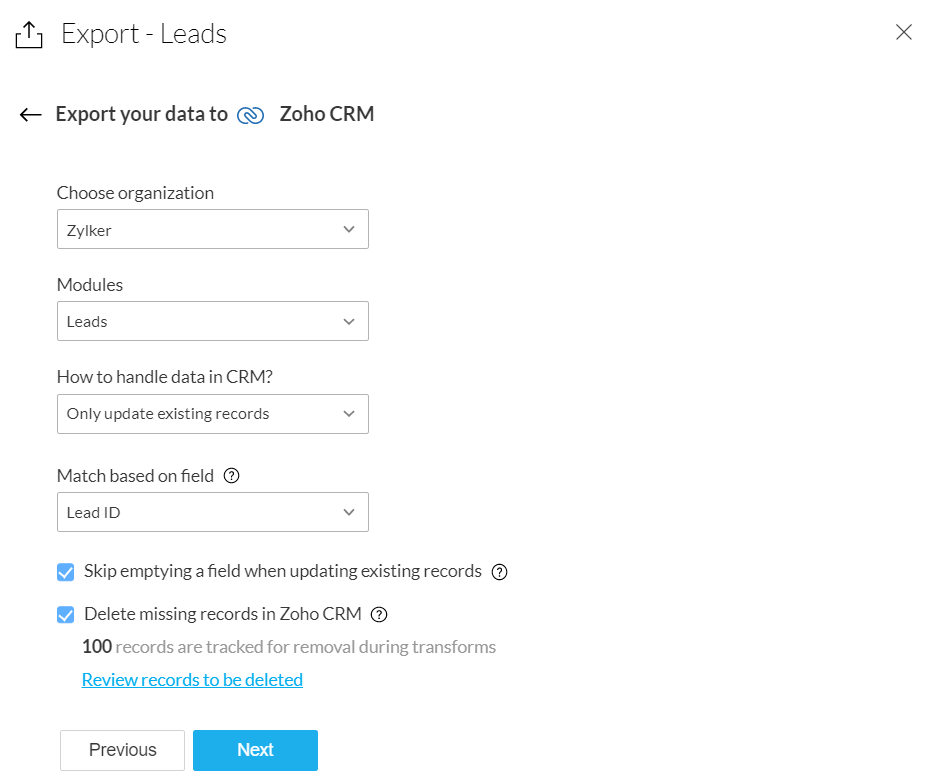
At the time of export to Zoho CRM, you can choose one of three options: only add new records, only update existing records, or add and update records.
This flexibility will help CRM admins determine the context in which the data preparation is being done.
If you’ve imported records from the Leads module for deduplication and cleansing, and you’re exporting the records back to the same CRM module, you can choose to delete the duplicate records.
At the time of export, you’ll be prompted to review the records that might be deleted, so you can rest assured that only the records you no longer want get deleted.
Refer to our knowledge base to learn more.
Use target matching to eliminate errors
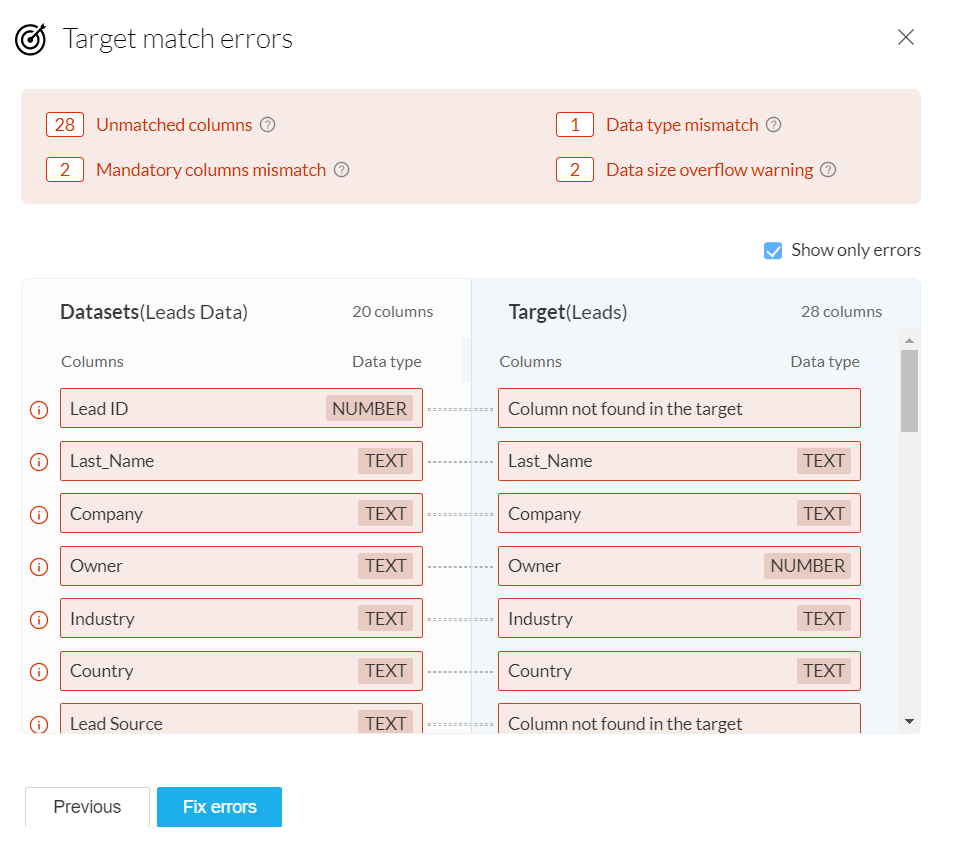
Target matching is a powerful feature that helps you match your data's schema to that of the CRM module you're exporting the data to. This will highlight errors such as unmatched columns, data type errors, and data format errors, before exporting the data.
Learn more about target matching.
You can view the error details for a detailed summary of target-matching errors. These errors could potentially fail the export when it happens, so you’ll have a chance to view them and fix them beforehand.
Sometimes an export can partially fail. This can happen due to extraneous reasons, like network connectivity problems.
In these cases, you have the option to rollback the export and restore the records back to their previous state.
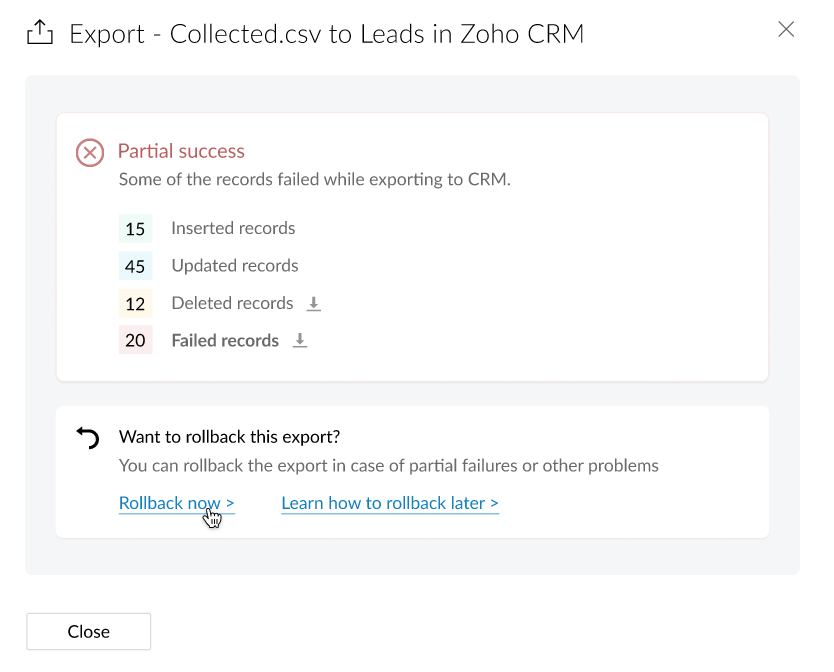
Learn more about Rollback from our Knowledge Base.
You can also refer to DataPrep's solution guide for Zoho CRM for more use case-related details.
The features outlined here are now available for beta access. We invite you to try these features and share your feedback with us.
Also, because this is still in the beta stage, we urge you not to run critical DataPrep features on production data. Please try it on sample/test data only.
Topic Participants
Karthik Subramanian
Sticky Posts
Announcement: Zoho DataPrep to Deprecate Password-Only Authentication for Snowflake Connections on July 31, 2025
As part of our ongoing commitment to security and in alignment with Snowflake's pledge to the Cybersecurity and Infrastructure Security Agency (CISA) Secure by Design initiative, Zoho DataPrep will no longer support single-factor password authentication.Announcement: Zoho DataPrep 1.0 will be deprecated on January 31, 2026
We'd like to inform you that the Zoho DataPrep 1.0 version will be officially deprecated as of January 31, 2026. This aligns with our efforts to streamline and improve your overall experience with Zoho DataPrep 2.0 which was released in Sep 2024 . ToAnnouncement: Migrate your workspaces to Zoho DataPrep 2.0
Zoho DataPrep 2.0 was recently launched with exciting new updates to the platform. You can read more about the new updates in the previous announcement. To take full advantage of the new data pipeline features, migrate your existing workspaces from theAnnouncing Zoho DataPrep 2.0: An AI-Powered Data Management Platform
Originally launched in 2021, Zoho DataPrep started as an efficient self-service data preparation solution. We are excited to launch our new version 2.0, with significant enhancements to our platform to help you manage your end-to-end data needs with theAnnouncing DataPrep 2.0 Beta!
Being data-driven is an important end goal for all organizations, because when businesses can manage, analyze, and make actionable decisions based on data, they have a competitive advantage. With that said, how confident are you in making business decisions
Recent Topics
Global lists for Multi select
It would be great if I could select a global list to use for a multi select dropdown filed.Yahoo is rejecting e-mails sent from a Zoho server
Diagnostic-Code: 4.7.0 [TSS04] Messages from 136.143.169.51 temporarily deferred due to unexpected volume or user complaints - 4.16.55.1; see https://postmaster.yahooinc.com/error-codes Remote-MTA: dns; mta5.am0.yahoodns.netYahoo blocks e-mail sent from Zoho servers
Getting this for a bunch of Yahoo addresses. Do you know if some of your servers got blacklisted? Diagnostic-Code: 4.7.0 [TSS04] Messages from 136.143.169.51 temporarily deferred due to unexpected volume or user complaints - 4.16.55.1; see https://postmaster.yahooinc.com/error-codesWorking with dates and Function Field
Hello friends! I'm trying to add days to a date, however the field function will always shows 00:00:00 after the resultant date. How can I display only the date, whithout the time? toDate(input.request_date.addDay(input.Prazo_acordado),"MM,d,yyyy") The code above will result something like "11-Feb-2020 00:00:00", but I want to display only "11-Feb-2020"What's New in Zoho Analytics - November 2025
We're thrilled to announce a significant update focused on expanding your data connectivity, enhancing visualization capabilities, and delivering a more powerful, intuitive, and performant analytics experience. Here’s a look at what’s new. Explore What'sUnable to send message;Reason:550 5.4.6 Unusual sending activity detected. Please try after sometime.
Please help my account got blocked automatically, can you help me how to avoid it? Thanks so muchUnusual activity detected from this IP. Please try again after some time
When i try to create new addresses on my account i am getting this error, it has been 24 hours now and i am still getting this error can anyone helptemporary system errorlouis
J'essaye d'envoyer des mails avec mes 2 adresses mail qe nous avons sur le compte arthur@lepunch.fr et louis@lepunch.fr mais j'ai toujours le message temporaire system error, je reçois les mails mais impossible d'en envoyer a qui que ce soitHow to Cancel/Delete Queued Mail Merge?
Hi. I just tried to do a mail merge before realizing there's a limit on number of sends. I accidentally sent one of my lists twice, and all of those emails are currently queued. Is there any way to cancel or delete a queued mail merge? Would love to beSOLVED: Stopping Multiple Invitations when sync with Google Calendar
I wanted to share this solution as I wasn't able to find it when searching through the Zoho community and via web search. The issue: When requestor books a meeting through Zoho Bookings, the requestor receives a confirmation email from both Bookings andNeed to add a new admin for my domain
Hello Zoho Support, I am the owner of the domain localeistanbul.com. The current super admin account (admin@localeistanbul.com) is not accessible. I do not want to reset or delete the existing account because I need to keep all existing emails. PleasePossible Fraud Site.
Hello. I received a text with the sender's name as zoho, claiming that my account was at risk and that I should sign in at https://verify.zohomails.ru/signin to verify my account. I signed in on the web address above, and a few days later someone hackedZoho mail to Teaminbox
Hello, We're searching for new mail program. Now I'm testing a bit with zoho mail and team inbox. My findings in the research: Pop mail throught zoho mail is almost instant. Any pop or imap via external provider takes a couple minutes to 15 minutes beforeCrear tarea CRM con recordatorio desde Zoho Flow
Hola, estoy intentando crear desde Zoho Flow una tarea en CRM. Lo he logrado hacer pero sin recordatorio, ya que no se como se debe escribir el string adecuado. He probado varias alternativas, pero ninguna me funcionó hasta ahora. - FREQ=NONE;ACTION=EMAIL;TRIGGER=DATE-TIME:${FechaVto}Inquiry Regarding Automated Assignment of Zoho TeamInbox Messages using Zoho Flow and Deluge
Hello, Our company is currently using Zoho TeamInbox, and we are interested in automating the assignment of responsible parties using tools such as ZOHO Flow and Deluge. Is it possible to achieve this? Allow me to provide more details. Currently, whenMultiple clients in one project
Hi team, What is the possibility to have more than one client to be linked for one project in the Zoho Books? Our business model is to have a project, and this project have expenses/bills, as well, we issue invoices for this same project to several customers.Upgrade Zoho Desk Agent-Side Answer Bot to GenAI
Hello Zoho Desk Team, We hope you're doing well. Following the recent announcements and rollout of the GenAI-based Answer Bot in Zoho SalesIQ (Nova '25), we’d like to formally request a similar upgrade for the Answer Bot used by agents inside Zoho Desk.Marketers' Space: The importance of warming up your sender domain
Hello Marketers, Welcome back to yet another post! Today, we'll talk about why warming up your sender domain matters. Imagine you've recently started a business and want to share the news with your customers. You've designed a great email campaign usingAn Exclusive Session for Zoho Desk Users: AI in Zoho Desk
A Zoho Community Learning Initiative Hello everyone! This is an announcement for Zoho Desk users and anyone exploring Zoho Desk. With every nook and corner buzzing, "AI's here, AI's there," it's the right time for us to take a closer look at how the AISearch Just Got Smarter in Notebook
Hello there! Introducing Our New & Improved Search Experience! We heard your feedback! Many of you shared that our previous search had some challenges like • Inconsistent results across different clients • Limited accuracy in finding the right contentZoho Desk app update - AI Integration for IM Chats
Hello everyone! We have now introduced AI integration for IM Chats within the Zoho Desk mobile app. To access the feature, please enable the 'Generative AI' settings on the desktop site(desk.zoho.com). Please refer to the help link attached below: ZohoOpen A.I assistant Connect with Zoho Desk instant Message Conversations
I would like to know how do I connect my instant messenger in Zoho desk with my Open A.I Gpt Assistant. this is very easy to setup using the Salesiq Zobot but when it comes to Zoho Desk i cannot figure how to make the connection. Ideal workflow CustomersCannot upgrade subscription plan due to payment error message
Hi Zoho team, This is to request support on an issue I am facing during an upgrade I am trying to make to our company's yearly Zoho subscription. I am trying to add 3 more license to my plan and during the payment phase I get the below error as in theEnhancing Zia's service with better contextual responses and article generation
Hello everyone, We are enhancing Zia's Generative AI service to make your support experience smarter. Here's how: Increased accuracy with Qwen One of the key challenges in AI is delivering responses that are both contextually accurate and empathetic whileZoho Desk app update: AI powered features
Hello everyone! We’ve introduced various AI-powered services on the Zoho Desk app. Let's take a look at what's new. Generate Content: Generate Content uses AI to formulate responses based on the your query and provides a ready-to-use reply which can beBulk update Archived Ticket
Dear All We would like to update the "Category" values to the new filed. We found the archived Ticket seems to be don't support the bulk action. Do we have any way to update it. Finally, we would to generate a report for our ticket system. Regards IChannel Configuration and Default Channels
There are some of the default fields that cannot be removed or changed. Examples are the social media ones, such as Facebook. It would be nice to be able to remove these fields as it would be confusing if someone selected this but it's not configureDelay function execute
I've got a workflow which uses a webhook to send information to Flow, which in return updates a record in Creator. Problem is, by the time this has executed, the rest of my script has run and can't find the (yet to be) updated info in the record. Is thereSupport www.camcard.com
Hi, Is it possible CRM Zoho have integrations with https://camcard.com/? Thanks Br, AndyOption to Customize Career Site URL Without “/jobs/Careers”
Dear Zoho Recruit Team, I hope you are doing well. We would like to request an enhancement to the Career Site URL structure in Zoho Recruit. In the old version of the career site, our URL was simply: 👉 https://jobs.domain.com However, after moving toCan't make a document editable to anyone
Hey everyone, I am using Zoho Workdrive and trying to share a document so that it is editable by anyone with the link. I am trying to convince people to shift from Google to Zoho, but they don't have accounts yet. When I try to change the share settingsEdit Default Print
What I want to do is create / edit the "Default Print" template without changing the layout I'm using. Currently I can create "Email Templates" but I don't use them for emailing and getting to that selection takes multiple clicks. If an email template could be set to be the Default Print template that would be helpful. I'd also like to print these in bulk but don't see that option (there is a mail merge macro but that goes straight to emailing, not to print or PDF).Widget shows error
Hi, May I ask why below characters will be auto added into the widget link and how to solve this error? As my widget shows 404 error now. ?serviceOrigin=https%3A%2F%2Fcrm.zoho.com&frameorigin=https%3A%2F%2Fcrm.zoho.comHow to print envelope labels from Zoho CRM
Can anybody give me any clue how to print envelope/package labels directly from Contacts view? Regards, Alexandru Moderation Update: The Canvas Print View, which also facilitates the formatting of mailing labels, is now available! Learn more here: ZohoData Import: New interface, improved field mapping, and more
Hello everyone! We’ve redesigned the data import process to ensure accurate field alignment and verify that every column in the uploaded file maps correctly with Desk fields before import. Here's how: Streamlined Import Steps Importing data is now moreAddress labels
Hi, we've been searching for a long time for a simple way for our employees to print address labels using a Dymo Label Writer 450. We came up with two alternatives that work, bur aren't really optimal. First one is WebMerge. Webmerge is a great application that does 100% what we need but it is way too expensive for our needs. We only need to print a couple of labels per month. The second one is the integrated print tool in Zoho CRM, (Print preview) You would think this is the obvious way to do thisThis domain is not allowed to add. Please contact support-as@zohocorp.com for further details
I am trying to setup the free version of Zoho Mail. When I tried to add my domain, theselfreunion.com I got the error message that is the subject of this Topic. I've read your other community forum topics, and this is NOT a free domain. So what is thePrint Labels
How can I configure my address to print my labels like this: Name Mailing Address Mailing City, Mailing State Mailing Zip Country Instead of: Name Mailing Address Mailing City Mailing State Mailing Zip Country Thanks!!!!Mailing labels - Improperly formatted
All I'm trying to do is print one, properly formatted, mailing label. I'm in the Contacts module. In the default "list view" for mailing labels I selected a single client, hit the "more actions" drop down and selected print mailing label. Unfortunately,Printing mailing labels
The ability to print mailing labels would seem to be an important, basic, function of a good CRM. I find it very surprising that this has still not been addressed adequately by Zoho. When trying to use the existing "mailing label" included: 1. the dataNext Page