A/B Testing Idea #2: Make your headlines sound super cool.
Hello everyone,
We're back with our second post in the CRO testing idea series. If you missed the first post, please check it out here: "Place irresistible and clear CTAs." In today's post, we'll look at how to effectively A/B test your headline content.

Some people say "you only get one chance to make a first impression" while others contend that it only takes seven seconds to make an impression about someone or something. Well, the same concept applies to your website.
A good first impression on your website is crucial for making visitors trust in your products/services and keeping them tied to your business forever. Creating this first impression depends on many factors like structure, colors, spacing, symmetry, amount of text, and fonts. But, of everything else, a good headline plays a major role in the success of your website.
Your headline is the first thing that readers see as soon as they land on your site; it holds the power to make or break a deal at first visit. Even if your content is truly unique and innovative, a weak headline can ruin its chances of being super successful in terms of conversions. So how do you create a strong headline that drives more traffic and clicks on your website?
Here are a few aspects to consider as you A/B test your site's headline content:
A good first impression on your website is crucial for making visitors trust in your products/services and keeping them tied to your business forever. Creating this first impression depends on many factors like structure, colors, spacing, symmetry, amount of text, and fonts. But, of everything else, a good headline plays a major role in the success of your website.
Your headline is the first thing that readers see as soon as they land on your site; it holds the power to make or break a deal at first visit. Even if your content is truly unique and innovative, a weak headline can ruin its chances of being super successful in terms of conversions. So how do you create a strong headline that drives more traffic and clicks on your website?
Here are a few aspects to consider as you A/B test your site's headline content:
Communicate your brand's purpose
Often we just assume that the visitors fully understand everything about our website and its product offerings. However, that’s not always the case, especially for new visitors. With hundreds of websites selling products/services online, it's important to make sure that the primary headline on your homepage tells visitors what your website has to offer and how it aligns with their expectations—all in a few short seconds. Tweaking and testing headline copy that clearly communicates your brand's purpose and differentiates yourself from the competitors can encourage your visitors to take the desired action without another thought.
Example:
Say you own a website testing and analytics software solution that offers a set of tools to grow an online business. Take a look below at the old and new versions of the same headline message. Notice that while the first tells people what the product is, the second tells people what the product will actually help them do.
Say you own a website testing and analytics software solution that offers a set of tools to grow an online business. Take a look below at the old and new versions of the same headline message. Notice that while the first tells people what the product is, the second tells people what the product will actually help them do.

Extra tip: The easiest way to determine if your brand message is clear to your visitors is by assuming your audience knows nothing about the business you're running.
Try different headlines for different set of target audiences
Each website caters to a specific type of audience. So understanding which audience group you cater to, where they come from, what their interests are, and what information they are hoping to find on your site is another major parameter to consider before starting to test your headline content. Testing and optimizing your headline copy based on a particular set of audience segments like demographics (such as location, gender, age, etc), personal interests, and past engagements with your site can help you deliver personalized content for each category of visitors, which is more likely to generate conversions.
Example:
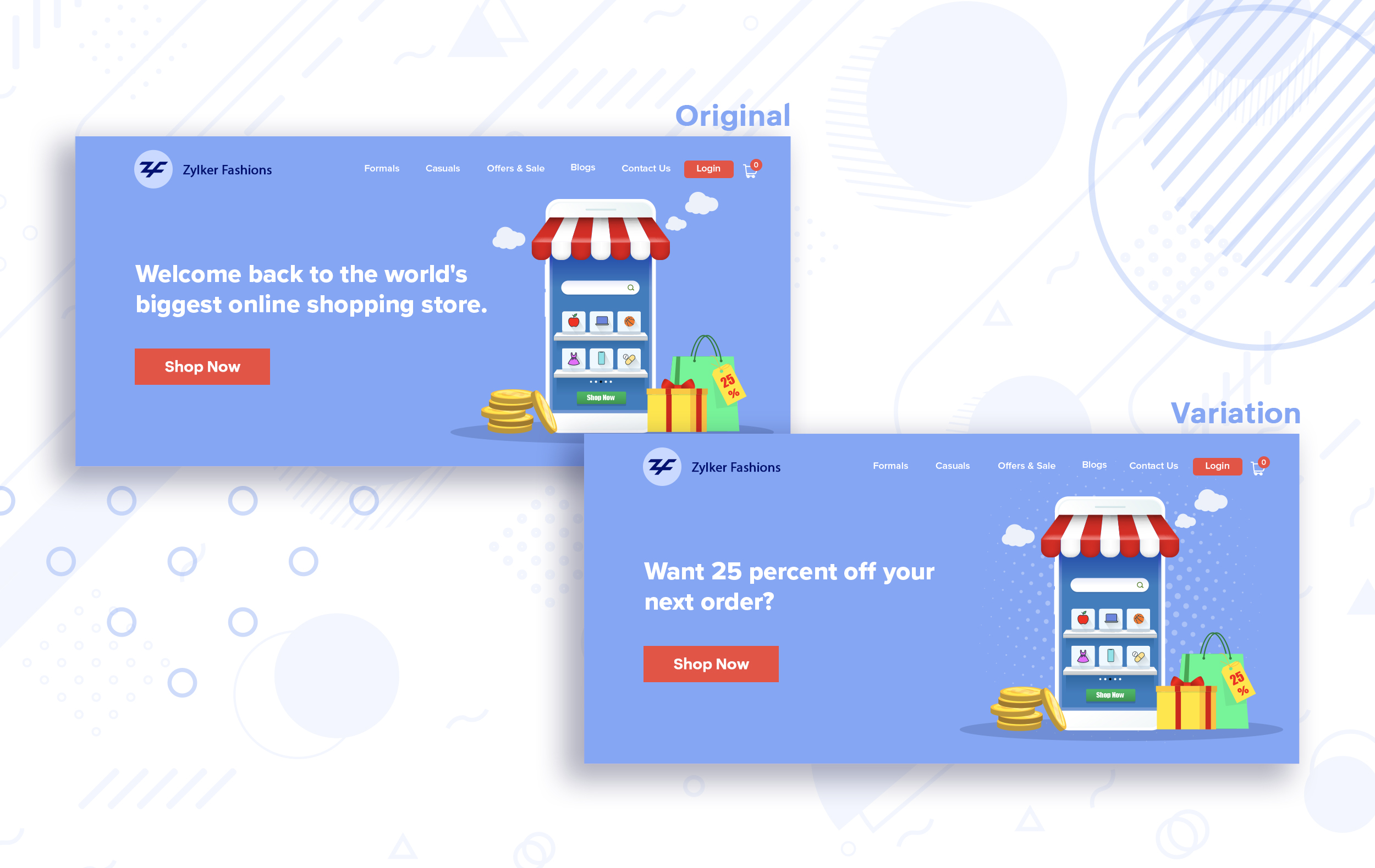
Say you run an ecommerce business and want to A/B test your headline copy with enticing offers for returning visitors to see which one convinces them to fulfill your conversion goals.
Say you run an ecommerce business and want to A/B test your headline copy with enticing offers for returning visitors to see which one convinces them to fulfill your conversion goals.
Extra tip:
- You can target your A/B test in PageSense using a variety of audience segments such as visitor type, device used, JS variable, day of the week, and more to learn which version grabs your audience's attention immediately and performs best for each segment.
- To know your target audience better, you can set up polls on your website using PageSense and learn your visitor’s business (or personal) needs and how your product can help achieve them. Later, you can use this feedback to test and optimize your website content.
Match your headline with your ad copy
When a visitor clicks on an ad, it's of the utmost importance to match the message on that ad to the headline content on your post-click landing page. If your headline doesn't match the offers and features that you promised in your ad copy, you're wasting all your marketing investment and conversion opportunities. A/B testing your headline by incorporating relevant keywords that resonate with your ad copy can help you reassure people that they've come to the right place. It can also later persuade them to take the desired action on your site more quickly. Further, this type of testing is more likely to generate increased clickthrough rates, conversions, and revenue for your website.
When a visitor clicks on an ad, it's of the utmost importance to match the message on that ad to the headline content on your post-click landing page. If your headline doesn't match the offers and features that you promised in your ad copy, you're wasting all your marketing investment and conversion opportunities. A/B testing your headline by incorporating relevant keywords that resonate with your ad copy can help you reassure people that they've come to the right place. It can also later persuade them to take the desired action on your site more quickly. Further, this type of testing is more likely to generate increased clickthrough rates, conversions, and revenue for your website.
Example:
Say you're running a Facebook Ad for older travelers, and the post-click landing page shows the most relevant tourist packages, flights, and hotel stays based on their interests. Now compare the old and new headline messages below to see which version of the message sounds better.
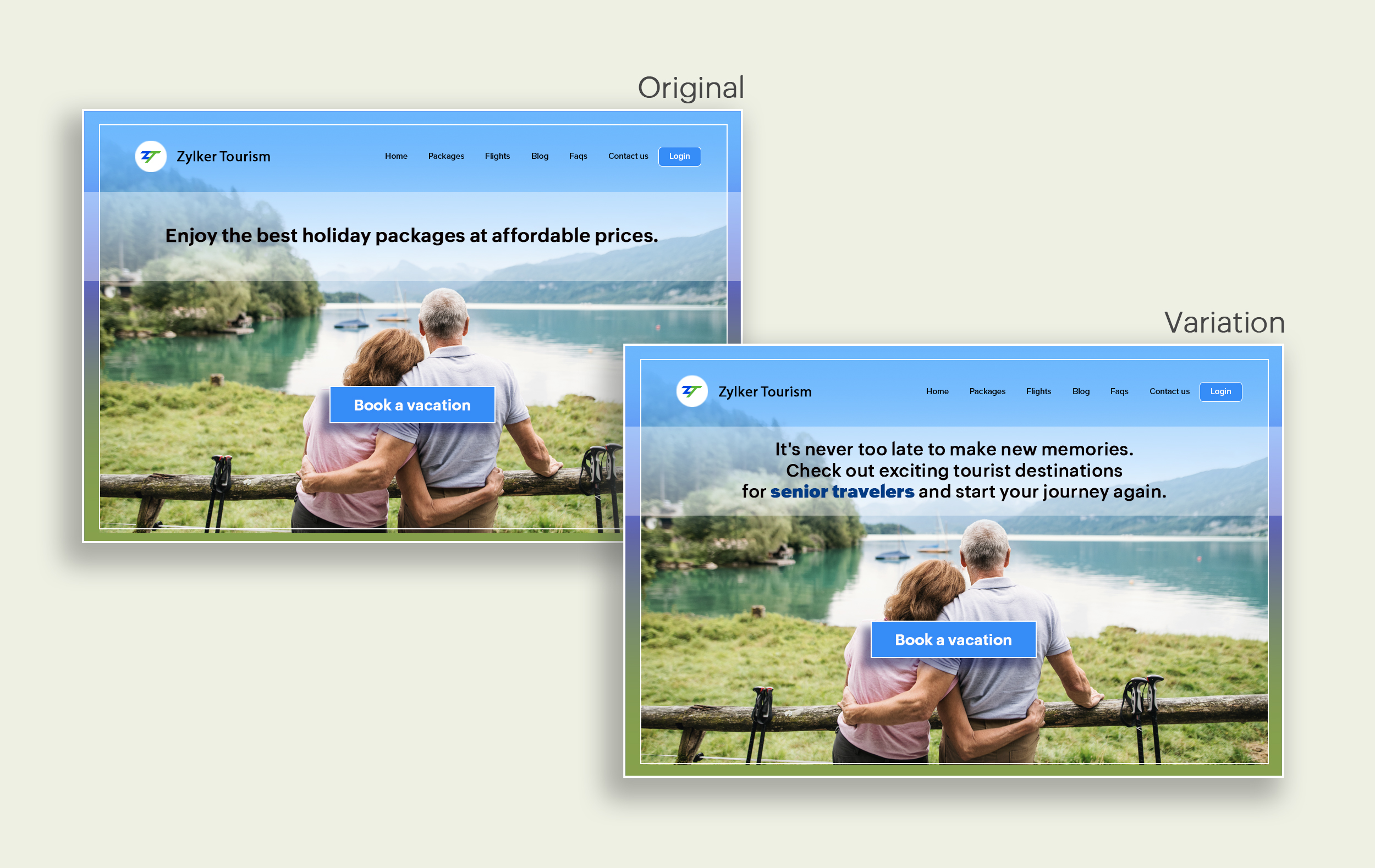
Say you're running a Facebook Ad for older travelers, and the post-click landing page shows the most relevant tourist packages, flights, and hotel stays based on their interests. Now compare the old and new headline messages below to see which version of the message sounds better.
Include stats and numbers
Numbers in your headlines are a great way to grab attention by spontaneously triggering curiosity in your targeted audience. When you use symbols like %, $, or digits instead of words to express percentages, dollars, or numbers in your headlines, it creates specificity around the duration, size, value, etc. of what you're offering customers, which is more attractive than a generic offering. This is a powerful psychological tactic that spotlights your headlines and immediately hooks the reader's interest, which results in more traffic.
Example:
Consider the pricing page of your website and see how adding a number to the headline can increase reader engagement.

Follow the problem-solving methodology
Solving your customers' problem is the easiest and fastest way to reach their heart. Crafting a headline that addresses an issue and provides a cutting-edge solution to solve the problem can make optimizing your website easier. Intriguing your readers like this can make them look for more information on the rest of your site. Further, when done well, it can build a solid emotional bond between you and your customer for a longer term.
Example:
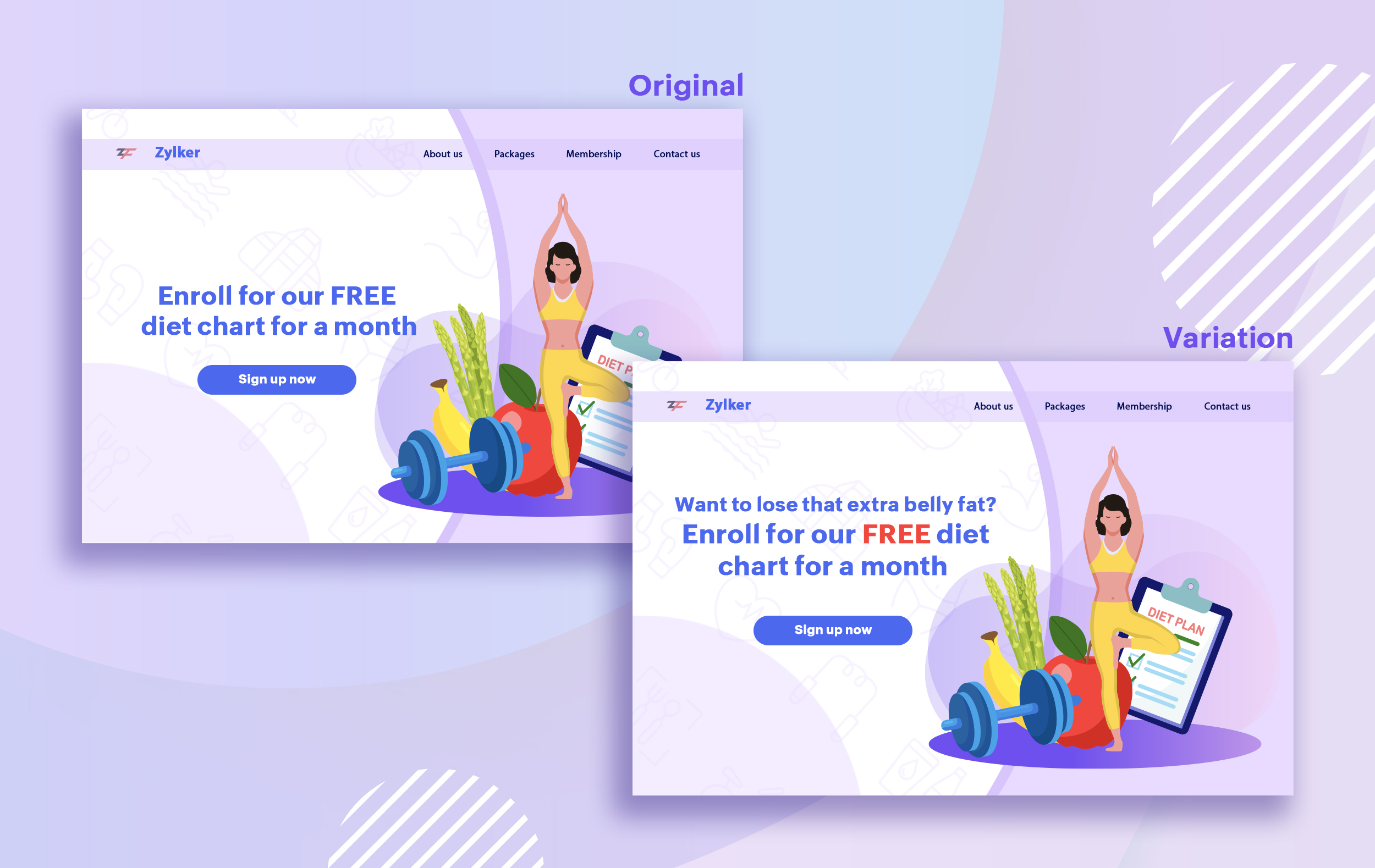
Take a look at the image below to see how implementing the problem and solution technique in your fitness website can make your headline sound more interesting.
Solving your customers' problem is the easiest and fastest way to reach their heart. Crafting a headline that addresses an issue and provides a cutting-edge solution to solve the problem can make optimizing your website easier. Intriguing your readers like this can make them look for more information on the rest of your site. Further, when done well, it can build a solid emotional bond between you and your customer for a longer term.
Example:
Take a look at the image below to see how implementing the problem and solution technique in your fitness website can make your headline sound more interesting.
Test with power words and sentiments
Sometimes the right audience is just one word away. Using forceful positive or negative power words in your headlines has the potential to kindle your customers' emotions and inspire action on your website in no time. Also, these words can guarantee more clicks and make your headlines stand out from the rest. You can test your headlines depending on two groups of power words:
Sometimes the right audience is just one word away. Using forceful positive or negative power words in your headlines has the potential to kindle your customers' emotions and inspire action on your website in no time. Also, these words can guarantee more clicks and make your headlines stand out from the rest. You can test your headlines depending on two groups of power words:
- Negative headlines: This type of headline tends to intrigue your customers by setting a stage to avoid a miserable situation. It includes words like never, stop, worst, avoid, or do not.
- Positive headlines: This type of headline tries to build a relationship with feel good emotions. It includes words like best, always, fastest, easiest, most, greatest, largest, funniest, hottest, strongest, biggest, and ever.
Example:
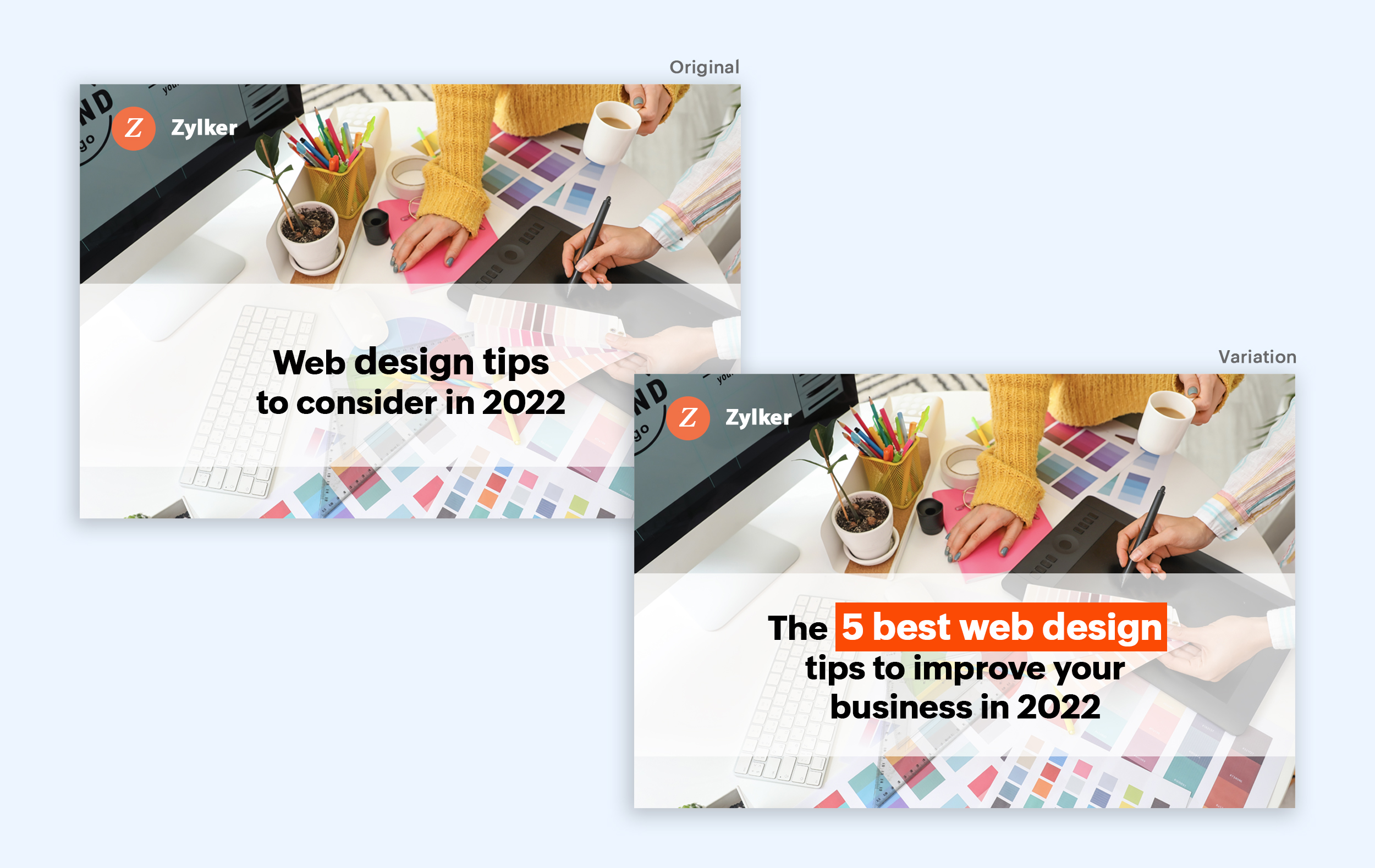
Take a look at the image below to see how the choice of words can invoke a positive feeling as you read the headline.
Test the font and appearance of your headline
The presentation (color, fonts, and layout) of your headline copy has a huge impact on the performance of your site. Below are a few points to consider while testing the appearance of your headline:
- Use title case. Avoid writing your headlines in all caps as it can reduce the readability of your text.
- Choose a font style and size that matches your website's personality. The most popular font style is sans-serif and font size is 20 - 36 pixels.
- Apply colors that contrast (while complimenting) your website's background well and focus on the legibility of your content.
- Align your headline perfectly with your body content for a bigger impact. Centered headlines are most powerful visually, while left-centered are more conservative and formal.
Example:
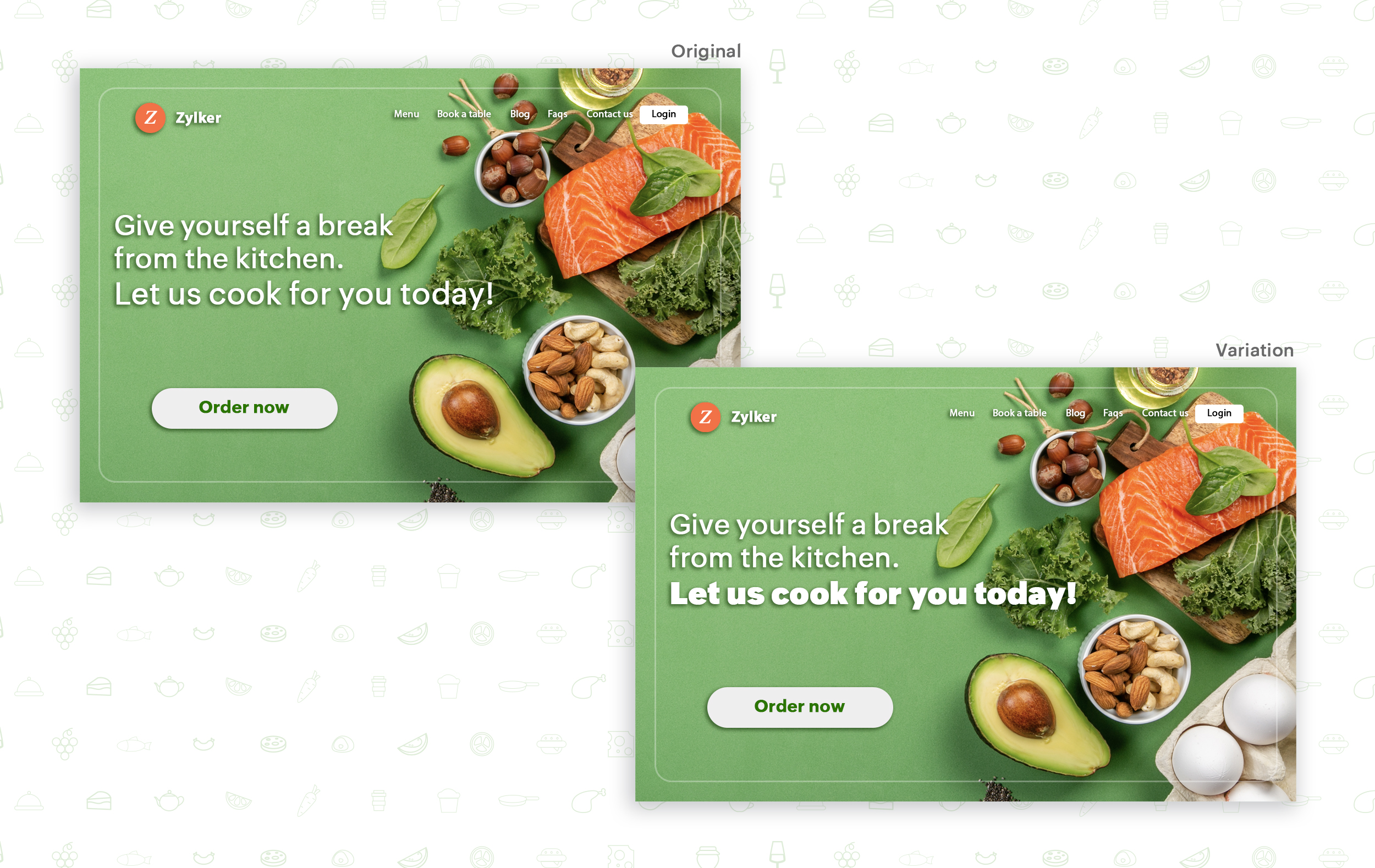
Say you own an online food delivery website, and you want to test the color and font of your homepage headline for better clickthrough rates. Take a look at the before and after images of the headline below. Which one you think will attract more eyeballs?
Try out the two-part strategy
Don't forget your supporting cast! Successful headlines act in two parts. Including a persuasive subheadline copy below your headline can be another winning strategy to pull your customers deeper into your website. You can test different versions of your subheadings to see which best suits your visitors, such as explaining a bit more about your product or services, emphasizing your product benefits, or encouraging visitors to click the CTA button placed on your site.
Example:
Take a look at the main headline and the subheading of a customer support software website as shown below. In this case, your subheadline re-affirms how your software helps your customers and adds emphasis about different product features.

Test the headline length and SEO compatibility
Test your headline for the right length, SEO keywords, and sentiments. Keeping a headline no longer than six words will help readers easily process your text and attain the goal of your website. Using free headline analyzer tools such as Coschedule or Sharethrough can help you effortlessly understand your website's performance. They analyze important factors (like searchable keywords, word balance, and sentiments) and assign a percentage score based on how good your headline is. They'll help you identify the factors you need to improve for more productive headlines.
Test your headline for the right length, SEO keywords, and sentiments. Keeping a headline no longer than six words will help readers easily process your text and attain the goal of your website. Using free headline analyzer tools such as Coschedule or Sharethrough can help you effortlessly understand your website's performance. They analyze important factors (like searchable keywords, word balance, and sentiments) and assign a percentage score based on how good your headline is. They'll help you identify the factors you need to improve for more productive headlines.
Example:
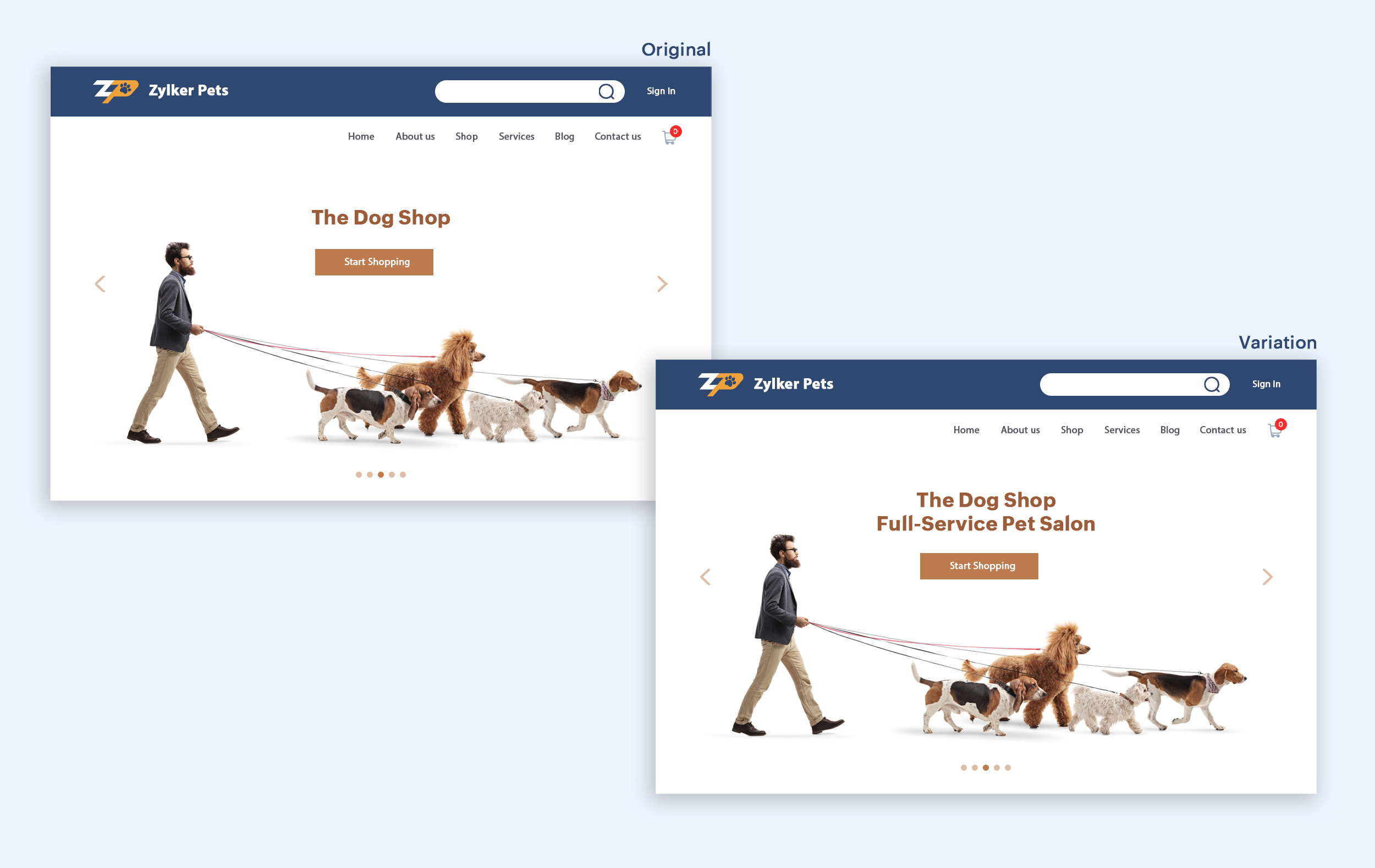
Let's say you own an online pet supply store and you want to test the headline of your homepage to attract more visitor traffic. The screenshots below show the performance of both the old and new versions of the headline in terms of length.
Bonus tips:
- Create a sense of urgency in your headline with words like "today," "now," and "last-minute offer."
- Use comparison phrases like "versus" to reinforce the benefits and features of your products/services.
- Research your competitor's headlines to add more value and optimize your headlines better.
We hope you found this article useful. What is your favorite headline tester? Have you had any success with headline A/B testing? Do share with us in the comments box below.
Happy testing. Happy converting!
Thank you.
Topic Participants
Balarohini Paulraj
info
Sticky Posts
[Live Webinar] How to maximize your conversions using existing website traffic
Hello all, Did you know that on an average only 0.1% of your traffic converts? The rest are either heading towards your competitors or dropping off without being able to find what they came for. When you want to increase your conversions, it's naturalA/B Testing Idea #2: Make your headlines sound super cool.
Hello everyone, We're back with our second post in the CRO testing idea series. If you missed the first post, please check it out here: "Place irresistible and clear CTAs." In today's post, we'll look at how to effectively A/B test your headline content.A/B Testing Idea #1: Place irresistible and clear CTA buttons
Are you wasting much of your time and effort A/B testing every single idea that pops into your head, yet you're not generating sufficient traffic to your website? Don't worry—we've got you. We'd like to introduce you to the A/B Testing Ideas learningDid you know?#3: How to target and run your experiment based on custom audience segments in PageSense
Whatever kind of online business you're running, defining your target audience is the key factor to delivering relevant messages and further positioning your brand in the industry. Most marketing efforts revolve around this basic strategy of segmentingDid you know?#2: How to filter your report by custom date range in PageSense
Do you want to quickly view your experiment analysis or responses over different time periods? Want to effortlessly compare the performance of your website by specific weeks, months, or years? Also, see whether your new marketing strategies or efforts
Recent Topics
search and Smart Bar both missing in Mail
One of the users on my account does not have the search bar at the top right or the Smart Bar at the bottom left of the desktop Mail app. Any ideas how to get those back?"Wrong password or login" Problem to configure Zoho on MAIL App on my Macbook
Hi, I'm having problems to configure my e-mail on my MAIL App(Macbook pro). My e-mail is hari@trespontoum.net Actually was working perfectly, and still working on my Iphone. My MAIL App prompt me that my login or password is wrong. I tried to change 3Remote Control Functionality During Screen Sharing in Zoho Cliq
Hello Zoho Cliq Team, We would like to request the addition of remote control functionality during screen sharing sessions in Zoho Cliq. Currently, while screen sharing in Cliq is very useful, it lacks the ability for another participant to take controlLet us add Lookup fields in the Blueprint Transitions
We are unable to add Lookup Fields in the blueprint transitions in Zoho Desk, we wanted to make it a requirement for our workflow but since it's not available in the transition we cannot. The lookup field exists in the Layout: But it cannot be added/selectedZoho Projects API Scope for Issue Attachments
I try to download issue attachments via the API, unfortunately I always get the following error code when trying to download the file from the supplied URL: {"ERROR_MESSAGE":"INVALID_OAUTHSCOPE","ERROR_CODE":401} indicating an auth scope error. I've triedHow to fetch custom fields for time entries in Zoho Project API v3
In the previous Zoho Projects REST API, we were able to retrieve custom field details for time entries, including picklist options, using the endpoint: GET /restapi/portal/[PORTAL_ID]/timesheetcustomfields In the new Zoho Projects API v3, we tried usingZoho Survey Enhancements
We love Survey. We use it a ton. It needs some enhancements. Maybe some of these are already on the roadmap? API - this is crucial. We have some complex surveys that take place and need to update records, trigger other functions/automations, etc. I wouldImages Don't Display on Blog
Hi, I've just posted a new blog entry, but regardless of format (png or jpeg) Images that display in Preview mode do not display on any browser in the published post. I've not done anything different with this post than others regarding images, please advice. Thanks! Edit: I've discovered that moving the image files from a my sub directory folder "Pics for Blog" to the top level of the "Files" folder on my site allows the images to display live. This, even though my other blog posts are correctlyCheckbox Field Mapping Zoho Forms to Zoho Sign
I have an application that will be filled out via Forms that I am mapping into a PDF Filler on Zoho Sign. I need to have a series of checkboxes mapped to the corresponding fields in Sign and I only see single checkboxes available via the mapping, thoughMCP > Creator connection failing with Claude
I'm trying to get claude to access any of my Zoho Creator apps and it keeps failing. I have enabled all tools for creator and ensured in claude settings that everything is authorised. Here is what claude says : Unfortunately, the error messages I'm receivingBooks P&L by Customer
Lately, we have found that the Customer field filter for the Profit & Loss report in Zoho Books is no longer available. We have several projects with the same customer and look at the P&Ls by project AND by Customer (overall). Can you please add back in this field selection alongside the Project field to the P&L report filter? Thanks! -GinaSent mail sort by date disappeared
Hello, We used to be able to sort the emails by date in the sent folder, but this feature has recently disappeared. Can we bring it back?I cannot check out to Zoho People.
When I tried to check out today, there's prompt that inhibits me to check out: To add entry in Attendance, log time for any of your jobsPricing Strategies: #2 Plan your Service Offerings using Plans
Meet Harvey & Mia, hailing from the same Tech school, carrying the dream of setting up their own IT maintenance firm in their location. They drew up a clear business plan and put their business in motion on New Year's Eve. They had great reception rightOpen a record to edit based on another form being edited
Hi all, I am trying to edit a record based on another record being edited. It works out like this: When I create a Monthly_Update and then submit I open the Monthly_Levels form and pass the ID from the Monthly_Update to a field called mu. I want it toProblem with signature on zoho survey
Hello, I'm trying to export individual responses with signatures on zoho survey. But the signatures on some of my surveys are not exported as the original image, but as a generic image, same for all (screen joins). Is there a solution to have the signaturesChange in Zoho CRM API?
Hello, I am using the Zoho API trough the PHP SDK v2.1 Since few days, I noticed that I have to change the way I pass the data to the API when I create, update, or upsert a record. Dates Before I was passing a PHP date object to "$record->addKeyValue(...)",MTA - BAD IP reputation by outlook/hotmail
Messages to Microsoft email servers are bouncing back due to poor reputation. Message: 4.7.650 The mail server [136.143.188.206] has been temporarily rate limited due to IP reputation. For e-mail delivery information see https://postmaster.live.com (S775)QuickBooks Extension for Zoho CRM - Advanced Features -2025
Hello Everyone, We’re happy to announce the latest version of our QuickBooks Extension for Zoho CRM, now officially live on the Zoho Marketplace! This release introduces one-click data sync, a user-friendly UI, enhanced performance, and a powerful setChanging Department often causes the Firefox tab to freeze
Title, it doesn't seem to happen with neither Opera nor Chrome. And even in Firefox, sometimes it just lets me change the department I'm in no problem, even to All Departments which is probably the most, like, resource heavy? But most of the time, theNeed to integrate Zoho Mail Mobile app with Zoho Meeting Mobile App for Android and Apple
Hello Zoho Team, Please bring integration of Zoho Mail Mobile app with Zoho Meeting for Android and Apple Thanks¡Muchas gracias por participar a los Meetups de Usuarios de Zoho! Y Novedades del ecosistema Zoho
¡Hola Comunidad de Zoho en Español! 👋 Después de un breve lapso de tiempo, volvemos con una nueva edición de nuestro Community Digest, donde te contamos las novedades de los productos de Zoho en los últimos meses. Estas mejoras se centran en nuestrosAnyway to move mail from one account to another yet?
Hello, Is there any way to move email from one mailbox account to another mailbox account in zoho yet? Thanks, Ryan.Using a CRM Client Script Button to create a Books Invoice
Hello, I need help handling error messages returned to my client script from a function. The scenario I have setup a client script button which is available from each Deal. This CS executes a crm function, which in turn creates an invoice based on theBuilding Toppings #2 - Learn how to use Bigin's Developer Console to build toppings
Hey Biginners, In our last post, we discussed what toppings are, why they're essential to extending Bigin's capabilities, and how the Bigin Developer Center serves as the starting point for building them. As a cloud platform, the Developer Center empowersProposal for Creating a Unique "Address" Entity in Zoho FSM
The "Address" entity is one of the most critical components for a service-oriented company. While homeowners may change and servicing companies may vary, the address itself remains constant. This constancy is essential for subsequent services, as it providesLinks are incorrect when sent out
I'm adding in hyperlinks into my eDM. When I send a test email, it's all correct. However, when I send out the eDM, all the hyperlinks jump up one space so none of the links are opening to the correct page. Why is this happening and how can I fix it?Tip of the week #16 - Search and filter threads based on criteria
Zoho TeamInbox lets you search and filter threads with any information that you have about the thread. You just have to input the criteria and Zoho TeamInbox will list all the threads that match the condition. Firstly, there is a global search you canIntroducing recipient authentication via Stripe Identity in Zoho Sign
Hi everyone! It's important to authenticate your recipient's identity before they access and sign important documents to ensure the highest level of compliance. Zoho Sign already helps businesses do this with various authentication methods: SMS OTP EmailIntroducing Multi-Asset Support in Work Orders, Estimates, and Service Appointments
We’re excited to announce a highly requested enhancement in Zoho FSM — you can now associate multiple assets with Work Orders, Estimates, and Service Appointments. This update brings more clarity, flexibility, and control to your field service operations,CRM: hosting a single html file in Zoho and displaying it as a widget
I have seen that CRM offers the option of uploading a web project to Zoho itself and displaying it as a widget in CRM. The instructions then talk about setting a development environment with Node and developing an application to upload to Zoho. But IKeep Converted Leads
How do I keep the converted leads in the Leads Module after conversion (converting it to account, contact, deal). I want to add it in a converted stage in the leads module in order to get a report or dashboard and see all converted leads from my pipCustomizing Global Search Settings for All Users
Hi Our team use the brilliant global search functionality within CRM many many times daily. But, we struggle with the out-of-the box columns that CRM gives you. We are always telling users to customize this look to more suit our business, to show theIntroducing Formula Fields for performing dynamic calculations
Greetings, With the Formula Field, you can generate numerical calculations using provided functions and available fields, enabling you to derive dynamic data. You can utilize mathematical formulas to populate results based on the provided inputs. ThisFrom Zoho CRM to Paper : Design & Print Data Directly using Canvas Print View
Hello Everyone, We are excited to announce a new addition to your Canvas in Zoho CRM - Print View. Canvas print view helps you transform your custom CRM layouts into print-ready documents, so you can bring your digital data to the physical world withTip of the Week #77– Stay informed of the activities happening in your organization
Whenever a message is handled in Zoho TeamInbox, every action is recorded in the Activity Log. This ensures you always know what’s happening across your teams and inboxes. To access it, simply click the Audits icon on the left pane’s top bar after loggingZoho Logs - Not seeing logs since 30 Nov
Hi, we have a few functions running, I am testing some new ones and noticed that although I can see executions, I cannot see any logs, even when the first line on the functions is a log. I reviewed some existing functions, one of which is invoked on aWorkdrive MS Office integration
Have installed subscribed version of Zoho WorkDrive VSTO runtime not found is the error when I try to install Zoho_WorkDrive_For_Office Unable to open work files in Excel and Word Urgent, since I have migrated all my OneDrive files to work drive alreadyHow do I create an update to the Cost Price from landed costs?
Hi fellow Zoho Inventory battlers, I am new to Zoho inventory and was completely baffled to find that the cost price of products does not update when a new purchase order is received. The cost price is just made up numbers I start with when the productHow to change Zoho Vault password
I am searching where I can change the Vault Password after having changed the Zoho account password. I don't see this option anywhere in my account. It should be simple and accessible! Please help. Thanks!Next Page