Augmenting subform capabilities
Greetings, everyone!
Finally, the day has come for us to announce some of the most anticipated, requested, and exciting updates to
subforms in Zoho Creator.
As you're aware, subforms are an integral part of Creator forms, as they help in establishing proper modelling of the app, collecting rows of data, and setting up users to enter data that has a parent-child relationship. With this new set of updates, we've bought in a paradigm shift to subforms, as they'll be getting an all-new look for an improved user experience, along with new capabilities for solving challenges. This post will give you a sneak peek into these new subform enhancements.
Do you find it difficult to scroll subforms horizontally? Do you wish you could drag and drop subform rows? Do you want to manipulate subform fields via Deluge script? Then your wait has come to an end—continue reading to learn more on how you can now do all of this in subforms.
Subform list and pop-up view
As announced in the
March 2023 post, the List
view type of subforms will display the subform as a pop-up, and the current method of displaying subforms has been christened
Grid.
To further understand how this can be helpful, let's put ourselves in the shoes of a supply chain manager. Their job requires them to regularly keep track of inventory lists in their warehouses.
Let's assume there's a form collecting warehouse details, like name, location, and stock inventory. For collecting the stock inventory details, a subform is present with these fields—Item No, Name, Manufacturer, Description, Cost Per Item, Stock Quantity, Inventory Value, Units Sold, Reorder Quantity, Reorder Date,
and
Person In Charge.
Now, the default view type will tire you out from scrolling back and forth horizontally, and results in a frustrating time-consuming process. We all long for a new way to avoid this and make data entry swifter.
To achieve this, make use of the new List option under
Subform->Field Properties->View Type.
List view, which looks similar to our list report, is a table-like subform without inline inputs. When you try adding or updating data in each row, a pop-up will be displayed listing out the fields with vertical scrolling, thereby ensuring a vastly superior user experience and more effective space management.
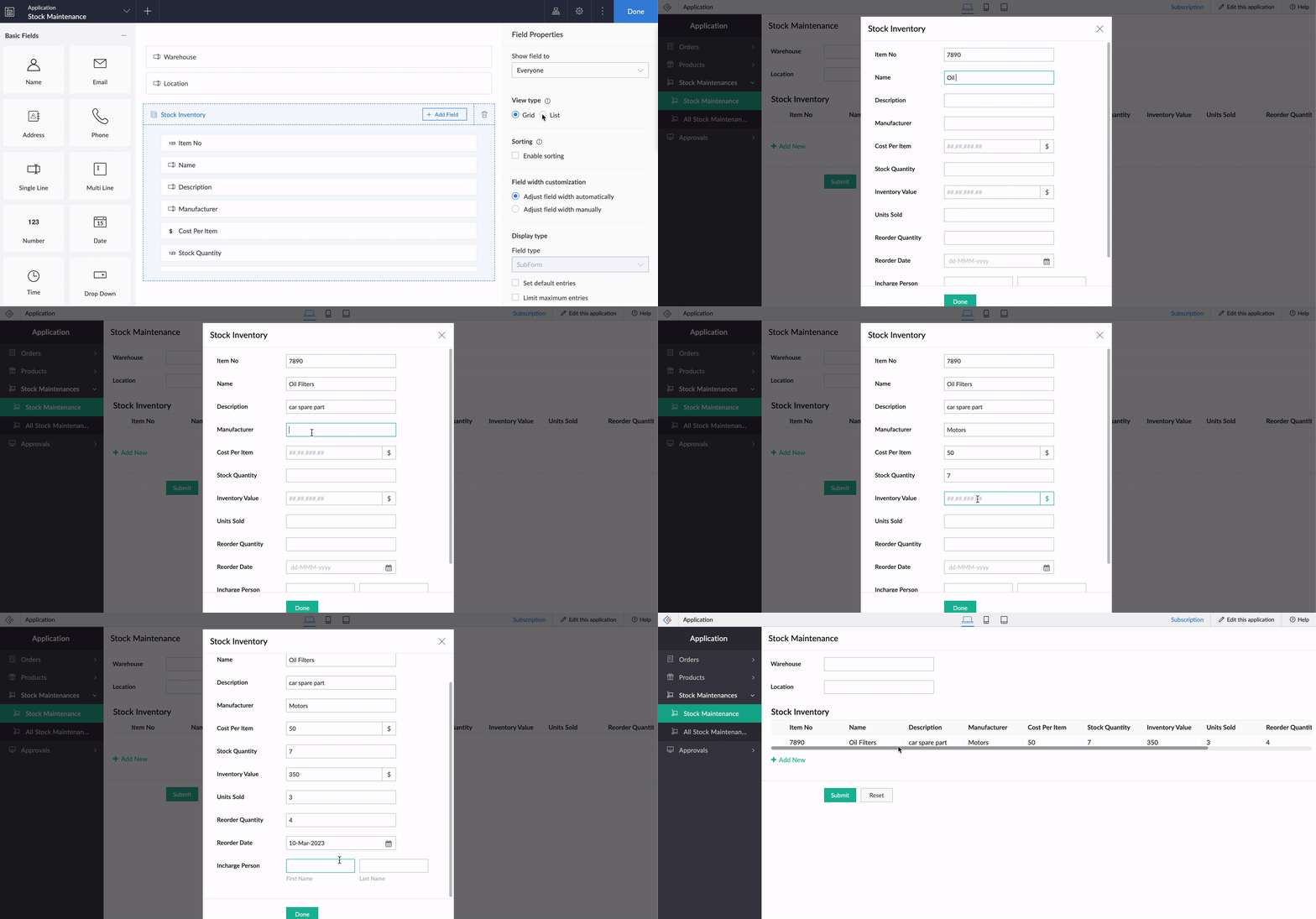
Crucially, it also helps to load subform rows quickly while editing records, by reducing the loading time.
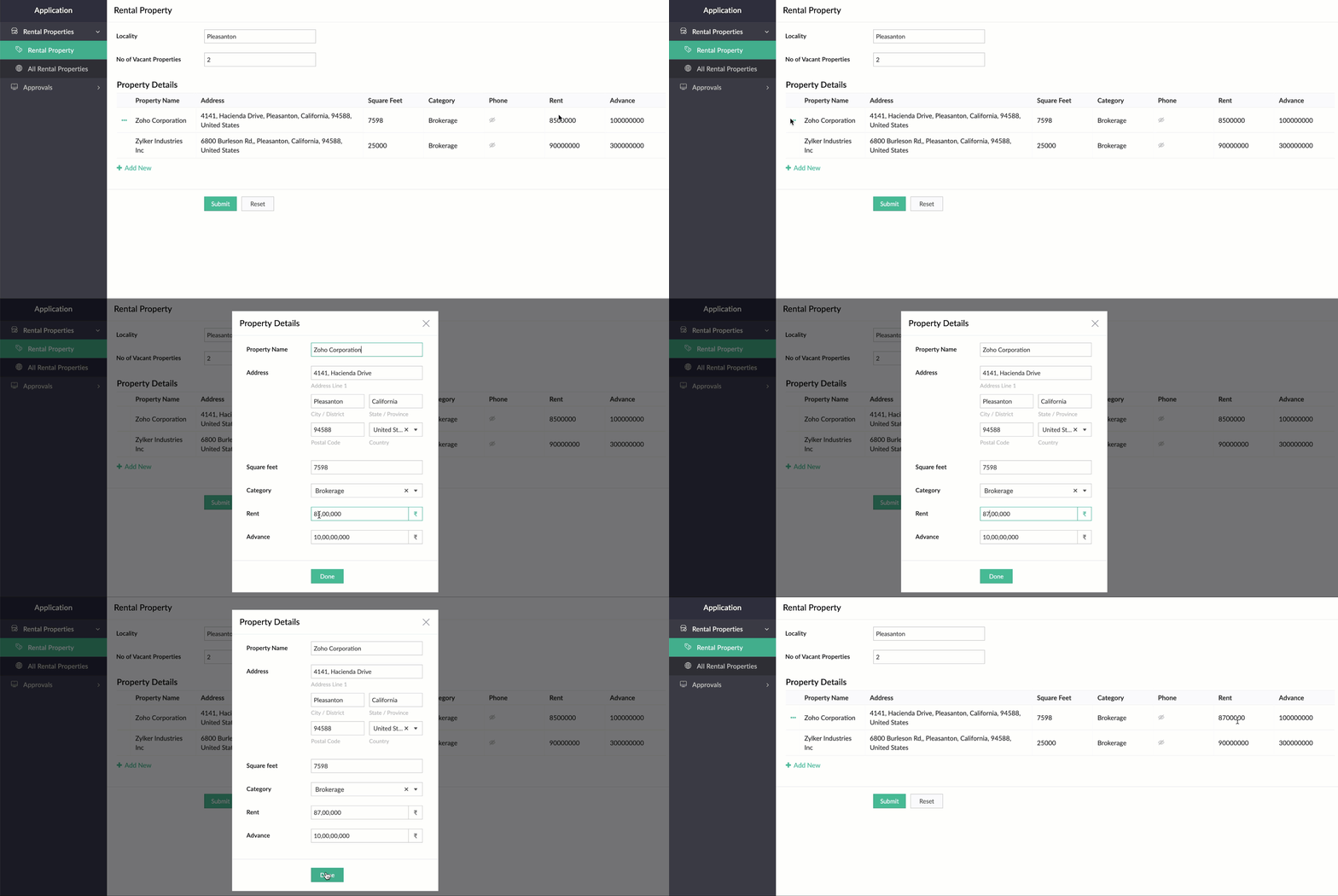
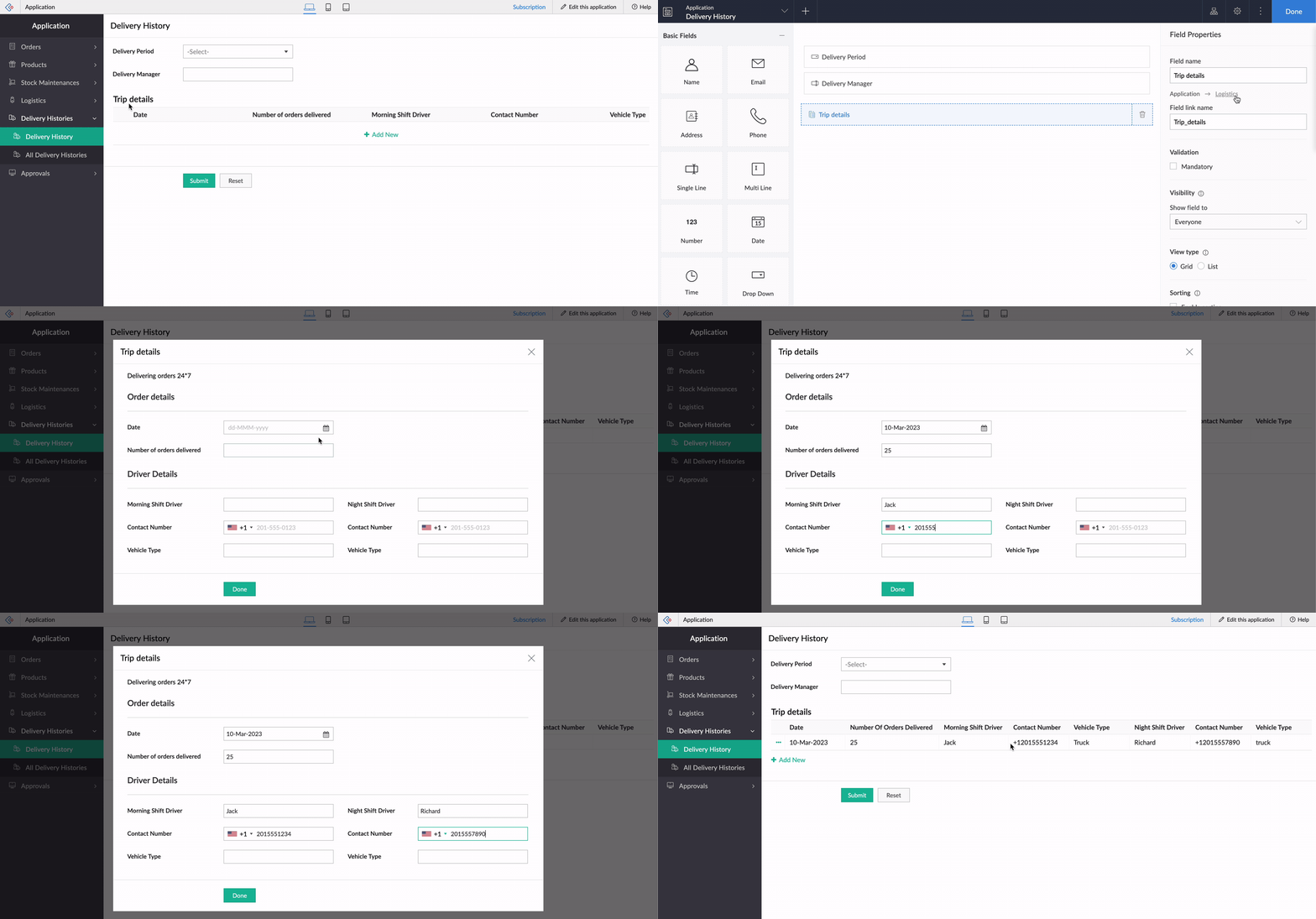
While using an existing form as a subform, the form's exact structure will be replicated in the pop-up, to ensure consistency in the look and feel of the form. To understand this better, let's assume our form has a two-column layout, with
Section
and Note
fields. Now the same customizations will be displayed in the pop-up, too!
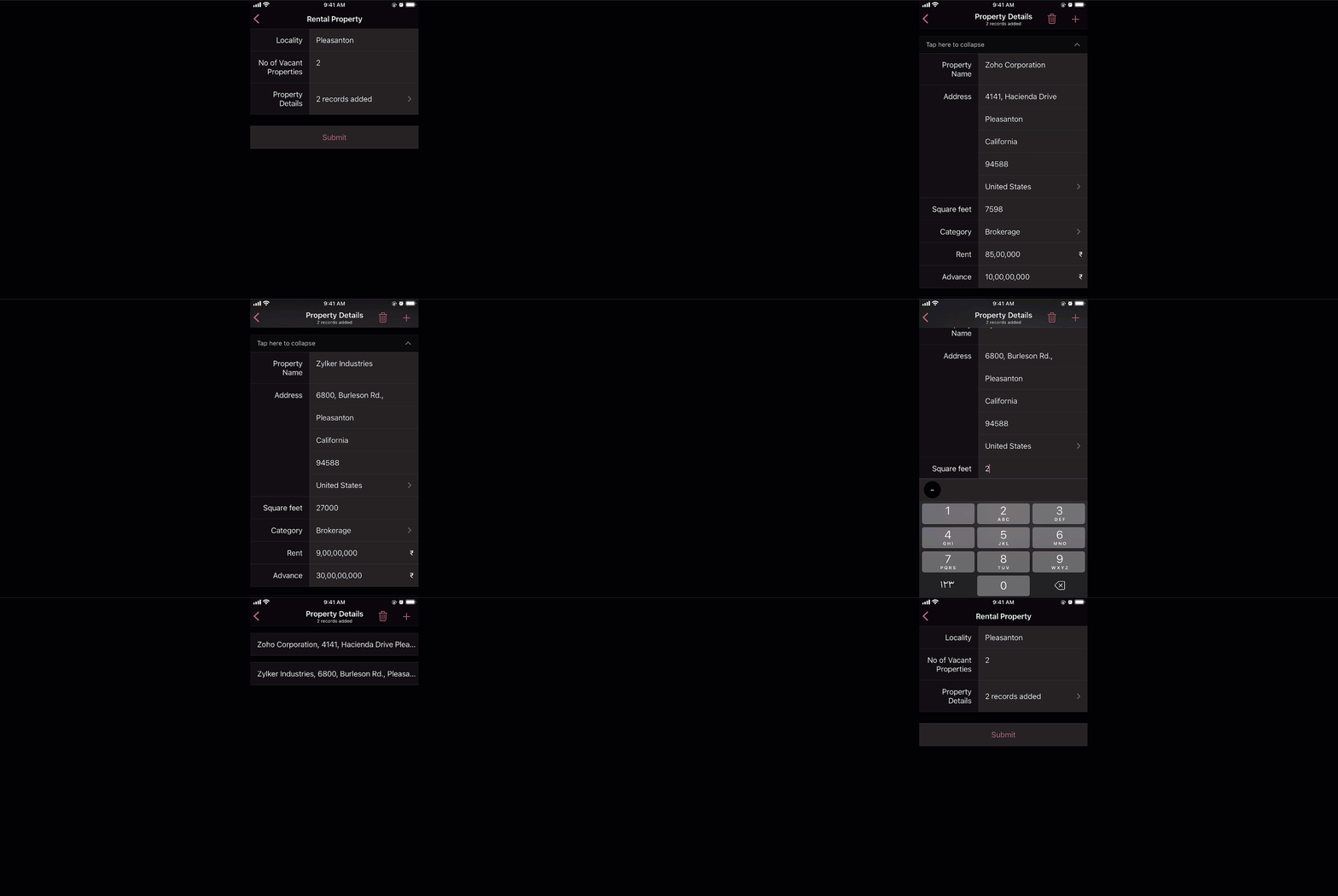
And that's not all—the new List view type is being extended to mobile apps, too. When it's enabled, the subform will be opened in the next screen, where users can add their data. This data will then be added as a subform row.
Custom sorting
Currently, the only sorting option in subforms is
field-based sorting, where you can choose a field based on which rows are sorted, either in ascending or descending order. Though this works well for basic cases, the need may arise in some cases to sort the subform in random order. With the new custom sorting support, you can effortlessly drag and drop subform rows to rearrange them.
To understand how it works, let's consider a task manager working on a To-Do List
form, to plan activities for a current project. For this, they have a main form collecting
project details, date-time,
and
milestones,
and a subform for maintaining the to-do list with the following fields:
Task Name, Description, Category, Status, Deliverables, Priority, and
Deadline. Here, before submitting the list, they want to rearrange some tasks based on their daily routine.
To achieve this, they use the Custom sorting option under
Subform->Field Properties->Sort type.
Now, with custom sorting, all they need to do to reorder the row sequence—both while adding and editing records—is simply drag and drop them in the required position.
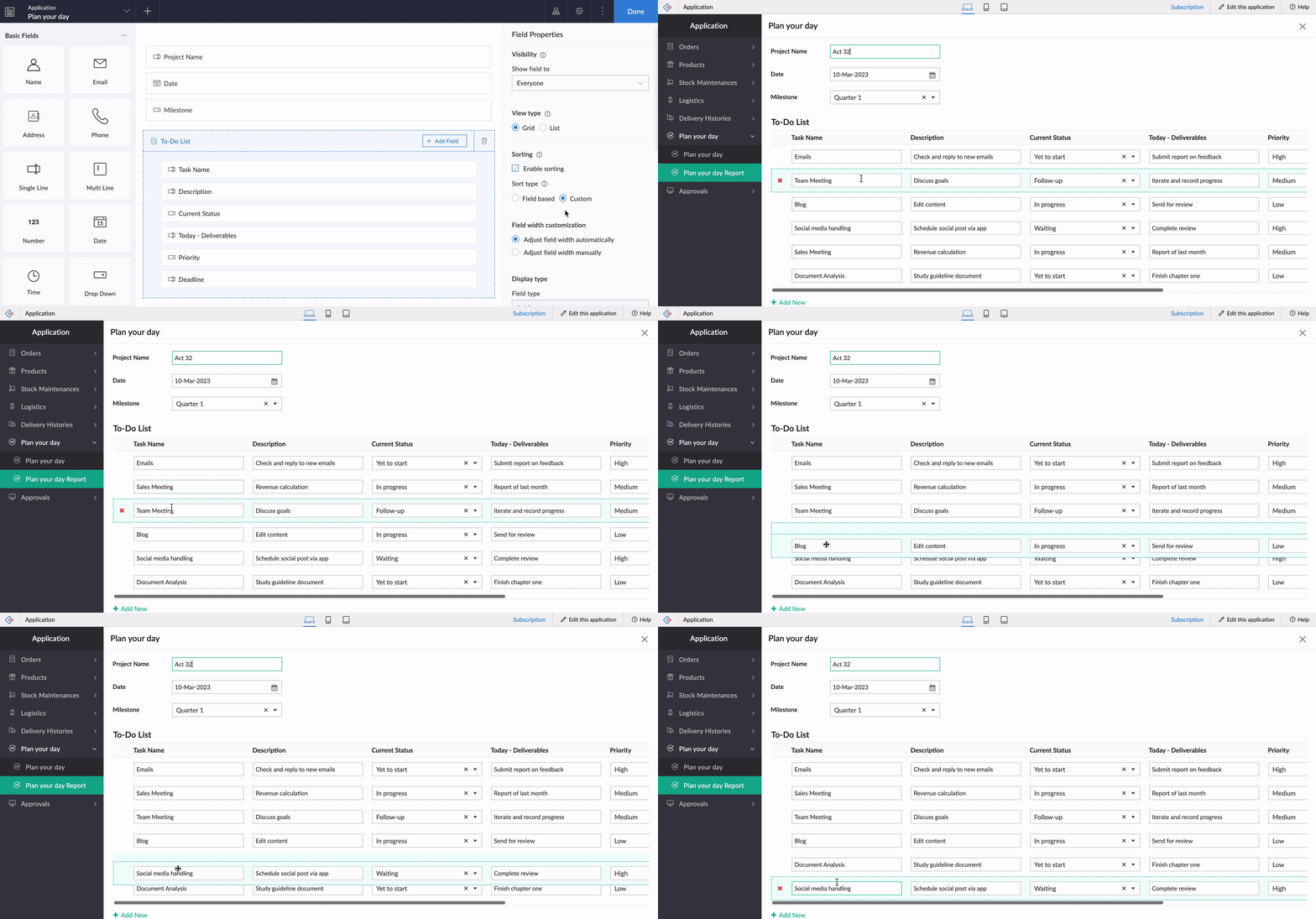
The same order will be retained in reports or while opening the form for updating the list.
Note:
Custom sorting can be used both in List and Grid-type subforms.
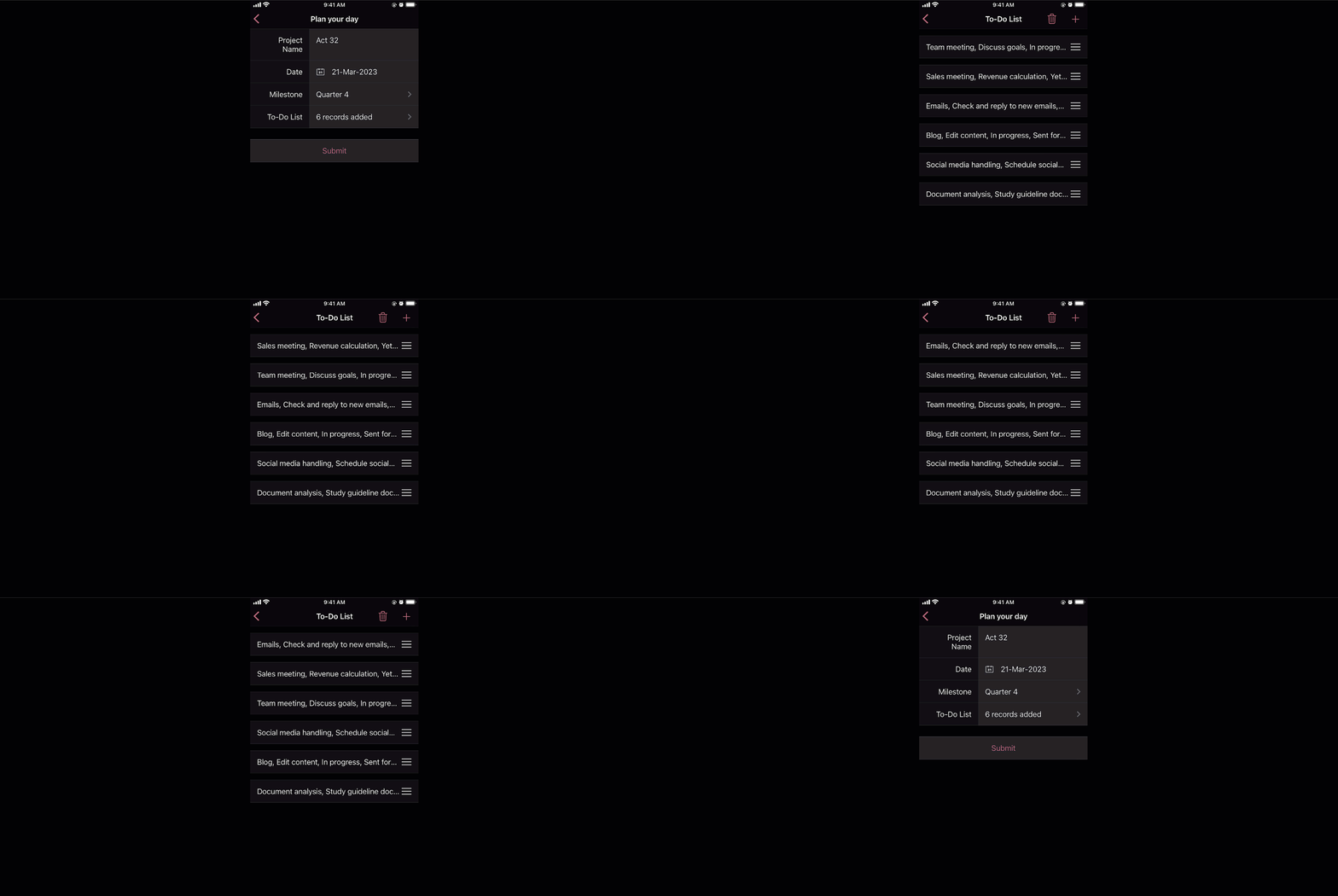
Custom sorting will also be available on the mobile apps and you can effortlessly rearrange fields in subforms.
Deluge tasks for row-level actions
You can use a combination of workflows and Deluge scripts to help your subforms handle complex business logic. With that in mind, we formulated the idea of bringing in actions that help you take control at the row level of subforms.
In the past, you may have come across business scenarios which required you to hide/show or enable/disable a particular field in a specific subform row. Now, with new dedicated Deluge tasks, you can bid adieu to shortcuts and workarounds.
Note:
Deluge tasks can be used both in List and Grid-type subforms.
Enable/disable
The new enable and disable subform Deluge tasks can be used to enable and disable specific fields.
Syntax:
enable row.subform_field
disable row.subform_field
disable row.subform_field
Events:
On add row, On delete row, On user input of subform field
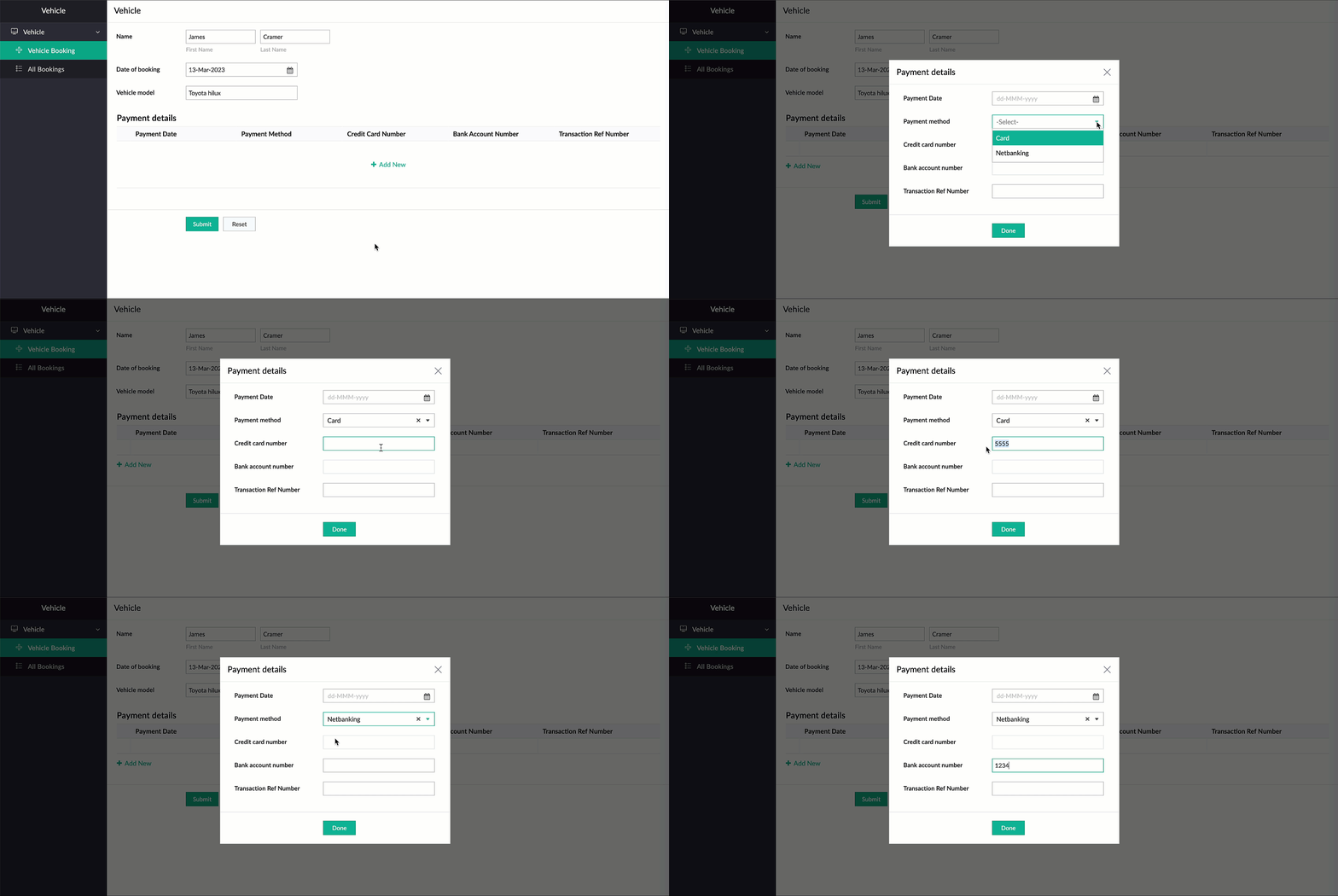
Let's assume a Vehicle form has fields like
Customer Name, Vehicle Model, and Date of Booking,
and a subform to collect payment details with the following fields:
Payment Date, Payment Method, Credit Card Number, Bank Account Number,
and
Transaction Ref Number.
Now, there are two payment options—Card and Netbanking. If Card is chosen, then the Credit Card Number field should be enabled and the Bank Account Number field should be disabled. Similarly, when Netbanking is chosen, then the Bank Account Number field should be enabled and the Credit Card Number field disabled.
Code snippet:
if(Payment_details.Payment_method == "Card")
{
enable row.Credit_card_number;
disable row.Bank_account_number;
}
if(Payment_details.Payment_method == "Netbanking")
{
enable row.Bank_account_number;
disable row.Credit_card_number;
}
{
enable row.Credit_card_number;
disable row.Bank_account_number;
}
if(Payment_details.Payment_method == "Netbanking")
{
enable row.Bank_account_number;
disable row.Credit_card_number;
}
Hide/show
The new show
and
hide subform
Deluge tasks can be used to show and hide specific fields.
Syntax: hide row.subform_field
show row.subform_field
show row.subform_field
Events: On add row, On delete row, On user input of subform field
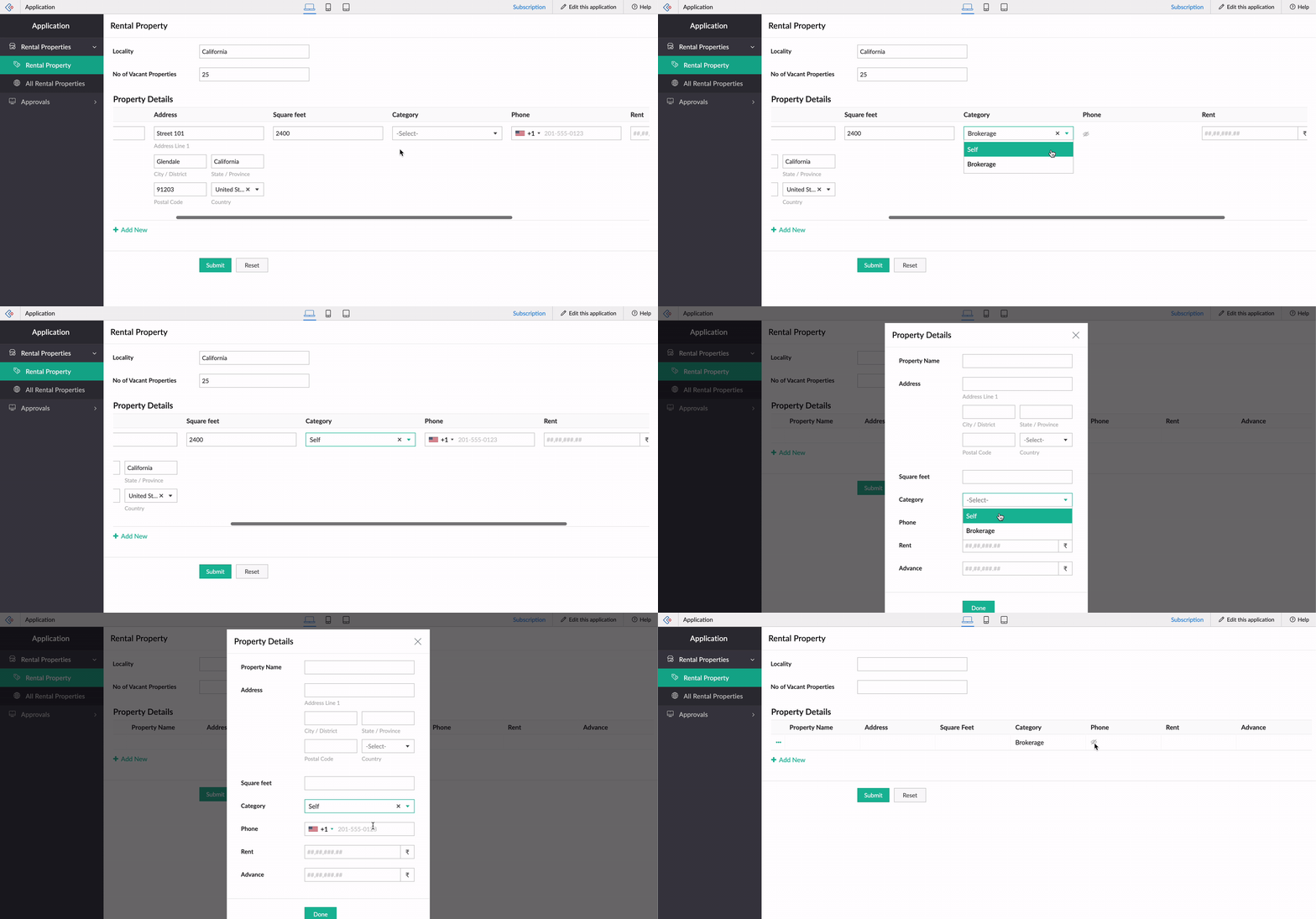
Let's use the example of a rental property manager who needs to keep track of a list of properties that are available in every locality. For this, a form is used for collecting information like Locality and No of Vacant Properties, and a subform will be used to list property details with the following fields: Property Name, Address, Square Feet, Rent, Advance, Category, and Contact Number.
When the category is Brokerage, we need to hide the contact number of the landlord. We can use the new Deluge tasks to achieve this.
Code snippet
:
if(row.Category == "Brokerage")
{
hide row.Phone_Number;
}
else
{
show row.Phone_Number;
}
-----
That's it from us on our subform enhancements! We expect these updates to be rolled out in the upcoming weeks. Once done, we'll pop in a comment below and also update our Release Notes page.
Don't forget—your feedback helps us make Creator better and stronger. We'd love to hear what you think about these updates. Please use the space below or send your feedback to
support@zohocreator.com.
Regards,
Zoho Creator Team
Topic Participants
Ashwin Vishal R
Jean Le Gal
stevesmith41
Darren Burn
Anurag Jaiswal
Sticky Posts
Introducing Zoho Creator's 2025 Release Projection 2
Hello Creators! I'm Prakash, from the Creator product management team, and today I'm delighted to unveil our next set of features as part of Release Projection 2 for 2025. With thoughtful analysis and planning, we've curated powerful new capabilitiesZoho Creator - 2023 Release Projection 1
Hello everyone! A very Happy New Year to you and your family. Hope you're all good and having a great time using Zoho Creator to make your lives easier and your businesses prosper. 2022 was an action-packed year for us at Creator, and we hope to continueZoho Creator User Group meetups in a city near you! - Oct - Nov, 2023
Greetings from the Zoho Creator team! We're hosting a series of Zoho Creator meetups in various cities across the globe, and we'd love to meet you there! Our meetups are a great opportunity to network with industry peers, exchange ideas and best practices,Zoho Creator - 2023 Release Projection 2
Hello everyone! Time truly flies when you're having an incredible journey, and today we mark the completion of an eventful and action-packed six months. It feels like just yesterday when we embarked on this adventure together with the launch of our newUpcoming Updates - August 2022
Hi all, Greetings from the Zoho Creator team! Today we've got news for you on some exciting updates. And rest assured— there’s more to come! In this post, we'll be going over the upcoming features and improvements for this month as mentioned below. A
Recent Topics
Where is the Global Search field?
I am looking for an alternative to SF.com. Zoho CRM seems to be work fine, and be customizable in terms of the fields and reports. But there's one big thing missing and it's going to prevent us from using it: there's no global search box at the top ofKeeping start and end time logged, when using the timer
As it seems to be now: I sometimes forget to stop and restart the timer, when switching projects. And switching between projects happens upto 10 times a day. Since there's no indication to when a timer was started or stopped, I have to guess how many hours I have to remove from one project and add it to another.API 500 Error
Hello amazing ZOHO Projects Community, I get this message. How can we solve this? { "error": { "status_code": "500", "method": "GET", "instance": "/api/v3/portal/2010147XXXX/projects/2679160000003XXXX/timesheet", "title": "INTERNAL_SERVER_ERROR", "error_type":In place field editing for candidates
Wondering about any insight/best practices for efficiently updating candidate records while reviewing them in a Job Opening pipeline. We can do in-field editing (e.g. update job title or City) only when we have the full candidate record open, howeverDefault tax type for mileage?
Where we are, mileage includes a government tax. Is there any way to set a default tax for the Personal Car Mileage category of expense? (Or any other way?)Show price book list price
When using price books, once you add products to the price book in the Products related list you can display the Unit price which is the default list price; however, there is no option to show the price book list price. To see the price book list priceCliq File Upload
While uploading large file like 500MB, it takes time, that fines. But if you resize window or move window in other screen, that uploading disappears. After upload complete & sent it will be visibleConstant color of a legend value
It would be nice if we can set a constant color/pattern to a value when creating a chart. We would often use the same value in different graph options and I always have to copy the color that we've set to a certain value from a previous graph to makeWhat's New in Zoho POS - October 2025
Hello everyone, Welcome to Zoho POS's monthly updates, where we share our latest feature updates, releases, changes, and more. Let’s take a look at how October went. Process returns for refunds, exchanges, or offer store credit Returns and exchanges canLoan and purchase
My husband is lending me mobey to buy a vehicle intersst free ... I need to know how to record the cash receipt and how I pay it back... the money is for a vehicle do I just post the invoice for that as I normally would usung the loan money to pay forZoho Connect Module in Zoho Trident
Hi I really like where Zoho Trident is going. Having Mail and Cliq in one place is especially powerful. However, Zoho Connect really needs to be included to make this a true communication and collaboration hub. I would like to request that Zoho ConnectFile Field Validation
Hello all, We are tracking our customer NDA agreements in our CRM and have created 2 fields to do so, an execution date field and a file upload field. I want to create a validation rule to ensure that when the execution date field is populated that the100 record view limitation
I have just migrated from another CRM and am starting in ZOHOcrm with over 5000 contacts. It seems that my searches and sorts are limited to 100 live records....or am I missing something. This seems to be very limiting...in a lot of scenarios (mass email,ZUG Meet-ups are back - Across India (December 2025)
The Zoho User Group (ZUG) meet-ups are back, and this time, we’re travelling across India to reconnect with our amazing community! From Chennai to Delhi, Bengaluru to Mumbai, we can’t wait to meet you all in person and talk everything Zoho SalesIQ, automation,Categorise Attachments
We take ID, proof of address, right to work documentation and more. I can upload a single file in to field, but we often receive multiple files for each category e.g. someone may send a separate file for the front and back of their national ID card. My team don't have time to manipulate the files in order to upload them as a single file. The options, as far as I can tell, would be to create additional fields on attachments in order to categorise what the file is, or to be able to upload singleScheduling a meeting for just a 1:1 phone call
My business is B2C and many of my customer's don't want to engage in an online meeting for what can be handled in a regular phone call. I am trying to create a new meeting invitation, but there is no venue optoin for "phone call". How are other's handlingNeed more details on API Usage Dashboard
Hi Team, We have implemented Zoho Expense for a client and has done some integrations with well known third party ERP via api. Recently we have noticed a huge spike in the API consumption. But we couldn't get the root cause for the same. I accept therePower of Automation:: Automating SLA Timelines for First Response & Resolution for Issues module.
Hello Everyone, Ever wished SLAs could update automatically based on issue severity i.e no manual tracking, no missed timelines? That is exactly what one of our customers, Alex, wanted to achieve in the Issues module. So, we have setup a simple automationPower of Automation :: Quick way to associate your Projects with Zoho CRM
A custom function is a software code that can be used to automate a process and this allows you to automate a notification, call a webhook, or perform logic immediately after a workflow rule is triggered. This feature helps to automate complex tasks andMove orders scan ISBN
Hi We have ISBN setup to be searched in items zoho but move orders dissent recognize the ISBN is there q missing configuration? regards, JSWhat's New - October 2025 | Zoho Backstage
Hey everyone! We’ve been busy rolling out a host of upgrades for Zoho Backstage. While some major features are still going through final rounds of testing to make your event experience smooth as butter, here’s what was new and improved in October 2025.Zoho People Attendance Regularization – Wrong Total Hours Displayed
While using Zoho People, I observed that the attendance regularization is showing wrong total hours when applied to past dates. For example, if a check-in is added at 10:00 AM and check-out at 6:00 PM for a previous date, the system sometimes calculatesAdd Flexible Recurrence Options for Meeting Scheduling in Zoho Cliq (e.g., Every 2 Weeks)
Hello Zoho Cliq Team, We hope you are doing well. Currently, when scheduling a meeting inside Zoho Cliq, the recurrence options are limited to Daily, Weekly, Monthly, and Yearly. There is no ability to set a meeting to occur every X weeks — for example,Subform Disabled Fields Should Remain Disabled on Edit/View
Currently, when we disable a subform field using on user input or on add new row, it works perfectly during the initial data entry. However, when the record is saved and reopened for viewing or editing, these disabled fields become editable again. ThisWhat is Resolution Time in Business Hours
HI, What is the formula used to find the total time spent by an agent on a particular ticket? How is Resolution Time in Business Hours calculated in Zohodesk? As we need to find out the time spent on the ticket's solution by an agent we seek your assistanceHide "Section" headers when using a form as a subform in "List view"
When using a form as a subform and setting the "View Type" to "List View" it is not possible to hide the section headers. This can become an issue if I have a section which is not applicable to this subform and I hide the fields within that section andAdd additional field to quick search results
IN the advanced search, we can add any field to the columns. In the regular search results (before you press enter, there is no option to modify the results. It would be super useful to include a custom field where it currently displays the pipleineNeed Help: Updating Related Records via Subform Entries in Zoho Creator
Hi everyone, I’m trying to set up a workflow in Zoho Creator where each row in a subform updates related records in another form automatically. Here’s the situation: My main form (e.g., “Receipts”) contains a subform where each row selects a related recordDisable signing in using email aliases?
Hi, I currently have user accounts that have multiple aliases, for example: Main: name@domain.com Alias: alias1@domain.com, alias2@domain.com Currently, I am able to use any of those 3 emails in the 'username' box during login, and it will log me into the email. Is there a way to setup so that email aliases cannot be used to sign on? I'd still be able to receive and send emails using those aliases in the main email account like it works now, except only the main email can be used to login. Cheers!Zoho Desk - Community - Customer Portal - Description Field UX Improvement
Hi Zoho Desk Team, As a prolific user of Zoho Cares Community, I find it very frustrating that I cannot increase the size of the Description box (this one which I am typing this message). Many apps with multi line text fields have a small handle in theAdd the same FROM email to multiple department
Hi, We have several agents who work with multiple departments and we'd like to be able to select their names on the FROM field (sender), but apparently it's not possible to add a FROM address to multiple departments. Is there any way around this? Thanks.Lead to Contact Conversion with multiple email address fields
We are a B2C business with a strong repeat cycle, and as such it's not uncommon for customers to use multiple email addresses with us. We have both our Contacts & Leads modules set up with 3 email fields. (Primary Email / Secondary Email / Historic Email)Exporting Charts from ZohoCRM
Hi...I'm relatively new to ZohoCRM, but very happy with it so far. I have all my leads and potentials accurately entered, and like the reports that I can view, with charts at the top of the data. But when I export the data, I'm receiving only the data, whether I export as excel, csv or pdf. How can I export both the chart and the data? In case it makes a difference, I'm using the free version right now. I tried researching the other editions to see if a paid version of the software offered the abilityAutomatically Update Ticket Status in Zoho Desk Based on Actions in Zoho Projects
Hi Zoho Desk Team, Hope you’re doing well. We’re using the Zoho Desk–Zoho Projects integration to manage tasks related to customer tickets, and it works well for linking and tracking progress. However, there are a few important automation capabilitiessms long credits
I’m trying to purchase Long Code credits so I can send SMS campaigns to my contacts. However, when I click the “Buy Now” button, the page appears blank and doesn’t load any purchase options. Could you please assist me in purchasing the Long Code creditsTip #48- Power Your AI Workflows with Zoho Assist on Zapier’s MCP- 'Insider Insights'
We’re thrilled to announce that Zoho Assist is now part of Zapier’s Model Context Protocol (MCP), bringing remote support automation right into your AI ecosystem. What is MCP? The Model Context Protocol (MCP) is Zapier’s new framework designed to connectInsert Cookie Policy in Zoho Sites
Hello, i need to insert a banner on my site because i'm in Italy so i have to respect EU laws for Cookie Policy and Privacy Policy. I see that i need to insert a code in <head> section of my site to show a banner/popup with cookie info. How i can do this? Thank you LucaForced Logouts - Daily and More Frequent
In the last month or so, I've been getting "power logged out" of all of my Zoho apps at least daily, sometimes more frequently. This happens in the same browser session on the same computer, and I need to re-login to each app separately after this happens.ENTER key triggering Submit
Is it possible to stopped the ENTER key from the mandatory triggering of the Submit button on Creator form? I want forms submitted "ONLY" when the Submit button is pressed.Is it possible to assign Client user to external task ON PROJECTS' TEMPLATES?
Is it possible to assign Client user to external task ON TEMPLATES PROJECTS?Next Page