Kaizen #174 : Client Script Commands

Client Script Commands feature is a highly anticipated functionality that enables users to trigger Client Scripts anywhere within Zoho CRM, extending the scope of client script beyond standard pages and events. In this Kaizen post, we'll explore how to implement and utilize this feature effectively.
In this post,
What are Client Script Commands?
How to create and use Client Script Commands?
Using Command Palette
Using Keyboard Shortcuts
Scenario - 1
Solution
Scenario - 2
Solution
Summary
Related Links
1. What are Client Script Commands?
Client Script Commands feature is another dimension of Client Script that enables users to trigger them anytime and anywhere in CRM, extending their event-driven functionality beyond just specific modules and pages. This functionality can be accessed through custom keyboard shortcuts or a command palette, making it easier for users to perform repetitive tasks quickly
2. How to create and use Client Script Commands?
Create a command by specifying the Category as Commands (instead of module) while creating a Client Script.

Check this documentation for more details.
To trigger a Command, you can use one of the following ways.
A. Using Command Palette
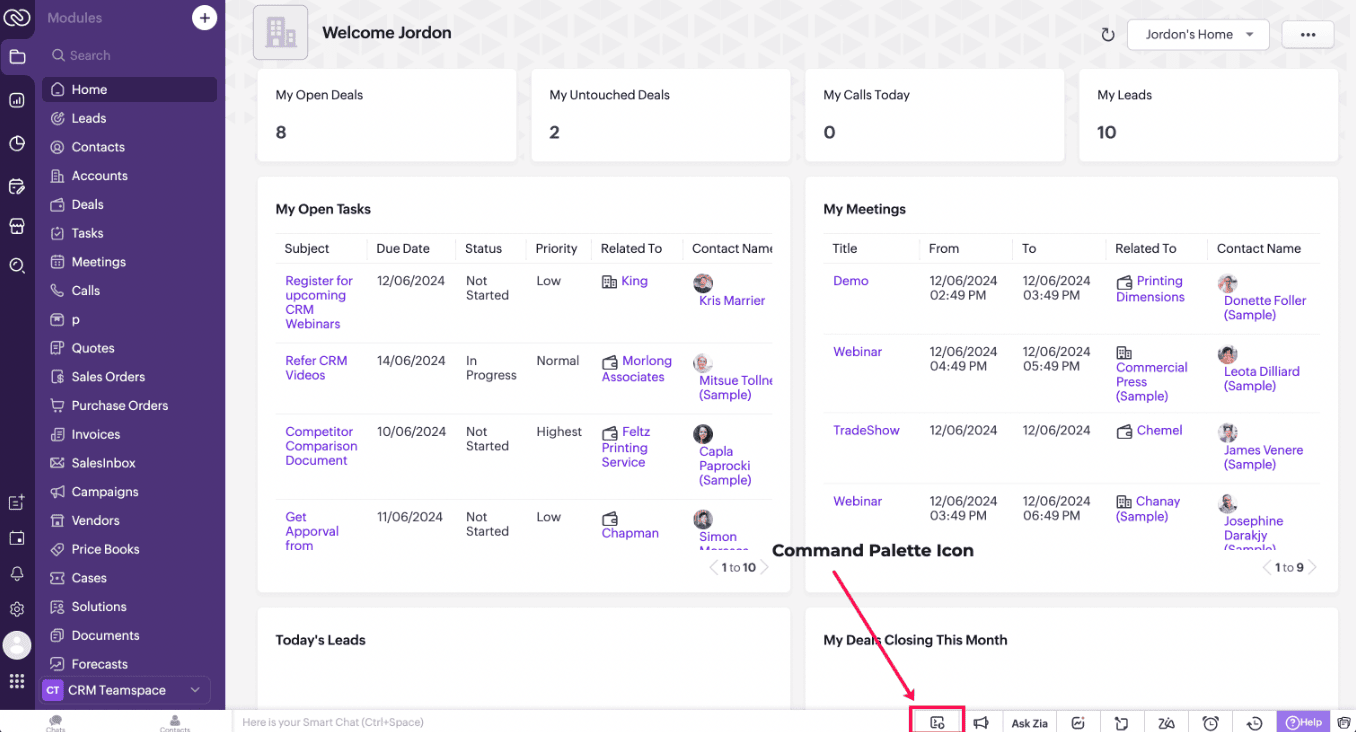
Click on the Command Palette icon in the footer of CRM and select the name of the Command that you want to trigger.
B. Using Keyboard shortcuts
You can also link each of the Commands to a shortcut key and trigger a Command using that designated shortcut key. Each user can set specific shortcuts based on individual preference and use them to trigger a Command.
Check this documentation for more details.
3. Scenario - 1
At Zylker, a financial company using Zoho CRM, Sales Advisors need a quick way to calculate EMI during customer phone calls. The solution should allow seamless access to an EMI Calculator from any page in Zoho CRM.
4. Solution
To achieve this in Zoho CRM, you need to create a Widget for EMI calculator and create a Client Script Command.
A. Create a Widget for EMI calculator
Install Zoho CLI, and follow the steps given in this document to create the Widget app folder. Then update the html, javascript, and css code as per your requirement.
index.html
<!DOCTYPE html>
<html lang="en">
<head>
<meta charset="UTF-8" />
<meta http-equiv="X-UA-Compatible" content="IE=edge" />
<meta name="viewport" content="width=device-width, initial-scale=1.0" />
<title>Document</title>
<link rel="stylesheet" href="style.css" />
</head>
<body>
<div class="loan-calculator">
<div class="top">
<h2>EMI Calculator</h2>
<form action="#">
<div class="group">
<div class="title">Amount</div>
<input type="range" min="1000" value="30000" max="50000" step="500" class="loan-amount" id="loanAmount" />
<div class="slider-label">$<span id="loanAmountValue"></span></div>
</div>
<div class="group">
<div class="title">Interest Rate</div>
<input type="range" min="5" value="6" max="100" step="1" class="interest-rate" id="interesRate" />
<div class="slider-label"><span id="interesRateValue"></span></div>
</div>
<div class="group">
<div class="title">Tenure (in months)</div>
<input type="range" min="6" max="100" step="1" value="12" class="loan-tenure" id="tenureMonth" />
<div class="slider-label"><span id="tenureMonthValue"></span></div>
</div>
</form>
</div>
<div class="result">
<div class="left">
<div class="loan-emi">
<h3>Loan EMI</h3>
<div class="value">123</div>
</div>
<div class="total-interest">
<h3>Total Interest Payable</h3>
<div class="value">1234</div>
</div>
<div class="total-amount">
<h3>Total Amount</h3>
<div class="value">12345</div>
<div class="right">
<canvas id="myChart" width="400" height="400"></canvas>
</div>
</div>
</div>
<script src="https://cdn.jsdelivr.net/npm/chart.js@3.6.2/dist/chart.min.js"></script>
<script src="https://live.zwidgets.com/js-sdk/1.2/ZohoEmbededAppSDK.min.js"></script>
<script src="main.js"></script>
</body>
</html>
Click here to view the complete code.
Once you have added the code, upload the zip file by following the below steps.
Go to Setup > Developer Space > Widgets.
Click Create New Widget and Fill in the details.
The Hosting should be "Zoho" and mention the html page of the app folder that you uploaded.

Note:
The widget should be of "button" type in order to render through a Client Script.
B. Create Client Script Commands.
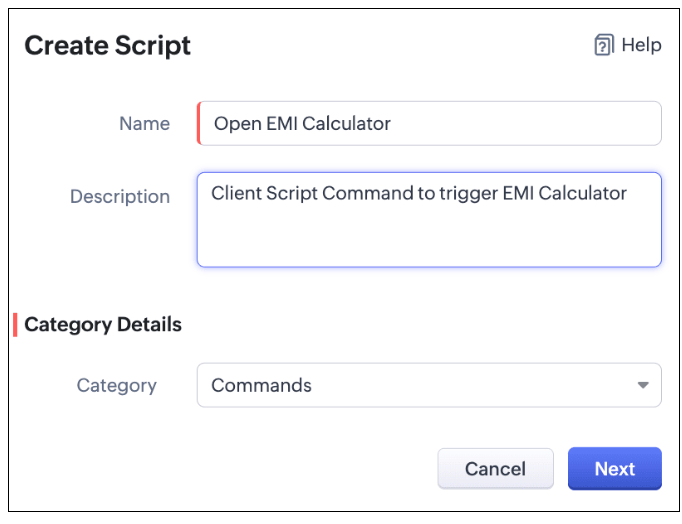
Configure a Client Script Command by specifying the Name and Description The Category should be Commands. Click Next. Click here to know how to configure a Client Script.
Enter the following script and click Save.
ZDK.Client.openPopup({ api_name: 'emi_calculator', type: 'widget', header: 'EMI Calculator', animation_type: 4, height: '750px', width: '500px', top:'100px',left: '500px' }, { data: 'sample data to be passed });
The syntax of openPopup() is as follows.
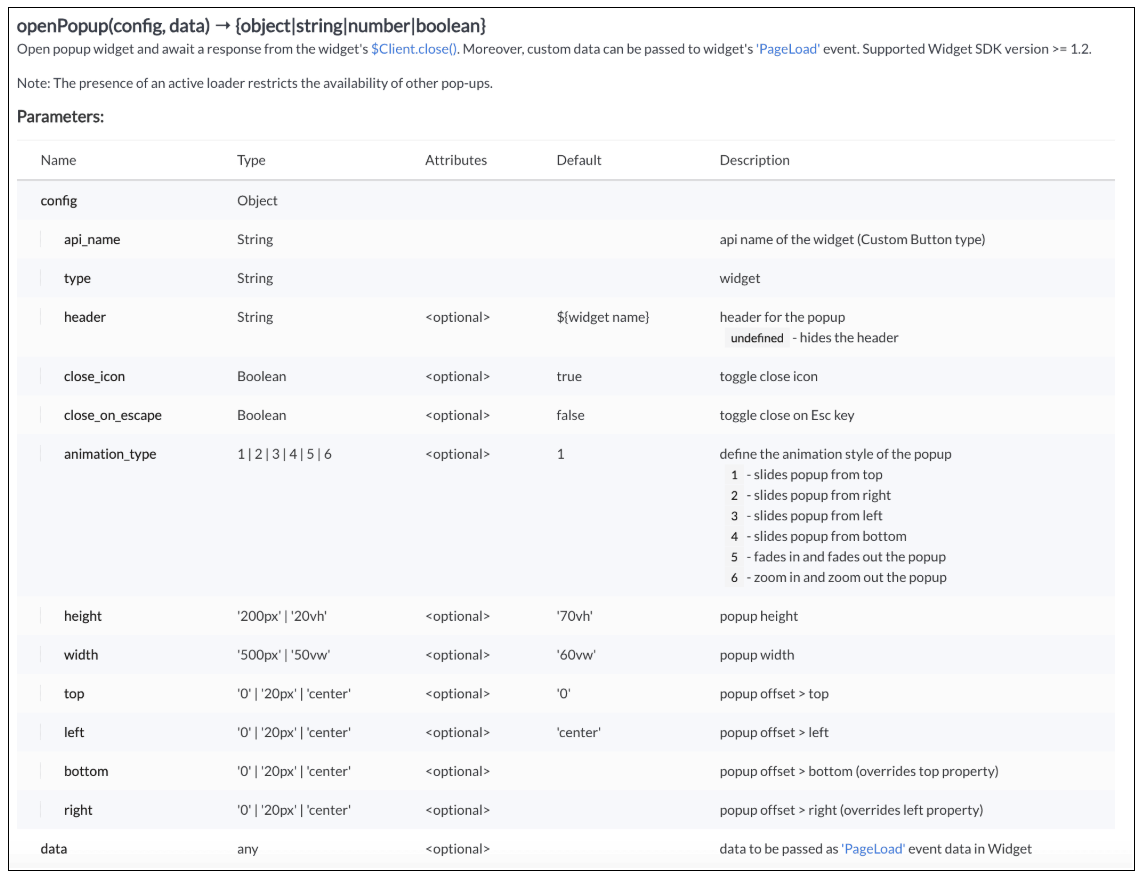
Here "emi_calculator" is the API name of the Widget,
Type is Widget,
Header is EMI Calculator,
animation type is 4 where the popup slides from the bottom.
The other parameters are optional and has default values as shown in the image.
Here is how the EMI Calculator appears as and when the salesperson needs. The user can either click on the Command Palette Icon at the footer or use a keyboard shortcut as per his convenience to open the calculator.
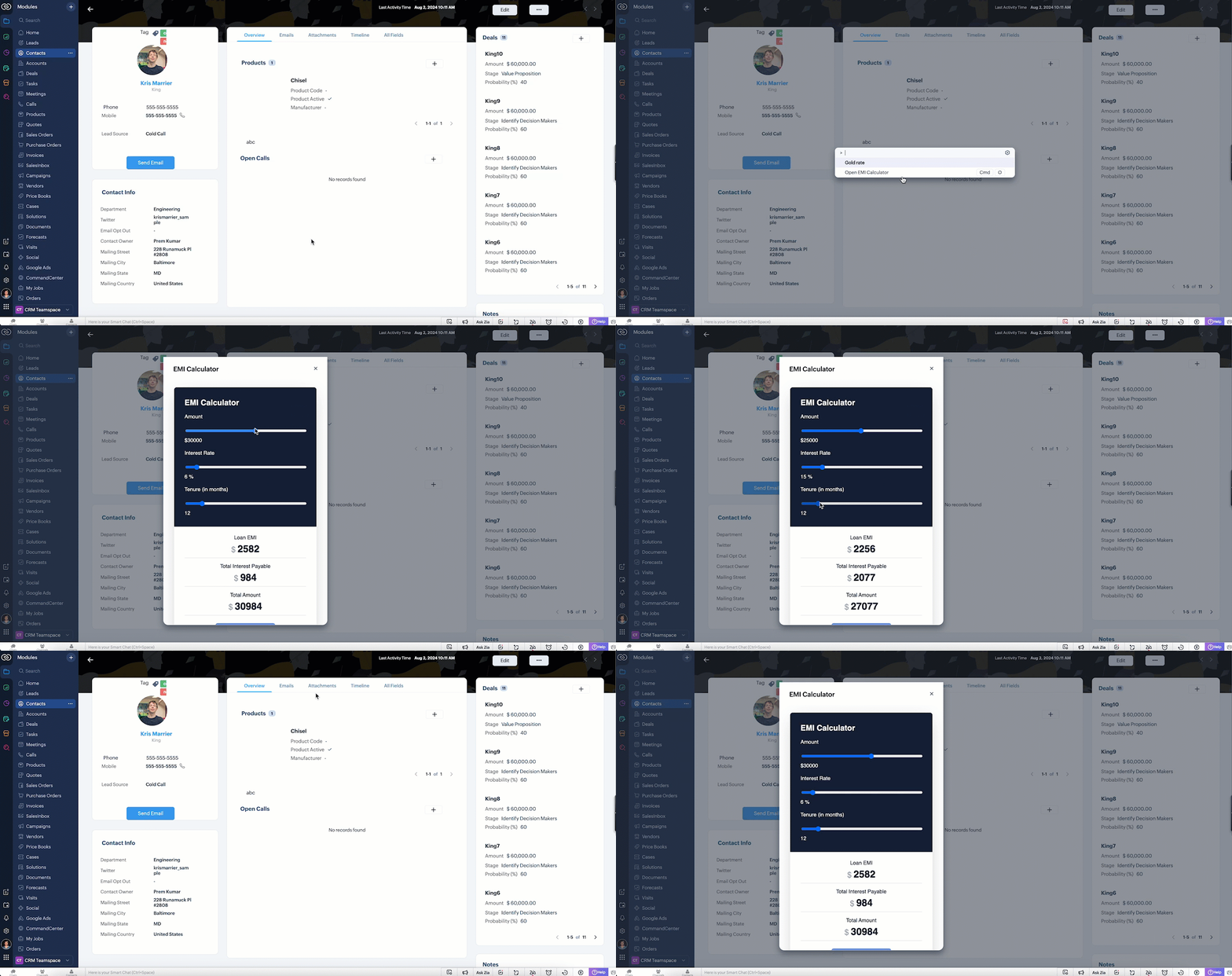
In the above gif, the keyboard shortcut is cmd O.
To customize the keyboard shortcut,
Go to Setup → General → Personal Settings. Select "Motor" from the Accessibility Tab and Click "View Shortcuts" as shown in the below gif.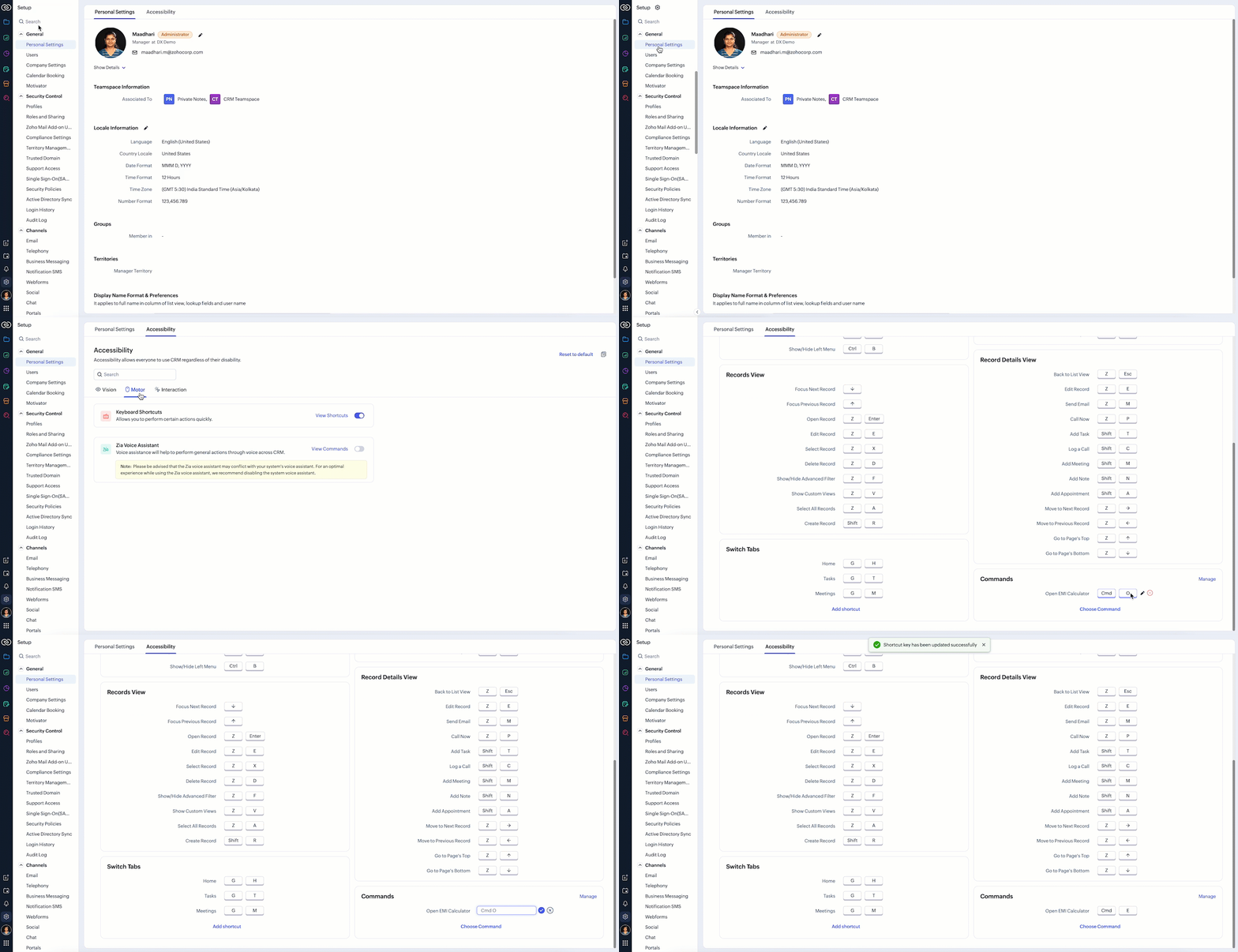
4. Scenario - 2
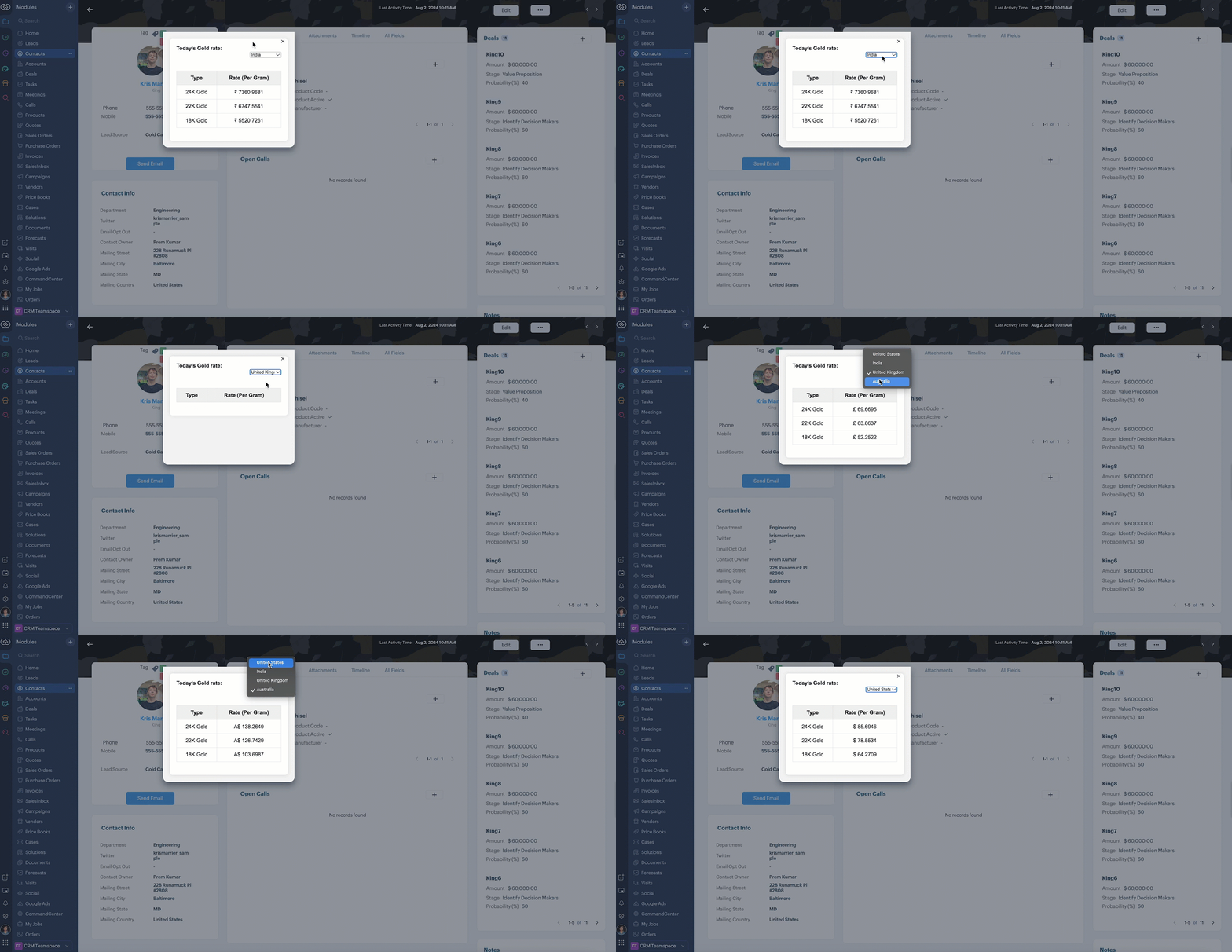
At Zylker, an international wholesale company using Zoho CRM, salespeople need a quick way to check real-time gold rates from different countries while discussing bulk orders with retailers. The solution should provide seamless access to updated, region-specific gold rates directly within the CRM interface to assist with accurate pricing decisions during customer interactions.
5. Solution
To achieve this in Zoho CRM, you need to create a Widget for EMI calculator and create a Client Script Command.
A. Create a Widget for gold rate
Install Zoho CLI, and follow the steps given in this document to create the Widget app folder. Then update the html, javascript, and css code as per your requirement.
index.html
<!DOCTYPE html>
<html>
<head>
<meta charset="UTF-8">
<script src="https://live.zwidgets.com/js-sdk/1.2/ZohoEmbededAppSDK.min.js"></script>
<div class="container">
<div style="display: flex;">
<label for="country" style="width: 70%;font-weight: bolder;">Today's Gold rate:</label>
<select id="country" onchange="updateGoldRates()" style="width: 30%;">
<option value="USD" >United States</option>
<option value="INR" selected>India</option>
<option value="GBP">United Kingdom</option>
<option value="AUD">Australia</option>
</select>
</div>
<table id="goldRatesTable">
<thead>
<tr>
<th>Type</th>
<th>Rate (Per Gram)</th>
</tr>
</thead>
<tbody>
</tbody>
</table>
</div>
<script>
const goldRatesData = {
};
const symbol = ['₹', '$', '£', 'A$'];
async function getLiveData (currency) {
var myHeaders = new Headers();
myHeaders.append("x-access-token", "goldapi-4wvh4nslzb5p0d5-io");
myHeaders.append("Content-Type", "application/json");
var requestOptions = {
method: 'GET',
headers: myHeaders,
redirect: 'follow'
};
let response = await fetch(`https://www.goldapi.io/api/XAU/${currency}`, requestOptions);
let res = await response.text();
let data = JSON.parse(res);
let desig;
if(data.currency === 'INR'){
desig = symbol[0];
}
else if(data.currency === 'USD'){
desig = symbol[1];
}
else if(data.currency === 'GBP'){
desig = symbol[2];
}
else if(data.currency === 'AUD'){
desig = symbol[3];
}
goldRatesData[`${data.currency}`] = [
{ type: '24K Gold', price: `${desig + " " + data.price_gram_24k}` },
{ type: '22K Gold', price: `${desig + " " + data.price_gram_22k}` },
{ type: '18K Gold', price: `${desig + " " + data.price_gram_18k}` }
];
};
async function updateGoldRates() {
var currency = document.getElementById("country").value;
console.log("Event:: ",currency);
const country = document.getElementById('country').value;
const tableBody = document.querySelector('#goldRatesTable tbody');
tableBody.innerHTML = '';
await getLiveData(currency);
if (country && goldRatesData[country]) {
const rates = goldRatesData[country];
rates.forEach(rate => {
const row = document.createElement('tr');
row.innerHTML = `
<td>${rate.type}</td>
<td>${rate.price}</td>
`;
tableBody.appendChild(row);
});
}
}
updateGoldRates();
ZOHO.embeddedApp.on("PageLoad",function(res){
document.getElementById('msg').innerText = res.data;
});
ZOHO.embeddedApp.init();
</script>
</body>
</html>
Once you have added the code, upload the zip file by following the below steps.
Go to Setup > Developer Space > Widgets.
Click Create New Widget and Fill in the details.
The Hosting should be "Zoho" and mention the html page of the app folder that you uploaded.
B. Create Client Script Commands
Configure a Client Script Command by specifying the Name and Description and click Next. Click here to know how to configure a Client Script.

ZDK.Client.openPopup({ api_name: 'goldrate', type: 'widget',header: undefined, animation_type: 4, height: '350px', width: '300px', top:'100px',left: '500px' }, { data: 'sample data to be passed' }); |
Click here to know more about openPopup().
Consider that the user has created the shortcut CMD G to trigger Client Script.
Here is how the Gold Rate appears as and when the salesperson used the shortcut keys CMD G.
6. Summary
We have seen,
how to use Client Script Commands
how to create keyboard shortcuts for Commands
how to view Widget as a popup using Commands
7. Related Links

Topic Participants
Maadhari M
Sticky Posts
Kaizen #198: Using Client Script for Custom Validation in Blueprint
Nearing 200th Kaizen Post – 1 More to the Big Two-Oh-Oh! Do you have any questions, suggestions, or topics you would like us to cover in future posts? Your insights and suggestions help us shape future content and make this series better for everyone.Kaizen #226: Using ZRC in Client Script
Hello everyone! Welcome to another week of Kaizen. In today's post, lets see what is ZRC (Zoho Request Client) and how we can use ZRC methods in Client Script to get inputs from a Salesperson and update the Lead status with a single button click. In thisKaizen #222 - Client Script Support for Notes Related List
Hello everyone! Welcome to another week of Kaizen. The final Kaizen post of the year 2025 is here! With the new Client Script support for the Notes Related List, you can validate, enrich, and manage notes across modules. In this post, we’ll explore howKaizen #217 - Actions APIs : Tasks
Welcome to another week of Kaizen! In last week's post we discussed Email Notifications APIs which act as the link between your Workflow automations and you. We have discussed how Zylker Cloud Services uses Email Notifications API in their custom dashboard.Kaizen #216 - Actions APIs : Email Notifications
Welcome to another week of Kaizen! For the last three weeks, we have been discussing Zylker's workflows. We successfully updated a dormant workflow, built a new one from the ground up and more. But our work is not finished—these automated processes are
Recent Topics
zoho mail non vérifié
Bonjour, Il y'a un jour que j'ai acheté un domaine et toute les tentatives pour l'associé a mon compte shopify son vaine. j'ai essayé TXT sans suite après, j'ai essayer avec CNAME sans suite. j'aurais besoin de votre assistance pour associé mon mail.Unable to send message;Reason:553 Relaying disallowed. Invalid Domain
i have facing the issue "Unable to send message;Reason:553 Relaying disallowed. Invalid Domain" if i verify domain evertthing i did but still face the same error.ZohoMail is so close to being Perfect BUT
Why don’t you have HILIGHTING???!! I've been trying to find a substitute for Edison Mail but I want & need hilighting (preferably in more than just yellow)! Is this even on your To Do list? I’m so disappointed. 🙄Override Auto Number field?
We are preparing to migrate from Salesforce. In Salesforce, we auto-generate a unique number on our Opportunities (Potentials). If the Opportunity results in a contract, we use that unique number as the Contract number. There are some situations whereUsing a third party service provider want to move directly with Zoho
Hi good day I’m currently using Zoho but I’m using a third party service provider I want to move directly with you guys I’m using Zoho email and invoices and my domain please let me know if it’s possible to move away from the third party provider my emailRequest for Assistance Regarding Email Sending Issue (554 5.1.8 - Email Outgoing Blocked)
Dear Zoho Support Team, I hope this message finds you well. I am writing to request assistance with an issue we are currently facing regarding our Zoho Mail account. Our email account, admin@tuyensinhcanuoc.com, is encountering the following error whenZoho Mail API returns empty inbox (0 messages) but webmail shows 37 unread emails
Hello, I'm experiencing a discrepancy between Zoho Webmail and the Mail API (EU region). **Setup:** - Account: EU datacenter (mail.zoho.eu) - API: Self Client OAuth2 via api-console.zoho.eu - Scopes: ZohoMail.messages.READ, ZohoMail.messages.UPDATE, ZohoMail.folders.READ,ShipStation and Zoho Inventory
Hello, I am looking to sync zoho inventory with shipstation ZOHO INVENTORY SHIP STATION Sales Order ==> create ORDERS INVOICE <== Shipments What exactly does BETA mean on the Shipstation connector? This is required for me to sign-on in the next month. Thanks in advance for your effortsE
We are trying to add our Zoho Form embed in our Elementor Page Builder. After adding Zoho Forms widget in elementor page builder it’s displaying in backend page builder but it’s giving 403 error while trying to save, as it’s not reflecting in front end.Connecting Zoho Inventory to ShipStation
we are looking for someone to help connect via API shipStation with Zoho inventory. Any ideas? Thanks. Uricustom module import.
Is there a way to import data into a custom module? Thanks RudyHEIC File Type Viewer
Hi, It would be nice to be able to click on the images in the All Entries/Reports Tables which are HEIC the same as JPG, PNG, etc. so they open in a viewer from Zoho or the Attachment Service, today HEIC requires you to download each image and open itHow to dynamically pass IDs from one API response to a second API call in Zoho DataPrep?
Hi Team, I am setting up a global consolidated reporting pipeline in Zoho Analytics (India) using Zoho DataPrep as the ETL engine. I am pulling data from multiple Zoho Books Data Centers (US, Singapore, India) thats why i used the URL Source (OAuth 2.0)Building Toppings #4 - Setting up and using connections in Bigin toppings
When building a topping to extend Bigin's functionality and connect it with third-party applications, creating and handling connections is an important step. Connections provide a secure way for your topping to authenticate and communicate with otherNeed code format to specify default values
Can someone please direct me to the code syntax or the proper translation per the instructions circled below. These instructions don't seem correct.AI Interview Insights: Turn Recorded Interviews into Quick Transcripts & Summaries
Evaluating interviews shouldn’t require replaying long recordings or taking manual notes. With AI Interview Insights, you can now review complete transcripts and AI-generated summaries of your One-way (Recorded) interviews right inside Zoho Recruit. ThisRecord payment: Payment Mode vs. Deposit To and how to "connect" them!?
How do we set up that when we choose: "Payment Mode"= Cash, then "Deposit to" is automatically set to Petty Cash, and if we choose "Payment Mode"= Check, then "Deposit to" is automatically set to Undeposited Checks, and if we choose "Payment Mode"=Grouping Undeposited Funds to Move to other accounts
In the bank option it would be nice to check what transactions in undeposited funds I want to move to other accounts. Then while checking this it can accumulate totals and created whats essentially a deposit slip. Once the transaction is moved it shouldFacing email delivery issues? Verify your domain's DNS records
Have you ever wondered why your legitimate emails are landing in the recipient’s spam folder? Or been surprised to see emails sent from your registered domain getting rejected by recipient email servers? Why does this happen? In most cases, this happensOrder of Departments in Help Desk
In the end user portal, , the departments are sorted by the date of creation of the department (or perhaps their id). Is there a way to choose the display order of the departments or at least to be able to sort them alphabetically?COGS - Account showing negetive
I have multiple COGS account and in these all there is one account is negetive so suggest why it is showing negetive value.?Create CRM Deal from Books Quote and Auto Update Deal Stage
I want to set up an automation where, whenever a Quote is created in Zoho Books, a Deal is automatically created in Zoho CRM with the Quote amount, customer details, and some custom fields from Zoho Books. Additionally, when the Sales Order is converted%PaymentLink%
Does not work. Software creates a BAD link. ....and yes payment options are turned on. Link on the invoice pdf once opened will work but this template is a joke.Google Photos
I am hoping that my question already has a fix. I current have Google synced accounts that I want to get away from. One in particular on is Google photos. Is there any software, or 3rd parties that I can join to back my photos up straight to specifically designated file in the ZOHO cloud that's tied to Docs? Please advise... MikeZoho Books Items Categorisation/Grouping/Folder
Is there a way to do items categorisation? a folder structure? Product Type A - Option 1/2/3 Product Type B - Option 1/2/3 Current problem : I have more than 50 items on the list, its hard for team to navigate.Cash payments before invoice date
We have been using zoho books for our hospitality business for some time and have been very happy with the system. However in 2025 an update was pushed through and we are now not able to record payments for invoices before the invoice date. the case scenarioCopy / Duplicate Workflow
I have workflows setup that are very similar to each other. We have a monitoring system watching servers, and all notifications - no matter what client it is about - will come from a noreply@ address which is not very helpful in having it auto assigned to the right account. I have setup a workflow that will change the contact name of the ticket (currently it would say noreply@) to the correct customer which is based on the subject line, as that mentions which server the alert it is about. I needTransfer between two customers (Peters Rental account to Peters Private account)
we are a Property Management company. Our customers have to accounts (registered as two customers - Peter Rental and Peter Private On the rental account all income and costs fron rental activities are noted. On the private account all private are notedAutomation#18: Automatically Fetch Values from Contacts to the Tickets Module
Hello Everyone, Welcome to this week's edition, where you can seamlessly sync fields from the Contacts to the Tickets module. For efficient business operations, it's crucial to have details mapped across different modules. Zylker Secure offers antivirusCharge multiple invoices
We use auto-charge/recurring invoicing for 100's of clients. If we create a single manual invoice we can charge it to the credit card for these clients with the CC added to their recurring invoices. If a client has multiple outstanding invoices, is there a way to make one charge for all of the invoices instead of a separate charge to the cc for each invoice?Handling/tracking escalation management in Zoho
Hi all, I am working on finding a tool to register and track our escalation management process. Specifically, this is about client escalations, typically related to project delivery issues. The idea is that we could have some sort of form with core questionsGlobal Choice List share ownership
I have created several forms that use one or more Global Choice Lists. These lists have been published to Org. I would like to allow one or more admins to edit the choices in these lists. Any help appreciated. GeoffSetting up property management in Zoho Books
Hi, I run a property management business that manages property complexes. There are multiple owners, some owning more than one property on the same complex. My role is to manage the fees they pay for maintenance of common areas, such as the swimming poolHow to prevent users from switching price lists in an order?
Hi, I have Zoho Finance integrated with Zoho CRM. My team will be placing orders through the CRM using the Finance module. When creating a new customer I will assign it a price list, I don't want the sales rep to switch to a different Price List, otherUnable to Change Display Name for my outlook mail ID
Hello, I recently added my personal outlook mail to Zohomail (in the web interface) using POP3 options. I tried to change the display name of the outlook account, but it changes for a brief moment and reverts back to the old name. Kindly help me withMollie Connect in Zoho Books
Have noticed that Zoho Books is missing the most popular payment provider in Europe: Mollie. Knowing that Mollie has a solid Java SDK, why is this not yet implemented in Zoho Books for European customers? More info: https://docs.mollie.com/oauth/ovUnable to change Lookup field from Multi Select to Single Select
I am trying to change a Lookup field in my Zoho Creator form from Multi Select to Single Select, but I am unable to find any option to do this.Simple Callback Notifications Needed
My team are terrible at remembering their CRM callbacks, often due to how long in the future they are set for. Is there a way i can set an e-mail notification for when a callback is due? For example we set it for 9am one day and five minutes before theyPersonal Data (RODO), Cookies / Trackers - ePrivacy
I have noticed several issues that should be addressed on the customer support page. Zoho Desk provides the support portal, but it currently lacks the following options: A GDPR and personal data processing consent checkbox before logging in, located inHow to set a multi-lookup field as mandatory?
Next Page