Enhancements to finance suite integrations

Enhancements to finance suite integrations

Alert
Update on the migration (October 28, 2025):

Starting this week (October 29 tentatively), we’ll begin migrating Zoho CRM users to Zoho Books as integration users. This means actions will now run under each user’s own Zoho Books access, instead of the admin’s.

As an admin, you can also choose to migrate users early from the Integration Settings page in Zoho CRM.

(Refer to the announcement for details).
Alert
Update:

Based on your feedback, we’ve updated the capabilities for integration users. In addition to the Estimates module, they can now create, view, and edit records in all the finance modules including Sales OrderInvoicesPurchase Order.

We're also running a migration and all existing users who have migrated already will receive an email once this change goes live.

Last modified on: May 15, 2025
Info
Please note that Zoho Subscriptions is now Zoho Billing.
Hello everyone!
 
We're delighted to announce some enhancements we've recently made to the finance suite integration with Zoho CRM. These improvements focus primarily on two major integrations:
  • Zoho Books
  • Zoho Subscriptions
We've implemented these updates carefully based on the valuable feedback we've received to ensure that the user experience is smoother. So without further ado, let's dive into the details!

Enhancements to the Zoho Books integration

We've refined some of the integrated features between Zoho CRM and Zoho Books to address previous challenges and enhance user interactions.

What were the challenges? 
  • Users were unable to send emails using their email addresses.
  • Zoho Books sometimes generated inaccurate reports during audits because records created from Zoho CRM weren't being updated with the correct user names in Zoho Books.
  • User-level permissions, field-level permissions and processes such as the Approval process in Zoho Books weren't being properly handled in Zoho CRM.
  • Users who did not have proper authorization to use Zoho Books were able to create transactions from CRM by using admin's permissions.
All of these challenges arose because the integration operated exclusively via the integration owner/admin's authentication (only the admin-level permissions in Zoho Books are handled, while other user-level permissions are not accounted for), which meant that any actions performed in CRM were recorded under the name of the admin in Books.

What have we enhanced? 

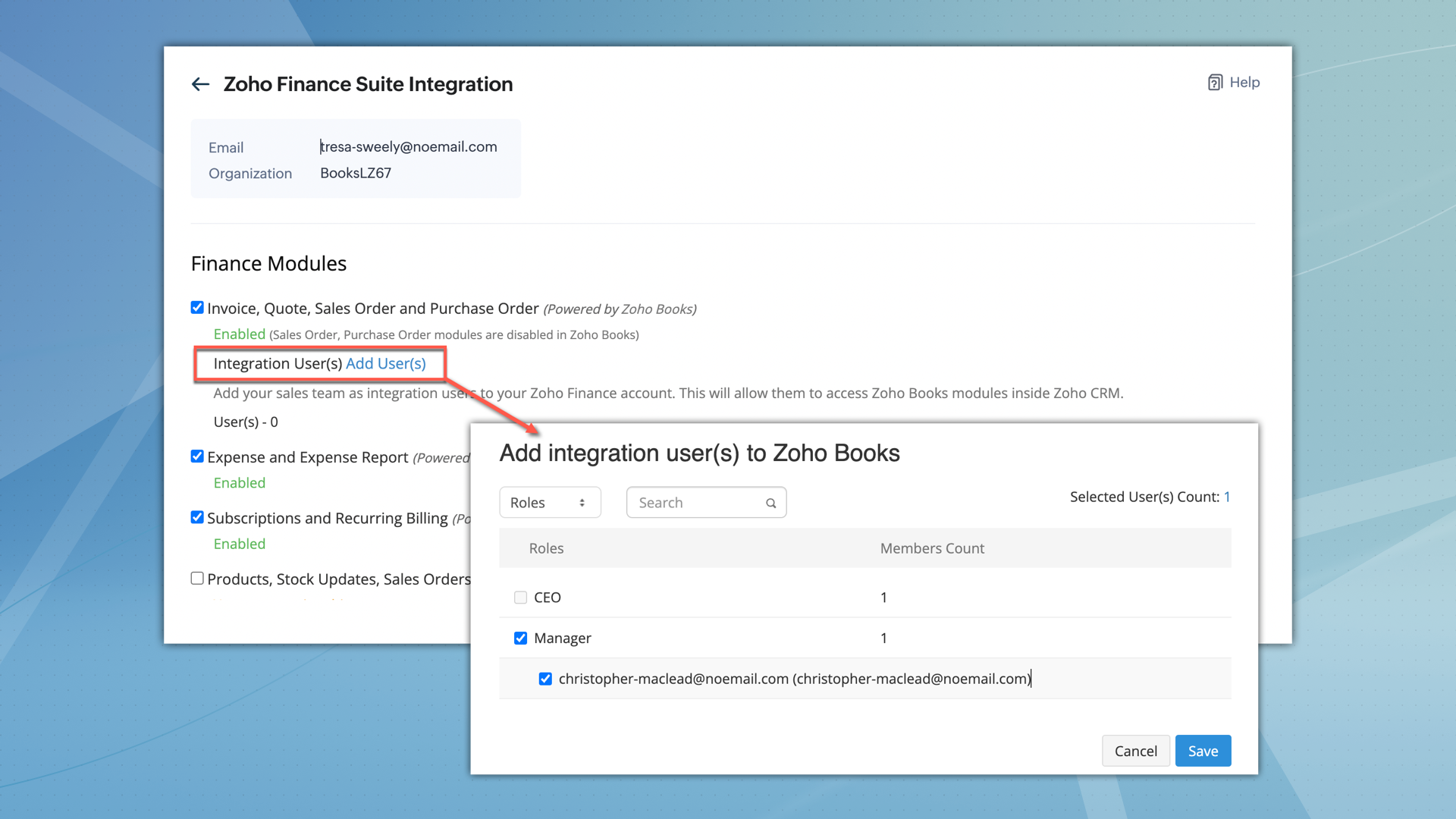
1. Introducing Integration users 

Sales personnel typically manage tasks up to the estimates stage in a sales process. Therefore, CRM users who have primarily worked on estimates modules and have not engaged in subsequent activities like invoices can now be added as Integration Users from CRM to Zoho Books without the need for new licenses in Books. In other words, integration users in Zoho CRM are standard CRM users whose admins can grant specific permissions to carry out certain tasks within the Estimates module, as required.


Info
What permissions do integration users have? 
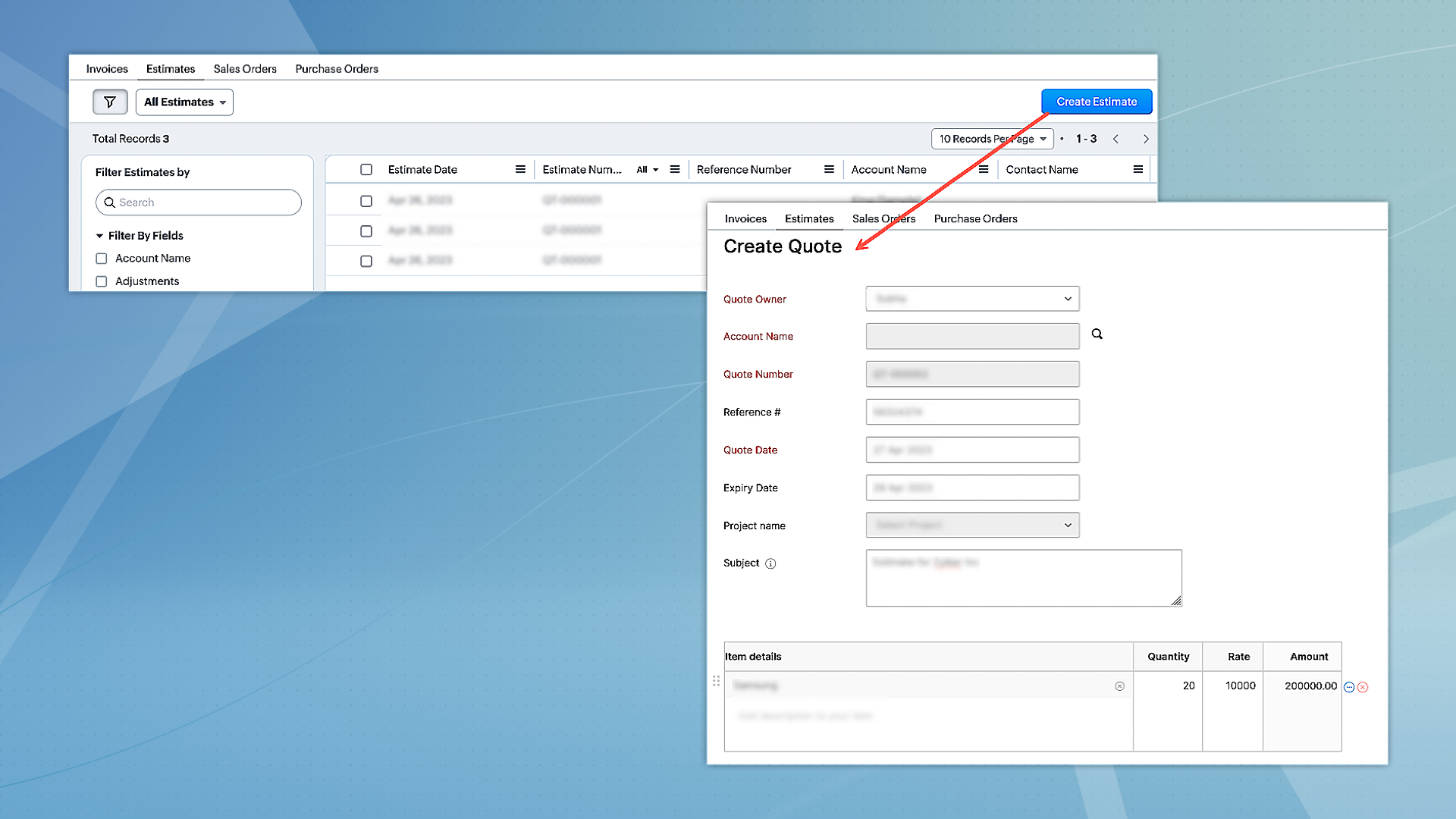
  • After being added, integration users can perform all operations, including creating, viewing, and editing records within the Estimates module.
    Notes
  • However, they can only access other modules, such as Invoices, Sales Orders, and Purchase Orders in view mode.
  • Integration users will not have direct access to Zoho Books.
  • When integration users are part of multiple finance suite products, their permissions are collectively applied within CRM.

2. Unified permissions between Zoho CRM and Zoho Books  

For users with access to both Zoho CRM and Books, the integration will now ensure proper management of permissions, covering all aspects. This means if a user is restricted from certain actions or features in Zoho Books, these restrictions will be consistently applied in CRM as well. Previously, users could access and interact with features in CRM that they were not authorized for in Zoho Books, leading to discrepancies. This enhancement will eliminate such inconsistencies, ensuring uniform permission management and preventing unauthorized access or actions across both platforms.

Alert
Migration for existing users
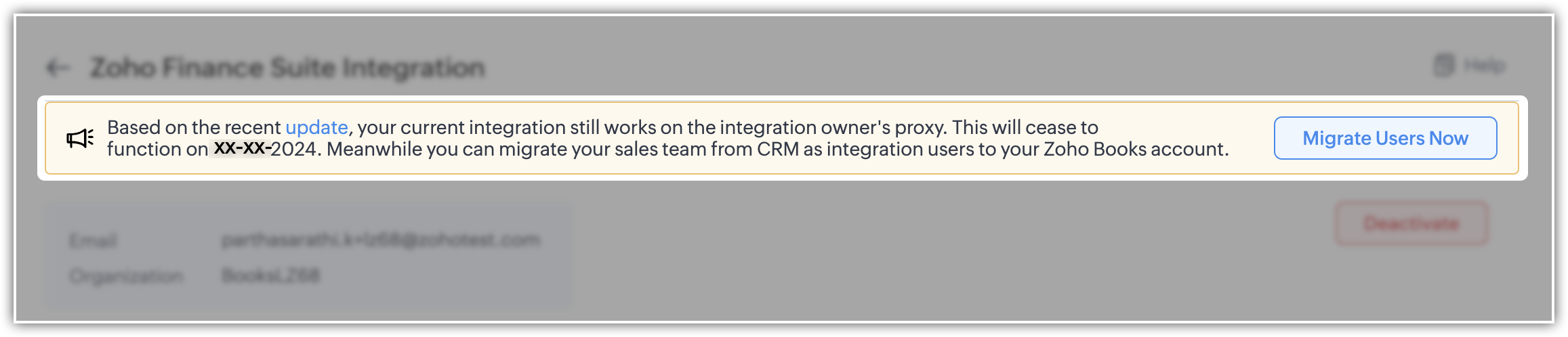
  • For the integration between Zoho CRM and Zoho Books to function seamlessly, and to maintain uniform user permissions,existing users have the option to migrate immediately.
  • Alternatively, they have a three-month window to complete the migration. After this period, users will be automatically added as 'Integration Users' based on their utilization of the finance module.
    Notes
  • To facilitate this, select the "Migrate Users" option to view and manage users common to both systems. Upon clicking "Save," the backend migration initiates. Following this, the integration adheres to each user's designated scope and permissions.
  • Users can migrate up to 1,000 integration users initially. If they need to migrate more, they can contact the support team for additional help.
  • Users who are already part of Zoho Books can't be added as integration users.
Please note that for new sign-ups, 'Integration users' will be available by default and they can set it up during the initial integration setup process.

Enhancement to the Zoho Subscription integration

Currently, when Zoho Subscription is integrated with CRM, it automatically adds Zoho Subscription as a related list in the Contacts and Accounts modules. You can view subscription details in a pop-up (iframe). Although users can create new subscriptions, there is a limitation on creating subscription-based reports and dashboards.
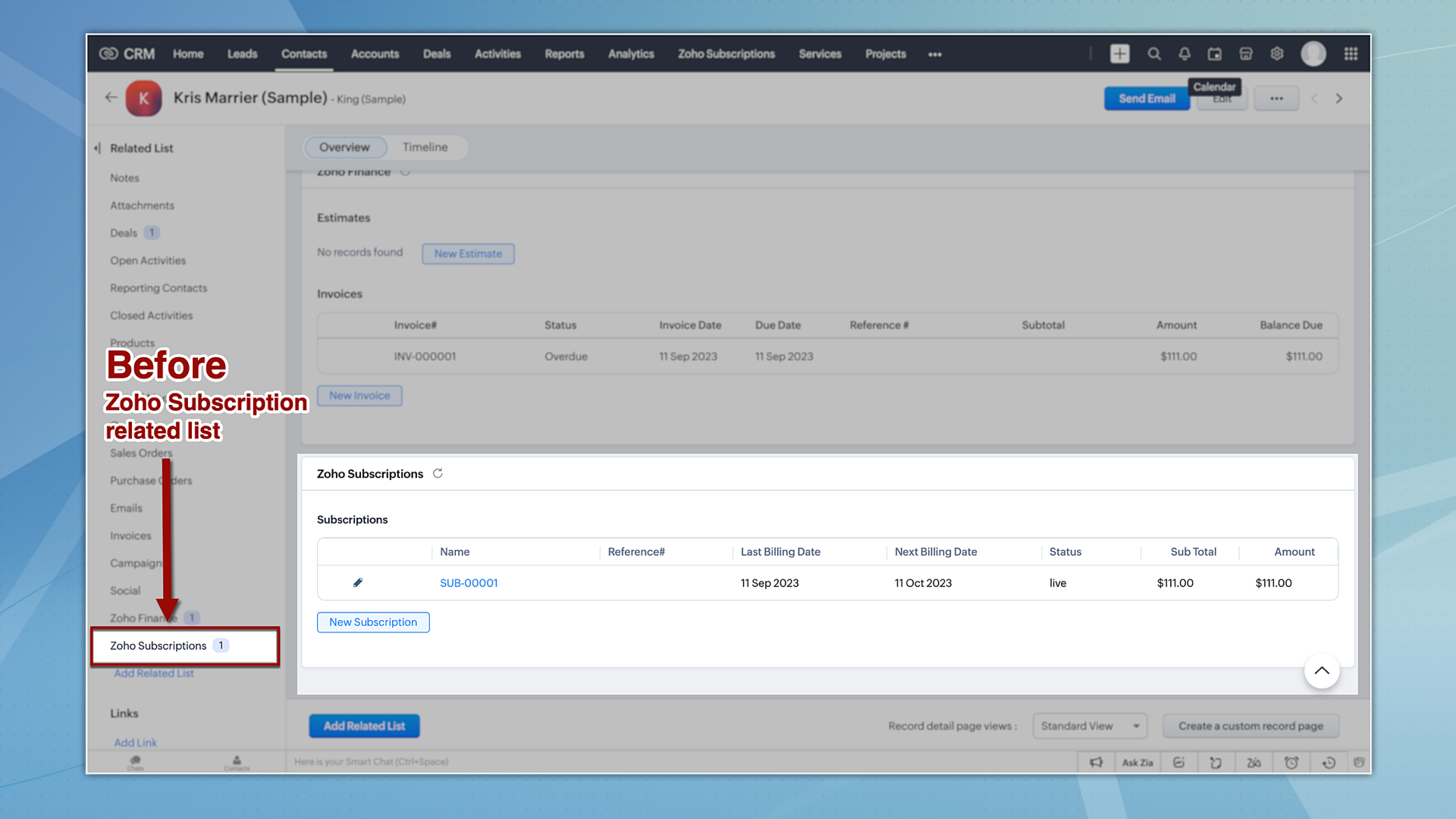


Now let's take a quick look at the enhancements made to the Zoho Subscription integration.

1. Introducing the Zoho Subscription Module

Zoho Subscriptions will now be available as a module in CRM, accessible to users with appropriate permissions. With this update, users now can generate reports based on Zoho Subscriptions data.
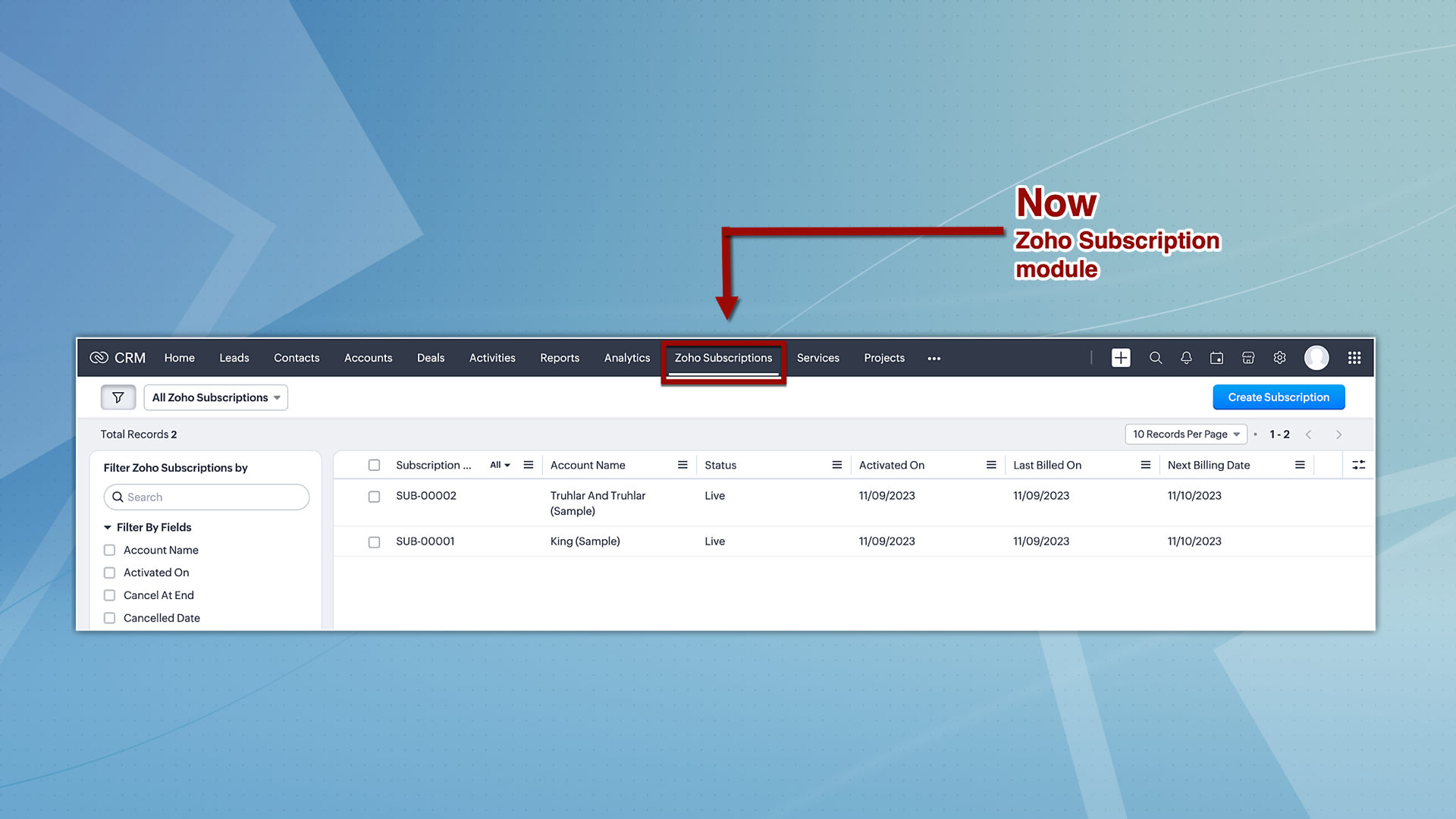


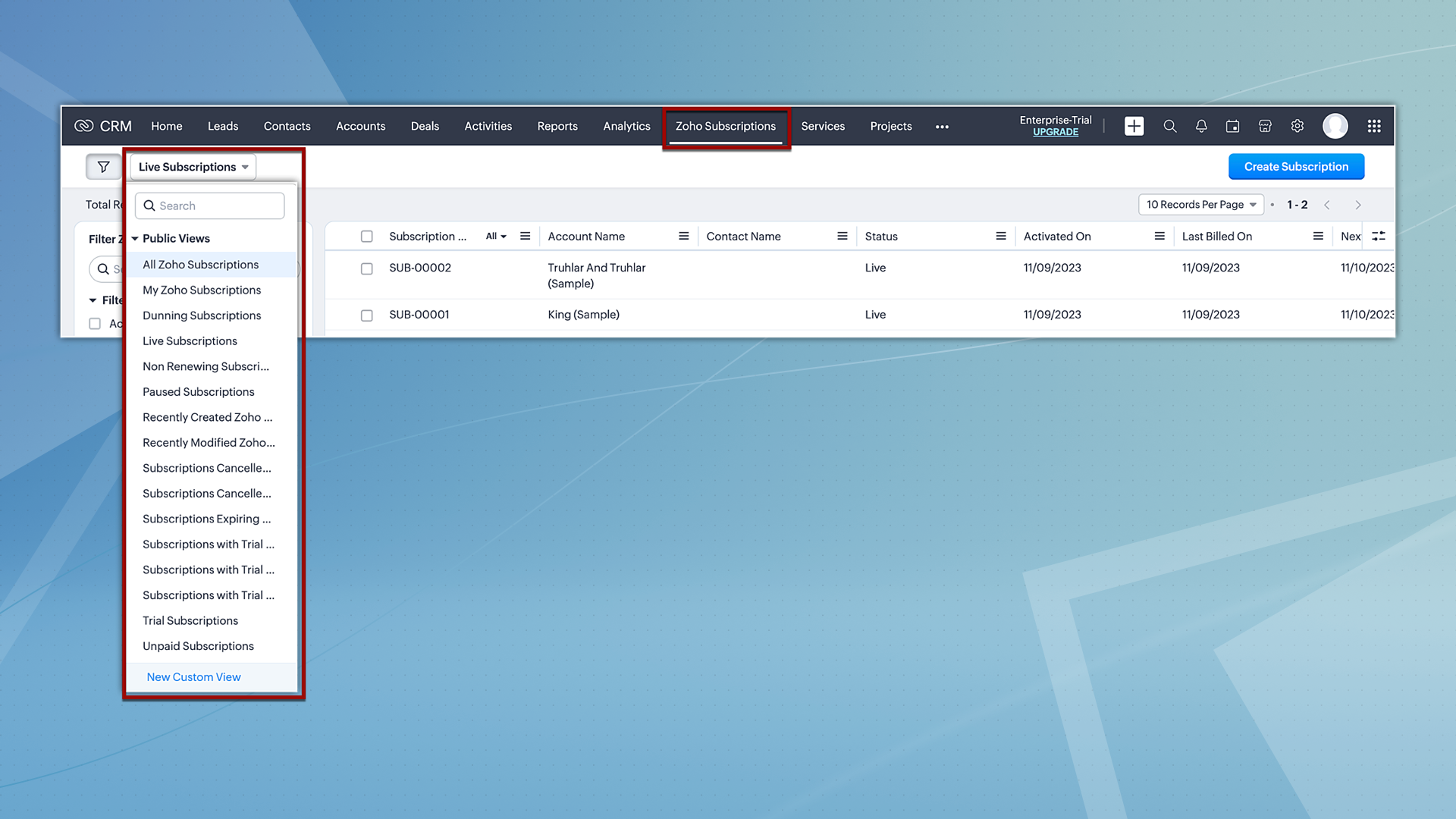
Hereafter, Zoho Subscriptions will be displayed both as a related list and as a module. Users with subscription permissions can currently create and view records in related lists; however, moving forward, they will be able to view and create records from the subscription module as well. Additionally, users will also have the option to view subscription records based on the pre-defined custom views.


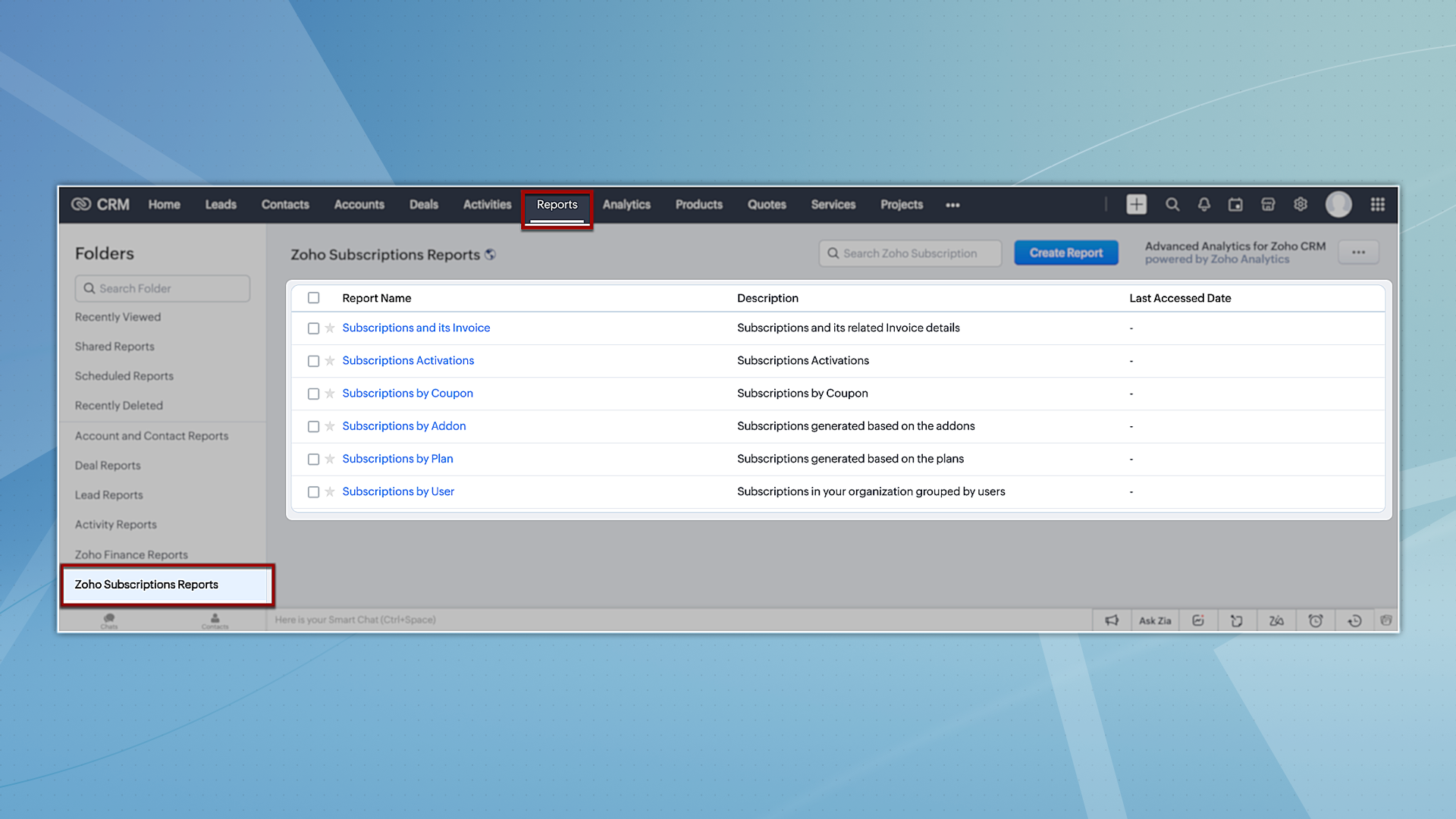
2. Reports and analytics for subscriptions 

Zoho CRM offers report and analytical dashboard presets that users can adjust as needed to create personalized reports. In turn, this allows users to gain a better understanding of their customers and track key performance metrics, enabling them to make more informed decisions.
 
To try out system-defined reports based on Zoho Subscriptions, you can navigate to the Reports module and select any of the reports available under the Zoho Subscription Reports folder.


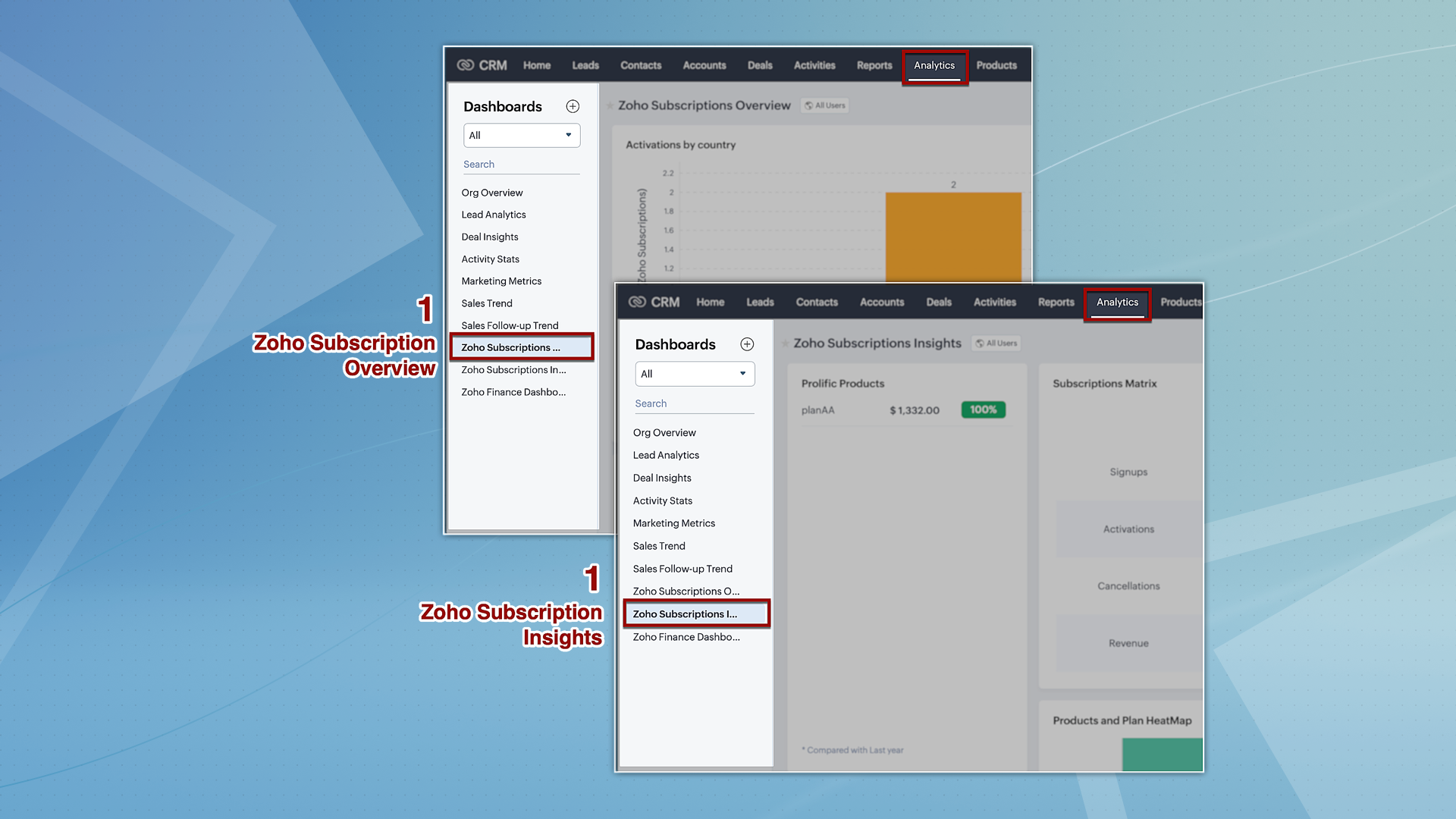
However, for analytics, we're providing two dashboards: Zoho Subscription Overview and Zoho Subscription Insights. You can navigate to the Analytics module and find these dashboards by default on the left panel.


3. Streamlined user permissions

The integration between Zoho CRM and Zoho Subscriptions, which used to be controlled by integration owner/admin permissions, will now operate based on the current users' scope. This guarantees uniformity in user permissions across both platforms, preventing users from accessing CRM features that they do not have authorization for in Zoho Subscriptions.
 
That's all we have for the enhancements in this edition. We'll keep you posted on further updates. Please feel free to share your thoughts and feedback in the comments below.
 

Release Plan: 
  • These enhancements are being rolled out in phases and are now available to all users across all data centres, with the exception of the US DC, where they are currently available only to organizations on editions below Enterprise
Thanks!
Nizamuddin
IdeaP.S. We would like to acknowledge the significant contributions and ongoing recommendations provided by our MVP, @Kevin Flynn. His insights – shared in the community forum – have been instrumental in addressing challenges related to users experiencing difficulties in sending emails with their addresses, as well as issues concerning user and field-level permissions.

    • Recent Topics

    • Deprecation Notice: OpenAI Assistants API will be shut down on August 26, 2026

      I recieved this email from openAI what does it means for us that are using the integration and what should we do? Earlier this year, we shared our plan to deprecate the Assistants API once the Responses API reached feature parity. With the launch of Conversations,
    • Capture Last check-in date & days since

      I have two custom fields on my Account form, these are "Date of Last Check-In" and "Days Since Last Contact" Using a custom function how can I pull the date from the last check-in and display it in the field "Date of Last Check-In"? and then also display the number of days since last check-in in the "Days SInce Last Contact" field? I tried following a couple of examples but got myself into a bit of a muddle!
    • Why is the ability Customize Calls module so limited?

      Why can't I add additional sections? why can't I add other field types than the very limited subset that zoho allows? Why can I only add fields to the outbound/inbound call sections and not to the Call Information section?
    • Zoho Desk - Upsert Ticket

      Hi Desk Team, It is common to request more information from end-users. Using forms is a great way to ensure all the required information is collected. It would be great if there were an "upsert" option on the Zoho Form -> Zoho Desk integration which would
    • CRM gets location smart with the all new Map View: visualize records, locate records within any radius, and more

      Hello all, We've introduced a new way to work with location data in Zoho CRM: the Map View. Instead of scrolling through endless lists, your records now appear as pins on a map. Built on top of the all-new address field and powered by Mappls (MapMyIndia),
    • Enhance Appointment Buffers in Zoho Bookings

      There was previously a long-standing feature request related to enhancing the way appointment buffers work in Zoho Bookings, but it looks like the original post has been deleted. I am therefore adding a new request that Zoho Bookings adjust how appointment
    • Subscriptions for service call

      So we install products and we want to offer a service contract for the customers yearly service calls to be billed monthly. So ideally at some point we want to email them a quote for their needs. WE will choice it our end based on the equipment. It would
    • Connection to other user

      Zoho Cliq handles sharing of Custom OAuth Connections that require individual user logins.
    • How to invite friends on other social media platforms to one of my group chats in arattai?

      Hello, I have formed chat groups in arattai. I want to invite my friends on other social media platforms like WhatsApp/ FB to one of my groups. Different friends would be invited to different groups. How to share an invite link of one of my groups to
    • Cliq does not sync messages after Sleep on Mac

      I'm using the mac app of Cliq. When I open my mac after it was in sleep mode, Cliq does not sync the messages that I received. I always have to reload using cmd + R, which is not what I want when using a chat application.
    • Creator Offline

      We had online access setup and working on our iphones. We have just set it up on an 'Android Tablet' and it is not downloading all the images? We use it to show customers our catalogue. Any ideas. Offline components all setup on both devices
    • Optimum CRM setup for new B2B business

      Can some advise the most common way to setup Zoho CRM to handle sales for a B2B company? Specifically in how to handle inbound/outbound emails. I have spent hours researching online and can't seem to find an accepted approach, or even a tutorial. I have
    • Facing Issues with Sites Mobile font sizes

      my page renediaz.com is facing issues mobile view, when i try to lower font sizes in home page, instead of changing the size, it changes the line space
    • Does the Customer “Company Name” field appear anywhere in the Zoho Books UI outside of PDFs?

      Hi everyone, I’m trying to understand how the Company Name field is actually used in Zoho Books. There is a Company Name field on the customer record, but when viewing transactions like a Sales Order in the normal UI (non-PDF view), that field doesn’t
    • Set expiration date on document and send reminder

      We have many company documents( for example business registration), work VISA documents. It will be nice if we can set a expiry date and set reminders ( for example 90 days, 60 days, 30 days etc.,) Does Zoho workdrive provide that option?
    • Analytics : How to share to an external client ?

      We have a use case where a client wants a portal so that several of his users can view dashboards that we have created for them in Zoho Analytics. They are not part of our company or Zoho One account. The clients want the ability to have user specific,
    • Automatically Update Form Attachment Service with Newly added Fields

      Hi, When I have a Form Setup and connected to a 3rd Party Service such as OneDrive for Form Attachments, when I later add a new Upload Field I have to remove and redo the entire 3rd Party Setup from scratch. This needs to be improved, such as when new
    • Zoho Sheet for Desktop

      Does Zoho plans to develop a Desktop version of Sheet that installs on the computer like was done with Writer?
    • Payroll and BAS ( Australian tax report format )

      Hello , I am evaluating Zoho Books and I find the interface very intuitive and straight forward. My company is currently using Quickbooks Premier the Australian version. Before we can consider moving the service we would need to have the following addressed : 1.Payroll 2.BAS ( business activity statement ) for tax purposes 3.Some form of local backup and possible export of data to a widely accepted format. Regards Codrin Mitin
    • Zoho Desk API - Send Reply to CUSTOMERPORTAL

      Hello! I'll try to send a reply to Customer Portal, But the response is 500 (INTERNAL_SERVER_ERROR in service response). {"Error":"{\"errorCode\":\"INTERNAL_SERVER_ERROR\",\"message\":\"An internal server error occurred while performing this operation.\"}"}
    • Python - code studio

      Hi, I see the code studio is "coming soon". We have some files that will require some more complex transformation, is this feature far off? It appears to have been released in Zoho Analytics already
    • Dheeraj Sudan and Meenu Hinduja-How do I customize Zoho apps to suit my needs?

      Hi Everyone, I'm Meenu Hinduja and my husband Dheeraj Sudan, run a business. I’m looking to tweak a few things to fit my needs, and I’d love to hear what customizations others have done. Any tips or examples would be super helpful! Regards Dheeraj Sudan
    • From Zoho CRM to Paper : Design & Print Data Directly using Canvas Print View

      Hello Everyone, We are excited to announce a new addition to your Canvas in Zoho CRM - Print View. Canvas print view helps you transform your custom CRM layouts into print-ready documents, so you can bring your digital data to the physical world with
    • Zoho Books Payroll

      How am I supposed to do payroll and pay my employees with Zoho Books? I think it's pretty strange that an accounting software doesn't have the ability to perform one of the most common functions in business; paying your employees. Am I missing something,
    • Layout Rules Don't Apply To Blueprints

      Hi Zoho the conditional layout rules for fields and making fields required don't work well with with Blueprints if those same fields are called DURING a Blueprint. Example. I have field A that is used in layout rule. If value of field A is "1" it is supposed to show and make required field B. If the value to field A is "2" it is supposed to show and make required field C. Now I have a Blueprint that says when last stage moves to "Closed," during the transition, the agent must fill out field A. Now
    • validation rules doesn't work in Blueprint when it is validated using function?

      I have tried to create a validation rule in the deal module. it works if I try to create a deal manually or if I try to update the empty field inside a deal. but when I try to update the field via the blueprint mandatory field, it seems the validation
    • Sort Legend & stacked bar chart by value

      I'd love to see an option added to sort the legend of graphs by the value that is being represented. This way the items with the largest value in the graph are displayed top down in the legend. For example, let's say I have a large sales team and I create
    • Is It Possible to Convert a Custom Module to a Quote?

      I recently created a custom module in our CRM environment for RFQs so that our sales team can submit quote requests directly in Zoho rather than by email/phone. This allows for a cleaner overall process, minimizing potential errors and potentially encouraging
    • All new Address Field in Zoho CRM: maintain structured and accurate address inputs

      The address field will be available exclusively for IN DC users. We'll keep you updated on the DC-specific rollout soon. It's currently available for all new sign-ups and for existing Zoho CRM orgs which are in the Professional edition. Latest update
    • How can Data Enrichment be automatically triggered when a new Lead is created in Zoho CRM?

      Hi, I have a pipeline where a Lead is created automatically through the Zoho API and I've been trying to look for a way to automatically apply Data Enrichment on this created lead. 1) I did not find any way to do this through the Zoho API; it seems like
    • Client Side Scripts for Meetings Module

      Will zoho please add client side scripting support to the meetings module? Our workflow requires most meeting details have a specific format to work with other software we have. So we rely on a custom function to auto fill certain things. We currently
    • Proposal: Actionable API Error Messages to Reduce Support Ticket Volume

      I've encountered a long-standing frustration with how Zoho Creator's API communicates errors to developers, and I'm hoping the Zoho team can address this in a future update. This issue has persisted for over 9 years based on community discussions, and
    • Zoho CRM - Option to create Follow-Up Task

      When completing a Zoho CRM Task, it would be very helpful if there was an option to "Complete and Create Follow-Up Task" in the pop-up which appears. It could clone the task you are closing and then show it on the screen in edit mode, all the user would
    • Dynamic Field Folders in OneDrive

      Hi, With the 2 options today we have either a Dynamic Parent Folder and lots of attachments all in that one folder with only the ability to set the file name (Which is also not incremented so if I upload 5 photos to one field they are all named the same
    • Drag 'n' Drop Fields to a Sub-Form and "Move Field To" Option

      Hi, I would like to be able to move fields from the Main Page to a Sub-Form or from a Sub-Form to either the Main Page or another Sub-Form. Today if you change the design you have to delete and recreate every field, not just move them. Would be nice to
    • File Conversion from PDF to JPG/PNG

      Hi, I have a question did  anyone every tried using custom function to convert a PDF file to JPG/PNG format? Any possibility by using the custom function to achieve this within zoho apps.  I do know there are many third parties API provide this with
    • Allocating inventory to specific SO's

      Is there a way that allocate inventory to a specific sales order? For example, let's say we have 90 items in stock. Customer 1 orders 100 items. This allocates all 90 items to their order, and they have a back order for the remaining 10 items which could
    • Cliq iOS can't see shared screen

      Hello, I had this morning a video call with a colleague. She is using Cliq Desktop MacOS and wanted to share her screen with me. I'm on iPad. I noticed, while she shared her screen, I could only see her video, but not the shared screen... Does Cliq iOS is able to display shared screen, or is it somewhere else to be found ? Regards
    • Pull cells from one sheet onto another

      Hello all! I have created an ingredients database where i have pricing and information and i want to pull from that database into a recipe calculator. I want it to pull based on what ingredient I choose. The ingredients database has an idea and i want
    • Closing the Loop: Why Lookup Asymmetry is Harming Data Integrity in Creator

      TL;DR: Lookup fields allow users to add new related records inline via the "+" icon, but there's no equivalent ability to edit an existing related record without navigating away and losing form context. Adding a native "Edit" icon—with automatic User
    • Next Page