Kaizen #175 - Leverage Settings Widget for Zoho CRM Extensions

Kaizen #175 - Leverage Settings Widget for Zoho CRM Extensions


Howdy, innovators!

Welcome back to a fresh week of Kaizen.

This week, we will delve into configuring a Settings widget in Zoho CRM for the effective functioning of extensions. It centralizes around key configurations that will be carried out to various integrations in an extension. A user-friendly settings widget enhances the usability and flexibility of your extensions. 

Why use a Settings Widget?

A Settings Widget plays a crucial role in making extensions user-friendly and adaptable to specific business needs. Following are a few key advantages of using the settings widget:
  • Seamless Setup Post-Installation: Users can configure critical parameters right after installing the extension.
  • Dynamic Customization: Users can revisit and modify configurations at any time, ensuring that the extension adapts to changing needs without re-installation or development
  • Improved User Experience: Allows the end-users to control how the extension interacts with their workflows and data.
  • Enhanced Control: Provides an overview and centralized control, making maintenance, troubleshooting, and updates simpler and faster.

Business Scenario: Notification Settings for Lead Import Extension

Let’s take a real-world use case to understand the value of this settings widget.

Imagine an organization named Zylker, using Zoho CRM along with a lead import extension. This extension pulls in leads from multiple sources like web forms, social media, or third-party marketing tools.

Requirement

Whenever a new lead enters a Zoho CRM organization through this extension, the sales team wants to receive an instant notification on a specific Zoho Cliq channel for that organization. This ensures they never miss a lead. 

Solution

By adding a Settings Widget to the extension, users can:

> Select a Preferred Zoho Cliq Channel: From the settings page, users can choose the channel where notifications should be sent.

> Modify the Channel Anytime: Based on team restructuring or communication preferences, users can revisit the settings and update the channel as needed.

With this setup, the settings widget becomes the control center, ensuring the efficient functioning of both the extension and the sales process. 

Building a Settings Extension Widget

Let us create a sample settings widget for the above business scenario. 

Create a Private Extension Widget

       1. Log into Zoho CRM, navigate to Setup > Marketplace > Extension Builder, and create a new extension by selecting Zoho CRM as the service.  
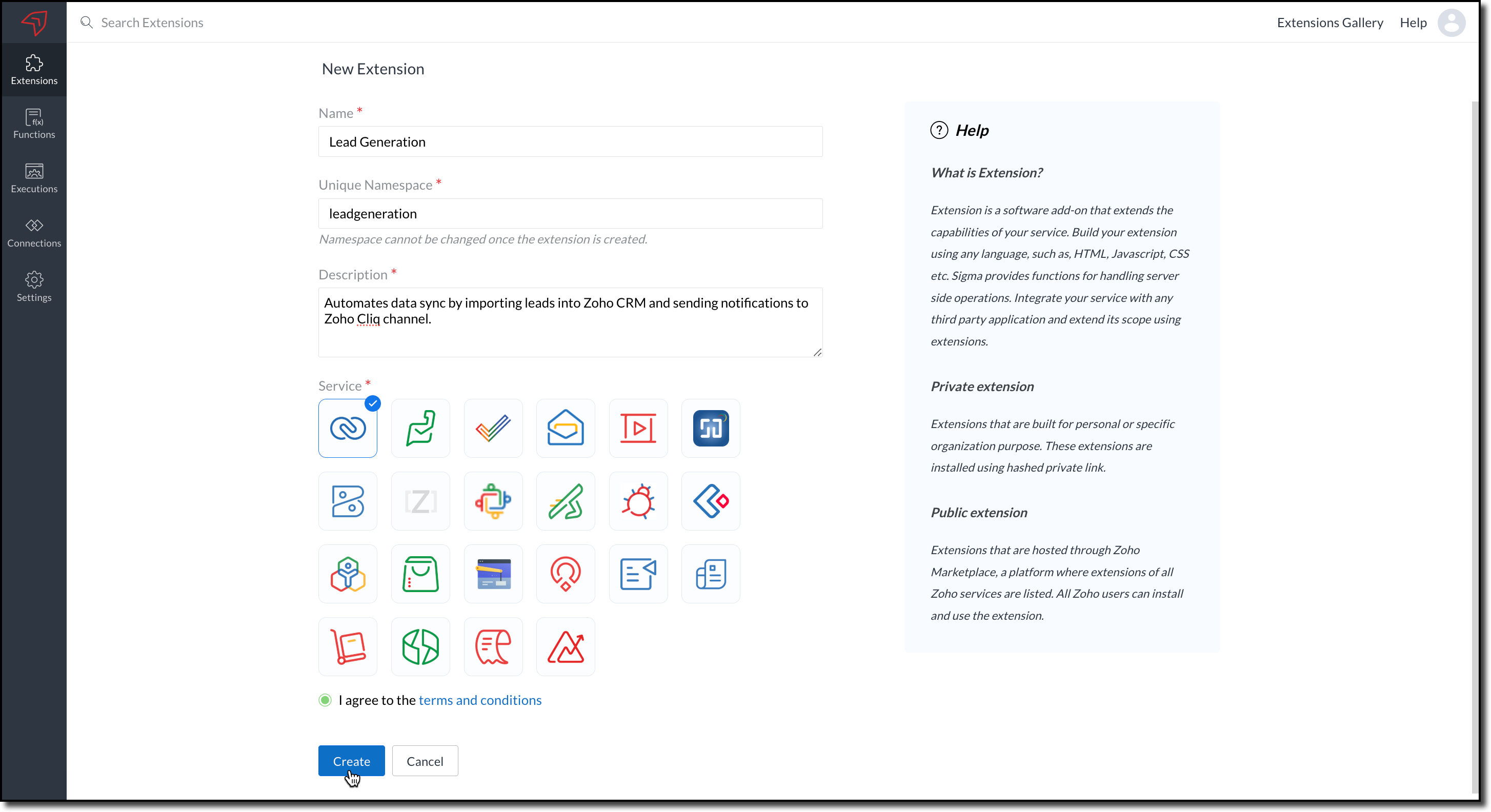
            

      2. The private extension that you have created will be listed in the Extensions page. Choose your extension and click the edit icon. 

            You will then be redirected to the Zoho Developer Console.
 
Dependency Configuration

Now, let us configure a couple of dependencies required for this use case in the developer console.  

Connectors 

To notify a Zoho Cliq channel, Connectors authorize the end user's Zoho Cliq account with the extension and grant access to the necessary data. Follow these steps to create a connector with the required APIs for the widget.

      3. In the console, navigate to Utilities > Connectors on the left-side menu.

      4. Click Create Connector and provide the required details using the guidance available on the Server-based Application help page.
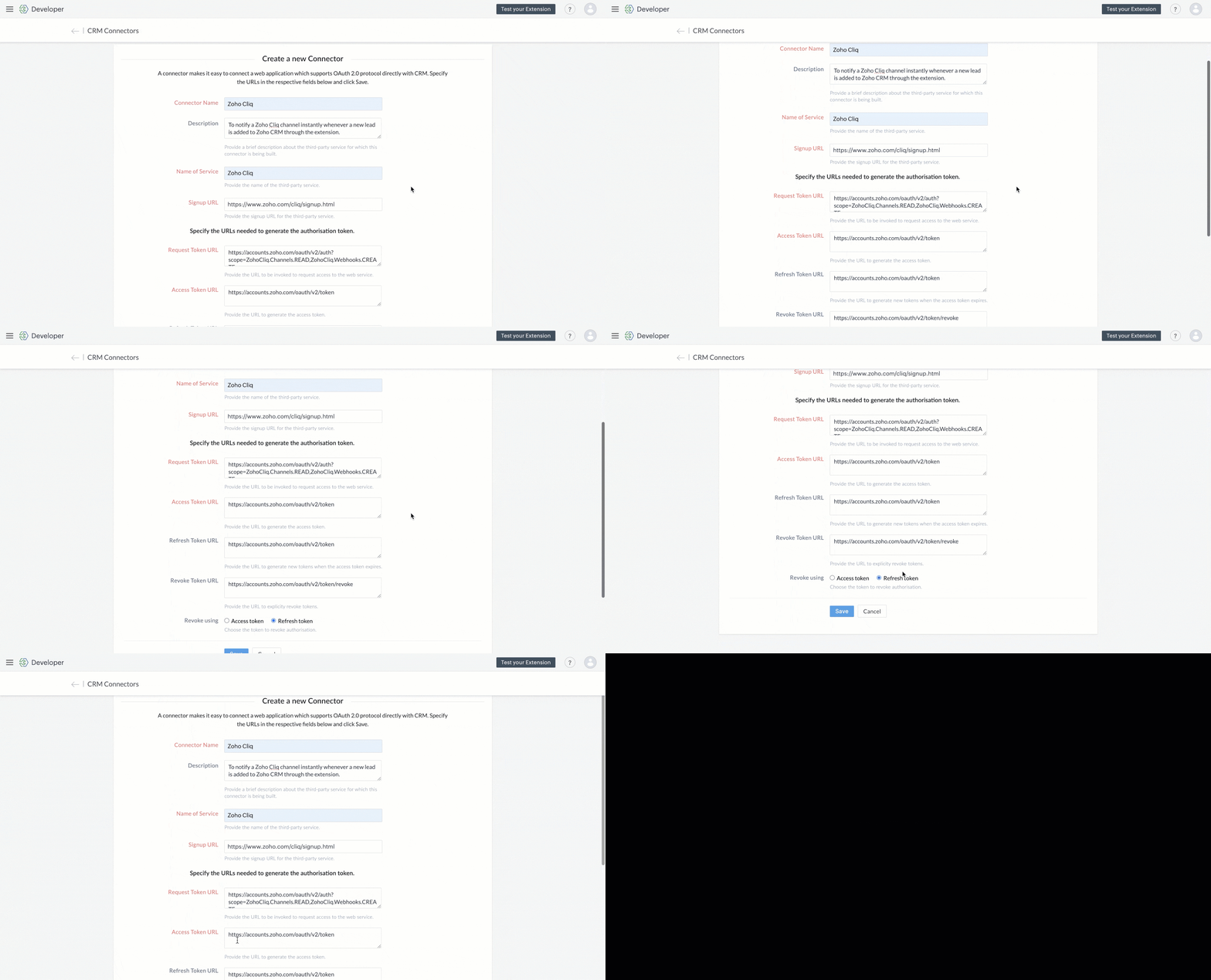
           

      5. Use the generated Redirect URL to register your application in Zoho's API Console. After registration, enter the Client ID and Client Secret in the developer console.  


      6. Create Connector APIs for the following: 
  •  GET List of all Channels to fetch all the available channels from your Zoho Cliq Account.  
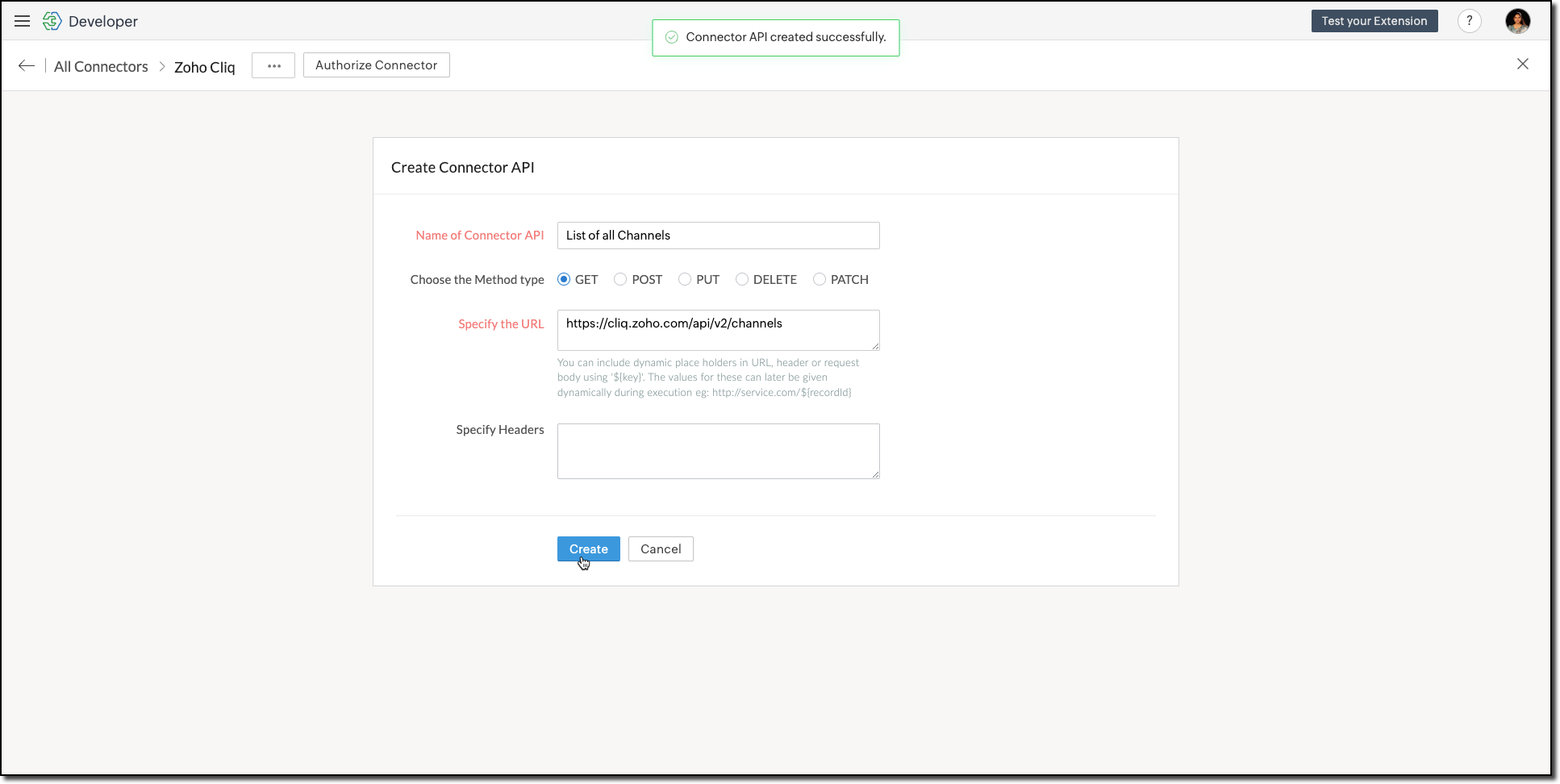


    The Authorization header is automatically added to all the Connector APIs. 
  • POST Message in Channel to notify the incoming leads in the channel. 
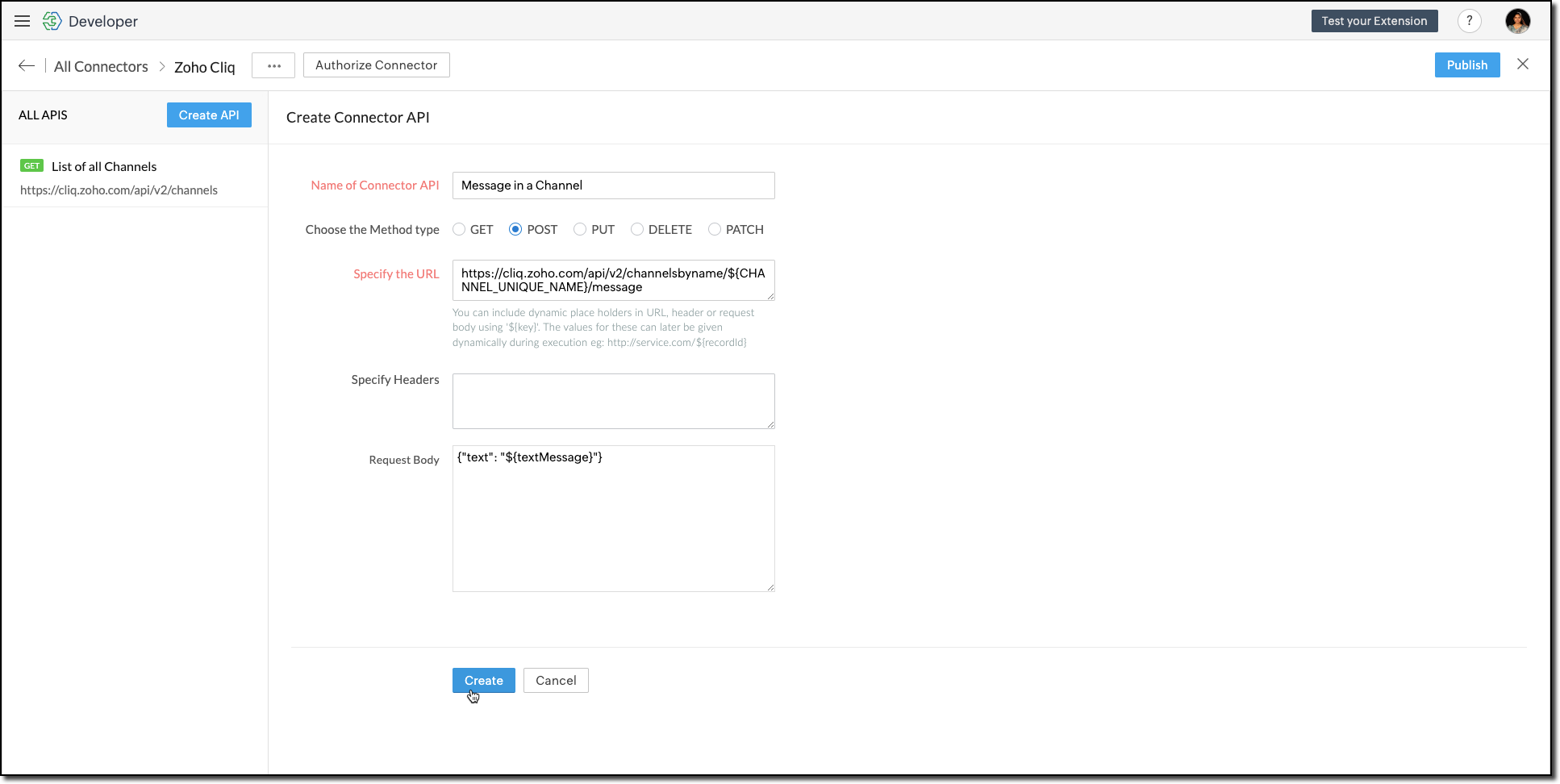


    You can include dynamic place holders in the URL, header, or request body using this format ${place_holder}.
      7. Once the APIs are configured, publish and associate the connector with the extension. 


           Refer to the Connectors help document to learn more. 

Variable 

Variables are required to store the admin's preferred channel details and retrieve them when a lead enters Zoho CRM through the extension. Upon installing the extension, this variable is automatically created in your Zoho CRM org. 

      8. Go to Build > Custom Properties and create a variable. 


Set the variable's permission to Hidden to prevent the CRM users from accessing/modifying the variable data from the Zoho CRM Variables page. This ensures that variables can only be configured through the extension.

For more information, refer to the Custom Variables help document

Idea
Tip

In your Zoho CRM, go to Setup > Security Control > Profiles and restrict permissions for your extension to prevent unauthorized access to the settings page.

Building a Connected App 

      9. In the console, go to Utilities > Connected Apps on the left-side menu.

      10. Follow the steps provided in this kaizen to create a new Zoho CRM widget for this use case. 

Code Logic for the Settings Panel
  • Create a drop-down field called Select Cliq Channel to the settings panel. This dropdown should dynamically list the channels from your Zoho Cliq account by invoking the GET Cliq Channels API. Follow the given Invoke Connector method to execute Connector APIs.           
 // Initialize Zoho Embed SDK
        ZOHO.embeddedApp.on("PageLoad", function () {
            fetchCliqChannels();
        });

        ZOHO.embeddedApp.init();

        // Fetch Cliq channels
        async function fetchCliqChannels() {
            const channelDropdown = document.getElementById("cliqChannel");
            try {
                console.log("Fetching channels from Zoho Cliq...");
                const req_data = {
                    "parameters": {}
                };
                const response = await ZOHO.CRM.CONNECTOR.invokeAPI("leadgeneration.zohocliq.listofallchannels", req_data);
                console.log("Response from Zoho Cliq:", response);
                const parsedResponse = JSON.parse(response.response);
                const channels = parsedResponse.channels;
                if (channels && Array.isArray(channels)) {
                    channelDropdown.innerHTML = channels.map(channel => `<option value="${channel.unique_name}">${channel.name}</option>`).join('');
                } else {
                    throw new Error("Invalid response structure");
                }
            } catch (error) {
                console.error("Error fetching channels:", error);
                if (error.code === '403') {
                    console.error("Authorization Exception: Please check your API permissions and authentication.");
                }
                channelDropdown.innerHTML = '<option value="">Failed to load channels</option>';
            }
        }

  • Add a Save Configuration button that stores the selected channel name and channel ID in the variable created earlier. To save the selected data into the variable, use the invokeAPI() function, with the namespace as crm.set
 // Save configuration
        async function saveConfiguration(event) {
            event.preventDefault();
            const channelDropdown = document.getElementById("cliqChannel");
            const selectedChannelUniqueName = channelDropdown.value;
            const selectedChannelName = channelDropdown.options[channelDropdown.selectedIndex].text;

            if (!selectedChannelUniqueName) {
                alert("Please select a channel.");
                return;
            }

            const settings = {
                unique_name: selectedChannelUniqueName,
                name: selectedChannelName
            };

            const data = {
                "apiname": "leadgeneration__Cliq_Channel",
                "value": JSON.stringify(settings)
            };

            try {
                const response = await ZOHO.CRM.CONNECTOR.invokeAPI("crm.set", data);
                console.log("Updated settings:", response);
                document.getElementById("setupStatus").innerText = "Configuration saved successfully!";
            } catch (error) {
                console.error("Error saving configuration:", error);
                document.getElementById("setupStatus").innerText = "Failed to save configuration.";
            }
        }

  • When a lead enters Zoho CRM through the extension, it should trigger a function that:Retrieves the saved channel details:  
                  > Retrieves the saved channel details: Uses the Get Organization Variable JS SDK to call the Zoho CRM GET Variable API to fetch the saved channel details.
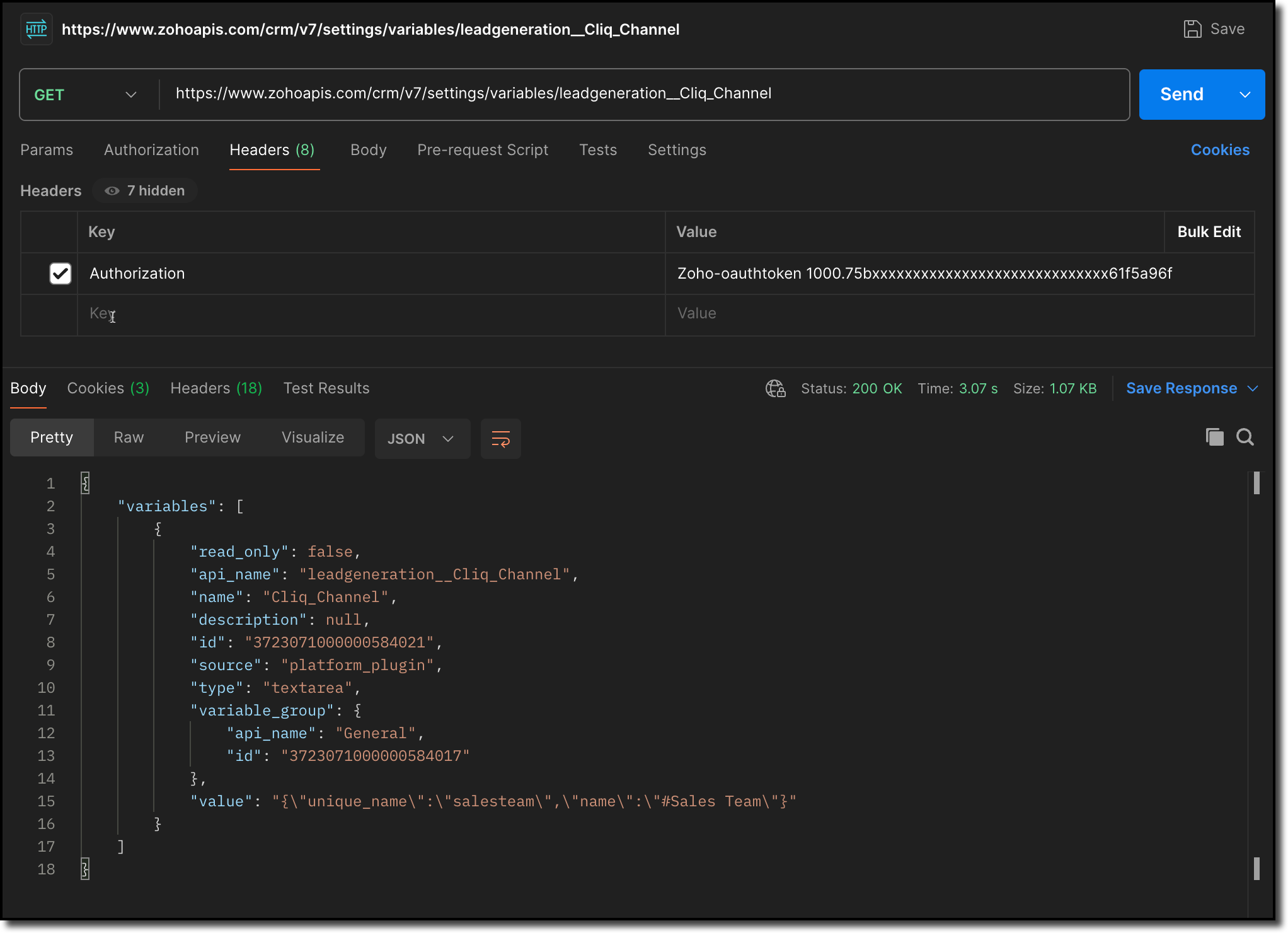


                  > Notifies the channel: Sends a message to the retrieved channel using the Post Message API

Info
Info

-> A complete working code sample for the use case is attached at the end of this post for your reference.  

-> The test function for triggering notifications is also included in the attachment. You can use the same snippet in your extension to initiate the notification process.

-> Ensure to replace the unique names of your Connector APIs and Variable.

      11. Fill in the details of the application as shown in this image and upload the widget ZIP file packed using the Zoho CLI command. 
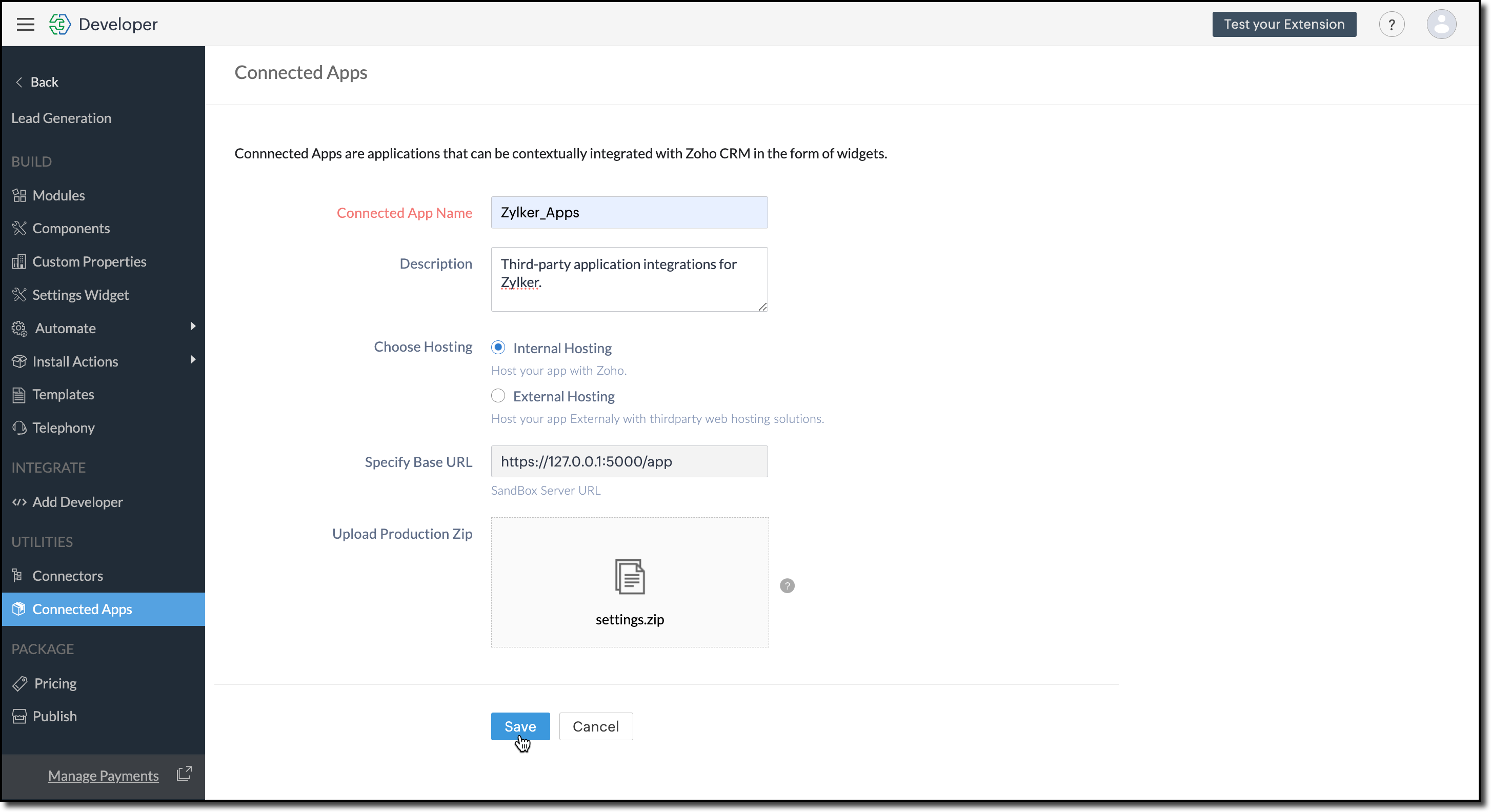
             

      12. Click Save.  

Configure the Settings Widget

      13. Navigate to Build > Settings Widget in the left menu.  

      14. Provide a Name and the Resource Path of your widget.   

      15. Click Save.

             
Info
The Settings Widget for Extension is available upon request. Contact support@zohocrmplatform.com to enable it for your account. 

Packaging, Publishing and Deploying 

      16. Go to Package > Publish on the left-side menu and publish the extension.   

      17. The review process for listing an extension in the Marketplace will take from three weeks to one month

            For the demo, we will proceed with deploying the extension using the private plugin deployment link.


      18. Now, replace the URL of your Zoho CRM page with the deployment link from the Developer Console and approve the extension installation.  

Try it Out! 

Once installed: 

A pop-up will appear, prompting you to authorize Zoho Cliq for the required configurations. 

If you do not already have a Zoho Cliq account, you can sign up directly from the pop-up and proceed with the authorization.
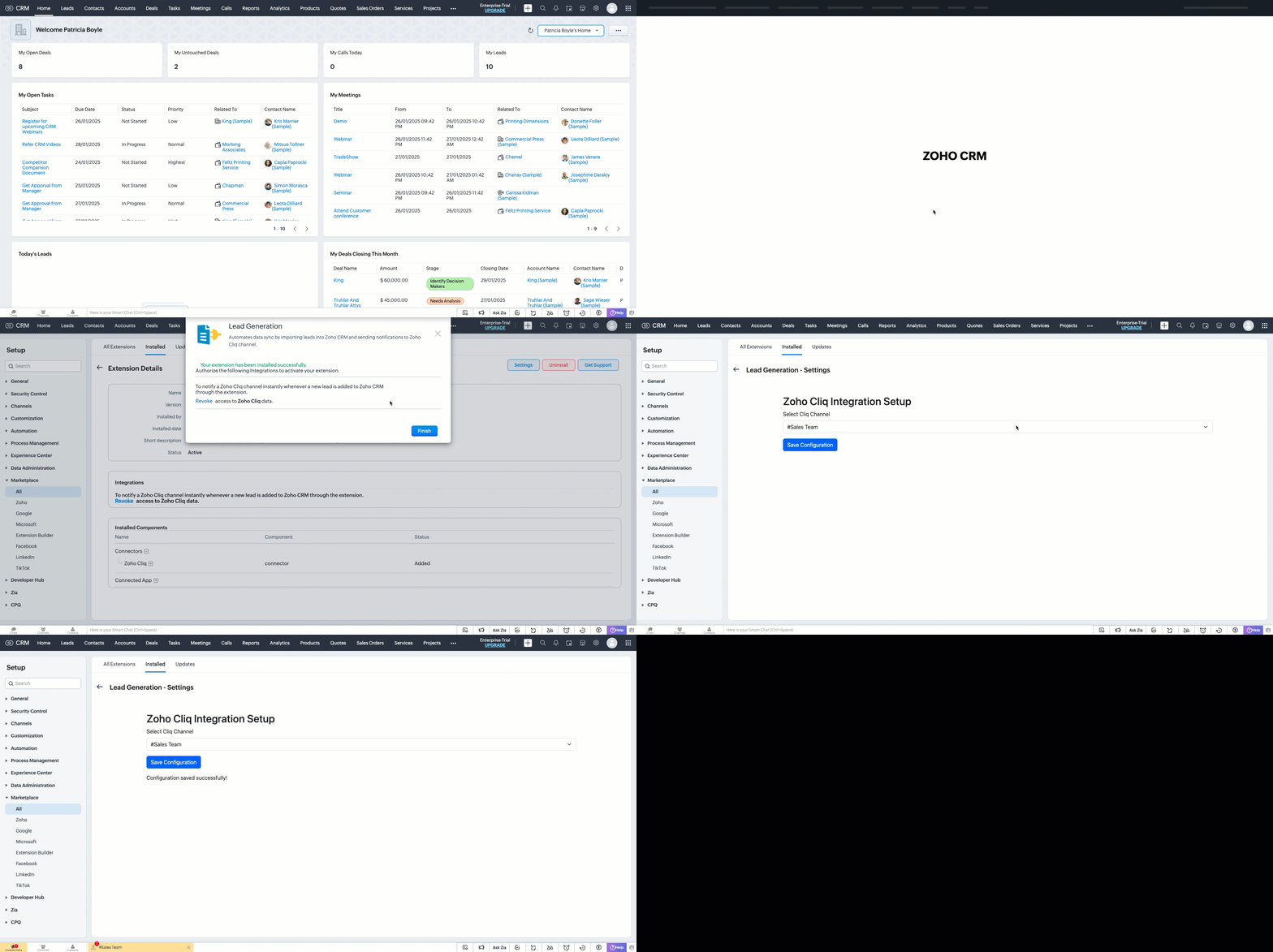

> After authorization, you will be redirected to the Settings widget page, where you can select and save your preferred Cliq channel.

> If you need to update the settings later, you can find them on the Installed Extensions page under the respective extension.


Notes
Note

The demo videos above use a testing function to notify the channel. You can deploy it anywhere in your extension to trigger a notification whenever a lead enters a Zoho CRM organization through the extension.

Find the function in the attachments at the end of this post.

Similar Scenarios

  • Sales Territory Management: An extension that auto-assigns incoming leads to sales reps can use a settings widget to allow managers to define territories and sales rep mappings dynamically.
  • Custom Field Mapping: For extensions that sync data between Zoho CRM and external systems, a settings widget can let users map CRM fields to external system fields.
  • Automated Email Preferences: In email automation extensions, the settings widget can allow users to specify email templates, recipients, or trigger conditions for follow-ups and campaigns.
Adding a Settings Widget to your Zoho CRM Extensions not only enhances user experience but also boosts the flexibility and efficiency of your extension. Whether it is notifying sales teams or customizing field mappings, a well-designed settings page is a game-changer for your extensions. 

Explore the Widget section in our Kaizen collection to try out various widget types and discover their unique use cases. 

If you have any queries or a topic to be discussed reach out to us at support@zohocrm.com or drop your comment below. 

Until next time, keep innovating!

Cheers! 

----------------------------------------------------------------------------------------------------------------------------------------

Related Reading

  1. Zoho CRM Widget - An Overview, Installation and Creation, Mobile Compatibility, Telephony Widget Extension, and other Kaizens.
  2. Widget SDKs - An Overview, Invoke Connector and Get Organization Variable.
  3. Zoho Developer Console - An Overview, Creating Extensions, Building Connected Apps, and A Quick Start Guide.
  4. Zoho Extensions - Custom Variables and Connectors
  5. Zoho Cliq - GET List of Channels and POST Message in Channel.
  6. Zoho Marketplace - An Overview
----------------------------------------------------------------------------------------------------------------------------------------

Idea
Previous Kaizen: Kaizen #174 - Client Script Commands | Kaizen Collection: Directory
Info
More enhancements in the COQL API are now live in Zoho CRM API Version 7. Check out the V7 Changelog for detailed information on these updates.
    • Sticky Posts

    • Kaizen #198: Using Client Script for Custom Validation in Blueprint

      Nearing 200th Kaizen Post – 1 More to the Big Two-Oh-Oh! Do you have any questions, suggestions, or topics you would like us to cover in future posts? Your insights and suggestions help us shape future content and make this series better for everyone.
    • Kaizen #226: Using ZRC in Client Script

      Hello everyone! Welcome to another week of Kaizen. In today's post, lets see what is ZRC (Zoho Request Client) and how we can use ZRC methods in Client Script to get inputs from a Salesperson and update the Lead status with a single button click. In this
    • Kaizen #222 - Client Script Support for Notes Related List

      Hello everyone! Welcome to another week of Kaizen. The final Kaizen post of the year 2025 is here! With the new Client Script support for the Notes Related List, you can validate, enrich, and manage notes across modules. In this post, we’ll explore how
    • Kaizen #217 - Actions APIs : Tasks

      Welcome to another week of Kaizen! In last week's post we discussed Email Notifications APIs which act as the link between your Workflow automations and you. We have discussed how Zylker Cloud Services uses Email Notifications API in their custom dashboard.
    • Kaizen #216 - Actions APIs : Email Notifications

      Welcome to another week of Kaizen! For the last three weeks, we have been discussing Zylker's workflows. We successfully updated a dormant workflow, built a new one from the ground up and more. But our work is not finished—these automated processes are
    • Recent Topics

    • ZOHO.CRM.UI.Record.open not working properly

      I have a Zoho CRM Widget and in it I have a block where it will open the blocks Meeting like below block.addEventListener("click", () => { ZOHO.CRM.UI.Record.open({ Entity: "Events", RecordID: meeting.id }).catch(err => { console.error("Open record failed:",
    • Python - code studio

      Hi, I see the code studio is "coming soon". We have some files that will require some more complex transformation, is this feature far off? It appears to have been released in Zoho Analytics already
    • 🚀 WorkDrive 6.0 (Phase 1): Empowering Teams with Content Intelligence, Automation, Accessibility, and Control

      Hello, everyone! WorkDrive continues to evolve from a robust file management solution into an intelligent, secure, and connected content collaboration platform for modern businesses. Our goal remains unchanged: to simplify teamwork, strengthen data security,
    • Introducing Workqueue: your all-in-one view to manage daily work

      Hello all, We’re excited to introduce a major productivity boost to your CRM experience: Workqueue, a dynamic, all-in-one workspace that brings every important sales activity, approval, and follow-up right to your fingertips. What is Workqueue? Sales
    • Department Overview by Modified Time

      We are trying to create visuals to show the work our agents do in Zoho Desk. Using Zoho Analytics how can we create a Department Overview per modified time and not ticket created time? In order for us to get an accurate view of the work our agents are
    • Zoho Commerce

      Hi, I have zoho one and use Zoho Books. I am very interested in Zoho Commerce , especially with how all is integrated but have a question. I do not want my store to show prices for customers that are not log in. Is there a way to hide the prices if not
    • Support Custom Background in Zoho Cliq Video Calls and Meetings

      Hello Zoho Cliq Team, We hope you are doing well. We would like to request an enhancement to the video background capabilities in Zoho Cliq, specifically the ability to upload and use custom backgrounds. Current Limitation At present, Zoho Cliq allows
    • Upload own Background Image and set Camera to 16:9

      Hi, in all known online meeting tools, I can set up a background image reflecting our corporate design. This doesn't work in Cliq. Additionally, Cliq detects our cameras as 4:3, showing black bars on the right and left sides during the meeting. Where
    • ISO 27001 Compliance

      What are people doing to ensure ISO 27001 compliance for their Zoho environments? It would make sense for Log360 Cloud to integrate natively with the Zoho suite, but that is not the case. It requires a gateway cluster, which is not an option for a fully
    • Zoho People - Retrieve the Leave Details - get("LeaveCount")

      Hi, Zoho People I need to collect all of an employee's leave requests for the calendar year and check how many half-days they have taken. If I run the script on the query he just modified, I can retrieve the information related to that query and use the
    • One Support Email Managed By Multiple Departments

      Hello,  We use one support email (support@company.com). Incoming emails come to the "Support Department" and based on what the customer is asking, we route that ticket to different departments (billing, technical support, etc.). When users in these different
    • Export blueprint as a high-resolution PDF or image file

      This would be a good feature for organizations that want to share the blueprint process with their employees but don't want them to have access to the blueprint in the system settings. At the moment all that users can do is screenshot the blueprint or
    • Importing into Multiselect Picklist

      Hi, We just completed a trade show and one of the bits of information we collect is tool style. The application supplied by the show set this up as individual questions. For example, if the customer used Thick Turret and Trumpf style but not Thin Turret,
    • What's new in Zoho Sheet: Simplify data entry and collaboration

      Hello, Zoho Sheet community! Last year, our team was focused on research and development so we could deliver updates that enhance your spreadsheet experience. This year, we’re excited to deliver those enhancements—but we'll be rolling them out incrementally
    • Multiple header in the quote table???

      Hello, Is it possible in Zoho CRM to add multiple headers or sections within the Quote product table, so that when the quote is printed it shows separate sections (for example “Products” and “Services”)? To clarify, I’m asking because: This does not appear
    • Zoho CRM for Everyone's NextGen UI Gets an Upgrade

      Hello Everyone We've made improvements to Zoho CRM for Everyone's Nextgen UI. These changes are the result of valuable feedback from you where we’ve focused on improving usability, providing wider screen space, and making navigation smoother so everything
    • Marketer's Space: New to Campaigns? Some common early mistakes that might occur

      Hello Marketers, Welcome back to another post in Marketer's Space. If you're just getting started with Zoho Campaigns, things can feel exciting and slightly confusing at the same time. You're not alone. Most early frustrations come from setup gaps rather
    • This user is not allowed to add in Zoho. Please contact support-as@zohocorp.com for further details

      Hello, Just signed up to ZOHO on a friend's recommendation. Got the TXT part (verified my domain), but whenever I try to add ANY user, I get the error: This user is not allowed to add in Zoho. Please contact support-as@zohocorp.com for further details I have emailed as well and writing here as well because when I searched, I saw many people faced the same issue and instead of email, they got a faster response here. My domain is: raisingreaderspk . com Hope this can be resolved.  Thank you
    • New 2026 Application Themes

      Love the new themes - shame you can't get a little more granular with the colours, ie 3 different colours so one for the dropdown menu background. Also, I did have our logo above the application name but it appears you can't change logo placement position
    • Workflow Rule - Field Updates: Ability to use Placeholders

      It will be great if you can use placeholder tags to update fields. For example if we want to update a custom field with the client name we can use ${CONTACT.CONTACT_FIRSTNAME}${CONTACT.CONTACT_LASTNAME}, etc
    • Need a Universal Search Option in Zohobooks

      Hello Zoho, Need a Universal Search Option in Zohobooks to search across all transactions in our books of accounts. Please do the needful Thanks
    • Implement Date-Time-Based Triggers in Zoho Desk

      Dear Zoho Desk Support Team, We are writing to request a new feature that would allow for the creation of workflows triggered by specific date-time conditions. Currently, Zoho Desk does not provide native support for date-time-based triggers, limiting
    • Why is my Lookup field not being set through Desk's API?

      Hello, I'm having trouble setting a custom field when creating a Ticket in Zoho Desk. The endpoint I'm consulting is "https://desk.zoho.com/api/v1/tickets" and even though my payload has the right format, with a "cf" key dedicated to all custom fields,
    • How exactly does "Reply assistance" work in Zoho Desk? What context is sent to the LLM?

      Hi, Im trying to better understand the technical behavior of the feature "Reply assistance" in Zoho Desk, and I couldn’t find detailed information in the current documentation. Specifically, I have questions about what data is actually being sent to the
    • Deletion Workflows

      Hello, Unless I missed it, we can't create deletion workflows. My usecase is to auto-delete junk leads. We have field called lead status, and an agent qualify all our new leads. When it's a junk lead she chose the correspondant value in the picklist. My goal is that the system delete them automatically. Is that possible? Planed ?
    • URGENTImpossible to book an appointement

      J'essaie plusieurs fois mais aucun créneau n''est disponible Message d'erreur lorsque j'essaie de sélectionner une date
    • Sendpulse SMTP/IMAP Issues

      It’s possible Zoho made some changes on their side. Sometimes, even if your regular password works, Zoho requires an app-specific password for external apps like SendPulse to connect via IMAP. You can create this in Zoho’s security settings and use it
    • Insane mail security

      I cannot access my email... anywhere. For some reason the password for the Mail app on my Mac is being rejected, it worked yesterday but now it doesn't? Ok let's try the web interface. I can access my general Zoho login with the password but if I want
    • UI issue with Organize Tabs

      When looking at the organize Tabs window (bellow) you can see that some tabs are grayed out. there is also a "Add Module/Web Tab" button. When looking at this screen it's clear that the grayed out tabs can not be removed from the portal user's screen
    • Task list flag Internal/External for all phases

      Phases are commonly used in projects to note milestones in the progression of a project, while task lists can be used to group different types of tasks together. It makes sense to be able to define a task list as either internal or external however the
    • HAVING PROBLEM WITH SENDING EMAIL

      Hi all, I'm unable to receive emails on info@germanforgirls.eu. I'm getting an error code 550. 5.1.1. invalid email recipients. Moreso, I would like info@germanforgirls.eu to be the default "send from" email and not solomon@germanforgirls.eu. Kindly see
    • Sharing my portal URL with clients outside the project

      Hi I need help making my project public for anyone to check on my task. I'm a freelance artist and I use trello to keep track on my client's projects however I wanted to do an upgrade. Went on here and so far I'm loving it. However, I'm having an issue sharing my url to those to see progress. They said they needed an account to access my project. How do I fix this? Without them needing an account.
    • Different Task Layouts for Subtasks

      I was wondering how it would be possible for a subtask to have a different task layout to the parent task.
    • Subscription went to default (@zoho.com) address instead for custom domain

      Hello! So I bought a lite sub to test things out, wanting to use my own domain. However, after passing through all the verification steps (completed now), it seems that the sub I bought was assigned to the default email that I already had with Zoho and
    • Canvas templates and font-family

      i dont understant why its always the smallest things that waste all of my time! why in some videos i see they have tamplates in the Canvas editor and i cant seem to fint it? and why oih why cant i cange the font? i just want simple Arial! help meeeeeeeeee
    • Re: Ca.gory groups and not all email addresses being added to a group emails

      Hi, I have added emails under 'Contacts' into categories but when sending a group email and putting the category name in not all email addresses go onto the email. I have refreshed the page, deleted and redone the info etc with no luck. I only found out
    • IMPORTANT

      Dear Zoho Support Team, I am currently experiencing an issue when trying to send emails from my Zoho Mail account. Each time I attempt to send a message, I receive the following error: "Unable to send message; Reason: 554 5.1.8 Email Outgoing Blocked."
    • Able to Send Emails from Zoho but Not Receiving Emails from Gmail

      Hello, I am experiencing an issue with my shopify domain email setup and would appreciate your help. Current situation: I can successfully send emails using Zoho. I can receive emails from some services (for example, Facebook). However, I cannot receive
    • Antispam validation failed for your domain in Accounts

      I tried adding a domain to zeptomail.zoho.com, but the “add domain” operation failed. The front‑end error reads: “Domain could not be added. Please contact support@zeptomail.com.” The back‑end API returned: ``` { "error": { "code": "TM_3601", "details":
    • Announcing new features in Trident for Windows (v.1.38.5.0)

      Hello Community! Trident for Windows just received a major update, with a range of capabilities that focuses on strengthening and enhancing communication. Let’s dive into what’s new! View complete technical email details. For those who need deeper visibility
    • Next Page