Ring in the New Year with Guided Conversations for Smooth Offline Support
As we step into the new year, it’s time to refocus, re-energize, and gear up for fresh opportunities. But what about your customers as they begin the year with their own set of challenges or queries to resolve?
With Zoho Desk’s Guided Conversations (GC), you can ensure they’re supported seamlessly, even as your team navigates the post-holiday rush.
Zylker Techfix, a mobile gadget firm, has a busy start as its customers flood them with requests: repair appointments, service inquiries, delivery tracking, and questions about new products. By leveraging Guided Conversations, Zylker Techfix provided an efficient, self-service experience that kept customers engaged while their team prioritized high-value tasks.
Here’s why Zylker Techfix setup the Guided Conversations feature within Zoho Desk:
- Customers could effortlessly log repair or service requests.
- Delivery updates and product inquiries were instantly addressed without delays.
- Clear and reassuring messaging kept customers informed that their concerns were logged and would be prioritized.
Guided Conversations acts as a dependable, 24/7 virtual assistant, automating ticket creation while offering a personal touch. Its intuitive, drag-and-drop builder enables you to design workflows that guide customers through their questions, gather essential information, and create tickets—even when your team is unavailable.
For businesses like Zylker Techfix, GC turned the often-hectic start of the year into an opportunity to build stronger customer relationships. By ensuring requests were acknowledged and logged, customers felt valued and confident that their needs were being addressed.
As you plan for the year ahead, Guided Conversations can help you create a customer experience that’s efficient, thoughtful, and future-ready.
Guide to Set up Guided Conversations (GC) in Zoho Desk
Guide to Set up Guided Conversations (GC) in Zoho Desk
Here’s how you can easily set up Guided Conversations to create tickets when agents are unavailable/offline:
1. Go to Setup > Self-Service > Guided Conversations.
2. Select the department before creating the flow because Guided Conversations are department-specific.
Create a New Flow
3. Click on the Create Flow tab in the top-right corner.
4. Select the Web Channel.
5. Enter a Name and Description for your flow, then click Next.
6. The GC design window will appear. Below the Guided Conversation icon, click the + icon to start building your flow.
7. Drag and drop elements from the right-hand panel to create your conversation blocks.
8. Drag the Text Message Block and drop it into the flow. Type a Welcome message.
9. Enter the Name of the block and the Message you want to display to customers. This block is used to share direct information with your customers.
10. Click the + icon below the text message block and add a Question Block.
11. Use the Question blocks to collect inputs from customers based on your questions.
For example, use the following Question Blocks using the + icon to receive the information from your customers:
- Name (Text Block)
- Email (Email Block)
- Contact Number (Number Block)
- Date (Calendar Block for availability)
- Attachments (Attachment Block to receive files or images, such as screenshots).

Add Button Choice Blocks
12. Use the Button Choice Blocks to present predefined options to customers, such as a list of countries, states, or regions. This is useful for collecting specific information like location and understanding the time zone.
13. Drag the Text Question block to receive a description on the Issues submitted.
14. Create the Date and Time question block to get the customer's availability time to reconnect, if required.

To Create a Ticket
15. Now, click on the Zoho Desk blocks, click on the Create ticket.
16. Give the Block Name, choose the Department (the same department where you create this Guided Conversation), choose the layout for the Email template.
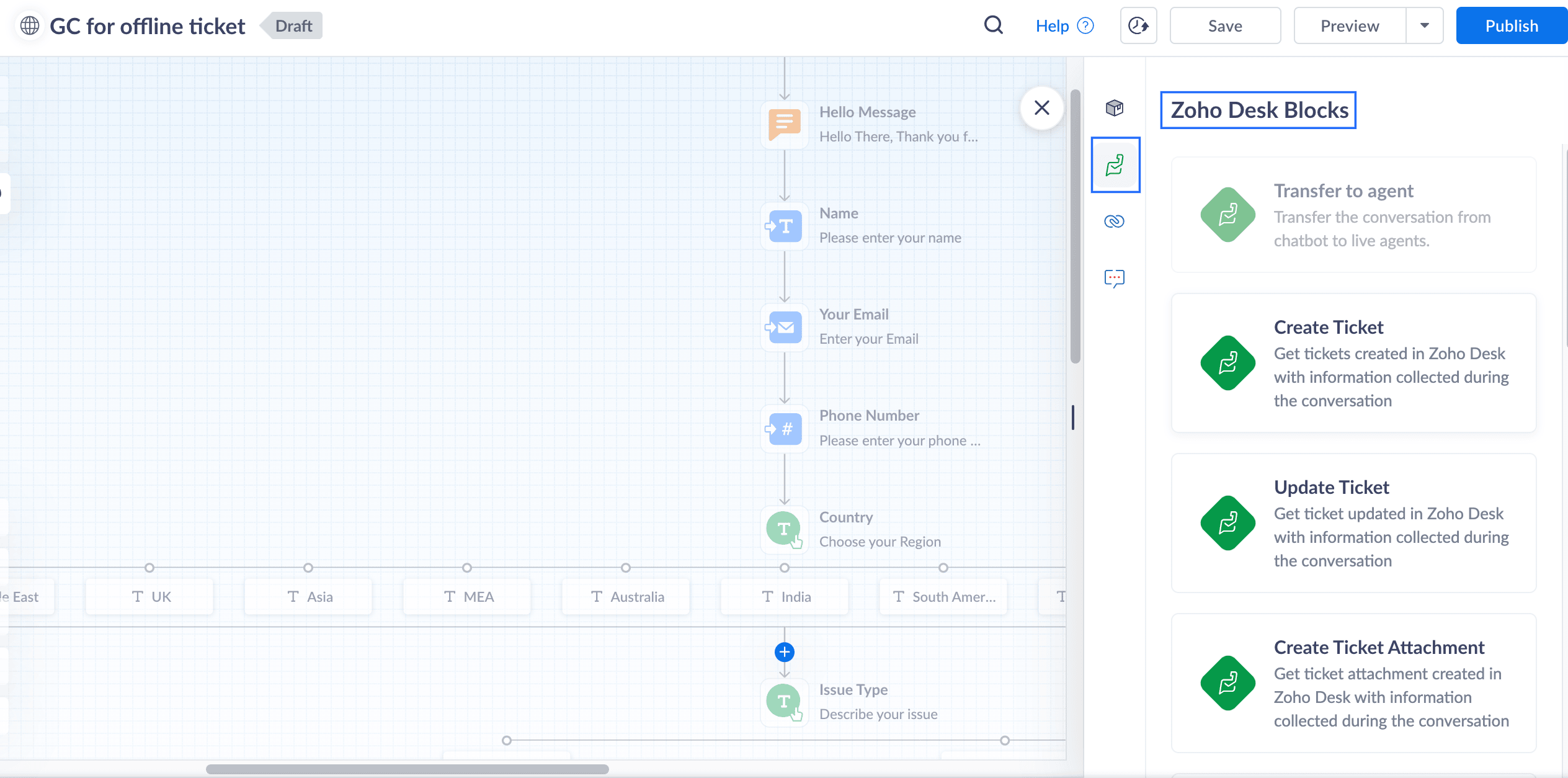
17. In the Input variable mapping, click on the gear icon, map the field variables in the Tickets layout with the Flow variables created within GC.
For example, map the Email field within Tickets to the Email block in GC, map Phone with the Phone field, map Subject with the Issue Type, and map Description with the Describe issue text block
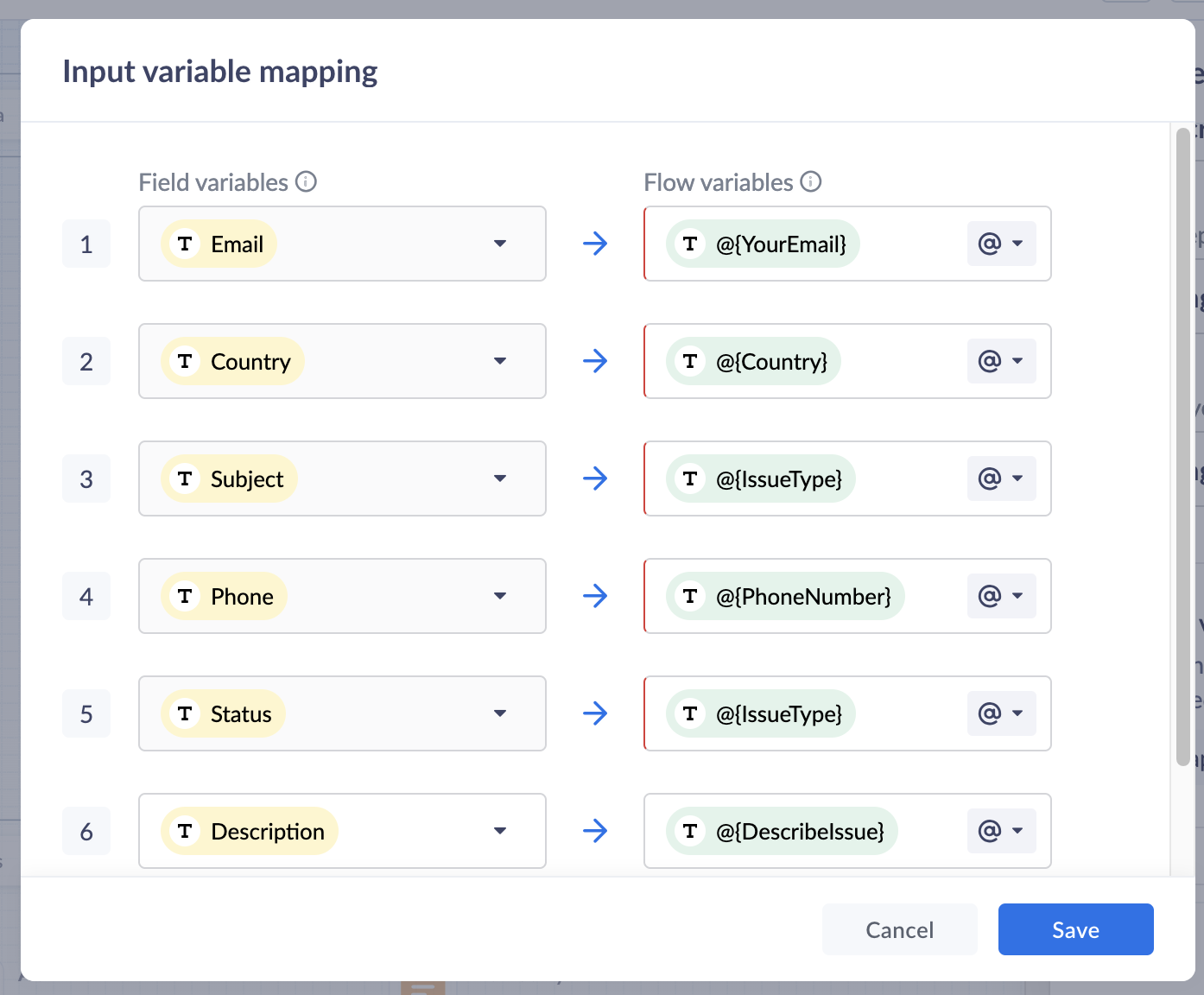
18. Click Save to save the mapping variables
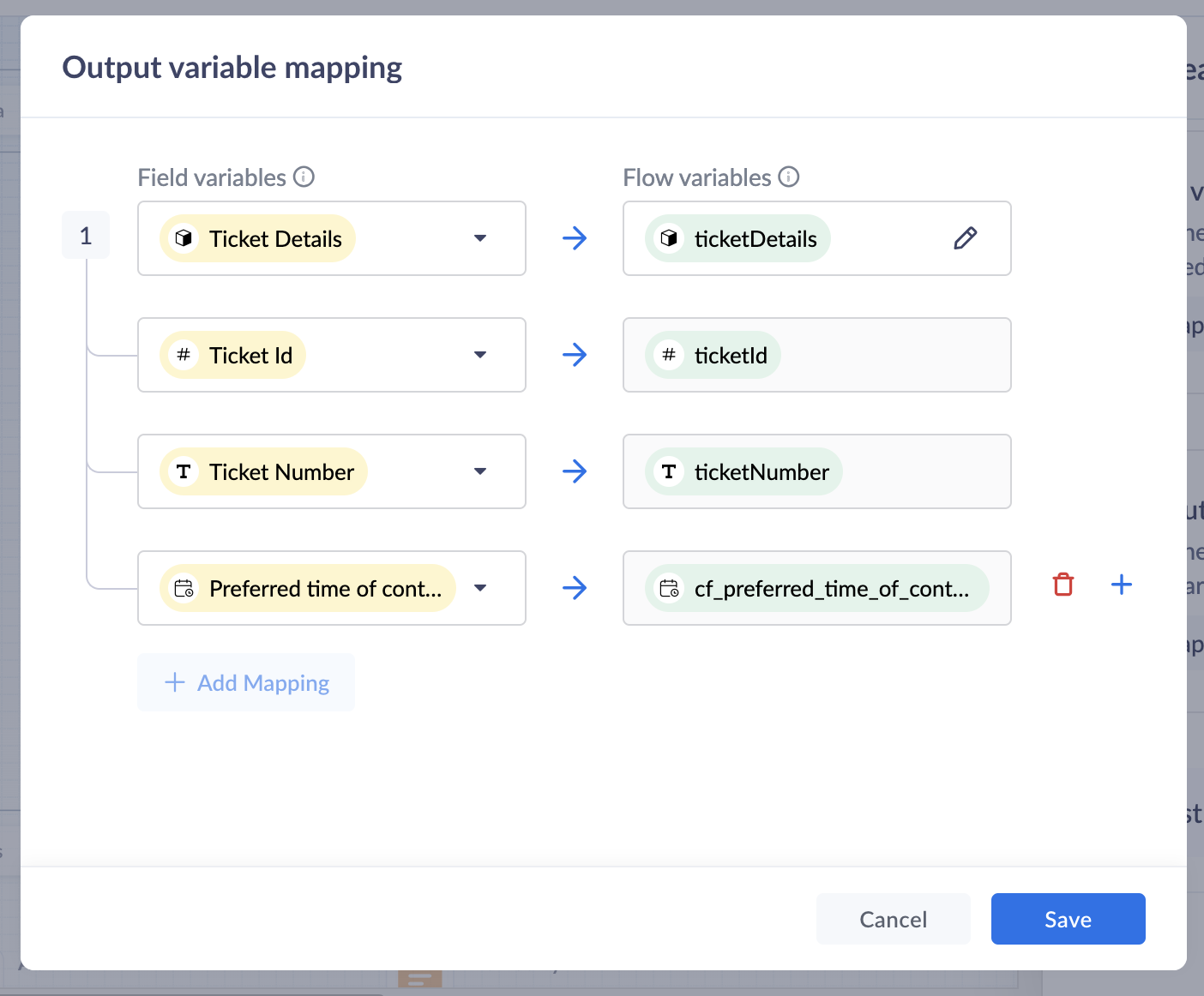
19. In the Output variable mapping, click on the gear icon, map the ticket related information which you would like to share with the customers within the GC.
Preview and Publish
20. Once all blocks are added, click on Preview to view the flow and ensure it works based on your requirements.
21. Save your changes, and click Publish. Your Guided Conversation is ready to use!

Note: Some blocks are being developed for Instant Messaging (IM) channels and will appear faded out if you choose IM channels.
Create A GC Widget
i. Go to Setup(S) >> Self Service >> Guided Conversations >> GC widgets.ii. Click on Create GC widget. Give a Name and Description.iii. Choose the Channels. click on the drop-down arrow under Associate flows >> Add Flow >> select the Published GC.iv. Click Associate. under Access Permissions, select users based on your preferences.v. Enter your preferred welcome message that you would like to appear on your GC widget.vi. Enter End Options based on your preferences.vii. Click Save to save your GC widget.
ASAP Widget
Go to Setup (S) >> Self-Service >> ASAP >> Create New Widget.
a. Enter a Name, enable the widget launcher to show the widget on your website.b. Associate the help widget with required departments.c. Choose the required modules to associate with the widget.d. Once you are done, click on Generate.
Embed GC
You can obtain the embed code to integrate the widget into your website or Help Center, as well as the organization ID for iOS and Android SDKs.
i. Go to Setup (S) >> Self-Service >> ASAP.ii. Hover over the created ASAP widget; click on Embeddable Code.iii. Copy the web embed code for use on your website or Help Center.iv. Use the iOS ID for iOS SDK and the Android ID for Android SDK.
That’s it—your Guided Conversation is now live and ready to assist your customers!
Pro Tip
Guided Conversations can be tailored to suit a variety of scenarios, from managing customer inquiries to streamlining ticketing operations. Enhance the customer experience by customizing, editing, or updating workflows to meet their needs effortlessly.
Explore our Guided Conversation Guide and the automation with GC to ensure your customers always have the support they need.
Here’s to a fantastic start to the New Year! Wishing you success and seamless experiences ahead: Happy New Year from the Zoho Desk Team! 🎉
Topic Participants
Lydia | Zoho Desk
Sticky Posts
Register for Zoho Desk Beta Community
With the start of the year, we have decided to take a small step in making the life of our customers a little easier. We now have easy access to all our upcoming features and a faster way to request for beta access. We open betas for some of our featuresShare your Zoho Desk story with us!
Tell us how you use Zoho Desk for your business and inspire others with your story. Be it a simple workflow rule that helps you navigate complex processes or a macro that saves your team a lot of time; share it here and help the community learn and grow with shared knowledge.Tip #1: Learn to pick the right channels
Mail, live chat, telephony, social media, web forms—there are so many support channels out there. Trying to pick the right channels to offer your customers can get pretty confusing. Emails are most useful when the customer wants to put things on record. However, escalated or complicated issues should not be resolved over email because it's slow and impersonal. When you need immediate responses, live chat is more suitable. It's also quick and convenient, so it's the go-to channel for small issues.Welcome to Zoho Desk Community - Say hello here!
Hello everyone! Though we have been here for a while, it’s time to formally establish the Zoho Desk Community; we’re really happy to have you all here! This can be the place where you take a moment to introduce yourself to the rest of the community. We’d love to hear all about you, what you do, what company or industry you work for, how you use Zoho Desk and anything else that you will like to share! Here’s a little about me. I am Chinmayee. I have been associated with Zoho since 2014. I joined hereWebinar 1: Blueprint for Customer Service
With the launch of a host of new features in Zoho Desk, we thought it’ll be great to have a few webinars to help our customers make the most of them. We’re starting off with our most talked about feature, Blueprint in Zoho Desk. You can register for the Blueprint webinar here: The webinar will be delivered by our in-house product experts. This is a good opportunity to ask questions to our experts and understand how Blueprint can help you automate your service processes. We look forward to seeing
Recent Topics
Cant't update custom field when custom field is external lookup in Zoho Books
Hello I use that : po = zoho.books.updateRecord("purchaseorders",XXXX,purchaseorder_id,updateCustomFieldseMap,"el_books_connection"); c_f_Map2 = Map(); c_f_Map2.put("label","EL ORDER ID"); c_f_Map2.put("value",el_order_id); c_f_List.add(c_f_Map2); updateCustomFieldseMapSet connection link name from variable in invokeurl
Hi, guys. How to set in parameter "connection" a variable, instead of a string. connectionLinkName = manager.get('connectionLinkName').toString(); response = invokeurl [ url :"https://www.googleapis.com/calendar/v3/freeBusy" type :POST parameters:requestParams.toString()Possible to connect Zoho CRM's Sandbox with Zoho Creator's Sandbox?
We are making some big changes on our CRM so we are testing it out in CRM's Sandbox. We also have a Zoho Creator app that we need to test. Is it possible to connect Zoho CRM's Sandbox to Zoho Creator's Sandbox so that I can perform those tests?I Need Help Verifying Ownership of My Zoho Help Desk on Google Search Console
I added my Zoho desk portal to Google Search Console, but since i do not have access to the html code of my theme, i could not verify ownership of my portal on Google search console. I want you to help me place the html code given to me from Google searchTimeline Tracker
Hi Team, I am currently using Zoho Creator – Blueprint Workflows, and I would like to know if there is a way to track a timeline of the approval process within a Blueprint. Specifically, I am looking for details such as: Who submitted the record Who clickedPrimary / Other Billing Contacts
If you add an additional contact to a Zoho Billing Customer record, and then mark this new contact as the primary contact, will both the new primary and old primary still receive notifications? Can you stop notifications from going to the additional contactsIs it possible to enforce a single default task for all users in a Zoho Projects ?
In Zoho Projects, the Tasks module provides multiple views, including List, Gantt, and Kanban. Additionally, users can create and switch to their own custom views. During project review meetings, this flexibility creates confusion because different users[Free Webinar] Zoho Creator webinars - Learning Table and Creator Tech Connect Series in 2026
Hello everyone, Wishing you all a wonderful new year! May 2026 and the years ahead bring more opportunities, growth, and learning your way 🙂 We’re excited to kick off the 2026 edition of the Learning Table Series and Creator Tech Connect Series ! LearningReply and react to comments
Hi everyone! We're excited to bring to you a couple of new features that'll make your sprint process simpler. A cloud application brings with it an array of social media features that can be efficiently used in your organizational setup. As an agile scrumModule Customisation - Lookup function not available
Good evening, Within my business, I can have multiple customers, who have multiple mobile assets. When I set these assets up, I enter information such as vehicle registration, Vehicle identification number (VIN), Unit number, YOM, in addition to others.zoho click, and nord VPN
Unfortunately, we've been having problems with Zoho Click, where essentially the line cuts off after about a minute's worth of conversation every time we are on VPN. Is there a way we can change this within the settings so it does not cut the line offZoho Calender
a) does the clanender in zoho project allow you to see the name of the event in the celnder view, it currently says either "Task (1) or "Milestoen (1)" b) Alternatively does the calender in Zoho project integrate with zoho calender?Matching ZOHO Payments in Banking
Our company has recently integrated ZOHO Payments into our system. This seemed really convenient at first because our customers could pay their account balance by clicking on a link imbedded in the emailed invoice. Unfortunately, we can't figure out howNew Enhancements to Zoho CRM and Zoho Creator Integration
Hello Everyone, We’ve rolled out enhancements to the Zoho Creator and Zoho CRM integration to align with recent updates made to the Zoho Creator platform. With enhancements to both the UI and functionality, This update also tightens access control byWork Type - Limitation
Hello, I'm setting up work types and have noticed, a limitation on the parts area to 10 lines. Can this be increased to 20 or greater? In addition to this, when I attempt to add the work type to a work order, the correct labour hours doesn't flow through.Locked out of MFA due to changing phones
I have been locked out of my Zoho Books account since i changed my mobile phone over. I can get the OTP through the ZOHO Books software but i cant confirm using my phone app as nothing appears to authorise. I need to know how to register/set up my newEmails sent through Bigin are not posting in IMAP Sent folder
I have set up my email to work from within Bigin using IMAP. I am using IMAP so I can sync my email across multiple devices - phone / laptop / desktop / iPad / etc. I want all my emails to populate my email client (outlook & iphone email) whether orTurning the page for Zoho SalesIQ: 2025 to 2026
As we wrap up 2025, we would like to take a moment to reflect on what we set out to achieve this year, what we’ve delivered, and where we’re headed next. What we focused on in 2025 This year was all about strengthening the core of engagement and AI, makingZoho Cliq not working on airplanes
Hi, My team and I have been having this constant issue of cliq not working when connected to an airplane's wifi. Is there a reason for this? We have tried on different Airlines and it doesn't work on any of them. We need assistance here since we are constantlyCustomer Management: #6 Common Mistakes in Customer Handling
Managing customers doesn't usually fall apart overnight. More often, slight gaps in the process slowly become bigger problems. Incidents like missed follow-ups, billing confusion, and unhappy customers will lead to revenue loss. Many businesses don'tZoho Desk iOS app update: UI enhancement of picklist and multi picklist fields
Hello everyone! We have enhanced the UI of the picklist and multiselect picklist fields on the Zoho Desk iOS app to provide a more refined, efficient, and user-friendly experience. We have now supported an option to Search within the picklist and multiselectZoho Desk iOS app update: Revamped scribbles with Apple pencil kit
Hello everyone! We’re excited to introduce a revamped Scribble experience, rebuilt from the ground up using Apple PencilKit for smooth strokes, proper scaling, and seamless image uploads. Please update the app to the latest version directly from the AppZoho Desk Android app update: Norwegian language support
Hello everyone! In the most recent Android version of the Zoho Desk app update, we have brought in support to access the app in Norwegian language. We have introduced the Norwegian language on the IM module of the Zoho Desk app as well. Please updatePayment Vouchers
Is there any Payment Vouchers in Zoho? How can we create payment for non-trade vendors, i.e. professional fees, rent, and payment to commissioner income tax?When I click on PDF/PRINT it makes the invoice half size
When I click PDF / Print for my invoice in Zoho Books, the generated PDF appears at half size — everything is scaled down, including the logo, text, and layout. The content does not fill the page as it should. Could someone advise what causes Zoho BooksSearch by contain letter in a column
Hello, everyone I need a filter function that searches by letter in a cell, and it should be a macro. To clarify further, if I have a column with several names and I chose a search cell and what I want is search by a single letter, for example, "a" thenCan add a colum to the left of the item in Zoho Books?
I would need to add a column to the left of the item column in Books. When i create custom fields, i can only display them to the right of the item.AI Bot and Advanced Automation for WhatsApp
Most small businesses "live" on WhatsApp, and while Bigin’s current integration is helpful, users need more automation to keep up with volume. We are requesting features based on our customer Feedbacks AI Bot: For auto-replying to FAQs. Keyword Triggers:2025 Ask the Experts sessions wrap-up : Key highlights from the experts
Here is a rewind journey of our Ask the Experts (ATE) Sessions, where we brought you expert insights and practical best practices together in one place. This recap highlights the key takeaways, learnings, and best practices from all these sessions soHow to disable the edit option in subform
How to disable the edit option in subformMove record from one custom module to another custom module
Is it possible to create a button or custom field that will transfer a record from one custom module to another? I already have the 'Leads' module used for the Sr. Sales department, once the deal is closed they convert it to the 'Accounts' module. I would like to create a 'Convert' button for a custom module ('Locations') for the department that finds locations for each account. Once the location is secured, I want to move the record to another custom module called 'Secured Locations'. It's basicallyNotes Not Saving
Hello, My notes are continuously not saving. I make sure to save them, I know the process to save them. It is not operator error. I go back into a Leads profile a while later and do not see the previous notes that I have made. I then have to go back and do unnecessary research that would have been in the notes in the first place. Not a good experience and it is frustrating. Slows me down and makes me do unnecessary work. Please resolve. As a quick heads up, deleting cookies is not a fixPrefill form with CRM/Campaigns
I created a form in zForms and created prefill fields. I added this to the CRM and selected the fields so when sending from the CRM, the form works great. However, I want to use the same form in Campaigns and I want it to pull the data from CRM (whichTriggering a campaign automation from a Form
I used Forms to create a lead form that is accessed by a button on my website. The field information flows into the CRM. However, I am trying to figure out how to use Campaign automations to start a workflow (series of campaign emails) that is triggeredEmployee Appraisal Applicability - Why is Date of Joining Hard-Coded?
In the new (to me, at least) Performance Appraisal Cycle wizard, it's possible to set criteria to determine for whom the appraisal process should apply. This makes sense on its face. However, one MUST use the Date of Joining criterion as a filter. WhyFormula fields
Zoho People now supports formula fields. This post illustrates it. Formula fields are fields whose value is calculated instead of being entered by the user. Using this, number, decimal and date manipulations can be done. The value of this field could be numeric or date depending on the output of the formula. In date manipulations, the result will be given in milliseconds, which you can format as per you need. The operators we support are +, - , *, /. Formula fields get recalculated automaticallyZobot operator information
I am working on a zobot that calls a plug to send data to our API. I want the response data from that API to be shown only to the operator and not the customer. I have tried writing this data out to the visitorCity field but nothing gets updated on theCopy paste from word document deletes random spaces
Hello Dear Zoho Team, When copying from a word document into Notebook, often I face a problem of the program deleting random spaces between words, the document become terribly faulty, eventhough it is perfect in its original source document (and withoutYou are not a part of any org. So Campaigns permission(s) will not be granted.
I have an issue while calling the access token by my email "kessam@axisapp.com" please give me suggestions for resolving this problem!Is it possible to use module field filters via URL parameters?
It would be really convenient if I could quickly link to a filter. For reference, this is the filter functionality I'm referring to: https://help.zoho.com/portal/en/kb/crm/customize-crm-account/advanced-filters/articles/advanced-filters For example: MyNext Page