Supercharge your operator productivity by leveraging the power of OpenAI in Zoho SalesIQ
Heads-up: The OpenAI integration is currently available only for users in (US, IN EU, AU and JP region). We will be rolling it out to other regions soon.
From complex neuroscience to simple note-taking, AI has seeped through every part of human lives, and we can only assume it is to stay with us and become a part of our lives moving forward. AI has revolutionized how businesses operate; many companies have already implemented AI in their core operations, saving hundreds of hours and tens of thousands of dollars due to its effectiveness and efficiency.
When we implemented AI features in Zoho SalesIQ, we had to prioritize functionality and reliability over features that are merely trendy. So, for this first phase, our focus was customer support.
Here are the features that have been enhanced by AI:
Become a better scriber with AI
We have introduced a new module in the operator chat window called Writing Assistant powered by OpenAI. Using this, your operators can send better responses to customers. Proofreading is one of the most tiresome jobs, but with the Writing Assistant, you can quickly proofread for spelling, grammar, and tone.
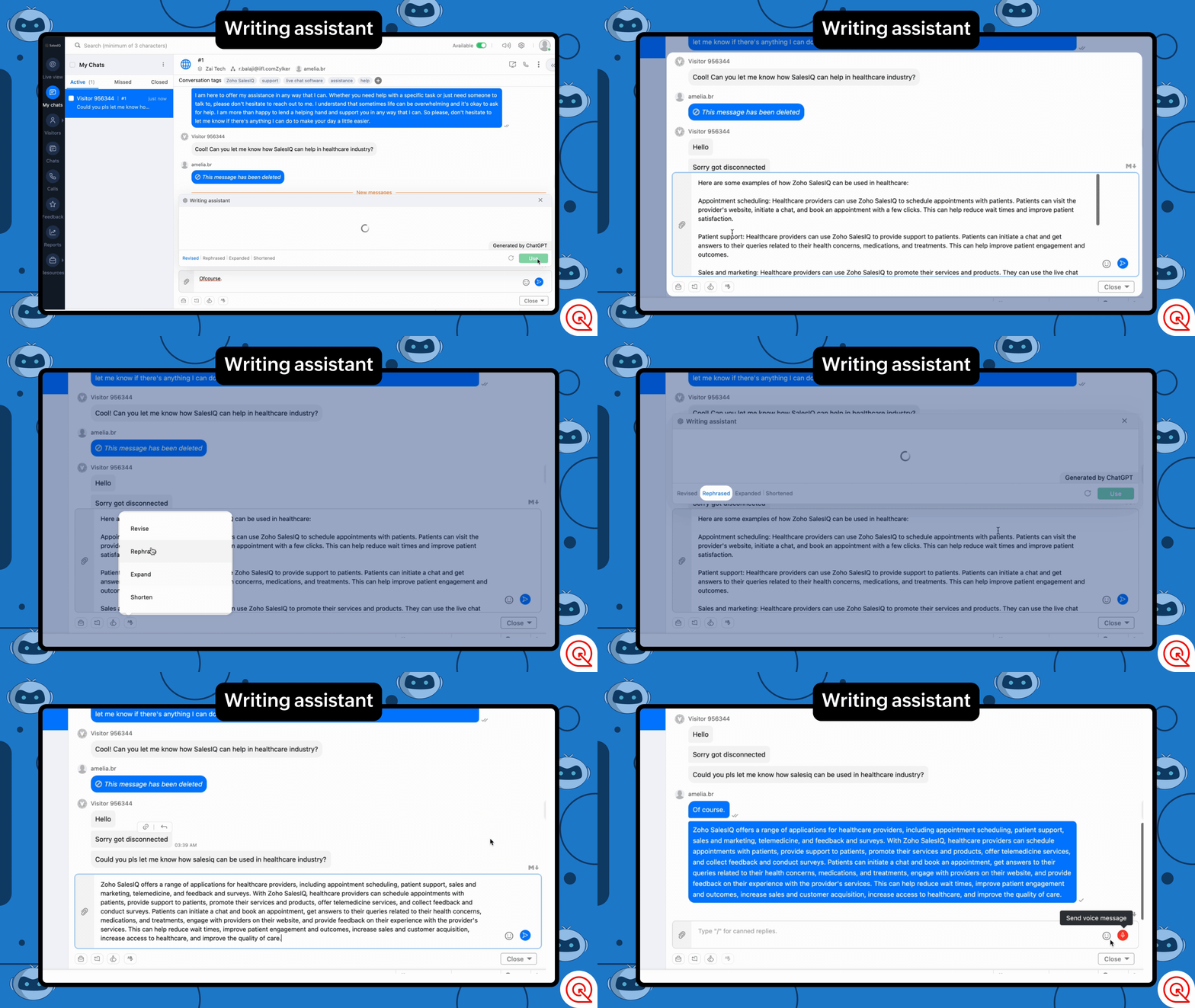
What can it do?
- Rephrase - Paraphrase to enrich the message.
- Shorten - Shorten the message to make the content crisp.
- Expand - Make the message longer to offer a more comprehensive explanation.
- Revise - Checks of grammar and spelling errors in the message.
Conversation summary for quick understanding and recap
Our new feature Summarize powered by OpenAI, will help you get a condensed overview of the entire conversation in actionable points.
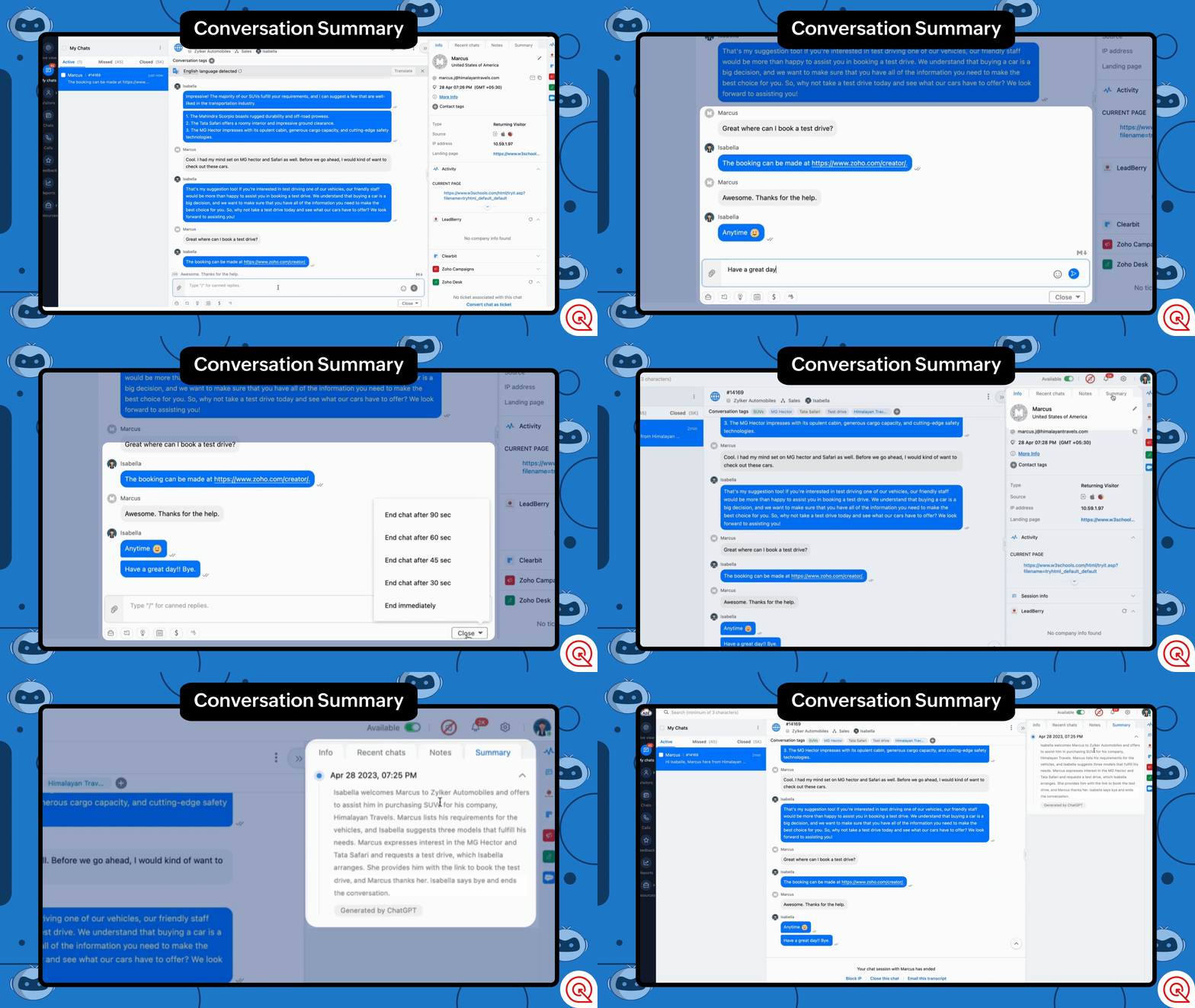
How can this help?
- Get a quick overview or recap of the conversation. Operators can skim through previous conversations to contextual assistance.
- Admins and analysts can now skim through customer chats 10 times faster.
- It can mitigate the need for operators to make conversation overview notes for admins, allowing them to focus on noting down critical drivers.
Quick Tag Suggestions for Better Classification
Tagging can be one of the most compelling features of Zoho SalesIQ when categorizing your conversations. Using Tags, analysts and admins can get in-depth insights into the conversation; it can also be used to understand customer behaviors and trends at a glance.
But manually tagging all the conversations can be tiresome, even more so if you have many untagged chats and want to add tags.
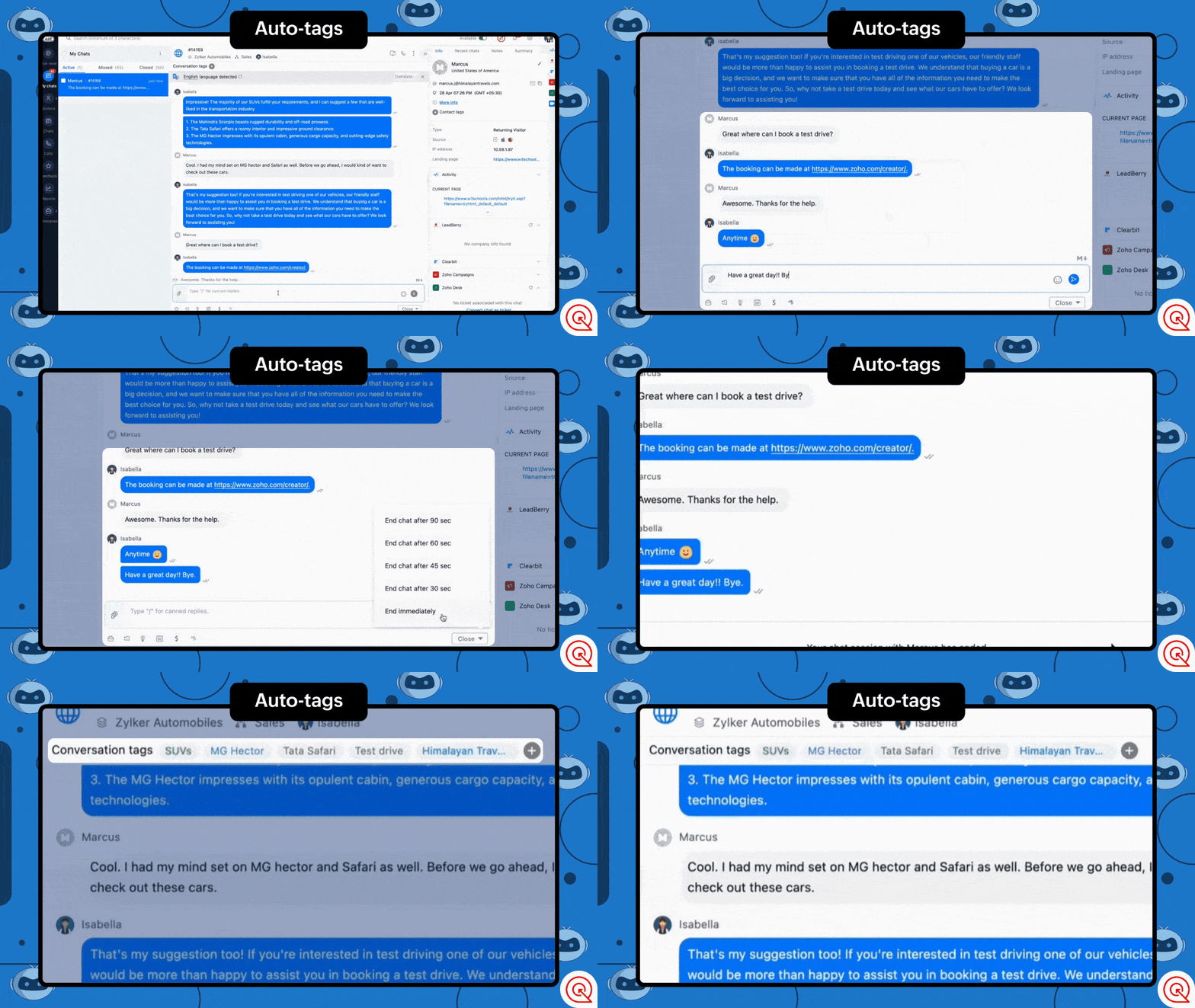
With the tags generation feature, OpenAI can analyze conversations and assign tags to them. You can choose one or both of these options for tag generation.
- Generate and suggest tags - This option allows you to generate new tags or assign existing based on the conversation and assign them with the help of OpenAI.
- Auto-assign tags - This option automatically assigns tags based on the conversation once ended.
Power Up Your Chatbots with ChatGPT
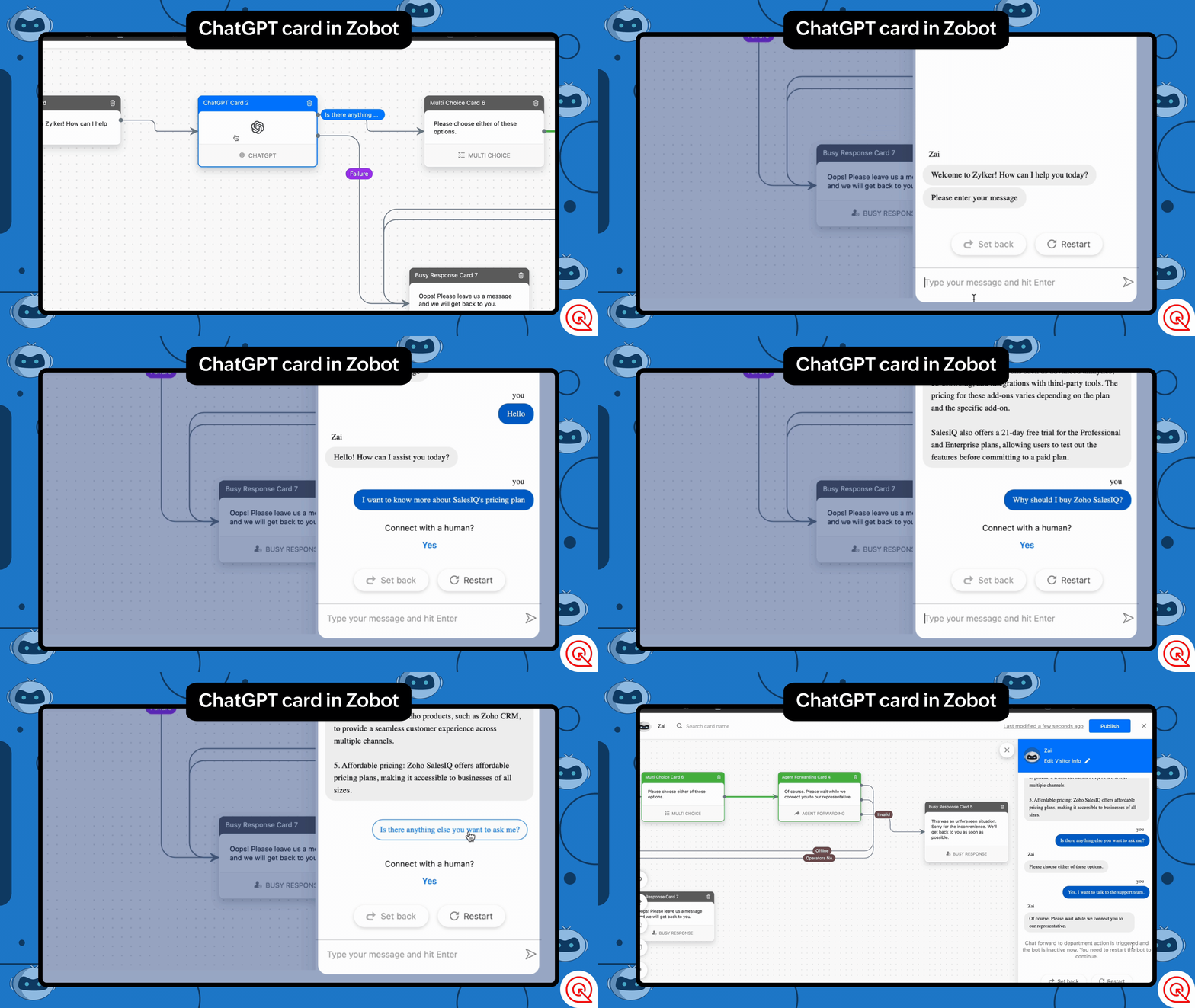
Take your chatbots to the next level and give them a boost by connecting them directly with ChatGPT, allowing your users to communicate directly with the AI. This feature can enrich your automated conversations by allowing users to ask general questions about your business domain or questions that are outside your area of expertise. With AI in the picture, your chatbots can become smart assistants that keep your visitors engaged.
Here is an example on how you can use the block in your chatbot:
Assuming you run a car retail business, you can set up the this block to help visitors with general questions about cars or how they work. ChatGPT can intuitively assist your visitors with these questions.
With features like the Writing Assistant, Summarize, and Tag generation, businesses can improve efficiency, accuracy, and personalization. As AI technology improves and becomes more reliable, we will be looking forward to further automating features of Zoho SalesIQ.
We hope that these features would add great value to operators and admins and to provide optimal support for your users. We are not stopping with this, as AI evolves and becomes more reliable we will be adding more AI based features or core functions of Zoho SalesIQ. Until then, please use this integration and let us know your suggestions. We are happy to hear back from you.
Get Started Now
Caution: Please be aware of the privacy concerns of using OpenAI. We prioritize protecting user data and encourage users to read more about OpenAI privacy policies. Read More.
Regards,
Naveen
Topic Participants
Naveen Chandar
Sushil Bhattachan
director
Adam LV
BeeTravel
Sticky Posts
Right Moment, Right Message, Right Operator: Never Miss a High-Intent Lead
Ever been on a website or app, thinking “Should I buy this or not?” and suddenly a friendly message “Hi! How can I help you?” pops up at the perfect moment? That’s not luck. That’s timing done right. Engaging right visitors at the right moment, with theSpeak Your Customers' Language: SalesIQ's chatbots now support 30 languages 🤖
We're unveiling some major upgrades to our chatbot that are set to revolutionize your experience! Now SalesIQ support 30 languages for both Zobot and Answer bot. By speaking your customers' language, you can enhance engagement, improve customer satisfaction,Attention Deluge Developers: Important Update Regarding "Send Email Deluge Task"
Hi Deluge Users, We hope this message finds you well. We would like to inform you about a recent update on the Send emails deluge task. If you are using this deluge task (SalesIQ Scripts) for your Zobot, widgets, or form controllers to send emails, pleasePlug Samples #12: Verify Customer Mobile Numbers with OTP to Avoid Spam Entries
Hi Everyone! Verifying customer information is critical in business to filter out junk data and spammers. Whether it’s lead generation, appointment booking, or any other operation, ensuring quality data is essential for driving meaningful outcomes. ABig Things Just Dropped in the SalesIQ Universe: Top Upgrades You’ll Love in Nova’25
Nova'25 has landed, and it’s packed with meaningful upgrades to help you engage smarter, work faster, and scale with ease. Whether you're into proactive messaging, smarter automation, or better admin control, there's something here for everyone. Here's
Recent Topics
User Tips: How to change the the label display name of a system defined field
Most users know how to change field label names via Settings > Modules & Fields but if you want to change the name of a system defined field you can’t as there is no “edit properties” option. However with a simple hack you can edit any system definedZoho CRM Community Digest - October 2025 | Part 1
Hello Everyone! Here's a quick recap of first two weeks of October! Product Updates: Zoho CRM Android App Update: Surveys, Blueprints, and Smarter Mobile Features! Zoho CRM’s Android app just got a useful upgrade. You can now share records, upload yourAutomate onboarding emails with CRM Workflow and Accounts module
We’re a B2B SaaS company selling to public-sector organisations. Each organisation is stored as an Account in Zoho CRM, and each organisation typically has multiple associated Contacts. Our backend syncs product-usage data (setup status, user activity,Important update: Enhanced security measures for account operations in Zoho Cliq
Greetings from the Zoho Cliq team! We’d like to share an important security update that has an influence on some admin actions such as password reset, MFA reset, and MFA backup code generation. What’s changing? With our latest security enhancements, theseSales Receipts Duplicating when I run reports why and how do we rectify this and any other report if this happens
find attached extract of my reportNo Functional Autosave or Manual Save Button
Application : Zoho Notebook So I wanted to try Zoho Notebook(On Ubuntu) as an application, I installed the application and went solving my LeetCode problems visually(Drawing mode), at one point the app just stopped saving anything... Every time I triedEnterprise subscription support
My organization sells subscription services to enterprise customers, which is a different model from the consumer subscription model that Zoho Billing has been designed to support and I beleve this capability should be added. An enterprise subscriptionIssue with Creator's IF logic
Hi, I found the following code produces unexpected results: if(-1.0 < 0.0000000) { info "True"; } else { info "False"; } if(-1.0 < 0.000000) { info "True"; } else { info "False"; } The output returned is: False True However, theNeed option to send Package PDF in shipment email (Shipment PDF is missing Lot info)
Is there any way to automatically attach the Package PDF instead of (or alongside) the Shipment PDF in the notification emails? We really need this feature because the default Shipment PDF creates a blind spot for our customers. It does not display Batch/Lotzoho creator view is not present in the workspace and blank reports
Hi Support, Users who have "write" permissions keep getting this error for all of our embedded reports all of a sudden. See screen shot below: Meanwhile, my developer permissions account sees a blank screen in view and edit mode as shown in the screenshotsCustomize portal email template
Can i fetch only first name of the user in portal email template instead of the below code Hi ${User.FULL_NAME}Can't we let users decide which options they'd like to add at embed widget?
It seems embed widget DOES NOT offer a feature, where users can choose options upon subscribing plans. What Zoho has instead, is that admins have to manually create plan with options. How come no one in Zoho dev team never raised issue about usabilityReupload and rename from one field to another field (file upload)
Hi Everyone, Sorry, i have question to use invoke url for rename and reupload attachments file to another field. Tested on development mode. Zoho C6. Refer to https://www.zoho.com/creator/help/api/v2/upload-file.html look my error notification. Does anyonePrinting Multi-Page Reports (PDF Export)
Hi, I am moving a report from Google's Looker Studio to Zoho Analytics and trying to reproduce the Looker page by page dashboard editing experience. With Google, what you see is what you get when you print to PDF. But I can't seem to create the same experienceI NEED TO NUMBER TO TEXT NO HERE
=NUMBERTEXT NEEEDError: View is not present in the workspace
When saving a dashboard, user receives a popup with the following error. "View is not present in the workspace" What does this mean or refer to? There is no further insight given.Dear Zoho CEO: Business Growth is about how you prioritise!
All of us in business know that when you get your priorities right, your business grows. Zoho CRM and Zoho Books are excellent products, but sadly, Zoho Inventory continues to lag behind. Just this morning, I received yet another one-sided email aboutBin Locations
Dear all, I am wondering if someone has the ability to develop the bin locations option for zoho inventory (integrated with zoho books) Regards, RyanCreate and populate a record in an instant: Introducing zero-shot field prompting to Zia's ICR
A couple of months ago, we upgraded our in-house AI image detection and validation tool, Zia Vision, with intelligent character recognition (ICR). By training Zia with sample images, you could create and enrich CRM records with data extracted from standardHow to Prevent Users From Skipping LMS Videos in Zoho People
How to Prevent Users From Skipping LMS Videos in Zoho People Hello Zoho Developers, In this blog, we will quickly look at how you can stop users from skipping or fast-forwarding videos in Zoho People LMS. Zoho People provides a feature called Disable[Integration Edition] Deluge Learning Series – Custom API with Deluge | November 2025
We’re excited to conclude this four-month Integration Edition of the Deluge Learning Series: Session 1 – Integrating Zoho Apps with Deluge Using Built-In Integration Tasks Session 2 – Integrating Zoho Apps with Deluge Using invokeURL and invokeAPI SessionTips for Organizing Workflows and Improving Team Coordination in Zoho
Hi everyone, I’m looking for some general advice on how different teams are organizing their daily work within Zoho’s apps. Our team recently expanded, and we’re trying to streamline how tasks, discussions, and documents are shared so everything staysPrevent user from viewing all records?
I have a report that is meant to be used by vendors to view only the records that are assigned to them. All the vendor information is stored in a separate application, so I need to call a function to get the current user's ID (not the zoho user ID). The report settings criteria doesn't support using function calls, so instead I'm embedding the report in an html page like this: if (thisapp.Global.CurrentUserIs("Vendor")) { personID = common.getLoggedInPersonID(); query = "Assigned_Vendor.ID="Zoho Site pages not displaying in iframes
I simply want to show a Zoho Site page inside an iframe on another non Zoho website. When testing this across many browsers, the iframe content simply does not appear. IE reports that the host does not allow their content to be displayed in iframes. Very disappointing. Is there a way around this please? Here is the URL of the page I would like to appear in an iframe. http://ips-properties-to-rent.zohosites.comZUG Meet-ups are back - Across India (December 2025)
The Zoho User Group (ZUG) meet-ups are back, and this time, we’re travelling across India to reconnect with our amazing community! From Chennai to Delhi, Bengaluru to Mumbai, we can’t wait to meet you all in person and talk everything Zoho SalesIQ, automation,Zoho Inventory as connector in Zoho Creator
Hello, It doesn't appear that Zoho Inventory is one of the many built in connectors in Zoho Creator? I see that there are non-Zoho inventory applications that have built in connectors such as Cin7, which leads me to believe that I'm missing somethingSend Zoho Forms Link using Zoho CRM Email Templates
I have set up Zoho Forms and CRM integration to pre-populate data from Zoho CRM to Zoho Forms. The setup is working fine. I have also created an email template in the Zoho CRM deals module to send Zoho forms links. So when I send an email using that templateMy go to On Load Client Script - Fast, efficient, and works for ALL profiles; Hides everything except initial fields
This is my on Load client script that I use for Create pages. I use a modified version for Edit and Display pages which you can create yourself using the same basic structure that I will give you below. First up, the script. Below that will be an explanationCustom Search using HTM+CSS Snippet
Suppose I wanted to create my own list view using HTML and CSS snippets inside a Page with a custom search input at the top of the list (not the Search snippet). Without Javascript, is there a way to retrieve a user's entry from that search input andZoho CRM Kiosk Upload Files
Hello all, We are trying out Kiosks at the moment to see where it can fit best in our business. We are still a bit off in the application but lets say we will sort this out. My question is the following - when I create a Kiosk I can add "File Upload"Double opt-in notifications and customizable confirmation messages for your webforms
Dear CRM Community, We are excited to announce a major upgrade to our Webforms feature. You can now customize the confirmation message shown to your users who double opt-in from your webform and also customize your confirmation emails when they submitHas Anyone successfully integrated Zoho and Sage Intact?
Hey all, We’re evaluating Zoho One + Sage Intacct and I’m trying to connect with anyone who has actually implemented the two together.Specifically, I’d love to know: -- Which functions you kept in Zoho vs. Intacct (e.g., Product Catalog, AR/AP, invoicing,Introducing Image Upload Field
Hello everyone, In this post we will discuss about the benefits and usage of the Image upload field. The field is available for standard and custom modules. Usage: This field can be used to upload a gallery of images to a record and share the record with peers or customers. The record can be made accessible to users outside of Zoho CRM via Portals, where they can upload the necessary images. Preview, editing, and deleting images: The uploaded images can be directly edited and saved from the recordFree webinar alert on November 19 - Email driven strategies - Master personality based styles
Hello Zoho Community! Want to make email management easier, smarter, and more you? We’ve got just the session for you! Join our interactive, game-based webinar to discover how Zoho Mail adapts to your personality and work style. Learn practical hacks,AI generated meeting notes associated to Account or Deal
As our organization works to improve efficiency we are looking for a solution to leverage AI to generate meeting notes and then add those notes to a CRM record such as an Account or Deal. I see Zoho has a Notebook AI offering that talks about the abilitydue date on cheue
how to handle cheque in zoho books for customers and vendors including due dateConta META desativada. Problema no uso do CRM Zoho e SalesIQ.
Olá, Habilitei um número Whatsapp no SalesIQ em Agosto/2025 com sucesso. Agora concluí a configuração do Zoho CRM e ao habilitar o Whatsapp, descobri que a conta META foi desativada: Configurar CRM -> Canais -> Mensagem de negócio -> WhatsApp Você não'Statement of Accounts does not exist' error received, when creating PO using api in Zoho Inventory
Here is request json -- JSONString = { "date": "2019-09-24", "purchaseorder_number": "PO-6-1", "delivery_date": null, "delivery_org_address_id": 36221200000056XXX, "vendor_id": 362212000000564XXX, "attention": "Testing", "line_items": [{ "unit": "Pieces", "account_id": 36221200000003XXX, "quantity": 1, "item_id": 362212000000049XXX, "tax_type": "", "tax_name": "", "name": "One HD", "purchase_rate": 85, "tax_percentage": 0, "item_total": 85.00, "tax_id": "", "warehouse_id": 362212000000564XXX }] }Zoho Projects API 100 requests/2 min. Limit
Hi Requesting clarification on the API documentation. "You can invoke or call an API for 100 times in a span of two minutes. If you invoke more than 100 times, the particular API request will be locked for the next 30 minutes. " Does this limit applyIntegrate your Outlook/ Office 365 inbox with Zoho CRM via Graph API
Hello folks, In addition to the existing IMAP and POP options, you can now integrate your Outlook/Office 365 inbox with Zoho CRM via Graph API. Why did we add this option? Microsoft Graph API offers a single endpoint to access data from across Microsoft’sNext Page