How to use Twilio to send appointment notification and reminder SMS in Zoho Bookings
Hit no-shows out of the ballpark by combining Zoho Bookings and SMS providers.
SMS notifications help you remind customers of their appointments and reduce no-shows by reaching out where they are.
In this guide, we'll configure an SMS provider called Twilio.
Prerequisites
- A Premium Plan of Zoho Bookings - Pricing Page.
- A Twilio Subscription
- You need at least one number to send messages from. It can be a short code, your personal number, a local number, or anything else. Twilio charges monthly for phone numbers. Check out Twilio's pricing page for more details.
- Since Twilio uses a pay-as-you-go model, there are no monthly commitments (except the sender number). The minimum recharge value is $20, and you can use it until the credits expire - Learn more about Twilio's pricing model here.
Things to Know Before Using Twilio
- You can share your Twilio subscription amongst multiple admins (if required).
- Twilio is responsible for everything except configuring SMS text (You can configure this inside Zoho Bookings).
- Both single and dual way communication is possible with Twilio
- Using Twilio, you can send messages across borders.
- Case 1: When you send messages from a US number to an Indian number, sender IDs might change. It ensures the deliverability of messages.
- However, reply messages from those recipients will not be routed back to your Twilio Number. You can read more about it here.
- Case 2: SenderIDs don't change when the sender and the recipient numbers belong to the same country.
- Twilio charges for text messages on a segment basis. (1 segment = 160 Characters). For instance, if you send an SMS with 200 characters, you'll be charged for two SMS credits - Learn more about it here.
- To find the number of SMS you'll be able to send with your top-up, use this formula:
- Number of SMS that can be sent = (Top Up Value - Phone Number Price)/ Message Per SMS
- Let's assume you belong to the US and recharge for $20. You've also opted for a long code that costs $1.16 (with carrier fees), the equation would look like
- Number of SMS that can be sent* = ($20 - $1.16)/ ($0.0079) = 2200.
- You'll be able to send approximately 2200+ SMS with this. (If you don't buy additional phone numbers in the US)
- Note - The calculation is only an approximate estimation of the number of messages that you can send. This is because factors like carrier fees, and per-message rate change often and vary widely across different service providers.
- Twilio credits are one-off amounts that don't expire until you use them.
- Your Twilio account will get suspended once your account balance reaches zero. To avoid this, Twilio sends a notification to your email requesting you to refill your funds when the balance hits $5.
- Another way to prevent your account from hitting zero you can set up an auto-recharge trigger for a minimum of $10. When your balance hits $10, you can automatically set it up to top up your account. Check out this page for setting up automatic payment triggers.
A2P 10 DLC Registration (only if you wish to send messages to the US)
Note - This is only necessary if you send messages to the United States. (Regardless of where you send your messages from - inside or outside the US)
- If you send messages to the US, you should register for A2P 10 DLC. (Application to Person 10 Digit Long Code messaging protocol)
- A2P 10DLC is a secure way to communicate with businesses and ensures that the messages are relevant to the recipients. We highly advise you to register for A2P 10 DLC Protocol as numbers without it will incur higher fees and even service disruptions from June 1, 2023. This is to comply with US messaging regulations. You can learn more about it here.
- This registration will cost a one-time fee - Read more about it here.
- A2P 10 DLC registration is only possible with a Twilio premium subscription and not for trial accounts.
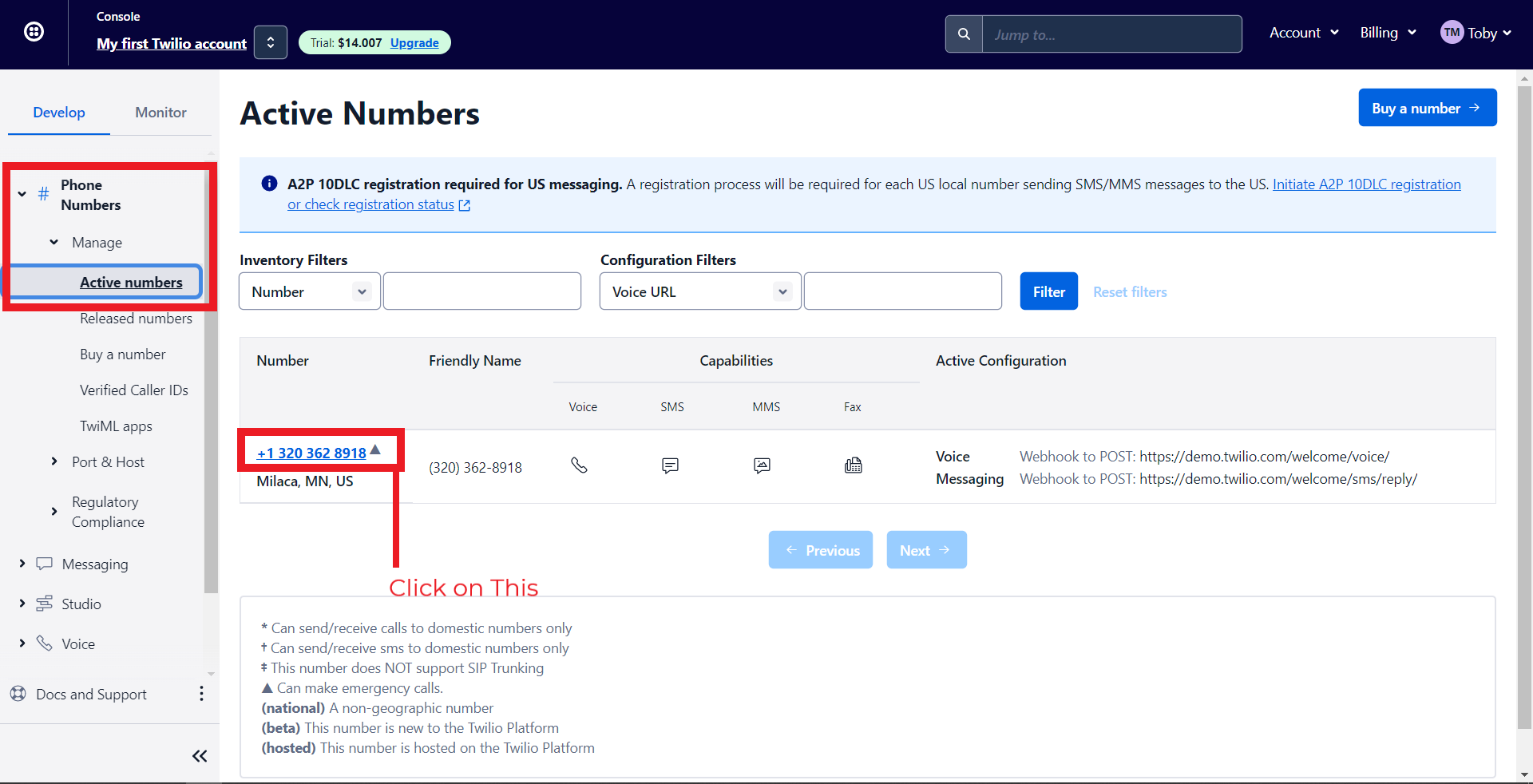
- To do this, navigate to Phone Numbers > Manage > Active Numbers > Click on a Number.
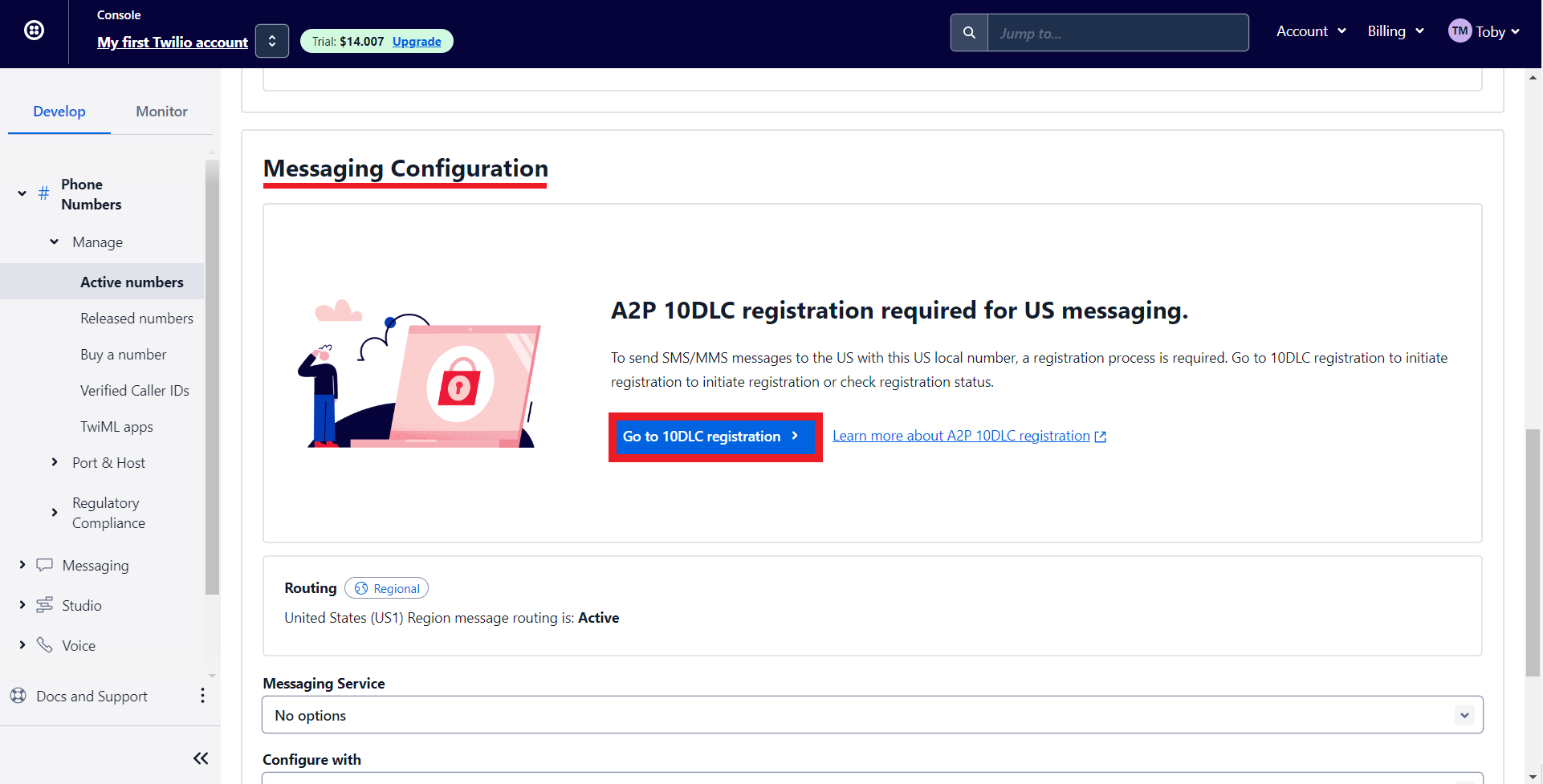
- Under Messaging Configuration, click on 'Go to 10DLC registration.'
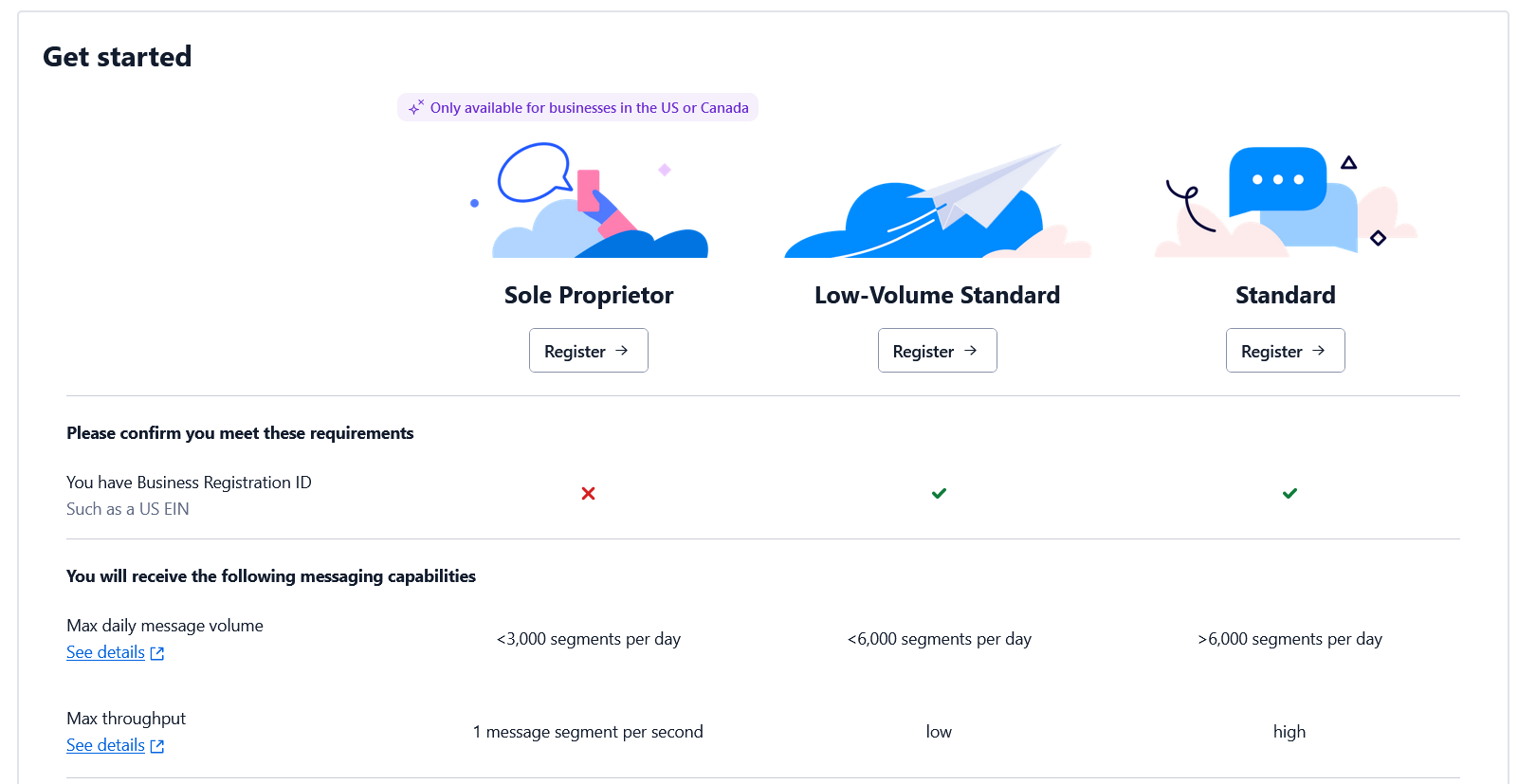
- Depending on whether you have an EIN (Tax ID) or not, you can register for the corresponding option. Check out this page for more details.
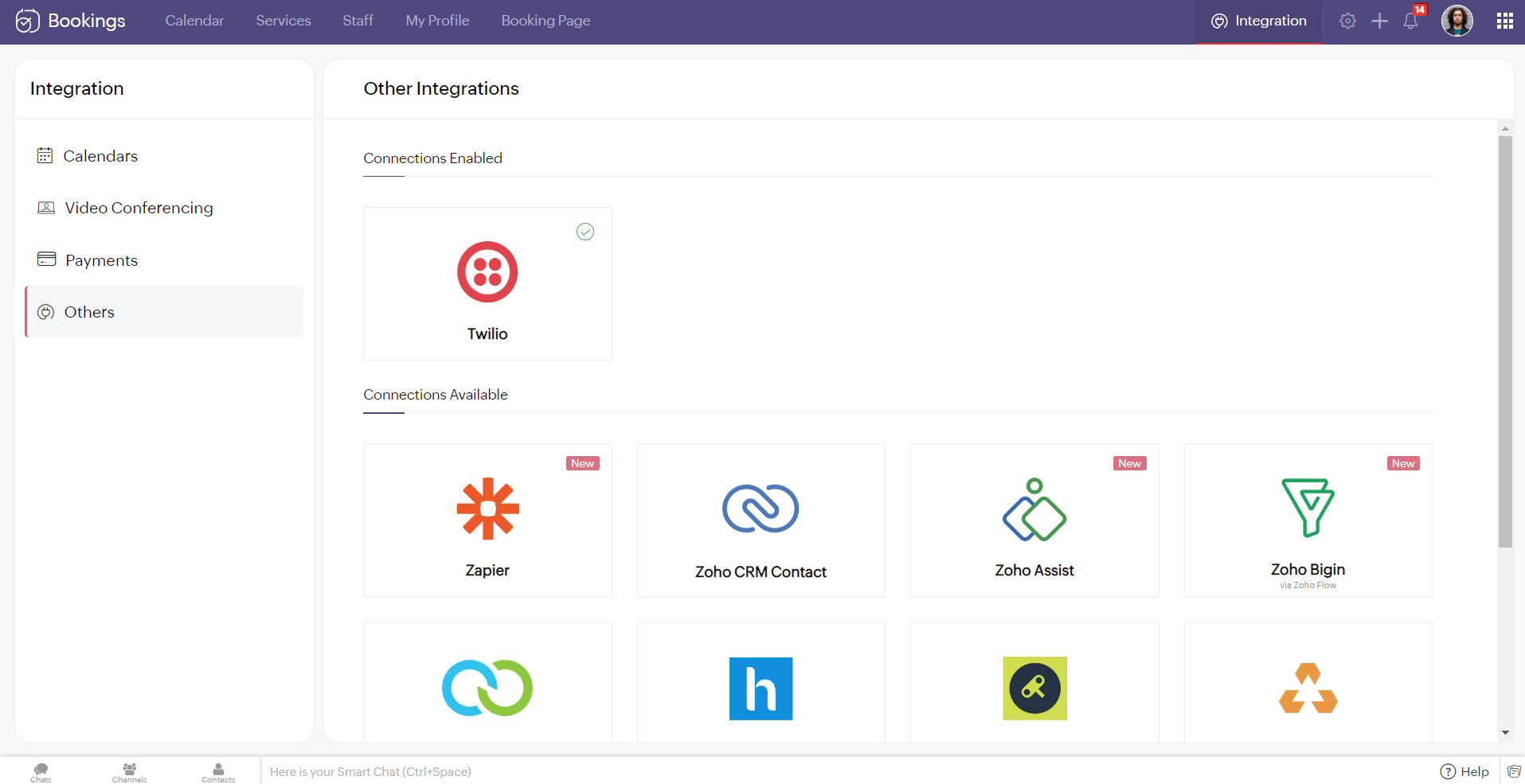
Note - You cannot integrate multiple SMS providers to Zoho Bookings simultaneously.
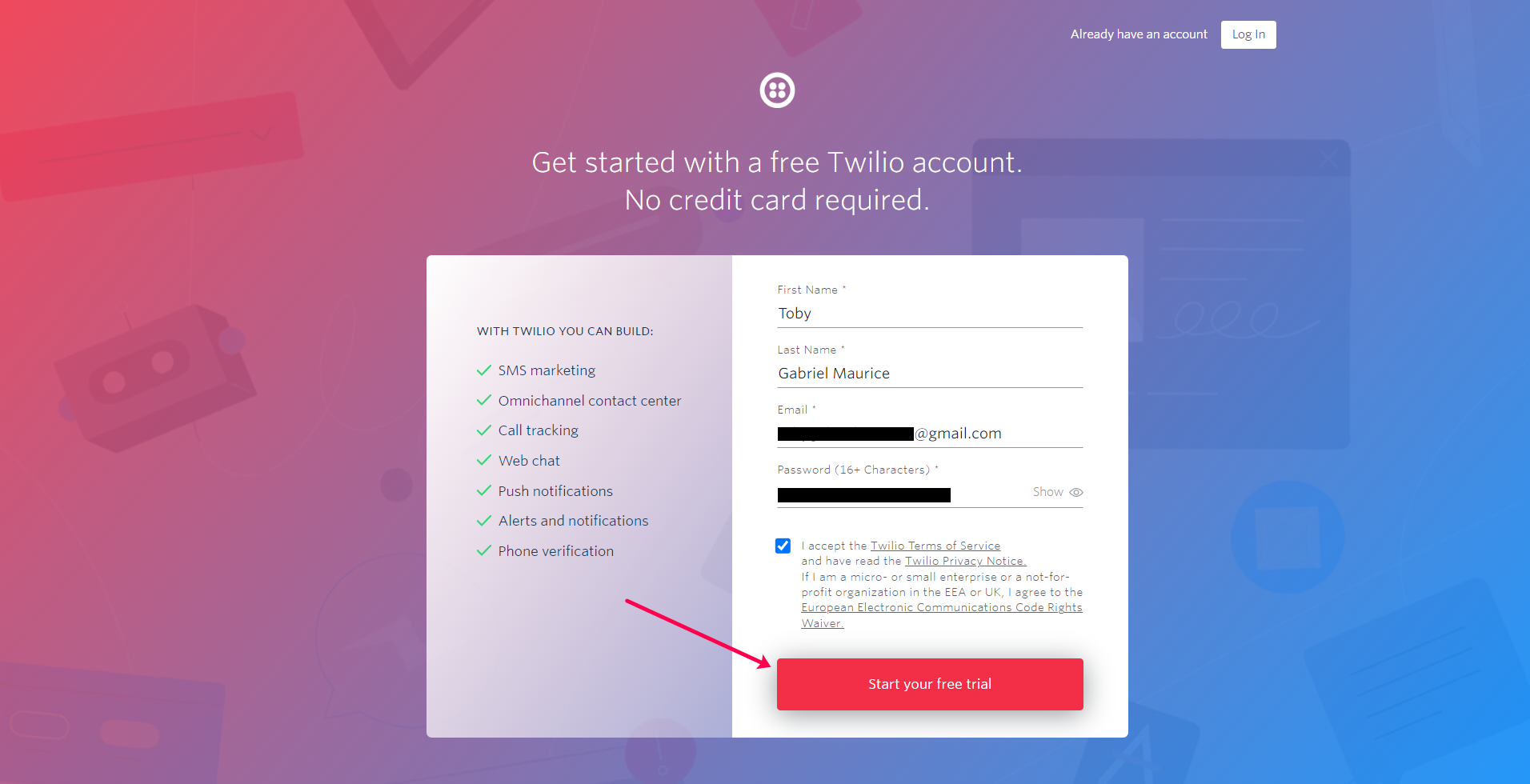
Configuring Twilio with Zoho Bookings
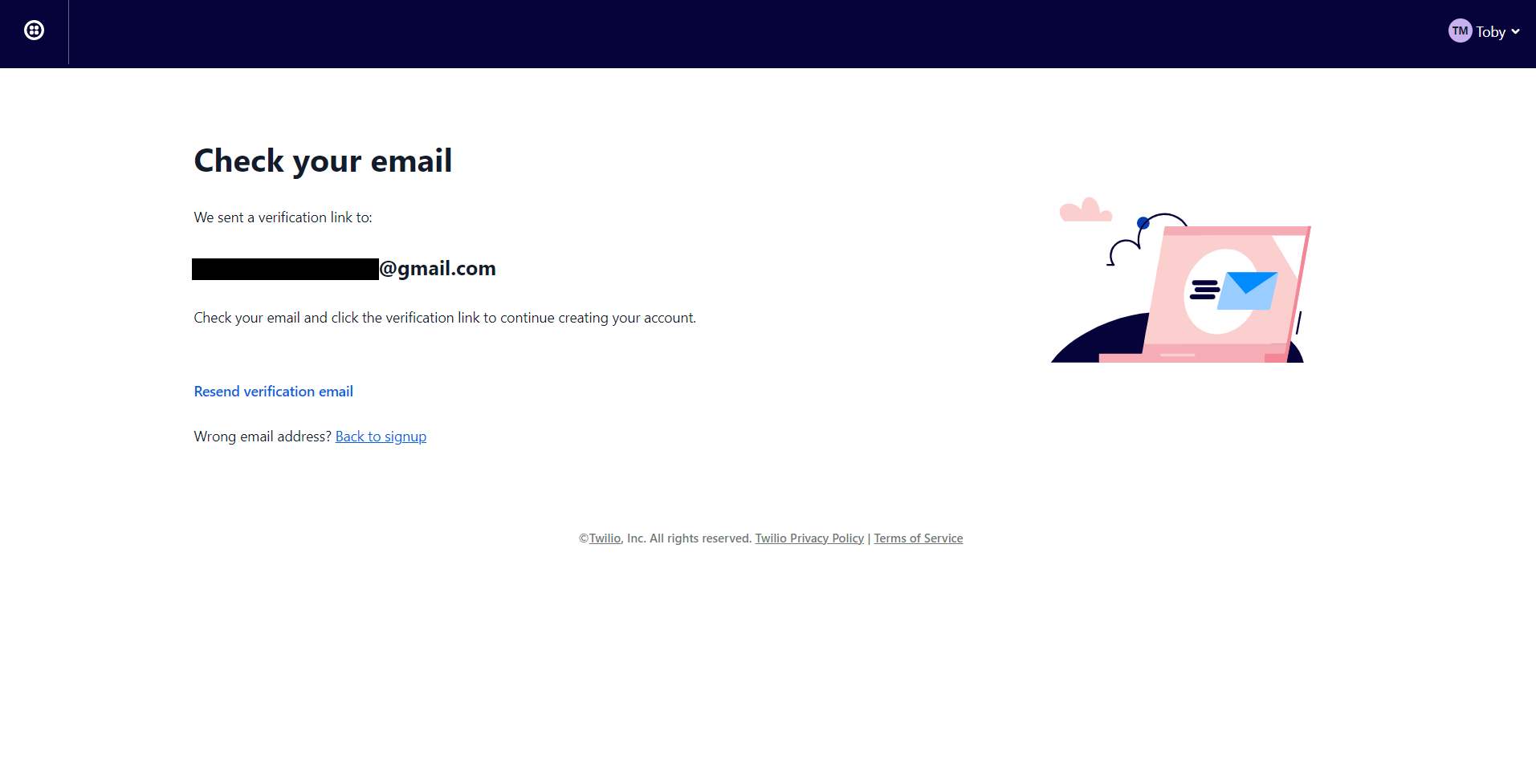
2. You'll be redirected to the following screen once you've signed up. Check your mail inbox.
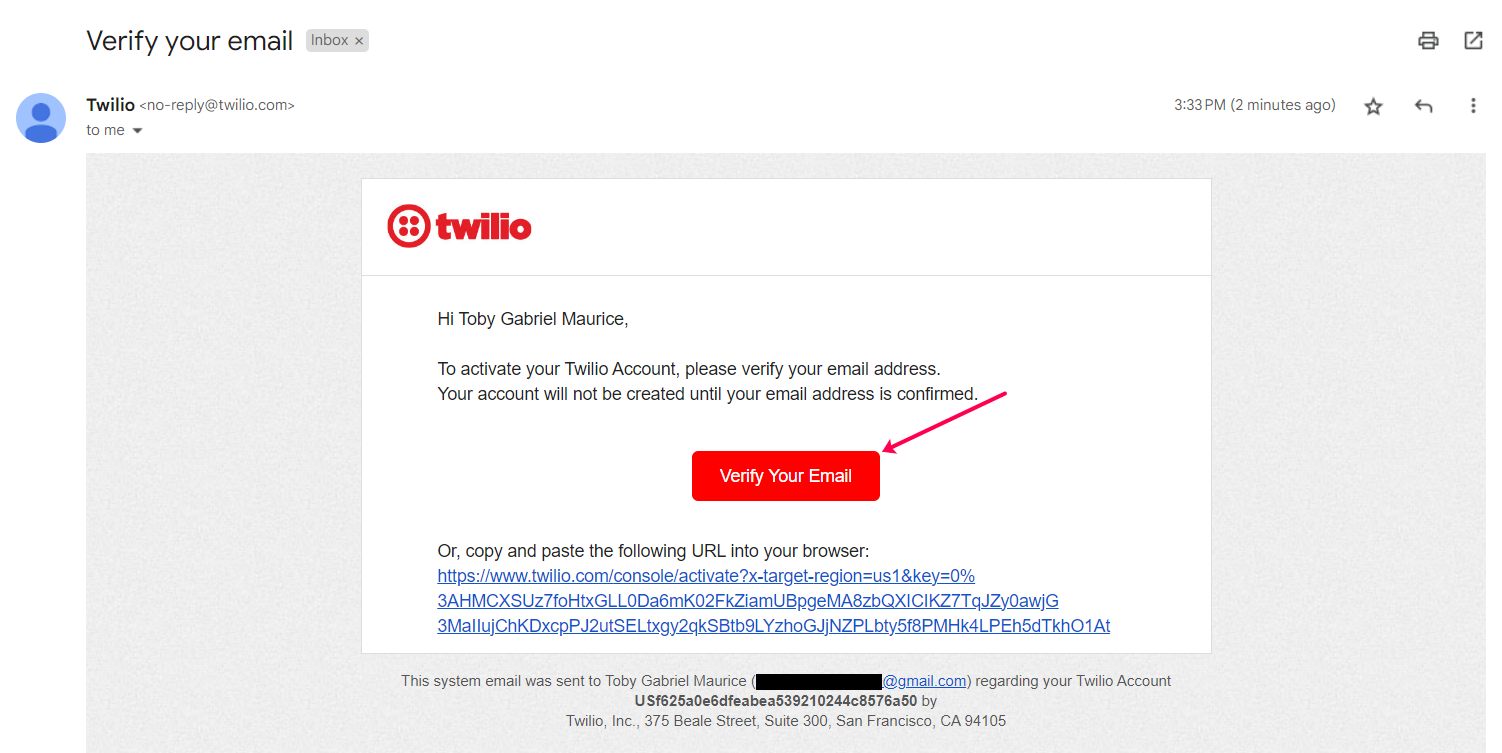
3. Your email would look like this. Confirm your account.
4. Twilio asks you to secure your account with a phone number. Enter your number and click on Send verification code/Get code via phone call depending on your choice.

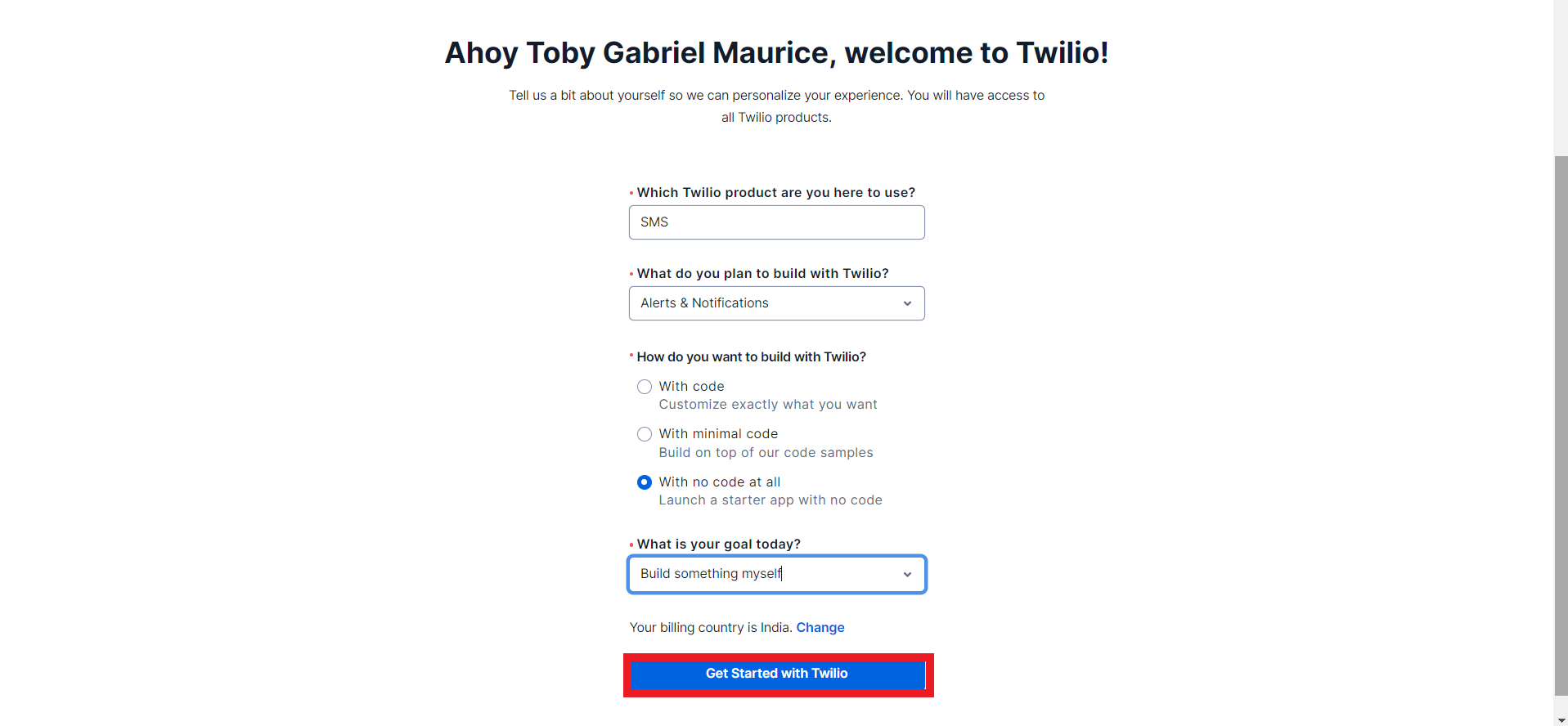
5. Once you've confirmed your phone number you can fill in the onboarding form and click on get started with Twilio.
6. You'll be redirected to the Twilio dashboard.
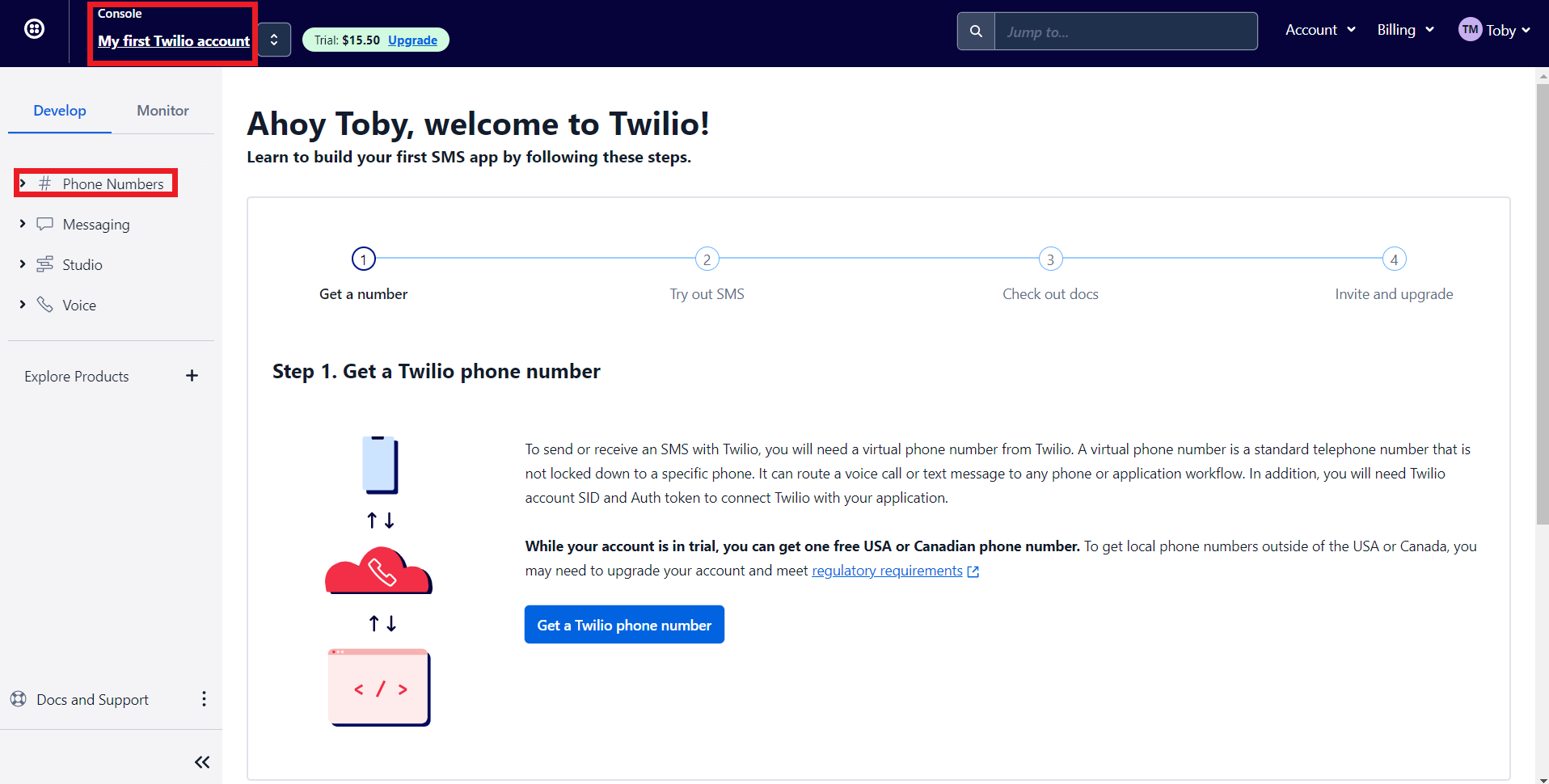
- 'My first Twilio account' is the account name of your Twilio SMS account. If you have multiple Twilio SMS accounts you can navigate it from here
- The Phone numbers tab helps you to
- Manage all your Phone numbers
- Buy new Numbers
- Release a Phone number
- When you sign up for a Twilio account, you'll get $15.50. You can get a trial number using this to test their configurations before opting for a premium plan.
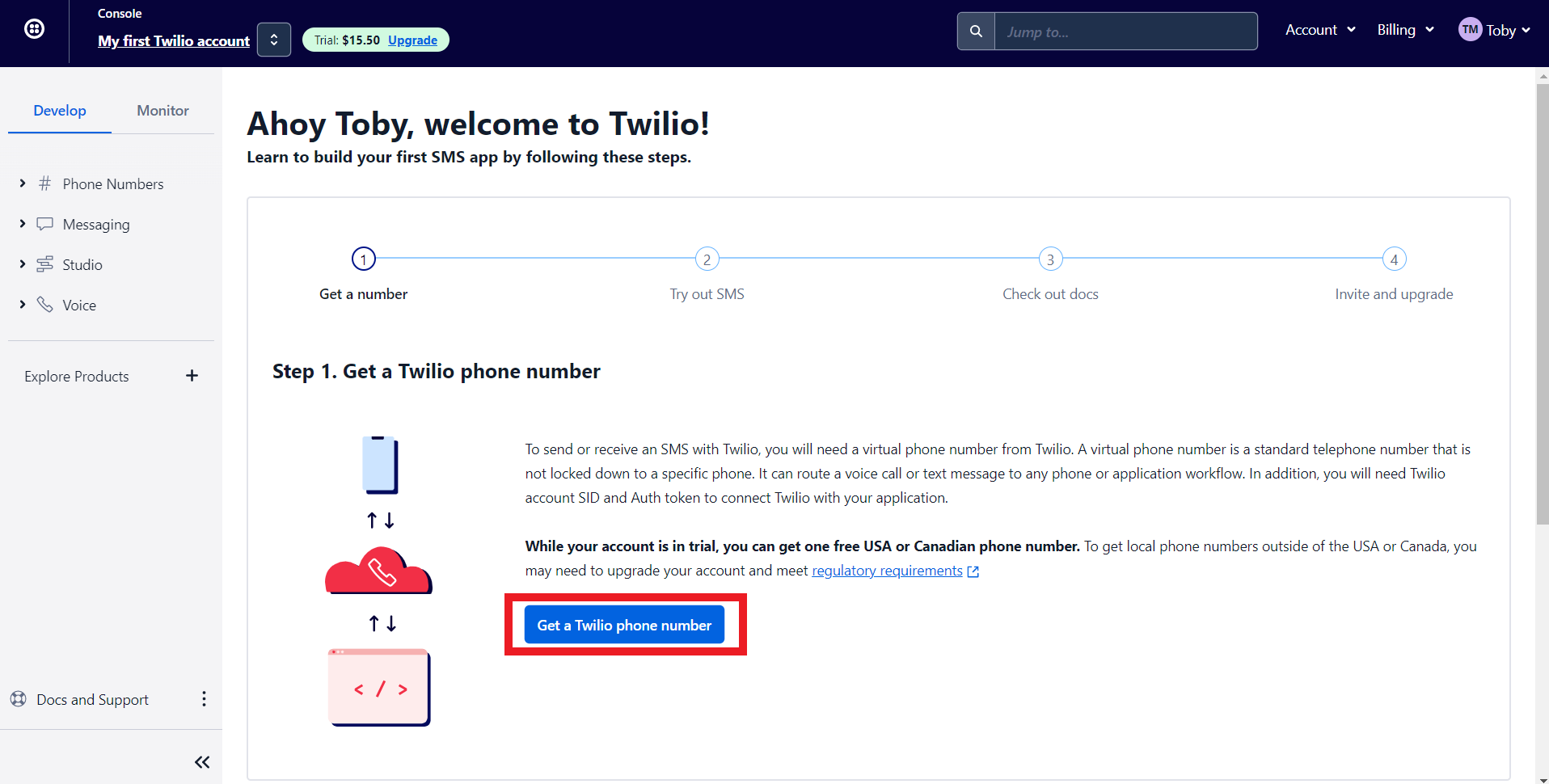
7. Let's get a phone number from Twilio. Click on 'Get a Twilio Phone Number.'
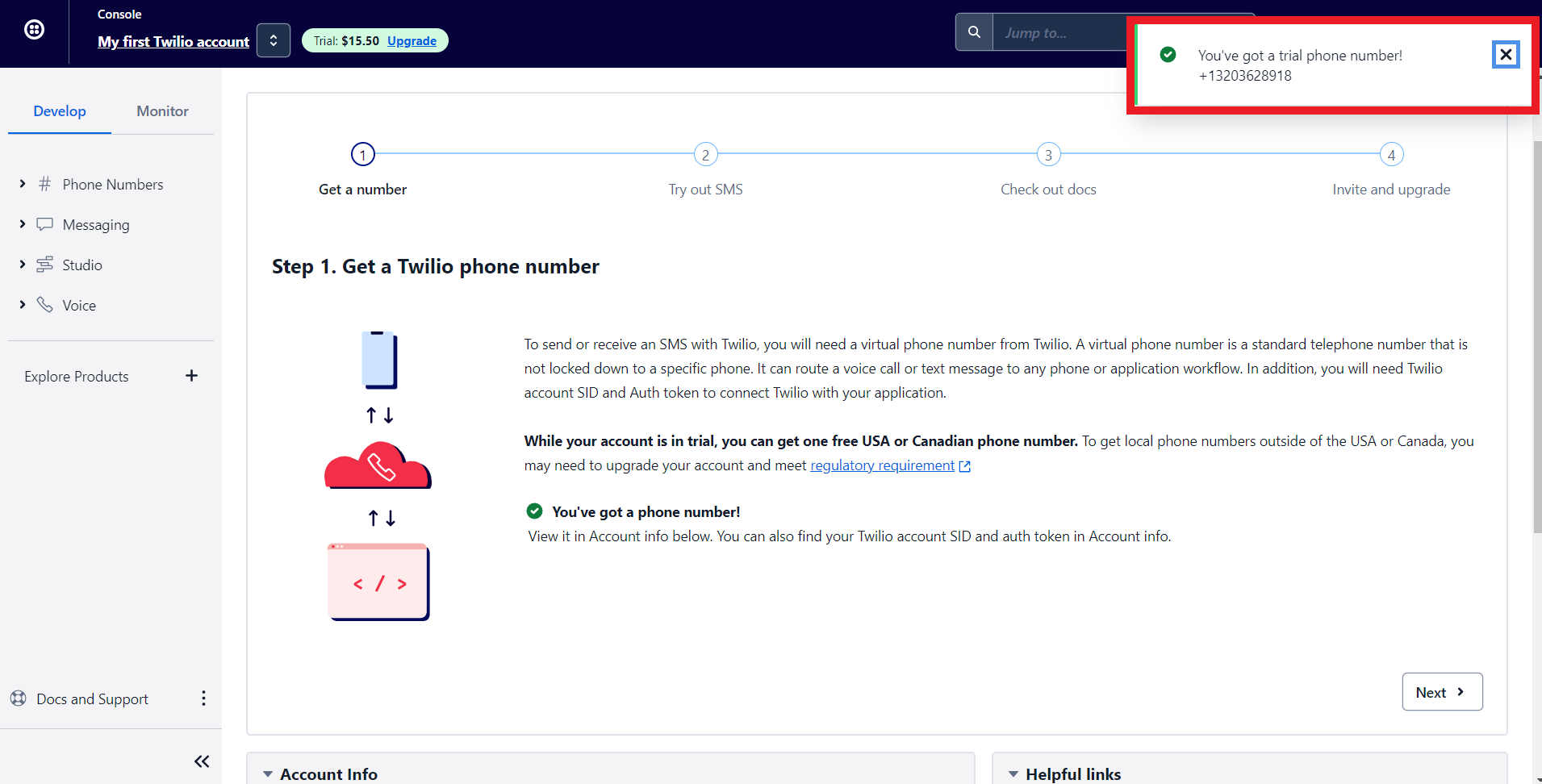
8. Twilio will assign you a phone number. Now let's configure Twilio with Zoho Bookings.
Note - To get a premium number, navigate to Phone numbers > Manage > Buy a Number
Choose which country's number you wish to get, SMS (as capability), and click search. You can click on buy to obtain the number.
Choose which country's number you wish to get, SMS (as capability), and click search. You can click on buy to obtain the number.

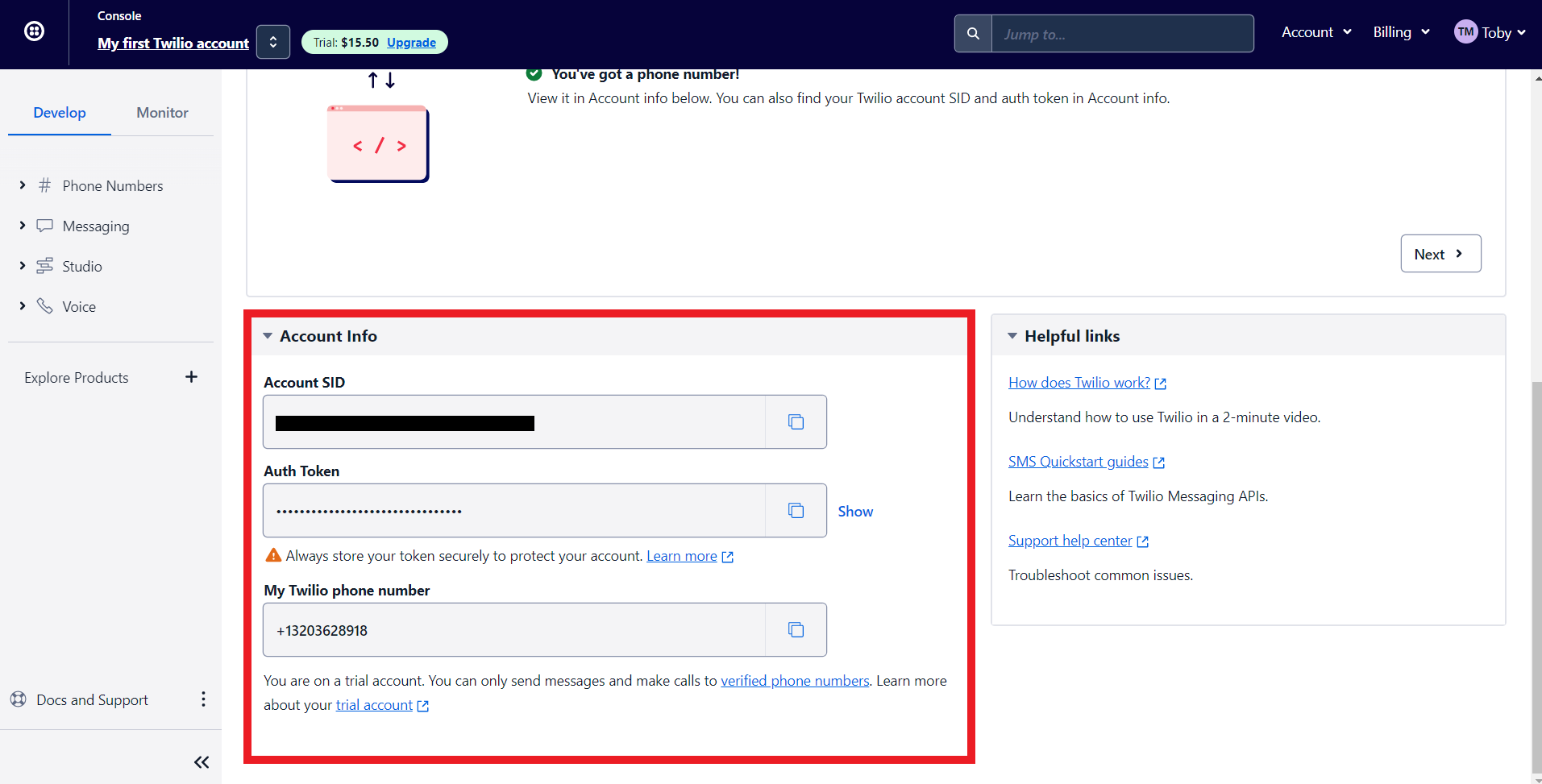
9. Scroll to the bottom of Twilio's main dashboard. You'll find three fields here, Auth Token, Account SID, and your Phone number. We'll paste all this data to integrate Zoho Bookings and Twilio.'
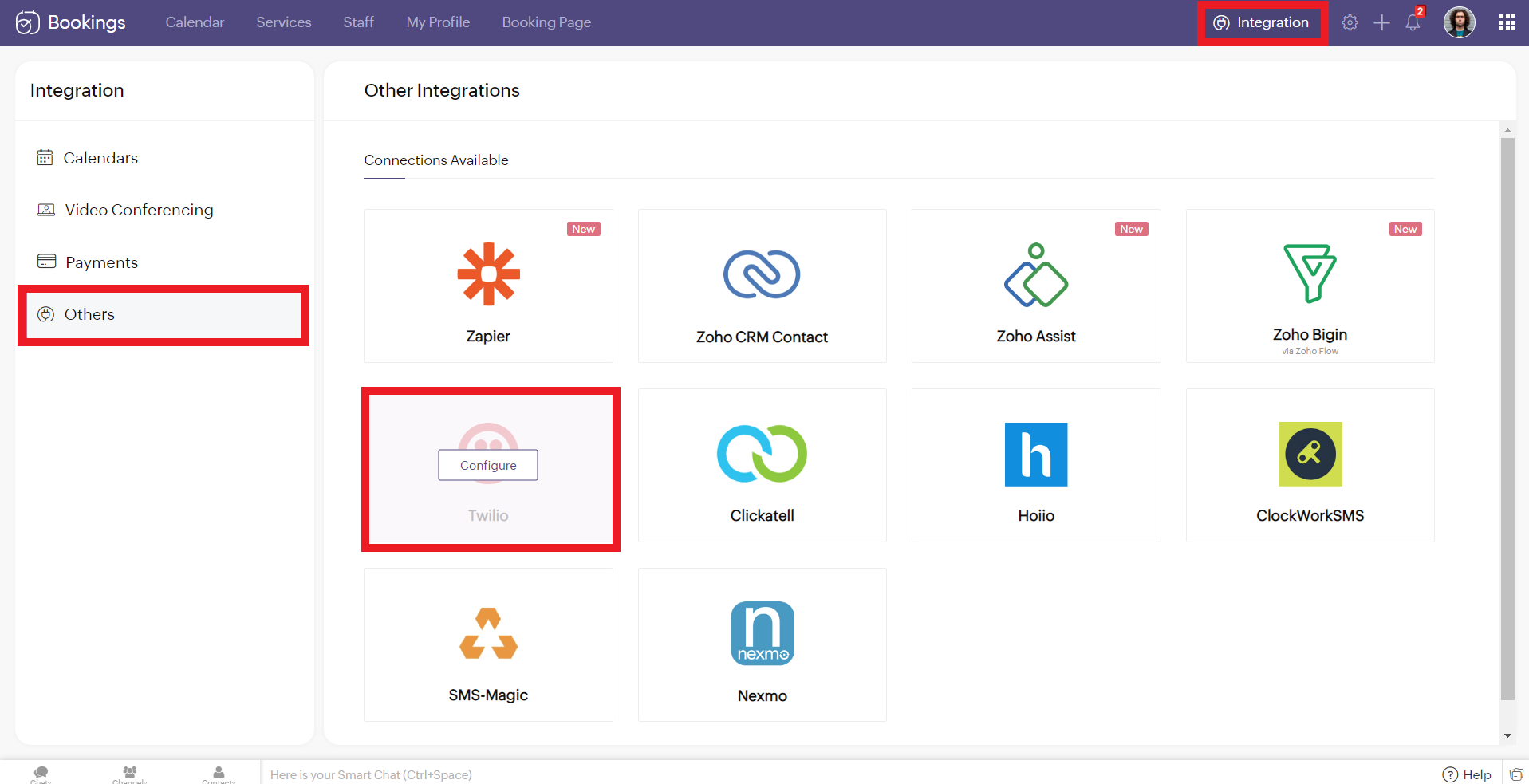
10. Now log in to your Zoho Bookings Dashboard. Navigate to Integrations > Others > Twilio. Hover over Twilio and click on Configure.
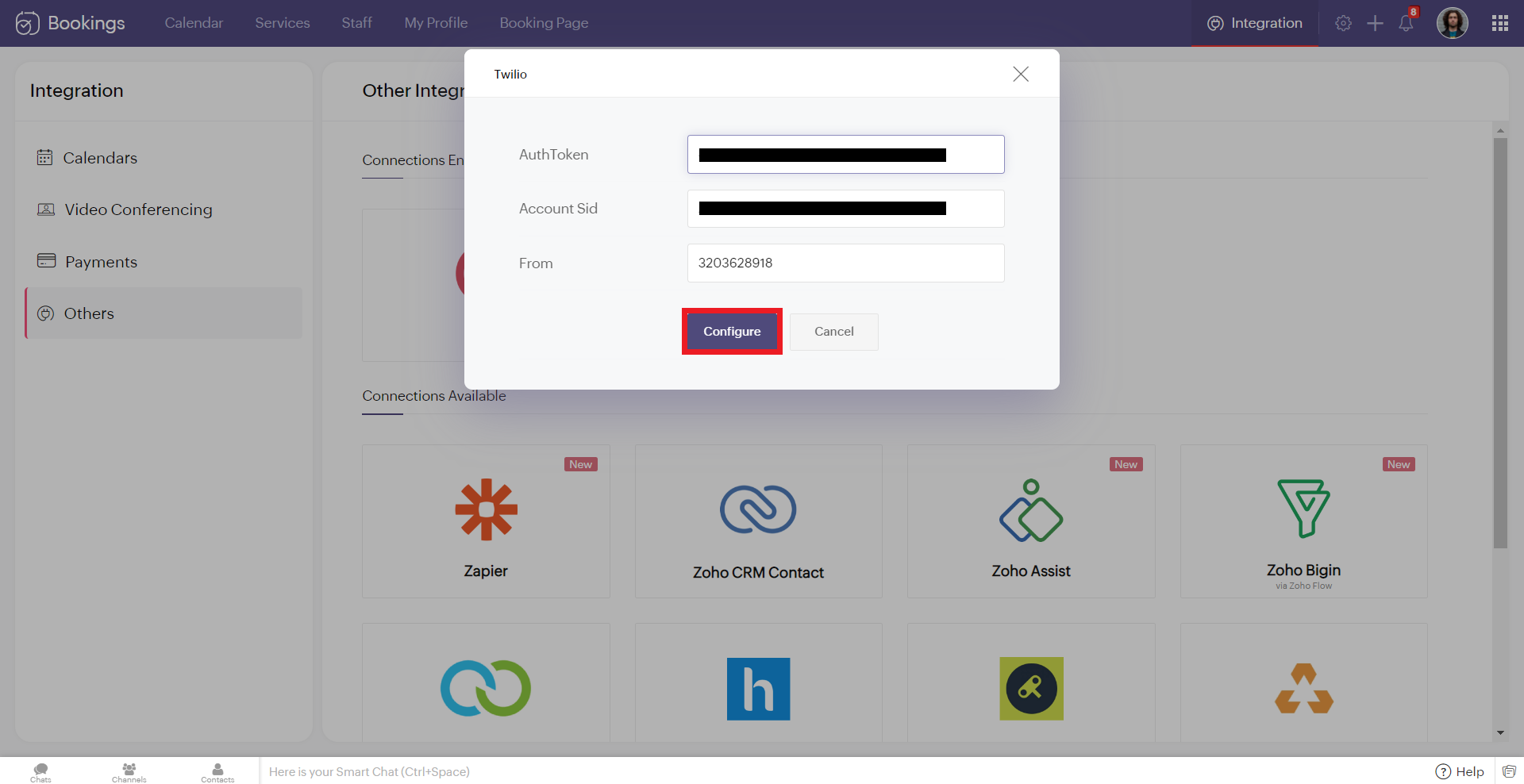
11. Copy and paste the details from Twilio to the corresponding fields in Zoho Bookings. Once you have pasted the details, click 'Configure.'
Note: While pasting the phone number, remove the country calling code. In this case, my phone number was +13203628918. '+1' is the country calling code. Remove it and paste the rest (i.e., 3203628918 without any spaces/symbols in between)
Note: While pasting the phone number, remove the country calling code. In this case, my phone number was +13203628918. '+1' is the country calling code. Remove it and paste the rest (i.e., 3203628918 without any spaces/symbols in between)
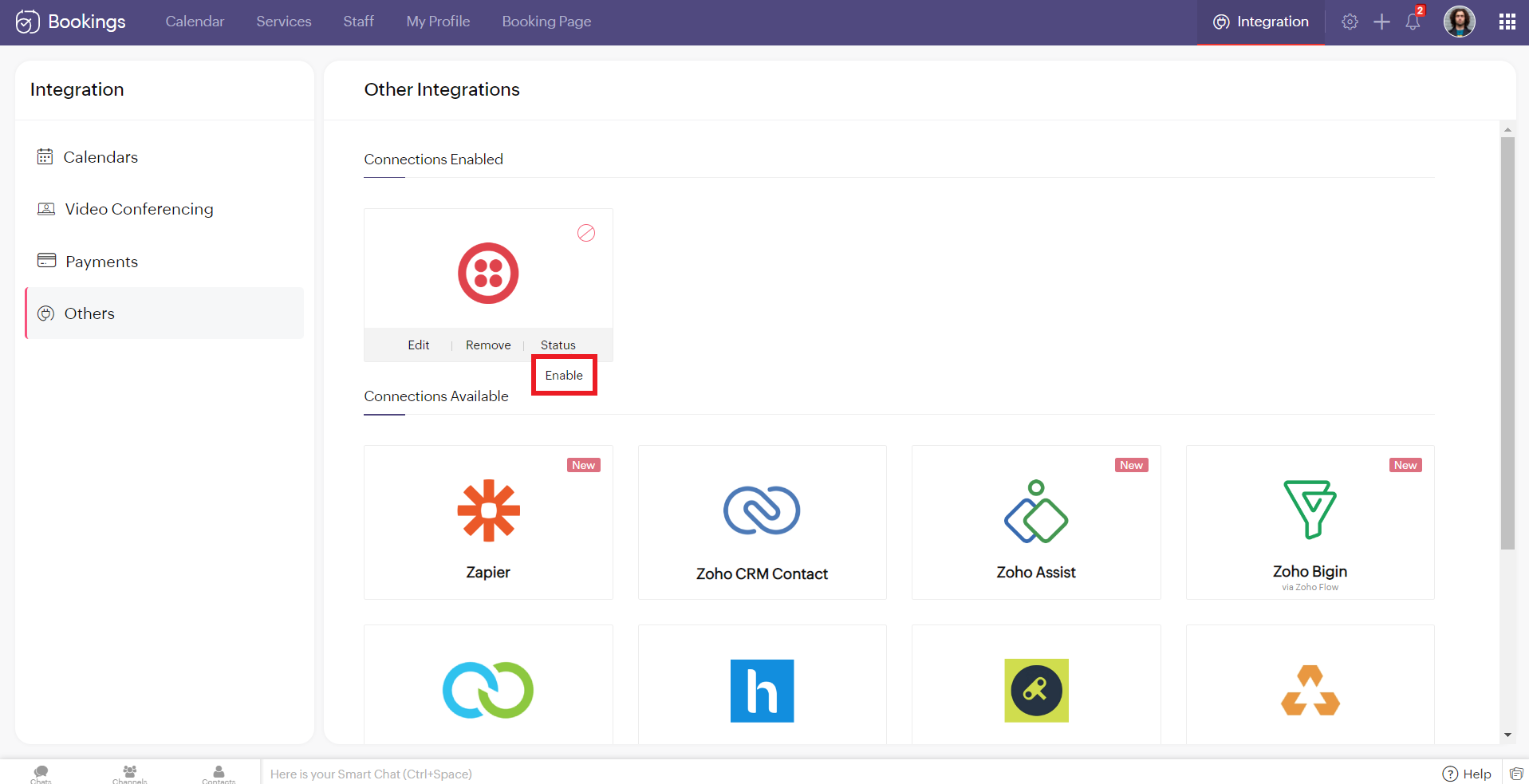
12. Hover over the created Twilio connection and click enable. Reload the page if the connection is still not active. You've successfully integrated Twilio with Zoho Bookings.
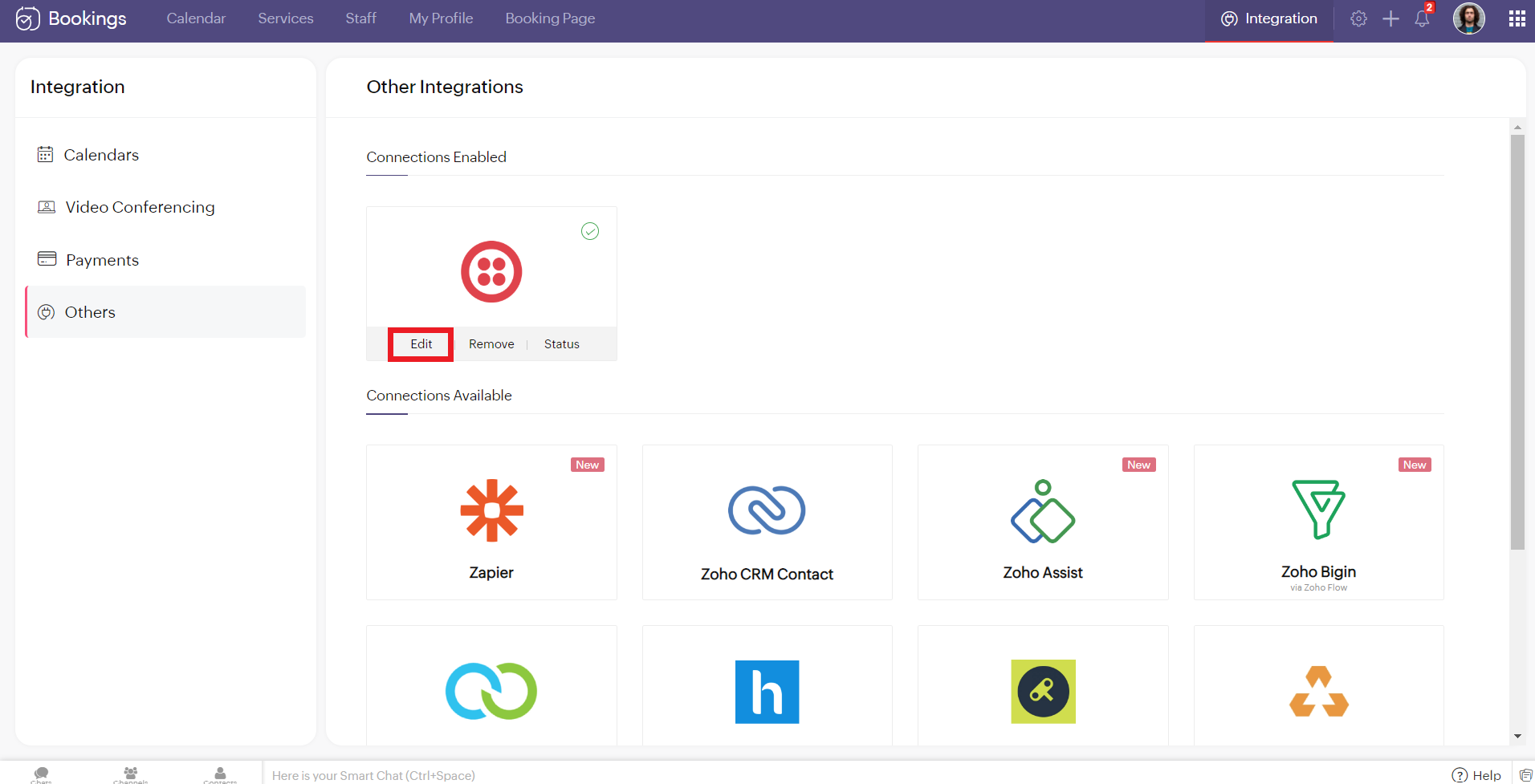
Editing Your Twilio Connection
To edit your Twilio connection, hover over the Twilio integration and click on edit. Once you've made the changes, click Configure.
If you wish to remove your Twilio connection, hover over the Twilio integration and click remove.

A pop-up appears asking you to confirm. Click 'Proceed' to delete your Twilio connection.
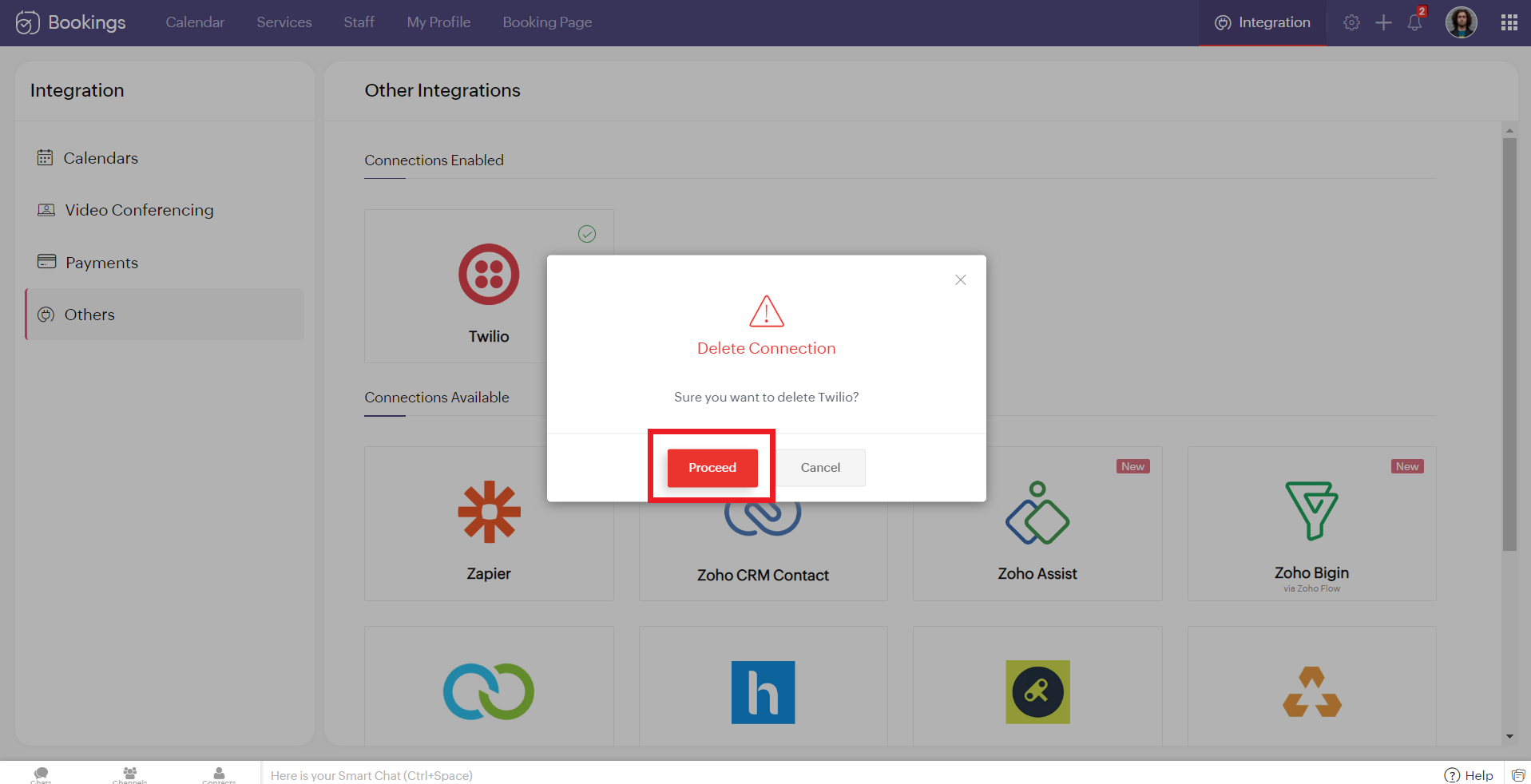
Note - While Editing or Removing your Twilio connections, if the changes don't reflect immediately, reload the page for the changes to reflect.
Configuring SMS Notifications
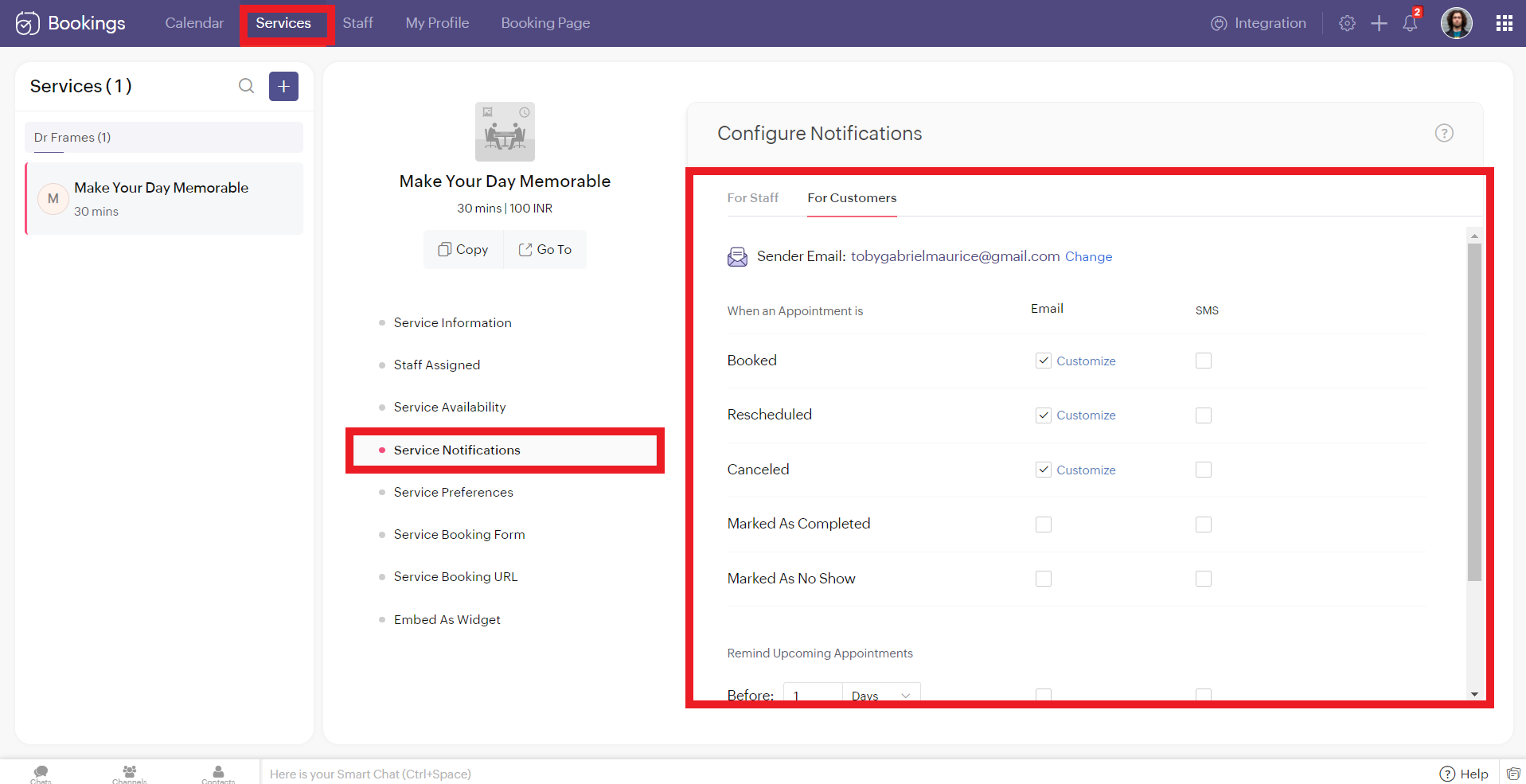
To configure SMS notifications for one on one bookings, navigate to services > service notification.
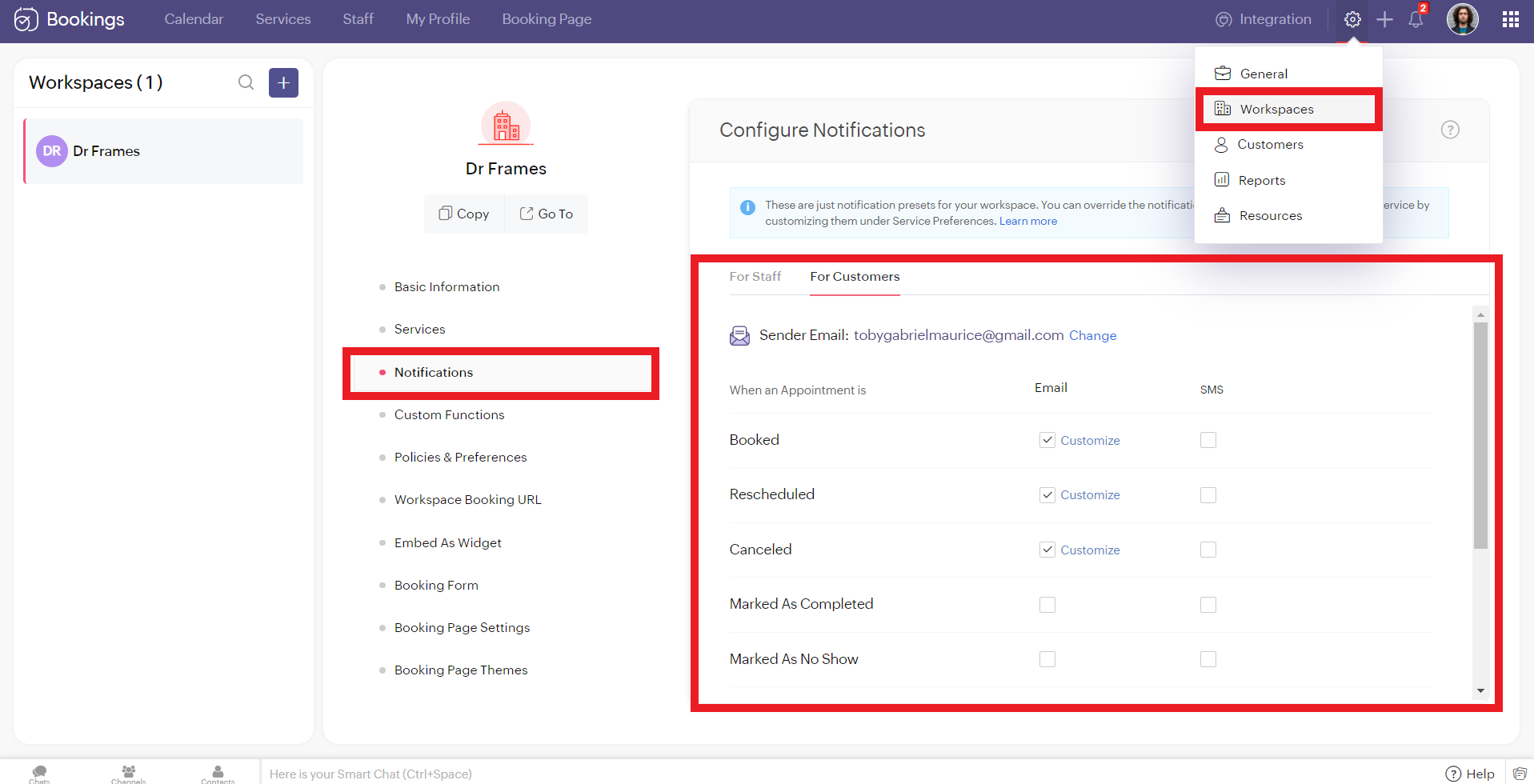
To configure SMS notifications for group/ resource bookings, navigate to settings > workspaces > notifications.
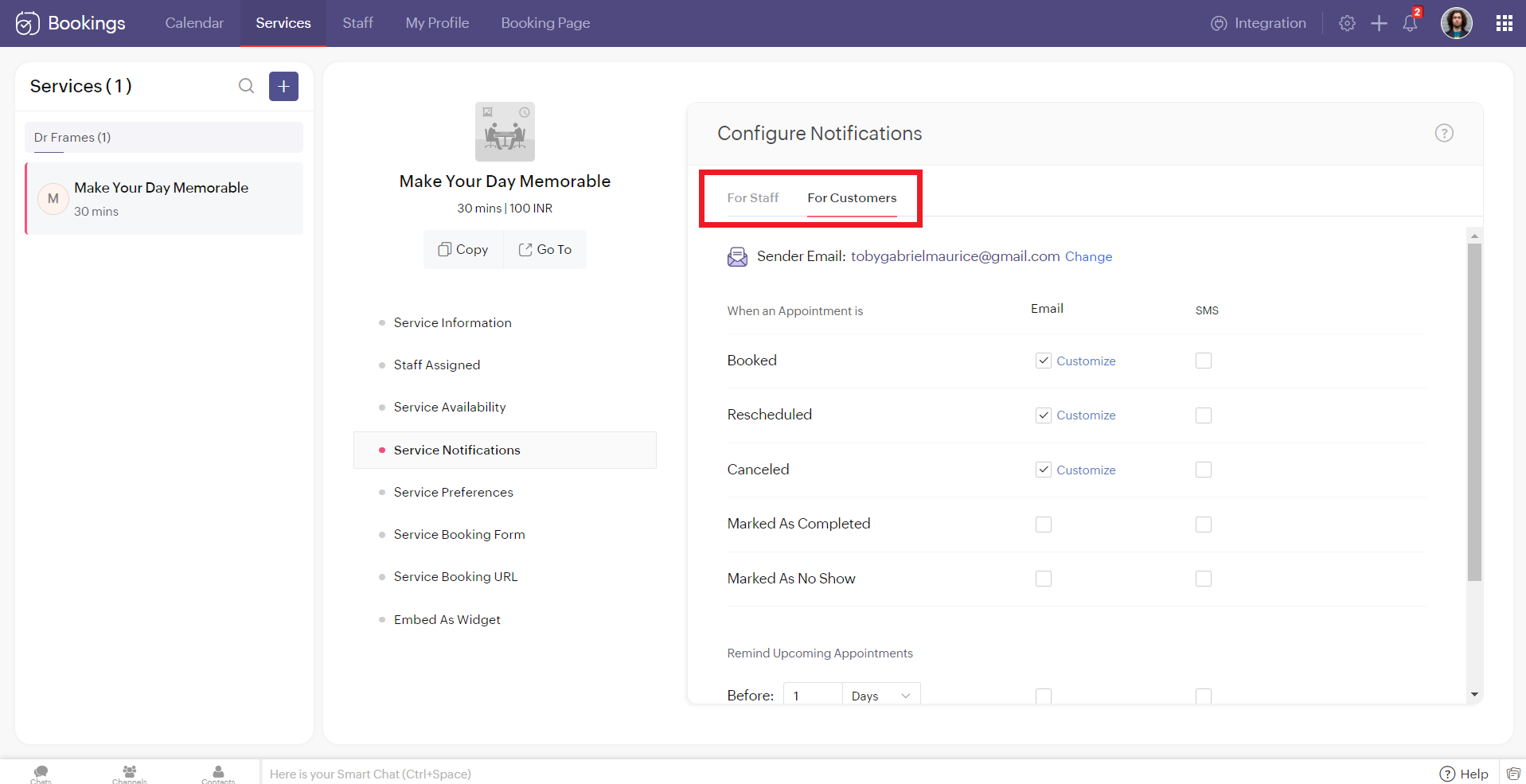
You'll see two tabs here. 'For Staff' and 'For Customers.' Zoho Bookings allows you to send eight different types of SMS under each tab.
You can configure Zoho Bookings to send SMS using Twilio when you change the appointment status to
- Booked
- Rescheduled
- Canceled
- Marked As Completed
- Marked As No Show
Alternatively, you can set up to three reminders before your appointment time.

Illustration: Let's send SMS notifications to a customer when an appointment(one-on-one) is booked.
- Make sure that the checkbox is enabled corresponding to the booked notification in the customer tab. It ensures that the customer receives an SMS notification when an appointment is booked.
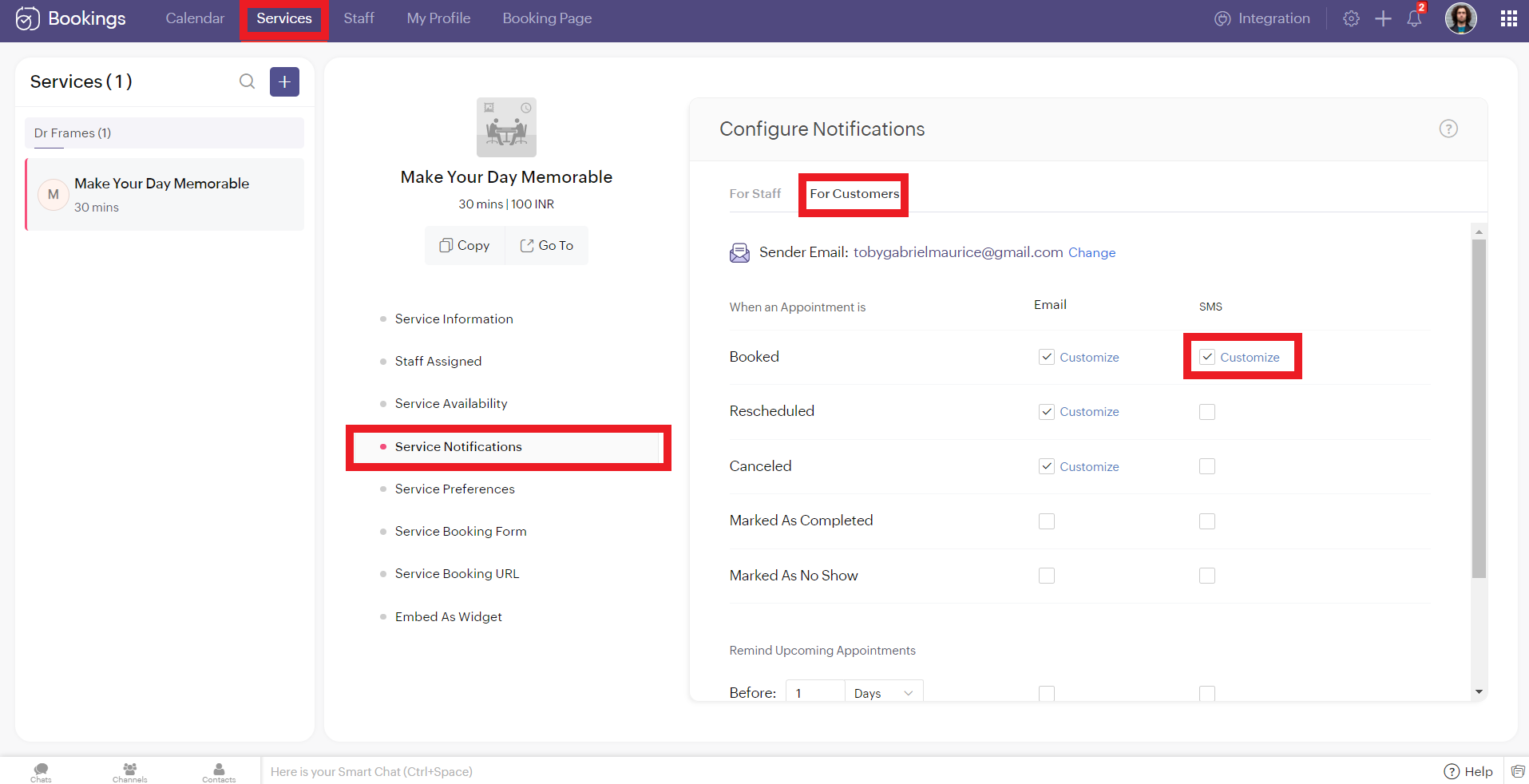
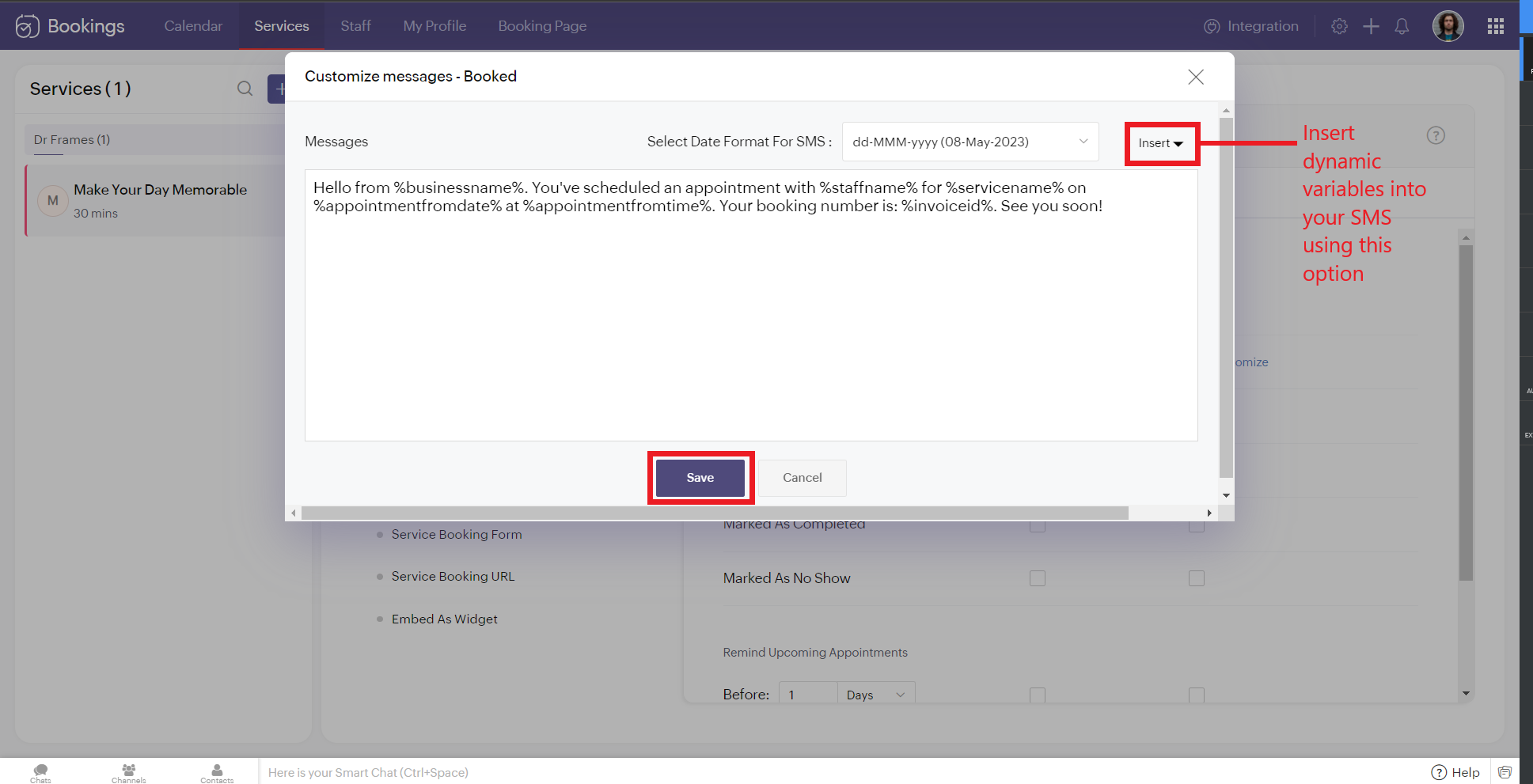
2. To customize the messages that will be sent, click on customize. You can change the message and insert dynamic variables like meeting info, customer name, meeting date, and more into your outgoing messages. Click 'Save' once you are done with the changes.
The customer receives the following message when an appointment is made.
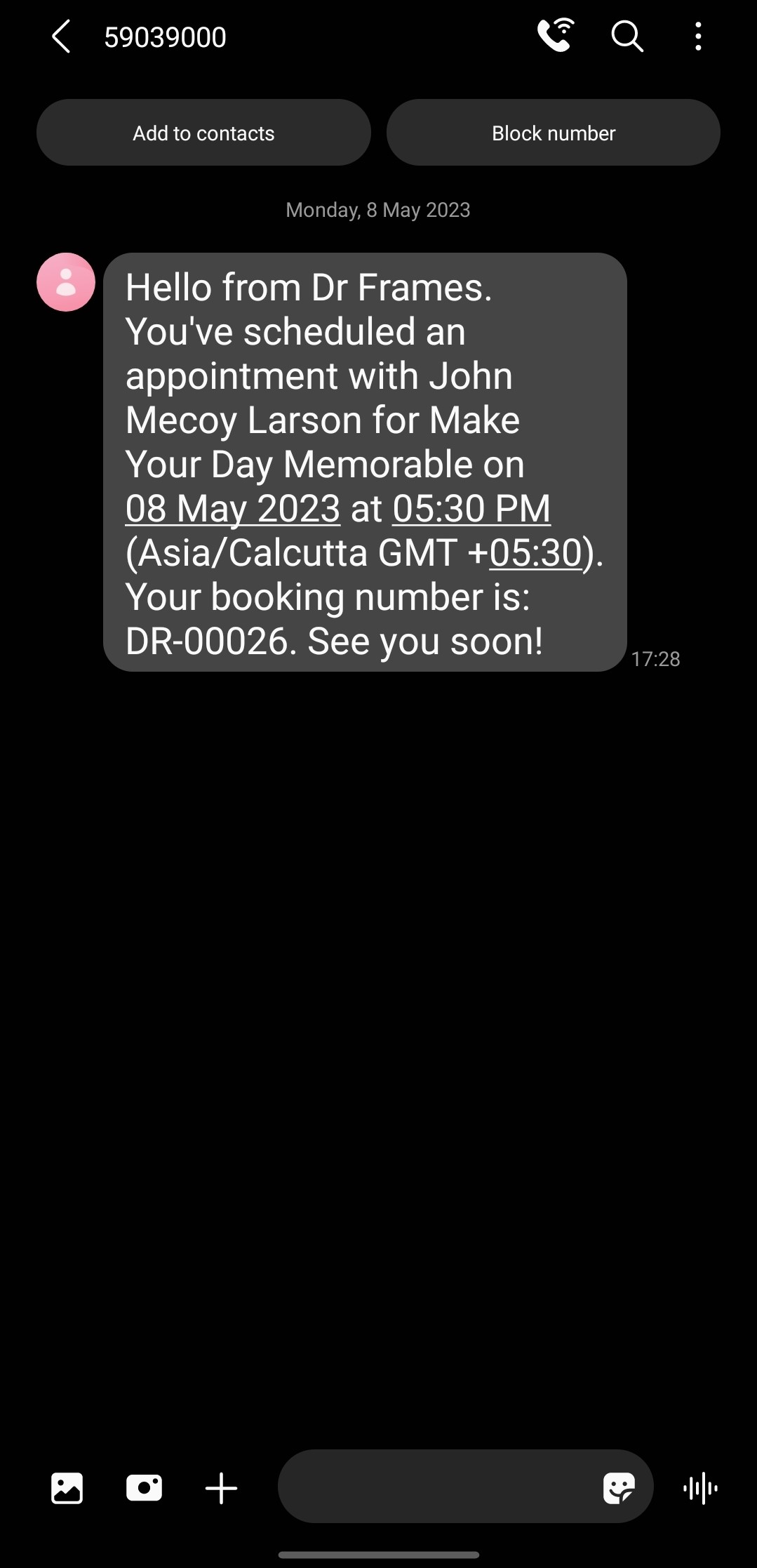
Note that the message is from the number '59039000' and not my original phone number. This is because the message is sent from a US number to an Indian Number. So the original long code is replaced with this number to ensure seamless deliverability.
If the sender and recipient belong to the same country, then the SenderID (i.e., your phone number) doesn't change.
There are cases where you might want to block incoming messages. For example, customers might reply to your SMS notifications requesting a reschedule or cancellation. This breaks the flow of Zoho Bookings and introduces unnecessary manual work. If that's the case, check out this document to block all incoming messaging.
If the sender and recipient belong to the same country, then the SenderID (i.e., your phone number) doesn't change.
There are cases where you might want to block incoming messages. For example, customers might reply to your SMS notifications requesting a reschedule or cancellation. This breaks the flow of Zoho Bookings and introduces unnecessary manual work. If that's the case, check out this document to block all incoming messaging.
SMS Customization Recommendations
- Since each message can accommodate only 160 characters, we recommend keeping your message crisp. Include vital info like appointment date, time, and business name.
- Avoid using emojis in your sms. As a single emoji consumes a lot of characters.
- We recommend you have your entire message length from 160 to 320 characters (i.e., 1 to 2 messages per message) to avoid consuming too many message credits for a single SMS.
Zoho Bookings Plans supporting this feature
Applicable in |
Premium |
If you want to start a trial of the Zoho Bookings Premium plan, please send an email to support@zohobookings.com including the word 'Twilio' in the subject line.
Topic Participants
Siva
Spencer Schmerling
Warren Krige
Recent Topics
Zoho Workdrive download was block by security software
Hi Team, Recently workdrive download was blocked by huorong security. Could you please advise how to put zoho workdrive as white list? every time we put "*.zohoexternal.com" or "workdrive.zohoexternal.com", the warning msg will still pop in next dowMerged cells are unmerging automatically
Hello, I have been using Zoho sheets from last 1 year. But from last week facing a issue in merged cells. While editing all merged cells in a sheet became unmerged. I merged it again, but it again unmerged. In my half an hour work I have to do this 3-4Zoho mail to contacts and leads, but not to accounts?
We use the accounts tab a lot for our business because they can be linked to the sales orders. Now we want to use the mail add on to link communication of our emails to our accounts. However this is only possible for contacts and leads? It would be convenientAPI keys not showing in ZeptoMail dashboard
Hi there, I'm hoping someone can provide some assistance as support isn't replying. I am trying to configure my transactional emails, but the dashboard doesn't show any of my API details - the `div` is there but it's emtpy. Every time I click "GenerateDoes Zoho Learn integrate with Zoho Connect,People,Workdrive,Project,Desk?
Can we propose Zoho LEarn as a centralised Knowledge Portal tool that can get synched with the other Zoho products and serve as a central Knowledge repository?Reading from and writing to Zoho Projects Custom Module with Deluge
Does anyone know if there is a way to read from and write to the Custom Modules that Zoho now supports. I would love to be able to loop through a set of data and create the entities I need to for this new custom module I'm looking to put together.How Does Knowledge Base Search and Article Recommendation Work?
Hello, I would like to understand how the Knowledge Base search engine works. Specifically, does it search based on: The article title only? The full article content? Both, the article and the content? Keywords? Tags? Also, how does the system determineZoho Books/Inventory - Restrict Items With Pricebook
Hi Zoho Team, I'm trying to address as use case where a client needs to restrict which products certain customers can purchase. I have been able to find a way to do this based on the current Zoho Books or Zoho Inventory configuation. My feature requestBest Way to Integrate Zoho Campaigns with Amazon SES Without Third-Party Tools
I am looking for the most seamless and efficient method to integrate Zoho Campaigns with Amazon SES. My goal is to avoid using any third-party automation tools like Zapier, Make, or Pabbly, and instead, leverage Zoho's native capabilities for this integration.Release Notes | January 2026
We have rolled out a set of powerful new enhancements across Zoho Vertical Studio that bring several long-awaited capabilities to your applications. These updates focus on deeper customization, smarter automation, better reporting, and improved usabilityscope for phonebridge in CRM and phonebridge API documentation
Hi I cannot find the scope to be used for phonebridge in CRM API V2 calls. I am getting OAUTH_SCOPE_MISMATCH for scope group ZohoCRM.modules.ALL,ZohoCRM.setttings.ALL Also I am not able to locate the documentation for the same, All I have is phonebridge API documentation for desk and url [ https://www.zohoapis.com/crm/v2/phonebridge/ ] from a web forum. It makes a reply and error in case of missing arguments, but scope error is returned when all arguments are provided. Regards Devel DevHow to charge Convenience fee OR payment gateway charges to the end client who is paying the invoice?
Hello, I am creating this topic after having discussions with various sets of users and have understood that with people moving more and more to digital payments, it is important for the client to enable the "Convenience fee" kind of scenario. I haveCard payment surcharge?
Hi, I would like to offer my customers the ability to pay invoices by card (using the PayPal integration). However, PayPal charges me around 5% to receive a card payment, and I would like to pass on this cost to my customer by way of a card payment surcharge. Is there any way for Zoho Invoice to be set up to automatically add a defined "card processing fee", say 5% of the invoice total, if the customer elects to pay by card? I don't want to add this on to invoice manually, since most of my clientsAutomate Credit Card Surcharge
Is there a way to create an automation that will add a 3.0% credit card surcharge to a subscription whenever a customer pays via credit card?Zoho Books | Product updates | January 2026
Hello users, We’ve rolled out new features and enhancements in Zoho Books. From e-filing Form 1099 directly with the IRS to corporation tax support, explore the updates designed to enhance your bookkeeping experience. E-File Form 1099 Directly With theZoho POS App Hanging Issue – Sales Becoming Difficult
The Zoho POS app frequently hangs and becomes unresponsive during billing, making it very difficult to complete sales smoothly. This commonly happens while adding items, during checkout, or at payment time, especially during peak hours. These issues causeTip #62- Exploring Technician Console: Send Ctrl + Alt + Del- 'Insider Insights'
Hello Zoho Assist Community! Imagine you are a technician supporting a remote employee who cannot log into their system. The computer is stuck on the login screen after multiple attempts, and the user is unsure how to proceed. Instead of walking the userSKUs for Invoices, POs, etc.
It doesn't appear that one can enable SKU display on invoices, POs, etc. This is problematic, and I don't see a good reason why this shouldn't be an option. Some of our vendors and customers use this in their system. Every other identifier code is availablehow to avoid duplicate customer
How can i avoid to create a duplicate customer. I charged a same customer with two different plans and it showed up twice in my customer list and subsequently in Zoho books contacts. It creates confusion to have a same customer appears multiple times in customer or contact list. How can i avoid it.RSC Connectivity Linkedin Recruiter RPS
It seems there's a bit of a push from Linkedin Talent Solutions to keep integrations moving. My Account Manager confirmed that Zoho Recruit is a Certified Linkedin Linkedin Partner but does not have RSC as of yet., (we knew that :-) She encouraged meim facing issue on generate the Estimate price
i couldn't understand what is the issue , i cant generate Estimate price where is the issuecannot be able to add user
Dear team I tried to add a new user for sales team, but after entering the OTP its showing error message cannot add nowChanging an existing item to different accounts & inventory-tracked
Hi everyone, I have an item in Zoho Books that was originally set up as a non-inventory item. Over time, I associated it with different sales and purchase accounts, and I now have many invoices, bills, and reports that use this item. My business processHow do I edit the Calendar Invite notifications for Interviews in Recruit?
I'm setting up the Zoho Recruit Interview Calendar system but there's some notifications I don't have any control over. I've turned off all Workflows and Automations related to the Calendar Scheduling and it seems that it's the notification that is sentBookings duration - days
Hi team, Is there any way to setup services/bookings that span multiple days? I am using Zoho Bookings for meeting room bookings. Clients may wish to book a room for more than one day, for up to a month. If not, is there a plan to allow services to be setup with durations of Days as well as hours and minutes? Many thanks, Anna.big 5 accounts
how do you find what accounts are listed as Big 5 ?Zoho recruit's blueprint configuration is not functioning as mapped
Current Status: Zoho Blueprint is not functioning as configured. Issue: We are moving a Candidate status in Zoho Recruit "for active file" but we encountered: "Status cannot be changed for records involved in Blueprint." This happens to various clientActual vs Minimum
Hi all, I am sure I am not the only one having this need. We are implementing billing on a 30-minute increment, with a minimum of 30 minutes per ticket. My question is, is there a way to create a formula or function to track both the minimum bill vs theDelay in rendering Zoho Recruit - Careers in the ZappyWorks
I click on the Careers link (https://zappyworks.zohorecruit.com/jobs/Careers) on the ZappyWorks website expecting to see the job openings. The site redirects me to Zoho Recruit, but after the redirect, the page just stays blank for several seconds. I'mHow to add interviews through API
I'm trying to add an interview without much luck. The documentation gives examples of adding just about everything except an interview. However, the issue might be the way I'm formatting it, because the documentation is unclear to me. It seems as if the xml should be passed in the url, which seems unusual. I've tried the data as both plain and character escaped, but nothing seems to work, nor do I even get an error response. https://recruit.zoho.com/recruit/private/xml/Interviews/addRecords?authtoken=***&scope=recruitapi&version=2&xmlData=<Interviews> <rowCan't scroll the page down unless I refresh the page
Hello, This issue has been going on with me and a lot of other users in my organization, we can't scroll down! the scrolling side bar doesn't appear and scrolling down through mouse or keyboard keys doesn't work, it seems that the page just ends in theOffer already made- but I withdrew it
I made an offer letter, but made a mistake on it. I withdrew the offer but now I can't recreate the correct offer. Zoho keeps saying that "A same offer has already been made". I look in the "offers" and there are NO offers (this is the first time I'veControl the precision of answer bot responses
Hello everyone, Admins can control the precision with which the Answer bot analyzes and generates a response by adjusting the threshold levels. Based on predefined threshold values, Zia analyzes how closely the query matches with the available KB articles.Rebrand your CRM with the all-new custom domain mapping setup
UPDATES TO THIS FEATURE! 19th Jan, 2024 — Custom domain mapping has been made available for portal users in Zoho One and CRM Plus. 23rd June, 2023 — Custom domain mapping has been made available for all users, in all DCs. Hello everyone! We are elatedAdd Israel & Jewish Holidays to Zoho People Holidays Gallery
Greetings, We hope you are doing well. We are writing to request an enhancement to the Holidays Gallery in Zoho People. Currently, there are several holidays available, but none for Israel and none for Jewish holidays (which are not necessarily the sameSender Email ID is duplicate
My sender id "automate@erplaunchpad.com" is coming as duplicate but I have not used it anywhere else please helpCRM x WorkDrive: File storage for new CRM signups is now powered by WorkDrive
Availability Editions: All DCs: All Release plan: Released for new signups in all DCs. It will be enabled for existing users in a phased manner in the upcoming months. Help documentation: Documents in Zoho CRM Manage folders in Documents tab Manage filesBuilding Toppings #6 - Install and uninstall actions
Hello Biginners! In our previous forum post, we explored creating connections - specifically, custom service connections in the Bigin Developer Console. In this post, we'll focus on another feature that can be used in every topping: install actions. We'llNew UI in Zoho One CRM
Hello, Just switched to the new UI for Zoho One CRM, do not like it, especially the search functions. What are the steps to backstep to the previous UI? UPDATE: I found it.App like Miro
Hi all, is there a way to have a interactive whiteboard like in Miro? We want to visualize our processes and workflows in an easy way.Next Page