Zoho CRM for Everyone's NextGen UI Gets an Upgrade
Hello Everyone
We've made improvements to Zoho CRM for Everyone's Nextgen UI. These changes are the result of valuable feedback from you where we’ve focused on improving usability, providing wider screen space, and making navigation smoother so everything you need is just one click away.
We've made improvements to Zoho CRM for Everyone's Nextgen UI. These changes are the result of valuable feedback from you where we’ve focused on improving usability, providing wider screen space, and making navigation smoother so everything you need is just one click away.
What's Improved?
- Navigate from a Single Sidebar
- Prominent Global Search and Quick Create options located on top
- Setup moved to the top-right along with a Setup Homepage
- Utility Actions moved to the top-right
- Access Reports and Dashboards in a single click.
- Relocation of the Teamspace switcher tab and Manage Teamspace option
- Hide and Show Sidebar options retained
- Filter option and Record Views brought together
- Custom Views as Tabs
Check out the video below to get a quick look at the updated CRM Nextgen interface.
Read on to learn more about each of these UI improvements.
Navigate from a Single Sidebar
Currently in the Nextgen UI, the sidebar (primary) could expand to reveal a secondary sidebar where modules/folders were listed. This took up some of the screen space on the left and left users unable to view module data in one place.

We’ve now replaced the dual sidebar layout with one unified sidebar where modules/folders would be displayed as a scrollable list at the bottom. This frees up space, giving you more room for larger screen views and reduces the number of clicks needed to switch between modules.

Prominent Global Search and Quick Create options now on top
Currently, the search icon in the Nextgen UI is placed below the modules available in the sidebar which lacked visibility making it difficult for users to search for records across their account.

In this upgraded version, global search now lives at the top of your CRM screen. The Quick Create menu has also been merged with the '+' icon from the Modules Tab in this enhancement so all quick create actions can be carried out from one single place. From here, you can:
- Quickly find records, modules, or information across your CRM using global search.
- Create records directly from any module, create new team modules or create org modules.
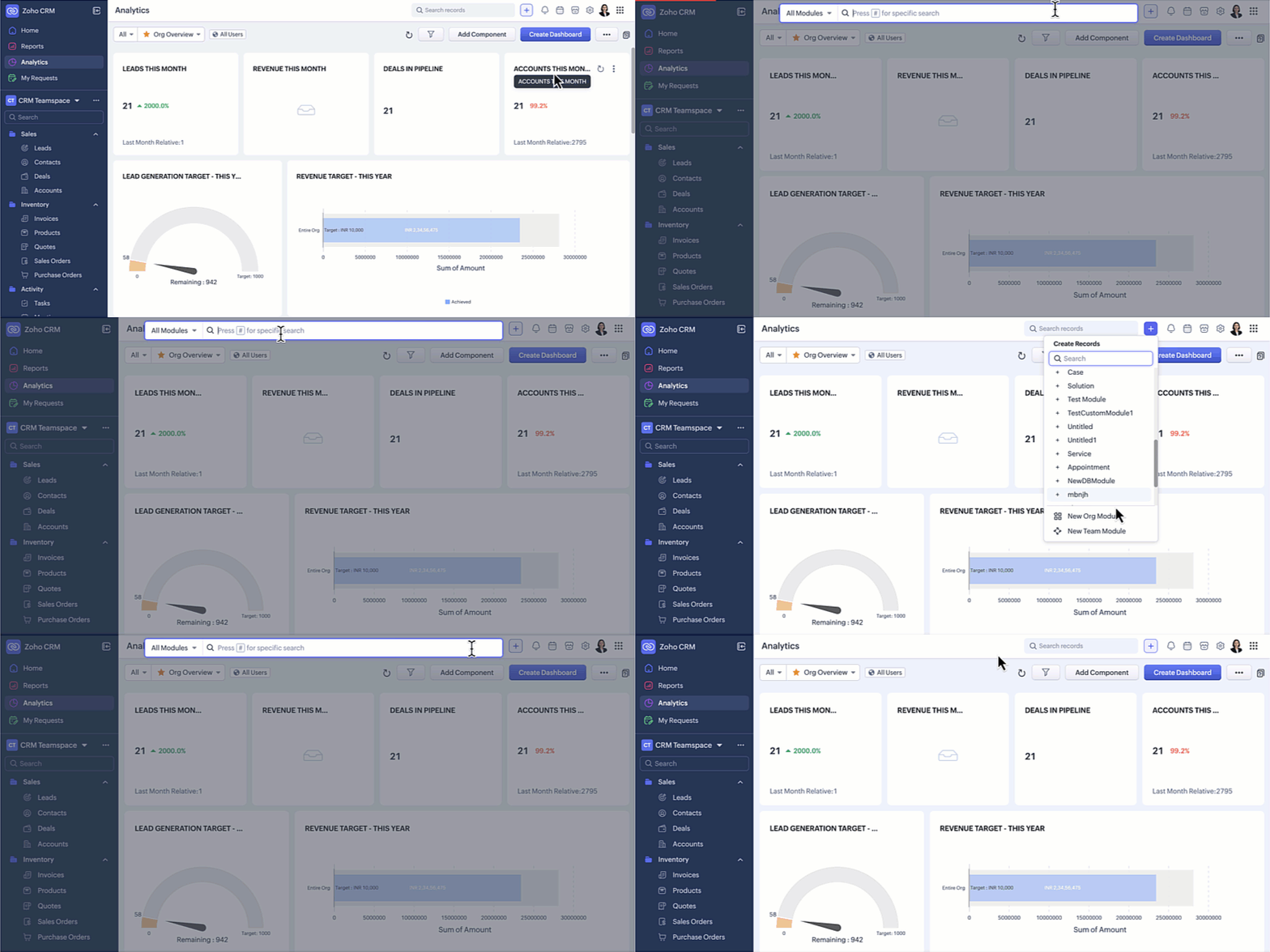
Setup moved to the top-right along with a Setup Homepage
Currently, the setup menu in the Nextgen UI is at the bottom and opens directly to the list of features available for users not giving users a bird's eye view of all the features CRM offers.

Now, Setup menu is moved to the top-right corner of your CRM account opening to a Setup homepage. All settings on the setup homepage are neatly organized into easy-to-understand categories, as shown in the GIF below. With everything brought together in one central view, you can navigate effortlessly, find the tools you need at a glance, and configure them with fewer steps.

Access Reports and Dashboards in a single click
Currently, Reports and Analytics modules will list the various reports and dashboards created on the secondary sidebar. Accessing other modules from reports and dashboards requires multiple clicks as shown in the GIF below.

In this enhancement, we moved this list into a drop-down menu from which you can choose the report or dashboard required. Earlier, navigating to other modules required multiple clicks, with this enhancement you need only a single click to move between modules.
You can also manage folders and dashboards created, use Zia and Zoho Analytics from the same drop-down menu option. Look at the GIF below to know where the list of reports and dashboards will now be located.

Hide / Show Sidebar Menu
We have retained the hide and show menu option to give you the option to view data in a larger screen space as shown in the video below.

Relocation of the Teamspace switcher tab
Currently, the teamspace switcher is placed at the bottom as shown in the screenshot below.

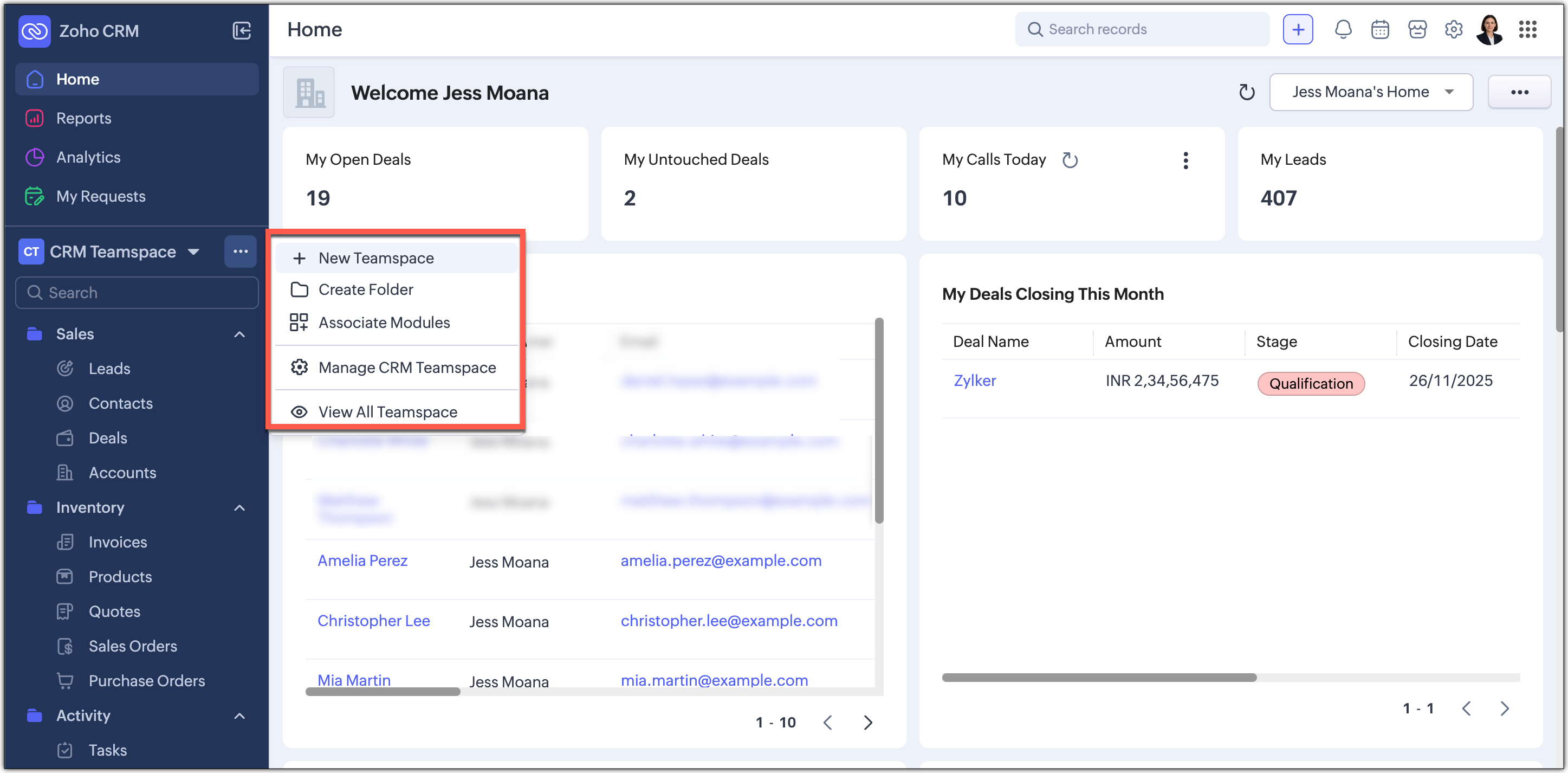
Now, we’ve relocated the teamspace switcher for easier access. We have added a More(...) option from where you can access the below options:
- It’s now centrally positioned, making it quicker to navigate between teamspaces.
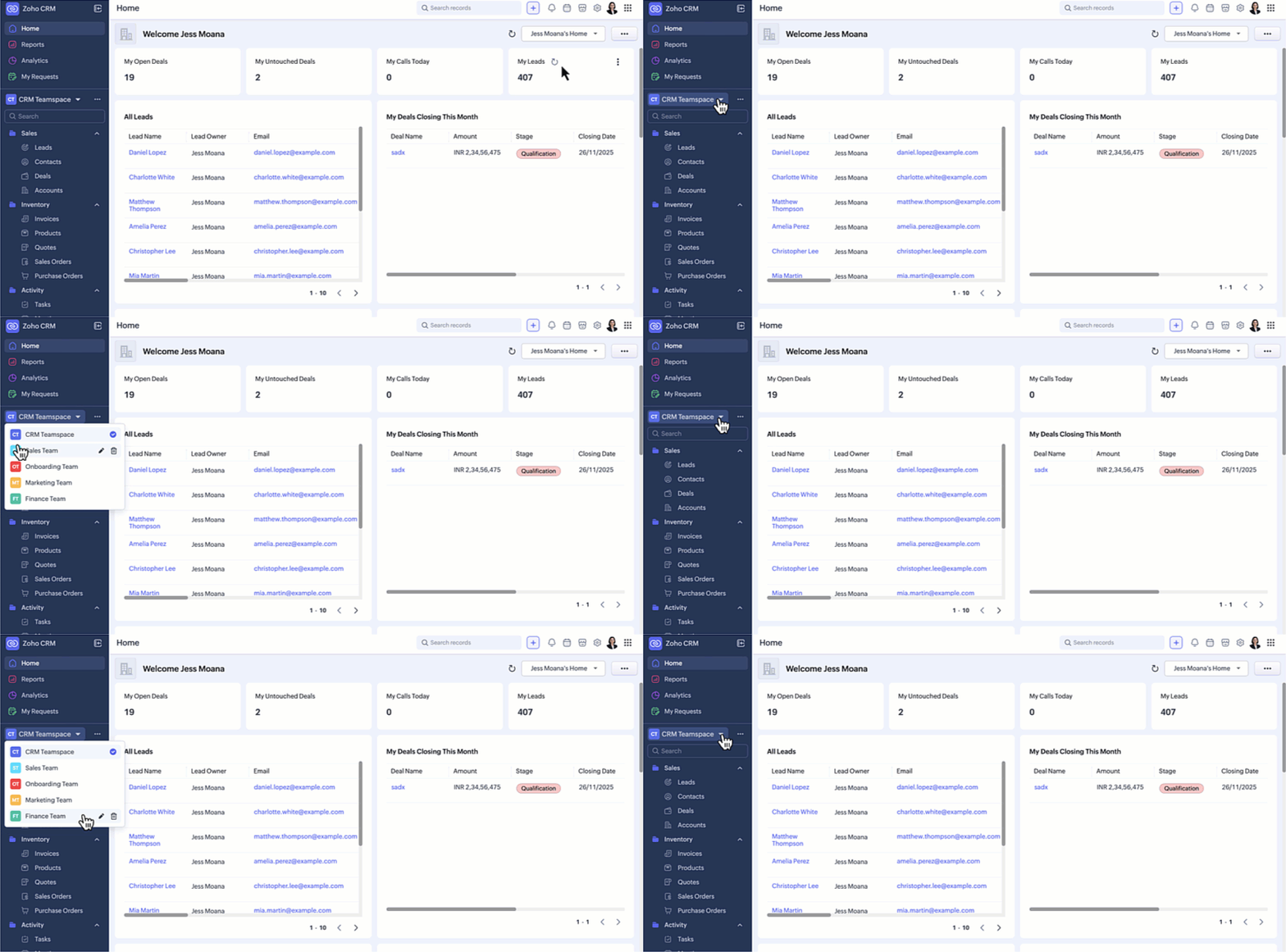
- Create new teamspaces, create folders, associate modules, manage and view teamspaces can now be done through the More Option next to the switcher tab.
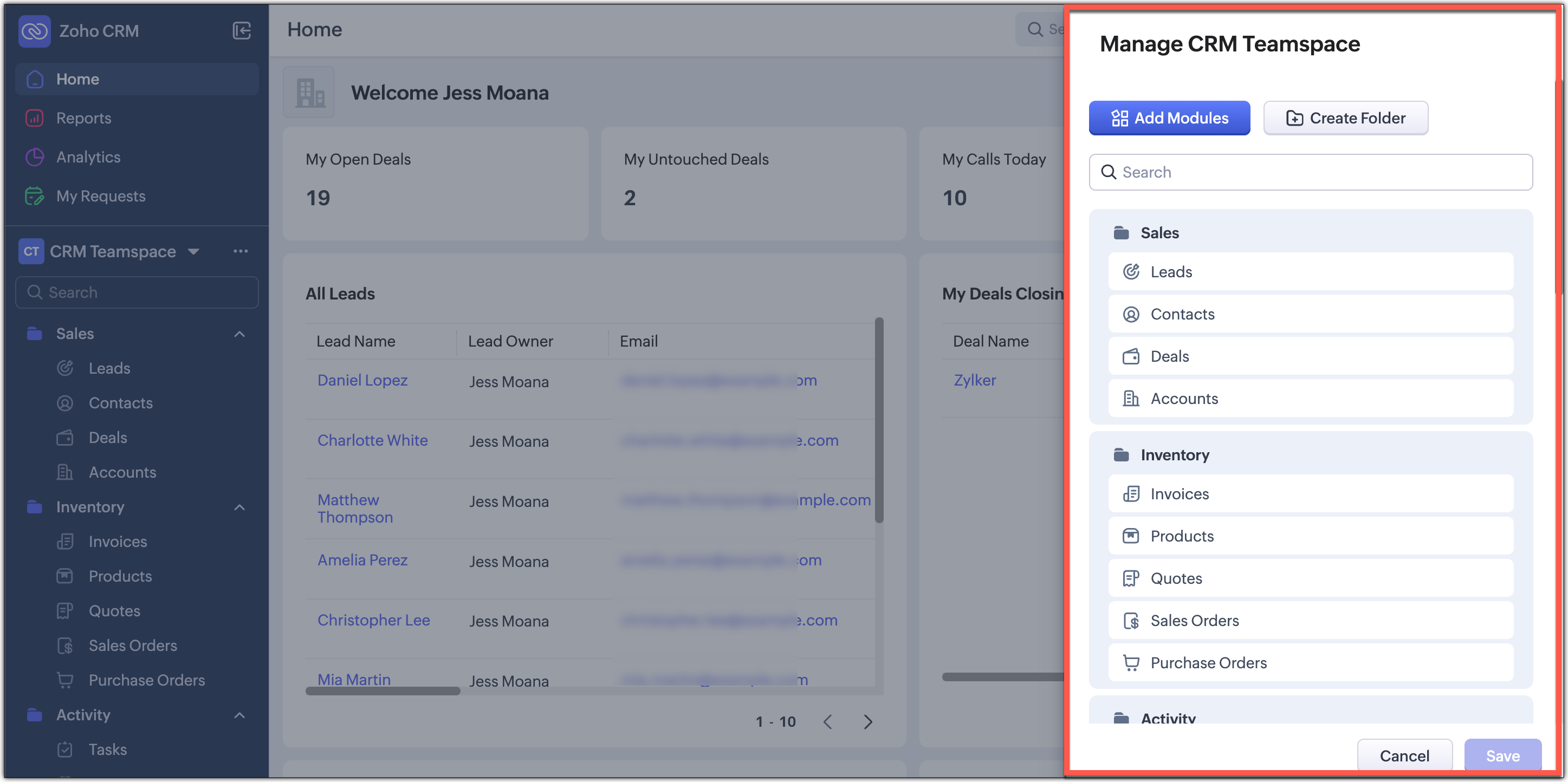
- Managing CRM teamspaces will now open out into a pop-up at the far-right of your screen.
Filter option and Record Views brought together
Currently, the filter option is available separately on top next to the custom view option. Similarly, record view for the module is also placed on top next to Create Record button and opens up as a drop-down for you to choose from.

In this enhancement, we’ve grouped the filter, sort, and record view options located on the action bar at the top of the list view just below the Module name. This creates a more consistent experience and makes these customization tools easier and quicker for you to access.

Custom Views as Tabs
You can now display your custom views as separate tabs, which makes them easy to spot and quick to open. This helps you keep your most used views right in front of you without extra clicks. It gives you a cleaner and more organized screen that matches the updated UI.

What does this mean for existing users?
We'll begin rolling out this upgraded version to existing accounts through a banner shown to users of the current Nextgen UI and the old UI. From the banner, users can either switch to this upgraded UI right away or choose to do it later at their convenience.
Timeline for the switch
For Nextgen UI users : The banner will be shown to switch to the upgraded version.You can either switch immediately or opt to choose at a later time. When you opt to switch later, you be forced to switch to the upgraded version after a week and the current Nextgen UI will no longer be available.
For old UI users : The banner will be shown allowing you to try the upgraded version. After this, clicking the Try CRM for Everyone button will take you to the upgraded version only, as the current Nextgen UI will no longer be available.

Availability
Currently this improved version is supported only in standalone CRM accounts. It will be supported for CRMPlus or Zoho One editions soon.
Release Plan
- For existing customers : We have started rolling out the upgraded Nextgen UI in batches for standalone accounts. Support for CRMPlus and Zoho One accounts will follow soon.
- For new signups : All new signups from today will get the upgraded Nextgen UI by default. This rollout is happening gradually across data centers.
Note : After switching to the upgraded Nextgen UI, users can still return to the Old UI if needed. However, they will not be able to switch back to the current Nextgen UI.
We're positive that this upgraded version of the Nextgen UI would definitely make your workday easier and more productive.
Your feedback continues to shape our product, so if you have any queries or thoughts, please do comment below and we will get back to you at the earliest.
Thanks & Regards,
Serena Woolridge
Topic Participants
Serena Woolridge
Zohoboy
Aishwarya M
Jeuel
Sunderjan Siddharth
Sticky Posts
Enhancement to ICR’s field prompting: Preferred data extraction using advanced field prompting
Dear Customers, We hope you’re well A quick background Intelligent Character Recognition (ICR) comes as part of Zia’s optical recognition capability called Zia Vision. When we introduced it last April, the data extraction was training-based and was applicableGood news! Calendar in Zoho CRM gets a face lift
Dear Customers, We are delighted to unveil the revamped calendar UI in Zoho CRM. With a complete visual overhaul aligned with CRM for Everyone, the calendar now offers a more intuitive and flexible scheduling experience. What’s new? Distinguish activitiesAccessibility in Zoho CRM: Not just a feature—a way to empower
For instructions on setting up these controls, please check this help document: Configuring accessibility controls. Hello everyone, Today (December 3, 2024), on the International Day of Persons with Disabilities, we begin our journey towards a CRM thatScaling the customer journey: What's new in CommandCenter
Dear Customers, The last time we connected about CommandCenter, it was about the tool's new controls and revamped UI. Personally, the overhaul of the UI from the last update, still excites me. Today, we're here with news about its scalability and addedZoho CRM's sales trend and sales follow-up trend dashboards are now customizable
Dear Customers, We're here with good news! Sales trend and sales follow-up trend are two system-defined dashboards that help you understand trends and anomalies in your sales outreach and conversion efforts. They use Zia's intelligence to identify patterns
Recent Topics
Quickbooks Integrations Stopped Working
All of our Quickbooks integrations have stopped working. I am checking in to see if: a) this is a known issue b) if anyone else is having this issue. As usual, Zoho support is unavailable.sync two zoho crm
Hello everyone. Is it possible to sync 2 zoho crm? what would be the easiest way? I am thinking of Flow. I have a Custom Module that I would like to share with my client. We both use zoho crm. Regards.CRM x WorkDrive: We're rolling out the WorkDrive-powered file storage experience for existing users
Release plan: Gradual rollout to customers without file storage add-ons, in this order: 1. Standalone CRM 2. CRM Plus and Zoho One DCs: All | Editions: All Available now for: - Standalone CRM accounts in Free and Standard editions without file storageIncorrect Functioning of Time Logs API (Version 3)
We need to fetch the list of time logs for each task for our company internal usage. We are trying to achieve it by using the next endpoint: https://projects.zoho.com/api-docs#bulk-time-logs#get-all-project-time-logs Firstly, in the documentation theZoho CRM Queries Now Support Databases and Cloud Data Sources
Hello everyone! We're thrilled to announce a major enhancement to the Queries feature in Zoho CRM! Queries now support a broader range of external data sources, allowing you to fetch live data and combine it with CRM records, all using a unified querySalesforceに添付ファイルを格納したい
お世話になっております。 Salesforceに添付ファイルを格納したく、カスタムオブジェクトに連携し、 「ファイルのアップロード」項目を設けました。 実際、エラーもなく送信出来たのですが、実際生成されたカスタムオブジェクトのレコードを見ると、どこにも添付ファイルがありません。仕様として、この添付ファイルはSalesforceのどこに格納されるのでしょうか? 今回作りたいフォームは、複数の書類を添付するため、Zohoformのファイルアップロード項目「本人確認書類」「源泉徴収票」などの項目を、Salesforce側にも設けた「本人確認書類」「源泉徴収票」という各項目にURLリンクとして紐づけたいと思っておりました。Dynamic image in form works in the app but not on the customer portal.
img = frm_Fichas[ID == input.Nombre].Foto; imgno = Nophoto[ID2 = 1].Image; if(len(img) > 1) { img = img.replaceAll("/sharedBy/appLinkName/",zoho.appuri); img = img.replaceAll("viewLinkName","Fichas_de_personal_public"); img = img.replaceAll("fieldName","Foto");Is it possible to retrieve function (Deluge) code from Zoho CRM externally?
Hi Everyone, Is it possible to fetch or retrieve the Deluge function code from Zoho CRM using an external method (API or any other approach)? I would like to know if there is any way to access or extract the function script outside of Zoho CRM, or ifUplifted homepage experience
Editions: All editions. Availability update: 17th February 2026: All editions in the CA and SA DC | JP DC (Free, Standard and Professional editions) 23 February 2026: JP (All Editions) | AU, CN (Free, Standard, Professional editions) 27 February 2026:Allow Font Size 11 in Editors...
That is basic functionality...Approval Workflow for Purchase Orders Abrir
The requirement is , that all purchase orders greater than or equal to 5000 go through an approval process from certain people, but within books I only see that the approvers can be by levels or any approver but we cannot enter a rule like these. CanWeTravel + Zoho CRM Integration - Has Anyone Built a Connector or Extension?
Hi all, I'm exploring options for integrating Zoho CRM with WeTravel (booking & payment platform for tour operators). Zapier seems to be the common method but seems limited. I'm wondering if anyone in the community has developed a more comprehensive solution,Option in pipeline deal to select which hotel or branch or store if client has more than one local store
Hi, I would like to know if there is an option in the deal pipeline to select which hotel, branch, or store a deal is related to—if the company has more than one location. For example, I have a client that owns several hotels under the same company, andUndo article like/dislike
It seems to be not possible to undo your like/dislike for an article. Would be great if you can. Kind regards, HelenNested notebooks
Dear Sir/Madam, I would like to know if it is possible to nest notebooks. It would be very helpful when there are too many, as it would improve organization. Thank you for your response. Best regards.Tax in Quote
Each row item in a quote has a tax value. At the total numbers at the bottom, there is also a Tax entry. If you select tax in both of the (line item, and the total), the tax doubles. My assumption is that the Tax total should be totalling the tax fromIssue with "Send Email" from Quotes not loading Email Template data
Hi everyone, I'm currently experiencing an issue when using the "Send Email" option from a Quote record in Zoho CRM. What’s happening: When I go to the Quotes module and select a record, then click Send Email, the attached file (Quote) correctly pullsDynamically Fetching Lookup Field Display Value
I have an audit trail form, Audit_Changes, that tracks old vs new values across different forms. For lookup fields, the old/new value is the ID, but I also need the display value. What's a best practice for dynamically fetching the display value of theStop Scrolling, Start Asking: Meet Zia for Your Files
Hey everyone 👋 The era of 'scrolling and searching' is officially over. Whether it's a dense legal contract or a long meeting recording, searching for specific details is a massive time-sink. We think you should be able to interact with your files, notIntroducing a smarter, faster, and more flexible charting experience
Hello Zoho Sheet users, We're delighted to share the latest news about a major update to charts in Zoho Sheet! The new version supports dynamic data ranges, granular styling options, faster loading, and other interesting enhancements that allow you toHow to create a new Batch and update Stock via Inventory?
Hi everyone, We are building an automation where a user enters batch details (Batch Number, Mfg Date, Expiry, and Quantity) into a Custom Module. I need this to trigger an API call to Zoho Inventory to: Create the new batch for the item. Increase theHow do I open MSG files in Microsoft Word?
If you want to open MSG files in Microsoft Word is not natively supported, as MSG is an email file format created by Microsoft Outlook. However, there are professional approaches to access MSG content in Word. First, open the MSG file in Outlook and copyUnable to charge GST on shipping/packing & Forwarding charges in INDIA
Currently, tax rates only apply to items. It does not apply tax to any shipping or packing & forwarding charges that may be on the order as well. However, these charges are taxable under GST in India. Please add the ability to apply tax to these charges.How to add packing & forwarding charge in purchase order & quotation???
Hello Zoho Team I have just started using Zoho for my company and I wanted to make purchase order. My supplier charges fix 2% as packing & forwarding on Total amount of material and then they charge me tax. For example, Material 1 = 100 Rs Material 2How to create a boxplot chart in Zoho Analytics?
Hi, I'm looking forward to making a boxplot in Zoho Analytics, either with all my data or with a time segmentation. No documentation or YouTube video explaining that was found. I guess this is a feature gap. How feasible would it be to add this to Analytics?What are the create bill API line item requiered fields
While the following documentation says that the line items array is requiered it doesn't say what if any files are requiered in the array. Does anyone know? API documentation: https://www.zoho.com/inventory/api/v1/bills/#create-a-bill I'm trying to addWorkDrive issues with Windows Explorer Not Responding
We are using WorkDrive to collaborate on editing video content. We have a lot of files and quite a few are a few gigs. Recently anytime I try and work with the files Explorer freezes for a couple minutes whether it's dragging the files into Premiere orConnecting Zoho Inventory to ShipStation
we are looking for someone to help connect via API shipStation with Zoho inventory. Any ideas? Thanks. UriWhere is the settings option in zoho writer?
hi, my zoho writer on windows has menu fonts too large. where do i find the settings to change this option? my screen resolution is correct and other apps/softwares in windows have no issues. regardsUsing IMAP configuration for shared email inboxes
Our customer service team utilizes shared email boxes to allow multiple people to view and handle incoming customer requests. For example, the customer sends an email to info@xxxx.com and multiple people can view it and handle the request. How can I configureWhen Does WorkDrive integrate with Books?
When Does WorkDrive integrate with Books?POP mailbox limits
If I am accessing a remote POP mail server using Zoho Mail is there a mailbox quota for the account or is it all related to my mail account storage limits?Warranty Service and Repair in Zoho FSM
Hi There, We are a retail store that sells products and also performs installations and repairs. Our field technicians handle this work. Some repairs are covered by manufacturers, who reimburse us for both parts and labour. In these cases, we performZoho Sheet for Desktop
Does Zoho plans to develop a Desktop version of Sheet that installs on the computer like was done with Writer?WhatsApp phone number migration
Hi @Gowri V and @Pheranda Nongpiur, Thanks for implementing the promised enhancements to the integration between Zoho CRM and WhatsApp. The previous discussion has been locked, so I'm opening this new one. I am copying below a specificWebDAV support
I need WebDAV support so that I can upload/download (and modify) documents from my local file system. Is anything planned in his direction?Suggestions for Improved Table Management and Dashboard Filter Controls in Zoho Analytics
Dear Zoho Analytics Community, I hope you are doing well. I would like to share a few suggestions based on issues I am currently experiencing while working with visualizations and dashboards. Firstly, when I create a new visualization using the Sales-OrderSPF: HELO does not publish an SPF Record
I am using Zoho mail. Completed all of the required prerequisites from the dashboard to avoid any issues with mail delivery. But when checking on mail-tester.com getting the following error. Can anyone help me solve this?How do I create an update to the Cost Price from landed costs?
Hi fellow Zoho Inventory battlers, I am new to Zoho inventory and was completely baffled to find that the cost price of products does not update when a new purchase order is received. The cost price is just made up numbers I start with when the productPrice Managment
I have been in discussions with Zoho for some time and not getting what I need. Maybe someone can help explain the logic behind this for me as I fail to understand. When creating an item, you input a sales rate and purchase rate. These rates are justNext Page