A/B Testing Idea #2: Make your headlines sound super cool.
Hello everyone,
We're back with our second post in the CRO testing idea series. If you missed the first post, please check it out here: "Place irresistible and clear CTAs." In today's post, we'll look at how to effectively A/B test your headline content.
Some people say "you only get one chance to make a first impression" while others contend that it only takes seven seconds to make an impression about someone or something. Well, the same concept applies to your website.
A good first impression on your website is crucial for making visitors trust in your products/services and keeping them tied to your business forever. Creating this first impression depends on many factors like structure, colors, spacing, symmetry, amount of text, and fonts. But, of everything else, a good headline plays a major role in the success of your website.
Your headline is the first thing that readers see as soon as they land on your site; it holds the power to make or break a deal at first visit. Even if your content is truly unique and innovative, a weak headline can ruin its chances of being super successful in terms of conversions. So how do you create a strong headline that drives more traffic and clicks on your website?
Here are a few aspects to consider as you A/B test your site's headline content:
A good first impression on your website is crucial for making visitors trust in your products/services and keeping them tied to your business forever. Creating this first impression depends on many factors like structure, colors, spacing, symmetry, amount of text, and fonts. But, of everything else, a good headline plays a major role in the success of your website.
Your headline is the first thing that readers see as soon as they land on your site; it holds the power to make or break a deal at first visit. Even if your content is truly unique and innovative, a weak headline can ruin its chances of being super successful in terms of conversions. So how do you create a strong headline that drives more traffic and clicks on your website?
Here are a few aspects to consider as you A/B test your site's headline content:
Communicate your brand's purpose
Often we just assume that the visitors fully understand everything about our website and its product offerings. However, that’s not always the case, especially for new visitors. With hundreds of websites selling products/services online, it's important to make sure that the primary headline on your homepage tells visitors what your website has to offer and how it aligns with their expectations—all in a few short seconds. Tweaking and testing headline copy that clearly communicates your brand's purpose and differentiates yourself from the competitors can encourage your visitors to take the desired action without another thought.
Example:
Say you own a website testing and analytics software solution that offers a set of tools to grow an online business. Take a look below at the old and new versions of the same headline message. Notice that while the first tells people what the product is, the second tells people what the product will actually help them do.
Say you own a website testing and analytics software solution that offers a set of tools to grow an online business. Take a look below at the old and new versions of the same headline message. Notice that while the first tells people what the product is, the second tells people what the product will actually help them do.

Extra tip: The easiest way to determine if your brand message is clear to your visitors is by assuming your audience knows nothing about the business you're running.
Try different headlines for different set of target audiences
Each website caters to a specific type of audience. So understanding which audience group you cater to, where they come from, what their interests are, and what information they are hoping to find on your site is another major parameter to consider before starting to test your headline content. Testing and optimizing your headline copy based on a particular set of audience segments like demographics (such as location, gender, age, etc), personal interests, and past engagements with your site can help you deliver personalized content for each category of visitors, which is more likely to generate conversions.
Example:
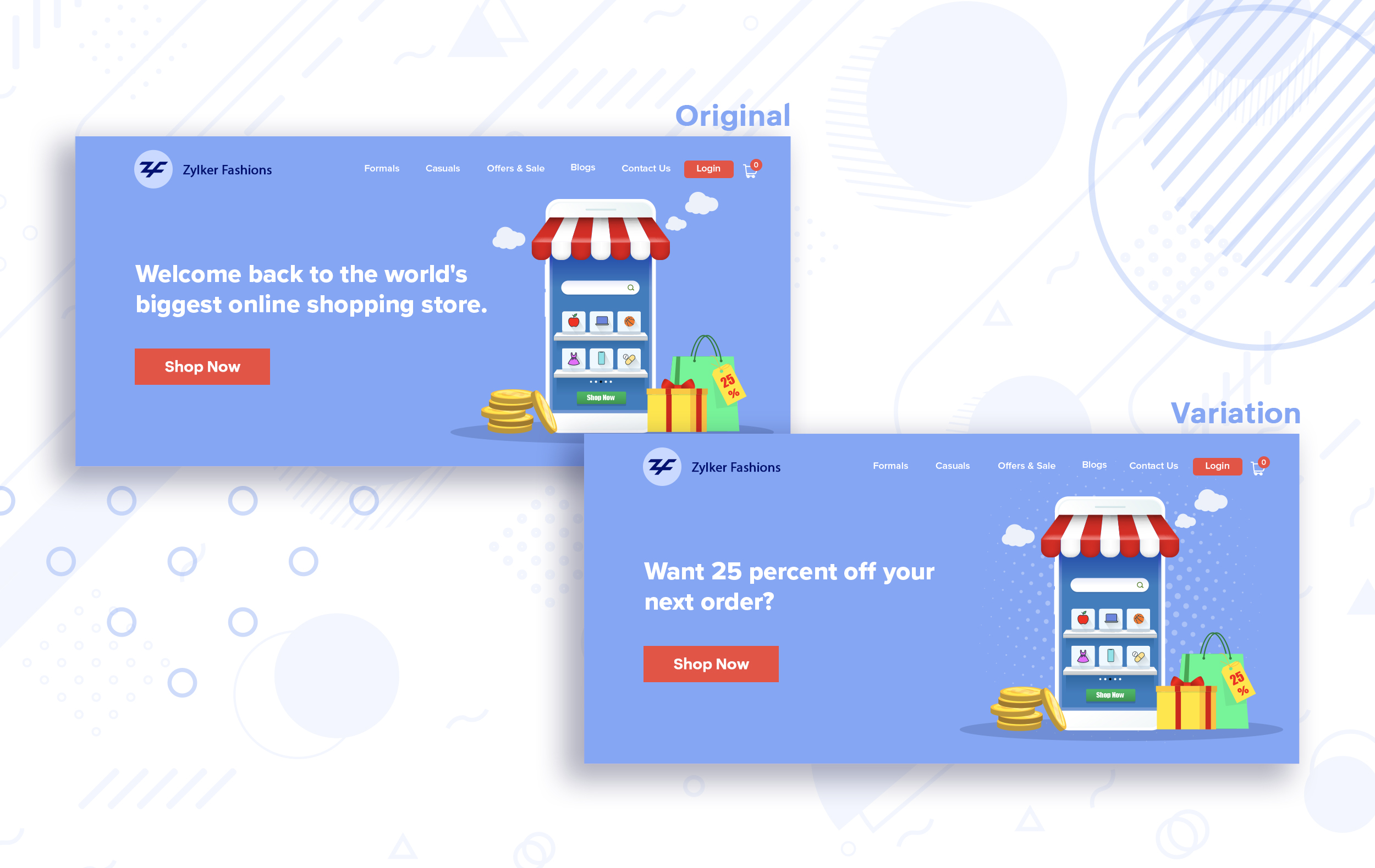
Say you run an ecommerce business and want to A/B test your headline copy with enticing offers for returning visitors to see which one convinces them to fulfill your conversion goals.
Say you run an ecommerce business and want to A/B test your headline copy with enticing offers for returning visitors to see which one convinces them to fulfill your conversion goals.
Extra tip:
- You can target your A/B test in PageSense using a variety of audience segments such as visitor type, device used, JS variable, day of the week, and more to learn which version grabs your audience's attention immediately and performs best for each segment.
- To know your target audience better, you can set up polls on your website using PageSense and learn your visitor’s business (or personal) needs and how your product can help achieve them. Later, you can use this feedback to test and optimize your website content.
Match your headline with your ad copy
When a visitor clicks on an ad, it's of the utmost importance to match the message on that ad to the headline content on your post-click landing page. If your headline doesn't match the offers and features that you promised in your ad copy, you're wasting all your marketing investment and conversion opportunities. A/B testing your headline by incorporating relevant keywords that resonate with your ad copy can help you reassure people that they've come to the right place. It can also later persuade them to take the desired action on your site more quickly. Further, this type of testing is more likely to generate increased clickthrough rates, conversions, and revenue for your website.
When a visitor clicks on an ad, it's of the utmost importance to match the message on that ad to the headline content on your post-click landing page. If your headline doesn't match the offers and features that you promised in your ad copy, you're wasting all your marketing investment and conversion opportunities. A/B testing your headline by incorporating relevant keywords that resonate with your ad copy can help you reassure people that they've come to the right place. It can also later persuade them to take the desired action on your site more quickly. Further, this type of testing is more likely to generate increased clickthrough rates, conversions, and revenue for your website.
Example:
Say you're running a Facebook Ad for older travelers, and the post-click landing page shows the most relevant tourist packages, flights, and hotel stays based on their interests. Now compare the old and new headline messages below to see which version of the message sounds better.
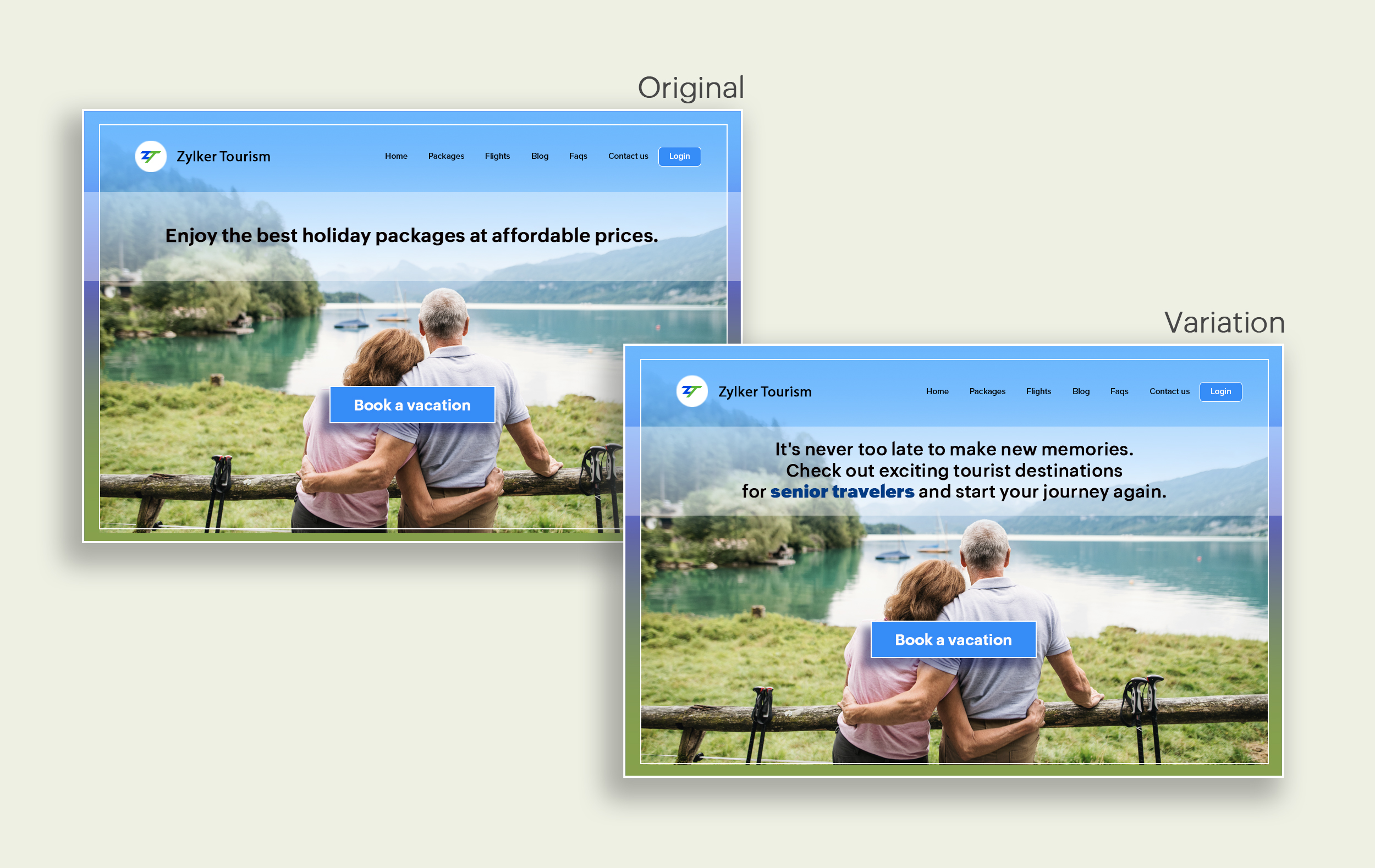
Say you're running a Facebook Ad for older travelers, and the post-click landing page shows the most relevant tourist packages, flights, and hotel stays based on their interests. Now compare the old and new headline messages below to see which version of the message sounds better.
Include stats and numbers
Numbers in your headlines are a great way to grab attention by spontaneously triggering curiosity in your targeted audience. When you use symbols like %, $, or digits instead of words to express percentages, dollars, or numbers in your headlines, it creates specificity around the duration, size, value, etc. of what you're offering customers, which is more attractive than a generic offering. This is a powerful psychological tactic that spotlights your headlines and immediately hooks the reader's interest, which results in more traffic.
Example:
Consider the pricing page of your website and see how adding a number to the headline can increase reader engagement.

Follow the problem-solving methodology
Solving your customers' problem is the easiest and fastest way to reach their heart. Crafting a headline that addresses an issue and provides a cutting-edge solution to solve the problem can make optimizing your website easier. Intriguing your readers like this can make them look for more information on the rest of your site. Further, when done well, it can build a solid emotional bond between you and your customer for a longer term.
Example:
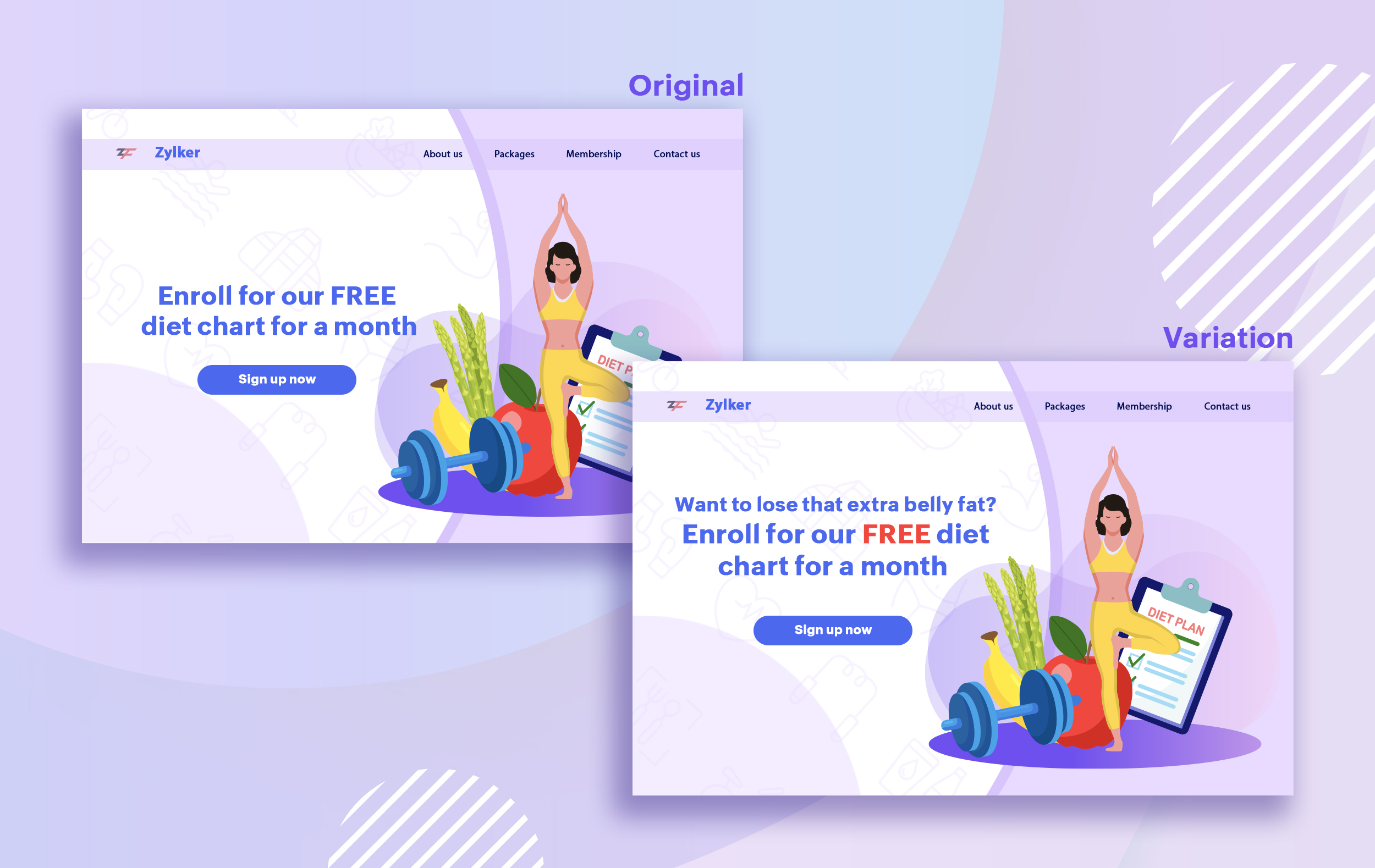
Take a look at the image below to see how implementing the problem and solution technique in your fitness website can make your headline sound more interesting.
Solving your customers' problem is the easiest and fastest way to reach their heart. Crafting a headline that addresses an issue and provides a cutting-edge solution to solve the problem can make optimizing your website easier. Intriguing your readers like this can make them look for more information on the rest of your site. Further, when done well, it can build a solid emotional bond between you and your customer for a longer term.
Example:
Take a look at the image below to see how implementing the problem and solution technique in your fitness website can make your headline sound more interesting.
Test with power words and sentiments
Sometimes the right audience is just one word away. Using forceful positive or negative power words in your headlines has the potential to kindle your customers' emotions and inspire action on your website in no time. Also, these words can guarantee more clicks and make your headlines stand out from the rest. You can test your headlines depending on two groups of power words:
Sometimes the right audience is just one word away. Using forceful positive or negative power words in your headlines has the potential to kindle your customers' emotions and inspire action on your website in no time. Also, these words can guarantee more clicks and make your headlines stand out from the rest. You can test your headlines depending on two groups of power words:
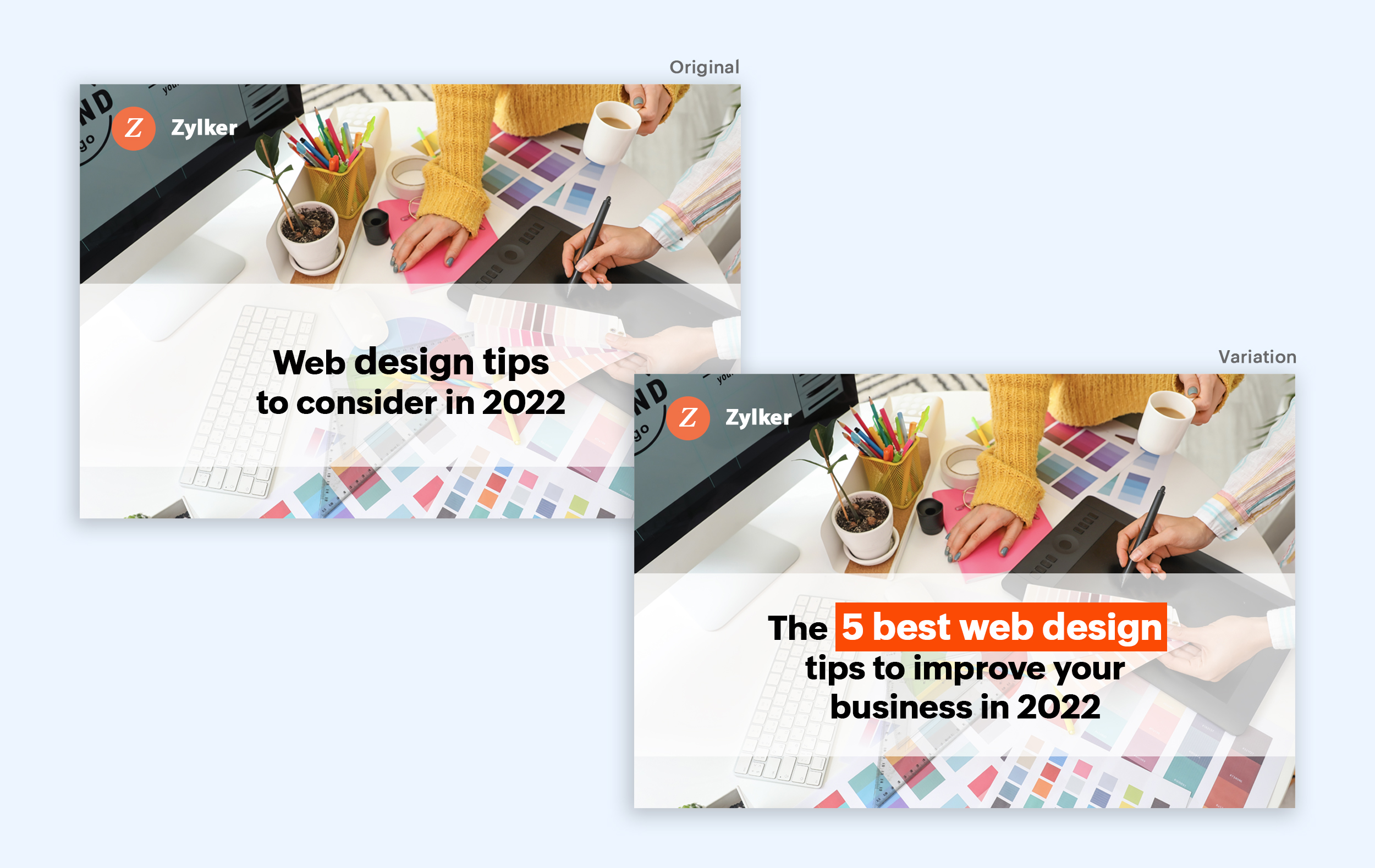
- Negative headlines: This type of headline tends to intrigue your customers by setting a stage to avoid a miserable situation. It includes words like never, stop, worst, avoid, or do not.
- Positive headlines: This type of headline tries to build a relationship with feel good emotions. It includes words like best, always, fastest, easiest, most, greatest, largest, funniest, hottest, strongest, biggest, and ever.
Example:
Take a look at the image below to see how the choice of words can invoke a positive feeling as you read the headline.
Test the font and appearance of your headline
The presentation (color, fonts, and layout) of your headline copy has a huge impact on the performance of your site. Below are a few points to consider while testing the appearance of your headline:
- Use title case. Avoid writing your headlines in all caps as it can reduce the readability of your text.
- Choose a font style and size that matches your website's personality. The most popular font style is sans-serif and font size is 20 - 36 pixels.
- Apply colors that contrast (while complimenting) your website's background well and focus on the legibility of your content.
- Align your headline perfectly with your body content for a bigger impact. Centered headlines are most powerful visually, while left-centered are more conservative and formal.
Example:
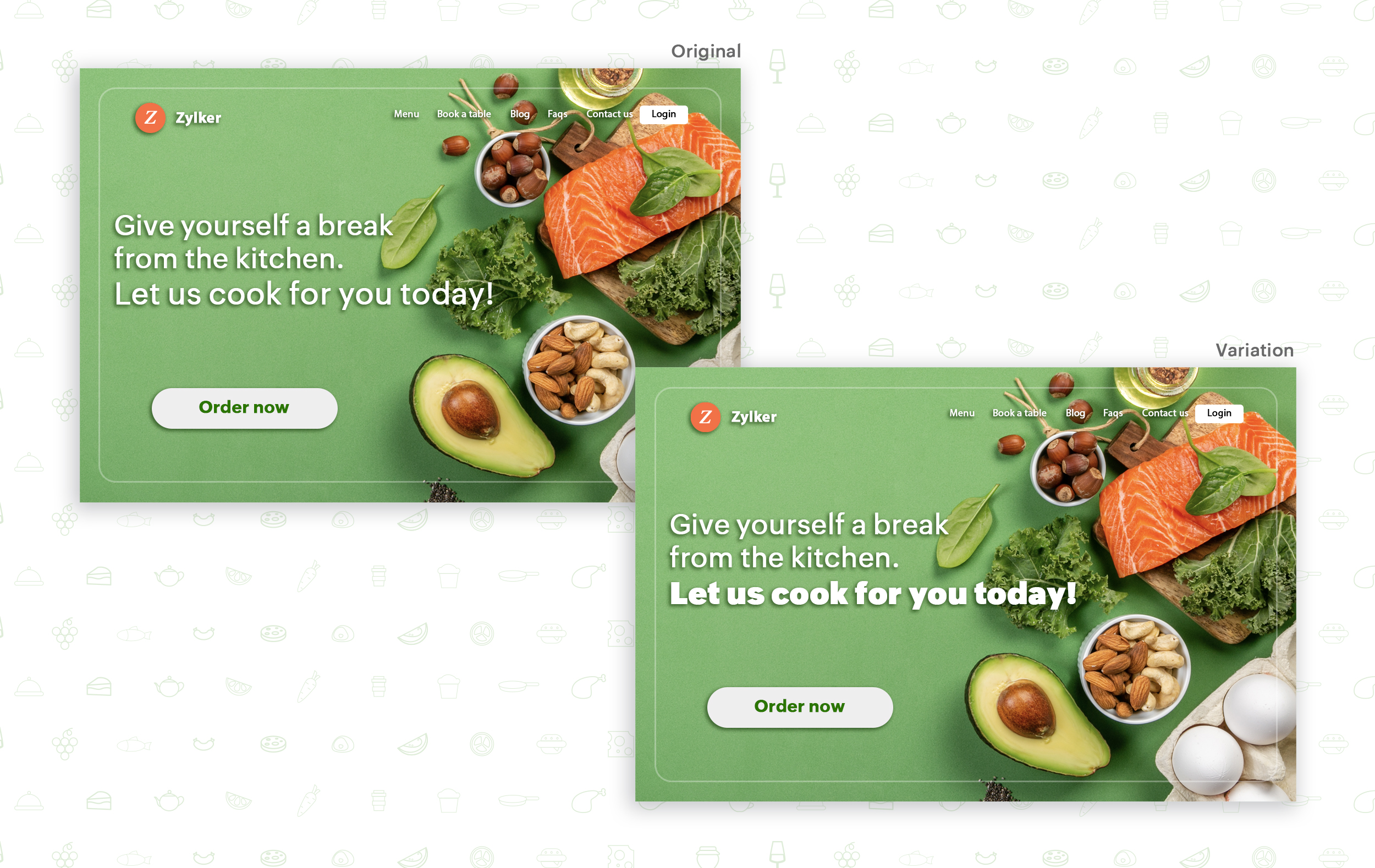
Say you own an online food delivery website, and you want to test the color and font of your homepage headline for better clickthrough rates. Take a look at the before and after images of the headline below. Which one you think will attract more eyeballs?
Try out the two-part strategy
Don't forget your supporting cast! Successful headlines act in two parts. Including a persuasive subheadline copy below your headline can be another winning strategy to pull your customers deeper into your website. You can test different versions of your subheadings to see which best suits your visitors, such as explaining a bit more about your product or services, emphasizing your product benefits, or encouraging visitors to click the CTA button placed on your site.
Example:
Take a look at the main headline and the subheading of a customer support software website as shown below. In this case, your subheadline re-affirms how your software helps your customers and adds emphasis about different product features.

Test the headline length and SEO compatibility
Test your headline for the right length, SEO keywords, and sentiments. Keeping a headline no longer than six words will help readers easily process your text and attain the goal of your website. Using free headline analyzer tools such as Coschedule or Sharethrough can help you effortlessly understand your website's performance. They analyze important factors (like searchable keywords, word balance, and sentiments) and assign a percentage score based on how good your headline is. They'll help you identify the factors you need to improve for more productive headlines.
Test your headline for the right length, SEO keywords, and sentiments. Keeping a headline no longer than six words will help readers easily process your text and attain the goal of your website. Using free headline analyzer tools such as Coschedule or Sharethrough can help you effortlessly understand your website's performance. They analyze important factors (like searchable keywords, word balance, and sentiments) and assign a percentage score based on how good your headline is. They'll help you identify the factors you need to improve for more productive headlines.
Example:
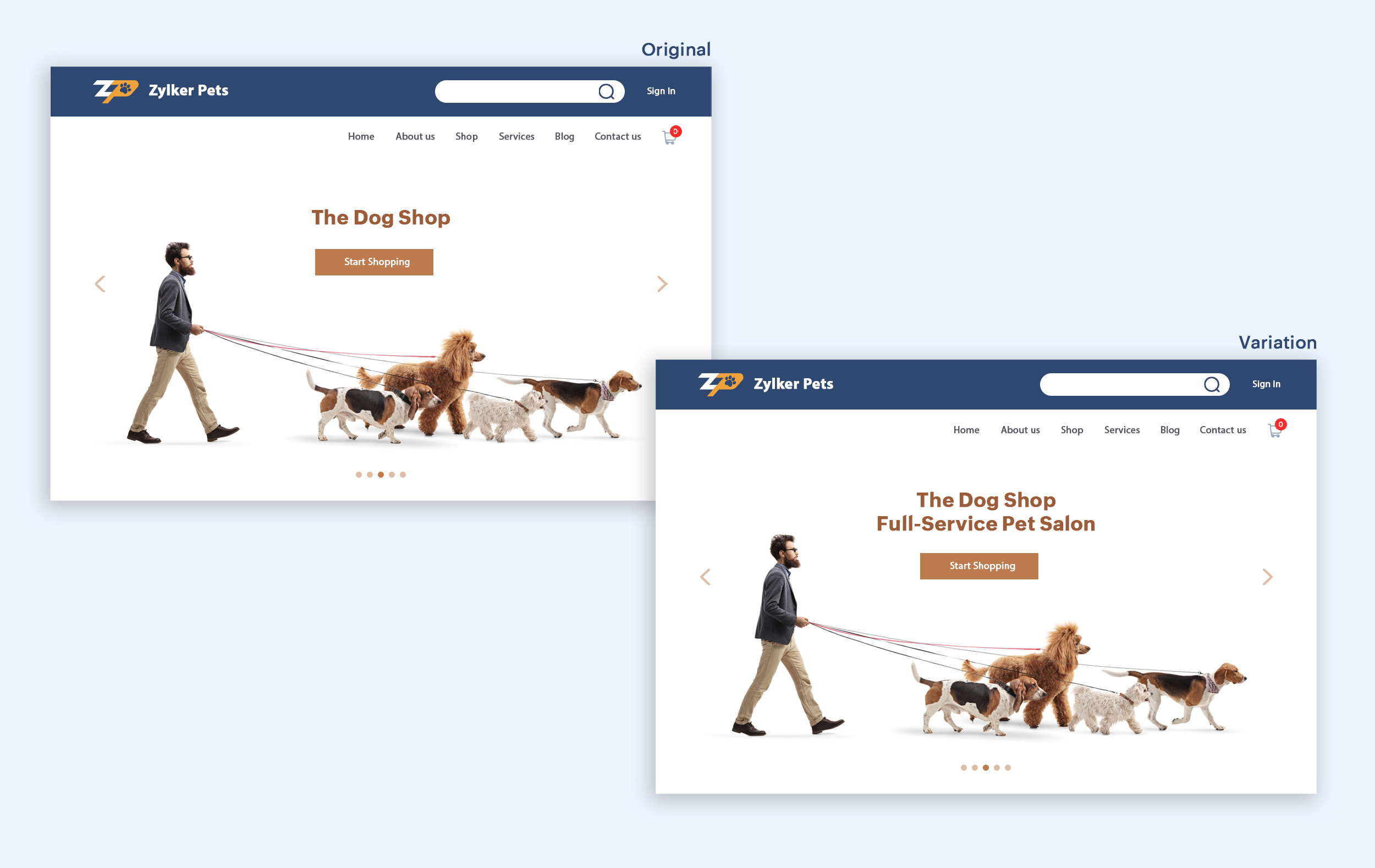
Let's say you own an online pet supply store and you want to test the headline of your homepage to attract more visitor traffic. The screenshots below show the performance of both the old and new versions of the headline in terms of length.
Bonus tips:
- Create a sense of urgency in your headline with words like "today," "now," and "last-minute offer."
- Use comparison phrases like "versus" to reinforce the benefits and features of your products/services.
- Research your competitor's headlines to add more value and optimize your headlines better.
We hope you found this article useful. What is your favorite headline tester? Have you had any success with headline A/B testing? Do share with us in the comments box below.
Happy testing. Happy converting!
Thank you.
Topic Participants
Balarohini Paulraj
info
Sticky Posts
[Live Webinar] How to maximize your conversions using existing website traffic
Hello all, Did you know that on an average only 0.1% of your traffic converts? The rest are either heading towards your competitors or dropping off without being able to find what they came for. When you want to increase your conversions, it's naturalA/B Testing Idea #2: Make your headlines sound super cool.
Hello everyone, We're back with our second post in the CRO testing idea series. If you missed the first post, please check it out here: "Place irresistible and clear CTAs." In today's post, we'll look at how to effectively A/B test your headline content.A/B Testing Idea #1: Place irresistible and clear CTA buttons
Are you wasting much of your time and effort A/B testing every single idea that pops into your head, yet you're not generating sufficient traffic to your website? Don't worry—we've got you. We'd like to introduce you to the A/B Testing Ideas learningDid you know?#3: How to target and run your experiment based on custom audience segments in PageSense
Whatever kind of online business you're running, defining your target audience is the key factor to delivering relevant messages and further positioning your brand in the industry. Most marketing efforts revolve around this basic strategy of segmentingDid you know?#2: How to filter your report by custom date range in PageSense
Do you want to quickly view your experiment analysis or responses over different time periods? Want to effortlessly compare the performance of your website by specific weeks, months, or years? Also, see whether your new marketing strategies or efforts
Recent Topics
Zoho One Support is non existent...
I've tried through Email, Chat, this community and finally through Phone. There is no way to receive an answer. Email = over a week and no answer Chat = not available Community = no answer at all Telephone = after clicking myself through the callcenterDisable Zoho Contacts
We don't want to use this app... How can we disable it?Custom module - change from autonumber to name
I fear I know the answer to this already, but thought I'd ask the question. I created a custom module and instead of having a name as being the primary field, I changed it to an auto-number. I didn't realise that all searches would only show this reference.Edit a previous reconciliation
I realized that during my March bank reconciliation, I chose the wrong check to reconcile (they were for the same amount on the same date, I just chose the wrong check to reconcile). So now, the incorrect check is showing as un-reconciled. Is there any way I can edit a previous reconciliation (this is 7 months ago) so I can adjust the check that was reconciled? The amounts are exactly the same and it won't change my ending balance.Dynamic Questions in Zoho Forms
Is it possible to add dynamic questions (like displaying a user’s name) in Zoho Forms? I know this is possible in surveys, but can we implement similar functionality in Zoho Forms?Introducing Zoho MCP for Bigin
Hello Biginners! We're excited to introduce Zoho MCP for Bigin, a completely new way of interacting with Bigin data using AI. With Zoho MCP, you can securely connect your Bigin account with popular AI tools like Claude, Cursor, Windsurf, and VS Code,Three Zoho Billing Limitations Blocking Standard Subscription Operations
After working through Zoho Billing support for over a year on these three issues without resolution, we wanted to flag them to the broader community. We are curious whether other businesses are running into the same walls. 1. Cannot Prepone (Move Earlier)SAP Business One(B1) integration is now live in Zoho Flow
We’re excited to share that SAP Business One (B1) is now available in Zoho Flow! This means you can now build workflows that connect SAP B1 with other apps and automate routine processes without relying on custom code. Note: SAP Business One integration[Action Required] : Update Shopify Access Scope to fetch complete order history
Hello Shopify Users! Shopify has updated the access scope for apps under developer portal. With this change, the read_orders scope now provides access only to the last 60 days of order history. To access older historical orders, Shopify requires a separateAdvance Payment Record Removed When Deleting Applied Credit from Bill
Hello, So while working with vendor advance payments, I noticed that removing the applied credit from a bill also removes the corresponding entry from the Payments Made section. What I did : Recorded an advance payment to a vendor through Payments Made.How to Connect Zoho Books with e-Way Bill Portal (Step-by-Step Guide)
Integrating Zoho Books with the e-Way Bill portal helps automate your logistics and compliance process. Follow the steps below to set it up easily: 🚀 How to Connect Zoho Books with e-Way Bill Portal (Step-by-Step Guide) Integrating Zoho Books with theIs there a way to update all the start and end dates of tasks of a project after a calendar change?
Hi! Here's my situation. I've built a complete project planning. All its tasks have start dates and due dates. After completing the planning, I've realized that the project calendar was not the right one. So I changed the project calendar. I now haveLookup fields can't be used for anything important
Hi It seems the lookup fields are mostly.... informative, you can at most link stuff between modules... You can't use lookup fields in blueprints, you can't use them in layout rules or anything... It that correct?Sales Allowed Beyond Available Stock and Payment Recorded Without Restriction
Hi, While testing in Zoho Inventory, I noticed that a sales order can be created with a quantity exceeding the available stock in the selected warehouse. In my case: Available stock: 5 units Ordered quantity: 6 units Despite this: I was able to convertZoho Writer Frequently not loading
I've reported this as a problem already but I can't log into my email right now or get onto the main site so you're going to hear about it again here: at least once a week, Zoho Writer will just refuse to load entirely. The main page will load and loadRead Thread Details
Does anyone know how to "read" the complete thread details in a ticket? I figured out how to pull a summary of the threads using a webhook, but it doesn't have all the details I want. I tried to create a loop in flow, which should have worked, but insteadHow to Structure Data in Zoho Creator Applications
Data structure is undoubtedly one of the most critical pillars in application development within Zoho Creator. Well-structured projects scale easily, enable more robust automations, and drastically reduce rework. Poorly modeled applications, on the otherApplication Architecture in Zoho Creator: Why You Should Think About It from the Start
Many companies begin using Zoho Creator by building simple forms to automate internal processes. This is natural — the platform is extremely accessible and allows applications to be built very quickly. The challenge begins to appear when the applicationCaptcha can't be enabled conditionally
Hi Problem: captcha on a form can't be enabled conditionally. Why is this a problem: Because I use the same form on our website (public) in the portal and mobile app. In the portal it works but in the mobile app it doesn't. So there should be a way toImproved RingCentral Integration
We’d like to request an enhancement to the current RingCentral integration with Zoho. RingCentral now automatically generates call transcripts and AI-based call summaries (AI Notes) for each call, which are extremely helpful for support and sales teams.WorkDrive issues with Windows Explorer Not Responding
We are using WorkDrive to collaborate on editing video content. We have a lot of files and quite a few are a few gigs. Recently anytime I try and work with the files Explorer freezes for a couple minutes whether it's dragging the files into Premiere orUS State abbreviations in Address fields
In regards to all Address fields within Zoho, Is there a way to change the State field to be the 2 letter abbreviation vs the full spelled out US State name? Example: "Washington" should be WA. I am able to type in the abbreviated state, but it's notIs it possible to retrieve function (Deluge) code from Zoho CRM externally?
Hi Everyone, Is it possible to fetch or retrieve the Deluge function code from Zoho CRM using an external method (API or any other approach)? I would like to know if there is any way to access or extract the function script outside of Zoho CRM, or ifZoho CRM Integration Form + Custom Fields
Hi! I've created an Integration Form from Zoho CRM's Vendors Module, but I can choose a few standard fields and no custom fields I've created in Zoho CRM. There is a plan to add this feature soon? Thanks in advance.AI secretary
In our company, Claude is the secretary and creates inquiries and schedules from Gmail. You no longer have to enter them yourself. The secret is that we created an MCP server that connects to CRM. https://x.com/Mac_nishio/status/1917954562566328694Como estruturar dados em aplicações Zoho Creator
A estrutura de dados é um dos pilares mais críticos no desenvolvimento de aplicações no Zoho Creator. Projetos bem estruturados escalam com facilidade, permitem automações mais robustas e reduzem drasticamente retrabalho. Já aplicações mal modeladas rapidamenteCreditos API
Queria saber se alguém poderia me ajudar a resolver um problema na compra e utilização de créditos de mensagens API do WhatsApp. ja tentei todos o tutoriais porem não consegui realizar a compre, pois ao clicar no botão de comprar créditos aparece a mensagemUsing Zoho Forms vs Zoho Survey
Hello - I'm looking for advice on whether to use Zoho Survey or Zoho Forms for our small non-profit. We have a Zoho One subscription, so have access to both. The main use case at the moment is application forms for our professional development programs.Custom CSS for Zoho CRM Team Bookings embeded widget
Hello, we are adding Zoho CRM Team Bookings (crm.zoho.com) in our public website. We know that we can change Theme Color, Font Color and Background Color: Zoho CRM Booking Styling But is it possible to change other CSS attributes e.g. Font Family, likeDashboard target enhancements
Often individuals in IT are creating dashboards for their sales team. The ability to create a single dashboard that can be used by multiple people is key. A components for a dashboard have the ability to filter by logged in user which is great. HoweverEnable integration of CRM CPQ functionality for ZohoOne customers using Zoho Finance application
Hi there. I can't believe I'm needing to launch this idea as I would have thought this was a little obvious. Following a number of conversations with the technical team it's become evident that the CPQ functionality within CRM cannot integrate with ZohoZoho Certified Workshops in Berlin | 20. - 21. April
Liebe Mitglieder der deutschen Zoho-Community! Wir freuen uns, Ihnen mitteilen zu können, dass unsere Zoho Certified Workshops am 20. und 21. April nach Deutschland zurückkehren! 📍Wo finden die Workshops statt? Die zertifizierten Workshops finden imZoho Payroll Expansion Plans
Dear Zoho Team, I truly appreciate the continuous innovation and improvements you bring to your suite of products. However, I—and I’m sure many others—would love some clarity on your Zoho Payroll expansion roadmap. Currently, it’s only available in theIs there a way to show contact emails in the Account?
I know I can see the emails I have sent and received on a Contact detail view, but I want to be able to see all the emails that have been sent and received between all an Accounts Contacts on the Account Detail view. That way when I see the Account detailUsar o Inventory ou módulo customizado no CRM para Gestão de Estoque ?
Minha maior dor hoje em usar o zoho é a gestão do meu estoque. Sou uma empresa de varejo e essa gestão é fundamental pra mim. Obviamente preciso que esse estoque seja visível no CRM, Inicialmente fiz através de módulos personalizados no próprio Zoho CRM,How do I setup the performance review module?
I am pretty adept when it comes to learning software and I've set up quite a few Zoho Apps over the past 3 years. But for the life of me, I can not figure out Zoho People performance reviews. I've figured out the "Organization" & LMS Modules, but theRecurring Addons
Hi, I know you can set the pricing interval for addons to weekly, monthly and yearly & set it for one off or recurring, which these are fine as a base addon item. It really would be helpful if when creating a subscription when you add on the addon itemCancellation Fees
Hi, It really would be good if Billing could take subscription management further with cancellations & being able to apply or set a cancellation fee for a plan that is either fixed or prorated. It is not uncommon in subscriptions for cancellation feesAllow agents to enable or disable feed notifications from certain departments
Hello everyone, Agents who are part of multiple departments receive feed notifications frequently from across the departments. They may not be actively involved in performing every action in all departments. For example, an agent could be a part of bothWorkDrive API returning empty response even after placing file in Team Folder
Hi everyone, I am trying to fetch a file from Zoho WorkDrive using a Deluge standalone function in Zoho People. The API call executes successfully using a configured connection, but the response is coming back empty. I have verified the following: TheNext Page