User Tips: Adding Multiple Products (Package) to a Quote v2.0 (with Client Script)
Hopefully this might help a few people. It helps our reps speed up the process of creating quotes and quoting accurately.
Details below:
Problem:
We run numerous manufacturer promotions with various bundled items and discounts. Reps struggle to remember all details, leading to incorrect discounts on quotes.
Solution
I created a custom module for Product Packages. For each promotion, we create a "Package" including all products, discounts, and start/end dates. A quote lookup field allows users to select a package, automatically adding the related products with accurate pricing and information.
When a user selects a package, a client script retrieves all related products and discounts, adding them to the quote. The lookup field is then reset for additional product entries.
Some fields on the package layout include:
- Promotion type
- Status
- Start / End dates for the promotion.
- Pop-up message field if we want to show the rep a message when quoting the package
I also have a workflow that sets the package to “Expired” when the record expiration date hits. The lookup is filtered in the quotes module to only show “Active” packages.
In Action (with lookup field to the package module):
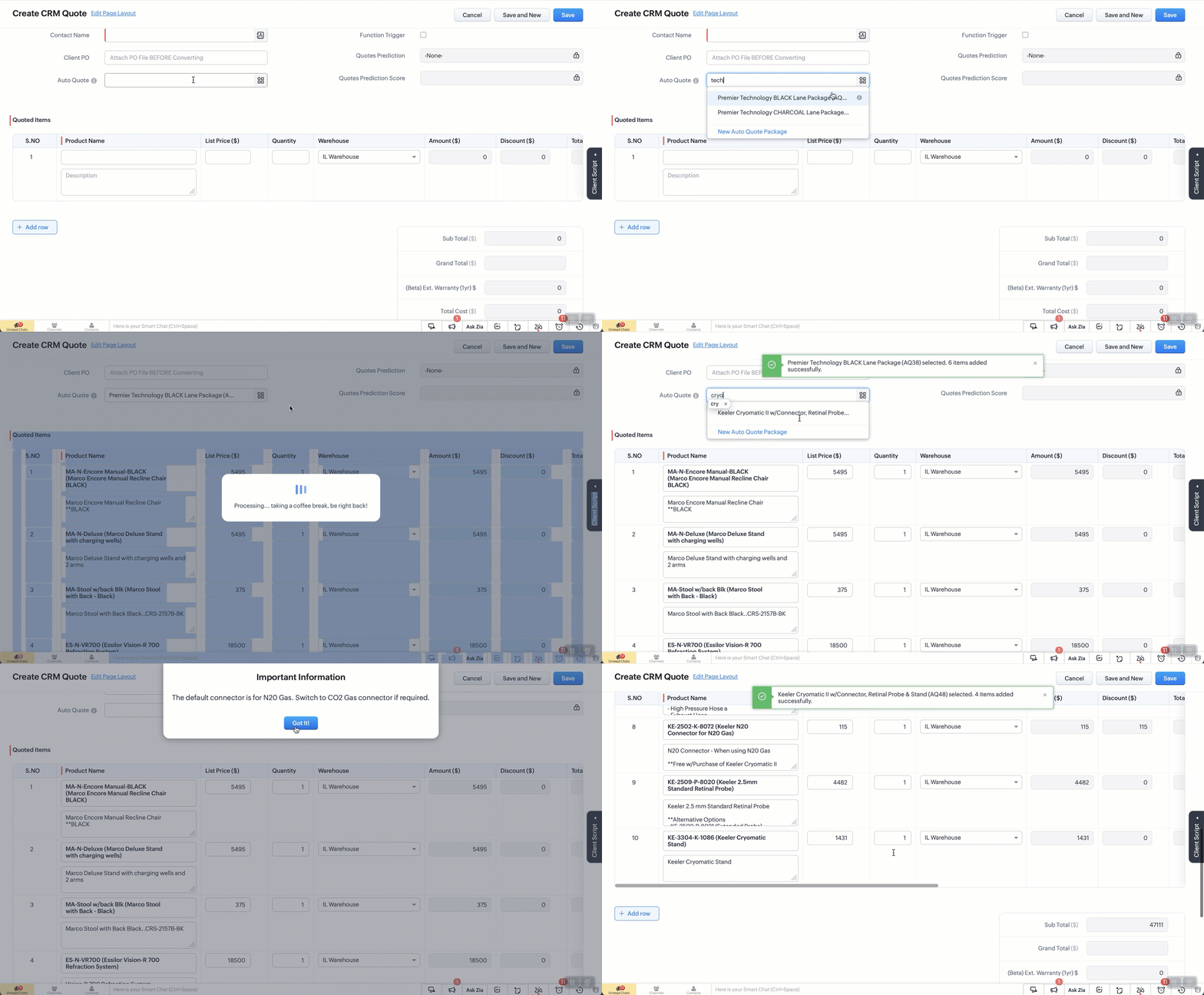
The Setup:
Create a custom module “Package Items”. Add the fields as below.
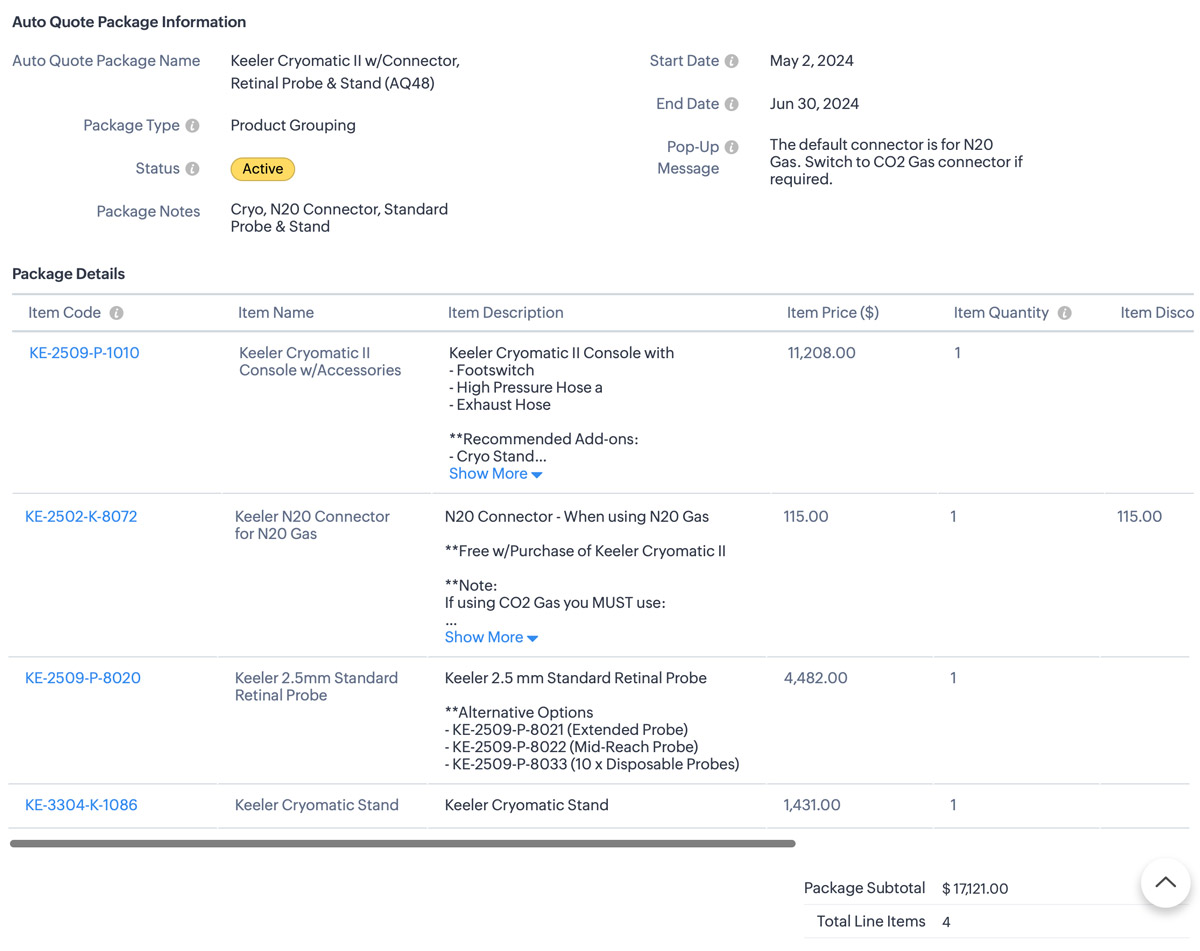
Additional Info
1. I also use client script to hide the “Auto-Quote” field when in a standard view page
2. When I name a package, a deluge script runs to append the Package ID number which is an auto-number field.
- try {// List of funny loading messagesvar loadingMessages = ["Cranking up the quote machine...","One sec... just stepped out for coffee.","Hold tight! The hamsters are running the wheels.","Almost there... giving it a little extra attention.","Loading... probably faster than your internet speed.","Please hold while we make magic happen.","Just a moment... our servers are stretching their legs.","Your patience is appreciated... and rewarded!","Brewing up your quote right now...","Give us a second... we're flexing our technical muscles.","Our system is doing some yoga... stay calm!","Loading... don't worry, it's not stuck!","Fetching your data... hopefully with no detours!","Keep calm and let us handle the rest.","Processing... taking a coffee break, be right back!","Stay tuned... greatness is loading.","Our system is running... faster than a cheetah!","Looks like you're going all in on this quote!","Getting things ready... just need a moment.","Hold on... we're aligning some stars for you.","Please wait... we're feeding the server squirrels.","One moment... your quote is coming fresh out of the oven.","Loading... just making sure everything is perfect!","Generating your quote... thanks for your patience!","Almost there... your quote is worth the wait!"];// Select a random message from the listvar randomMessage = loadingMessages[Math.floor(Math.random() * loadingMessages.length)];// Log the entire value object to see its structurelog("Full value object: " + JSON.stringify(value));// Ensure value.id is defined before proceedingif (!value || !value.id) {log("No product selected or value.id is undefined");return; // Exit the script quietly since no valid product was selected}// Show loaderZDK.Client.showLoader({ type: 'page', template: 'vertical-bar', message: randomMessage });// Extract the product ID and name from the value passed invar packageId = value.id;var packageName = value.name;log("Product ID: " + packageId);log("Package Name: " + packageName);// Get the subform field from Quotes modulevar quotedItemsSubform = ZDK.Page.getField("Quoted_Items");// Fetch product information for the package IDvar packageDetails = ZDK.Apps.CRM.Auto_Quote_Packages.fetchById(packageId);var packageStatus = packageDetails.Status; // Active or Expired.var popUpMessage = packageDetails.Pop_Up_Message; // Check the package for any Pop-up message we want to showlog("Package Details: " + JSON.stringify(packageDetails));log("Package Status: " + packageStatus);log("Pop-Up Message: " + popUpMessage);// Initialize array for existing line items.var existingLineItems = quotedItemsSubform.getValue() || [];log("Existing line items: " + JSON.stringify(existingLineItems));//// Only include rows with products. Excude any blank rows from the quotevar filteredExistingLineItems = existingLineItems.filter(function(item) {return item.Product_Name && item.Product_Name.id;}).map(function(item) {return {id: item.Product_Name.id // Include only the item ID};});log("Filtered existing line items: " + JSON.stringify(filteredExistingLineItems));// Array to hold new line items we are addingvar newLineItemArray = [];// Check if package is active and populate new line itemsif (packageStatus === "Active") {var packageItems = packageDetails.Package_Details;packageItems.forEach(function(item) {var productLineItem = {Product_Name: {id: item.Item_Code.id,name: `${item.Item_Code.name} (${item.Item_Name})`},Product_List_Price: item.Item_Price,Description: item.Item_Description,List_Price: item.Item_Price,Quantity: item.Item_Quantity ?? 1, // Default to 1 if Qty is null or undefinedDiscount: Math.abs(item.Item_Discount ?? 0) // Get the discount or default to 0 if null};log("New product line item: " + JSON.stringify(productLineItem));newLineItemArray.push(productLineItem);});} else {// Show error message if the package is not active// My layout to only show Active items but if you don't do that this solves it.ZDK.Client.showMessage('This package / promo is no longer active. Please contact the admin for details.', { type: 'error' });ZDK.Client.hideLoader();return; // Exit the script since the package is not active}// Combine existing line items with new line itemsvar updatedLineItemArray = filteredExistingLineItems.concat(newLineItemArray);log("Updated line items array: " + JSON.stringify(updatedLineItemArray));// Add all updated items to the Quotes pagequotedItemsSubform.setValue(updatedLineItemArray);// Reset the pick list field so user can re-useZDK.Page.getField("Auto_Quote").setValue(null);// Hide loaderZDK.Client.hideLoader();log("Final updated line items: " + JSON.stringify(updatedLineItemArray));// Function to show confirmation and number of items added back to the uservar showSuccessMessage = function() {ZDK.Client.showMessage(`${value.name} selected. ${newLineItemArray.length} items added successfully.`, { type: 'success' });};// Function to show popup message and then success messagevar showAlertAndSuccess = function(message, heading, buttonText) {ZDK.Client.showAlert(message, heading, buttonText);showSuccessMessage();};// Check for pop-up message and show alert if it existsif (popUpMessage) {showAlertAndSuccess(popUpMessage, "Important Information", "Got It!");} else {// No pop-up message, show the success messageshowSuccessMessage();}} catch (error) {// Log the errorlog('Error: ' + error.message);// Show error messageZDK.Client.showMessage('An error occurred while adding items. Please try again.', { type: 'error' });// Hide loaderZDK.Client.hideLoader();}
Topic Participants
Kevin Flynn
Andres
Carnemolla
Vasile Mogos
Sticky Posts
Zoho CRM's sales trend and sales follow-up trend dashboards are now customizable
Dear Customers, We're here with good news! Sales trend and sales follow-up trend are two system-defined dashboards that help you understand trends and anomalies in your sales outreach and conversion efforts. They use Zia's intelligence to identify patternsIntroducing Multiple Sandbox Types and Support for Module's Data Population
Register here for the upcoming Focus Group webinar on Multiple Sandbox | Help documentation to learn more about the new enhancements Hello everyone, Sandbox in CRM is a testing environment for users to create and test new configurations like workflowGood news! Calendar in Zoho CRM gets a face lift
Dear Customers, We are delighted to unveil the revamped calendar UI in Zoho CRM. With a complete visual overhaul aligned with CRM for Everyone, the calendar now offers a more intuitive and flexible scheduling experience. What’s new? Distinguish activitiesVoC in Zoho CRM is now data savvy: Explore response drilldown, summary components and participation in CRM criteria
VoC has all the goods when it comes to customer intelligence—which is why we're constantly enhancing it. We recently added the following: A customer drilldown component that shows you the list of prospects and customers behind a chart's attribute ExpandedWrapping up 2025 on a high note: CRM Release Highlights of the year
Dear Customers, 2025 was an eventful year for us at Zoho CRM. We’ve had releases of all sizes and impact, and we are excited to look back, break it down, and rediscover them with you! Before we rewind—we’d like to take a minute and sincerely thank you
Recent Topics
Zoho mail to contacts and leads, but not to accounts?
We use the accounts tab a lot for our business because they can be linked to the sales orders. Now we want to use the mail add on to link communication of our emails to our accounts. However this is only possible for contacts and leads? It would be convenientAPI keys not showing in ZeptoMail dashboard
Hi there, I'm hoping someone can provide some assistance as support isn't replying. I am trying to configure my transactional emails, but the dashboard doesn't show any of my API details - the `div` is there but it's emtpy. Every time I click "GenerateDoes Zoho Learn integrate with Zoho Connect,People,Workdrive,Project,Desk?
Can we propose Zoho LEarn as a centralised Knowledge Portal tool that can get synched with the other Zoho products and serve as a central Knowledge repository?Reading from and writing to Zoho Projects Custom Module with Deluge
Does anyone know if there is a way to read from and write to the Custom Modules that Zoho now supports. I would love to be able to loop through a set of data and create the entities I need to for this new custom module I'm looking to put together.How Does Knowledge Base Search and Article Recommendation Work?
Hello, I would like to understand how the Knowledge Base search engine works. Specifically, does it search based on: The article title only? The full article content? Both, the article and the content? Keywords? Tags? Also, how does the system determineZoho Books/Inventory - Restrict Items With Pricebook
Hi Zoho Team, I'm trying to address as use case where a client needs to restrict which products certain customers can purchase. I have been able to find a way to do this based on the current Zoho Books or Zoho Inventory configuation. My feature requestBest Way to Integrate Zoho Campaigns with Amazon SES Without Third-Party Tools
I am looking for the most seamless and efficient method to integrate Zoho Campaigns with Amazon SES. My goal is to avoid using any third-party automation tools like Zapier, Make, or Pabbly, and instead, leverage Zoho's native capabilities for this integration.Release Notes | January 2026
We have rolled out a set of powerful new enhancements across Zoho Vertical Studio that bring several long-awaited capabilities to your applications. These updates focus on deeper customization, smarter automation, better reporting, and improved usabilityHow to charge Convenience fee OR payment gateway charges to the end client who is paying the invoice?
Hello, I am creating this topic after having discussions with various sets of users and have understood that with people moving more and more to digital payments, it is important for the client to enable the "Convenience fee" kind of scenario. I haveCard payment surcharge?
Hi, I would like to offer my customers the ability to pay invoices by card (using the PayPal integration). However, PayPal charges me around 5% to receive a card payment, and I would like to pass on this cost to my customer by way of a card payment surcharge. Is there any way for Zoho Invoice to be set up to automatically add a defined "card processing fee", say 5% of the invoice total, if the customer elects to pay by card? I don't want to add this on to invoice manually, since most of my clientsZoho Books | Product updates | January 2026
Hello users, We’ve rolled out new features and enhancements in Zoho Books. From e-filing Form 1099 directly with the IRS to corporation tax support, explore the updates designed to enhance your bookkeeping experience. E-File Form 1099 Directly With theZoho POS App Hanging Issue – Sales Becoming Difficult
The Zoho POS app frequently hangs and becomes unresponsive during billing, making it very difficult to complete sales smoothly. This commonly happens while adding items, during checkout, or at payment time, especially during peak hours. These issues causeTip #62- Exploring Technician Console: Send Ctrl + Alt + Del- 'Insider Insights'
Hello Zoho Assist Community! This week, we’ll be exploring the Send Ctrl + Alt + Del option in the Technician Console. Let’s jump right in. System administrators often rely on Ctrl + Alt + Del when managing remote devices that have unresponsive applicationsSKUs for Invoices, POs, etc.
It doesn't appear that one can enable SKU display on invoices, POs, etc. This is problematic, and I don't see a good reason why this shouldn't be an option. Some of our vendors and customers use this in their system. Every other identifier code is availablehow to avoid duplicate customer
How can i avoid to create a duplicate customer. I charged a same customer with two different plans and it showed up twice in my customer list and subsequently in Zoho books contacts. It creates confusion to have a same customer appears multiple times in customer or contact list. How can i avoid it.RSC Connectivity Linkedin Recruiter RPS
It seems there's a bit of a push from Linkedin Talent Solutions to keep integrations moving. My Account Manager confirmed that Zoho Recruit is a Certified Linkedin Linkedin Partner but does not have RSC as of yet., (we knew that :-) She encouraged meim facing issue on generate the Estimate price
i couldn't understand what is the issue , i cant generate Estimate price where is the issuecannot be able to add user
Dear team I tried to add a new user for sales team, but after entering the OTP its showing error message cannot add nowChanging an existing item to different accounts & inventory-tracked
Hi everyone, I have an item in Zoho Books that was originally set up as a non-inventory item. Over time, I associated it with different sales and purchase accounts, and I now have many invoices, bills, and reports that use this item. My business processHow do I edit the Calendar Invite notifications for Interviews in Recruit?
I'm setting up the Zoho Recruit Interview Calendar system but there's some notifications I don't have any control over. I've turned off all Workflows and Automations related to the Calendar Scheduling and it seems that it's the notification that is sentBookings duration - days
Hi team, Is there any way to setup services/bookings that span multiple days? I am using Zoho Bookings for meeting room bookings. Clients may wish to book a room for more than one day, for up to a month. If not, is there a plan to allow services to be setup with durations of Days as well as hours and minutes? Many thanks, Anna.big 5 accounts
how do you find what accounts are listed as Big 5 ?Zoho recruit's blueprint configuration is not functioning as mapped
Current Status: Zoho Blueprint is not functioning as configured. Issue: We are moving a Candidate status in Zoho Recruit "for active file" but we encountered: "Status cannot be changed for records involved in Blueprint." This happens to various clientActual vs Minimum
Hi all, I am sure I am not the only one having this need. We are implementing billing on a 30-minute increment, with a minimum of 30 minutes per ticket. My question is, is there a way to create a formula or function to track both the minimum bill vs theDelay in rendering Zoho Recruit - Careers in the ZappyWorks
I click on the Careers link (https://zappyworks.zohorecruit.com/jobs/Careers) on the ZappyWorks website expecting to see the job openings. The site redirects me to Zoho Recruit, but after the redirect, the page just stays blank for several seconds. I'mHow to add interviews through API
I'm trying to add an interview without much luck. The documentation gives examples of adding just about everything except an interview. However, the issue might be the way I'm formatting it, because the documentation is unclear to me. It seems as if the xml should be passed in the url, which seems unusual. I've tried the data as both plain and character escaped, but nothing seems to work, nor do I even get an error response. https://recruit.zoho.com/recruit/private/xml/Interviews/addRecords?authtoken=***&scope=recruitapi&version=2&xmlData=<Interviews> <rowOffer already made- but I withdrew it
I made an offer letter, but made a mistake on it. I withdrew the offer but now I can't recreate the correct offer. Zoho keeps saying that "A same offer has already been made". I look in the "offers" and there are NO offers (this is the first time I'veControl the precision of answer bot responses
Hello everyone, Admins can control the precision with which the Answer bot analyzes and generates a response by adjusting the threshold levels. Based on predefined threshold values, Zia analyzes how closely the query matches with the available KB articles.Rebrand your CRM with the all-new custom domain mapping setup
UPDATES TO THIS FEATURE! 19th Jan, 2024 — Custom domain mapping has been made available for portal users in Zoho One and CRM Plus. 23rd June, 2023 — Custom domain mapping has been made available for all users, in all DCs. Hello everyone! We are elatedAdd Israel & Jewish Holidays to Zoho People Holidays Gallery
Greetings, We hope you are doing well. We are writing to request an enhancement to the Holidays Gallery in Zoho People. Currently, there are several holidays available, but none for Israel and none for Jewish holidays (which are not necessarily the sameSender Email ID is duplicate
My sender id "automate@erplaunchpad.com" is coming as duplicate but I have not used it anywhere else please helpCRM x WorkDrive: File storage for new CRM signups is now powered by WorkDrive
Availability Editions: All DCs: All Release plan: Released for new signups in all DCs. It will be enabled for existing users in a phased manner in the upcoming months. Help documentation: Documents in Zoho CRM Manage folders in Documents tab Manage filesBuilding Toppings #6 - Install and uninstall actions
Hello Biginners! In our previous forum post, we explored creating connections - specifically, custom service connections in the Bigin Developer Console. In this post, we'll focus on another feature that can be used in every topping: install actions. We'llNew UI in Zoho One CRM
Hello, Just switched to the new UI for Zoho One CRM, do not like it, especially the search functions. What are the steps to backstep to the previous UI? UPDATE: I found it.App like Miro
Hi all, is there a way to have a interactive whiteboard like in Miro? We want to visualize our processes and workflows in an easy way.Important updates to your connectors
Hello everyone, Greeting from Zoho Creator! We're excited to announce that we'll be rolling out significant backend updates to Zoho Creator's built-in connectors to enhance security by following the latest frameworks. The existing version of some of theHow Do Mutliple Sales People Prospect in the "LEADS" module without calling the same leads?
We have 4 sales reps and the Leads module does not have real time intuitive knowlodge to make the sales rteps dont call the same people at the same time. How can we crate a fluent prospecting sytem where the salres reps can go out bound without callingKeeping track of project expenses
I have talked to a few support techs and it is very hard for me to believe that Zoho's project accounting software can't keep accounts for my projects. I must not understand what they're saying. We get a contract to build something. So the project revenueMailbox delegation - A secure way to enable collaboration
Admins often encounter scenarios where a user needs another team member to access and manage their mailbox during extended leave, role transitions, or while handling high email volumes. In such situations, ensuring business continuity without sharingCanvas View bug
I would like to report a bug. When clone a canvas view from an existing canvas view, if the original canvas view have canvas button with client script. Then the new create canvas view will have canvas button, it is make sense. But when I try to deleteNext Page