All Zoho Survey tables explained

Introduction
Hey everyone! Sometimes, deciphering the structure and meaning of data in Zoho
Analytics, especially when Zoho’s native syncs and integrations are
activated, can be quite challenging. That’s why I’ve put together an
overview, not only to aid myself but also to assist others in navigating
through these complexities.
Collectors
The table plays an important role in the administration of surveys, especially when using the multi-collector feature. This feature makes it possible to distribute a survey to different groups and then filter the results by group.
What is a collector?
A collector is basically a way to distribute a single survey in different ways. Normally a survey is shared via a single link, but with this feature separate links can be created for different groups. This makes it easier to filter and analyze responses by group. In addition, numerous settings such as restrictions, quotas, visibility and hash URLs can be set separately for each collector.
A practical example illustrates this: Suppose you are organizing a workshop for many different customers from different companies and want to get feedback from the participants. Instead of creating separate surveys per company, you can create a single survey and send it to each participant using multi-collectors. This way, all incoming responses are already automatically segmented by company without participants having to provide information manually.
The Collectors table therefore makes it easier for you to organize survey activities.
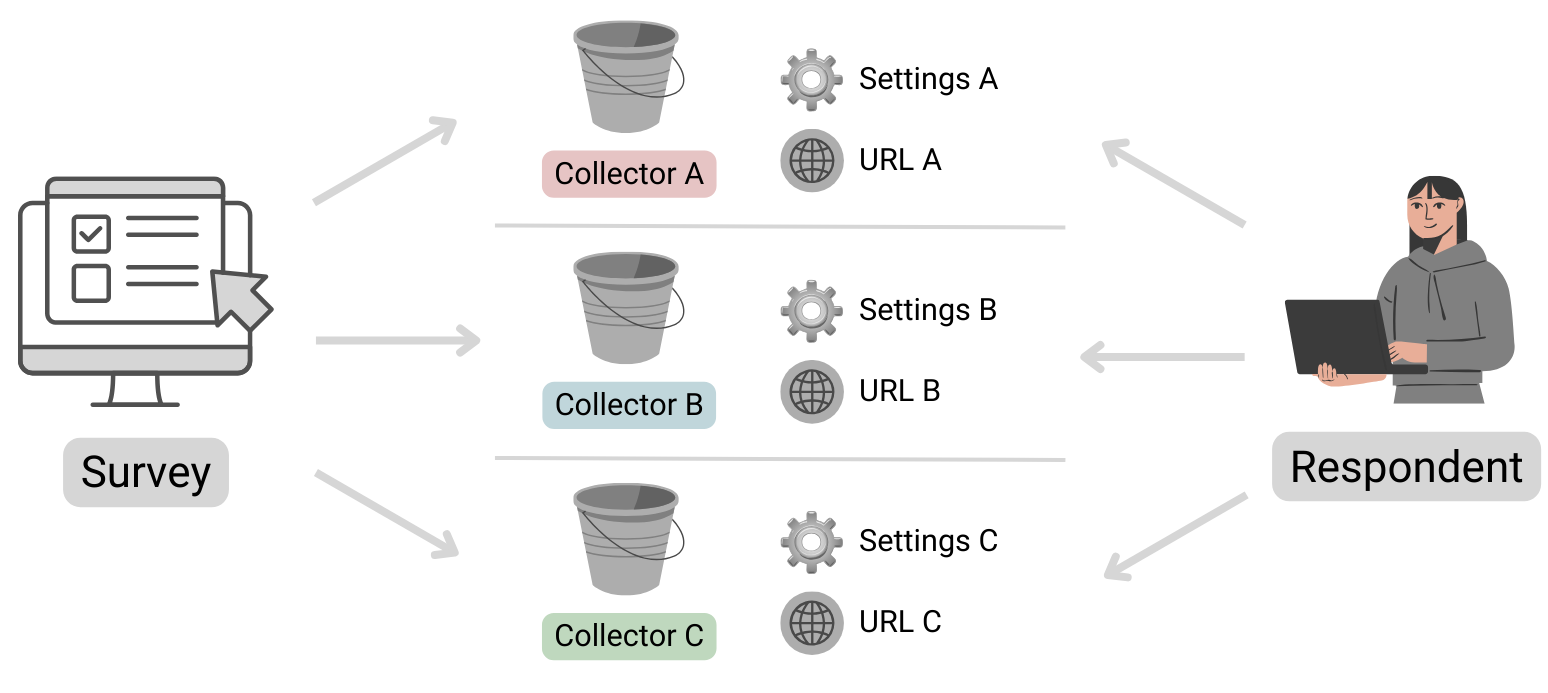
Table structure
| Column name | Data type | Explanation | Table relationships | Values |
|---|---|---|---|---|
| ID | Number | Primary key | Respondents.Collector ID | |
| Name | Text | Name of the collector | ||
| Unique URL | Text | The public URL where the survey can be accessed | ||
| Survey ID | Text | Reference to the survey to which this collector belongs | Surveys.ID | |
| Status | Text | Indicates whether the collector is still accepting submissions or is already closed. | open, closed | |
| Type | Text | Specifies whether the collector is public or private. If a survey is set as private, it can only be opened by logged-in Zoho users. | public, private | |
| Offline URL | Text | Zoho Survey offers the option of completing surveys offline. This
means that responses can be received even without an Internet connection
and can be viewed and uploaded after authentication. Further
information can be found here: https://help.zoho.com/portal/en/kb/survey/launch/offline-survey/articles/offline-surveys
Attention: Even if this function is deactivated, a URL is displayed here. If this is opened, a corresponding message appears stating that it cannot be accessed. |
||
| Offline Enabled | Boolean (DecisionBox) | Indicates whether the offline feature is activated or not. |
|
|
| Published Date | Date + Time | Time at which the Collector was published. | ||
| Cut Off Date | Date | Time at which the collector should be closed (this is the deadline specified in the settings).If a collector was closed manually, the date is not entered here (unfortunately this cannot be found anywhere else). | ||
| Multiple Response | Text | This column is always empty, even the support team couldn’t help me here. It looks as if information on restrictions is stored here (Editor 🡆 Publish 🡆 Restrictions 🡆 Response Restriction). |
Surveys
This table stores basic information about a survey.
Table structure
| Column name | Data type | Explanation | Table relationships | Values |
|---|---|---|---|---|
| ID | Number | Primary key | Responses.Survey IDQuestions.Survey IDVariables.Survey IDResponse Variables.Survey IDCollectors.Survey IDPages.Survey ID | |
| Language | Text | Identification of the standard language selected for the survey | Set 1 of the ISO 639 language codes | |
| Created Date | Date + Time | Date on which the survey was created (the publication date can be found in the Collectors table!) | ||
| Modified Date | Date + Time | Time of the last editing of the survey | ||
| Page Count | Positive number | Indicates the total number of pages in the survey. | ||
| Title | Text | A different title can be configured in the settings if the name of the survey (table column ‘Name’) is not to be used. | ||
| Submit Button | Text | The text stored in the settings for the button to send the survey | ||
| Back Button | Text | The text stored in the settings for the button to go back to the previous page has been changed. | ||
| Enable Back | Text | Indicates whether the respondent can return to the previous page or whether the button is not displayed. | true, false (Attention! Zoho uses the text true and false here and not the data type Desicion Box, this inconsistency is confusing and must be taken into account). | |
| Next Button | Text | The text that was defined in the settings for the button to go to the next page | ||
| Group ID | Number | Reference to the department in which the survey was created | Departments.ID | |
| Name | Text | Survey name | ||
| Type | Text | As a rule, the value “survey” is available here. However, if scores
have been configured under Editor 🡆 Advanced settings, the value scoring is available instead. |
survey, scoring |
Automatically import new surveys is selected, there should normally be no missing data!Pages
The table contains all the information about the pages in the survey. Normally, this table should not play a major role in evaluations, unless you want to use the page title for segmentation.
Table structure
| Column name | Data type | Explanation | Table relationships |
|---|---|---|---|
| ID | Number | Primary key | Responses.Page ID
Questions.Page ID |
| Title | Text | Title of the page | |
| Description | Text | Description text | |
| Question Count | Positive number | Indicates the total number of questions on the corresponding page | |
| Survey ID | Number | Reference to the survey in which this page exists | Surveys.ID |
Questions
All data relating to the individual questions is stored here.
Table structure
| Column name | Data type | Explanation | Table relationships | Values |
|---|---|---|---|---|
| ID | Number | Primary key | Responses.Question ID | |
| Type | Text | Indicates the type of question | ||
| Text | Text | Question text | ||
| Page ID | Number | Reference to the page on which the question is located | Pages.ID | |
| Trashed | Boolean (DecisionBox) | Indicates whether the question is visible or whether it has been deleted |
|
|
| Mandatory Enabled | Boolean (DecisionBox) | Indicates whether the question is defined as a mandatory fieldThis column can contain the value NULL! Further information on the supported question types can be found below. |
|
|
| Random Enabled | Boolean (DecisionBox) | Indicates whether a random order of answer options is activated for the questionThis column can contain the value NULL! Further information on the supported question types can be found below. |
|
|
| Hint Enabled | Boolean (DecisionBox) | Indicates whether a hint text is stored for the questionThis column can contain the value NULL! Further information on the supported question types can be found below. |
|
|
| Other Option | Boolean (DecisionBox) | An optional “Other” field can be activated for certain questions. This column indicates whether this setting is active. Please note that the “Other” field cannot be used for all question types. Therefore, this column may contain the value NULL. Further information on the supported question types can be found below. |
|
|
| Hint | Text | If configured, the information text is stored here | ||
| No. Of Stars | Positive number | Maximum number of stars to be awardedThis column can contain the value NULL! Further information on the supported question types can be found below. |
Question types
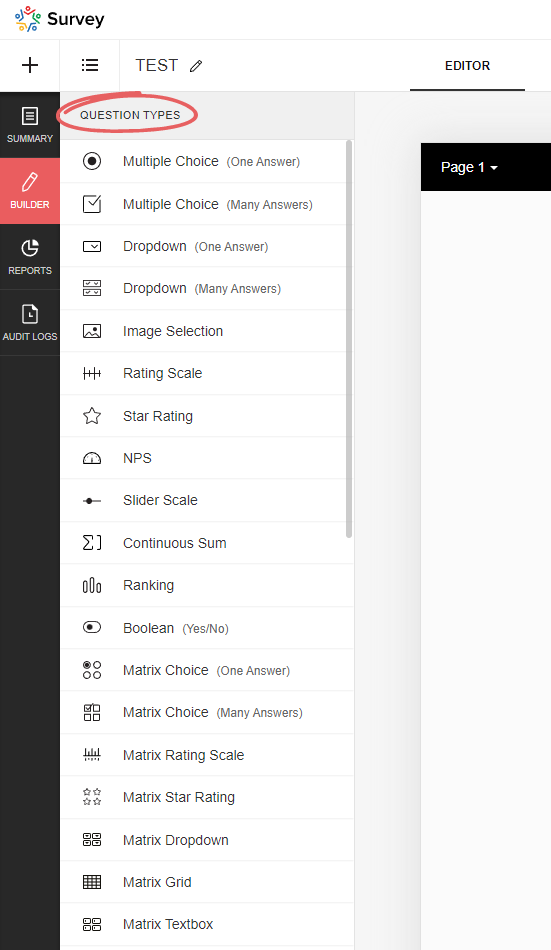
Zoho Survey offers a variety of question types, and depending on which type you select, certain options may not be available, resulting in the corresponding Boolean (DecisionBox) fields having the value NULL. In the table below you will find an overview of all available question types.
| Type | Field name (on the UI) | Note | Mandatory Enabled | Random Enabled | Hint Enabled | Other Option | No. Of Stars |
|---|---|---|---|---|---|---|---|
| full_name | Full name | NULL | NULL | Yes/No | NULL | NULL | |
| demographic | Contact details | NULL | NULL | Yes/No | NULL | NULL | |
| heading_descriptive | Heading and description | This is not a question! This element is only used to display text | NULL | NULL | NULL | NULL | NULL |
| single_drop_down | Dropdown field (one answer) | Yes/No | Yes/No | Yes/No | Yes/No | NULL | |
| multi_select_dropdown | Dropdown field (many answers) | Yes/No | Yes/No | Yes/No | Yes/No | NULL | |
| likert_rating | Rating Scale | The following setting is selected: Likert scale (can be selected when initially added) | Yes/No | NULL | Yes/No | NULL | NULL |
| image_star_rating | Image Selection | The following setting is selected: Star rating | Yes/No | NULL | Yes/No | NULL | Positive number |
| image_single_choice | Image Selection | The following setting is selected: Multiple selection (one answer) | Yes/No | Yes/No | Yes/No | NULL | NULL |
| image_multiple_choice | Image Selection | The following setting is selected: Multiple selection (multiple answers) | Yes/No | Yes/No | Yes/No | NULL | NULL |
| boolean_choice | Boolean | Yes/No | NULL | Yes/No | NULL | NULL | |
| combined_file_upload | File Upload | Yes/No | NULL | Yes/No | NULL | NULL | |
| calendar_box | Date/Time | Yes/No | NULL | Yes/No | NULL | NULL | |
| email_textbox | Yes/No | NULL | Yes/No | NULL | NULL | ||
| single_textbox | Short Answer | Yes/No | NULL | Yes/No | NULL | NULL | |
| textarea | Long Answer | Yes/No | NULL | Yes/No | NULL | NULL | |
| continuous_sum | Continuous Sum | Yes/No | NULL | Yes/No | NULL | NULL | |
| matrix_text_box | Matrix Textbox | Yes/No | NULL | Yes/No | NULL | NULL | |
| matrix_radio_box | Matrix Choice (One Answer) | Yes/No | NULL | Yes/No | Yes/No | NULL | |
| matrix_check_box | Matrix Choice (Many Answers) | Yes/No | NULL | Yes/No | Yes/No | NULL | |
| matrix_likert_rating | Matrix Rating Scale | The following setting is selected: Likert scale (can be selected when initially added) | Yes/No | NULL | Yes/No | NULL | NULL |
| matrix_grid | Matrix Grid | Yes/No | NULL | Yes/No | NULL | NULL | |
| matrix_drop_down | Matrix Dropdown | Yes/No | NULL | Yes/No | Yes/No | NULL | |
| matrix_star_rating | Matrix Star Rating | Yes/No | NULL | Yes/No | NULL | Positive number | |
| multiple_textbox | Multiple Textboxes | Yes/No | NULL | Yes/No | NULL | NULL | |
| single_choice | Multiple Choice (One Answer) | Yes/No | Yes/No | Yes/No | Yes/No | NULL | |
| multiple_choice | Multiple Choice (Many Answers) | Yes/No | Yes/No | Yes/No | Yes/No | NULL | |
| nps | NPS | Yes/No | NULL | Yes/No | NULL | NULL | |
| ranking | Ranking | Yes/No | NULL | Yes/No | NULL | NULL | |
| slider | Slider Scale | Yes/No | NULL | Yes/No | NULL | NULL | |
| signature | Signature | Yes/No | NULL | Yes/No | NULL | NULL | |
| star_rating | Star Rating | Yes/No | NULL | Yes/No | NULL | Positive number | |
| numeric_textbox | Number | Yes/No | NULL | Yes/No | NULL | NULL | |
| matrix_weightage | Matrix Rating Scale | The following setting is selected: Weighted selection (can be selected during initial addition) | Yes/No | NULL | Yes/No | NULL | NULL |
| choice_weightage | Rating Scale | The following setting is selected: Weighted selection (can be selected during initial addition) | Yes/No | NULL | Yes/No | NULL | NULL |
Respondents
This table stores data on the specific completion of the survey, including information on who completed it and when, and to which collector it belongs.
Table structure
| Column name | Data type | Explanation | Table relationships | Values |
|---|---|---|---|---|
| ID | Number | Primary key | Responses.Respondent IDResponse Variables.Respondent ID | |
| Start Date | Date + Time | Time at which the respondent opened the survey | ||
| End Date | Date + Time | Time at which the respondent submitted/completed the survey. If the survey has not yet been completed, this value is of course empty | ||
| IP Address | Text | IP address of the respondent; whether this data is saved or not depends on the setting in the collector (under general restrictions) | ||
| Status | Text | Indicates whether or not the survey has already been completed or submitted by the user | completed, partial | |
| Collector ID | Number | Reference to the collector through which the survey data was collected | Collectors.ID | |
| Survey ID | Number | Reference to the survey | Surveys.ID | |
| Time Taken in Minutes | Decimal number | Time difference between start and end time in minutes | ||
| Time Taken | Number | Time difference between start and end time in seconds | ||
| Survey Modified Time | Date + Time | Time at which the survey was last edited |
partial). Please take this into account when evaluating the data, as these should generally be excluded…Response Variables
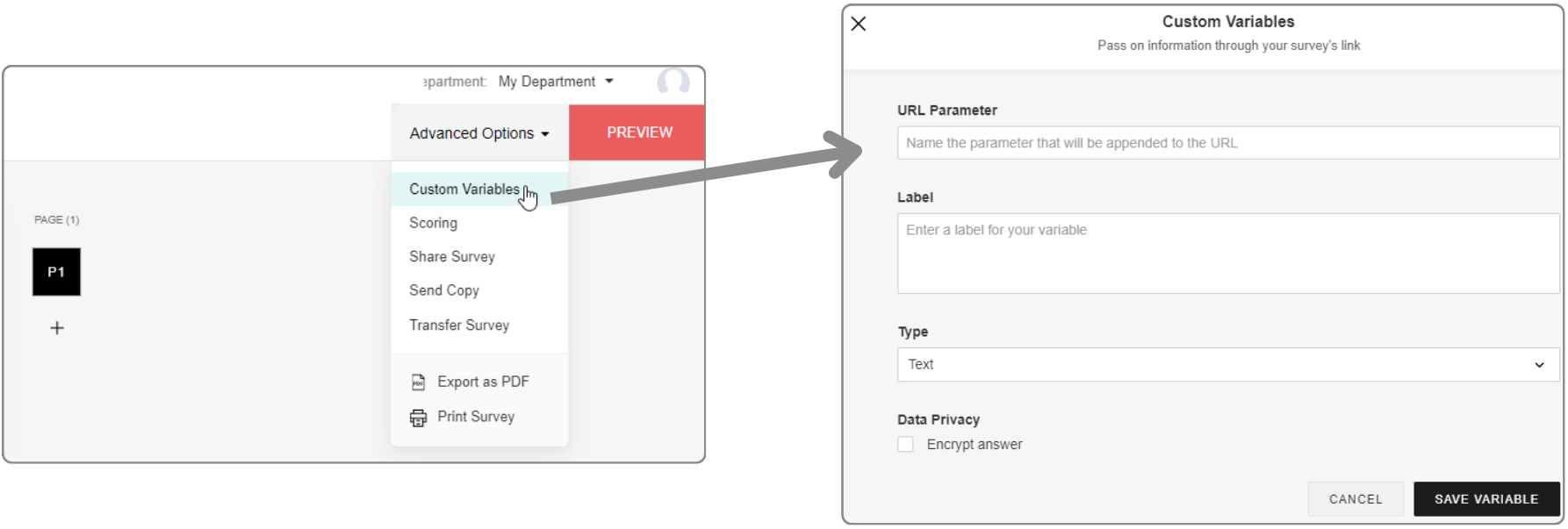
URL parameters can be configured in the editor under Advanced settings. If data has been transferred in a survey link and a response has been submitted, this data is saved here.
In addition, URL parameters can also be used as response restrictions, whereby these can be set per collector. This means that only one submission is permitted per unique URL parameter value.
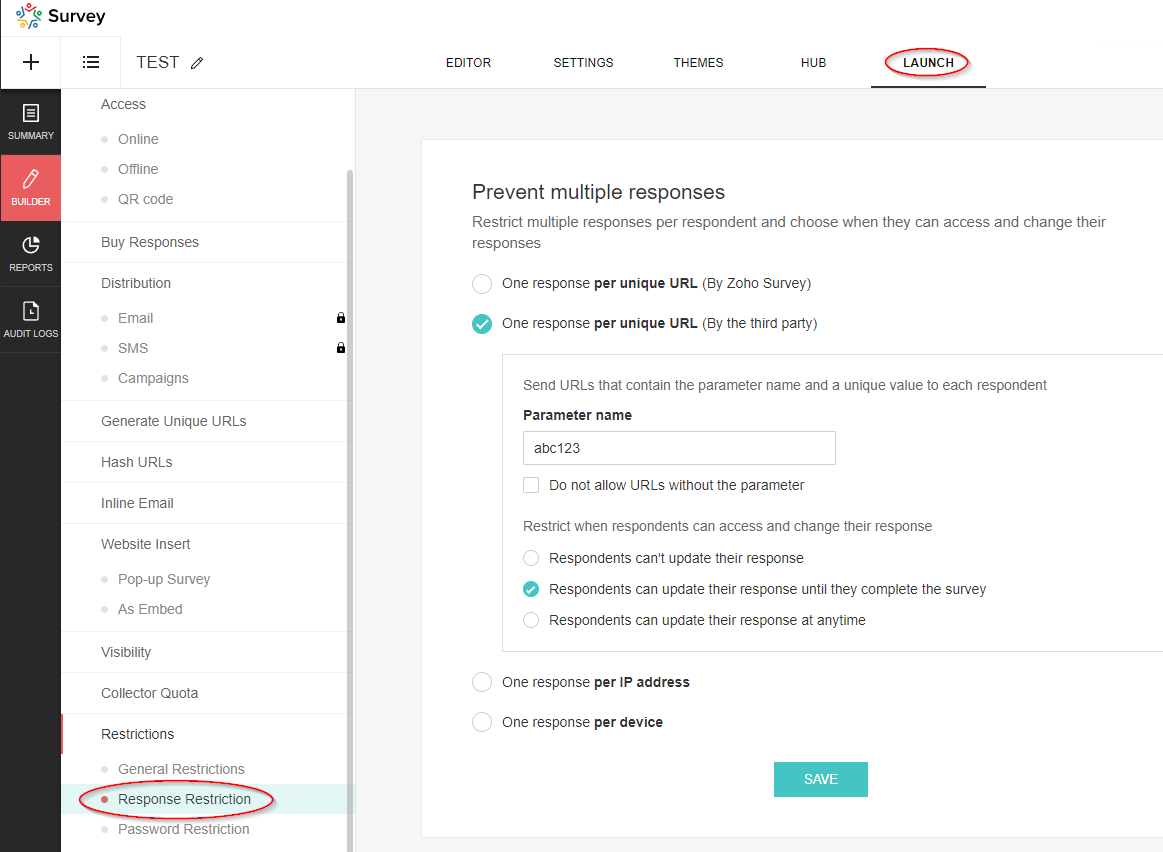
These parameters are not visible in the editor under Advanced settings, but are also saved in this table.
Table structure
| Column name | Data type | Explanation | Table relationships | Values |
|---|---|---|---|---|
| Respondent ID | Number | Reference to the data set of the respondent | Respondents.ID | |
| Variable ID | Number | Reference to the variable | Variables.ID | |
| Variable Label | Text | Description | ||
| Variable Value | Text | Value of the variable | ||
| Skipped By Logic | Boolean (DecisionBox) | ? |
|
|
| Survey ID | Number | Reference to the survey | Surveys.ID |
Variables
This table contains the basic data of the variables (URL parameters).
Table structure
| Column name | Data type | Explanation | Table relationships | Values |
|---|---|---|---|---|
| ID | Number | Primary key | Response Variables.Variable ID | |
| Name | Text | Name of the parameter, i.e. the exact string used in the URL | ||
| Label | Text | Description of the parameter | ||
| Type | Text | Data type |
|
|
| Unique Order | Text | Order in which the parameters were added (in the advanced settings) | Capital letters (A, B, C, etc.) | |
| Trashed | Boolean (DecisionBox) | Indicator whether the parameter has been deleted |
|
|
| Respondent / Custom | Text | If the parameter is used for the response restriction, the value is Respondent, otherwise it is Custom. |
|
|
| Survey ID | Number | Reference to the survey | Surveys.ID |
Responses
This table is of particular interest as it contains the answers to the questions that were submitted.
Table structure
| Column name | Data type | Explanation | Table relationships | Values |
|---|---|---|---|---|
| Respondent ID | Number | Reference to the respondent’s data record | Respondents.ID | |
| Question ID | Number | Reference to the question | Questions.ID | |
| Option ID | Number | Reference to the option: “Option” refers to the selected value in a drop-down field or the selected answer in a multiple choice question. Image selection questions also refer to an option. However, it should be noted that this does not currently contain any information about the image, so it is unfortunately useless. For further details, please see the section on the corresponding table! | Options.ID | |
| Text | Text | Answer to the question. This field is empty if it is a dropdown field or a multiple choice question (then the answer is the selected option) | ||
| Row ID | Number | Reference to the row | Rows.ID | |
| Column ID | Number | Reference to the column | Columns.ID | |
| Row | Text | The name of the row (this is simply a lookup, unfortunately the value at the time of the evaluation is not saved) | Rows.Text | |
| Column | Text | The name of the column (this is simply a lookup, unfortunately the value at the time of the evaluation is not saved) | Columns.Text | |
| Option | Text | The name of the option (this is simply a lookup, unfortunately the value at the time of evaluation is not saved) | ||
| Survey ID | Number | Reference to the survey | Surveys.ID | |
| Field ID | Number | Reference to the field if it is a text field or a number field. Further information can be found in the section on the corresponding table! | Fields.ID | |
| Not Applicable Enabled | Boolean (DecisionBox) | For certain questions, you can add the option “Not applicable”. If this option was selected by the respondent, this flag is set. The option can be activated for the following question types: ranking, image_star_rating, matrix_star_rating, matrix_likert_rating | Yes, No | |
| Others | Text | For certain questions, it is possible to activate the “Other” option. You can find more information on this in the section on question types! If this option is activated and the respondent has used it, the answer is not recorded in the “Text” field, but in this field. | ||
| Page ID | Number | Reference to the page on which the answered question is located. | Pages.ID | |
| Field | Text | The name of the field (this is simply a lookup, unfortunately the value at the time of the evaluation is not saved) | Fields.Text |
Rows
The row information for multi-line questions, such as those that occur in a matrix, is recorded in this table. The data in this table relates to the following question types (Questions.Type):
- matrix_likert_rating
- matrix_grid
- matrix_check_box
- matrix_star_rating
- matrix_radio_box
- matrix_text_box
- matrix_weightage
- ranking
- matrix_drop_down
- image_star_rating
Table structure
| Column name | Data type | Explanation | Table relationships | Values |
|---|---|---|---|---|
| ID | Number | Primary key | Responses.Row ID | |
| Question ID | Number | Reference to the question | Questions.ID | |
| Text | Text | Name of the row | ||
| Survey ID | Number | Reference to the survey | Surveys.ID | |
| Unique Order | Text | Specifies the sequence |
Columns
The column information for questions with multiple columns that only occur in a matrix is recorded in this table. The entries in this table refer to the following question types (Questions.Type):
- matrix_grid
- matrix_text_box
- matrix_radio_box
- matrix_drop_down
- matrix_check_box
- matrix_weightage
Table structure
| Column name | Data type | Explanation | Table relationships | Values |
|---|---|---|---|---|
| ID | Number | Primary key | Responses.Column ID | |
| Text | Text | Name of the column | ||
| Question ID | Number | Reference to the question | Questions.ID | |
| Survey ID | Number | Reference to the survey | Surveys.ID |
Fields
This table contains information on group input fields that are used to enable multiple entries per question. This also includes the file upload field and the Boolean (DecisionBox) field, as multiple fields can also be configured here as an option.
In the table, the fields of the following question types (Questions.Type) are listed:
- continuous_sum
- demographic
- Boolean (DecisionBox)_choice
- multiple_textbox
- full_name
- combined_file_upload
Table structure
| Column name | Data type | Explanation | Table relationships | Values |
|---|---|---|---|---|
| ID | Number | Primary key | Responses.Field ID | |
| Text | Text | Name - Attention! If there is only a single switch, “Boolean (DecisionBox)” is displayed here. Otherwise, the corresponding values for the labels will of course appear. | ||
| Type | Text | Indicates the type of input field. | single_textbox, numeric_textbox, email_textbox, file_upload, single_choice | |
| Unique Order | Text | Specifies the order. | ||
| Sequence No | Number | Specifies the order. | ||
| Question ID | Number | Reference to the question | Questions.ID | |
| Survey ID | Number | Reference to the survey | Surveys.ID | |
| Mandatory Enabled | Boolean (DecisionBox) | Indicates whether the field is defined as a mandatory field or not. | Yes, No |
Options
The selectable values that are available in drop-down fields or for multiple-choice questions are saved here. There is also an option for image selection questions. However, it should be noted that this option currently contains no information on the image and is therefore unfortunately useless. In addition, this table is also important for weighted rating scales, as the weightings are saved here. A look at this table is therefore essential for evaluations with this type of scale.
Options are saved for the following question types (Questions.Type):
- matrix_drop_down
- single_choice
- single_drop_down
- image_single_choice
- multi_select_dropdown
- multi_select_dropdown
- multiple_choice
- matrix_weightage
- choice_weightage
Table structure
| Column name | Data type | Explanation | Table relationships | Values |
|---|---|---|---|---|
| ID | Number | Primary key | Responses.Option ID | |
| Text | Text | Name of the option/answer | ||
| Question ID | Number | Reference to the question | Questions.ID | |
| Survey ID | Number | Reference to the survey | Surveys.ID | |
| Column ID | Number | Reference to the column | Columns.ID | |
| Weightage | Number | For questions of the rating scale type and the Weighted selection option set, the respective weighting is displayed here. |
Topic Participants
Sven
Sticky Posts
What's New in Zoho Analytics - February 2026
Hello Users! We're back with another round of updates for Zoho Analytics. This month's release focuses on giving you greater flexibility in how you visualize, manage, and act on your data - with new features like custom visualizations, remote MCP server,What's New in Zoho Analytics - January 2026
Hello Users! We are starting the year with a strong lineup of updates, marking the beginning of many improvements planned to enhance your analytics experience. Explore the latest improvements built to boost performance, simplify analysis, and help youWhat's New in Zoho Analytics - November 2025
We're thrilled to announce a significant update focused on expanding your data connectivity, enhancing visualization capabilities, and delivering a more powerful, intuitive, and performant analytics experience. Here’s a look at what’s new. Explore What'sWhat's New in Zoho Analytics - October 2025
Hello Users! We're are back with a fresh set of updates and enhancements to make data analysis faster and more insightful. Take a quick look at what’s new and see how these updates can power up your reports and dashboards. Explore What's New! ExtremeWhat’s New in Zoho Analytics – September 2025
Hello Users!! In this month’s update, we’re raising the bar across multiple touchpoints, from how you bring in data, plan and track projects to how you design and brand your dashboards. We’ve added the all-new Gantt chart for project visualization, expanded
Recent Topics
Allow Zia Agents using Zoho One Account
When I went to try Zia Agents, it forced the creation of a new, separate account. This seems counter-intuitive to me. I don't want to manage a separate account. Plus, aren't Zoho One users the ones most likely to adopt Zia Agents most quickly? It seemsMake Camera Overlay & Recording Controls Visible in All Screen-Sharing Options
Hi Zoho WorkDrive Team, Hope you are doing well. We would like to request an improvement to the screen-recording experience in Zoho WorkDrive. Current Limitation: At the moment the recording controls are visible only inside the Zoho WorkDrive tab. WhenID:2406331
Hello, I have sent the form (ID:2406331) but no answer after two days. This is a paid subscription, I am not allowed to use the eighth paid slot of 50GB email space anymore, only 7 are being used. Is anyone going to help me please so I can use the eighth商談の特定ステージ選択時に、集計項目の入力を必須化したい
こんにちは。Zoho CRMの商談管理で以下を実現したいです。レイアウトルールでは、集計項目を条件に選択できず実現できておりません。よい方法があればご教示いただけると嬉しいです。 ■やりたいこと 商談で特定のステージに変更する場合に、特定の集計項目(同じ商談データ内の項目。以降、集計項目Aとする)を入力必須化したい。 ■概要、状況 ・集計項目Aは、別のオブジェクトで、商談に関連する月ごとの売上を集計している数値項目 ・見積を顧客に提示した際に、集計項目Aに見積金額と一致するようにデータ登録する運用をしているSetting default From address when replying to request
At the moment, if I want to reply to a request, the From field has three options, company@zohosupport.com, support@company.zohosupport.com, and support@company.com. The first two are really internal address that should never be seen by the customer andAllow Multiple Scheduled Appointments with Zoho Support
Dear Zoho Team, I hope you're doing well. First, thank you for introducing the option to schedule support calls via the Zoho CRM booking link. This has been a fantastic enhancement, eliminating the need for back-and-forth coordination when schedulingShare Edit while in Workflow
There are times that while a writer document is in the middle of a workflow the user that's responsible for that stage of the workflow needs to bring in other people to work on the document. Currently there is no way for the user to be able to allow other'sHow to add a custom hyperlinked button in ZohoCRM Canvas Builder?
I am building custom views in ZohoCRM Canvas builder, with one view that will be used for a client Portal. Trying to add a custom button that when clicked opens a separate window to a ZohoForm. How do I do this?Event Time Zone in meeting invites are confusing users
When sending calendar invites to internal and external users, the first section "Event Time Zone" is confusing people and they are automatically declining events. Can this section please be removed??? It already shows the correct time zone next to theHow do you create an event/meeting in a different time zone?
Does anyone know how do you create an event/meeting in a different time zone?Extend GitHub Commit Integration to Tasks in Zoho Projects
Hello Zoho Projects Team, We hope you are doing well. We would like to submit a feature request regarding the current GitHub integration in Zoho Projects, specifically the ability to link commit information. Current Limitation: As of now, Zoho ProjectsAdd Native GitHub Pull Request Creation & Management from Tasks/Bugs
Hi Zoho Projects Team, I am submitting a feature request to enhance our development lifecycle by enabling native GitHub Pull Request (PR) creation and management directly within Zoho Projects. The Current Limitation: Currently, the GitHub integrationAdd Actionable “Smart Commits” for GitHub Integration
Hi Zoho Projects Team, I am submitting a feature request to introduce Smart Commits support for the GitHub integration in Zoho Projects. The Current Limitation: Currently, Zoho Projects offers a "passive" integration. Including a Task ID in a commit messageAdd Unified Project-Wide Development & Release GitHub Dashboard
Hi Zoho Projects Team, I am writing to submit a feature request for a Unified Development & Release GitHub Dashboard that provides centralized GitHub visibility at both the Project and Milestone levels. The Vision: We need a single "Command Center" thatAdd Native “Create GitHub Branch” Action for Tasks and Bugs
Hi Zoho Projects Team, I would like to submit a feature request to enhance the GitHub integration in Zoho Projects by adding the ability to initiate a GitHub branch directly from a Task or Bug. The Current Limitation: Currently, Zoho Projects lacks aOne-click “Open in VS Code” from Zoho Tasks/Bugs with automatic branch checkout
Hi Zoho Projects Team, I am submitting a feature request to enhance the development workflow within Zoho Projects, specifically the ability to open a Task or Bug directly in VS Code and automatically check out the related branch, similar to capabilitiesHow to reduce inventory valuation when not tracking individual items?
We purchase clothing items wholesale, embroider them with a company's logo, then resell. The garment style, size, color, etc. changes according to a customer's desire, so we don't track the individual item's purchase within Zoho Inventory unless there'sMerge tag didn't work in the campaign sent to test email list
Hello, I just sent out a campaign to my list of test emails (including my personal one). The merge tag that's supposed to put a first name of the contact $[UD:FIRST_NAME||]$ didn't work. Where the first name of the contact should be displayed there'sAdd Camera Background Blur During Recording
Hi Zoho WorkDrive Team, Hope everything is well. We would like to request an enhancement to the video recording feature in Zoho WorkDrive. Currently, the camera preview displayed during a recording does not support background blur. This is an essentialSync Data from MA to CRM
Currently, it's a one-way sync of data from the CRM to MA. I believe we should have the ability to select fields to sync from MA to the CRM. The lead score is a perfect example of this. In an ideal world we would be able to impact the lead score of aHow can I transfer data from Production to Development environment?
Hi, I am using Creator V6 and would like to bring all the data in production to the Development and Testing environments? Is there an easy way of doing that or I have to export and import each table?filter on sheets mobile (iOS, iPadOS) does not work
re-posting this as a question because reporting as a problem netted zero responses... I have this issue on every spreadsheet, whether imported or created natively in Zoho Sheets. I can use on desktop without issue: but on iOS the filter dropdowns areHow to map fields from Zoho Recruit to Zoho People
I've got these fields from my Job Offer that I'm trying to map to the Work information fields in Zoho People, but they arent showing up. For example, how do I get the department name field (in the job post) to map to the work information field in ZohoMass email from Report output
Hi, I'd like to send a mass email based on a report output. The report is pulling multiple information from linked modules. Each line of the report ends up with a contact name, email and multiple field values pulled from the linked modules (some are customIntroducing SlyteUI : From Idea to a Working Interface in Minutes
Hello everyone! Are you spending hours building basic UIs? Does even the smallest customization feel like a major task? CRM customization should feel intuitive and straightforward, not time consuming or exhausting. SlyteUI makes this possible by simplifyingAdd Comprehensive Accessibility Features to Zoho Writer
Hello Zoho Writer Team, We hope you are doing well. We would like to submit a feature request to enhance Zoho Writer with a full set of accessibility tools, similar to the accessibility options already available in the Zoho Desk agent interface. 🚧 CurrentHow to see Tickets that require a response
When an agent checks his work he should be able to see a list of tickets that he has to reply to. Currently he can only see if the ticket is closed or open. However the ticket might be open but we are waiting for the customers reply, so there is nothingZoho Books' 2025 Wrapped
Before we turn the page to a new year, it’s time to revisit the updates that made financial management simpler and more intuitive. This annual roundup brings together the most impactful features and enhancements we delivered in 2025, offering a clear[Free webinar] Integrations in Zoho Creator - Creator Tech Connect
Hello everyone, We’re excited to invite you to another edition of the Creator Tech Connect webinar. About Creator Tech Connect The Creator Tech Connect series is a free monthly webinar featuring in-depth technical sessions designed for developers, administrators,Issue with attaching files to a task through the API
Hello! I've implemented a function that creates a task for every new bill that is created but I haven't been able to attach to the task the files which are attached to the bill. I have encountered multiple errors but the most common one is error 33003:Trigger workflows from SLA escalations in Zoho Desk?
Hey everyone, I’m currently working with SLA escalation rules in Zoho Desk and ran into a limitation that I’m hoping someone here has solved more elegantly. As far as I can tell, SLA escalations only support fairly limited actions (like changing the ticketCan I hide empty Contact fields from view?
Some contacts have a lot of empty fields, others are mostly filled. Is there a way I can hide/show empty fields without changing the actual Layout? I would like to de-clutter my view, and also be able to add information later as I am able. I would beAgents permission per department
Hi Team, can I setup permission for each agent what they can do in each department, for example I want account department agents to only have view access to support department tickets and not allowed to assign or reply to clients. I am sure this wouldAsk the Experts - Live Q&A webinar
Hello Community, We’re excited to host our very first Ask the Experts session! Join us on 7 April 2026 from 11 a.m. to 12 p.m. (IST) for this live webinar Q&A session, where you will have an opportunity to connect directly with our product experts, gainCliq iOS can't see shared screen
Hello, I had this morning a video call with a colleague. She is using Cliq Desktop MacOS and wanted to share her screen with me. I'm on iPad. I noticed, while she shared her screen, I could only see her video, but not the shared screen... Does Cliq iOS is able to display shared screen, or is it somewhere else to be found ? RegardsPrevent Automatic Milestone Inheritance for Newly Created Task Lists
Hello Zoho Projects Team, We hope you are doing well. We would like to request an enhancement regarding how new task lists inherit Milestone association in Zoho Projects. Current Behavior: At the moment, when a new task list is created below an existingHiding / removing Currency field from Layout
Hello, I'm working on the LEAD standard layout of Zoho CRM. I like to have it as minimal as possible for our team. I could remove most of the field, but Currency is not possible. As lead, I don't quite understansd the necessity to have Currency as mandatory.Updating Sales orders on hold
Surely updating irrelevant fields such as shipping date should be allowed when sales orders are awaiting back orders? Maybe the PO is going to be late arriving so we have to change the shipment date of the Sales order ! Not even allowed through the api - {"code":36014,"message":"Sales orders that have been shipped or on hold cannot be updated."}Can we have Backorder Management ?
Can we have Backorder Management ?Accept credit card payment for multiple invoices
We have a problem with Zoho Books. While we can charge a customer's credit card for an individual customer invoice, we cannot charge a customer's credit card for more than one invoice. In our business, it is common for a client to phone up and say, "HereNext Page