Building extensions #2: Creating extensions for Zoho Projects using a CLI
In our previous post, we noted the two ways to create extensions for Zoho Projects— using the cloud editor and using the command line interface (CLI). We also shared how to create an extension using the Sigma cloud editor. In this post, we'll take a closer look at creating an extension using the CLI.
You'll learn how to create an extension project template with the CLI, test it, upload the zipped project while creating an extension, and then edit or change it. Let's go over each of these steps in detail.
Building an extension project using the CLI
- To create an extension project, we must first set up the development environment, which involves:
➤ Downloading Node.js: Node.js acts as the base platform as well as the JavaScript environment in which the JavaScript code is executed.➤ Installing ZET CLI: Zoho offers a command line interface called Zoho Extension Toolkit (ZET) which enables you to build, test, and pack your extension project.Please follow the steps in this link to download Node.js and install ZET CLI.
- Once the development environment is ready, use the basic ZET commands to create, validate, pack, and test your extension project.
➤ zet init: Create a new project and add the necessary folder structure and resources➤ zet validate: Validate the entire project➤ zet pack: Pack the project to get a zipped file that will later be associated as the connected app➤ zet run: Run the internal Zoho server to test the project locally
Now, let's use these commands to create and manage an extension project.
- First, use the zet init command. Select Zoho Projects as the Zoho service from the dropdown list.
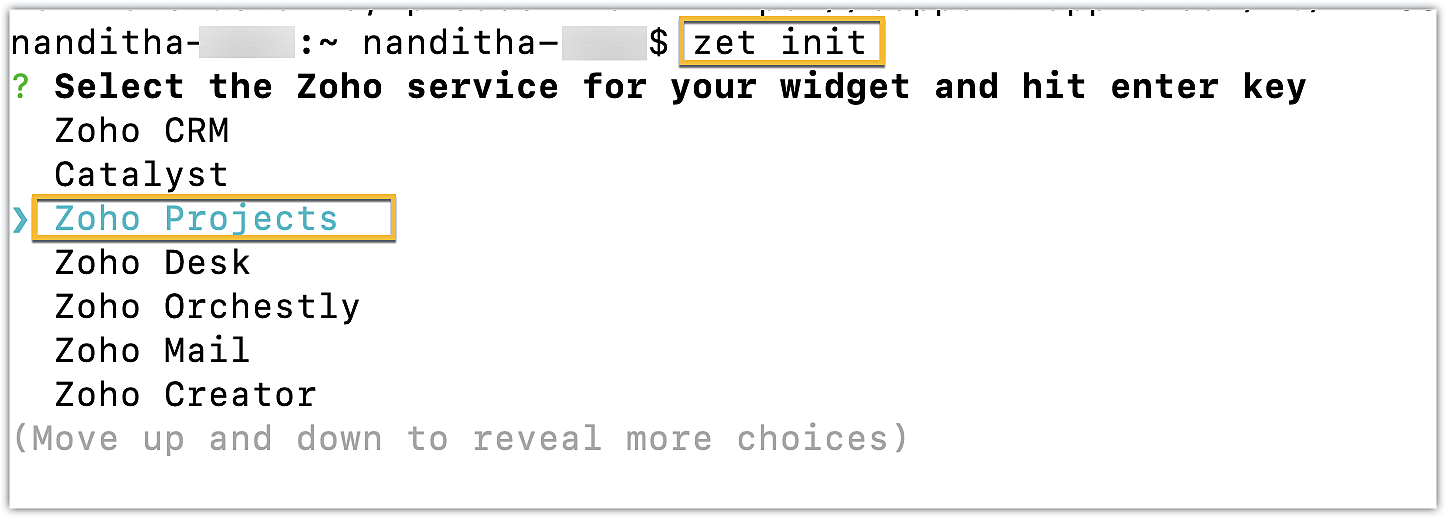
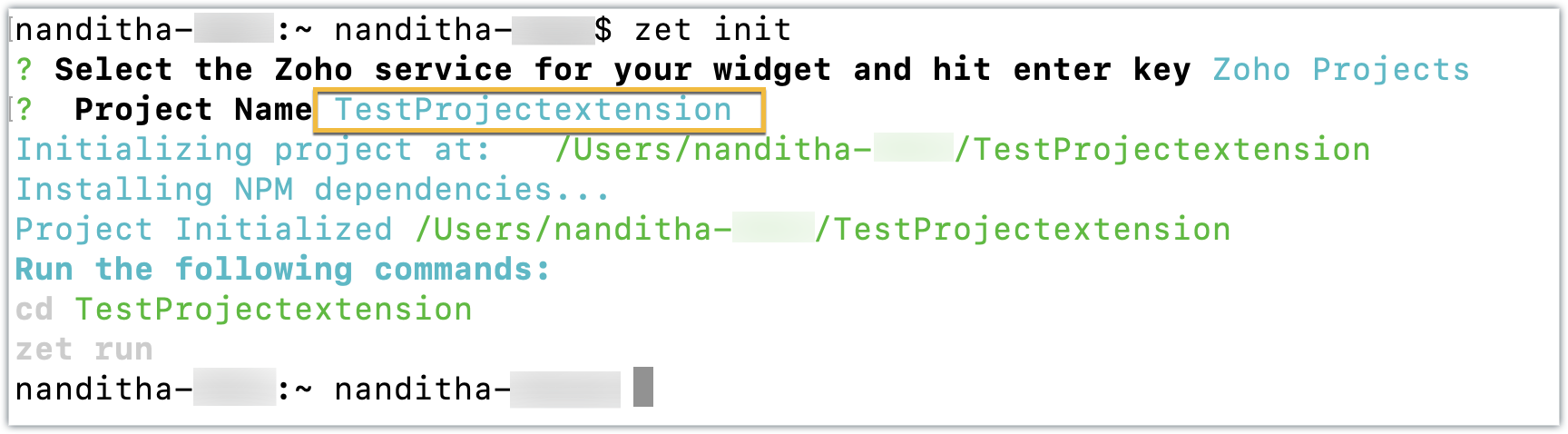
- Enter a name for the extension. An extension with the directory structure required for a sample Zoho Projects extension is created automatically.
- This directory structure contains an app folder and a plugin-manifest.json file, both of which are similar to those created by the Sigma cloud editor detailed in the last post.
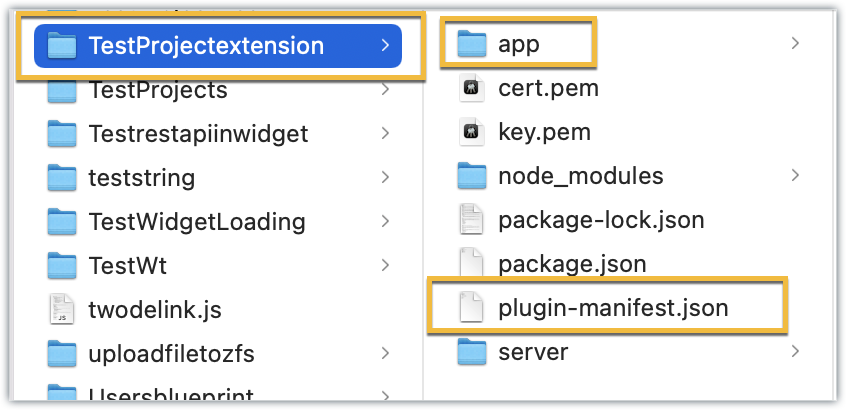
- The app folder can be used to manage all the important resources required for your extension. By default, itincludes an index.html file, which serves as the UI for a sample widget.
- The plugin-manifest.json file helps with extension configuration. It includes a widgets key configured with a default sample widget named, "Projects Extension" in the default location as the task details tab, along with the URL as the location of the index.html file.
Now that the extension project has been created, lets go ahead and test it in the Zoho Projects portal.
Testing an extension project using the CLI
- To test a sample Zoho Projects extension created with the ZET CLI, use the Change Directory command to navigate to the project folder. Then, run the zet run command.
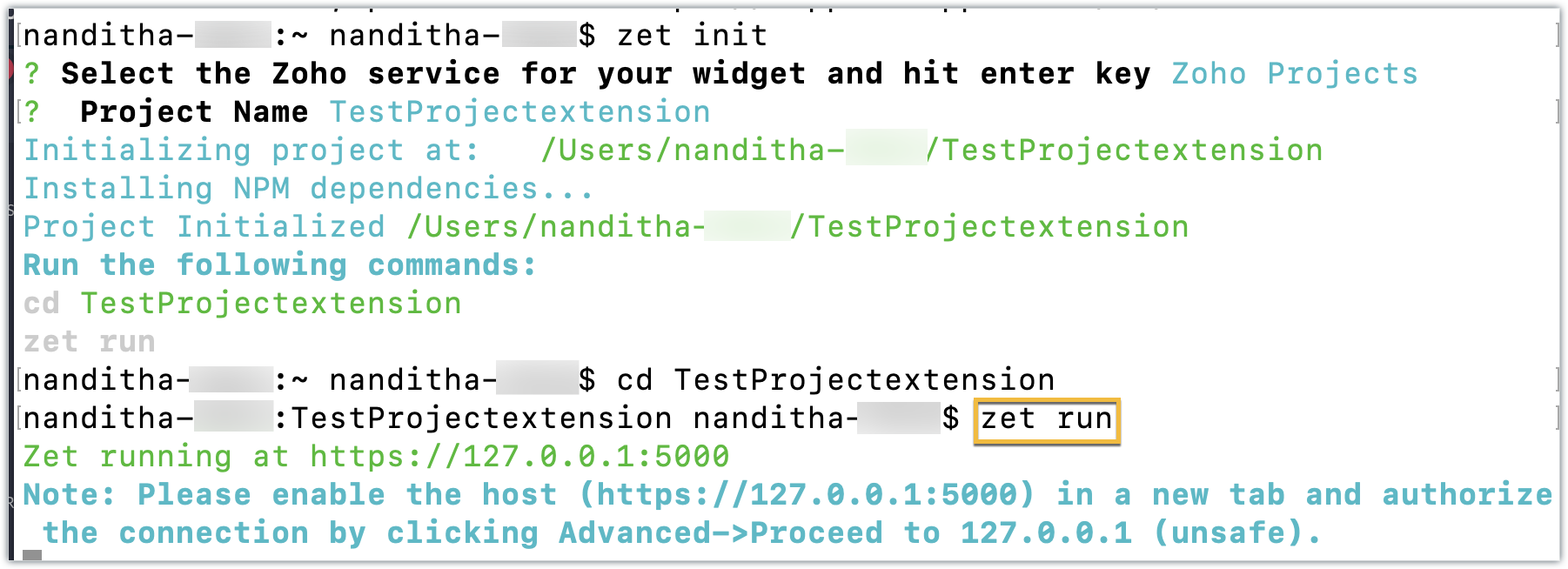
- This command starts a local server and enables you to test your extension locally.
- Now, navigate to your Zoho Projects portal. Click the Setup icon.
- Select Developer Space from the left panel. Click Enable Developer Mode.
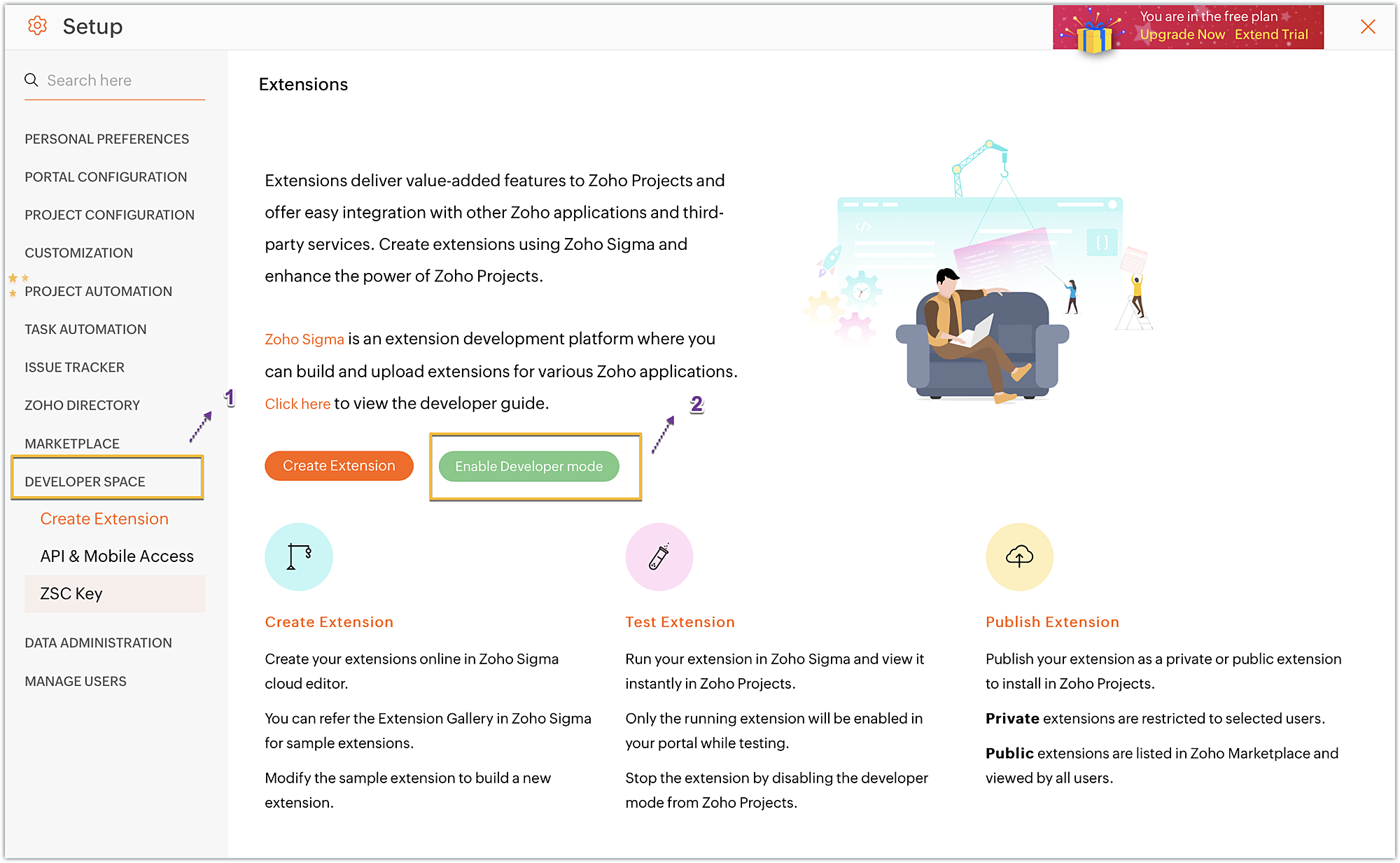
- Developer Mode will be enabled and the page will automatically refresh.
- You may now test your extension functionalities in the Zoho Projects portal.
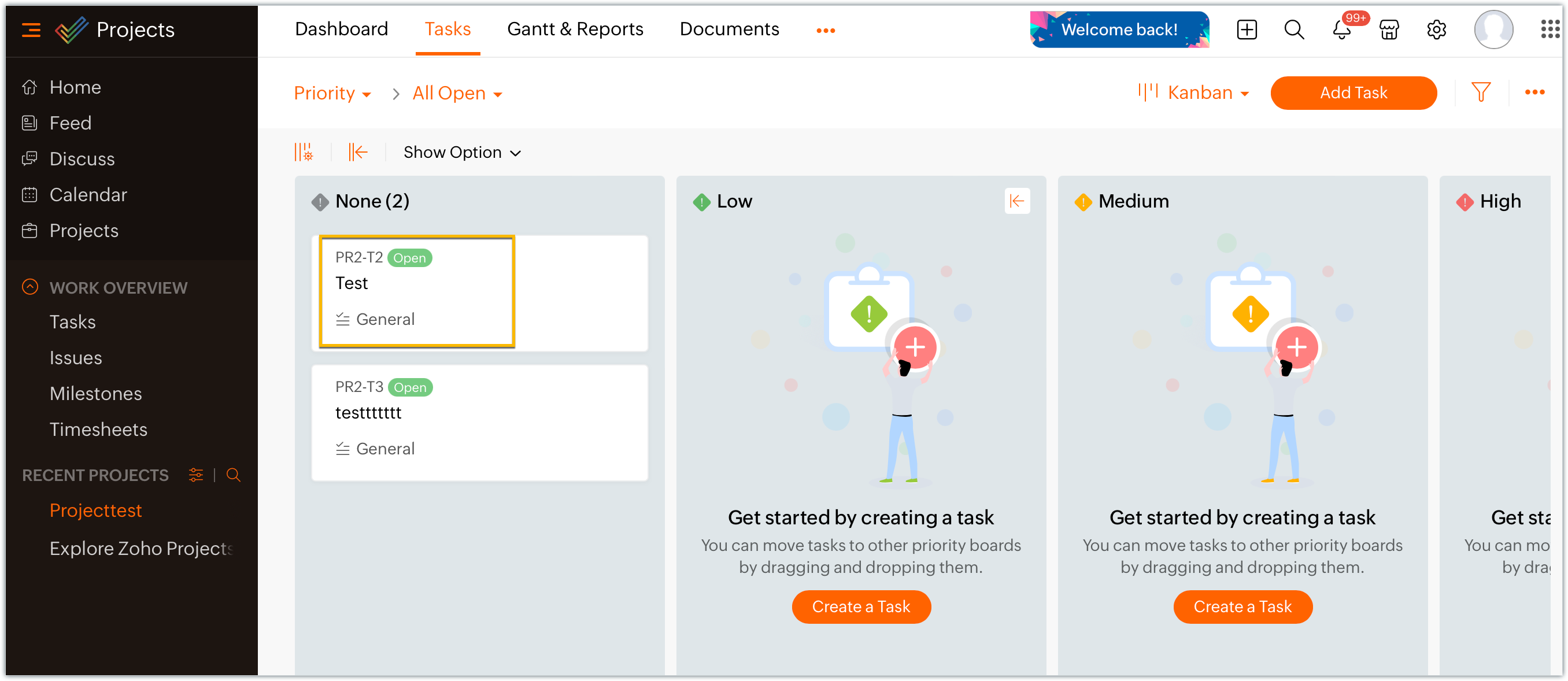
- Since the sample extension had a default widget called, "Projects Extension" configured on the Task Details page, choose and enter a project task in your portal.
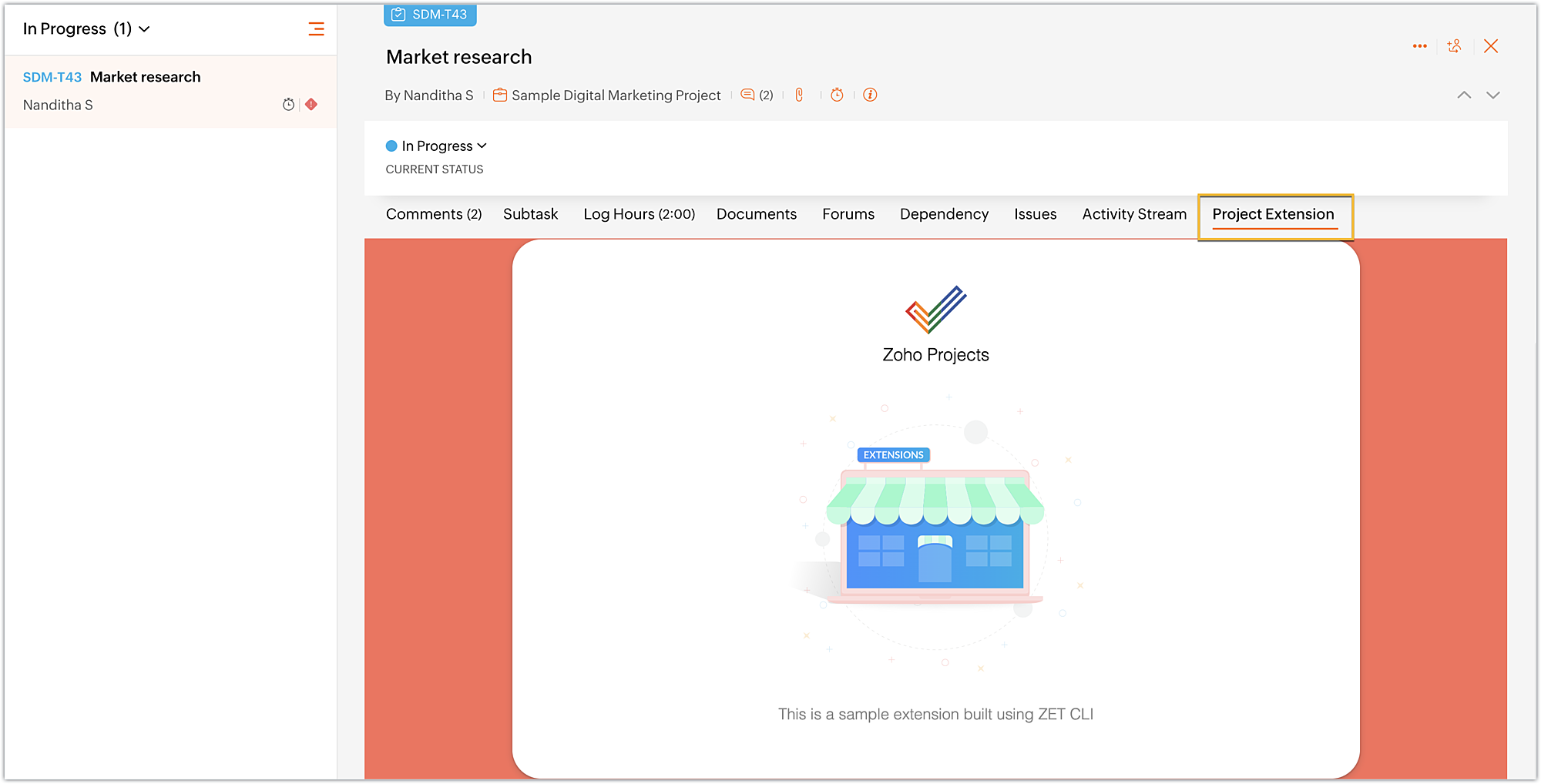
- Click on the Projects Extension tab on the Task Details page, and you will see that the widget has loaded.
- Once you have finished testing your extension's functionality, use the zet pack command. This command adds a dist folder to the directory structure, zips the extension project, and places the zipped file inside the newly created dist folder.
Uploading the zipped file to your Sigma extension
Now that we have created the extension project and tested its functionalities locally, lets go ahead and create an extension in Sigma.
- Log into or sign up for developer.zoho.com. Go to Sigma and access your workspace.
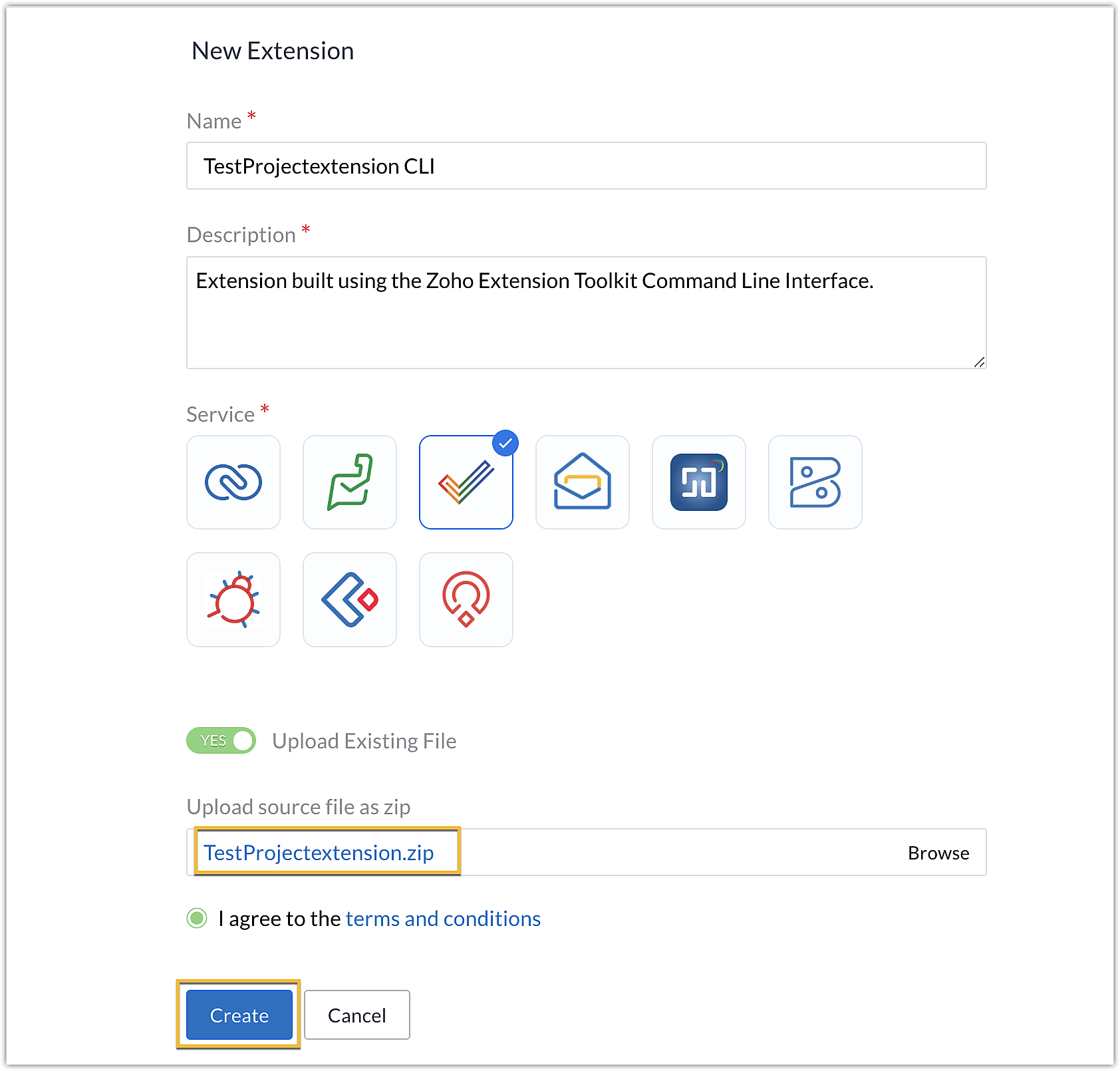
- Once you enter your Sigma workspace, click the New Extension button to build a new extension.
- Enter a name and description for the extension. Choose Zoho Projects for the service.
- Toggle Upload Existing File to Yes.
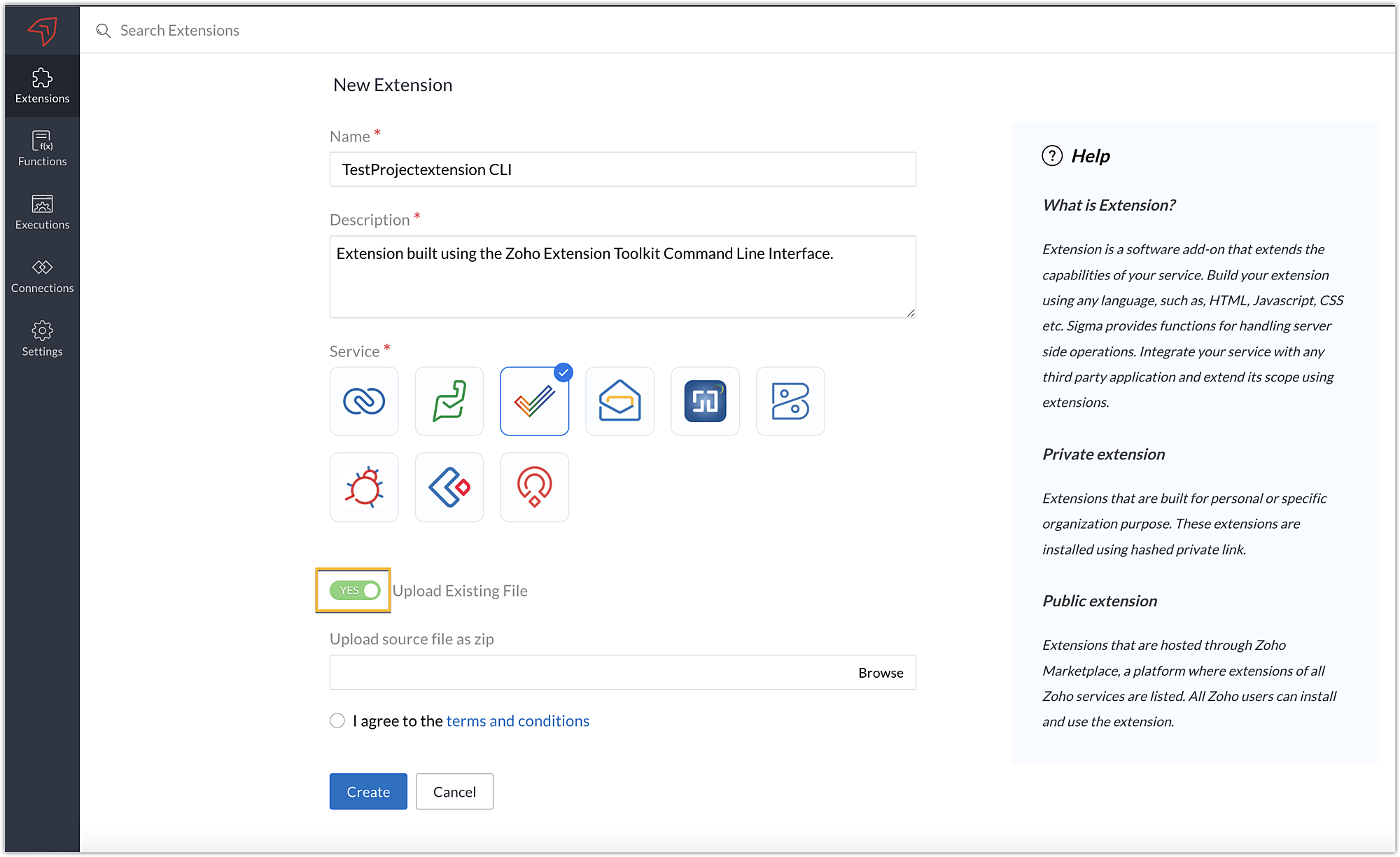
- Click Browse to locate and upload the extension project's zipped file, accept the terms and conditions, and click Create.
- You will be redirected to the cloud editor. The directory structure of your CLI extension project will be automatically populated with the project's contents.
Editing an extension created with the CLI
- You can make edits or changes to your extension code directly from the cloud editor.
- If you wish to make changes to a file or its contents in the directory structure of your CLI extension project, please be sure to pack the extension project again using the zet pack CLI command.
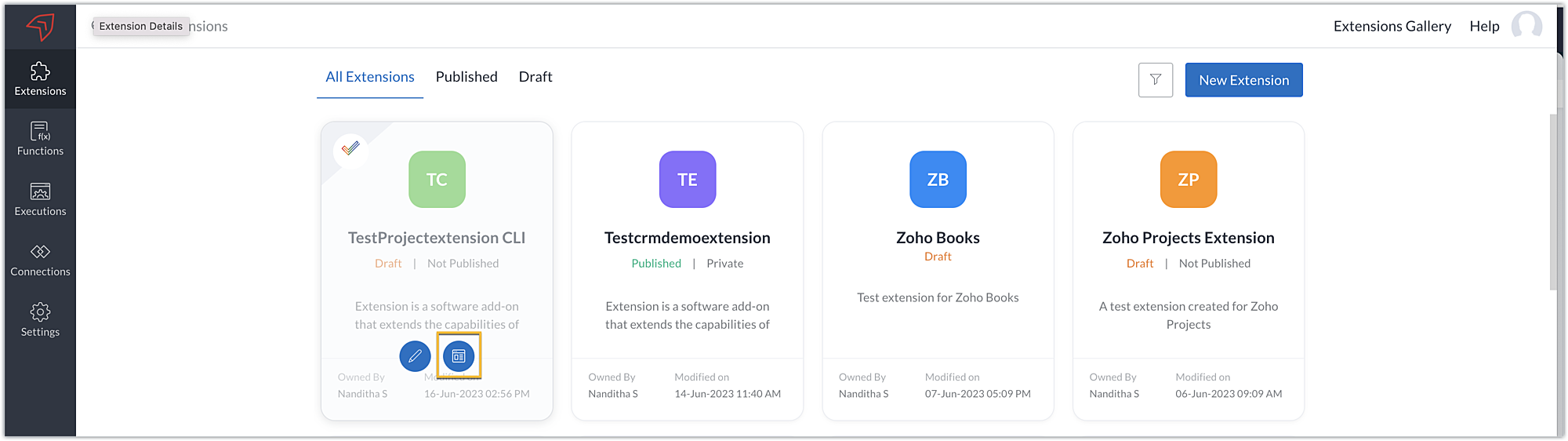
- Go to Sigma. Click the Extension Details icon of the extension you wish to edit.
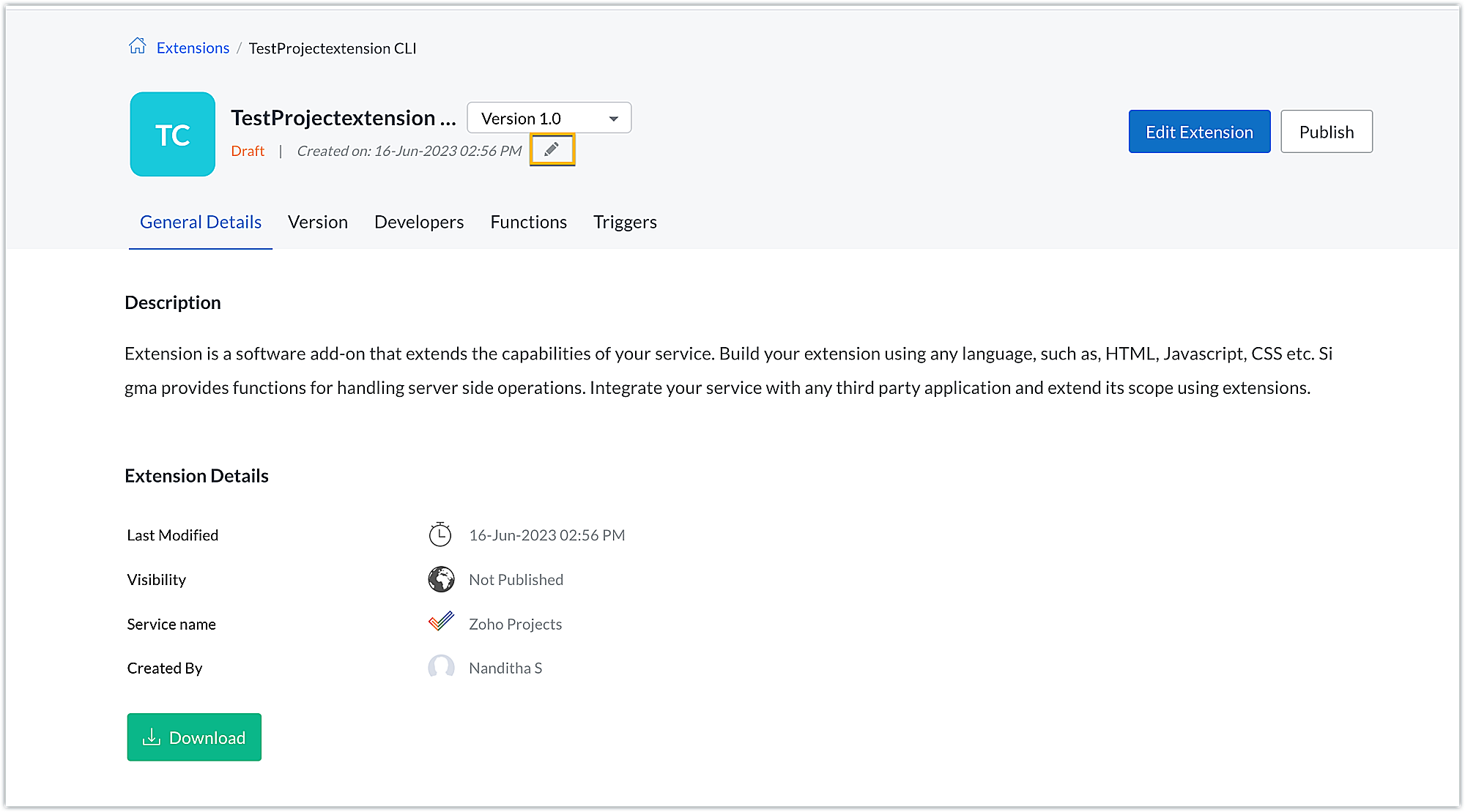
- Click the Edit icon under the extension name.
- Browse for and upload the new zipped file, accept the terms and conditions, and click Update.
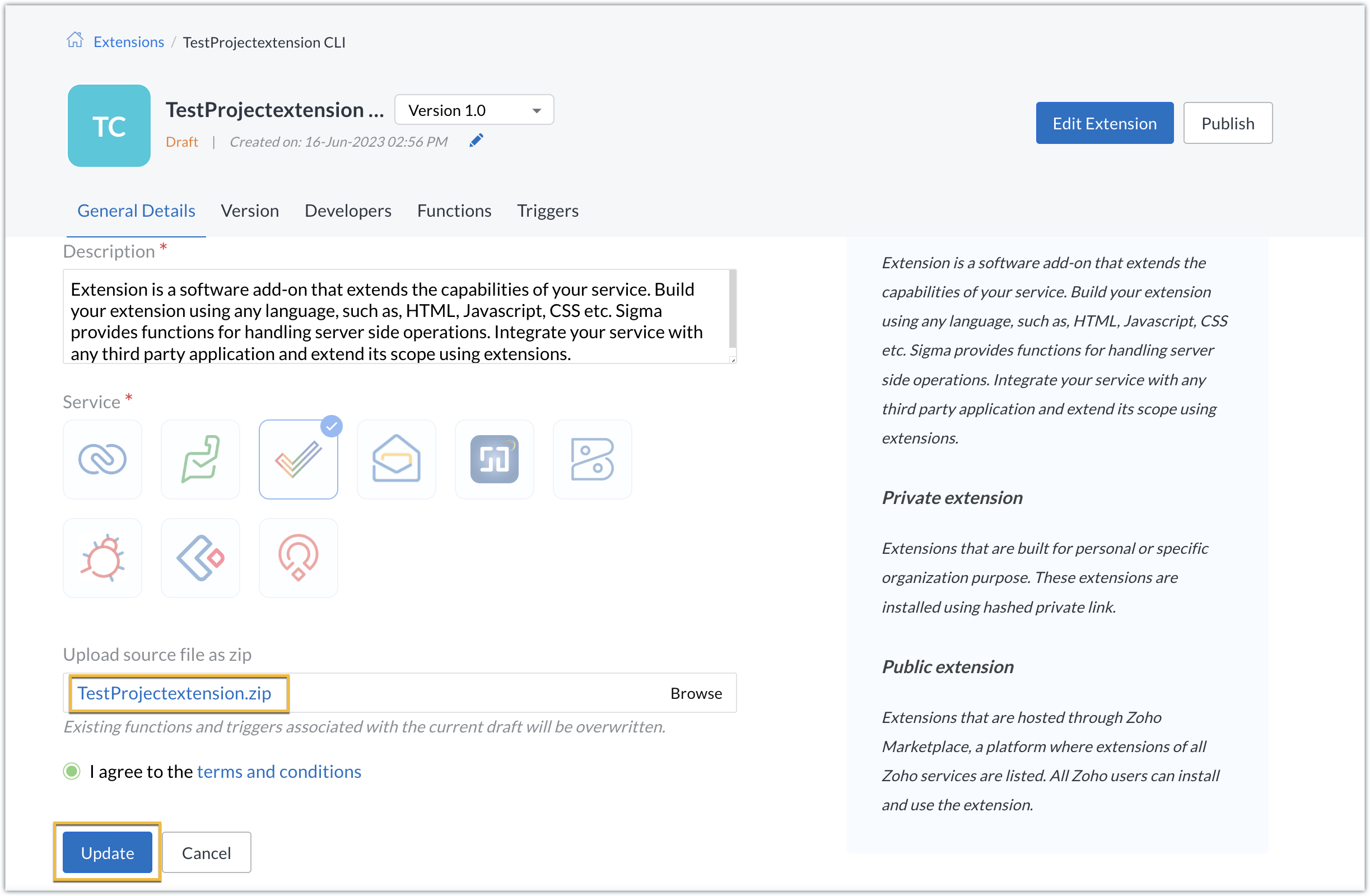
- The extension will be updated to reflect the changes you have made.
In this post, we have covered the process of creating an extension for Zoho Projects through ZET CLI. We hope you found this information useful. Keep following this space for more information!

Sign up for a Zoho Developer account and start developing extensions for Zoho products using Sigma.
SEE ALSO
Topic Participants
Nanditha Somasundaram Somasundaram
Sticky Posts
Building extensions #10: Fetch customized user inputs, store them globally at the app level, and access them across entities
This data storage concept enables you to store data related to your extension for both entity properties and extension properties. In our previous piece, we looked at how to store data for entities using entity properties. In this post, we'll look atBuilding extensions #9: Store, retrieve, and access entity-specific data in widgets using data storage
Data storage - Overview Storing data related to the extension you are working on is essential. It can be saved as key-value pairs for an entity or extension, known as entity and extension properties, respectively. Data can be saved for the following entitiesBuilding extensions #7: Create custom widgets for a simplified end-user experience
Discover the benefits of using widgets! We explored the significance of widgets, prerequisites, and the availability of JS SDK methods as part of our previous post. In this post, let's go over a detailed example of using widgets along with certain ZohoBuilding extensions #6: Custom user interfaces with Widgets
Welcome to our post on Widgets for Zoho Projects! In our last post, we explored the significance of the connections feature, showed how to use it, and provided an example use case. In this article, we'll look at the importance of widgets, another featureBuilding extensions #5: Integrating applications with Zoho Projects through Connections
In our last post, we discussed the essential features that a Zoho Projects extension can provide. Starting with this post andin every subsequent post going forward, we'll go through each of those features in depth, one by one, with an example use case.
Recent Topics
Weekly Tips : Master Keyboard Shortcuts in Zoho Mail
If you spend a lot of time managing emails, switching between your mouse and keyboard can slow you down. Whether you are replying to clients, organizing your inbox, or searching for messages, every second counts. So, how can you streamline your emailIntroducing custom lookup fields in the Tickets, Contacts, and Accounts modules
Hello all, We are excited to announce a new enhancement that will empower you to further customize the Tickets, Contacts, and Accounts modules. Now, you will be able to create custom lookup fields in your Tickets, Contacts, and Accounts layouts for moreDKIM cannot be enabled for the domain as no verified default selector present
Can't get the DKIM working. May you please check my account (nksy.us) to see what's wrong?Collections Management: #3 Tackling Payment Failures
Sam refreshed the dashboard. "Payment failed". Same customer. Same subscription. This is happening for the third time. He sends a usual email: "Your renewal payment failed again. Could you please check and retry?" A couple of days passed, and there wasHow do I increase the email attachment size in Zoho CRM ?
It looks like I'm limited to 10MB when sending an attachment using the email widget on a record in Zoho CRM. Is there a way to increase the size? Or can I use some other tool? From what I'm reading online, I'm maxed out at 10MB. Any insight would be greatlyProblem : Auto redirect from zoho flow to zoho creator
Hi there, I've been waiting for zoho team to get back on this for last couple of days. Anyone else have the problem to access zoho flow? everytime I click on zoho flow it redirects me to zoho creator. I tried incognito mode but it still direct me to zohoWhatsApp Channels in Zoho Campaigns
Now that Meta has opened WhatsApp Channels globally, will you add it to Zoho Campaigns? It's another top channel for marketing communications as email and SMS. Thanks.Zoho sign and creator error message {"code":9043,"error_param":"Checked by","message":"Extra key found","status":"failure"}
Good day, I receive the error message: {"code":9043,"error_param":"Checked by","message":"Extra key found","status":"failure"} when running below code from creator to sign, void TestForSign(int ID) { //Fetch Template Details (Optional, for dynamic mapping)Download a writer template as .docx instead of .pdf.
I have been trying to implement a feature to download a writer template as a .docx and got it working partly but it isn't good. Earlier I checked our code and I saw openurl("https://crm.zoho.com/crm/org121314/specific/Template.do?action=print&step=pdfPreview&id="Allow the usage of Multi-Select fields as the primary field on "Layout Rules"
We want to force our users to enter some explanation strings when a multi-select field has been utilized. I can't understand the reason for the usage restriction of Multi-Select fields as a primary field. This is a simple "Display hidden mandatory fieldExtract Archived Projects using Zoho Projects API
In my organization we archive the projects when they are already completed, charged, invoiced, so that only those that are still pending process remain active. I need to access all projects (active and archived) from an external system, but the API v3Ask the Experts: Five-hour live Q&A session with Zoho WorkDrive product experts
Have questions about WorkDrive 5.0? Let’s talk! We recently launched Zoho WorkDrive 5.0, packed with powerful updates to help your team work smarter, stay secure, and get more value from your business content. From content-centric workflows and AI-poweredFile upload support for subforms
Dear All, Subforms help you add and track data related to your CRM records. We've always supported most of the commonly used field types in subforms, so as to cater to your business requirements. Now we're happy to extend support to file upload fields.Circular record relationship in CRM
Given there is a lookup in custom module Transactions creating a related list on the chosen Contact record. I. e. a lookup field on Transactions module points to Contacts. The related list on a Contact record can thus have have many transaction records.Is it possible to pull the Zoho desk data into Zoho analytics in real time
Hi - I am looking to add more dashboards and reports of Zoho Desk in analytics. I see there is a schedule to pull the data into analytics, but I'm wondering if there is an option to pull the data in real time instead of a specific interval?How to set value of dropdown field to variable
For the life of me, I can't figure out why the following code won't set input.status to the previousSelection. Steps to reproduce: 1. Click input.complete 2. input.status dropdown updates from '1-Backlog' to '4-Done' 3. Click input.complete again to deselect[Product Update] TimeSheets module is now renamed as Time Logs in Zoho Projects.
Dear Zoho Analytics customers, As part of the ongoing enhancements in Zoho Projects, the Timesheets module has been renamed to Time Logs. However, the module name will continue to be displayed as Timesheets in Zoho Analytics until the relevant APIs are[WEBINAR][MEA] Learn how to control your inventory and multi-channel sales with the Zoho Inventory & Zoho Books integration
Hello there, We are hosting an exclusive live webinar tailored for businesses across the Middle East and African countries, where you'll learn how to take full control of your inventory and multi-channel sales while keeping your accounting perfectly inLess clicks, more connection – the usability edge of Zoho Desk
Imagine joining a new workplace, eager to prove your skills, partner with peers, learn new tools, and build a strong foundation for your career. The standards you've set could drive pressure into your head. You now discover the organization is using ZohoTip #3 Automating total item weight calculation for your sales orders in Zoho Inventory
Hello, Hope the day is treating you well. Last week, we saw how we could automate the calculation of total shipping charges from numerous shipments for your sales orders and invoices. This week, we will see how you can automate the calculation of total item weight for your sales orders. How does this work? First, you are required to capture the weight of all your items using a custom field. And when you create a sales order, you can either have the system display the individual weights for you orWhy Format section gets disabled when we create Merge Template over PDF
I need some assistance I have a Client who is going to give certificates to users who passes his exam. So, I am using mail merge but in ZOHO writer after I upload the PDF and create merge Template over PDF the format Section gets disabled. My problemWhatsapp Integration on Zoho Campaign
Team: Can the messages from Zoho Campaign delivered through Whatsapp... now customers no longer are active on email, but the entire campaign module is email based.... when will it be available on whatsapp.... are there any thirdparty providers who canHow to calculate separate totals for Product Line Items filtered by category in Quotes?
Hello! I'm working with Quotes in Zoho CRM and need help calculating conditional totals for line items. Current setup: I have two tables in my Quote template (Zoho Writer), both displaying Quoted Line Items Table 1 (top): Shows all products where ProductZoho Desk API Documentation missing a required field
We are trying to create a section using this information. Even after preparing everything based on that page, we still get an error. The error we get is this: {"errorCode":"INVALID_DATA","message":"The data is invalid due to validation restrictions","errors":[{"fieldName":"/translations","errorType":"missing","errorMessage":""}]}Fetch Subform values through a lookup of a lookup
Hi, I'm having an issue fetching the values of a subform through a lookup field through another lookup field. The code works perfectly to show me the subform row ID, but the second I try to get any readable data, it says "Error occurred. Please contactTurn Decision Box to a button
Dear all, I need your help on CSS to turn a Decision Box to a Button. I have a Decision Box like: Turn on/off to refresh the information. (on User Input, either True or False, will refresh the information) Now I want to simulate to treat it like a RefreshEmails not being received from a particular domain
Cannot receive any emails sent from atco.com Domain is in the spam whitelist so should be no reason for it not to be coming through. Have filed a ticket and besides a generic response of we are looking at it - it seems there is no actual support workersStock Count
The stock count is a nice new feature, but we cannot figure out how to: 1. Use it without assigning to a person, we have a team or one of multiple do stock counts as do most any company. 2. Add any extra fields to what the "counter" sees. The most importantCan you import projects into Zoho Projects yet?
I see some very old posts asking about importing project records into Zoho Projects. But I can't find anything up to date about the topic. Has this functionality been added? Importing tasks is helpful. But we do have a project where importing projectsSend Whatsapp message from Whatsapp template with custom variables
Hi, I'm trying to do some basic integration for sending WhatsApp messages from Zoho CRM using Zoho Desk whatsapp templates. When creating new whatsapp template in Zoho Desk we can choose ticket related fields as variables but it's not clear how to useOutgoing blocked: Unusual activity detected.
I just made payment for my Zohomail Today and have been debited so i will like to be Unblocked because this is what it says (Outgoing blocked: Unusual activity detected) Thank you i await your swift responsesIntegrating with My Own Application and ZOHO CRM Simultaneously
I have my own WhatsApp bot that uses my WhatsApp business account. I want to use the same phone number to integrate with ZOHO as well. What is the recommended way to do that? Should I integrate my application with ZOHO, forwarding messages whenever theHow do i move multiple tickets to a different department?
Hello, i have several tickets that have been assigned to the wrong department. I am talking about hundreds of automatically generated ones that come from a separate system. How can i select them all at once to move them to another department in one go? I can select them in "unsassigned open tickets view" but i can't find a "move to another department" option. I also can't seem to assign multiple tickets to the same agent in that same view. Could somebody advice?Account for Cryptocurrency Holdings in Zoho Books/Custom Currencies?
Hello, I've recently started using Zoho to run my small business and I've really been enjoying all of its features. However, I've been struggling to find a way to account for cryptocurrencies in Zoho Books. My company mines a Cryptocurrency token calledTransferring CRM Attachments to Workdrive
relatedrecords = zoho.crm.getRelatedRecords("Attachments","Conditions",conId); attachid = List(); for each ele in relatedrecords { attachementId = ele.get("id"); attachid.add(attachementId); } for each ele in attachid { counter = 1; downloadFile = invokeurl [ url: "https://www.zohoapis.com/crm/v2/Conditions/" + conId + "/Attachments/" + ele type: GET connection : "work_drive" ]; resp2 = zoho.crm.attachFile("Deals",dealId,downloadFile); resp3 = zoho.workdrive.uploadFile(downloadFile, dealWD, "PlaceHolder"+counter+"",New Customization options in the module builder: Quick Create and Detail view
Hello everyone, We have introduced two new components to the module builder: Quick create and Detail view. The Quick Create Component It is a mini form used to create a record and associate it to the parent record from a lookup field. For example, if you have a Deals lookup in the Contacts module, then you can associate existing deals or create a deal and associate it with the contact. You can customize this Quick Create form by adding standard as well as custom fields. There is no limit to the numberunblock my zoho mail account. outlines@zoho.com
please unblock my zoho mail account, outlines@zoho.comSMTP email sending problem
Hello, I've sent emails before, but you haven't responded. Please respond. My work is being disrupted. I can't send emails via SMTP. Initially, there were no problems, but now I'm constantly receiving 550 bounce errors. I can't use the service I paidMailk got blocked / Inquiry About Email Sending Limits and Upgrade Options
Dear Zoho Support Team, My name is Kamr Elsayed I created this account to use for applying for vocational training in Germany. As part of this process, I send multiple emails to different companies. However, after sending only 8 emails today, I receivedForwarder
Hi, I tried to add a forwarder from which emails are sent to my main zoho account email . However, it asks me for a code that should be received at the forwarder email, which is still not activated to send to my zoho emial account. So how can I get theNext Page