Creating a Gmail integration using custom connectors
Hello everyone!
Greetings from Deluge. Following up on our series aimed at exploring the capabilities of Deluge, today we'll take an in-depth look into the Deluge custom connections that can be created across Zoho services.
Deluge boasts an extensive range of over 260 built-in integrations spanning more than 35 Zoho services. These integrations streamline data access and modification with these services, from a single point in Zoho, without having to toggle between services. However, we understand that the needs of our users vary widely, and sometimes existing integrations may not cover every scenario.
That's where custom connections come in. Think of them as the Swiss Army Knife of integrations, enabling connections with hundreds of services—such as Gmail and Outlook—and seamlessly integrating them with your favorite Zoho services. With custom connections, you have the power to build your own integrations with virtually any third-party service and tailor them to meet your requirements. Moreover, since the custom connections use the OAuth 2.0 authentication mechanism, you're getting best-in-class security while integrating with third-party services.
What are connections?
Before we dive into the details of custom connectors, let's take a glimpse at what connections are in Deluge. Connections are a means to connect your Zoho account and any third-party accounts you wish to integrate with. Once a connection is created and connected, you can use it in Deluge integration tasks or invokeURL scripts to perform REST operations on the target service from the required Zoho service. For more information, visit our Connections help doc.
Use case
Assume the sales team of an organization uses Zoho CRM for managing leads, customer retention, and customer acquisition, and uses Gmail for communication purposes, like following up with potential clients via email. While the system works as is, it's time-consuming and prone to error, so an integration between Gmail and Zoho CRM is necessary to improve efficiency.
A custom connection to your Google account will enable you to sync your Zoho CRM and Google accounts, allowing you to perform actions related to your Google account from Zoho CRM. For example, you can invoke the connection using the invokeURL task in Zoho CRM and send an email to your leads from your Gmail address.
Steps to configure the Google custom connection
Configuration video
Configuration steps
Creating Google OAuth credentials
- Visit https://console.cloud.google.com/.
- Click the dropdown and choose the required project.

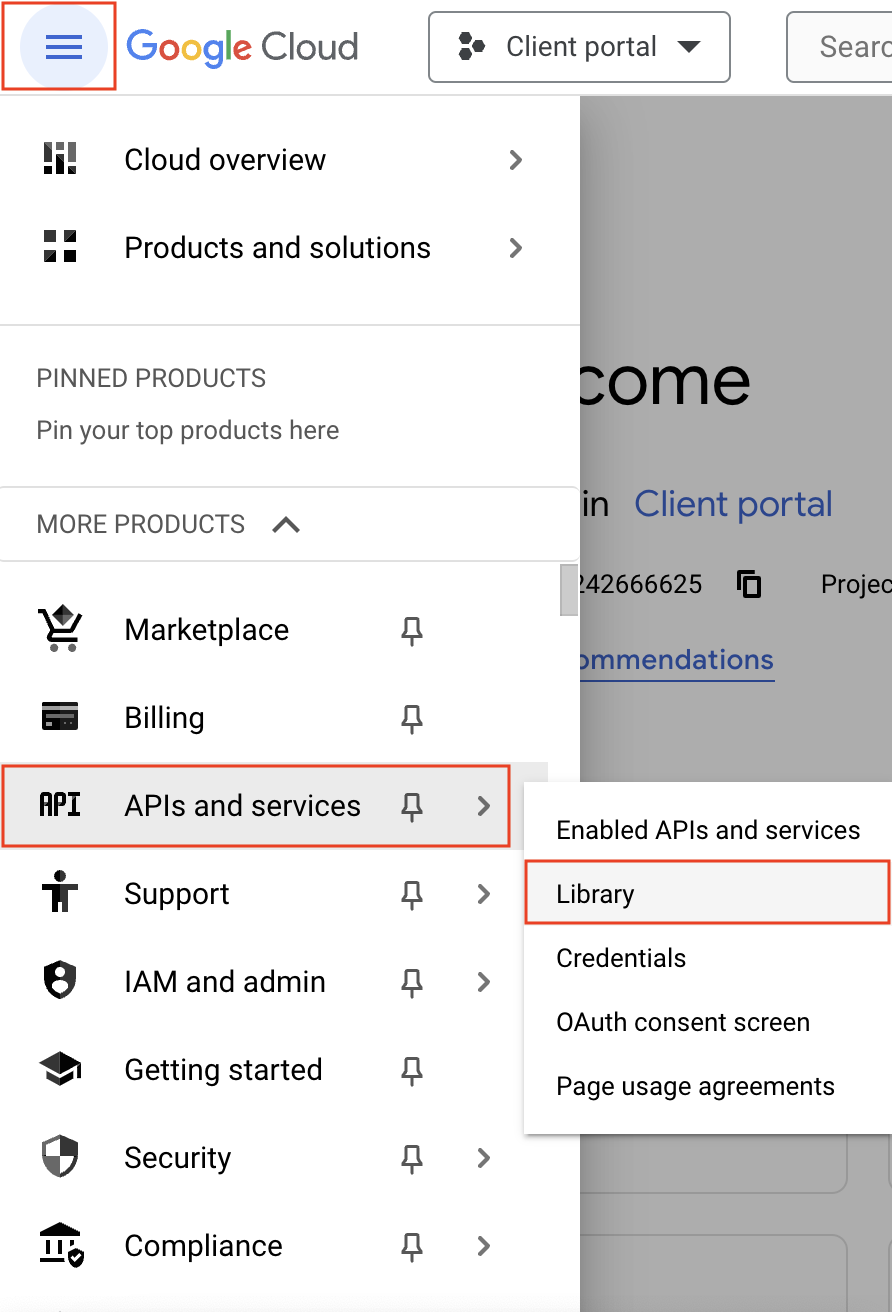
- Navigate to the hamburger menu on the left and click APIs and services -> Library.
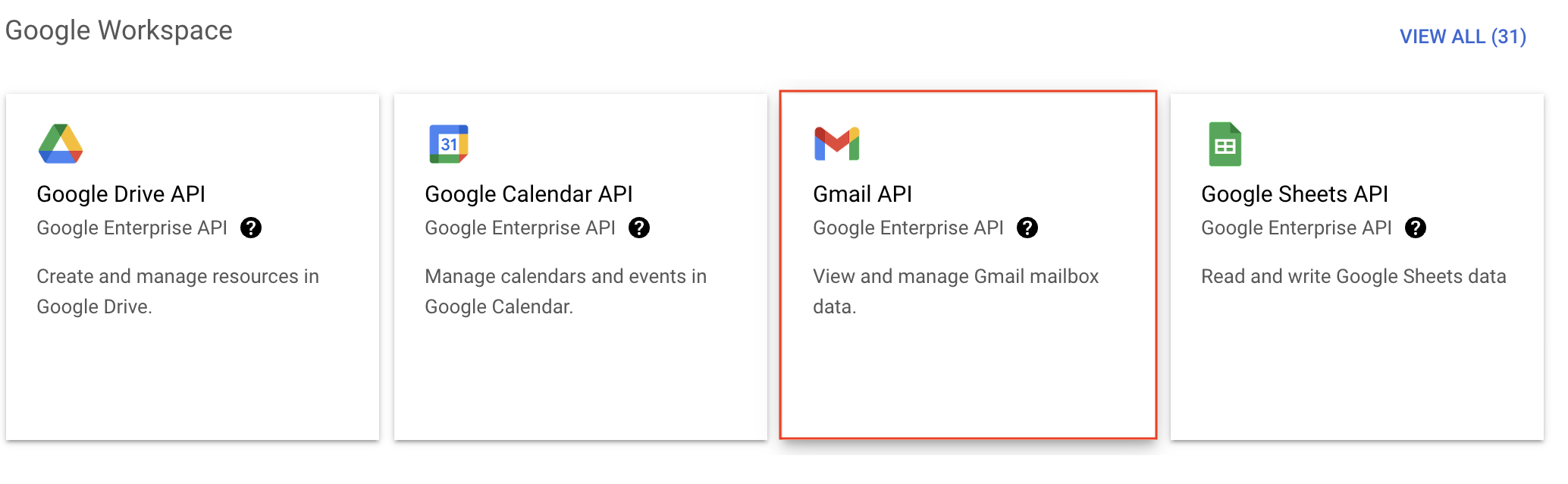
- You'll be taken to the API library page. Navigate to the Google Workspace section and click Gmail API.
- Next, click Enable on the Gmail API product details page.
- In order to use this API, you'll need to create credentials. Click CREATE CREDENTIALS.

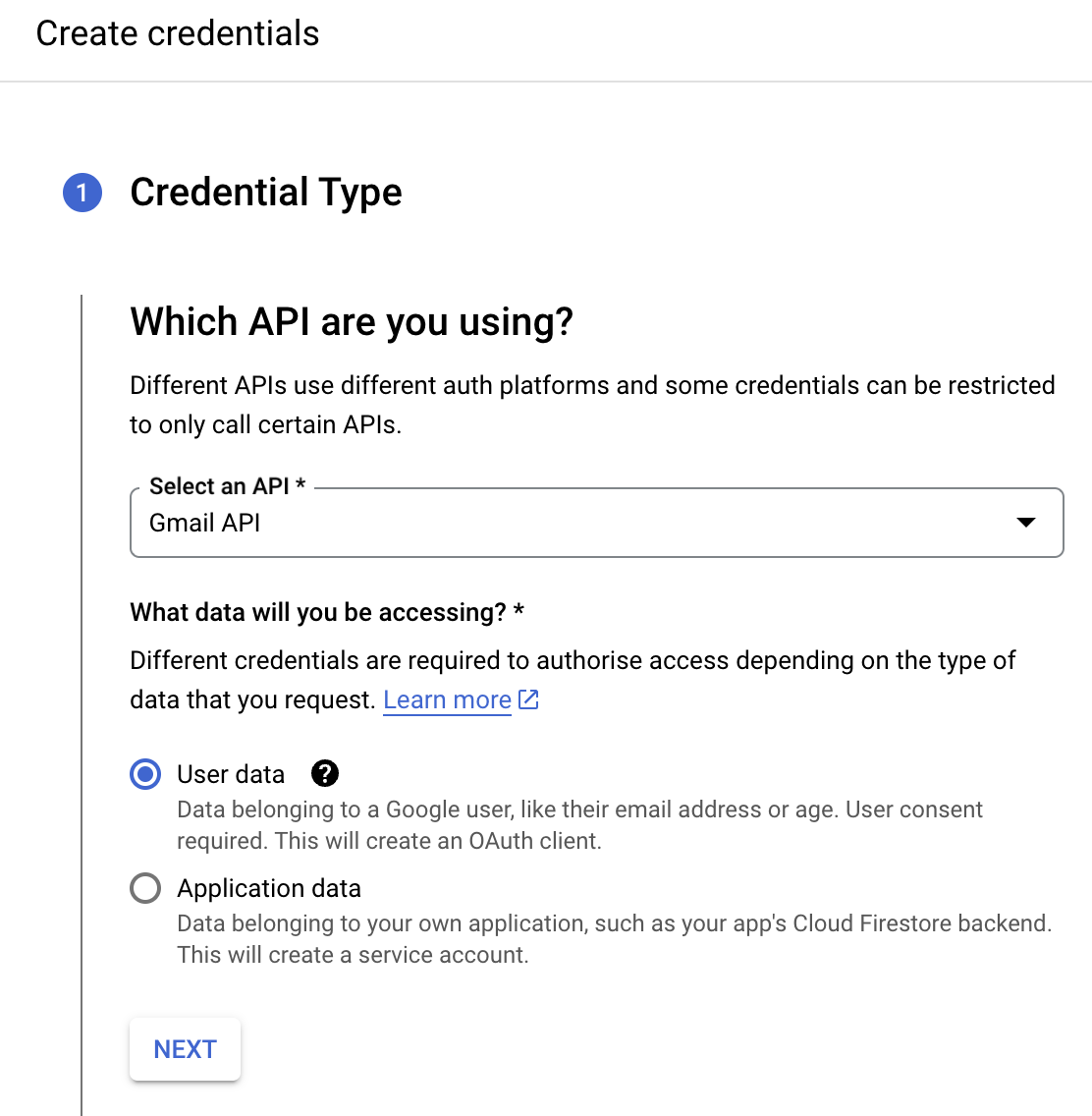
- On the Create credentials page, choose Gmail API in the Select an API dropdown and User Data under the What data will you be accessing? section. Click Next.
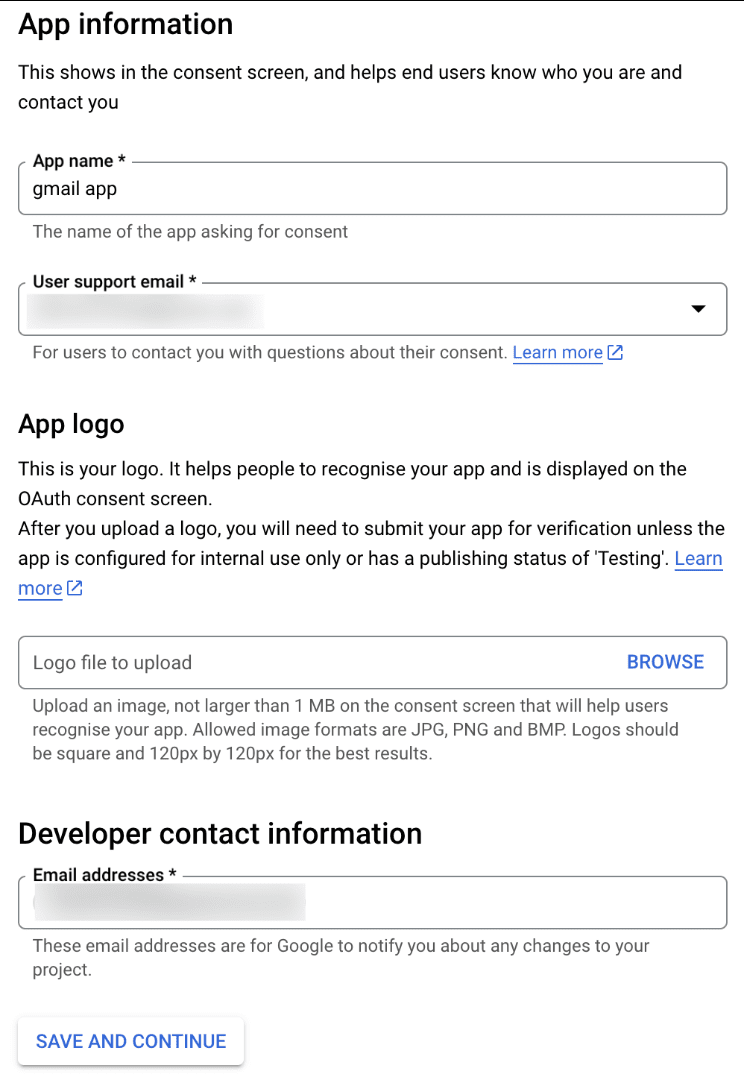
- Next, on the OAuth consent screen, enter the App name, User support email, and Developer contact email address. Then click Save and Continue.
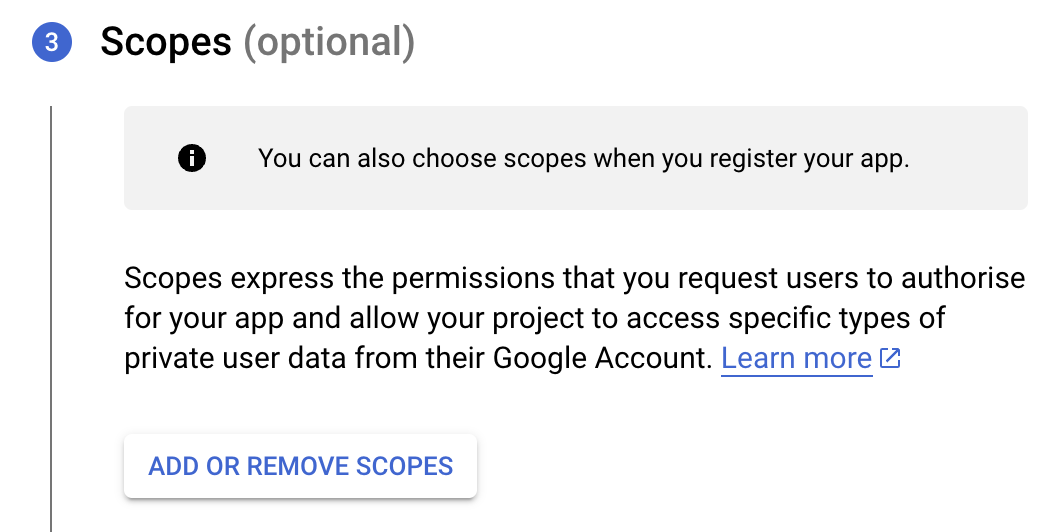
- Next, under the Scopes section, click the ADD OR REMOVE SCOPES button.
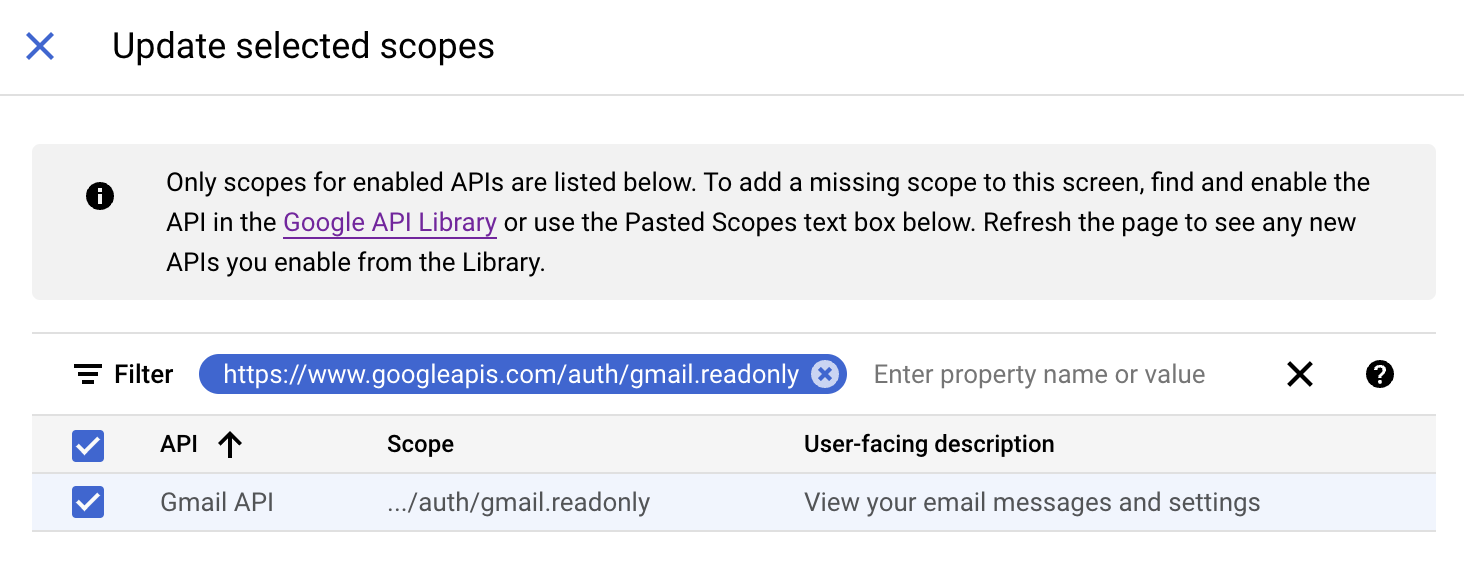
- In the Update selected scopes pane, search and select the gmail.readonly scope. Click Update, and then click Save and continue.
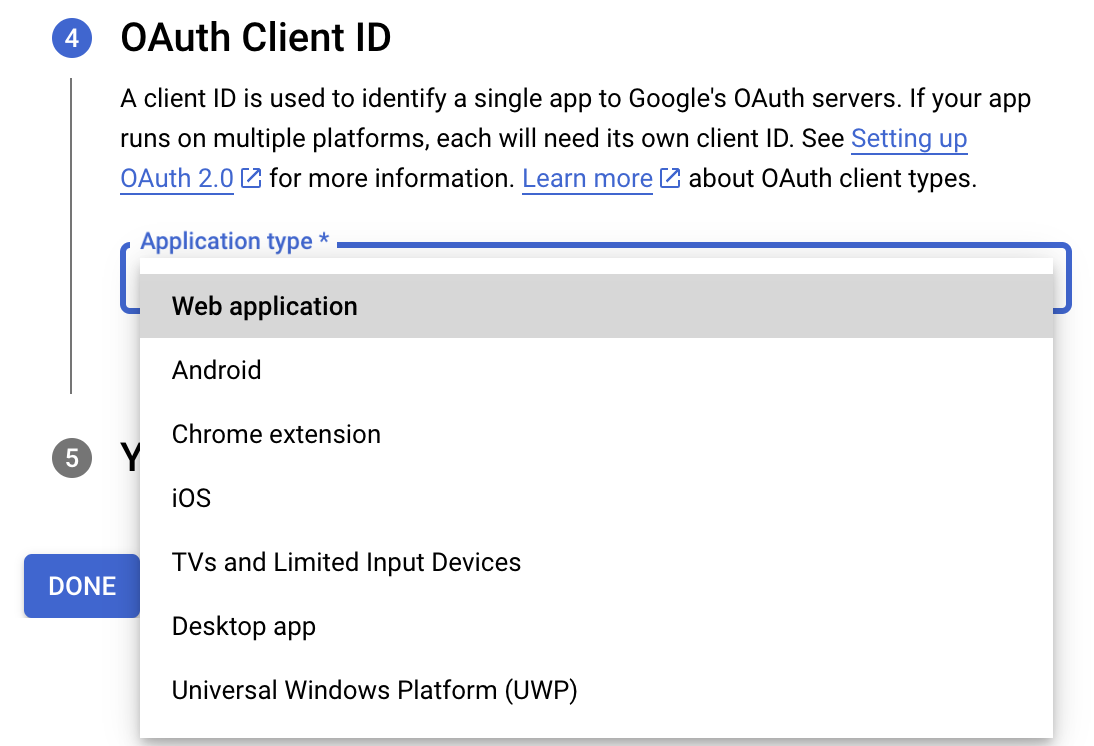
- Now, under the OAuth Client ID section, choose Web application in the Application type dropdown. Then name your app.
- Enter https://deluge.zoho.com/delugeauth/callback as the Authorized redirect URI.
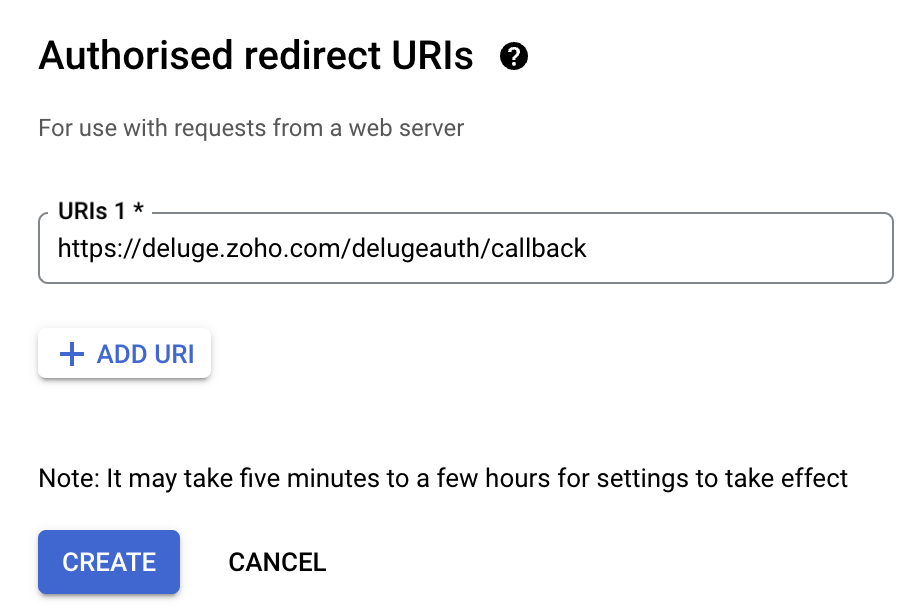
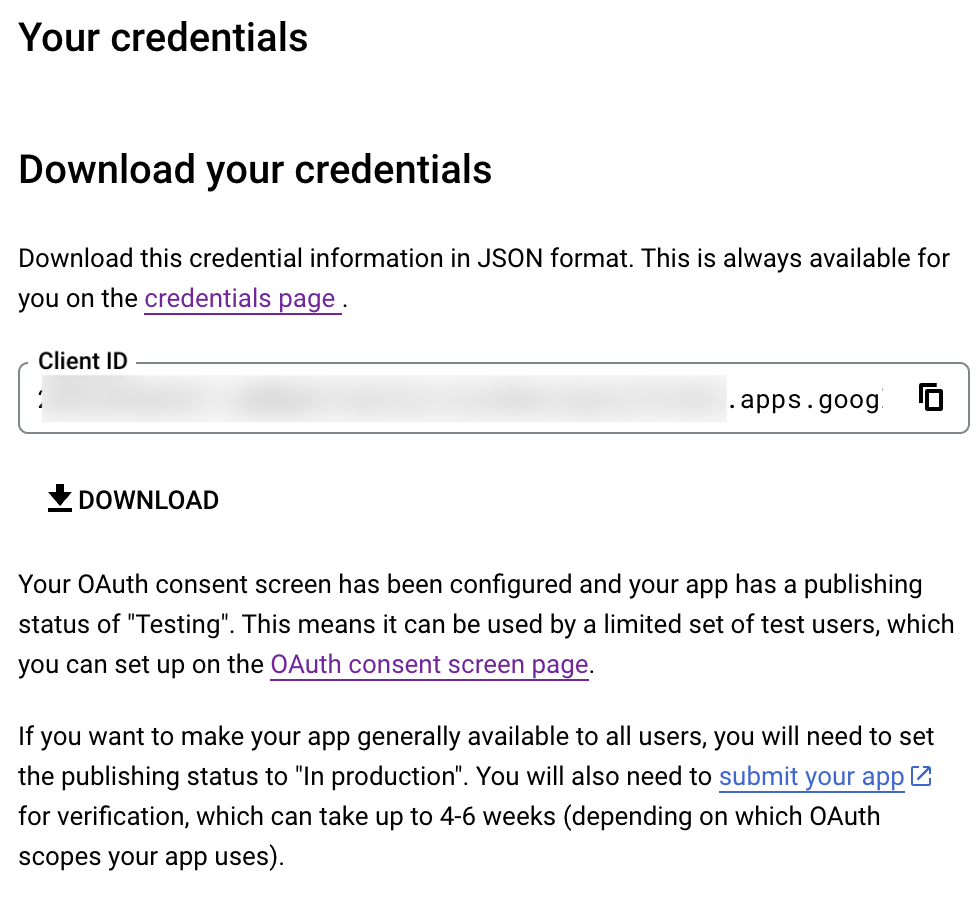
- Click Create and download your credentials. This Client ID and others will be required later, while creating a connection in Zoho CRM.
- Navigate to the OAuth consent screen and click Add users under Test users. Enter the user's email address and click Save.
Creating a custom connector for Gmail
- Now the action shifts to Zoho CRM. Navigate to crm.zoho.com -> Settings -> Connections.
- Choose Custom Services and click Create Service.
- On the Create Service screen, choose OAuth 2.0 as the Authentication type and Header as the Parameter.
- Enter the Client ID, Client Secret, and Authorize URL generated from Google as shown in step 12 above.
Tip: Having the Offline access type will allow your application to refresh tokens even when the user is not actively using the application. - Then enter https://oauth2.googleapis.com/token as the Access token URL and Refresh token URL.
- Specify the necessary scopes like read and create, etc. and then click Create Service.
- On the next page, click Create Connection. Give the connection name and choose the scopes. Then click Create and Connect.
- Finally, authenticate the connection on the Google accounts page. Your custom connection will be created, and the two services can be integrated!
Now that the connection between Zoho CRM and Gmail has been established, you can use the invokeURL task to access and modify data in Gmail using the different APIs.
Sample
You can use the below code in invokeURL task to get the latest emails from Gmail.

userId = "emailaddress@gmail.com";
get_gmail = invokeurl
[
url: "https://gmail.googleapis.com/gmail/v1/users/"+userId+"/messages"
type: GET
connection : "connectionname"
];
messageID = get_gmail.get("messages").get(0).get("id");
get_gmail_withID = invokeurl
[
url: "https://gmail.googleapis.com/gmail/v1/users/"+userId+"/messages/"+messageID
type: GET
connection : "connectionname"
];
Content_of_the_mail = get_gmail_withID.get("snippet");
info "Mail Content : " + Content_of_the_mail;
gmail_values = get_gmail_withID.get("payload").get("headers");
for each headers in gmail_values
{
if ( headers.get("name") == "Subject" )
{
info "Subject of the Mail : " + headers.get("value");
}
if ( headers.get("name") == "From" )
{
info "From Address : " + headers.get("value");
}
}
get_gmail = invokeurl
[
url: "https://gmail.googleapis.com/gmail/v1/users/"+userId+"/messages"
type: GET
connection : "connectionname"
];
messageID = get_gmail.get("messages").get(0).get("id");
get_gmail_withID = invokeurl
[
url: "https://gmail.googleapis.com/gmail/v1/users/"+userId+"/messages/"+messageID
type: GET
connection : "connectionname"
];
Content_of_the_mail = get_gmail_withID.get("snippet");
info "Mail Content : " + Content_of_the_mail;
gmail_values = get_gmail_withID.get("payload").get("headers");
for each headers in gmail_values
{
if ( headers.get("name") == "Subject" )
{
info "Subject of the Mail : " + headers.get("value");
}
if ( headers.get("name") == "From" )
{
info "From Address : " + headers.get("value");
}
}
References
----
And that's a wrap for today! We hope you found this post informative and start using custom connections to experience the full capabilities of Deluge and Zoho.
Kindly let us know if you have any questions, feedback, or suggestions in the comments, or write to us at support@zohodeluge.com!
Regards,
The Deluge Team
Topic Participants
Ashwin Vishal R
Kaushal
Anand M B
Recent Topics
Suggestion : link KB with Accounts
Hi Zoho teams. I think it could be good to link KB articles with : accounts in order to easily find articles dedicated to some account specificities. I tried to use tags , but tags are free text with not easy way to retrieve it directly from ticket or list article for one tag. Tickets : It would be a good way to measure usage of KB directly from ticket when we don't need to copy/paste KB in solution. And : Great Tool , keep going !Drag and Drop in Creator Application
Hi, I am in the planning phase of a new application and I would like to use 'Drag and Drop' in the user interface of my new Creator application that I am sketching out, but I don't seem to be able to find any reference that this is available to developers. In my instance I have table of entries and I would like to be able to allow users to move an entry to another table (much like you do in your own interface when creating a Pivot Table report. In addition, I would like the user to be able to re-orderIs there any way to integrate Zoho with Zapier?
Is there any way to integrate Zoho with Zapier? I'd like to use it to create a workflow, sharing posts from our Wordpress website to all our channels.Popular Articles Report
From data to decisions: A deep dive into ticketing system reports Content management teams can use various metrics to assess the effectiveness of knowledge base articles, improve content quality, and ensure articles are regularly updated. Predefined articleInvoice Ref. Field
Hello Team, Currently, the Invoice Ref. field is set to a Number type with a maximum limit of 9 digits. However, we often receive customer invoices that contain up to 12 digits. In some cases, the invoice reference includes not only numbers but also letters60 Days Into Zoho - Tiktok Branding Startup -7 Questions?!
Wsp Everybody I co-own a TikTok Branding / Consulting Startup & have been using Zoho for the past 60 days - Am now looking to make our overall operations & processes more Efficient & Effective! Curious to know how others are using the platform & what'sTurning off the new UI
Tried the new 'enhanced' UI and actively dislike it. Anyone know how to revert back?XML format to import knowledgebase into Zoho Desk
Hi, We just started to use Zoho Desk and want to import our knowledgebase from our old support system (Freshdesk) to Zoho Desk. Can anyone give us information about the format of xml file to import? There is no explanation on the related page.Pushing Zoho People leave into Microsoft calendar: how to chose how "event" is shown (busy, free etc)
Hi, how can I select how a "leave" event is pushed into Microsoft calendar? I want for leave "working elsewhere" to show as working elsewhere and NOT as busy.Duplicate Accounts
Hi There, I am looking for a solution, script, workflow or anything to solve an issue we have - in our customers section we have a rule that doesn't allow duplicates, however Zoho will allow customers with xxxxx and xxxxx PLC or LTD so effectivley weError with If formula
I've got this super simple If formula, what is the reason for the error? If ( LEN(${Leads.Trial Slot Option}) == 3,'y','n') Syntax Error. Check the examples for any functions you're using to see if you formatted them correctly. Make sure your fields areAnnouncing Multi-language Support in Zoho FSM
Zoho FSM now speaks your language. The much-awaited multi-language support is now available in Zoho FSM. The following languages are supported in Zoho FSM: Dutch (Nederlands) English - United Kingdom English - United States French (français) French -Creating multiple CRM leads from a Zoho Forms subform
Hi all, We have a heavily used intake form that is used for new leads as a part of our intake. There is a subform that allows the lead to add additional team members, their titles and other basic info. That form submission creates a new Lead and the subformFree webinar! Build smarter apps with Zoho Sign and Zoho Creator
Hello, Bring the power of digital signatures to the apps you build in Zoho Creator! Connect Zoho Sign as a microservice and enable seamless e-signature workflows in your applications. This integration allows you to automate signing tasks using Deluge.Restrict Addresses in Zoho Forms?
In the address field, is there a way to restrict the addresses that auto populate (via Zoho Maps or Google Maps) to a specific state (I know it's possible with the country). Additionally, how often does the address in Zoho Maps get updated? Certain addressesWeekly Tips: Secure your attachment downloads with Zoho Mail
Safety is one of our main concerns, whether it’s about device security or online protection. We use tools like fingerprint scanners, facial recognition, and two-factor authentication to keep our devices and email accounts secure. We use methods like OTPResume Harvester: New Enhancements for Faster Sourcing
We’re excited to share a set of enhancements to Resume Harvester that make sourcing faster and more flexible. These updates help you cut down on repetitive steps, manage auto searches more efficiently, and review candidate profiles with ease. Why we builtLooking for best practices to import data from SAP Business One (on-prem) into Zoho Analytics via Zoho DataPrep / Databridge — daily automated schedule
Hi all, I’m using SAP Business One on-prem (SQL Server / or HANA — depending on DB backend) as our ERP. I want to build a pipeline that, every morning at 9:00 AM IST: pulls transactional data (invoices, customers, products, stock, etc.) from SAP B1, loadsZoho One Unified Portal - Applications
Hello, It is great to see the work on the New Unified Customer Portal. Thanks for that. The number of applications is limited though. It is now only around the Zoho Books ecosystem (Books, Expense...) and Zoho Social. = Are other applications plannedMarketing Tip #10: Start a customer loyalty program
Winning a new customer is great, but keeping them coming back is even better. A loyalty program rewards repeat buyers with points, giving them more reasons to shop again. Over time, this builds trust and long-term relationships. Try this today: Set upZia Actions: AI-powered Workflow Automation for Faster and Smarter Execution
Hello everyone, Updated on 12th Dec 2025 Zia actions for Workflow is available for Enterprise edition ONLY. These features are currently available in the following DCs: US, CA, EU, IN, and AU Email Auto reply and Content Generation are available as EarlyDo Individual Forums within Categories, in Desk Community, Produce Their Own RSS Feed?
Do Individual Forums within Categories, in Desk Community, Produce Their Own RSS Feed? If not, can anyone share a work-around that could help me get an RSS feed for individual category forums?Incremental Migration Issue – Ticket Showing Resolution on Dec 9 Despite Urgent MX Cutover (Ticket ID: 152080262)
I am experiencing an issue with Zoho Mail incremental migration from Rackspace. The initial full migration completed successfully, but the incremental migration for one mailbox failed immediately with the message: “User not exist” This appears to be aChange Last Name to not required in Leads
I would like to upload 500 target companies as leads but I don't yet have contact people for them. Can you enable the option for me to turn this requirement off to need a Second Name? Moderation update (10-Jun-23): As we explore potential solutions forResend Client Portal Invitation + View Email Delivery Status
Hi Zoho Team, We hope you are doing well. We would like to request two important enhancements related to the Zoho Creator Client Portal invitation process. At the moment, when we add a user to the Client Portal, Zoho Creator automatically sends an invitationGet user last login
1. Is there a way to programmatically get the last user login to trigger certain workflows? 2. Is there a way to programmatically access the custom fields on a user's account?Seeking Zoho Creator Expert (Delivery Management App / Logistics Ops) — Built & Deployed Before
Hi everyone, We’re building a Delivery Management App (focused on delivery operations for now) using Zoho Creator. We’re looking for a Zoho Creator expert who has already developed and deployed a similar delivery/workflow system and can assist us withAdding Multiple Files to a Zoho Vault Entry
There is a old blog post talking about adding multiple file attachments to one Zoho Vault Secret: https://www.zoho.com/blog/vault/introducing-new-features-in-zoho-vault-powerful-password-sharing-wider-storing.html Is that still possible, I can see howFNB South Africa Bank Feed
I should've thought this wouldn't work. As suspect, Zoho claims to be able to pull bank feeds from First National Bank (South Africa), but fails everytime. I suppose Xero (or even Sage One) is the way to go? If they (miraculously) get it to work again,Dropshipping Address - Does Not Show on Invoice Correctly
When a dropshipping address is used for a customer, the correct ship-to address does not seem to show on the Invoice. It shows correctly on the Sales Order, Shipment Order, and Package, just not the Invoice. This is a problem, because the company beingZoho unreliable
Some mails are delivered, others not. How can I trust Zoho any more? Some friends get my e-mail, some don't. Same with receiving e-mails: Some I get, some not. If I use Google, everything works well. But Zoho?!!! How to solve this problem? I already reported this problem before, but didn't get any reply. Thanks, Kimthe custom domain forwards by default to the old career site / how to switch it off??
dear friends, how to switch off the old version of the career site?? The set up custom domain forwards directly to the old site, so that I cant publish it... Any ideas? Thank you! KR, VictoriaPreserve Ticket Issue Mapping When Migrating from Jira to Zoho Projects
Hello Zoho Projects Team, We hope you are doing well. We are currently exploring a full migration from Jira to Zoho Projects, and we identified a critical limitation during the migration process involving Zoho Desk integration. Current Situation: We useRecording Shopify/Amazon fees in Zoho Books - Zoho Inventory
We are currently flushing out the connections between Shopify/Amazon and Zoho Inventory. For other users of Zoho Books - Zoho Inventory, where and at what point do you record the merchant fees associated with theses channels? I have gotten mixed responsesPre-fill webforms in Recruit
I don't want to use the career site portal (as I have my own already), but I would like to direct users to the application forms for each role, from my website job pages. Is there a way to pre-fill fields in Recruit application forms, so that I only haveFunction #8: Add additional charges to invoices
Here goes one of the highly sought-after custom functions in Zoho Books. If you find yourself needing to apply additional charges to customers on their invoices (say credit card surcharges, or fuel charges applicable to customers from a certain region,Taxes Payable Adjustment
I am from Canada and I need to make an adjustment to my Taxes Payable (HST) account. Basically I need to take a portion of the amount within Taxes Payable and expense that portion to another account. The adjusting entry would like like the following:ASAP Widget Not showing "My Tickets"ed
Hello Team, I have created a ZOHO ASAP Widget and embedded to my portal app.clearvuiq.com , widget renders ok and I can open tickets from widget. However I want my opened tickets to be visible in the widget. How can I achieve that?Bug Causing Major Sync & SO Access Failures in Zoho POS
We are experiencing critical and recurring issues in Zoho POS that all trace back to role-permission handling defects in the latest POS app version. These issues directly affect syncing, login ability, and Sales Order access for role-restricted usersAdd Zoho Forms to Zoho CRM Plus bundle
Great Zoho apps like CRM and Desk have very limited form builders when it comes to form and field rules, design, integration and deployment options. Many of my clients who use Zoho CRM Plus often hit limitations with the built in forms in CRM or Desk and are then disappointed to hear that they have to additionally pay for Zoho Forms to get all these great forms functionalities. Please consider adding Zoho Forms in the Zoho CRM Plus bundle. Best regards, Mladen Svraka Zoho Certified Consultant andNext Page