Enhance Data Visibility with Mapping Fields from Lookup Module
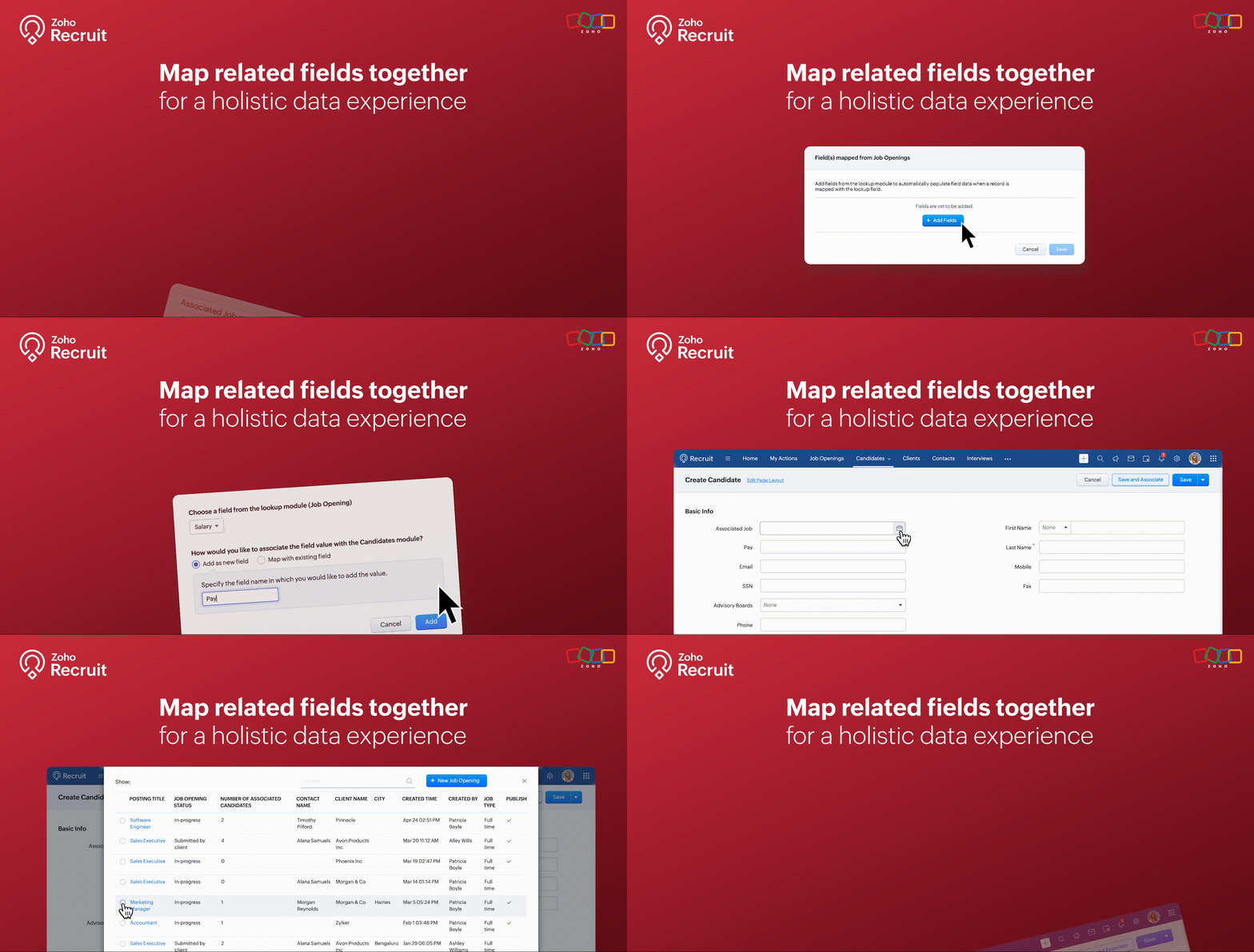
Enhance Data Visibility with Mapping Fields from Lookup Module


We’re thrilled to announce an exciting new feature in Zoho Recruit: Mapping Fields from Lookup Module! This powerful addition is designed to display additional details from a related module when using lookup fields. This enhances data visibility and provides more context within a single module view.

What is Mapping Fields from Lookup Module?

The "Mapping Fields from Lookup Module" feature allows you to incorporate additional fields from related (lookup) modules directly into your primary module's layout. This means you can now view more contextual information within a single view without the need to switch back and forth between different modules.

For example, if you're in the Candidates module, you can map fields like Job Location, Job Type, and Hiring Manager from the Job Openings module. This way, you can see all key details about the job opening a candidate applied for right within the candidate’s record.

Benefits

  • Enhanced Data Visibility: By mapping fields from related modules, you can see all pertinent information at a glance. This comprehensive view enables better decision-making since all the relevant data is readily accessible within a single module.
  • Improved Workflow Efficiency: Say goodbye to the constant toggling between different modules. With mapped fields, you have a more streamlined workflow, saving time and reducing the chances of missing critical information.
  • Better Data Consistency: Ensure that all necessary information is consistently available across different modules. This reduces data silos and enhances the reliability of your recruitment data.

Use Cases

1. Streamlined Candidate Evaluation:

Managing candidate evaluations often requires accessing various details about job openings they’ve applied for. Mapping fields from the Job Openings module to the Candidates module makes this process seamless and efficient.

Example:

A recruiter at a healthcare organization is evaluating candidates for multiple nursing positions. By mapping fields like Shift Type, Department, and Hiring Manager from the Job Openings module, they can view all relevant job details directly within the candidate’s profile. This comprehensive view helps the recruiter quickly assess each candidate's fit for the roles based on the specific requirements of each department, without needing to navigate to the Job Openings module.

2. Comprehensive Interview Scheduling:

Scheduling interviews for candidates can be a complex task, especially when coordinating with multiple hiring managers. Mapping fields from the Interview Schedule module to the Candidates module can streamline this process.

Example:

An HR coordinator at a retail company is responsible for scheduling interviews for various store manager positions. By mapping fields such as Interview Date, Interview Time, and Interviewer from the Interview Schedule module to the Candidates module, they can keep track of all upcoming interviews directly from the candidate’s profile. This ensures that the coordinator can efficiently manage interview schedules and communicate details to candidates without missing any critical information.

3. Enhanced Client-Specific Job Management:

Recruitment firms often manage job postings for multiple clients, each with specific requirements and details. Mapping fields from the Clients module to the Job Openings module can provide a unified view of client-specific job postings.

Example:

A recruitment consultant at a staffing agency is managing job postings for several clients in the finance sector. By mapping fields such as Client Industry, Client Contact, and Special Requirements from the Clients module to the Job Openings module, the consultant can view all client-related information directly within each job opening. This comprehensive view helps the consultant tailor their recruitment efforts to meet the unique needs of each client, ensuring better client relationship management and more successful job placements.

How to Use the Mapping Fields from Lookup Module

  1. Identify the Fields: Determine which fields you want to map from the lookup module to your primary module.
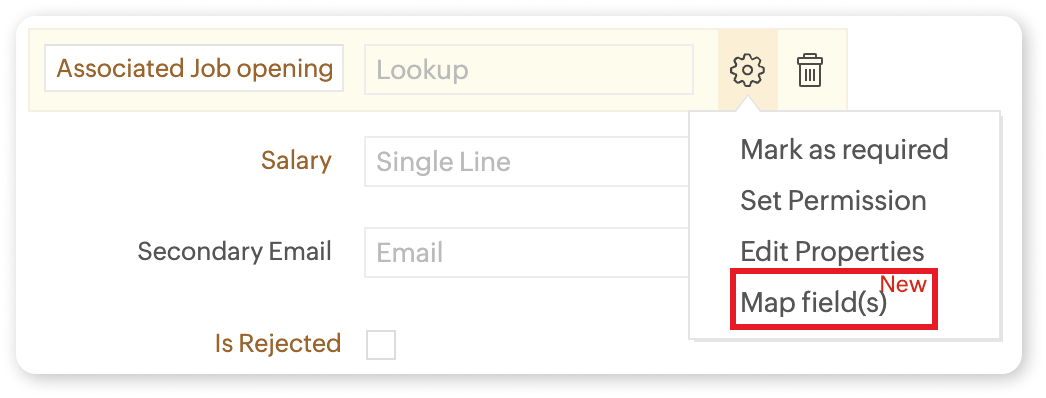
  2. Add the Lookup Field: Include the lookup field in your module layout where you want the additional information to appear.
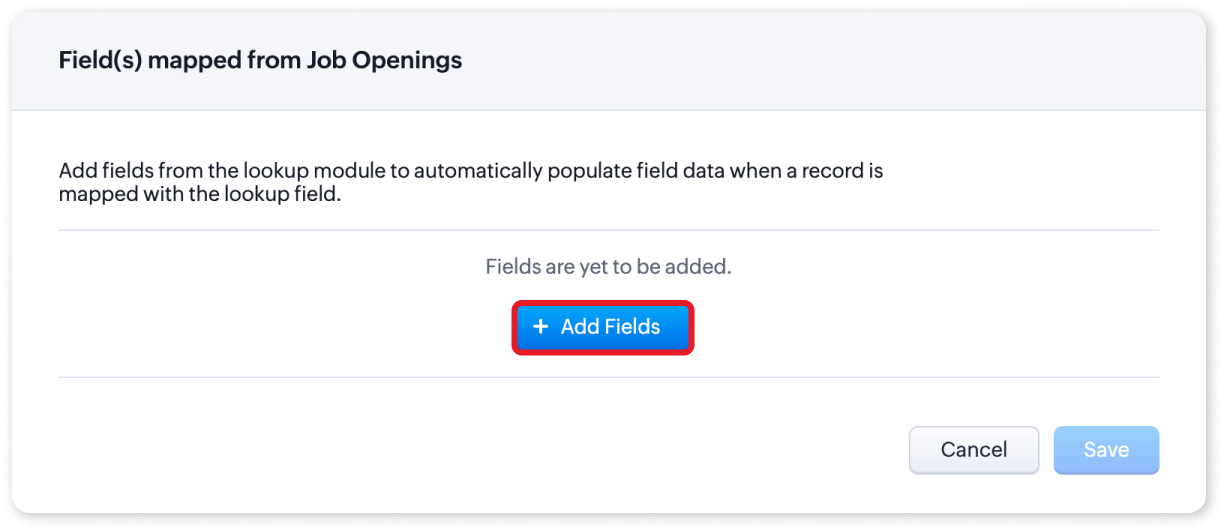
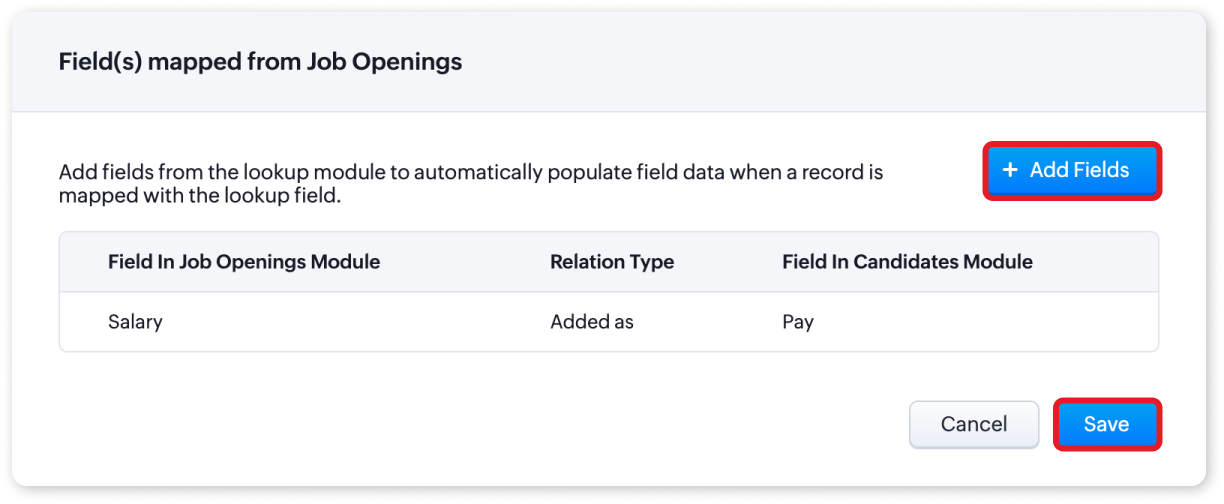
  3. Map the Fields: Click on the settings icon and select "Map Field(s)". You can choose to add the fields as new or map them to existing fields.
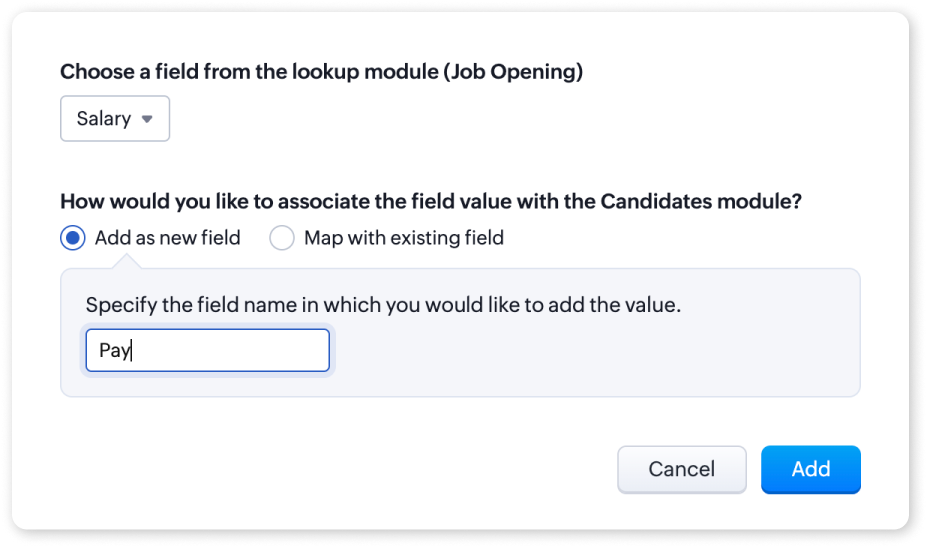
  4. Save Changes: Once you have mapped the fields, save the changes to your layout.
For more detailed information, please refer to our help article on Mapping fields from Lookup Module. If you have any questions or suggestions regarding this update, feel free to leave a comment below or reach out to our customer support team at support@zohorecruit.com.

Regards
Team Zoho Recruit


    • Sticky Posts

    • Zoho Recruit Community Meetup - London 🇬🇧

      Hello Recruiters! We’re excited to announce that the Zoho Recruit team is coming to the UK for an in-person Zoho User Group (ZUG) Meetup in London! This is your chance to connect with fellow Zoho users, learn from experts, and walk away with actionable
    • An update to improve email delivery | Email Authentication & Relay

      Update Rollout Latest Update: Enterprise users (8th July, 2025) This update is now live for Enterprise plan users in all regions. This includes People Plus, but not Zoho One, which will be covered in an upcoming update. Professional users (31st May 2025)
    • Zoho Recruit User Group Meet-up | INDIA 2025 (Venue Finalised)

      Hello Zoho Recruit users from India, We’re pleased and excited to announce our 2025 edition of Zoho user group meet-up in India in five cities! In this meet-up, our team of experts will help you understand the intricate nuances to use Zoho Recruit better,
    • Zoho Recruit is coming to the UK | Zoho Community Learning Series

      Customers from the United Kingdom, Exciting news: We will be in London for the Zoho Recruit user meet up. Our team will help you better understand the intricate nuances of Zoho Recruit to help you hire faster, inform about new and upcoming features, and
    • Ask the experts - A live Q & A discussion on Zoho Recruit

      We are delighted to come back with another edition of Ask the Experts community series. This edition, we'll be focusing on everything about Zoho Recruit. The topics will focus on the features that are used/asked by the majority of users and also based
    • Recent Topics

    • ZOHO Payroll Canada

      Any plans on the roadmap for Canada?
    • What's New in Zoho Billing | January 2026

      Excited about the latest enhancements in Zoho Billing? Our January updates bring an intelligent AI assistant, smarter subscription management, and improved tax compliance, saving you time and reducing manual work. Dive into the details below to see how
    • Zoho Books Sandbox environment

      Hello. Is there a free sandbox environment for the developers using Zoho Books API? I am working on the Zoho Books add-on and currently not ready to buy a premium service - maybe later when my add-on will start to bring money. Right now I just need a
    • Multi-currency and Products

      One of the main reasons I have gone down the Zoho route is because I need multi-currency support. However, I find that products can only be priced in the home currency, We sell to the US and UK. However, we maintain different price lists for each. There
    • Cliq iOS can't see shared screen

      Hello, I had this morning a video call with a colleague. She is using Cliq Desktop MacOS and wanted to share her screen with me. I'm on iPad. I noticed, while she shared her screen, I could only see her video, but not the shared screen... Does Cliq iOS is able to display shared screen, or is it somewhere else to be found ? Regards
    • COQL API in JS Widget only pulling 200 records

      Hello! We've been building a custom homepage widget using the Zoho JS SDK, and it seems that this https://help.zwidgets.com/help/latest/ZOHO.CRM.API.html#.coql only allows 200 records. I thought the limit was 2000 for COQL queries, but am I mistaken?
    • Passing the CRM

      Hi, I am hoping someone can help. I have a zoho form that has a CRM lookup field. I was hoping to send this to my publicly to clients via a text message and the form then attaches the signed form back to the custom module. This work absolutely fine when
    • Paid Support Plans with Automated Billing

      We (like many others, I'm sure) are designing or have paid support plans. Our design involves a given number of support hours in each plan. Here are my questions: 1) Are there any plans to add time-based plans in the Zoho Desk Support Plans feature? The
    • Do buttons and vba msgbox work on mobile, specifially the iPhone zoho sheets app?

      In Zoho sheets on the web, I inserted a button and assigned a VBA macro to it. It pops up a msgbox with some text. When I go onto the iPhone mobile zoho sheets app, the button is there. When I click on that button, the spinning asterisk appears for a
    • Different form submission results for submitter and internal users

      I'm looking for suggestions on how to show an external submitter a few results while sending internal users all the results from the answers provided by the external user. The final page of our form has a section with detailed results and a section with
    • Column letter from number

      Hello, I am trying to select a cell and i have the column number. How do i do this or is there a way of getting the letter from the number? Thank you
    • Help Desk Services Solution

      I am here looking for Help Desk services solution for organization. I also searched this on many different website and found many solutions. We are bit confused to which one to choose. One of my friend suggest me this platform, and i am hoping i will
    • Facing Issues with Sites Mobile font sizes

      my page renediaz.com is facing issues mobile view, when i try to lower font sizes in home page, instead of changing the size, it changes the line space
    • Remove 'This is an automated mail from Zoho Sign' in footer

      Hi there, Is it possible to remove or change the text under the e-mail templates? I can't figure out how to do that: Would love to hear from you. Kind regards, Tristan
    • Formatting and slow

      Creating campaigns are difficult.  I'm fairly computer literate but some of the way Zoho Campaigns formatting works is painful.  Images fail to upload or are very slow. To top it off, syncing the contacts is a pain as well as temperamental links to create Segments. At this rate I'm afraid we might need to migrate back to Mailchimp.
    • Default Ticket View - Table?

      Guys, We mostly use the table view to queue tickets. Maybe I am missing it - but how can I set that view as 'default" for all our agents? Thanks JV
    • Boost your Zoho Desk's performance by archiving tickets!

      The longer your help desk operations are, the more likely it is to accumulate tickets that are no longer relevant. For example, ticket records from a year ago are typically less relevant than currently open tickets. Such old tickets may eventually lead
    • Paste emails to create segment

      We are moving over from Mailchimp to ZOHO. However Mailchimp allows me to create a segment by pasting in emails from excel (or importing a .csv) can I do the same in Mailchimp?
    • Getting the Record ID of a form once it is submitted - so that form can be edited later

      In Zoho Forms, where can I access the record ID of a form once the form is submitted? - Record ID is not available in webhook payloads - It is not available to form fields, including in formulas - It is not available as a parameter in a thankyou page
    • Auto-Generate Line Numbers in Item Table Using HTML & CSS Counters (Zoho Books & Zoho Inventory Custom Templates)

      <div> <style> /* Start counter from 0 inside tbody */ tbody#lineitem { counter-reset: rowNumber; } /* Increment counter for each row */ tbody#lineitem tr { counter-increment: rowNumber; } /* Show counter value in first column */ tbody#lineitem tr td:first-child::before
    • Possible to define default font and size in Zoho Campaigns?

      Is it possible to define a default font (font, size and colour) for the text, H1 and H2 in Zoho Campaigns? For example: In a campaign, I add a text block, and the text is automatically century gothic, size 11, grey (6f6f6e) by default? Thank you!
    • Zoho Sites - General Feedback

      Hi Everyone-- Quick question for discussion: is it me or is working with Zoho Sites like entering the Twilight Zone? I've built many sites over the years, but this platform seems impossible. I've spent an entire day and a half trying to get a simple one-color
    • File Upload field not showing in workflow

      Hi, I have added a field on Zoho CRM. I want to use it in a workflow where that particular field is updated based on another field, however it is not showing up in the field list to select it in the workflow. Why is this please?
    • You cannot send this email campaign as it doesn't have any eligible contacts in the selected mailing list. You can try adding contacts or choose other mailing lists.

      please help
    • Strengthening the capabilities of CommandCenter in Zoho CRM Plus

      When you look at the prospect-to-customer journey in most businesses 10 to 15 years ago, it was relatively straightforward. Many of us remember walking into a store, sharing our requirements with a sales associate, reviewing a few options, and making
    • World date & time format

      Hello, Is there a timeline to get the worldwide used date and time format ? I mean not the american one... I mean day month year, and 24 hours clock. Regards
    • How can Data Enrichment be automatically triggered when a new Lead is created in Zoho CRM?

      Hi, I have a pipeline where a Lead is created automatically through the Zoho API and I've been trying to look for a way to automatically apply Data Enrichment on this created lead. 1) I did not find any way to do this through the Zoho API; it seems like
    • Announcing Kiosk 1.1 - Customize screen titles, configure new fields & actions, use values from your Kiosk to update fields, and more.

      Hello all We are back again with more enhancements to Kiosk. So what's new? Enhancements made to the Components Add titles for your Kiosk screens and adjust its width to suit your viewing preferences. Three new fields can be added to your screen: Percentage,
    • Any recommendations for Australian Telephony Integration providers?

      HI,  I am looking for some advice on phone providers as we are looking to upgrade our phone system, does anybody have experience with any of the Australian providers that integrate with CRM Telephony? So far we are looking at RingCentral and Amazon Connect, and would love to hear feedback on any of the other providers you might have tried.  Thank you
    • CRM Cadences recognise auto-responses

      I have leads in a Cadence. I get an auto-responder reply "I'm out of the office..." Normally Cadences seems to know that isn't a real reply and keeps the lead enrolled in the cadence. However, today, Cadences has UNENROLLED a Lead who sent an auto-reponse
    • Zoho Campaigns Workspaces

      Hi, I’m currently working on a Zoho CRM + Zoho Campaigns setup for a franchisee-based organization, where each franchise must only see and use its own contacts. At the moment, franchisees cannot properly access their contact lists in Zoho Campaigns unless
    • Limited System because of Limited Number of Fields for Car Dealership

      Dear Zoho Support, we want to have all the information about a car inside of a car record. We want to have Zoho CRM as our single source of truth for our data, but the limited number of fields are not allowing that. The data consist of: technical data
    • Automatically Update Form Attachment Service with Newly added Fields

      Hi, When I have a Form Setup and connected to a 3rd Party Service such as OneDrive for Form Attachments, when I later add a new Upload Field I have to remove and redo the entire 3rd Party Setup from scratch. This needs to be improved, such as when new
    • Zoho CRM for Everyone's NextGen UI Gets an Upgrade

      Hello Everyone We've made improvements to Zoho CRM for Everyone's Nextgen UI. These changes are the result of valuable feedback from you where we’ve focused on improving usability, providing wider screen space, and making navigation smoother so everything
    • Newsletter in multiple languages

      Hi We are planning on starting to use Zoho Campaigns for our newsletters. Since we send our newsletters in three languages, I would need the "unsubscribe page" and other pages related to the NL (Thank you page and so on) to be available in different languages
    • Fixed assets in Zoho One?

      Hi, We use Zoho Books and have the fixed asset option in it. I started a trial for Zoho One and I do not see that as an option. Is the books that is part of zoho one equivalent to Zoho Books Elite subscription or is it a lesser version? Thanks, Matt
    • Set Default Status of Assembly to "Assembled" When Entered in UI

      I've just discovered the new "confirmed" status of Assemblies within Inventory. While I understand the intent of this (allowing for manufacturing planning and raw material stock allocation), it was initially confusing to me when manually entering some
    • I need to Record Vatable amount and non vatable amount separately in zoho books in a single line

      I need to Record Vatable amount and non vatable amount separately in zoho books in a single line give me the customisation option and in invoice copy to customer the total amount should be inclusive 5%vat and no need to show the vatable and non vatable
    • Sort Legend & stacked bar chart by value

      I'd love to see an option added to sort the legend of graphs by the value that is being represented. This way the items with the largest value in the graph are displayed top down in the legend. For example, let's say I have a large sales team and I create
    • Scanned Doc - selecting Item overwrites Rate

      I have a Vendor Invoice which was uploaded to Documents. I select Add To > New Bill. The OCR is actually quite good, but it is reading an Item Description instead of an Item Number. I remove the description and select the correct Item Number... and it
    • Next Page