Function #48: Manage fixed installment payments using Zoho Books

Hello everyone, and welcome back to our series!
Businesses offer installment payment options to their customers, particularly for expensive purchases, to ease the financial burden on them. By breaking down the total cost into smaller, more manageable payments, businesses can attract a wider audience who may not be able to afford large upfront payments. This approach not only increases the likelihood of making more sales, but also helps to spread revenue over time, improve cash flow, enhance customer satisfaction and loyalty, and provide a competitive advantage in the market.
We receive numerous requests from our users regarding the handling of these installment scenarios. We heard you loud and clear. Today, we are excited to share a solution that utilizes custom functions to manage installment payments in Zoho Books.
Let's take the example of Mr. John Hector, who wants to buy a 75-inch TV from Zylker Electronics, priced at a hefty $2,300. He is finding it difficult to pay the entire amount upfront. Therefore, Zylker Electronics offers him the option to pay in installments. They mutually decide that John will spread the payment over 5 months, committing to monthly installments of $460 until he settles the entire purchase amount. Let's delve into how this process can be efficiently managed within Zoho Books using custom functions.
Firstly, Zylker Electronics should create a sale invoice of $2,300 in their Zoho Books organization. While creating it, they should input the start date of the installment and the number of installments in two custom fields. For instance, if the sale was made on 01.04.2024 and Mr. John agreed to pay in 5 installments starting on 10.05.2024, the start date should be entered as 10.05.2024, and the number of installments as 5.
Two custom functions will come into play: one to generate the retainer invoices to collect the installment payments and another to apply the retainer payments to the sale invoice.
Based on the number of installments entered the function will determine the amount to be charged as monthly installments.
Installment amount = Total Amount Payable / No of installments = $2300 / 5 = $460.
On the specified start date, the first function will create and send the retainer invoice for the first installment. Once the payment for this installment is recorded, the second function will apply it to the sale invoice, reducing the balance accordingly. The process repeats each month, generating and sending retainer invoices for subsequent installments until all 5 are completed. Each retainer invoice will be for $460 and due on the 10th of every month for 5 consecutive months. As each retainer invoice is paid, the second function will automatically apply it to the sale invoice, thereby recognizing the income.
Prerequisites:
1. Create a Connection named "zbooks" to successfully execute the scheduler. You can watch the GIF attached below to know how to create the connection.

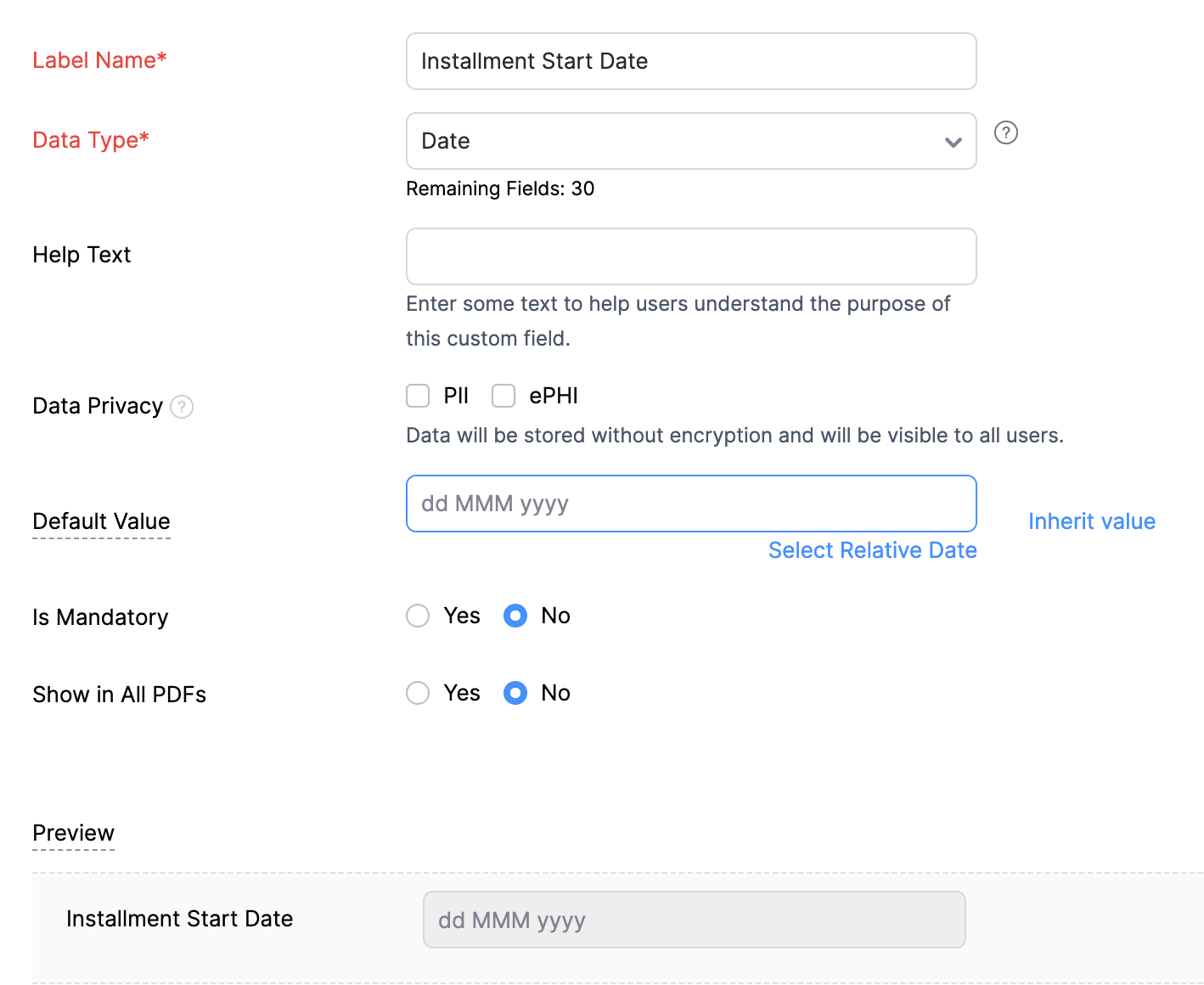
2. Create a Date-type custom field called "Installment Start Date" for the Invoices. This field will be used to input the starting date for installment payments.
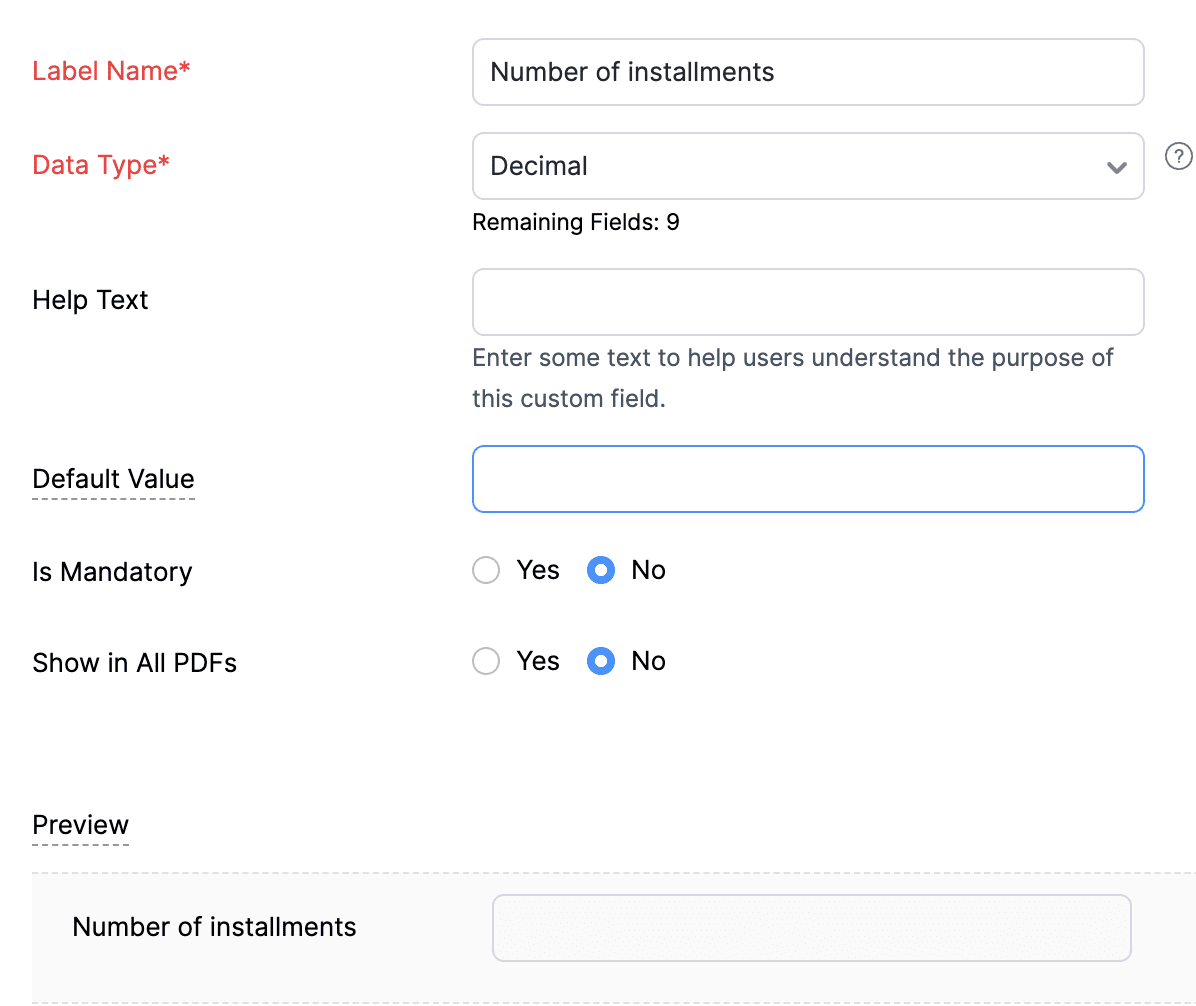
3. Create a Decimal-type custom field called "Number of installments" for the Invoices. Here, you'll specify the agreed-upon number of installments. Using this information and the total invoice amount, the function will determine the monthly installment amount.
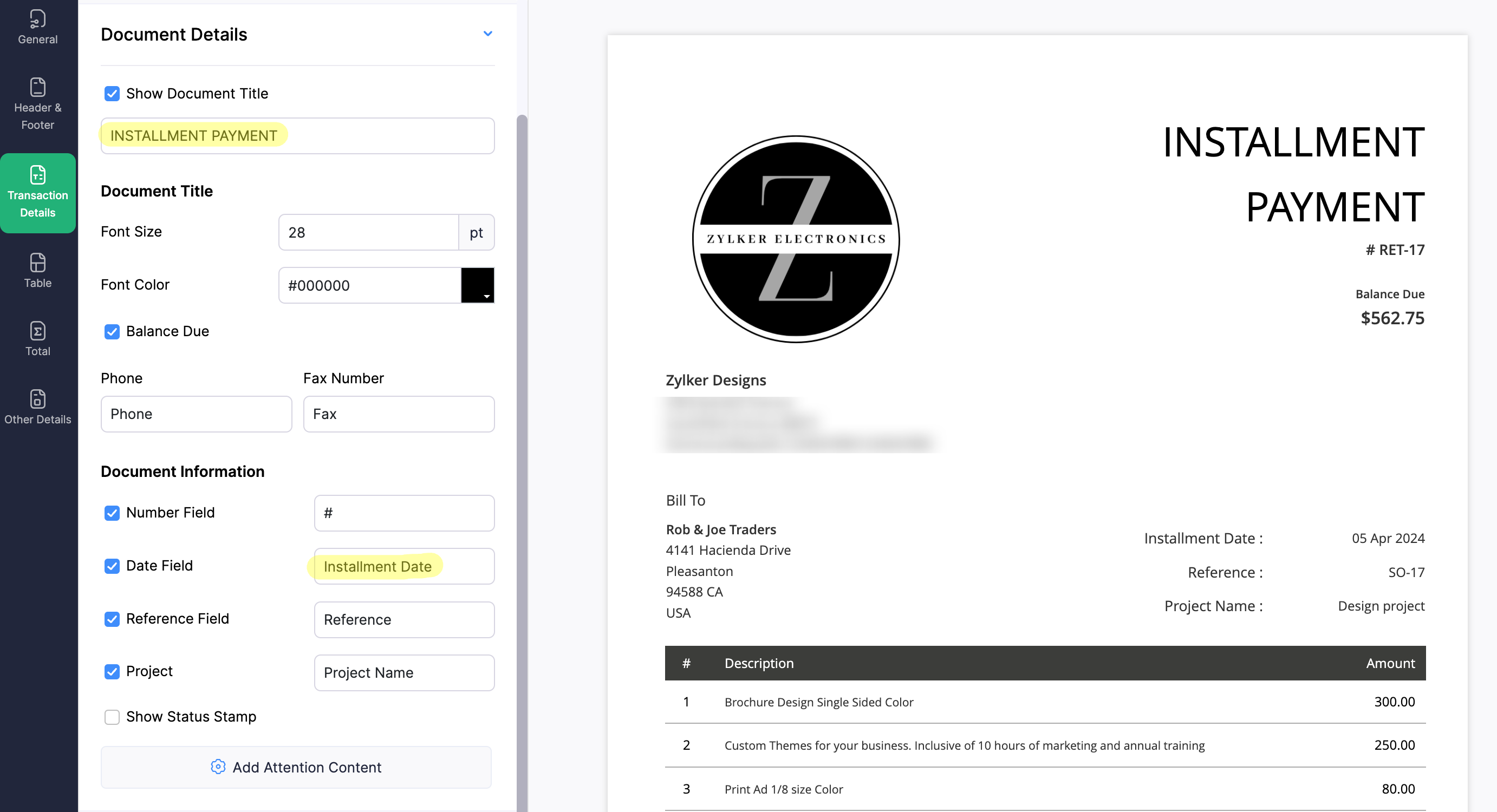
4. Create a new Retainer Invoice template with the document title "Installment Payment". Then, copy the template ID (You can get the ID from the URL of the webpage) and substitute it into line 26 of the first function. This ensures that all the retainers sent for collecting installment amounts are correctly labeled.
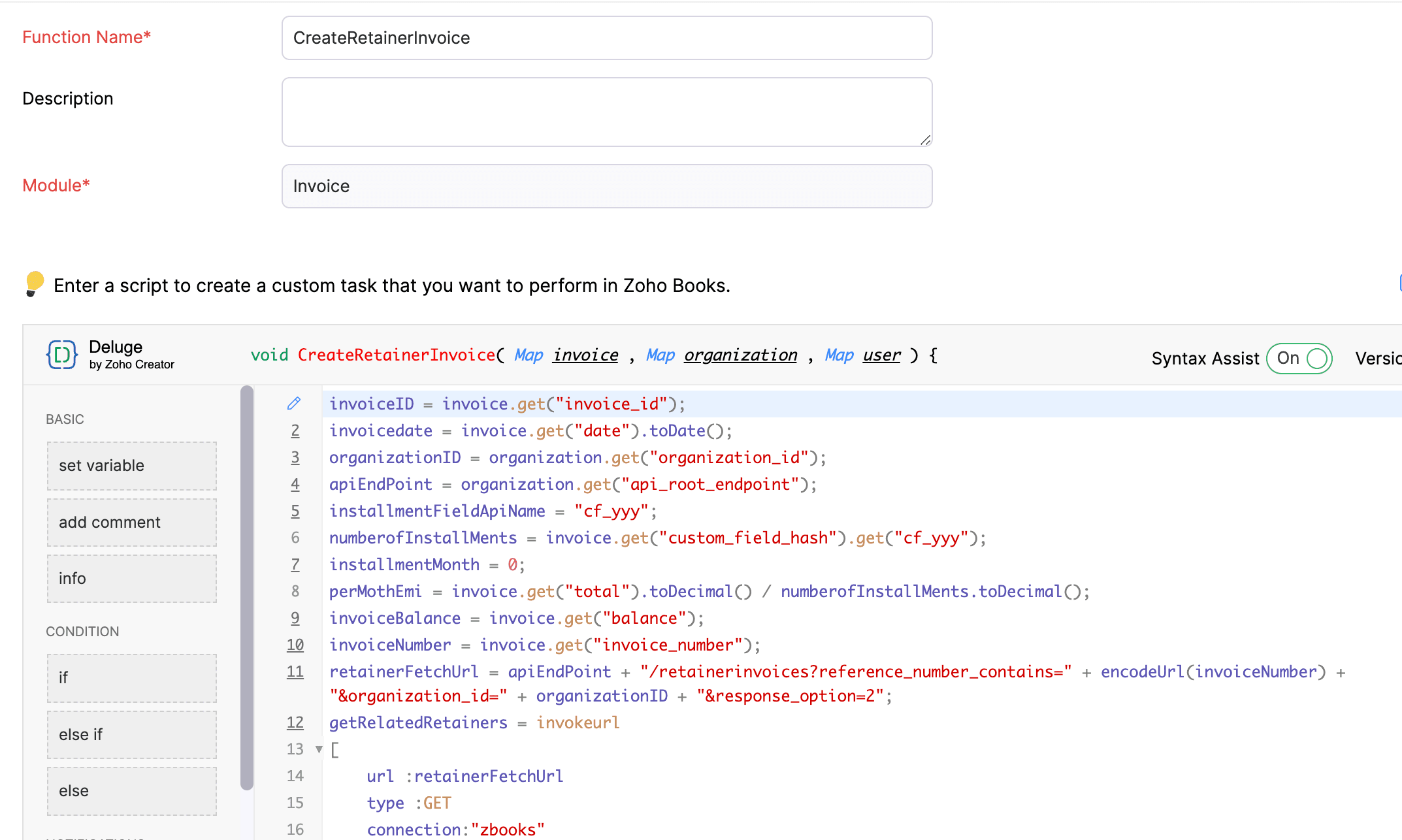
(1) Custom Function to create Retainer Invoices:
Navigate to Settings -> Automation -> Workflow Actions -> Custom Functions -> +New Custom Function -> Module -> Select Invoice -> Add the function code from this GitHub Link -> Save.
(2) Workflow Rule to create Retainer Invoices:
Go to Settings -> Automation -> Workflow Rules -> +New Workflow Rule and set up the workflow rule as shown below:-


In the final step of this workflow rule, associate the custom function you created and then hit Save.
(3) Custom Function to apply installment payments to the sale invoice:
Navigate to Settings -> Automation -> Workflow Actions -> Custom Functions -> +New Custom Function- > Module -> Select Retainer Invoice -> Add the function code from this GitHub Link -> Save.

(4) Workflow Rule to apply installment payments:
Go to Settings -> Automation -> Workflow Rules -> +New Workflow Rule and set up the workflow rule as shown below:-
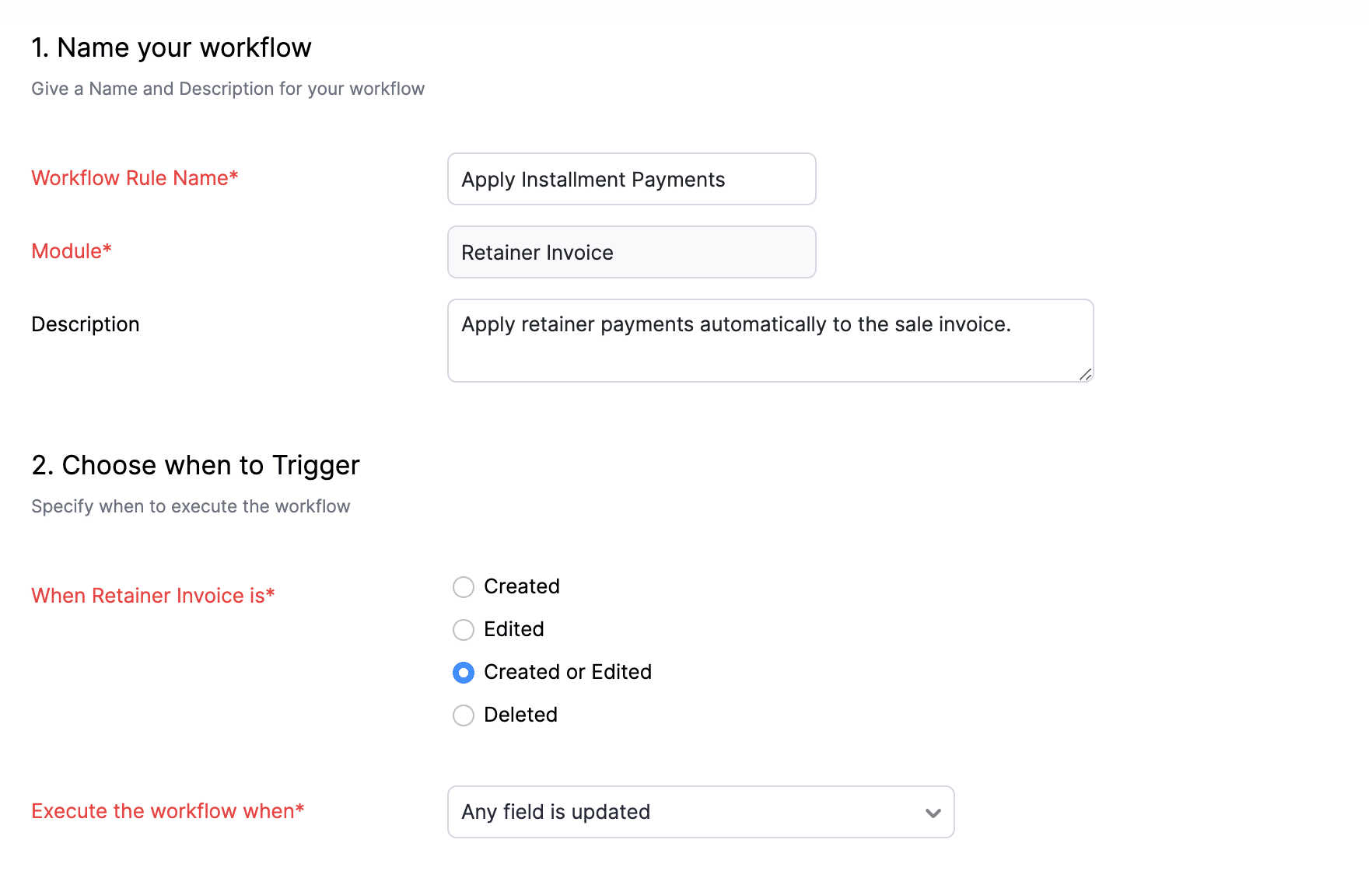
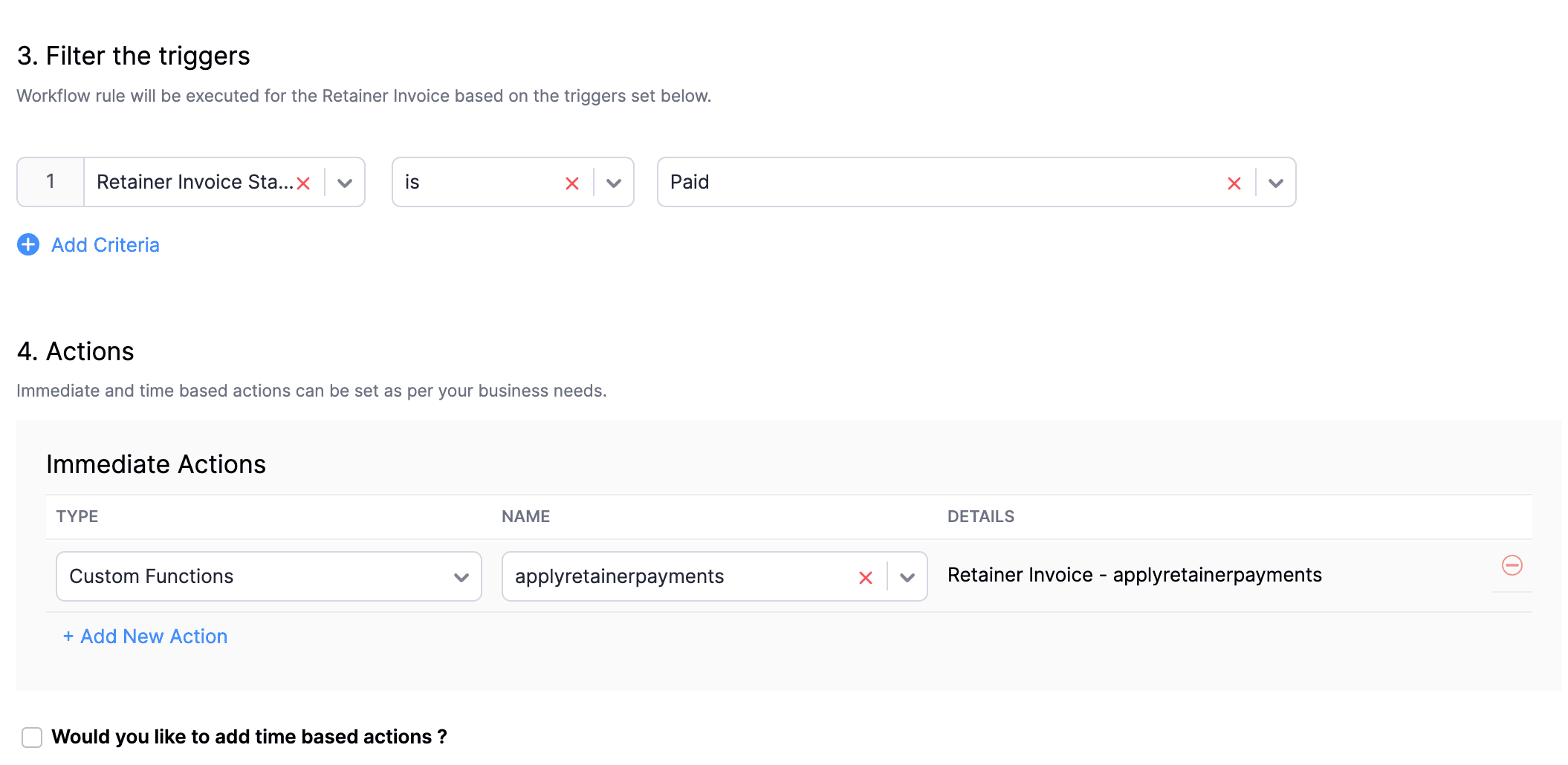
In the final step of this workflow rule, associate the custom function you created and then hit Save.
We really hope that today's functions help you streamline the process of handling installments in Zoho Books. If you need any assistance in customizing the functions to better suit your needs, please do not hesitate to contact us at support[at]zohobooks[dot]com. We are always happy to help you.
Also, for those looking to collect varying percentages of the invoice total as installments, stay tuned!
Regards,
Shireen Farhana
Zoho Books
Topic Participants
Shireen Farhana
Dmitry Solovyev
Dylan Cleppe
Julio Cazaroto
Maj
Sticky Posts
Introducing Invoice Consolidation for Offline Subscriptions
Hello Folks, Glad to announce the feature of Invoice Consolidation for Offline Subscriptions. If you are having multiple subscriptions for your customers, now, you can send a single consolidated invoice for all the Offline Subscriptions that are getting renewed on the same date. Advantage? Customers will be receiving single invoice instead of multiple invoices upon renewal. Also reduces your efforts in follow-up with your customers for payment collections. For Example: If Customer has SubscriptionNew feature: Create back-dated subscriptions
Hello from the Zoho Subscriptions team. :) We’re happy to announce that today marks the launch of a much-awaited feature: creating back-dated subscriptions! From here on out, whenever you create a new subscription with an activation date that is earlier than the present date, you’ll no longer get an error. Instead, you'll be creating a back-dated subscription. This means that the subscription started at that earlier point in time. The next billing date will be calculated automatically based onAnnouncement Regarding Notification Emails
Hello Everyone! This announcement is regarding the admin notification emails which you've been receiving from the email address "support@zohosubscriptions.com". From the 1st of October, 06:00 GMT, the emails with the following subjects will be sent from "no-reply@zohosubscriptions.com". Unable to send invoice for the profile - {profile_name} Unable to process auto payments. If you have set up any filters or workflow in your email account, please add "no-reply@zohosubscriptions.com” and “support@zohosubscriptions.com”Zoho Subscriptions plugin for WordPress
Zoho Subscriptions plugin for WordPress allows you to easily embed your plan specific checkout page in an iframe with just a few mouse clicks and without a single line of code. How can WordPress Zoho Subscriptions Plugin boost your productivity? It's now easier to embed Zoho Subscriptions checkout page in your WordPress site. Forget the old method of logging in to Zoho Subscriptions, copying a URL and scripting to make adjustments. All this can be done automatically through this plugin. A great timeIndian GST organisation Migration Guide
With respect to the new GST regime releasing on July 1, 2017in India, Zoho Subscriptions Indian edition is also gearing up to make your business GST Ready. This article focuses on how to get your existing organisation in Zoho Subscriptions to migrate to the new GST regime. Note: Any organisation created on or after July 1, 2017 will already be GST ready. You wouldn't have to migrate your organisation. Migrating your existing organisation to support GST To migrate your existing organisation to
Recent Topics
Where is the settings option in zoho writer?
hi, my zoho writer on windows has menu fonts too large. where do i find the settings to change this option? my screen resolution is correct and other apps/softwares in windows have no issues. regardsEnhance Sign CRM integration
Hello all, I'm working on a custom Deluge script to enhance the integration between Zoho CRM and Sign by using a writer merge template for additional flexibility. I want to replicate the post-sign document integration that exists between CRM and SignTask status - completed - other options
I have a dumb question I know i can make custom statuses for the tasks - but is there anyway to make additional "completed" statuses like for instance if i have a task "call back customer" and i leave a vm for them to call back marking it "completed -Bank feed integration First Abu Dhabi Bank (FAB) to Zoho? (UAE)
Hello everyone, Is First Abu Dhabi Bank in the list of banks available for bank feed integration with Zoho Books? Thank you.How to Export Filtered List of Contacts?
This seems like it should be simple, but I'm stymied. I'm trying to export a filtered list of my Contacts for analysis in a spreadsheet. The use case is that I'm an ecom business based in the US. The bulk of our customers are individuals stored as Contacts.Possible to Turn Off Automatic Notifications for Approvals?
Hello, This is another question regarding the approval process. First a bit of background: Each of our accounts is assigned a rank based on potential sales. In Zoho, the account rank field is a drop-down with the 5 rank levels and is located on the accountQuick Create needs Client Script support
As per the title. We need client scripts to apply at a Quick Create level. We enforce logic on the form to ensure data quality, automate field values, etc. However, all this is lost when a user attempts a "Quick Create". It is disappointing because, fromcan we add product images in Zoho CRM Quote PDF template?
I want to create a quotation format in Zoho CRM similar to the attached PDF, where each product is displayed in a table with rpoduct image I need the product image to appear inside the line items section of the quote. However, while checking the QuoteDoes Zoho Writer have Dropdowns
I want to add a drop down field in Zoho writer. Is this possible?Facturation électronique 2026 - obligation dès le 1er septembre 2026
Bonjour, Je me permets de réagir à divers posts publiés ici et là concernant le projet de E-Invoicing, dans le cadre de la facturation électronique prévue très prochainement. Dans le cadre du passage à la facturation électronique pour les entreprises,Connecting Multiple WooCommerce Stores to a Single Zoho Marketing Automation Account
Is it possible to connect multiple WooCommerce stores to a single Zoho Marketing Automation account?Service Title in Service Report Template Builder
I am currently working on the Service Report Template Builder in Zoho FSM. I have created three separate service report templates for different workflows: Preventive Maintenance Report Requested Service Report Installation Report My issue is that I cannotUpdate: New Security Admin Role
Hello Zoho Directory Admins! This post is to highlight the recent role and permission changes introduced as part of the security enhancements. Previously, Helpdesk Admins had the security permissions and were responsible for managing the security configurationsClient Script | Update #14 - Client Script Support for Quick Create
Hello Everyone! We are back with another exciting and highly awaited update in Client Script! Over the past months, many of you shared your insights and requests, asking for the power to extend Client Script functionality to Quick Create forms. This capabilityEmpty folders are now appearing in the sidebar...
...and the folder list is now auto-collapsed by default with no way to change. Neither of these recent updates are useful or user-friendly. ==================== Powered by Haiku https://www.haiku.co.uk ====================Upload from Zoho Creator File Upload field to OpenAI Vector Store
I’ve struggled for quite a while to get this working properly. For a long time we relied on Azure Functions as a workaround to handle file transfers between Zoho Creator and OpenAI Vector Stores. It worked, but added unnecessary infrastructure and complexity.Career site URL - Suggestion to modify URL of non-english job posting
Hi, I would like to suggest making a few modification to career sites that are not in english. Currently, the URL are a mix of different languages and are very long. It makes for very unprofessional looking URLs... Here is an example of one of our URLI'd like to suggest a feature enhancement for SalesIQ that would greatly improve the user experience across different channels.
Hello Zoho Team, Current Limitation: When I enable the pre-chat form under Brands > Flow Controls to collect the visitor’s name and email, it gets applied globally across all channels, including WhatsApp, Messenger, and Instagram. This doesn't quite alignThe Social Playbook - February edition: Why moment marketing works (and how brands use it)
Imagine the final season of your favorite series is about to drop. Your entire feed is talking about it. Trailers everywhere. Fan theories. Hype at 100%. Now your go-to burger place launches a limited-edition meal box themed around that series—customPDF Attachment Option for Service Reports
Hello Team, I would like to check with you all if there is an option to attach PDF documents to the service reports. When I try to attach a file, the system only allows the following formats: JPEG, JPG, and PNG. Could you please confirm whether PDF attachmentsManage Every Customer Conversation from Every Channel inside Zoho SalesIQ
Your customers message you from everywhere. But are you really able to track, manage, and follow through on every conversation, without missing anything? With interactions coming in from websites, mobile apps, and messaging platforms like WhatsApp andApprovals in Zoho Creator
Hi, This is Surya, in one of my creator application I have a form called job posting, and I created an approval process for that form. When a user submits that form the record directly adding to that form's report, even it is in the review for approval.Cliq Bots - Post message to a bot using the command line!
If you had read our post on how to post a message to a channel in a simple one-line command, then this sure is a piece of cake for you guys! For those of you, who are reading this for the first time, don't worry! Just read on. This post is all about howDepositing funds to account
Hello, I have been using Quickbooks for many years but am considering moving to Zoho Books so I am currently running through various workflows and am working on the Invoicing aspect. In QB, the process is to create an invoice, receive payment and then【Zoho CRM】営業日のロジックに関するアップデート
ユーザーの皆さま、こんにちは。コミュニティチームの中野です。 今回は「Zoho CRM アップデート情報」の中から、営業日のロジックに関するアップデートをご紹介します。 本アップデートにより、ワークフローにおける営業日の計算方法が改善されました。 週末などの非営業日にワークフローのトリガーが発生した場合でも、 「+0」「+1」「+2 営業日」といった設定が、意図どおりに正確に動作するようになりました。 営業日に基づくワークフローでは、日付項目を基準に「何営業日後に処理を実行するか」を指定します。Merged cells are unmerging automatically
Hello, I have been using Zoho sheets from last 1 year. But from last week facing a issue in merged cells. While editing all merged cells in a sheet became unmerged. I merged it again, but it again unmerged. In my half an hour work I have to do this 3-4Introducing Built-in Telephony in Zoho Recruit
We’re excited to introduce Built-in Telephony in Zoho Recruit, designed to make recruiter–candidate communication faster, simpler, and fully traceable. These capabilities help you reduce app switching, handle inbound calls efficiently, and keep everyJust want email and office for personal use
I am unclear as how to how I would have just a personal email (already do have it and love it) and get to use docs, notebook, workdrive etc. In other words mostly everything I had a google. I find gocs can be free with 5gb and so can mail with 5gb. AreUnable to change the "credentials of login user" option when creating a connection
I want to create a new Desk connection where the parameter to use 'credentials of login user' is set to YES. I'm able to create a new connection but am never given the option to change this parameter. Is this a restriction of my user profile, and if so,Show backordered items on packing slip
Is it possible to show a column on the Packing Slip that shows number of backordered items when a PO is only partially filled? I would also like to see the Backordered column appear on POs after you receive items if you didn't get ALL of the items or partial amounts of items. And lastly, it would be nice to have the option of turning on the Backordered column for invoices if you only invoice for a partial order. -TomZoho Sheet for Desktop
Does Zoho plans to develop a Desktop version of Sheet that installs on the computer like was done with Writer?Zoho CRM Community Digest - January 2026 | Part 1
The new year is already in motion, and the Zoho CRM Community has been buzzing with steady updates and thoughtful conversations. In this edition, we’ve pulled together the key product enhancements, Kaizen learnings, and helpful discussions from the firstZoho CRM Feature Requests - SMS and Emails to Custom Modules & Time Zone Form Field
TLDR: Add Date/Time/Timezone form field, and be able to turn off auto timezone feature. Allow for Zoho Voices CRM SMS Extension to be able to be added to custom modules, and cases. Create a feature that tracks emails by tracking the email chain, ratherIntroducing Bigin's Add-in for Microsoft Outlook
Hello Everyone, Email is an important way to communicate with customers and prospects. If you use Outlook.com for emails and Bigin as your CRM, the Outlook Add-in helps you connect them easily so you can see your Bigin contact details right inside Outlook.com.Ask the Expert – Zoho One Admin Track : une session dédiée aux administrateurs Zoho One
Vous administrez Zoho One et vous vous posez des questions sur la configuration, la gestion des utilisateurs, la sécurité ou encore l’optimisation de votre back-office ? Bonne nouvelle : une session Ask the Expert – Zoho One Admin Track arrive bientôt,Zoho Commerce
Hi, I have zoho one and use Zoho Books. I am very interested in Zoho Commerce , especially with how all is integrated but have a question. I do not want my store to show prices for customers that are not log in. Is there a way to hide the prices if notWill be possible to create a merge mail template for products?
Hi, we would need to create a mail merge template for products (native) module. Will be possibile? or do you have a smart solutions to merge products data with a mail merge? thanks ChrisAll new Address Field in Zoho CRM: maintain structured and accurate address inputs
The address field will be available exclusively for IN DC users. We'll keep you updated on the DC-specific rollout soon. It's currently available for all new sign-ups and for existing Zoho CRM orgs which are in the Professional edition. Latest updateHow to Associate Zoho Projects in Zoho CRM
Hi I need script for associating projects in zoho projects to particular Account in zoho CRM side. It can be done manually but I need the automation for this process. There are no api regarding associating a project in zoho crm account. Need assistanceAdd Claude in Zoho Cliq
Let’s add a real AI assistant powered by Claude to your workspace this week, that your team can chat with, ask questions, and act on conversations to run AI actions on. This guide walks you through exactly how to do it, step by step, with all the codeNext Page