Get a realistic picture of your revenue with Forecast Adjustments in Zoho CRM
#crm25q1
Dear Customers,
We hope you're doing well!
Today, we're here with an important enhancement for business decision makers: forecast adjustments. Let's get straight to it!
With technology on the rise and CX at its core, businesses are constantly developing plans for the future. However, these plans come with risks and uncertainties, and businesses use forecast reports to gain a foothold on the actual performance and predict their trajectory.
- There can be economic factors and competitor actions that affect margins.
- The sales representatives' skills for upselling, cross-selling, or negotiating could positively affect the quoted deals.
- A customer could add or subtract from their BOM and seek additional discounts.
- Deals quoted in the forecast period may not always close by the end of it.
When a deal doesn't close as projected, it creates a significant difference in the actual revenue for the forecast period, leaving the decision makers to work with outdated information.
Thus, to help you make informed decisions based on realistic and plausible numbers, we've added the ability to adjust your open deals revenue.
Adjusting the revenue means to come up with a realistic number considering all these influencing factors so that the decision makers can have informed expectations.
Adjusting forecast revenue:
Your open deals are a reflection of ongoing performance, and based on their momentum, they are categorized as pipeline, best case, and committed in your forecast report. However, irrespective of these categories, the best people to know and reflect your likely-to-be revenue are your sales rep and their managers.
- They directly interact with your customers.
- They know if and when a customer shall close a deal.
- They negotiate pricing and discounts.
- They have rich market insights from the field.
- They can predict shortcomings.
Thus, we have added two types of adjustments for open deals: Owner adjustments and manager adjustments.
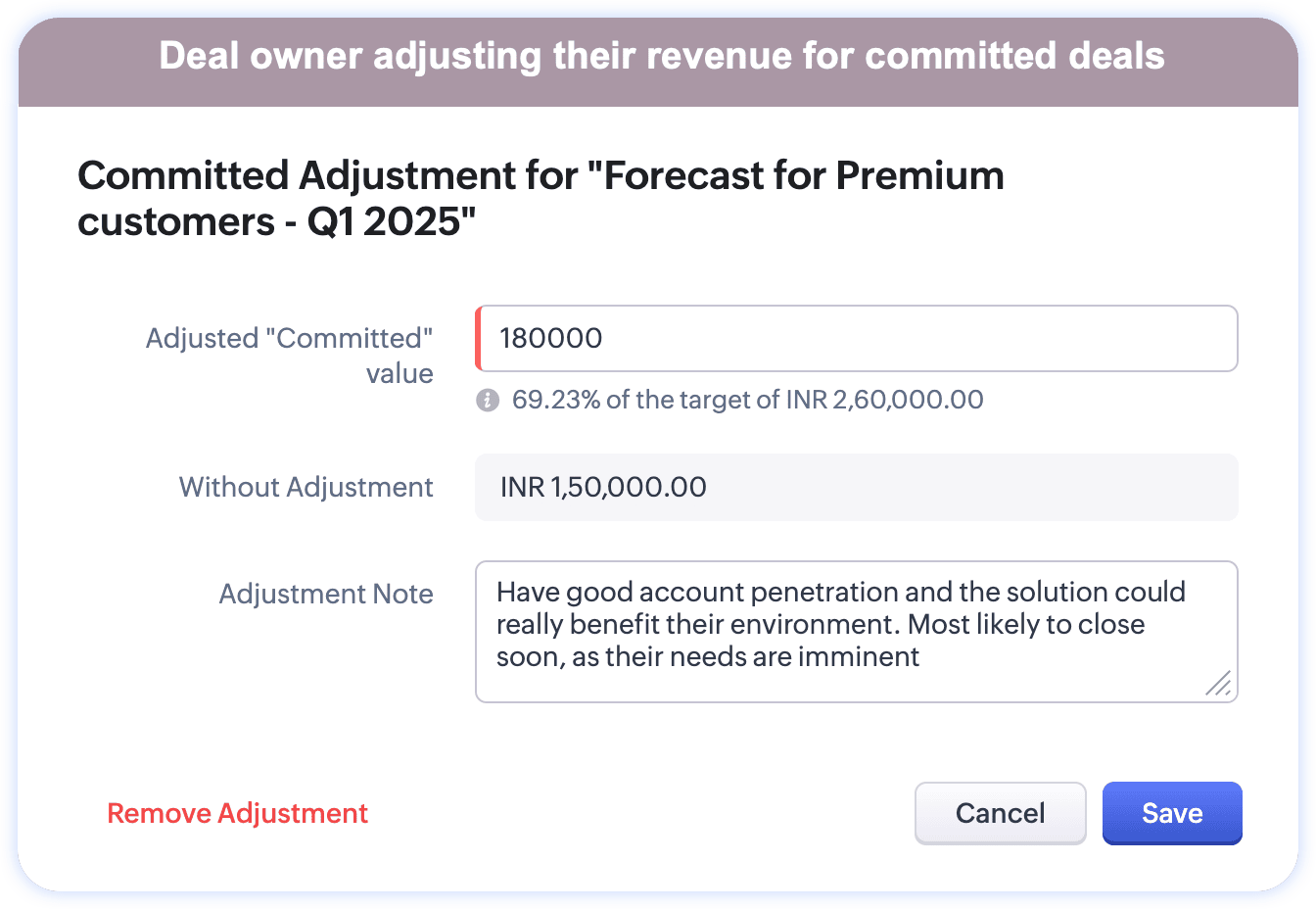
Manager adjustment lets managers adjust and/or reevaluate the revenue per their expertise and their assessment on their subordinates' (deal owners') efficiency and strategic skills.
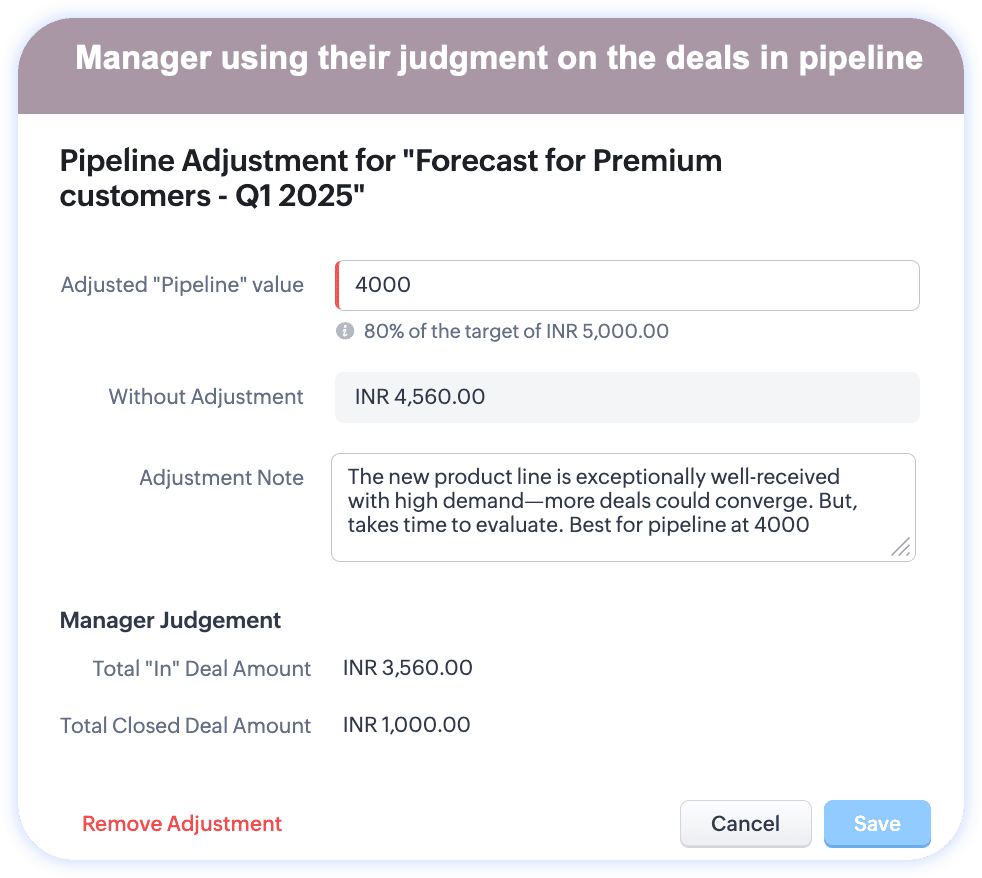
In addition to adjusting the open deals' values, managers can use their judgment to include or exclude a deal's revenue based on its likelihood to converge. 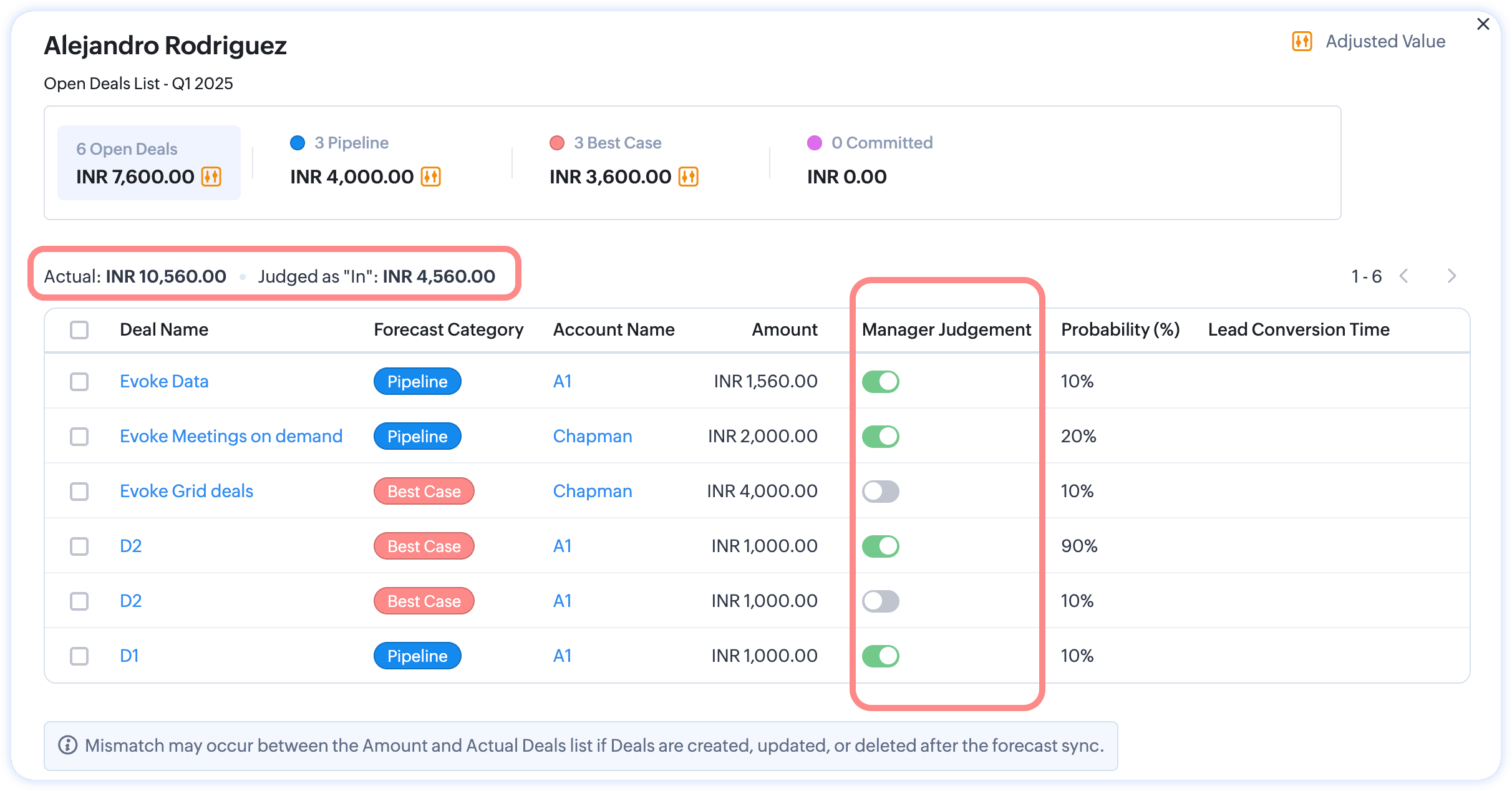
With these new settings, a deal's adjustment and judgment will more accurately reflect revenue and set realistic expectations for decision makers.
However, it's important to note that these values are estimated numbers and won't affect the actual value of participating deals. You can:
- Look at the percentage of adjustments made.
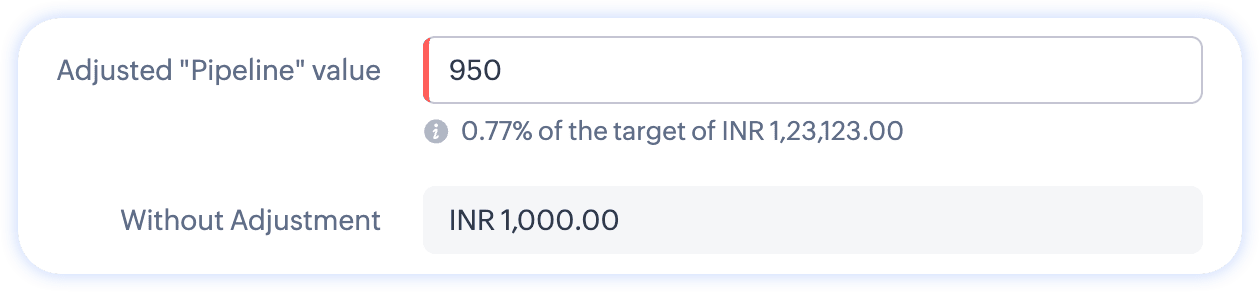
- Understand why the adjustments were made.
- View adjustment logs for these values.
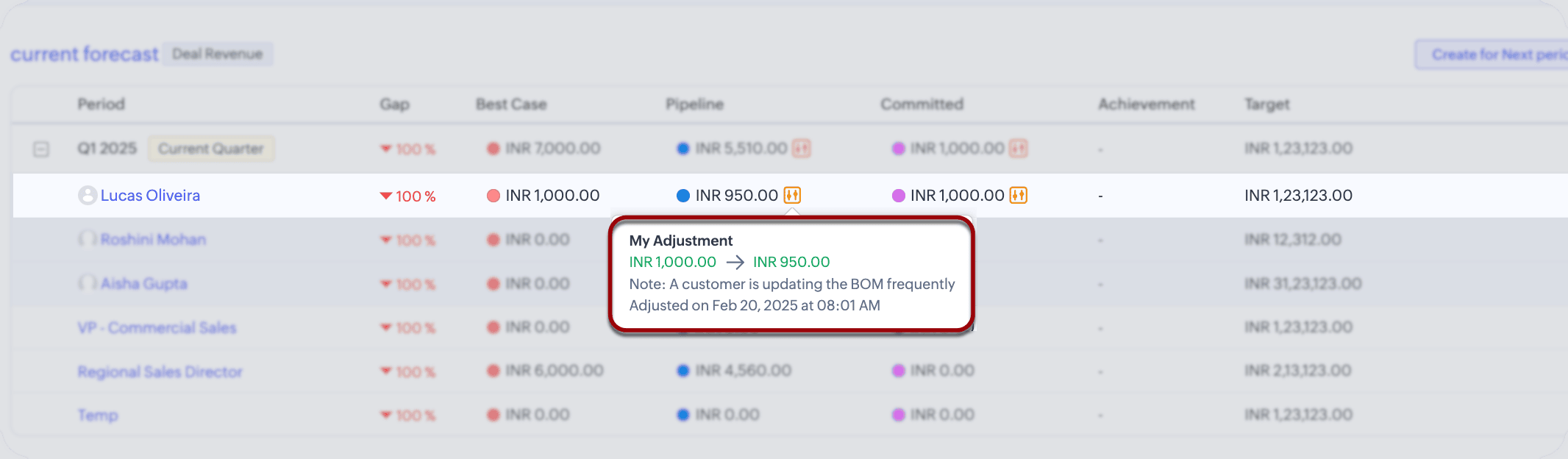
There—that's how you can adjust forecast revenue in your report. However, adjusting is not an inherent ability; a forecast manager or the admin has to enable it from the forecast configuration page.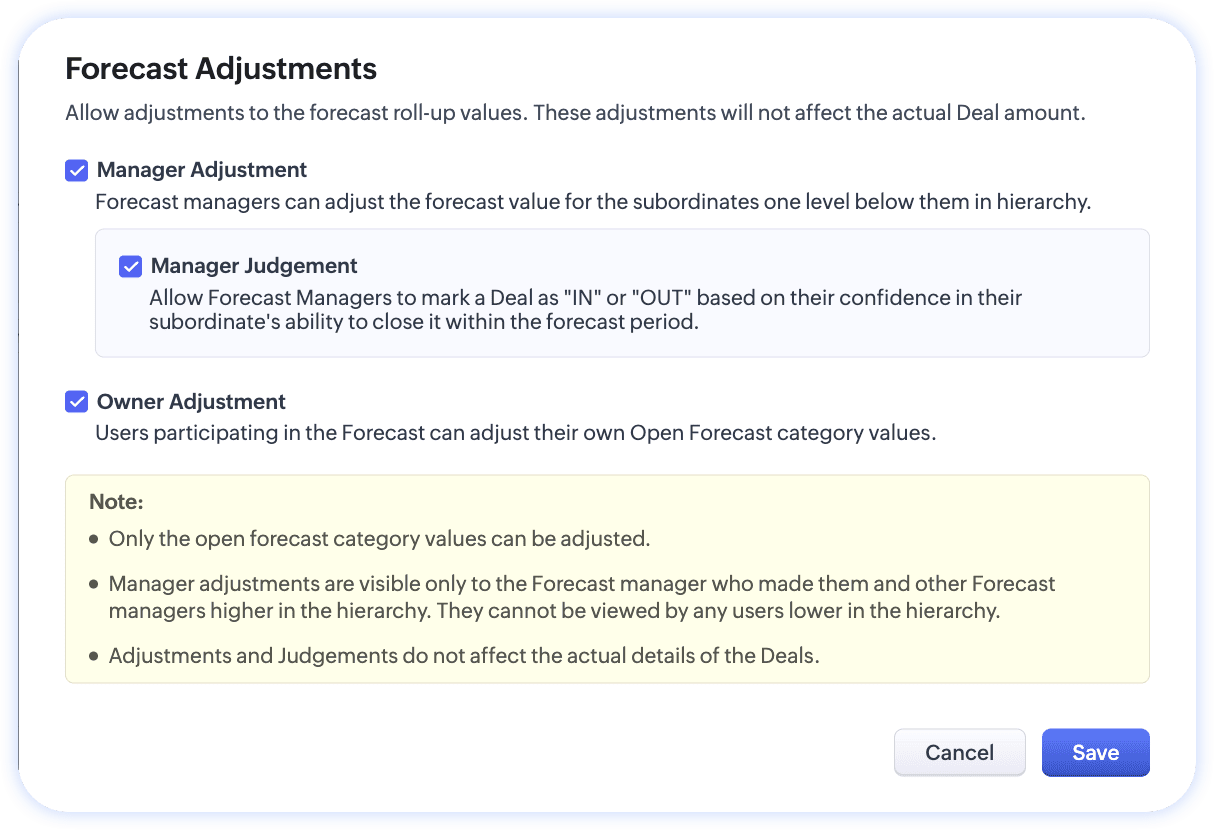
That's all, folks! We hope this enhancement helps your leadership team make more accurate predictions.
Help document: Creating and working with forecasts
Thanks, and have a good one!
Saranya Balasubramanian

Moderation Update:
Forecast adjustments is now opened for users in all DCs.
Topic Participants
Saranya Balasubramanian
Sticky Posts
Enhancement to ICR’s field prompting: Preferred data extraction using advanced field prompting
Dear Customers, We hope you’re well A quick background Intelligent Character Recognition (ICR) comes as part of Zia’s optical recognition capability called Zia Vision. When we introduced it last April, the data extraction was training-based and was applicableZoho CRM's sales trend and sales follow-up trend dashboards are now customizable
Dear Customers, We're here with good news! Sales trend and sales follow-up trend are two system-defined dashboards that help you understand trends and anomalies in your sales outreach and conversion efforts. They use Zia's intelligence to identify patternsIntroducing Multiple Sandbox Types and Support for Module's Data Population
Register here for the upcoming Focus Group webinar on Multiple Sandbox | Help documentation to learn more about the new enhancements Hello everyone, Sandbox in CRM is a testing environment for users to create and test new configurations like workflowGood news! Calendar in Zoho CRM gets a face lift
Dear Customers, We are delighted to unveil the revamped calendar UI in Zoho CRM. With a complete visual overhaul aligned with CRM for Everyone, the calendar now offers a more intuitive and flexible scheduling experience. What’s new? Distinguish activitiesVoC in Zoho CRM is now data savvy: Explore response drilldown, summary components and participation in CRM criteria
VoC has all the goods when it comes to customer intelligence—which is why we're constantly enhancing it. We recently added the following: A customer drilldown component that shows you the list of prospects and customers behind a chart's attribute Expanded
Recent Topics
Synching changes to Stripe when changes are made in Zoho Billing
We have a situation where we have merged customers in Zoho BIlling and then found out later that the payment in Stripe was not updated and still associated with the old customer record. The card gets updated and billed, but that payment is still associatedZoho Sign Not Delivering
I have sent several contracts out via Zoho Sign. They do not seem to be getting delivered. I had one person receive it, but the others have not. I had one person tell me they sent it back to me and never got it and doesn't show as signed. I've sentBank Feeds Breaking Constantly
Hey Everyone, I have already reached out to support about this issue but I am wondering if anyone else is having the same issue. My bank feeds keep breaking within days of me fixing them by updating the credentials. Its been happening for a while andAutomatic Matching from Bank Statements / Feeds
Is it possible to have transactions from a feed or bank statement automatically match when certain criteria are met? My use case, which is pretty broadly applicable, is e-commerce transactions for merchant services accounts (clearing accounts). In theseZoho Payroll's USA and KSA editions are available in Zoho One!
Greetings! We’re excited to share that Zoho Payroll, currently available only in India and the UAE, is now introducing the KSA (Kingdom of Saudi Arabia) edition and the USA (United States of America) edition, and these editions are now available in ZohoOutlook/Hotmail Blocking Zoho SMTP IPs (S3150)
We are currently facing a serious deliverability issue with Zoho SMTP while sending transactional OTP emails for our production application. Emails sent to Outlook / Hotmail addresses are being rejected with the following error: 550 - 5.7.1 Unfortunately,Tip #63- Exploring Technician Console: Elevate to Admin Mode (Windows & Mac)- 'Insider Insights'
Hello Zoho Assist Community! Ever been in a remote support session where you couldn’t complete a task because you didn’t have admin privileges? Maybe installing software, accessing secure system areas, or rebooting into Safe Mode just didn’t work becausePrevent accidental duplicate entry of Customer Ordersome
Zoho Support has confirmed that Zoho currently does not have any method (using Deluge, flow or any other method) to alert a user when a sales order has been entered twice using the same customer reference number (i.e. a duplicate). Most ERP platformsPermissões granulares por usuário além do modelo baseado exclusivamente em perfis
Atualmente, o modelo de segurança do Zoho CRM é fortemente baseado em perfis. Embora funcional, esse modelo apresenta limitações quando equipes possuem variações individuais de acesso dentro do mesmo grupo operacional. Em cenários reais, é comum que usuáriosEvolução do modelo de ambientes: Dev, Homologação e Produção com pacotes versionados
Hoje o Zoho CRM já oferece Sandbox, o que é um avanço importante para organizações que trabalham com customizações mais complexas. No entanto, na prática, o modelo atual ainda apresenta limitações significativas quando múltiplas equipes ou consultoriasZoho Mail - Email Reminder template (default)
Zoho Mail Users, Does anybody here use the email reminder template? I'm asking Zoho to allow and add us to select which one of our many templates will be our default. It allows us to operate more efficiently. It's a Checkbox. If you feel this can benefitWindows Desktop App - request to add minimization/startup options
Support Team, Can you submit the following request to your development team? Here is what would be optimal in my opinion from UX perspective: 1) In the "Application Menu", add a menu item to Exit the app, as well as an alt-key shortcut for these menusCanva Integration
Hello! As many marketing departments are streamlining their teams, many have begun utilizing Canva for all design mockups and approvals prior to its integration into Marketing automation software. While Zoho Social has this integration already accomplished,Announcement integration between Zoho People and Zoho Connect
As we're using these 2 products, there're areas of overlapping especially in the Announcement. When there's a new announcement in Zoho People, can it push to the company wall in Zoho Connect?Does Zoho Mail Have Popout windows?
I recently switched my work email over to Zoho and everything I read said that you can popout the draft email as you're writing, however, all the pictures or info I've seen show the typical popout arrow in the top right, which I can not for the life ofCan I reorder how the staff are displayed on the booking page?
As the title suggests, can I change this? Either reorder manually reoreded to my preference, or automatically (a-z, z-a etc.)FSM integration with Books
Hi, I have spent a few months working with FSM and have come across a critical gap in the functionality, which I find almost shocking....either that, or I am an idiot. The lack of bi-directional sync between Books and FSM on Sales Orders/ Work OrdersBulk upload image option in Zoho Commerce
I dont know if I am not looking into it properly but is there no option to bulk upload images along with the products? Like after you upload the products, I will have to upload images one by one again? Can someone help me out here? And what should I enterEnhancement to ICR’s field prompting: Preferred data extraction using advanced field prompting
Dear Customers, We hope you’re well A quick background Intelligent Character Recognition (ICR) comes as part of Zia’s optical recognition capability called Zia Vision. When we introduced it last April, the data extraction was training-based and was applicableSubheaders for Sections in forms
Currently, every form section has a field name, which one can choose to show/hide to the end user. It would be great if there was an option to show a SUB-HEADER in addition to a header. It would be useful for explaining to the end user what the sectionCustom view inconsistencies
Why is "is not" missing from criteria, along with other comparison operators ??? It makes it almost impossible to build required custom views, I don't want "void" invoices listed & why on earth would "Void" invoices be showing when the criteria includesCRM x WorkDrive: We're rolling out the WorkDrive-powered file storage experience for existing users
Release plan: Gradual rollout to customers without file storage add-ons, in this order: 1. Standalone CRM 2. CRM Plus and Zoho One DCs: All | Editions: All Available now for: - Standalone CRM accounts in Free and Standard editions without file storagePromote a layout to standard so I can delete one layout
Similar to this and many other topics: https://help.zoho.com/portal/en/community/topic/set-layout-as-standard The problem, every model has a standard layout, which is what we use most of the time... But as the business grows and evolves we may have toAdding VENDOR SKU to PURCHASE ORDERS
how can we add the Vendor SKU when issuing a Purchase Order , so the PO shows the Supplier SKU and our own Internal SKU , which is what we want to receive into the system .Can Zia summarize fields?
A great use case of AI for me would be summarizing company descriptions. We often get long winded descriptions from databases or scraping websites, then reduce them to a couple of sentences stating what a company actually does. Is there any way withinZoho Recruit Community Meet-up - India (Venues Finalised)
Zoho Recruit Community Meet-up - India (Venues Finalised) Namaste, India. 🙏🏼 The Zoho Recruit team is hitting the road—and we're absolutely excited behind the scenes. Join us for the Zoho Recruit India Meet-up 2026, a morning designed to make your recruiting[Webinar] Solving business challenges: Secure, real-time, and external collaboration
Hi Zoho Writer users, We are excited to announce Zoho Writer's webinar for March 2026: Solving business challenges: Secure, real-time, and external collaboration. Zoho Writer supports real-time collaboration by allowing teams to work together in documents.Table dimensions
I try changing the dimensions of the table on my computer but it doesn't change. Do I have to be a premium member or does it only work on the app?Zoho CRM Community Digest - January 2026 | Part 2
Hello Everyone! Here’s the second part of January’s Zoho CRM Community Digest, rounding up the remaining highlights from the month. From newly rolled out updates to thoughtful implementation questions and practical solutions, the community once againFind and Merge Duplicates to trigger webhook
My sales team uses the Find and Merge Duplicates feature often to cleanup records in the CRM. We use webhooks to signal to our internal tools database when new Contacts are created, updated, or deleted, in order to keep our DB in sync with Zoho CRM. However,Introducing WhatsApp integration and quick editing capabilities in Zoho Sign
Hi there, Zoho Sign already helps users collect signatures via email and SMS, and we're happy to announce that you can now send documents and authenticate recipients right through WhatsApp. Some of the key benefits include: Communication with recipientsDynamic Field Folders in OneDrive
Hi, With the 2 options today we have either a Dynamic Parent Folder and lots of attachments all in that one folder with only the ability to set the file name (Which is also not incremented so if I upload 5 photos to one field they are all named the sameLogging Out of FSM
I have tried to log out of FSM app of the last person and it will not let me do so. I need to log in to my account.Manage Every Customer Conversation from Every Channel inside Zoho SalesIQ
Your customers message you from everywhere. But are you really able to track, manage, and follow through on every conversation, without missing anything? With interactions coming in from websites, mobile apps, and messaging platforms like WhatsApp andSuper Admin Logging in as another User
How can a Super Admin login as another user. For example, I have a sales rep that is having issues with their Accounts and I want to view their Zoho Account with out having to do a GTM and sharing screens. Moderation Update (8th Aug 2025): We are workingEnhancement in Zoho CRM: Control who gets to participate in a forecast by customizing the user hierarchy
Include only users from the sales function; exclude the rest Dear Customers, We hope you're well! We started this year with a series of exciting enhancements to Zoho CRM and to this list, we are thrilled to add an enhancement to forecasting. Let's talkMultiple Zoho One accounts
Hello. I'm searching for a solution to run multiple organizations under 1 Zoho One account or have a different Zoho One account for each organization and still be able to easily login to each. Currently Zoho One doesn't allow the same email address toTips and tricks #63: Hold and Drag to select elements in the Show app for iOS
Hello everyone! Welcome to another tips and tricks article. In today's article, we will learn about the Hold and Drag function in the Show app for iOS. The Hold and Drag option lets you select multiple elements on a slide quickly. Once they are selected,Organize and manage PDFs with Zoho PDF Editor's dashboard
Hello users, Zoho PDF Editor's dashboard is a one-stop place to upload, sort, share PDF files, and more. This article will explore the various capabilities that Zoho PDF Editor's dashboard offers. A few highlights of Zoho PDF Editor's dashboard: UploadPossible to generate/download Quote PDF using REST API?
See title. Is there any way after a quote has been created to export to a PDF using a specified template and then download it? Seems like something that should be doable. Is this not supported in the API v2.0?Next Page