Kaizen #193: Creating different fields in Zoho CRM through API
🎊 Nearing 200th Kaizen Post – We want to hear from you!
Do you have any questions, suggestions, or topics you would like us to cover in future posts? Your insights and suggestions help us shape future content and make this series better for everyone.
Hello all, welcome back to another exciting Kaizen post!
In Zoho CRM, you have the option to tailor modules according to your organization's unique needs using custom fields. These can be created manually in the module builder or via API.
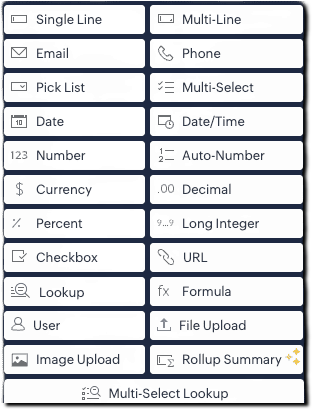
From Zoho CRM API version 6, you can add custom fields via API using the below endpoint:
|
POST
{api-domain}/crm/{version}/settings/fields?module={module_API_name}
|
From Zoho CRM API version 8, additional field types like multi-select lookups, multi-user lookup additions are also supported.
This article is intended to be a guide on how to create fields through the API.
|
Field Type (UI)
|
Field Data Type
|
|
Single Line
|
text
|
|
Multi-Line
|
textarea
|
|
Email
|
|
|
Phone
|
phone
|
|
Pick List
|
picklist
|
|
Multi Select
|
multiselectpicklist
|
|
Date
|
date
|
|
Date/Time
|
datetime
|
|
Number
|
integer
|
|
Auto-Number
|
autonumber
|
|
Currency
|
currency
|
|
Decimal
|
double
|
|
Percent
|
percent (only in POST)
|
|
Long Integer
|
bigint
|
|
Checkbox
|
Boolean
|
|
URL
|
website
|
|
Lookup
|
lookup
|
|
Formula
|
formula
|
|
User (Type- Single User)
|
userlookup |
|
User (Type- Multiple Users)
|
multiuserlookup
|
|
File Upload
|
fileupload
|
|
Image Upload
|
imageupload
|
|
Rollup Summary
|
rollup_summary
|
|
Multi-Select Lookup
|
multiselectlookup
|
The fields in below JSON are common for all fields. Field types such as single line text, phone, email, date, datetime, integer, and url fields consists of the below common fields alone and there are no dependent fields for them.
|
{
"fields": [
{
"field_label": "Your Field Label",
"data_type": "<field_type>",
"length": "<length>",
"tooltip": {
"name": "static_text",
"value": "Tooltip message"
},
"profiles": [
{
"id": "<profile_id_1>",
"permission_type": "read_write"
},
{
"id": "<profile_id_2>",
"permission_type": "read_only"
}
],
"external": {
"type": "user",
"show": false
},
"crypt": {
"mode": "decryption"
}
}
]
}
|
|
Key
|
Mandatory
|
Description
|
|
field_label
|
Yes
|
Display name of the field
|
|
date_type
|
Yes
|
Field type
|
|
length
|
No
|
Max number of characters allowed for a field |
|
filterable
|
No
|
Whether field can be used in filters. When set to true, the field will be available for use in Criteria Pattern Editors. Note that it is not applicable for imageupload, fileupload, textarea, and formula fields |
|
tooltip
|
No |
Field help text; name can be static_text or info_icon
|
|
profiles
|
No
|
Access control per profile (read_write, read_only, hidden)
|
| crypt |
No
|
Whether to encrypt the field (encryption or decryption)
|
|
unique
|
No
|
Enforce uniqueness across records
|
|
hipaa_compliance_enabled
|
No
|
Enable HIPAA protection
|
|
private
|
No
|
Enable GDPR-level handling (Low or High)
|
Single line Field
The single line field is a string field that can store 255 characters, and alphanumeric and special characters. It can be used to store fields like name, company, account name, etc. To create a single line field, give data_type as text.
A single line field can be marked as an external field. An external field is used to hold a record's unique ID available in an external system.
|
{
"fields": [
{
"data_type": "text",
"field_label": "External ID",
"external": {
"type": "org",
"show": true
}
}
]
}
|
Multiline Fields
The multi line field is a string field that can be used when you need a larger string field. It accepts alphanumeric and special characters. Multiline fields are of three types: plain text small, plain text large, and rich text field.
|
Multi-line field type
|
Character limit
|
Can be marked Mandatory?
|
Can be Encrypted?
|
|
Plain text small
|
Up to 2000
|
Yes
|
Yes
|
|
Plain text large
|
Up to 32000
|
Yes
|
No
|
|
Rich text (RTF)
|
Up to 50000
|
No
|
No
|
1) Plain Text Small Field
This type of multi-line field is ideal for concise entries up to 2000 character size. To create a plain text small multi line field, give data_type as textarea and type key in text area JSON object as "small".
|
{
"fields": [
{
"field_label": "Apartment_details",
"data_type": "textarea",
"length" : 2000,
"textarea": {
"type": "small"
}
}
]
}
|
2) Plain Text Large Field
This type of multi line field is ideal for more extensive entries of up to 32000 character size. To create a plain text large multi line field, give data_type as textarea and type key in text area JSON object as "large".
|
{
"fields": [
{
"field_label": "Apartment_details",
"data_type": "textarea",
"length" : 32000,
"textarea": {
"type": "large"
}
}
]
}
|
3) Rich text Field
Rich text field is ideal when formatted text needs to be entered. The length of the entry can be up to 50000 characters. To create a plain text large multi line field, give data_type as textarea and type key in text area JSON object as "rich_text"
|
{
"fields": [
{
"field_label": "Apartment_details",
"data_type": "textarea",
"length" : 50000,
"textarea": {
"type": "rich_text"
}
}
]
}
|
Picklist Field
Picklist is a field that lets you choose a value from a set of predefined values. The pick list value accepts all alphanumeric and special characters.
To create a picklist field, give data_type as picklist .Picklist fields have dependent JSON array - pick_list_values.
- pick_list_values: This JSON array comprises the options for the picklist field. Inside the array, display_value and actual_values stores the label shown for the picklist value in the CRM UI and the actual internal value of the picklist option respectively. The colour_code field consists of the color code of the picklist option in hex format, if color code is enabled.
- enable_colour_code - Boolean value that represents whether color code is enabled for the script
- history_tracking_enabled - This key when set as true audit/history tracking for the picklist field is enabled. Users with Module Customization permission can enable picklist history tracking. You can enable tracking for one picklist field per module, and this will be applicable across all layouts.
|
{
"fields": [
{
"field_label": "Your picklist's field label",
"data_type": "picklist",
"enable_colour_code": true,
"history_tracking_enabled": true,
"pick_list_values": [
{
"display_value": "Option 1",
"colour_code": "#af38fa",
"actual_value": "Option 1"
},
{
"display_value": "Option 2",
"colour_code": "#ffd6bc",
"actual_value": "Option 2"
},
{
"display_value": "Option 3",
"colour_code": "#cfddbc",
"actual_value": "Option 3"
}
]
}
]
}
|
Global picklist Field
Global sets in Zoho CRM is a type of picklist that helps you easily manage picklist values that recur across modules. To create a global picklist, use the Create Global Picklist API. The global picklist can then be associated to a module in the below format using the Create Custom Field API.
|
{
"fields": [
{
"field_label": "Source",
"data_type": "picklist",
"global_picklist": {
"id": "72223455366"//Id of the global picklist
}
}
]
}
|
Multi-Select Picklist Field
Multi-select picklist allows you to select multiple values while creating or editing record. The pick list value accepts all alphanumeric and special characters. To create a multi select picklist, give data type as multiselectpicklist.
Note that Picklist tracking is not supported for multi-select picklists
|
{
"fields": [
{
"field_label": "Preferred working days",
"data_type": "multiselectpicklist", // Specify the data type as multiselectpicklist*
"pick_list_values": [
{
"display_value": "Monday",
"actual_value": "1"
},
{
"display_value": "Tuesday",
"actual_value": "2"
},
{
"display_value": "Wednesday",
"actual_value": "3"
},
{
"display_value": "Thursday",
"actual_value": "4"
},
{
"display_value": "Friday",
"actual_value": "5"
}
],
"pick_list_values_sorted_lexically": true,
"enable_colour_code": true
}
]
}
|
Auto Number Field
Auto Number fields are used for assigning a unique incremental number automatically to each record, making identification easy. To create an auto number field, set "data_type" as "autonumber" and include an auto_number object with the following keys:
- start_number (mandatory) – Starting value for the auto-number sequence.
- prefix (optional) – (String) to prepend to the number.
- suffix (optional) – (String) to append to the number.
- _update_existing_records (optional) – (Boolean). If set to true, updates existing records with new auto-numbers based on the current format. Default value is false.
|
{
"fields": [
{
"field_label": "Order ID",
"data_type": "autonumber",
"auto_number": {
"start_number": 1000,
"prefix": "ORD-",
"suffix": "-2025",
"_update_existing_records": true
}
}
]
}
|
Currency Field
Currency field is used to store amount values. To create a currency field, set "data_type" as "currency" and define the currency JSON object with the following keys:
- rounding_option(mandatory) – Specifies how values should be rounded:
- "normal" – No rounding.
- "round_off" – Rounds to nearest based on precision.
- "round_up" – Always rounds up based on precision.
- "round_down" – Always rounds down based on precision.
- precision(optional) – Number of decimal places displayed in the UI (e.g., 123.466 with precision 2 becomes 123.47).
- decimal_place(optional) – Maximum number of decimal places stored. Values beyond this are truncated. Max allowed decimal places: 9.
|
{
"fields": [
{
"field_label": "Deal Amount",
"data_type": "currency",
"currency": {
"rounding_option": "round_up",
"precision": 2,
"decimal_place": 3
}
}
]
}
|
Decimal Field
Decimal field is used to store decimal numbers. To add a decimal (floating point) number field, use "data_type": "double".
- length(optional) – Total number of digits allowed, including both sides of the decimal point.
- decimal_place(optional) – Number of digits to allow after the decimal point (e.g., 2 means values like 123.45).
|
{
"fields": [
{
"field_label": "Discount Rate",
"data_type": "double",
"length": 16,
"decimal_place": 2
}
]
}
|
Percent Field
This field type is used to capture percentage values, such as scores or growth rates. To create a percentage field, use "data_type": "percent".
|
{
"fields": [
{
"field_label": "Enrollment number",
"data_type": "bigint",
"length": 18,
"separator": true
}
]
}
|
Long Integer Field
Long Integer Fields are number fields that accept up to 18 digits. To create a long integer field, use "data_type": "bigint".
|
{
"fields": [
{
"field_label": "Enrollment number",
"data_type": "bigint",
"length": 18,
"separator": true
}
]
}
|
Separator: a Boolean key that indicates whether the number is formatted for better readability. It is applicable for data types integer, double, bigint. Refer to this article on changing locale information for information on how to change it.
Checkbox Field
Checkbox value allows you to select or unselect a value indicating true or false. To create a checkbox field, use "data_type": "boolean".
|
{
"fields": [
{
"field_label": "Previously Employed?",
"data_type": "boolean"
}
]
}
|
Lookup Field
Use "data_type": "lookup" to associate records from another module. The lookup JSON object defines the target module, display label, and optional filter criteria.
-
module.api_name(mandatory) – API name of the target module (get via Modules API).
-
display_label(mandatory) – Label shown in the related list.
-
query_details(optional) – Used to define lookup filters. Inside query_details JSON Object following keys are present:
-
criteria(mandatory if query_details is used) – Filter logic.
-
group_operator – "AND"/"OR" (required for multiple conditions).
-
group – Array of filter conditions. Each condition includes:
-
field.api_name: Field in the target module
-
comparator: Operator like contains, equal
-
value: Value to match
-
revalidate_filter_during_edit(optional) – If true, validates filter conditions on record edit.
|
{
"fields": [
{
"field_label": "Your lookup",
"data_type": "lookup",
"lookup": {
"module": {
"api_name": "Contacts"
},
"display_label": "Contact Lookup",
"revalidate_filter_during_edit": true,
"query_details": {
"criteria": {
"group_operator": "AND",
"group": [
{
"field": {
"api_name": "Phone"
},
"comparator": "contains",
"value": "91"
},
{
"field": {
"api_name": "Lead_Source"
},
"comparator": "equal",
"value": [
"Cold Call"
]
}
]
}
}
}
}
]
}
|
Formula Field
Formula fields are used to calculate different types of values, including numeric values, text values, date values, etc. Use "data_type": "formula" to calculate dynamic values based on other fields.
For more details on all the available usages in the formula field, refer to this help doc on formula field. The formula object defines the logic and output type.
- formula.return_type (mandatory for formula field) – Output type of the formula. Possible values: double, currency, text, date, datetime, boolean
- formula.expression(mandatory) – The actual formula logic (e.g., "Sqrt(Len(${Email}))").
- decimal_place(optional) – Number of decimal places (only for double or currency).
- number_separator(optional) – If true, formats the number using separators (default is true).
|
{
"fields": [
{
"field_label": "Total amount",
"data_type": "formula",
"formula": {
"return_type": "double",
"expression": "${Amount} + 150"
},
"decimal_place": 0,
"number_separator": false
}
]
}
|
Auto refresh formula field
These type of formula fields are used when you need an accurate time measurement whenever you view the record. The key "dynamic" set as true indicates that the field is an auto refresh formula field.
For example, the age of a deal can be calculated by comparing the created time of the deal with the current time. A condition can be given to stop computing the value of the auto refresh field.
- dynamic: When set as true, indicates that the formula field is an auto refresh field.
- stop_compute_conditionally: When set as true, indicates that the computation of field stops when the condition given in stop_compute_expression key
-
stop_compute_expression: Mandatory when stop_compute_conditionally is true. Consists of the condition for stopping computation of the auto refresh formula field.
|
{
"fields": [
{
"field_label": "Deal Age",
"data_type": "formula",
"formula": {
"expression": "Datecomp(${Created_Time},Now())",
"return_type": "double",
"dynamic": true,
"stop_compute_conditionally": true,
"stop_compute_expression": "${Probability}==100"//When the deal probability is 100, the calculation gets stopped.
}
}
]
}
|
User lookup Field
User lookup field is used to associate a specific user to a record of the module. Use "data_type": "userlookup" to add a user lookup field.
The lookup JSON object defines the key properties of the user lookup
- query_details (JSON object): Defines filters to restrict which users are selectable.
- criteria: Uses a group of field conditions (field, comparator, value) with a group_operator (AND, OR) to filter users.
- revalidate_filter_during_edit (Boolean): If true, the criteria is reevaluated on record edit for the value selected on the record creation. This option is useful when associated values or fields have changed due to updates. It allows users to re-check and confirm that the correct records are still linked when editing the record.
- sharing_properties (JSON object): Contains details of access given to users
- share_preference_enabled (Boolean): If true, enables access to the records for the users.
- share_permission (String): Defines what level of access the associated user has (e.g., "read-only", "full-access", "read-write").
|
{
"fields": [
{
"field_label": "Assigned Sales Rep",
"data_type": "userlookup",
"tooltip": {
"name": "info_icon",
"value": "Sales user responsible for this lead"
},
"lookup": {
"revalidate_filter_during_edit": true,
//associate only users from countries India, and email containing "zylker.com".
"query_details": {
"criteria": {
"group_operator": "AND",
"group": [
{
"field": {
"api_name": "country"
},
"comparator": "equal",
"value": "India"
},
{
"field": {
"api_name": "email"
},
"comparator": "contains",
"value": "@zylker.com"
}
]
}
}
},
"sharing_properties": {
"share_preference_enabled": true,
"share_permission": "read-only"
}
}
]
}
|
Multiuser lookup Field
Multi-user look up is a lookup field that lets you add multiple users to a module record. It allows you to establish many-to-many relationships between modules and users in CRM.
Multi user lookup can be added by using the data_type "multiuserlookup".
- record_access: This Boolean key when marked as true indicates that the added user has access to the record. The users selected in the multi-user lookup field will be able to 'Edit', 'Delete', 'Change the owner' of that respective record
|
{
"fields": [
{
"field_label": "Associated_Agents",
"data_type": "multiuserlookup",
"multiuserlookup": {
"record_access": true
}
}
]
}
|
File Upload Field
User data type "fileupload" to add a file upload field
|
{
"fields": [
{
"field_label": "Resume Upload",
"data_type": "fileupload",
"length": 1,// Allow only 1 file, Maximum length : 5
"tooltip": {
"name": "info_icon",
"value": "Upload the applicant's resume in PDF or DOC format"
}
}
]
}
|
Image Upload Field
User data type "imageupload" to add an image upload field
|
{
"fields": [
{
"field_label": "Profile Photo",
"data_type": "imageupload",
"length": 1, // Only 1 profile photo allowed, Maximum length 10
"tooltip": {
"name": "info_icon",
"value": "Upload a professional head shot for the employee record"
}
}
]
}
|
Rollup Summary Field
Rollup Summary is a field that aggregates or summarizes a desired related list field. Rollup Summary Fields are of two types - Custom Rollups and Predefined Rollups. You can create only custom rollups using APIs. Supported related modules for APIs are Calls, Meetings, and Tasks
- function - Indicates the mathematical function applied to calculate the rollup summary.
- field_label - Represents the label of the field as it appears in the UI.
- data_type - This must be set to "rollup_summary" for rollup summary field.
- rollup_summary - This object contains all the configuration details for the rollup field.
- return_type - Specifies the type of value returned.
- expression - Defines the calculation logic for the rollup.
- function_parameters An array containing parameters needed by the function, typically including:
- api_name: The field being summarized.
- criteria Defines the filters to apply to the related records. Each condition includes:
- group_operator: If there are multiple conditions, you should also include AND or OR as the group operator for the conditions. It consists of an array of conditions.
- group: Array element of a condition
- field
- api_name: The API name of the field.
- comparator: The comparison operator (e.g., equal, greater_than, contains).
- value: The value used in the comparison.
- function - The function to be applied to the filtered records. Allowed functions : COUNT, MAXIMUM, MINIMUM, AVERAGE, RECENT, UPCOMING, EARLIEST.
- based_on_module - Specifies the module from which to summarize related records.
- related_list - Indicates the related list within the module (e.g., "Deals", "Contacts") to summarize from.
|
{
"fields": [
{
"field_label": "Total Invoice Amount",
"data_type": "rollup_summary",
"rollup_summary": {
"return_type": "currency",
"expression": {
"function_parameters": [
{
"api_name": "Grand_Total"
}
],
"criteria": {
"group_operator": "AND",
"group": [
{
"comparator": "equal",
"field": {
"api_name": "Billing_Country"
},
"value": "United States"
},
{
"comparator": "greater_than",
"field": {
"api_name": "Invoice_Date"
},
"value": "2024-01-01"
}
]
},
"function": "SUM"
},
"based_on_module": {
"api_name": "Invoices"
},
"related_list": {
"api_name": "Invoices"
}
}
}
]
}
|
Multi-Select Lookup Field
Multi-Select Lookup Field enables you to establish a many-to-many relationship between two modules in CRM.
- multiselectlookup : The mulitselectlookup JSON object specify the linking details between the module in which the field is present and another module
- connected_details: This JSON object contains details about the module you want to connect the current module with.
- module.api_name: Specify the module API name you want to link the current module with.
- field.field_label: When connecting a module, the system creates a new lookup field in the connected module for the current module. Use this key to specify a field label in the connected module.
- linking_details: When creating a multi-select lookup field, the system creates a separate module connecting these two modules, which contains their common details. This module is called the linking module
- module: Consists of the details of the linking module.
- plural_label: Specify a plural label for the linking module.
|
{
"fields": [
{
"field_label": "Skills",
"data_type": "multiselectlookup",
"multiselectlookup": {
"connected_details": {
"module": {
"api_name": "Skills"
},
"field": {
"field_label": "SkillName"
}
},
"linking_details": {
"module": {
"plural_label": "EmpXSkill"
}
}
}
}
]
}
|
Previous Kaizen Post : Kaizen #192 - Implementing Custom Token Persistence|Kaizen Directory