Kaizen 214 - Workflow APIs - Part 2

Last week, we discussed how Zylker Cloud Services used the Workflow APIs to discover and audit all the automations in their CRM, listing every workflow, checking triggers, and understanding their automation limits. This week, we take the next step: understanding what configurations are valid before creating or updating workflows via APIs.
Step 4: Workflow Rule Configurations API
When you work in the CRM UI, creating workflows feels straightforward. The interface shows only valid triggers and actions. Try adding an unsupported action, and it simply will not appear. This is because the UI enforces hundreds of rules behind the scenes.
With APIs, these validations must be handled manually. That is where the Workflow Rule Configurations API comes in. It gives all the valid triggers and actions for a given module, preventing errors before they happen.
Why this API matters
Consider two examples:
You want to create a workflow for the Products module based on a Scoring Rule update. The UI hides this option because scoring rules are not supported for Products.
You try to add a Field Update action for a Record Delete trigger. This is invalid, as the record no longer exists. The UI prevents it, but via API, you would get an error if you try to create or update the workflow with this configuration.
The Configuration API removes this guesswork, allowing you to fetch and respect valid triggers and actions.
Sample Request:
GET {api-domain}/crm/v8/workflow_configurations?module=Deals
Sample Response:
{ "workflow_configurations": { "related_triggers_details": [ { "api_name": "Notes", // The API name of the related module that can trigger workflows "module": { // Details about the related module "singular_label": "Note", "plural_label": "Notes", "api_name": "Notes", "name": "Notes", "id": "4876876000000002197" }, "name": "Notes", // Module name "triggers": [ // Available triggers for this related module { "api_name": "create", "deprecated": false, "name": "Create", "scheduled_actions_supported": true, "actions": [ // List of supported actions for this trigger "add_tags", "remove_tags", "email_notifications", "tasks", "create_record", "create_connected_record", "add_meeting", "webhooks", "functions", "flow" ] }, // ... other triggers (create_or_edit, edit, delete) omitted for brevity ] } ], "triggers": [ // Primary triggers for the Deals module itself { "api_name": "score_increase", "deprecated": false, "name": "ScoreIncrease", "scheduled_actions_supported": false, // Indicates whether scheduled actions are allowed for this trigger "actions": [ // Only these instant actions are supported "field_updates", "assign_owner", "add_tags", "remove_tags", "email_notifications", "tasks", "webhooks", "functions", "circuits", "flow" ] }, // ... other triggers omitted for brevity ... ], "actions": [ // Details about available workflow actions { "is_clickable": true, "associate_action": false, "limit_per_action": null, "api_name": "schedule_call", "supported_in_scheduled_action": true, "name": "ScheduleCall", "limit": 1 // Maximum instances per workflow }, { "is_clickable": true, "associate_action": true, "limit_per_action": null, "api_name": "tasks", "supported_in_scheduled_action": true, "name": "Task", "limit": 5 }, // ... other actions omitted for brevity ... ] } } |
Interpreting and using the Workflow Configuration API
The configuration response might look complex, but it gives us all the information we need about configuring Workflow Rules in Zoho CRM, for the specific module.
4.1 "What can trigger my Workflow?"
The triggers array shows all the supported triggers for that specific module.
"triggers": [ { "api_name": "create", "deprecated": false, "name": "Create", "scheduled_actions_supported": true, "actions": [ "field_updates", "assign_owner", "add_tags", "remove_tags", "email_notifications", "tasks", "create_record", "create_connected_record", "add_meeting", "webhooks", "functions", "circuits", "flow" ] }, . . // ... other triggers omitted for brevity ... { "api_name": "score_increase", "deprecated": false, "name": "ScoreIncrease", "scheduled_actions_supported": false, "actions": [ "field_updates", "assign_owner", "add_tags", "remove_tags", "email_notifications", "tasks", "webhooks", "functions", "circuits", "flow" ] } ] |
The response lists all available triggers for the module. For each trigger type, you get:
Trigger conditions: When the workflow will be triggered (on create, edit, score change, etc.)
Action compatibility: Which actions can be used with each trigger type
Scheduled actions support: Whether scheduled actions are supported for that trigger or not.
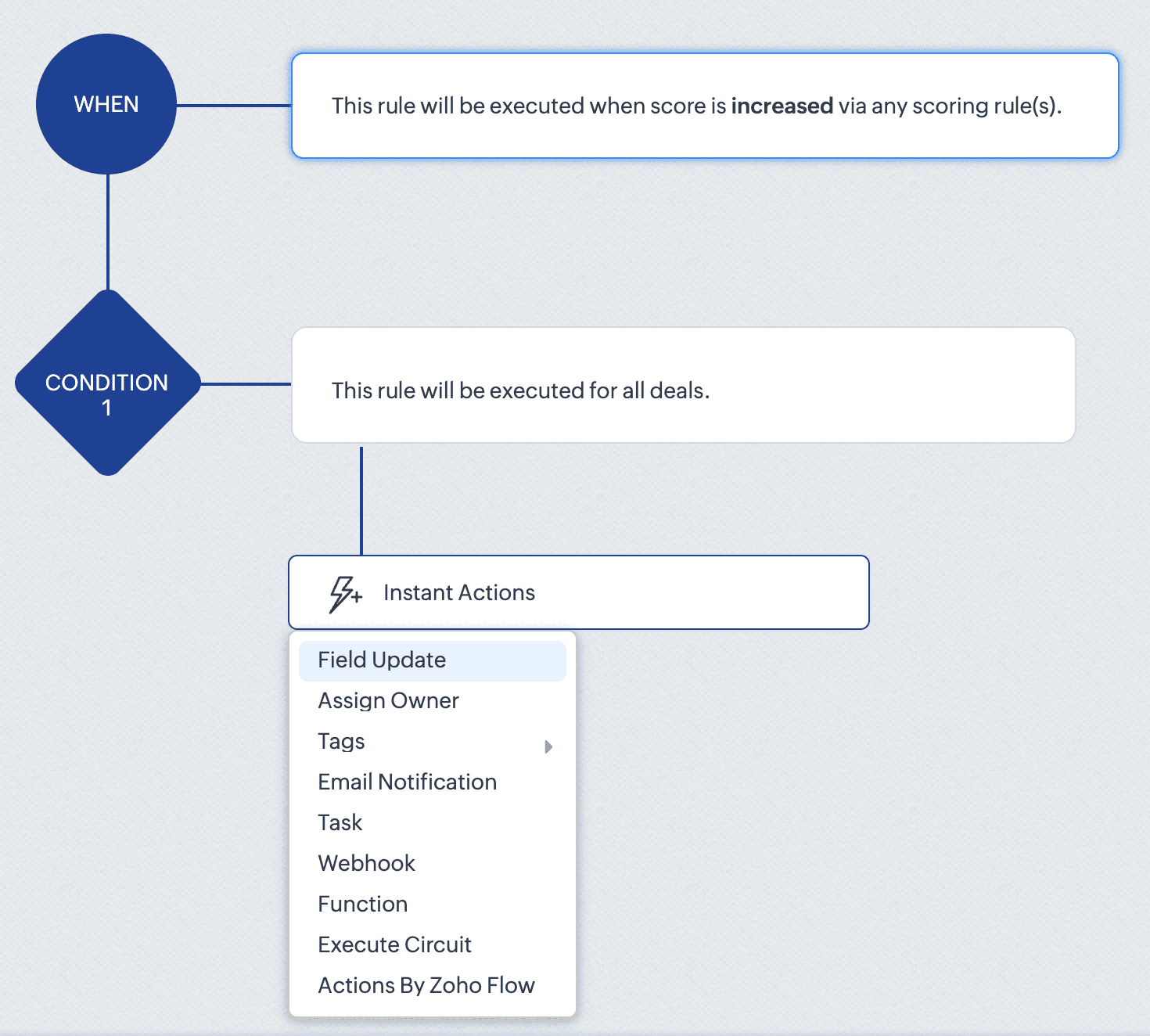
For instance, the score_increase trigger triggers the workflow when the score of a record is increased. The scheduled_actions_supported key is false for this trigger, which means that this specific trigger type doesn't support scheduled actions. This directly translates to API behaviour: attempting to configure a Workflow Rule via API with a scheduled action for the score_increase trigger will result in an error.
This API constraint is visibly enforced in the CRM interface. When configuring a score-based trigger in the UI:
4. 2. "What can my Workflow actually do?" - Understanding Actions
The actions array defines the execution capabilities of your workflows. For each action type, you get important information like:
Limits per action instance: Maximum number of items that can be processed within a single action instance
Instance limits: How many times this specific action can be added to a condition in the Workflow rule.
Scheduled action support: Whether the action can be added as a scheduled action.
For example, in the add_tags action:
{ "is_clickable": true, "associate_action": false, "limit_per_action": 10, // Maximum 10 tags per Add Tags action "api_name": "add_tags", "supported_in_scheduled_action": true, "name": "AddTags", "limit": 1 // Maximum one Add Tags action per workflow } |
From this data, it is clear that within a single Add Tags action, you can select up to 10 specific tags to add. Similarly, you can only include one Add Tags action instance in the entire workflow rule. Also, this action cannot be used as a scheduled action.
This has direct implications for API users:
Attempting to configure a workflow that adds more than 10 tags in one action will result in an error
Trying to add two separate Add Tags actions to the same workflow will fail
Adding a Add Tags action under scheduled actions section will also result in an error.
In the UI, these constraints are proactively taken care of. As seen in the GIF, if you add fewer than 10 tags, clicking Add Tags again only lets you edit the existing action. Also it lets you add only up to 10 tags in an action. And if you have already added an action with 10 tags, the Add Tags option will no longer be available. Either way, the system prevents any possibility of adding a second Add Tags action, regardless of tag count.
This UI experience is what the Workflow Rules Configuration API replicates for developers. By checking these limits before making API calls, you can build workflows using APIs with the same confidence and error-free experience that UI users have.
4.3. “What can trigger my Workflow from a related module?” – Understanding related triggers
The related_triggers_details array shows how changes in related records can trigger workflows in your primary module. For example, in the Deals module, for the Notes related trigger:
"related_triggers_details": [ { "api_name": "Notes", // The API name of the related module "module": { // Detailed information about the related module "singular_label": "Note", "plural_label": "Notes", "api_name": "Notes", "name": "Notes", "id": "4876876000000002197" }, "name": "Notes", // Module name "triggers": [ // Available triggers for this related module { "api_name": "create", // Trigger when related records are created "deprecated": false, "name": "Create", "scheduled_actions_supported": true, "actions": [ // Supported workflow actions for this trigger "add_tags", "remove_tags", "email_notifications", "tasks", "create_record", "create_connected_record", "add_meeting", "webhooks", "functions", "flow" ] }, // ... other triggers (create_or_edit, edit, delete) omitted for brevity ] } ] |
For each related module, you get:
Module information: Details about the related module that can trigger workflows.
Available triggers: The actions on the related record (create, edit, delete, etc) that can trigger the workflow.
Supported actions: For each trigger, the actions that are supported for that specific trigger.
For instance, the Notes related trigger allows you to create workflows that execute when notes are added to deals. The configuration shows that when a note is created, your workflow can perform actions like sending email notifications, creating tasks, triggering webhooks, and more.
If you try to include an unsupported trigger or unsupported action, the API call will fail. For example, adding a field_updates action for a Notes create trigger . The configuration API response clearly shows that field_updates is not among the supported actions for Notes-related triggers.
The API also gives us important differences between trigger-action configurations. For example, while field_updates action is supported for the create trigger for the main module (Deals), the same action is not supported for the related module (Notes) create trigger. These distinctions would otherwise only be discovered through API errors.
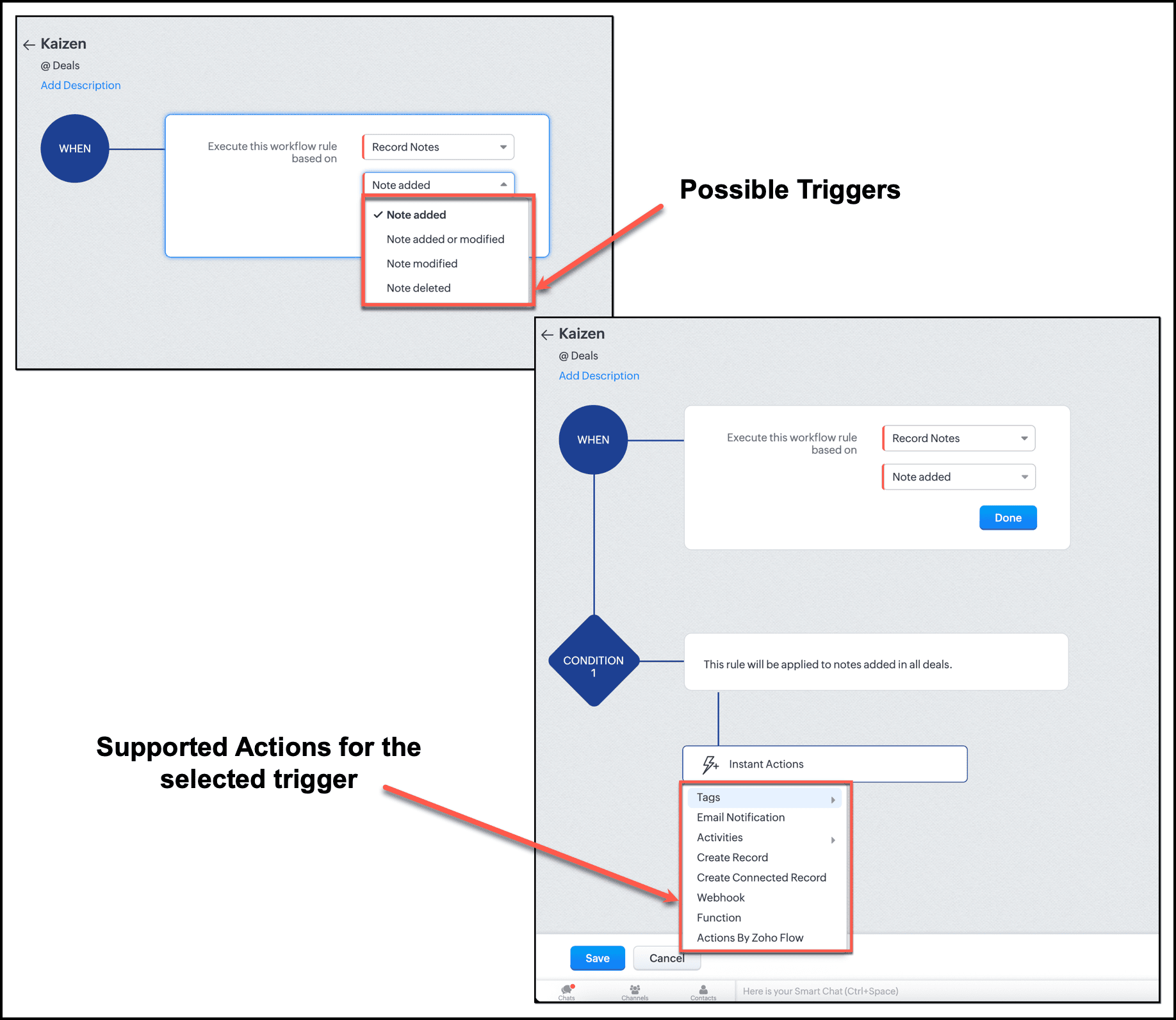
In the UI, this limitation is enforced. When setting up a workflow triggered by Notes, the "Field Updates" action does not appear in the available actions list.
By checking the related_triggers_details section before making API calls, you can discover exactly which actions are supported for each related module trigger, thus avoiding configuration errors while creating or updating Workflow rules.
Conclusion
The Workflow Configuration API transforms how we approach automation development through APIs. Instead of discovering constraints through failed API calls, we can now design workflows with the right configuration, without any trial-and-error methods. It gives us complete visibility into all valid trigger-action combinations before a single line of code is written, enough information to build automations triggered by related records, and limit awareness to respect action constraints before they become API errors.
For Zylker, this means we can now confidently proceed with updating the old Workflow rules and creating new ones. In our next post, we will put this knowledge into action.
We hope that you found this post useful. If you have any questions or feedback, let us know in the comments below, or write to us at support@zohocrm.com. We would love to hear from you!

Topic Participants
Anu Abraham
Sticky Posts
Kaizen #198: Using Client Script for Custom Validation in Blueprint
Nearing 200th Kaizen Post – 1 More to the Big Two-Oh-Oh! Do you have any questions, suggestions, or topics you would like us to cover in future posts? Your insights and suggestions help us shape future content and make this series better for everyone.Kaizen #226: Using ZRC in Client Script
Hello everyone! Welcome to another week of Kaizen. In today's post, lets see what is ZRC (Zoho Request Client) and how we can use ZRC methods in Client Script to get inputs from a Salesperson and update the Lead status with a single button click. In thisKaizen #222 - Client Script Support for Notes Related List
Hello everyone! Welcome to another week of Kaizen. The final Kaizen post of the year 2025 is here! With the new Client Script support for the Notes Related List, you can validate, enrich, and manage notes across modules. In this post, we’ll explore howKaizen #217 - Actions APIs : Tasks
Welcome to another week of Kaizen! In last week's post we discussed Email Notifications APIs which act as the link between your Workflow automations and you. We have discussed how Zylker Cloud Services uses Email Notifications API in their custom dashboard.Kaizen #216 - Actions APIs : Email Notifications
Welcome to another week of Kaizen! For the last three weeks, we have been discussing Zylker's workflows. We successfully updated a dormant workflow, built a new one from the ground up and more. But our work is not finished—these automated processes are
Recent Topics
How to Fetch data from Sales Order and Insert into Purchase Order with Deluge
Hello, I am wanting to write a Deluge script that would take the shipping address on a Sales Order and upon conversion to a Sales Order automatically insert it into that corresponding PO. I am new to Deluge but understand that it has great capabilities.Google Drive shared folder
My deluge script has stopped working, no longer collecting files from Google Drive - have these connections finally been deprecated ?? They seem to be active but errors occur when updating them ?Zoho Desk: Mobile Updates | Q1 2026
Hello everyone, Greetings! As we gear up for the end of Q1, we are excited to share a quick journey into all that released in the first quarter of 2026. We have brought in a few enhancements in the mobile apps that improve overall user experience andCRM x WorkDrive: We're rolling out the WorkDrive-powered file storage experience for existing users
Release plan: Gradual rollout to customers without file storage add-ons, in this order: 1. Standalone CRM 2. CRM Plus and Zoho One DCs: All | Editions: All Available now for: - Standalone CRM accounts in Free and Standard editions without file storageAdditional Address - Company Name
It would be very helpful to have a "Company Name" field in the Additional Address shipping section. In a situation where you drop-ship orders to a different address or different company entirely, it may be necessary to list the company name of the receiver. I understand that the Attention field can be used for that purpose, but that's not really the intended purpose of that field.All new Address Field in Zoho CRM: maintain structured and accurate address inputs
Availability Update: 29 September 2025: It's currently available for all new sign-ups and for existing Zoho CRM orgs which are in the Professional edition exclusively for IN DC users. 2 March 2026: Available to users in all DCs except US and EU DC. 24Zoho Payroll's Kuwait, Oman, Qatar, Bahrain and Canada edition is available in Zoho One
Great news for Zoho One users! Zoho Payroll has expanded to five new regions: Kuwait, Oman, Qatar, Bahrain, and Canada. And the best part? These new editions are fully integrated with Zoho One, just like our existing editions in India, the UAE, SaudiDoes Zoho Creator support multilingual translation for user-entered data?
I understand that Zoho Creator provides localization support for UI elements such as field labels and static text. I would like to know: Does Zoho Creator support automatic translation of user-entered data (for example, form inputs or stored records)Upload field on tasks module
Hello, Why I cannot add an upload field to a Task? Or maybe when creating the task make attachements visible, so you can add an attachement while creating the task? Looking forward to your response!WhatsApp phone number migration
Hi @Gowri V and @Pheranda Nongpiur, Thanks for implementing the promised enhancements to the integration between Zoho CRM and WhatsApp. The previous discussion has been locked, so I'm opening this new one. I am copying below a specificHow to let club members update their own profile data
Our club has about 200 members. We keep names, addresses, phones, emails, payment records, etc. for each, recently migrated to Creator. Once a year I send email to each member to confirm or correct their info on file with us, as well as ask for paymentDocument retention in Zoho Sign
Document management doesn’t end at signing. It extends to how long you retain agreements—and how securely you dispose of them. With the document retention option in Zoho Sign, you can define structured, policy-driven timelines for managing completed documents.Sales Allowed Beyond Available Stock and Payment Recorded Without Restriction
Hi, While testing in Zoho Inventory, I noticed that a sales order can be created with a quantity exceeding the available stock in the selected warehouse. In my case: Available stock: 5 units Ordered quantity: 6 units Despite this: I was able to convertDeleting, Adding and Changing a Zoho Books Entry
Zoho Books Community & Support, If a bulk upload of entries were added to an account, what is the process to: - Delete an entry - Change the amount of an entry - Is there a means to manually add an entry other than upload?Zoho Commerce in multiple languages
When will you be able to offer Zoho Commerce in more languages? We sell in multiple markets and want to be able to offer a local version of our webshop. What does the roadmap look like?Zoho CRM - Feature Request - Analytics Components Group By Week Alternative Formats
On the Zoho CRM Analytics Components, please consider adding an option to allow group by week format to be changed to other formats such as Week Commencing or Week Ending dates, rather than the current Week Number. This would provide improved usabilityThe Social Playbook March edition: Myth vs Facts
We’ve all heard a lot of myths growing up. Some sound convincing, some feel believable, and over time they start to feel like facts. But the truth is, a myth is still a myth until it’s backed by real facts. Marketing is no different. Over time, many ideasUpdating Analytical Fields Data
Dear Zoho team, I'm having an issue with the recently added fields in both Analytical Desk and Analytical. How can I generate the data in Analytical when new fields are added? https://analytics.zoho.com/workspace/2436819000000007005/edit/24368190000Marketing Tip #26: Optimize product images for SEO
Product images can do more than make your store look good. They can also help customers discover your products through search. Since search engines can’t "see" images, they rely on text signals to understand what an image is about. Two small actions makeWhat's New in Zoho Analytics - February 2026
Hello Users! We're back with another round of updates for Zoho Analytics. This month's release focuses on giving you greater flexibility in how you visualize, manage, and act on your data - with new features like custom visualizations, remote MCP server,Clone a Module??
I am giong to repurpose the Vendors module but would like to have a separate but very similar module for another group of contacts called Buyers. I have already repurposed Contacts to Sellers. Is it possible to clone (make a duplicate) module of Vendors[Webinar] Solving business challenges: Secure, real-time, and external collaboration
Hi Zoho Writer users, We are excited to announce Zoho Writer's webinar for March 2026: Solving business challenges: Secure, real-time, and external collaboration. Zoho Writer supports real-time collaboration by allowing teams to work together in documents.Realtime Translations of Video via OnAir
It would be an amazing feature to have a drop down selector in the On Air video area for attendees to select a language to convert the original language to.can change deal colors in bigin?
can be super useful if we can change colors deals process any way to do it?You have reached the maximum limit of bank accounts that can be connected to Zoho Books through token.
I can no longer connect to my bank account to download transactions into Zoho Books. I egt the error message: "You have reached the maximum limit of bank accounts that can be connected to Zoho Books through token. To connect more accounts, write to usAssign emails to lead
I have some contacts who refers leads but there is no away to manually assign emails to lead.Separate Items & Services
Hi, please separate items and services into different categories. Thank youCan I import MSG files into Microsoft 365 without Outlook?
Yes, absolutely. You do not need Outlook installed to import MSG files into Microsoft 365. Aryson MSG file Converter is a dedicated tool that eliminates the Outlook dependency entirely, making the migration process simple and efficient for all users.Print Sales Orders, Purchase Orders or Invoices from API
Hello, Is it possible to use the print option that is available in Sales Orders Purchase Orders and Invoices with the API?. I don't see any information in the docs about this. ThanksHow are you syncing CRM, Inventory & orders in Zoho without issues?
Hi everyone, While working with Zoho One, I noticed syncing CRM, Inventory, and orders can get tricky as operations grow. Issues I’ve seen: Inventory mismatches Delayed order updates Too much manual intervention For those using Zoho at scale — How arePush Forms to CRM
Hello, I created a Form but forgot to integrate to CRM before many of the Forms were filled out. Is it possible to push those entries to CRM or should I just export a CSV then upload to CRM?Better use of contacts
Zoho inventory has the ability to add multiple contacts to customers. However Zoho inventory doesn't currently provide a way to link a contact to objects like sales orders. This means that while you can tell what company has placed a sales order you can'tLayout Adjustment.
Hello Latha, Hope you are doing well. I wanted to check with you about adjusting the layout columns in the Service Report from the backend, as currently there is no capability for us to customize the layout from our end. Below is the output that I amLooking for Guidance on Building a Zoho Website
I'm exploring the possibility of building a custom website with specific features using Zoho as an alternative platform. My goal is to create something similar to https://gtasandresapk.com , with the same kind of functionality and user experience. I'dInvoice emails repeatedly "Bounced back" from perfectly good email address of clients.
Hi For a couple of months now I am getting tens of invoice email invoices "bounced back" from perfectly sound email addresses when they are sent via Zoho Books. (see attached or an example) (the common theme seems to be that the emails are going to eitherNewby Questions - Vendors, Customers, and Income vs. Other Income Clarifications
Q1. For Deposits, there does not seem to be an option for "Income". "Other Income" is an option however. What is the process to add the option to assign a deposit to type "Income"? Q2. In many cases Vendors and Customer are the same. Vendors may purchaseyodlee bank fees
My bank feeds have been pretty much error-free until this recent Yodlee update. I have configured it as per the information however nothing comes through. It says that bank feeds have been refreshed as of 30th June, 2022. It is the end of the financialCreate Item group from a composite Item
I have applied my mind for hours but cannot figure this out. Can you have a composite item in an item group?. E.g. We bundle different color and size SKU's together as composite items. Also Using composite items as Bill of Materials. We want to createAmazon.in FBA multiple warehouse integration with Zoho Inventory
My organisation subscribed to Zoho One looking at the opportunity to integrate Amazon.in with Inventory. But during the configuration, we understood the integration has severe limitations when it involves multiple warehouses in the same Organisation.Feature Request - Make Available "Alias Name" Field In Item List View
Hi Zoho Inventory Team, I have noticed that the "Alias Name" field does not appear on the list of selectable columns in the Customise Columns feature in the Items module. This would be very useful to see for businesses who are using the Alias Name fieldNext Page