Kaizen 214 - Workflow APIs - Part 2

Last week, we discussed how Zylker Cloud Services used the Workflow APIs to discover and audit all the automations in their CRM, listing every workflow, checking triggers, and understanding their automation limits. This week, we take the next step: understanding what configurations are valid before creating or updating workflows via APIs.
Step 4: Workflow Rule Configurations API
When you work in the CRM UI, creating workflows feels straightforward. The interface shows only valid triggers and actions. Try adding an unsupported action, and it simply will not appear. This is because the UI enforces hundreds of rules behind the scenes.
With APIs, these validations must be handled manually. That is where the Workflow Rule Configurations API comes in. It gives all the valid triggers and actions for a given module, preventing errors before they happen.
Why this API matters
Consider two examples:
You want to create a workflow for the Products module based on a Scoring Rule update. The UI hides this option because scoring rules are not supported for Products.
You try to add a Field Update action for a Record Delete trigger. This is invalid, as the record no longer exists. The UI prevents it, but via API, you would get an error if you try to create or update the workflow with this configuration.
The Configuration API removes this guesswork, allowing you to fetch and respect valid triggers and actions.
Sample Request:
GET {api-domain}/crm/v8/workflow_configurations?module=Deals
Sample Response:
{ "workflow_configurations": { "related_triggers_details": [ { "api_name": "Notes", // The API name of the related module that can trigger workflows "module": { // Details about the related module "singular_label": "Note", "plural_label": "Notes", "api_name": "Notes", "name": "Notes", "id": "4876876000000002197" }, "name": "Notes", // Module name "triggers": [ // Available triggers for this related module { "api_name": "create", "deprecated": false, "name": "Create", "scheduled_actions_supported": true, "actions": [ // List of supported actions for this trigger "add_tags", "remove_tags", "email_notifications", "tasks", "create_record", "create_connected_record", "add_meeting", "webhooks", "functions", "flow" ] }, // ... other triggers (create_or_edit, edit, delete) omitted for brevity ] } ], "triggers": [ // Primary triggers for the Deals module itself { "api_name": "score_increase", "deprecated": false, "name": "ScoreIncrease", "scheduled_actions_supported": false, // Indicates whether scheduled actions are allowed for this trigger "actions": [ // Only these instant actions are supported "field_updates", "assign_owner", "add_tags", "remove_tags", "email_notifications", "tasks", "webhooks", "functions", "circuits", "flow" ] }, // ... other triggers omitted for brevity ... ], "actions": [ // Details about available workflow actions { "is_clickable": true, "associate_action": false, "limit_per_action": null, "api_name": "schedule_call", "supported_in_scheduled_action": true, "name": "ScheduleCall", "limit": 1 // Maximum instances per workflow }, { "is_clickable": true, "associate_action": true, "limit_per_action": null, "api_name": "tasks", "supported_in_scheduled_action": true, "name": "Task", "limit": 5 }, // ... other actions omitted for brevity ... ] } } |
Interpreting and using the Workflow Configuration API
The configuration response might look complex, but it gives us all the information we need about configuring Workflow Rules in Zoho CRM, for the specific module.
4.1 "What can trigger my Workflow?"
The triggers array shows all the supported triggers for that specific module.
"triggers": [ { "api_name": "create", "deprecated": false, "name": "Create", "scheduled_actions_supported": true, "actions": [ "field_updates", "assign_owner", "add_tags", "remove_tags", "email_notifications", "tasks", "create_record", "create_connected_record", "add_meeting", "webhooks", "functions", "circuits", "flow" ] }, . . // ... other triggers omitted for brevity ... { "api_name": "score_increase", "deprecated": false, "name": "ScoreIncrease", "scheduled_actions_supported": false, "actions": [ "field_updates", "assign_owner", "add_tags", "remove_tags", "email_notifications", "tasks", "webhooks", "functions", "circuits", "flow" ] } ] |
The response lists all available triggers for the module. For each trigger type, you get:
Trigger conditions: When the workflow will be triggered (on create, edit, score change, etc.)
Action compatibility: Which actions can be used with each trigger type
Scheduled actions support: Whether scheduled actions are supported for that trigger or not.
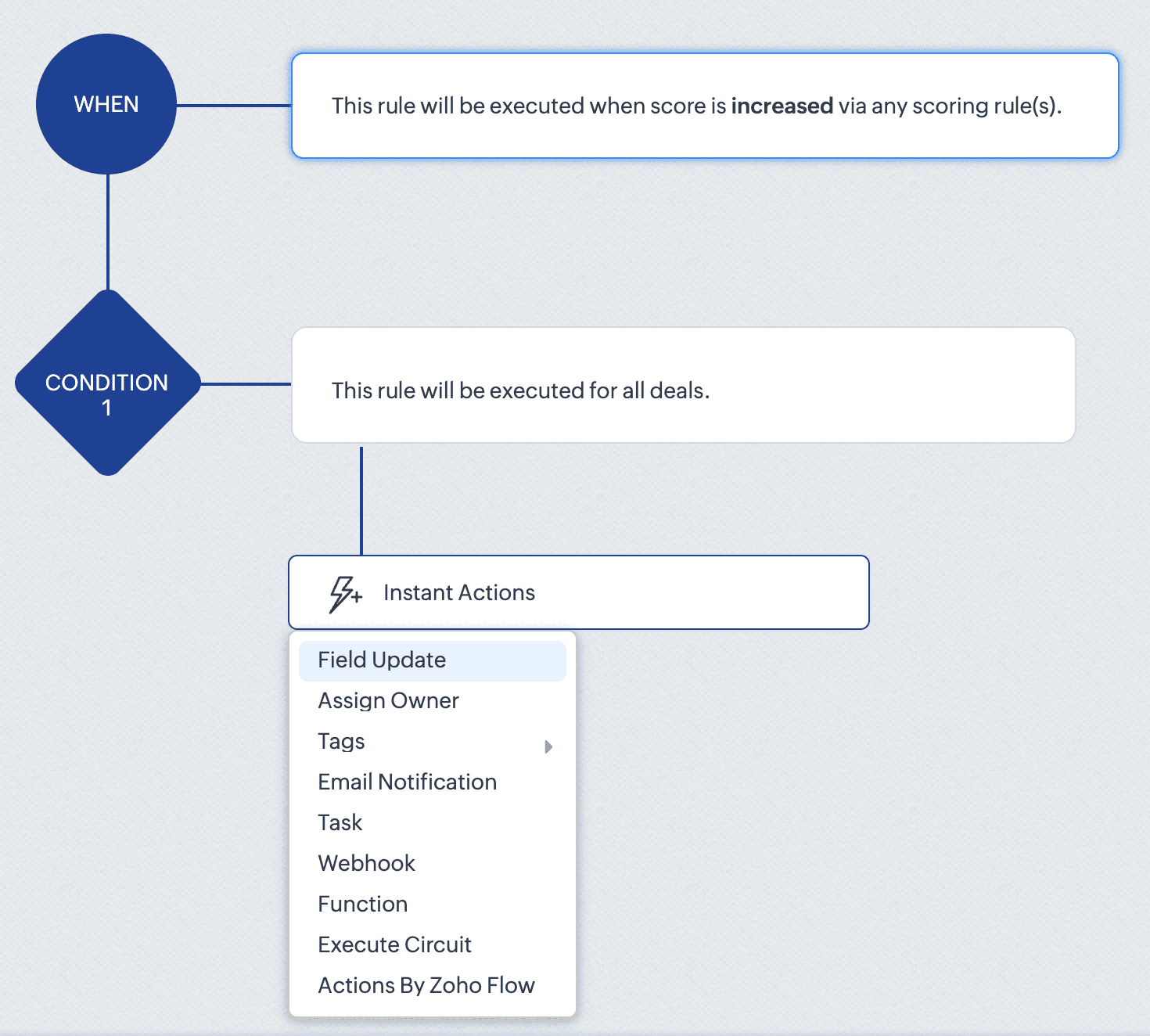
For instance, the score_increase trigger triggers the workflow when the score of a record is increased. The scheduled_actions_supported key is false for this trigger, which means that this specific trigger type doesn't support scheduled actions. This directly translates to API behaviour: attempting to configure a Workflow Rule via API with a scheduled action for the score_increase trigger will result in an error.
This API constraint is visibly enforced in the CRM interface. When configuring a score-based trigger in the UI:
4. 2. "What can my Workflow actually do?" - Understanding Actions
The actions array defines the execution capabilities of your workflows. For each action type, you get important information like:
Limits per action instance: Maximum number of items that can be processed within a single action instance
Instance limits: How many times this specific action can be added to a condition in the Workflow rule.
Scheduled action support: Whether the action can be added as a scheduled action.
For example, in the add_tags action:
{ "is_clickable": true, "associate_action": false, "limit_per_action": 10, // Maximum 10 tags per Add Tags action "api_name": "add_tags", "supported_in_scheduled_action": true, "name": "AddTags", "limit": 1 // Maximum one Add Tags action per workflow } |
From this data, it is clear that within a single Add Tags action, you can select up to 10 specific tags to add. Similarly, you can only include one Add Tags action instance in the entire workflow rule. Also, this action cannot be used as a scheduled action.
This has direct implications for API users:
Attempting to configure a workflow that adds more than 10 tags in one action will result in an error
Trying to add two separate Add Tags actions to the same workflow will fail
Adding a Add Tags action under scheduled actions section will also result in an error.
In the UI, these constraints are proactively taken care of. As seen in the GIF, if you add fewer than 10 tags, clicking Add Tags again only lets you edit the existing action. Also it lets you add only up to 10 tags in an action. And if you have already added an action with 10 tags, the Add Tags option will no longer be available. Either way, the system prevents any possibility of adding a second Add Tags action, regardless of tag count.
This UI experience is what the Workflow Rules Configuration API replicates for developers. By checking these limits before making API calls, you can build workflows using APIs with the same confidence and error-free experience that UI users have.
4.3. “What can trigger my Workflow from a related module?” – Understanding related triggers
The related_triggers_details array shows how changes in related records can trigger workflows in your primary module. For example, in the Deals module, for the Notes related trigger:
"related_triggers_details": [ { "api_name": "Notes", // The API name of the related module "module": { // Detailed information about the related module "singular_label": "Note", "plural_label": "Notes", "api_name": "Notes", "name": "Notes", "id": "4876876000000002197" }, "name": "Notes", // Module name "triggers": [ // Available triggers for this related module { "api_name": "create", // Trigger when related records are created "deprecated": false, "name": "Create", "scheduled_actions_supported": true, "actions": [ // Supported workflow actions for this trigger "add_tags", "remove_tags", "email_notifications", "tasks", "create_record", "create_connected_record", "add_meeting", "webhooks", "functions", "flow" ] }, // ... other triggers (create_or_edit, edit, delete) omitted for brevity ] } ] |
For each related module, you get:
Module information: Details about the related module that can trigger workflows.
Available triggers: The actions on the related record (create, edit, delete, etc) that can trigger the workflow.
Supported actions: For each trigger, the actions that are supported for that specific trigger.
For instance, the Notes related trigger allows you to create workflows that execute when notes are added to deals. The configuration shows that when a note is created, your workflow can perform actions like sending email notifications, creating tasks, triggering webhooks, and more.
If you try to include an unsupported trigger or unsupported action, the API call will fail. For example, adding a field_updates action for a Notes create trigger . The configuration API response clearly shows that field_updates is not among the supported actions for Notes-related triggers.
The API also gives us important differences between trigger-action configurations. For example, while field_updates action is supported for the create trigger for the main module (Deals), the same action is not supported for the related module (Notes) create trigger. These distinctions would otherwise only be discovered through API errors.
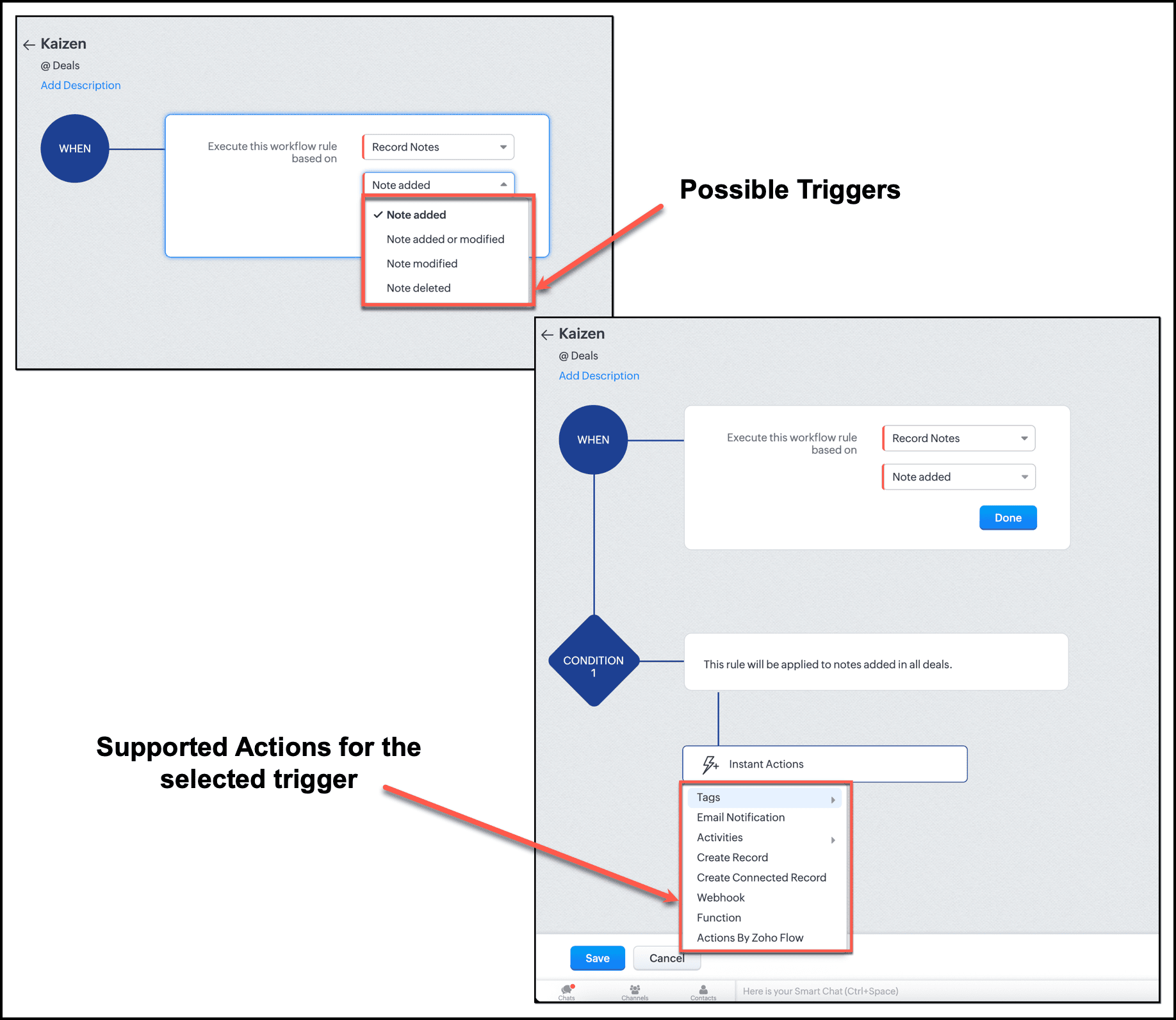
In the UI, this limitation is enforced. When setting up a workflow triggered by Notes, the "Field Updates" action does not appear in the available actions list.
By checking the related_triggers_details section before making API calls, you can discover exactly which actions are supported for each related module trigger, thus avoiding configuration errors while creating or updating Workflow rules.
Conclusion
The Workflow Configuration API transforms how we approach automation development through APIs. Instead of discovering constraints through failed API calls, we can now design workflows with the right configuration, without any trial-and-error methods. It gives us complete visibility into all valid trigger-action combinations before a single line of code is written, enough information to build automations triggered by related records, and limit awareness to respect action constraints before they become API errors.
For Zylker, this means we can now confidently proceed with updating the old Workflow rules and creating new ones. In our next post, we will put this knowledge into action.
We hope that you found this post useful. If you have any questions or feedback, let us know in the comments below, or write to us at support@zohocrm.com. We would love to hear from you!

Topic Participants
Anu Abraham
Sticky Posts
Kaizen #198: Using Client Script for Custom Validation in Blueprint
Nearing 200th Kaizen Post – 1 More to the Big Two-Oh-Oh! Do you have any questions, suggestions, or topics you would like us to cover in future posts? Your insights and suggestions help us shape future content and make this series better for everyone.Kaizen #226: Using ZRC in Client Script
Hello everyone! Welcome to another week of Kaizen. In today's post, lets see what is ZRC (Zoho Request Client) and how we can use ZRC methods in Client Script to get inputs from a Salesperson and update the Lead status with a single button click. In thisKaizen #222 - Client Script Support for Notes Related List
Hello everyone! Welcome to another week of Kaizen. The final Kaizen post of the year 2025 is here! With the new Client Script support for the Notes Related List, you can validate, enrich, and manage notes across modules. In this post, we’ll explore howKaizen #217 - Actions APIs : Tasks
Welcome to another week of Kaizen! In last week's post we discussed Email Notifications APIs which act as the link between your Workflow automations and you. We have discussed how Zylker Cloud Services uses Email Notifications API in their custom dashboard.Kaizen #216 - Actions APIs : Email Notifications
Welcome to another week of Kaizen! For the last three weeks, we have been discussing Zylker's workflows. We successfully updated a dormant workflow, built a new one from the ground up and more. But our work is not finished—these automated processes are
Recent Topics
Newby Questions
Q1. The top bar of Zoho Books has a "Search in Banking (/) " field. What is the proper use of this text box? - Searching for Amazon for example has no results but there are transactions. - Is the search case sensitive? - Are regular expressions allowed?Transaction Rule Matching
Q1. Is there a method to have the Transaction Rules applied across multiple Bank Accounts? Q2. To match "contains" text in Transaction Rules, is a wildcard or regular expression required? Is it case sensitive? Would searching for "issue" in the followingThree Zoho Billing Limitations Blocking Standard Subscription Operations
After working through Zoho Billing support for over a year on these three issues without resolution, we wanted to flag them to the broader community. We are curious whether other businesses are running into the same walls. 1. Cannot Prepone (Move Earlier)Automation #3 - Auto-sync email attachments to tickets
This is a monthly series where we pick some common use cases that have been either discussed or most asked about in our community and explain how they can be achieved using one of the automation capabilities in Zoho Desk. Most of our customers use emailCan't add a sender adress from zoho campaigns
hi, I need to change the sender address for a campaign. When i try to add it i get a message to say 'duplicated email address found while adding your sender address'. This is the first campaign i'm sending so I don't understand why this message is displayed? Thanks JaneUsing a custom single line External ID form as merge fields in templates
Hey everyone, We're looking to integrate a few external systems better with our Zoho CRM, and we had hoped to use external fields for this purpose. In this case, it would mean being able to use our own inoice system's invoice numbers are a direct id compatibleIntroducing Workqueue: your all-in-one view to manage daily work
Hello all, We’re excited to introduce a major productivity boost to your CRM experience: Workqueue, a dynamic, all-in-one workspace that brings every important sales activity, approval, and follow-up right to your fingertips. What is Workqueue? SalesDashboard target enhancements
Often individuals in IT are creating dashboards for their sales team. The ability to create a single dashboard that can be used by multiple people is key. A components for a dashboard have the ability to filter by logged in user which is great. HoweverZoho Campaigns - Feature Request - Re-Send Existing Email Action in Automations/Journeys
Hi Zoho Campaigns and Zoho Marketing Automation teams, I would like to suggest a feature that would make building and managing complex automations significantly easier. The Feature Introduce a “Re-Send” or “Send Existing Email” action within AutomationsCan I write a check in Zoho Books with no associated bill?
This currently does not seem possible, and I have a client that desperately needs this function if I am able to convert them with Quickbooks. Thank you in advance for your reply.ISO 3166-2 Compliant Country and Regions
Zoho should consider implementing ISO 3166-2 standards for countries and regions in address dropdowns. It adds a lot of noise in the data when items added programmatically conform to ISO 3166-2 (e.g., TX for Texas, CA for Canada, etc.), but the few itemsUS State abbreviations in Address fields
In regards to all Address fields within Zoho, Is there a way to change the State field to be the 2 letter abbreviation vs the full spelled out US State name? Example: "Washington" should be WA. I am able to type in the abbreviated state, but it's notZoho Booking - TIN vs ATIN & ITIN
Zoho Booking Vendors allows for TAX ID values of SSN, EIN, ATIN an ITIN. There is no option for TIN. What is the method to properly add TIN to the list of taxable values for companies? For reference: Social Security Numbers (SSN) Individual Taxpayer IdentificationHow to see Statement Details Shown in Unclassified Transactions in All Transactions?
All, The list of Unclassified Transactions show the Statement Details and Descriptions. What is the method to see that column in the All Transactions list? -Thanks!Zoho Books | Product updates | October 2025
Hello users, We’ve rolled out new features and enhancements in Zoho Books. From iOS 26 updates to viewing reports as charts, explore the updates designed to enhance your bookkeeping experience. Zoho Books Updates for Apple Devices At WWDC 2025, AppleBill sent for Payment Approval
Zoho Books currently supports three levels of transaction approval for bills: Draft, Submit, and Approved. We are looking to add a layer of approval like a bill marked for payment before initiating payment requests through HSBC Bank. Can you please guideAsk the Experts - Live Q&A webinar
Hello Community, We’re excited to host our very first Ask the Experts session! Join us on 7 April 2026 from 11 a.m. to 12 p.m. (IST) for this live webinar Q&A session, where you will have an opportunity to connect directly with our product experts, gainKaizen #235 - Automating record restoration using Recycle Bin APIs in Zoho CRM
Welcome to another Kaizen week. Here's a question that came up in our developer forum: "I'm working on a piece of software to automate conversion of Leads into Deals based on order status from my company's website. There are some cases where a previouslyOpen PDFs using Zoho PDF Editor
Hello users, In this article, we will be exploring the open PDF capability in Zoho PDF Editor to collaboratively edit PDFs, insert text and images, add fillable and e-signature fields, and more. You can upload PDFs upto 50 MB or 150 pages. Password-protectedOne Contact with Multiple Accounts with Portal enabled
I have a contact that manages different accounts, so he needs to see the invoices of all the companies he manage in Portal but I found it not possible.. any idea? I tried to set different customers with the same email contact with the portal enabled andBank Feeds Breaking Constantly
Hey Everyone, I have already reached out to support about this issue but I am wondering if anyone else is having the same issue. My bank feeds keep breaking within days of me fixing them by updating the credentials. Its been happening for a while andTimed addition to segments
Hi there - hoping you can help me figure out a graceful way of doing this: • I want to add contacts to a Segment in Campaigns based on a Stage pick-list field value X in CRM - that bit's fine. The problem is that I only want to add them to the SegmentZoho Developer AI Agent = Claude AI + MCP Server + Zoho Ecosystem
Hello Zoho Community 👋 I’m excited to share a recent integration we’ve worked on at Officehub Tech: ✅Claude + MCP Server + Zoho Creator Zoho Developer AI Agent – an AI-powered Zoho automation platform This solution connects Zoho applications with anCliq iOS can't see shared screen
Hello, I had this morning a video call with a colleague. She is using Cliq Desktop MacOS and wanted to share her screen with me. I'm on iPad. I noticed, while she shared her screen, I could only see her video, but not the shared screen... Does Cliq iOS is able to display shared screen, or is it somewhere else to be found ? RegardsGoogle Fonts Integration in Pagesense Popup Editor
Hello Zoho Pagesense Team, We hope you're doing well. We’d like to submit a feature request to enhance Zoho Pagesense’s popup editor with Google Fonts support. Current Limitation: Currently, Pagesense offers a limited set of default fonts. Google FontsCRM
How do I build an email funnel of 10 emails with decision tree ie; if yes use this email if no use this email. Also I cannot figure out how to add more groups or see my whole groups. I've set up different groups like attorneys is one group of companies/peopleWebDAV support
I need WebDAV support so that I can upload/download (and modify) documents from my local file system. Is anything planned in his direction?Replying from same domain as a catch-all?
I have 2 domains setup on Zoho, both with associated email addresses. They look something like this: john@example.com (primary address) john@test.com (this domain also has a catch-all setup) I use the catch-all for test.com as a public-facing email addressIs there a way to show contact emails in the Account?
I know I can see the emails I have sent and received on a Contact detail view, but I want to be able to see all the emails that have been sent and received between all an Accounts Contacts on the Account Detail view. That way when I see the Account detailInternal Fillable Contract with Zoho Writer (Before Sending to Client)
Hi everyone, I’m trying to automate the following process in Zoho CRM and would appreciate some guidance. Process: When a Deal moves to a specific stage, CRM triggers an automation. CRM sends a contract template to an internal team member so they canImport Quote from CRM into document in Writer?
Hi, I created a quote for a proposal in the Zoho CRM and was wondering if there is a way to embed the quote into a document in Zoho Writer so I can make our sales proposals look a little nicer. Is that possible?Zoho Sheet for Desktop
Does Zoho plans to develop a Desktop version of Sheet that installs on the computer like was done with Writer?Can I convert MSG to HTML on Mac?
Yes, you can convert MSG files to HTML on a Mac using software Aryson MSG file Converter. This tool allows you to convert Outlook MSG emails into multiple formats, including HTML, PDF, EML, PST, and more. It preserves all email content, attachments, metadata,Duplicate Leads Notification Help!
Hello! I have several web forms that have a duplicate lead notification that are being sent to the creator of the web form. I understand how to change the form entry notification, but I am specifically looking to change the recipient of the "Duplicate Lead" notification. Any help you can offer is greatly appreciated! TIA, ~ JennAdding Calendar Display to Home Page
I would like to display my calendar in a module on the Zoho CRM Home Page. I can't figure out a way to do this. Is it possible to display the CRM Calendar on the Home Page?Schedule a Call by Date and Time when a specific lead status is selected
Hi Wanting to create a workflow where a call can be scheduled by date & time when a specific lead status is selected. Can only currently set the date by Due Date - Trigger Date - Plus 'x' day(s) ThanksIncoming email replies not automatically associating with Deals/Opportunities - Is this possible in Zoho CRM?
Hello Zoho Community, I'm running a travel agency (B2B and B2C) and we've been struggling with what seems like a basic functionality that we cannot get to work properly. Our use case: We send emails to suppliers (hotels, transportation companies) andDuplicate Leads Concerns with Round Robin and Lead Approval Process
It is great to have the Duplicate Lead Approval Process, there are a few issues with the process that I would greatly appreciate taken consideration in enhancing. It appears that A Lead comes in Lead owner assigned by the Round Robin Check for Duplicate,Private email threads
When sending a Private email or receiving a response once the email thread has been marked as 'Private'- is there a way to trigger the system to "restart the clock"? I am finding that when someone responds to a 'Private' thread that it is opening theSLA Notification
Team members have been receiving this notification and feel as though it is as random. Explanation on this notification is appreciated! Also, is there a way to disable this notification?Next Page