Unveiling Cadences: Redefining CRM interactions with automated sequential follow-ups

Last modified on 01/04/2024: Cadences is now available for all Zoho CRM users in all data centres (DCs). Note that it was previously an early access feature, available only upon request, and was also known as Cadences Studio. As of April 1, 2024, it's been rolled out for all Zoho CRM accounts. Find out more about Cadences in our help documentation.

Updates to Cadences (6th May 2025):
Option to Resume or Restart follow-ups when re-enrolling records into a Cadence, and specify custom un-enrollment criteria
Read more: Option to resume or restart follow-ups
Read more: Option to resume or restart follow-ups
Updates to Cadences (12th Sep 2025):
You can now add WhatsApp messages as follow-ups inside any Cadence, alongside your existing emails, calls, and tasks. We've also made changes related to Cadence limits.
Read more: WhatsApp follow-ups and upgraded limits
Read more: WhatsApp follow-ups and upgraded limits
Hello everyone,
In the ever-evolving landscape of customer relationships, businesses face the challenge of standing out with unique and tailored engagement strategies. Gone are the days of generic communications and mass email blasts. Today's customers crave engagement that feels unique, tailored, and truly understands their needs. Zoho CRM proudly unveils its answer: Cadences, a tool that not only enriches customer interaction but also simplifies complex workflow processes.
What are Cadences?
Cadences in Zoho CRM automates and streamlines customer follow-up processes. It enables users to create targeted, sequential communications, like emails, calls, or tasks, based on customer interactions and behaviours. Ideal for sales and marketing professionals, it maintains consistent, personalized follow-ups with leads and prospects until a desired outcome is achieved.
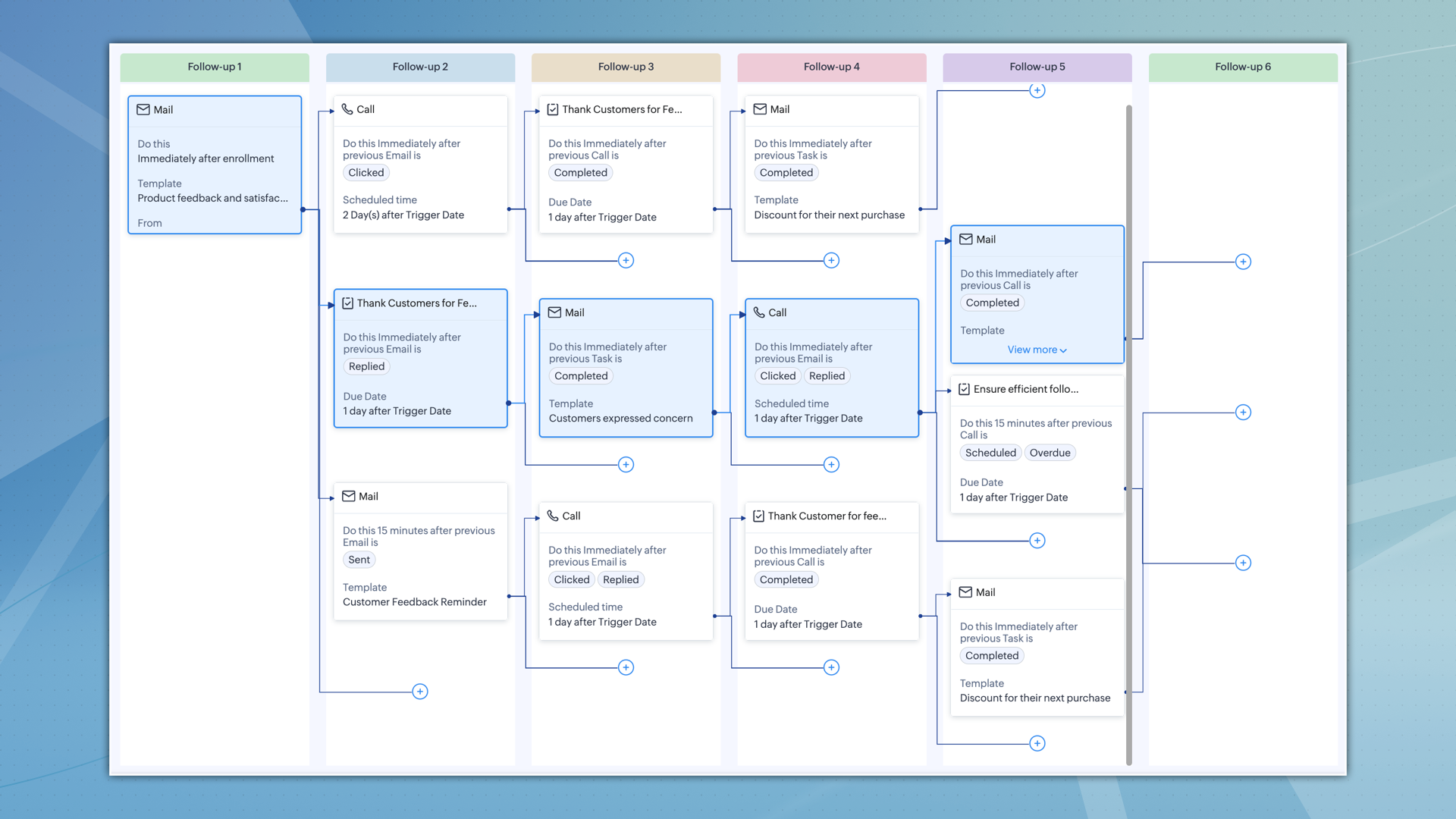
Cadences in Zoho CRM are more than just automation tools for follow-ups; they're a transformative solution for managing customer interactions.
Previously, a series of responsive follow-ups often meant creating multiple workflows, using different fields and conditions. Cadences streamline this, enabling you to handle what once needed several workflows with just one cadence.
Consider a case where you're sending multiple emails for an event. You want to stop sending them once a customer replies or the event date passes. In the past, this required setting up many workflows, each with its own conditions. Cadences Studio simplifies this by offering a single platform. This single platform does the job of many workflows, saving time and making things less complex.
It's a strategic asset, meticulously designed to enhance your marketing and sales strategies, empowering you to personalize your interactions with every customer, from their first interaction with your follow-up to, ultimately, when you un-enrol them from the cadence.
The true power of Cadences lies in the ability to transform various business scenarios.
Cadence's adaptability makes it suitable for various industries. Whether it’s for collecting e-commerce customer feedback, managing healthcare appointments, updating SaaS users about new features, or engaging real estate prospects, Cadences can be tailored to meet these diverse requirements.
- Real estate: Respond promptly to inquiries, schedule property visits, and nurture leads with the right information at the right time. Cadences help realtors convert more leads into happy homeowners, propelling them to the top of the market.
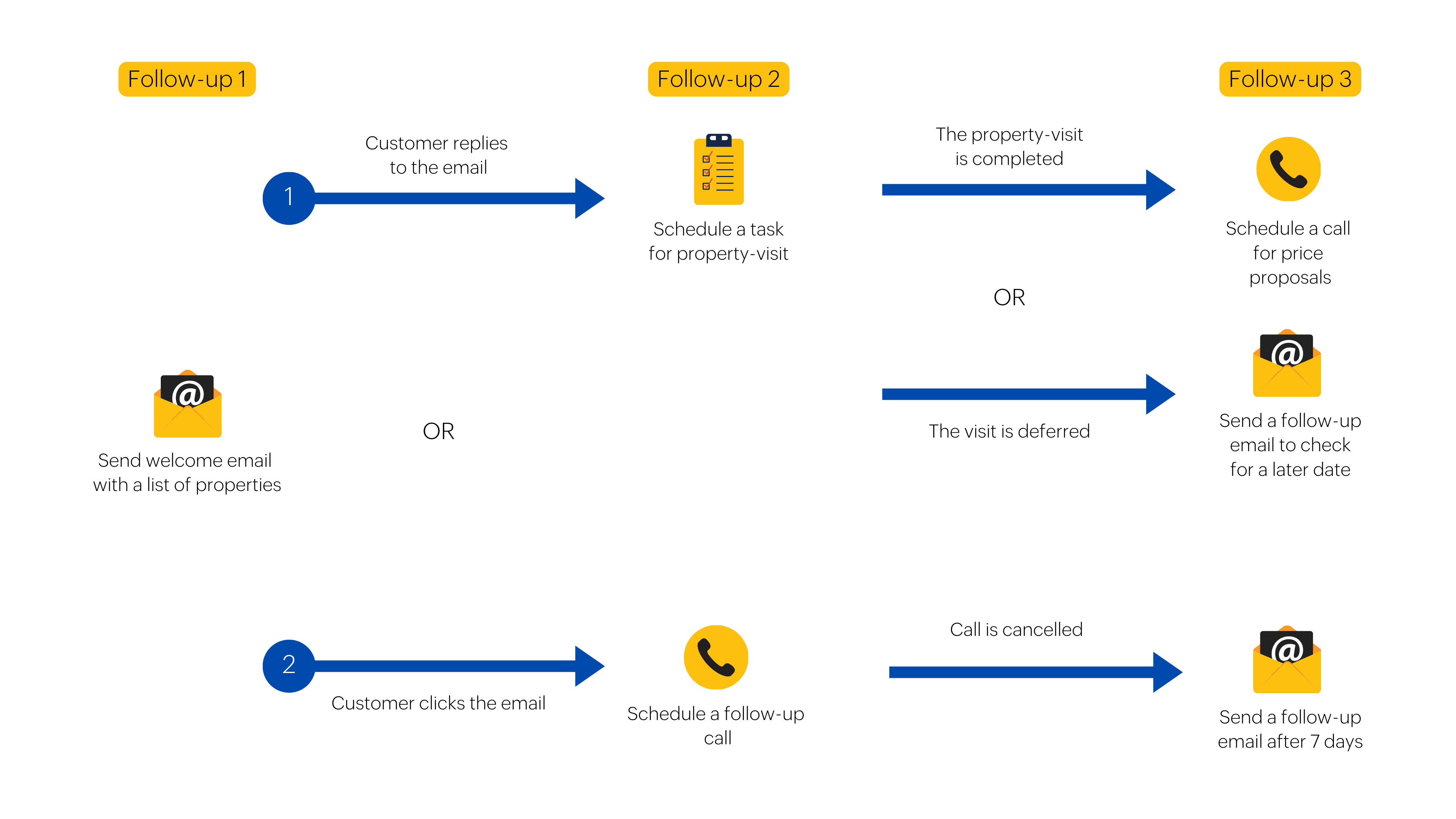
- E-commerce: Imagine collecting valuable customer feedback after each purchase, automatically prompting reviews, and proactively addressing negative experiences. Cadences help online retailers foster meaningful relationships with customers and drive continuous improvement.
Key highlights of Cadences
- Automated sequential follow-ups
Automated sequences of actions can be established by businesses, which are activated according to customer responses or the absence of them. For instance, if a customer opens an email but does not reply, a subsequent email can be automatically sent. Similarly, if the email is bounced, a different email can be sent based on the predetermined cadence configuration.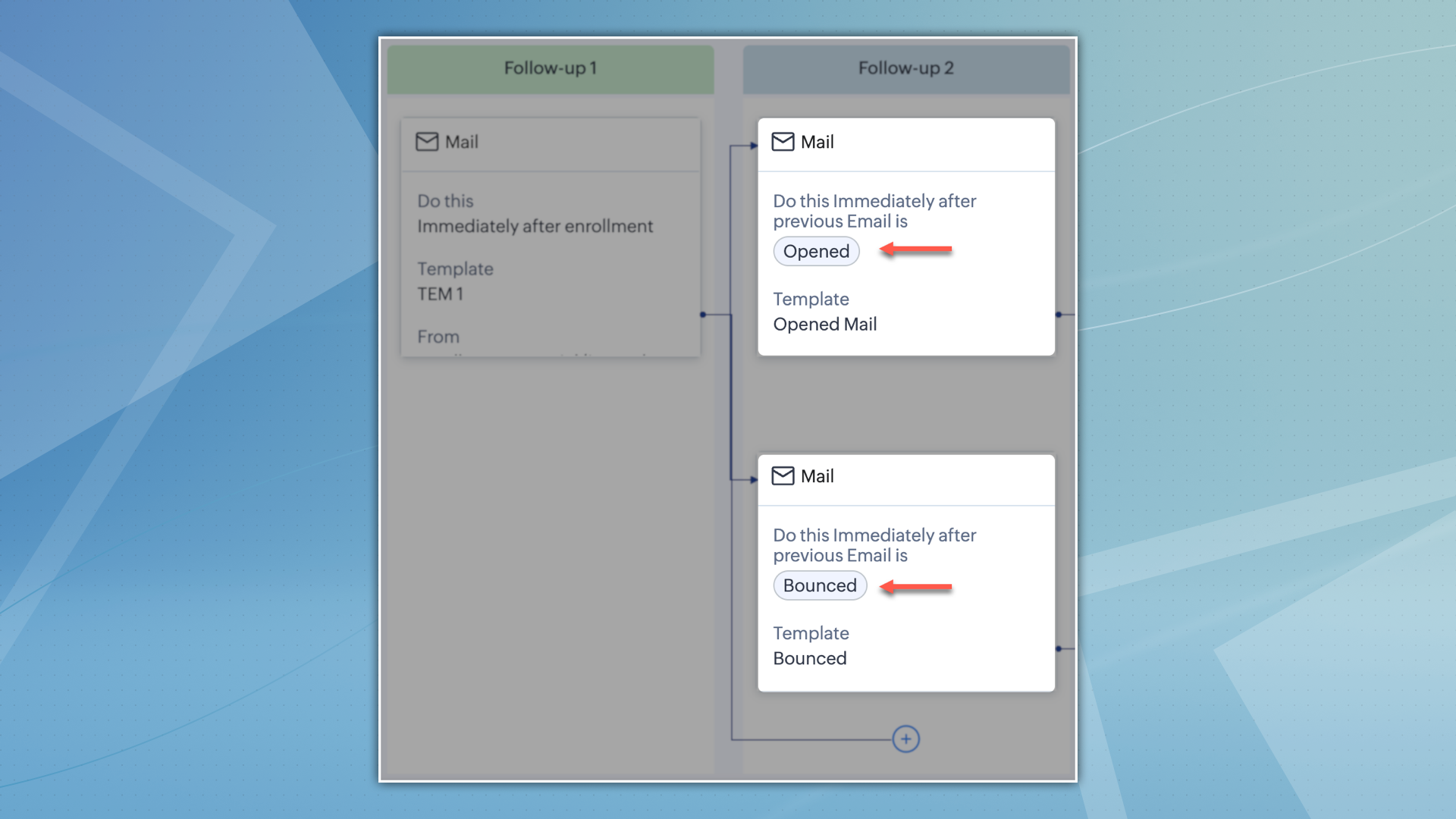
- Intelligent automation
Cadences' intelligent automation doesn't stop at follow-ups. It automatically removes records that have reached their desired outcome, maximizing your team's efficiency and focusing your efforts on the most relevant interactions.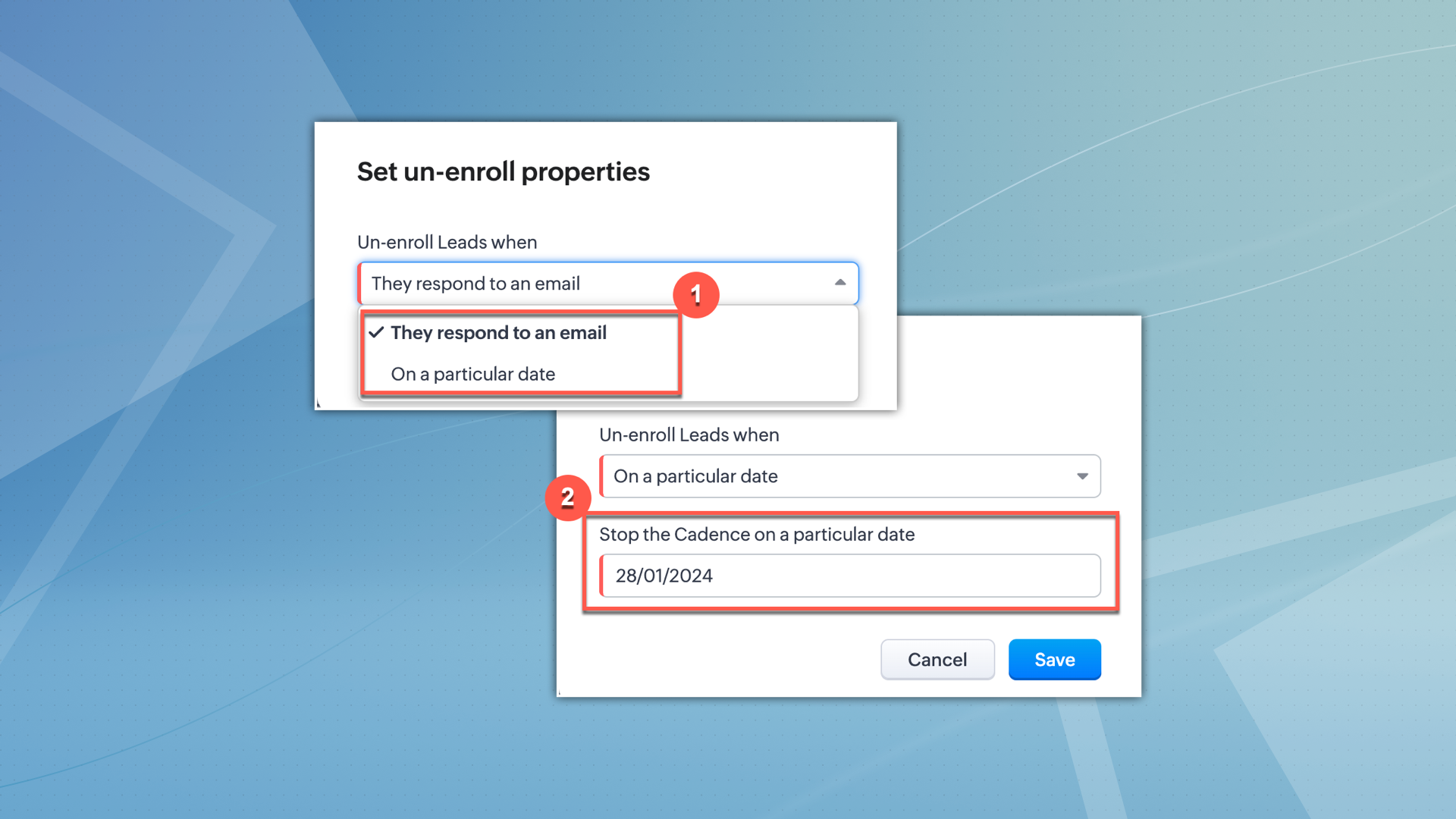
- Multiple follow-up capabilities
Expand your communication beyond the traditional email follow-ups by utilizing Cadences. This platform allows you to incorporate phone call and task follow-ups effortlessly, alongside email follow-ups, resulting in a diverse and personalized experience that aligns with the preferences of every customer. - Robust analytics
Gain a thorough comprehension of customer engagement with the advanced analytics offered by Cadences. Track the effectiveness of campaigns and customer behaviour to obtain valuable insights. These analytics are essential for optimizing strategies and improving engagement, serving as a reliable tool for continuously enhancing customer engagement efforts.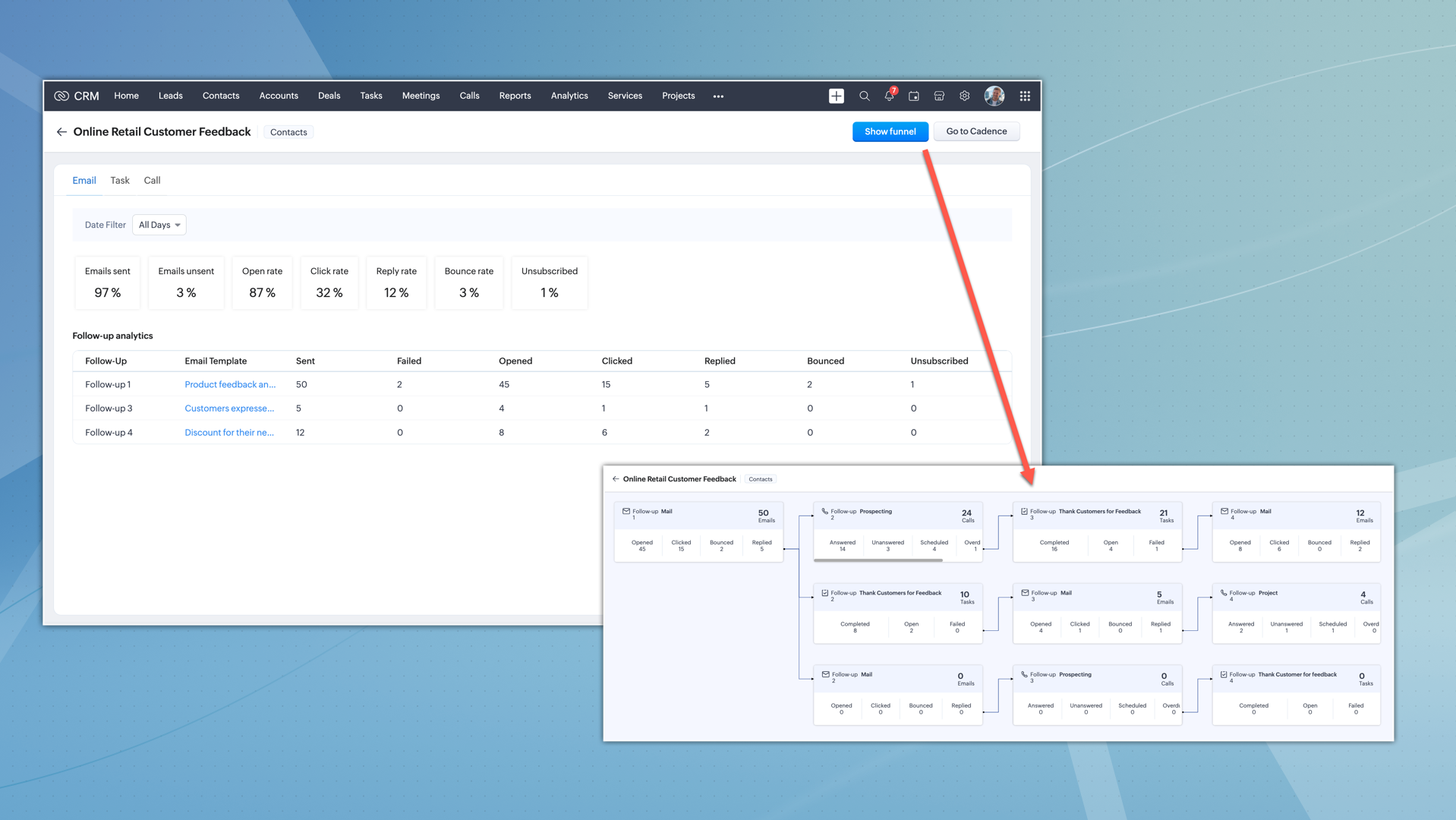
Configuration and utilization
Setting up Cadences involve choosing your target audience and configuring up to three types of follow-ups (emails, tasks, and calls), each with specific configuration options to suit your unique campaign needs.
Configuring Cadences is a streamlined process:
- Target audience selection
Choose between manual enrollment or custom views in your chosen module. This allows for precise targeting and effective campaign execution.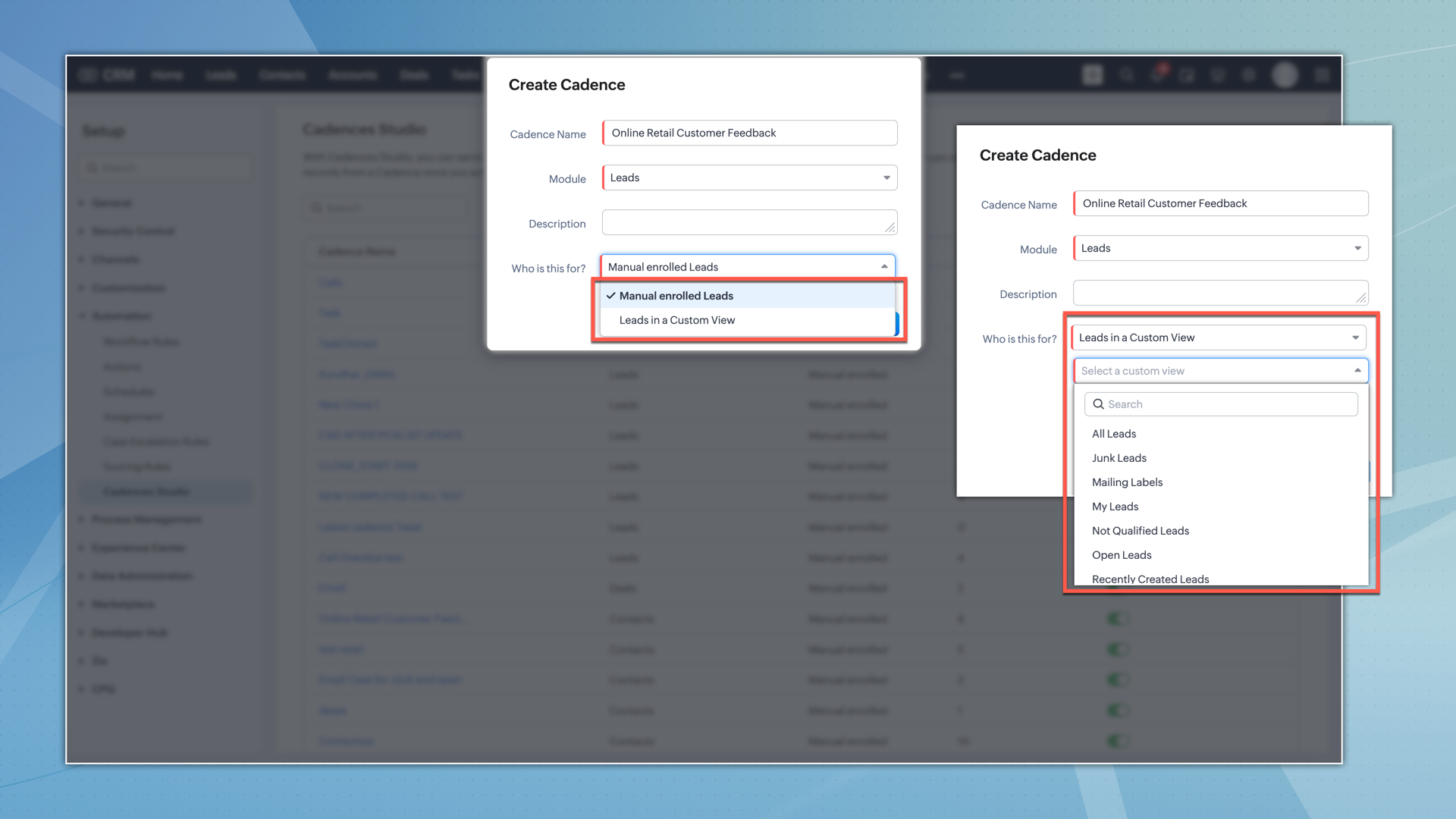
- First follow-up configuration
You can configure the first follow-up as either an email, task, or call. You can also choose when the first follow-up should be triggered.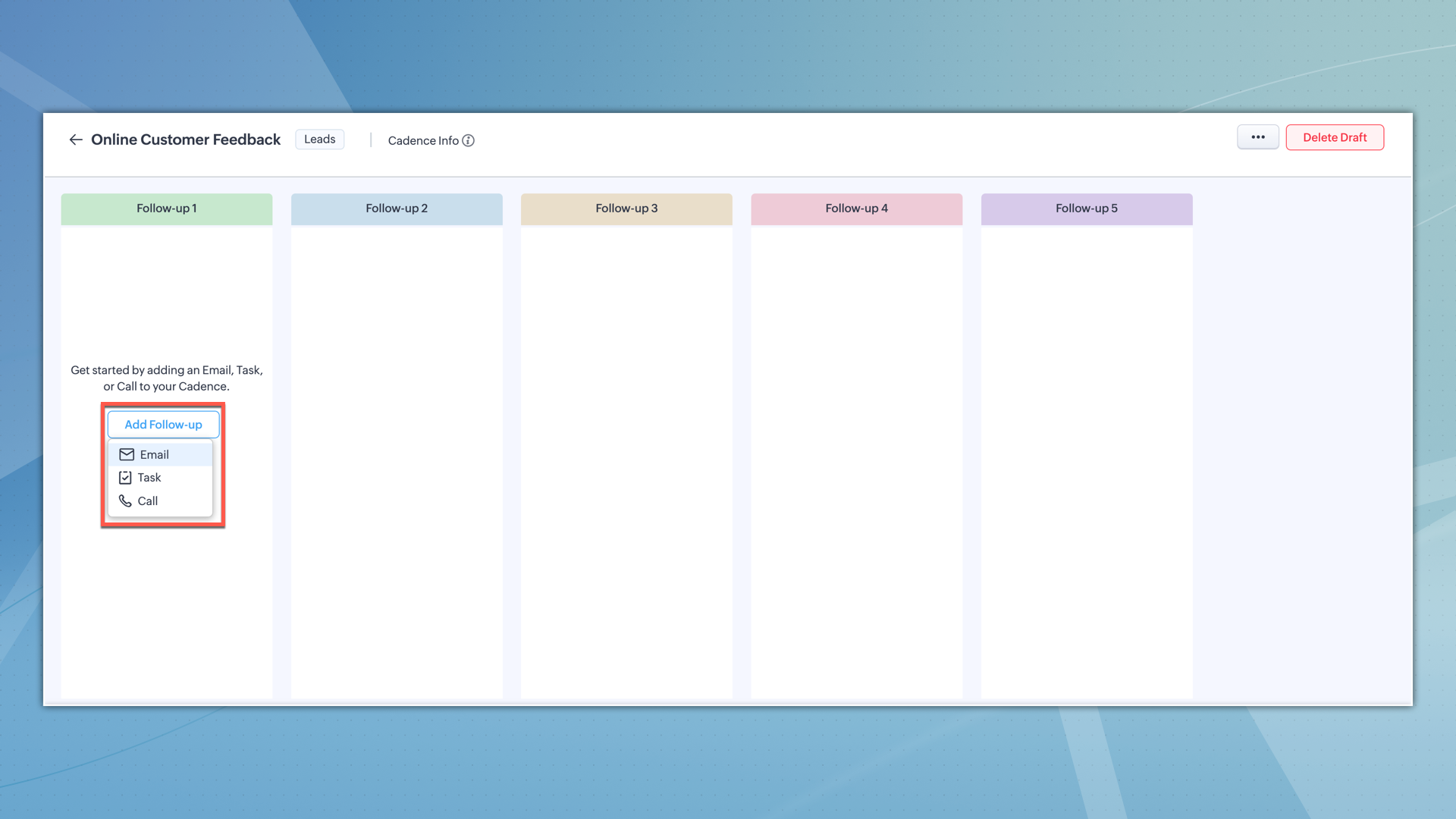
- Responsive follow-up configuration
The successive follow-ups within a cadence can be intricately configured based on the actions taken on the previous follow-up. For instance, if an email in the first follow-up is opened or clicked, you can set the subsequent follow-up to be a personalized call or a task, depending on the customer's interaction.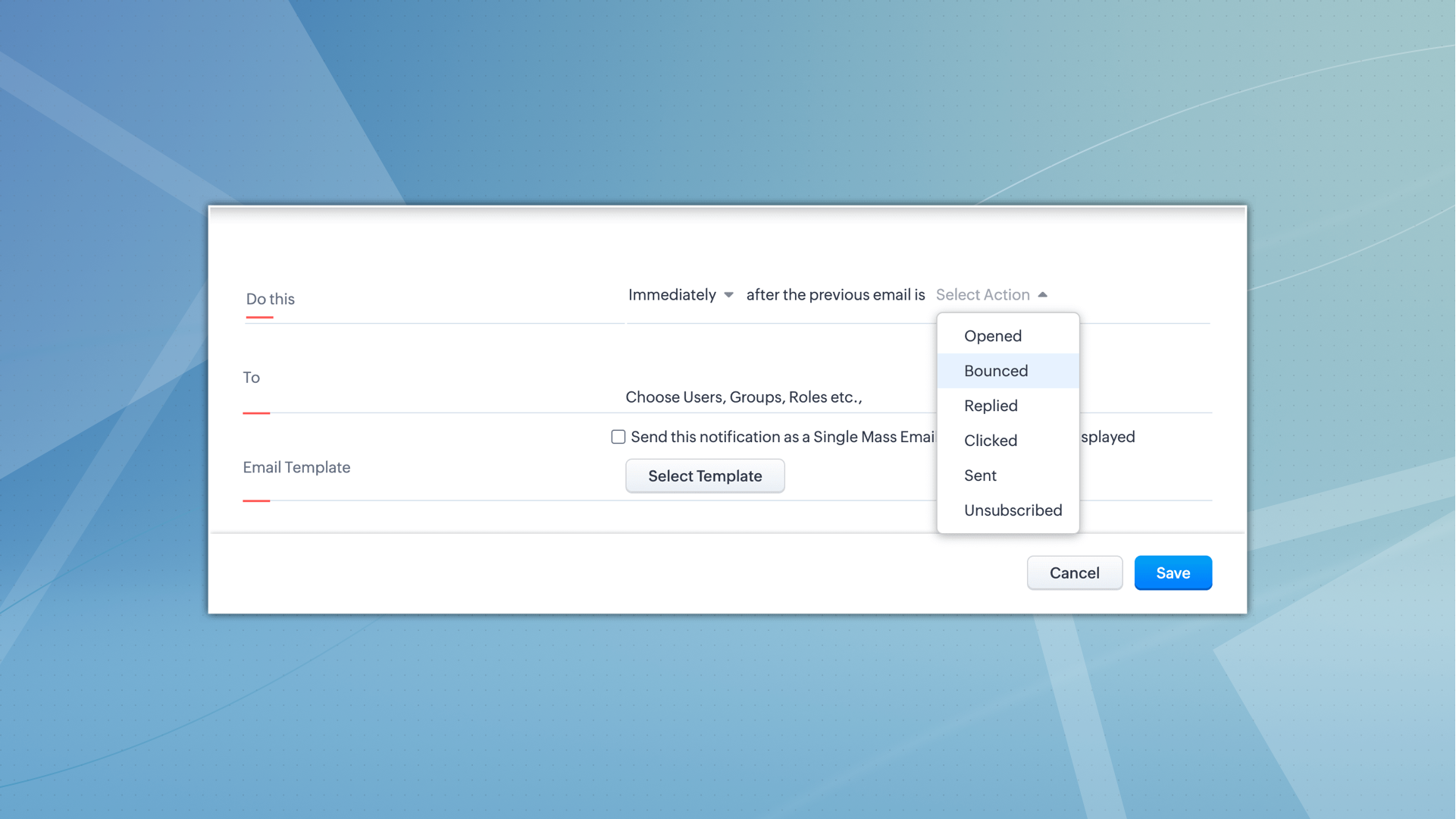
In summary, Cadences empower you to automate and personalize lead engagement, driving efficiency and effectiveness in your CRM strategy, and ultimately fostering stronger customer relationships and enhanced business growth.
Resources: Cadences | Zoho CRM Help
Thanks!
Nizamuddin
Topic Participants
Nizamuddin Sohel SK
Mark
Robert
Michael Trow
Greg Robson
Sticky Posts
Enhancement to ICR’s field prompting: Preferred data extraction using advanced field prompting
Dear Customers, We hope you’re well A quick background Intelligent Character Recognition (ICR) comes as part of Zia’s optical recognition capability called Zia Vision. When we introduced it last April, the data extraction was training-based and was applicableGood news! Calendar in Zoho CRM gets a face lift
Dear Customers, We are delighted to unveil the revamped calendar UI in Zoho CRM. With a complete visual overhaul aligned with CRM for Everyone, the calendar now offers a more intuitive and flexible scheduling experience. What’s new? Distinguish activitiesAccessibility in Zoho CRM: Not just a feature—a way to empower
For instructions on setting up these controls, please check this help document: Configuring accessibility controls. Hello everyone, Today (December 3, 2024), on the International Day of Persons with Disabilities, we begin our journey towards a CRM thatScaling the customer journey: What's new in CommandCenter
Dear Customers, The last time we connected about CommandCenter, it was about the tool's new controls and revamped UI. Personally, the overhaul of the UI from the last update, still excites me. Today, we're here with news about its scalability and addedZoho CRM's sales trend and sales follow-up trend dashboards are now customizable
Dear Customers, We're here with good news! Sales trend and sales follow-up trend are two system-defined dashboards that help you understand trends and anomalies in your sales outreach and conversion efforts. They use Zia's intelligence to identify patterns
Recent Topics
Create formula calculations in Assemblies for scaling quantities
Something we have been encountering with our composite items is dealing with scaling of quantity of one or more items within the composite assembly relative to the number of complete units being sold. I.e. running the equation 2(n-1) on one of the assemblyHow I Implemented Subscription-Based Access Control and Expiry Handling in Zoho Creator
I recently worked on a use case where users come into the application to request a service, but they should only be able to continue the process after completing a subscription. The challenge was not just controlling access, but also making sure thatZoho Forms API
Is there any way to get all form entry list using API? Looking forward to hear from youZoho Projects : Task should auto-update to 'In Progress' if timer started
Namaskaram. Right now, if a Task's timer is started, the Task stays in 'Not Started' status. One has to manually update it to 'In Progress'. From a #uxdesign standpoint, it is an unnecessarily two step process to start working on a task. It would be better that, if I start the timer on a task, it should automatically change to 'In Progress' status. Crafted with ❤️ Zoho Gurus | Zoho One Practice Team @ CubeYogi Zoho Authorised Partner | 7+ Yrs | 200+ Projects | 100+ CustomersLaatste facturen en betalingen niet zichtbaar in mijn account
Wij gebruiken ZOHO invoice al jaren, maar sinds afgelopen week is mijn laatst verzonden factuur niet zichtbaar in mijn account, en tevens de laatst betaalde facturen zie ik niet. Hoe kan dit? Ik heb de pagina al diverse keren gerefreshed.Undelivered Mail uncategorized-bounce errors when sending invoices
Recently we have been getting Undelivered Mail bounce notification when sending invoices. Reason: uncategorized-bounce Some go through no problem some bounce back. We recently sent 10 invoices, 6 received bounce notifications. After reaching out to theOption to Delete Chats in IM
Currently, there is no option to delete any chats in IM, regardless of their source.CRM x WorkDrive: File storage for new CRM signups is now powered by WorkDrive
Availability Editions: All DCs: All Release plan: Released for new signups in all DCs. It will be enabled for existing users in a phased manner in the upcoming months. Help documentation: Documents in Zoho CRM Manage folders in Documents tab Manage filesCan I import MSG files into Microsoft 365 without Outlook?
Yes, absolutely. You do not need Outlook installed to import MSG files into Microsoft 365. Aryson MSG file Converter is a dedicated tool that eliminates the Outlook dependency entirely, making the migration process simple and efficient for all users.Zoho API
I have little experience with API. I'm trying to get a Custom API working with Zoho creator. I have created a Custom API and created an Endpoint URL, but i get a 9400 error code "The provided HTTP method is not valid for this custom API". Based off theAll new Address Field in Zoho CRM: maintain structured and accurate address inputs
Availability Update: 29 September 2025: It's currently available for all new sign-ups and for existing Zoho CRM orgs which are in the Professional edition exclusively for IN DC users. 2 March 2026: Available to users in all DCs except US and EU DC. 24Introducing Radio Buttons and Numeric Range Sliders in Zoho CRM
Release update: 1. 2 March 2026: Currently out for CN, JP, AU and CA DCs (Free and standard editions). For other DCs, this will be released by mid-March. 2. 26 March 2026: CA, SA, AU, JP, CN DCs - Free, Standard, Professional, Enterprise, Ultimate, CRMFeature Request - A Way To Search Item Groups
Hi Inventory Team, I can't find any way to filter or search by fields of Item Groups. It would be great to see that functionality added. I have a use case where a single product might come from 5 or more suppliers and each supplier's item is an Item inZoho Books/Inventory - Update Marketplace Sales Order via API
Hi everyone, Does anyone know if there is a way to update Sales Orders created from a marketplace intigration (Shopify in this case) via API? I'm trying to cover a scenario where an order is changed on the Shopify end and the changes must be reflectedTicket id issues
When I reply a ticket from desktop, it doesn't have ticket id in the subject and it's great. When I reply a ticket from Zoho desk mobile, Zoho adds ticket id in the subject and I don't want that. Please help in this matter.Advanced email configuration - agent's name vs. department name
We currently have all four Advanced Configuration options turned ON at the Global-level (Channels > Email > Advanced Configuration) - including the "Show Agent name in Ticket replies and outgoing emails" option. We also had that same option turned ON#157127950
Where did my initial question go?sync two zoho crm
Hello everyone. Is it possible to sync 2 zoho crm? what would be the easiest way? I am thinking of Flow. I have a Custom Module that I would like to share with my client. We both use zoho crm. Regards.Add Bounced as an Email Action / Notification for Bounced Emails
This is one of the hard requirements for the clients we're servicing. They want to get an internal email notification whenever the email they sent to their contacts have bounced, so that they can look into it and update the email address. Currently, theFiles Uploaded to Zoho WorkDrive Not Being Indexed by Search Engines
Hello, I have noticed that the files I upload to Zoho WorkDrive are not being indexed by search engines, including Google. I’d like to understand why this might be happening and what steps I can take to resolve it. Here are the details of my issue: FileZoho Recruit - Email Relay
Good day, Has anyone succeeded in setting up an email relay for Office 365? If I add the details from https://support.microsoft.com/en-us/office/pop-imap-and-smtp-settings-8361e398-8af4-4e97-b147-6c6c4ac95353, I get the connection error. Regards, EkaNotebook AI limits
Hi folks, Working with the AI transcription tools in Notebook, on the Mac App, which I find quite handy, but the one thing I am struggling with is the inability to either edit or copy the results of the transcript: I can't click in any of the boxes, andnot able to convert pdf to jpg and other forms and vice versa.
i want to change my pdf to jpg, word, etc and some times jpg to pdf. i don't know how to do in this.What’s New in Zoho Analytics - March 2026
Hello Users! In this month's update, we bring improvements across integrations, security, reporting, and analytics capabilities to help you work with your data more efficiently and with greater control. Explore what’s new and see how these enhancementsTickets without registration
Hi, would it be possible to give customers the opportunity to be able to read their tickets without registration?Zoho People > Performance Management > Appraisal cycle
Hello All I am using this 2 users to test out how it work on Performance Management User 1 - Reportee User 2 - Reporting Manager : Li Ting Haley User 1 : Self Appraisal Error How do i fix this error?SalesIQ Tip for Admins: Guide Operators in Real-time Without Interrupting the Chat
Consider this. You're a supervisor and you're looking through the active conversations. An associate is mid-chat with a high-value prospect. The prospect asks something unexpected, maybe about a tailor-made subscription plan or a bulk discount that’sEarly Access: Check Printing in Zoho Books
Hello Everyone, Are you constantly writing checks to pay your vendors? We've got a great news to share with you! You can now pay your vendors by writing and printing a check directly from Zoho Books. The feature is ready and we'll be rolling it out to our customers in phases. It is available in the US Edition of Zoho Books and also in the Global edition, where the country is selected as USA and the currency is USD. Here’s a summary of what’s possible: 1. Write and print a check. 2. MakeConnecting Zoho Inventory to ShipStation
we are looking for someone to help connect via API shipStation with Zoho inventory. Any ideas? Thanks. UriSyncing zoho books into zoho crm
I was wondering how I can use zoho books in crm as I have been using them separately and would like to sync the two. Is this possible and if so, how? ThanksZoho no support response.
Problem is Zoho support seems to be just a concept. Just completing my trial, am ready to purchae 3 user subscriptions pending answer to a question, submitted two suport request during my trial that weren't responded to. Gave up trying the 888 line. Hard to imagine my production data in hosting environment with no support response.Updating transaction number series for fiscal year 2026-2027 in Zoho POS
A fiscal year or financial year is a 12-month period that businesses follow to manage and track their financial activities such as expenses, revenue, and taxes. This doesn't need to match the calendar year (JAN-DEC) and varies based on region, and taxTrigger workflows from SLA escalations in Zoho Desk?
Hey everyone, I’m currently working with SLA escalation rules in Zoho Desk and ran into a limitation that I’m hoping someone here has solved more elegantly. As far as I can tell, SLA escalations only support fairly limited actions (like changing the ticketBank Feeds
Since Friday my bank feeds wont work. I have refreshed feeds, deactivate and reactivate and nothing is workingMass emails - Allow preview of which emails will receive the email based on the criteria
Feature request. Please allow us to view and confirm the exact recipients of the mass emails based on the criteria we've chosen before sending. It can be quite sensitive if you send the mass email to some wrong accounts accidently, so it would be greatLack of Looping and Carry-Forward Functionality in Zoho Survey
Zoho Survey currently does not support looping or carry-forward functionality, meaning it is not possible to dynamically generate follow-up questions based on each option selected in a previous question or to pipe selected responses (such as {LoopingForecast in Zoho CRM Just Got Smarter with an upgraded Zia Intelligence
Hello Everyone, We are here with an interesting enhancement to Forecasts in Zoho CRM — Enhanced Zia Insights for your sales Forecast. Imagine a regional sales manager reviewing their team’s performance using forecasts in Zoho CRM. Instead of switchingUpdate TDS and TCS rates for Income Tax Act, 2025 (effective April 1, 2026)
Hello everyone, The Income-tax Rules, 2026 (G.S.R. 198(E), dated March 20, 2026) have been notified, marking a significant structural shift in India’s direct tax framework. From April 1, 2026, the Income Tax Act, 2025 replaces the Income Tax Act, 1961.What is a realistic turnaround time for account review for ZeptoMail?
On signing up it said 2-3 business days. I am on business-day 6 and have had zero contact of any kind. No follow-up questions, no approval or decline. Attempts to "leave a message" or use the "Contact Us" form have just vanished without a trace. It stillService line items
Hello Latha, Could you please let me know the maximum number of service line items that can be added to a single work order? Thanks, Chethiya.Next Page