Automate a CRM workflow with Zoho Cliq

Imagine having a virtual assistant that provides rapid updates to your team through Zoho Cliq, helping you stay on top of your sales processes. After returning from a client meeting filled with updates and action items, managing this information together can feel overwhelming, especially when juggling multiple roles and responsibilities.
Business benefits
- Notification of deal closures: Ensures the sales team is promptly informed when a deal is closed to celebrate wins, update forecasts, and maintain team morale.
- Product and development feedback: Quickly communicate client requests or demo glitches to the product and development teams to enhance product offerings and resolve issues.
- Managerial updates: Keep managers in the loop with meeting outcomes to strategize the next steps or escalate issues.
- Syncing with the team: Link CRM updates directly to team chat channels to ensure all team members are updated about lead statuses. This reduces the need for multiple app switches, enhances real-time collaboration, coordinates efforts, and aligns strategies.
Let's examine an example of Zoho CRM workflow automation for a new lead created with a Zoho Cliq bot.
Step 1 : Bot creation
- Navigate to the top right corner of your profile, click on it, and select "Bots and Tools".
- To create a new bot, click on "Create Bot" on the right under the "Bots" section.
- Provide a name and description for the bot, then enable channel configuration settings during setup.
Step 2 : Bot webhook URL retrieval
- Webhook tokens are listed under the Bots & Tools section along with all the other internal tools. When navigated to the webhook tokens module, you will be required to authenticate using 2FA, verify your identity, and click Continue.
- After authentication, you can create, edit, and manage your Webhook Tokens as needed.
- Generate a webhook token and retrieve the bot's webhook URL as specified below.
ⓘ Learn more about webhook tokens in Zoho Cliq
Step 3 : Configuration of CRM workflow rule
Workflow rules in Zoho CRM are actions (email notifications, tasks, and field updates) executed when certain specified conditions are met. These rules automate sending email notifications, assigning tasks, and updating specific fields of a record when a rule is triggered.
ⓘ Learn more about configuring workflow rules in Zoho CRM
Similarly, you can set up and configure new workflow rules for events like the update of a lead status or the assignment of a lead to any sales representative (Lead owner ).

Step 4 : Setting up bot incoming webhook handler
- Go back to Cliq and find the bot you created under the "Bots and Tools" section. Then, access the bot's incoming webhook handler.

- The incoming webhook handler is designed to allow third-party services, such as Zoho CRM, to post messages directly to your bot.
- Copy and paste the below code and click "Save".
Pre-requisites:
To post an alert to the channel, you need the unique names of both the channel and the bot, as we are using zoho.cliq.postToChannelAsBot deluge task in the code below. Follow the steps to retrieve these names.
How to obtain or locate the channel unique name in Cliq?
- Navigate to the top right corner of the preferred channel and locate the three dots. Click it.
- In the menu that appears, select "Channel info" and a pop-up will open, displaying detailed channel information. Hover over the "Connectors" section and click it.
- Under "API Parameters," you will find the channel unique name.
How to obtain or locate the bot unique name in Cliq?
- Navigate to "Bots & Tools", and under the bots section, select the bot you prefer.
- Copy the API endpoint URL. The bot's unique name is located after "bots/" and before the next slash "/".
- Example:
- URL: https://cliq.zoho.com/company/2345678/api/v2/bots/crmupdatesincliq/message
- The bot unique name in the above example is crmupdatesincliq
- info params;
- eventType = params.get("event-type");
- leadName = params.get("Lead Name");
- company = params.get("Company");
- leadStatus = params.get("Lead Status");
- title = params.get("Title");
- email = params.get("Email");
- phone = params.get("Phone");
- leadSource = params.get("Lead Source");
- industry = params.get("Industry");
- leadId = params.get("Lead ID");
- if(eventType.equalsIgnoreCase("Lead Created"))
- {
- response = {"text":"🎯Heads up! A new lead has been successfully added to your list. Prepare to engage and convert!","card":{"title":"🚀 New Lead Added!","thumbnail":"https://i.imgur.com/jDagRms.png","theme":"modern-inline"},"slides":{{"type":"text","title":"Lead Details :","data":"🏆 Lead Name : " + leadName + "\n💼 Company : " + company + "\n⏱️ Lead Status : *" + leadStatus + "*"},{"type":"label","title":"","data":{{"📧 *Email*":email},{"☎️ *Phone*":phone},{"🏢 *Industry*":industry},{"📣 *Lead Source*":leadSource}}}}};
- // Use zoho.cliq.postToChannelAsBot(${channel_unique_name}, ${bot_unique_name}, response);
- zoho.cliq.postToChannelAsBot("clientleadupdates","crmupdatesincliq",response);
- }
- if(eventType.equalsIgnoreCase("Lead Assigned"))
- {
- leadOwner = params.get("Lead Owner");
- response = {"text":"🚀📈Promising prospect assigned to " + leadOwner + ". Opportunity awaits!","card":{"title":"🎯 New lead generated","thumbnail":"https://i.imgur.com/UisAlKn.png","theme":"modern-inline"},"slides":{{"type":"text","title":"Lead Details :","data":"🏆 Lead Name : " + leadName + "\n💼 Company : " + company + "\n⏱️ Lead Status : *" + leadStatus + "*"}}};
- zoho.cliq.postToChannelAsBot("clientleadupdates","crmupdatesincliq",response);
- }
- if(eventType.equalsIgnoreCase("Lead Status Updated"))
- {
- response = {"text":"✅💼 Great news! Lead status is now Qualified. Ready to engage!","card":{"title":"✅ Lead qualified","thumbnail":"https://i.imgur.com/d2jhClm.png","theme":"modern-inline"},"slides":{{"type":"text","title":"Lead Details :","data":"🏆 Lead Name : " + leadName + "\n💼 Company : " + company + "\n⏱️ Lead Status : *" + leadStatus + "*"}}};
- zoho.cliq.postToChannelAsBot("clientleadupdates","crmupdatesincliq",response);
- }
- return Map();
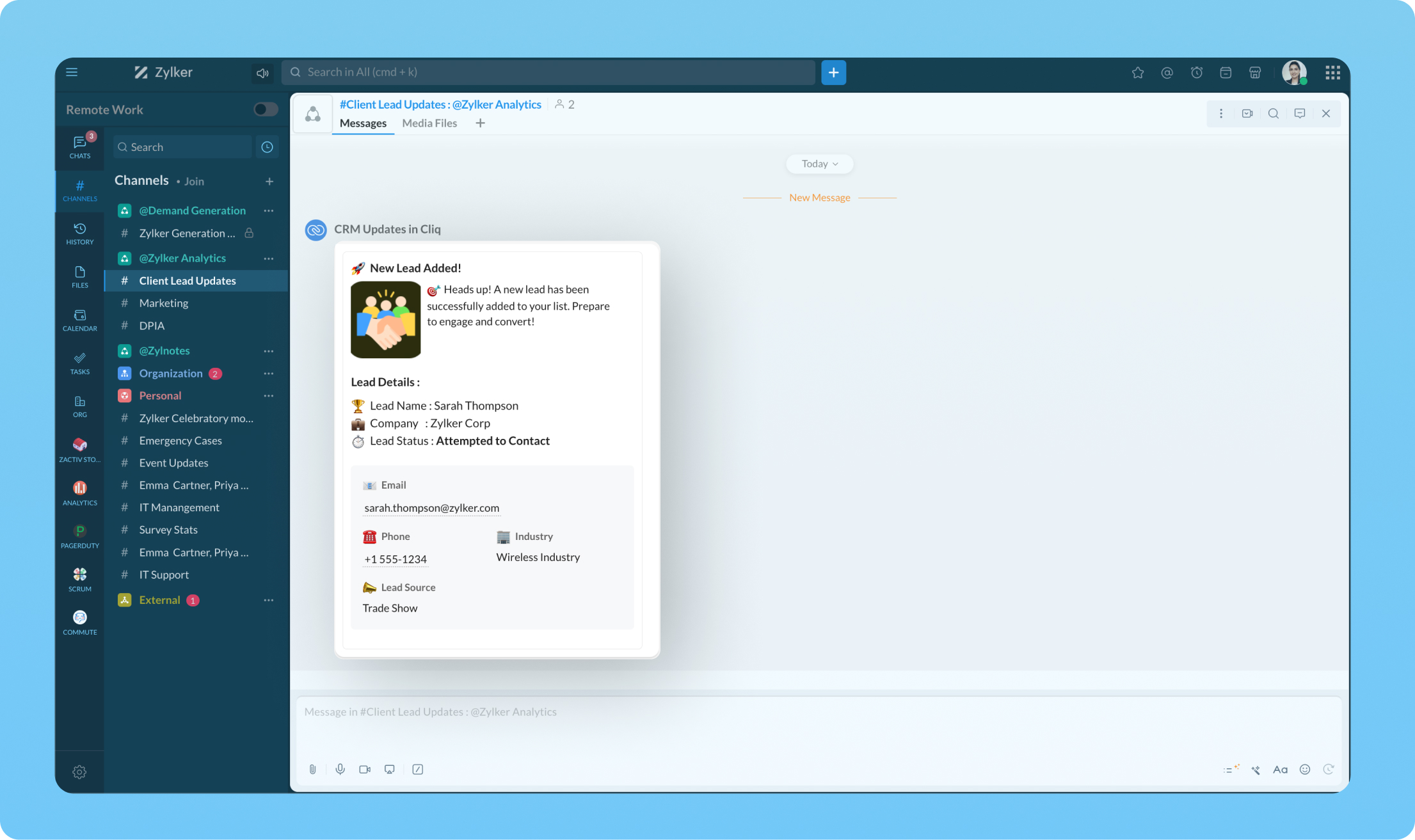
Transform your workflow experience with ease! Imagine having the ability to set up custom automation that sends instant messages to your team channels whenever a deal is sealed or a new lead steps on board.
We're here to help, so don't hesitate to reach out to support@zohocliq.com with any questions or if you need assistance in crafting even more tailored workflows.
Topic Participants
Harsha SS
Sticky Posts
Automating Employee Birthday Notifications in Zoho Cliq
Have you ever missed a birthday and felt like the office Grinch? Fear not, the Cliq Developer Platform has got your back! With Zoho Cliq's Schedulers, you can be the office party-cipant who never forgets a single cake, balloon, or awkward rendition ofCustomer payment alerts in Zoho Cliq
For businesses that depend on cash flow, payment updates are essential for operational decision-making and go beyond simple accounting entries. The sales team needs to be notified when invoices are cleared so that upcoming orders can be released. In contrast,Accelerate Github code reviews with Zoho Cliq Platform's link handlers
Code reviews are critical, and they can get buried in conversations or lost when using multiple tools. With the Cliq Platform's link handlers, let's transform shared Github pull request links into interactive, real-time code reviews on channels. ShareApp Spotlight : PagerDuty for Zoho Cliq
App Spotlight brings you hand-picked apps to enhance the power of your Zoho apps and tools. Visit the Zoho Marketplace to explore all of our apps, integrations, and extensions. In today's fast-paced world, seizing every moment is essential for operationalAutomate your status with Cliq Schedulers
Imagine enjoying your favorite homemade meal during a peaceful lunch break, when suddenly there's a PING! A notification pops up and ruins your moment of zen. Even worse, you might be in a vital product development sprint, only to be derailed by a "quick
Recent Topics
No chat option
Chat option is not supported.Direct “Add to Google Calendar” Option in Zoho Meeting
Hello Zoho Meeting Team, Hope you are doing well. We would like to request an enhancement related to the “Add to Calendar” functionality in Zoho Meeting. Currently, when we open Zoho Meeting and view our meetings under My Calendar, there is an Add toDefault Tagging on API-generated Transactions
If one assigns tags to an Item or Customer, those tags get auto-populated in each line item of an Invoice or Sales Order when one creates those documents. However, if one creates the Sales Order or Invoice via the API (either directly coding or usingDKIM cannot be enabled for the domain as no verified default selector present
Hi Support Team, For Domain DKIM record trying to enable status. but showing error "DKIM cannot be enabled for the domain as no verified default selector present" So, please resolve the issue. Thank you.unable to send message reason 554 5.1.8 Email outgoing blocked
unable to send message reason 554 5.1.8 Email outgoing blockedI can't log in to my account on Thunderbird
I've just had to rebuild my PC (calamitous mess from Microsoft with Win10/Win 11 'upgrade' - they confirmed I had to start with a new build). I have used Zoho mail for years via Mozilla Thunderbird, but now I've had to download the latest version of TBird,Should I Use DMARC?
When I configure Zoho Mail's DMARC settings, it's mandatory to fill in the RUA and RUF (Aggregate notification email address*, Forensic notification email address*) addresses. When we enter an email address in these fields, we receive reports from theIntroducing Profile Summary: Faster Candidate Insights with Zia
We’re excited to launch Profile Summary, a powerful new feature in Zoho Recruit that transforms how you review candidate profiles. What used to take minutes of resume scanning can now be assessed in seconds—thanks to Zia. A Quick Example Say you’re hiringBooks API Receiving an Error that Doesn't Make Sense when Creating Credit Note - trying to use 'ignore_auto_number_generation' argument
Hello, I'm working on a newly created routine and I'm getting an error that doesn't make sense when trying to create a new Credit Note. Here is my POST request. Endpoint: https://www.zohoapis.com/books/v3/creditnotes?organization_id=########## Body: {How to move emails to Shared Mailbox?
Hello, I created a Shred Mailbox instead of using a distribution group. But I cannot move previous emails to certain shared mailbox. Is it possible move some emails from inbox to shared mailbox?Collaboration with free plan user.
Hello. Do both users need to be on Pro plan to collaborate? Or can a Pro user share a note with a free plan user with the ability to edit?Connection to other user
Zoho Cliq handles sharing of Custom OAuth Connections that require individual user logins.In arattai received message can't be deleted
The issue has been noticed in following: arattai app (Android) arattai app (Window) arattai web While the message posted by me may be deleted, the ones received from others can't be. The item <Delete> change to <Report> when the message is a receivedAnalytics Portal
I have the "standard plan" and want to explore the portal option; I activated the 15-day trial but do not see the pricing for the add-on. How can I get the price under "Upgrade add-ons." Thanks RudyCan I filter a Lookup field to only show related records from another Lookup in Zoho CRM?
In our Leads module, we have two Lookup fields: Recruitment Agency – the agency that the lead came from Recruiter – the individual contact from that agency who sent us the lead Both fields link correctly to their respective records in CRM. However, ourZoho Books API invoice email bouncing with 'relaying-issues' error
I have waited over 30 days for zoho books uk to assist with the following and i have had no replies or tickets erronously closed. The service has been terrible - very unlike zoho! So i am raising this here hoping that a community member can assist: Hello,How do I filter contacts by account parameters?
Need to filter a contact view according to account parameter, eg account type. Without this filter users are overwhelmed with irrelevant contacts. Workaround is to create a custom 'Contact Type' field but this unbearable duplicity as the information alreadyZoho Writer to Zoho Sign Template Misalignment – Request for Community
We are currently facing a critical issue impacting our live business operations due to a misalignment problem between Zoho Writer templates and Zoho Sign output. Issue Summary: We have an automated workflow in Zoho CRM using Deluge scripts that generatesWhy can't we change the Account type from an Expense to an Asset?
Like the question. Why in QuickBooks for example if I mistakenly created an account as an expenses and I already captured information in those accounts, I can just change the account type from expense to assetAccount blocked
Yesterday I got my Zeptomail account blocked due to too many hard bounces. My account is used exclusively for sending transactional emails (eg. your order has been shipped, a form has been filled, etc) and the sudden blocking impacted hundreds of websitesMigration Tool Download
Since apparently you have to ask for the migration tool to download (why?), I need the download for the migration tool for exchange servers. Please forward link, thanks.IF Formula
Hi, I'm having trouble setting up a custom formula in a field. Can you help me with it? The formula should do the following: If the created date is less or equal to 30 days the field should display a string New in pieline or Exisitng pipeline if aboveAutorespond to one specific sender
Is there any way to create a rule or filter that sends an automatic reply to messages from one specific email address? I really need to set up something like a "vacation response" but only for one "received from" address.View comprehensive logs of all actions in Custom Module History
Hello everyone, We are happy to announce our new feature, Detail View in Custom Module History, which enhances visibility, control and accountability over your records. Users can now access a detailed timeline of every action that has been performed onTrack ZohoForm Conversion using Postmessage event
Hi, I’ve been using a third-party lead tracking tool to capture leads from my website along with their source. Earlier, with the HubSpot form, the third-party script was able to detect the postMessage event that iframe forms typically send back to theEmail task creator when task is updated/marked complete
I am looking for a way to notify the creator of a task in zoho todo when - Task is updated Task is closed Comments entered 1 and 2 are critical, and I cannot find a zoho flow to do this. There is no way that as a manager I will know when someone has completedEmail Recall Feature In Zoho Mail Which Should Also Work For Outside Organisation Members
Add a feature to recall or undo sending an email within a configurable short time window (e.g., 30 seconds to 2 minutes) after hitting send, similar to Gmail’s undo send. Currently the sent email can not be recall If the recipient is not from within yourhow to treat a same person as customer and vendor in zoho
hi team, in my company, few persons acting as creditors as well as debtors (which means sometimes we pay them... some times we paid by them). in that case i would like to maintain a same ledger for that person.in zoho books it is treating creditor andHow to implement calculating average value of averaged values?
Hi, I'm trying to implement a formula in my layout for a module that calculates the average of 2 averaged values, but I can't do so using the formula custom field. To calculate the 2 averaged values, I could use the formula custom field, but in the customZoho Recruit update published job boards
If we have a job thats already posted on several different job boards and we edit this job in zoho recruit (e.g. the description of the job), does this then automatically update this new information to all the published job boards? If not, how does theNarrative 14: The magic bazaar of Desk
Behind the scenes of a successful ticketing system: BTS Series Narrative 14: The magic bazaar of Desk Marketplace is a centralized platform where users can discover Zoho and third-party applications that can be integrated with their Desk account to facilitateCollections Management: #2 Late Payment Automation
"Sir, I'll process the payment by evening, please don't apply any late payment charges", the customer said while arranging papers on his desk. Sanjay stood there with a tired smile. He had already visited twice that week. Payment collection was one thing.Create a table in the layout section of modules
Dear Sirs, I would like to know whether is possible to create a table under new fields in layouts section of modules. In fact in this section there are single line, multi line, pick list, multi-select, date, formula etc. but I am unable to add a tableNimble enhancements to WhatsApp for Business integration in Zoho CRM: Enjoy context and clarity in business messaging
Dear Customers, We hope you're well! WhatsApp for business is a renowned business messaging platform that takes your business closer to your customers; it gives your business the power of personalized outreach. Using the WhatsApp for Business integrationPower of Automation :: Automatic Task Status Handling for Users
Hello Everyone, A custom function is a software code that can be used to automate a process and this allows you to automate a notification, call a webhook, or perform logic immediately after a workflow rule is triggered. This feature helps to automateQuestion - why no way to input a 'tool description' and 'tree of 'tools'
Every business is different, with different business processes. To be truly useful Zoho MCP needs to have user editable tool descriptions (or ruleset) and a 'tool tree' so that the LLM is context aware when being used. For example, the tool descriptionDevelop Zoho Meeting as a Full Native Application (Not a Browser Wrapper)
Hello Zoho Meeting Team, Hope you are doing well. We would like to suggest an important improvement regarding the Zoho Meeting desktop application. At the moment, the Zoho Meeting app feels more like a mini browser window or an iframe that loads the webCan I create a custom function for chart of accounts?
I'm trying to add a custom function that should run whenever a record in the Chart of Accounts module is edited, but on the form for creating a new function, the module dropdown does not include the chart of accounts as an option.billing
hi, I am being billed $12/year, and I can't remember why. My User ID is 691273115 Thanks for your help, --Kitty PearlUnable to confirm Super Admin assignment — confirmation button not working
I’m trying to change the roles within my organization. I am currently a super admin and would like to add another user as a super admin. When I attempt to confirm the action, a screen appears asking for my password to verify my identity. However, whenNext Page