Client Script | Update - Introducing ZRC: Simplified HTTP request library
Hello Developers!
Are you tired of juggling different methods to make API calls? Are you confused with multiple syntaxes and version restrictions? Have you ever wished for one simple way to make all API calls in CRM?
We heard you :)
Here comes ZRC (Zoho Request Client), the new way of making any API call in Client Script with one simple syntax!

What is ZRC?
ZRC (Zoho Request Client) is a built-in SDK that simplifies making API calls in Client Script. It uses one simple and consistent syntax to handle,
- CRM APIs
- Connection requests
- Public APIs .
There is no setup or configuration needed, making API calls hassle free.
ZRC is now available for use in Client Script, helping you build faster with less effort.
Why use ZRC ?
APIs serve as the backbone for customizing Zoho CRM, powering vital tasks like updating records, adding leads, and integrating with external services. For developers, working with these APIs has not always been simple. Each type of API, whether internal CRM APIs, Connection APIs, or external APIs, requires different methods and boilerplate codes, which creates friction and slows down building solutions. Here comes ZRC to address this by handling authentication, supporting all CRM API versions, and managing requests and responses automatically, so developers can focus on building meaningful solutions.
Here is why ZRC is a game changer for scripting in Zoho CRM:
Supports Any CRM API Version
With ZRC, you can use any version of the CRM APIs, even the latest ones like v7 and v8.
Self domain calls
For CRM API calls, ZRC requires only the API endpoint without specifying the domain. This enables usage across different domains and simplifies API calls.
Unified Syntax for All Calls
Whether it is a CRM API, a custom Connection, or an external public API, all calls follow the same simple syntax.

No Authentication Needed for Same CRM Org
You do not have to worry about tokens or domain configurations. Just pass the endpoint, ZRC takes care of authentication behind the scenes.
Smart JSON Handling
ZRC automatically handles JSON responses. There is no need to manually stringify or parse response objects.
Async/Await & Clean Code
Write clean, modern code with full support for async/await and promise chains using `.then().catch().`
Let us see how to use ZRC to make API calls for different scenarios.
Use Cases
1. CRM API Use Case - Create Task with one click
At Zylker, a custom button “Log Call Attempt” should prompt the user to enter call details, save them as a Note on the Lead, update the Lead_Status to “Contacted”, and create a follow-up task for the next day, streamlining the process and reducing errors.


Click here to view source code
2. Connection based Use Case - Export Subform Data to Zoho Sheet via API
At Zylker Finance, users maintain multiple loan options under each lead using a subform in Zoho CRM. The Admin requires the ability to export these subform rows to Zoho Sheet via API. This export should allow structured data transfer for further analysis, comparison, and reporting, all without manual copying or downloading.
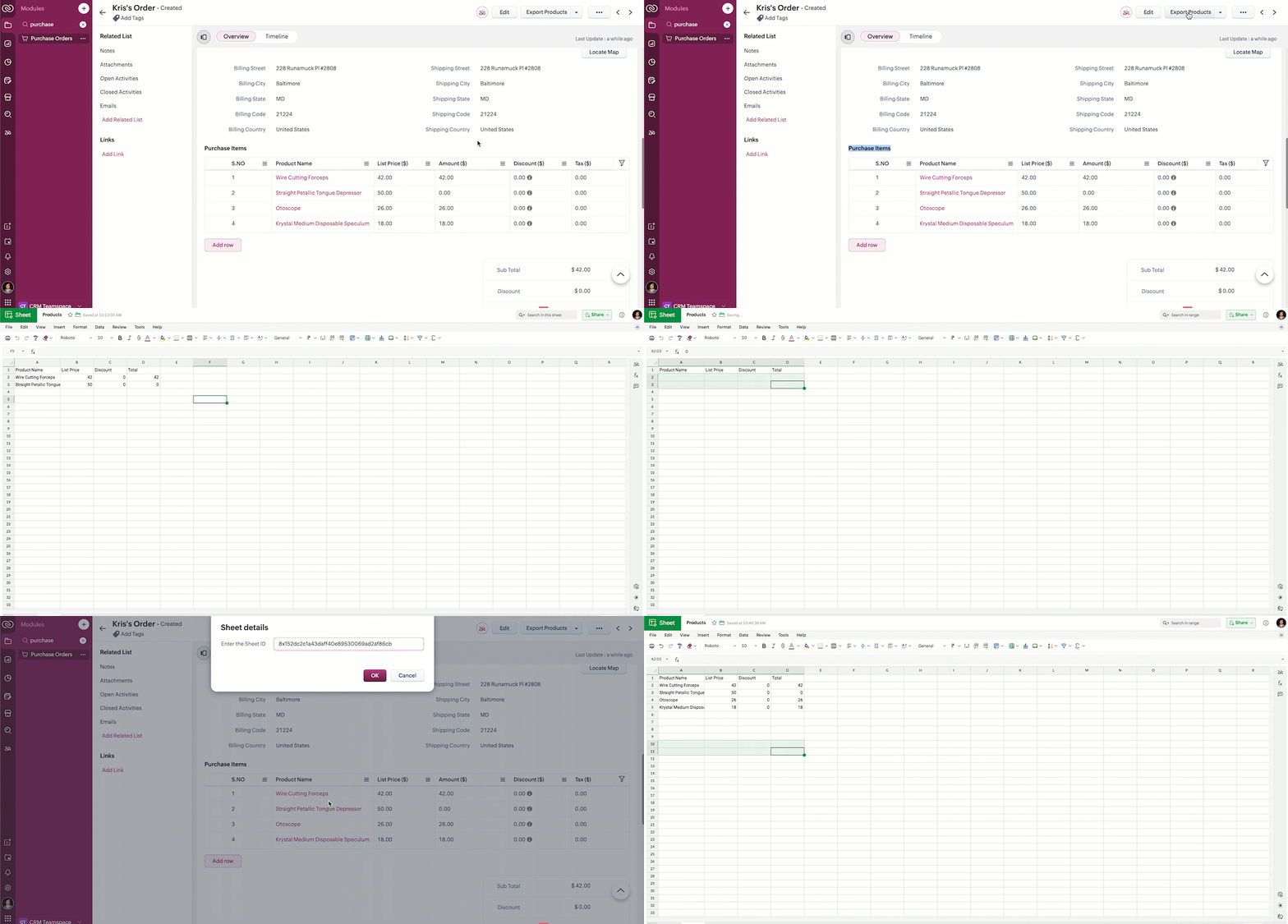

Click here to view source code.
3. Public API - Instantly retrieve real-time gold prices and perform currency conversions directly within the CRM interface
At Zylker, a gold jewelry company using Zoho CRM, the Admin needs the ability to instantly retrieve real time gold prices and perform currency conversions directly within the CRM interface without switching to external tools or websites.
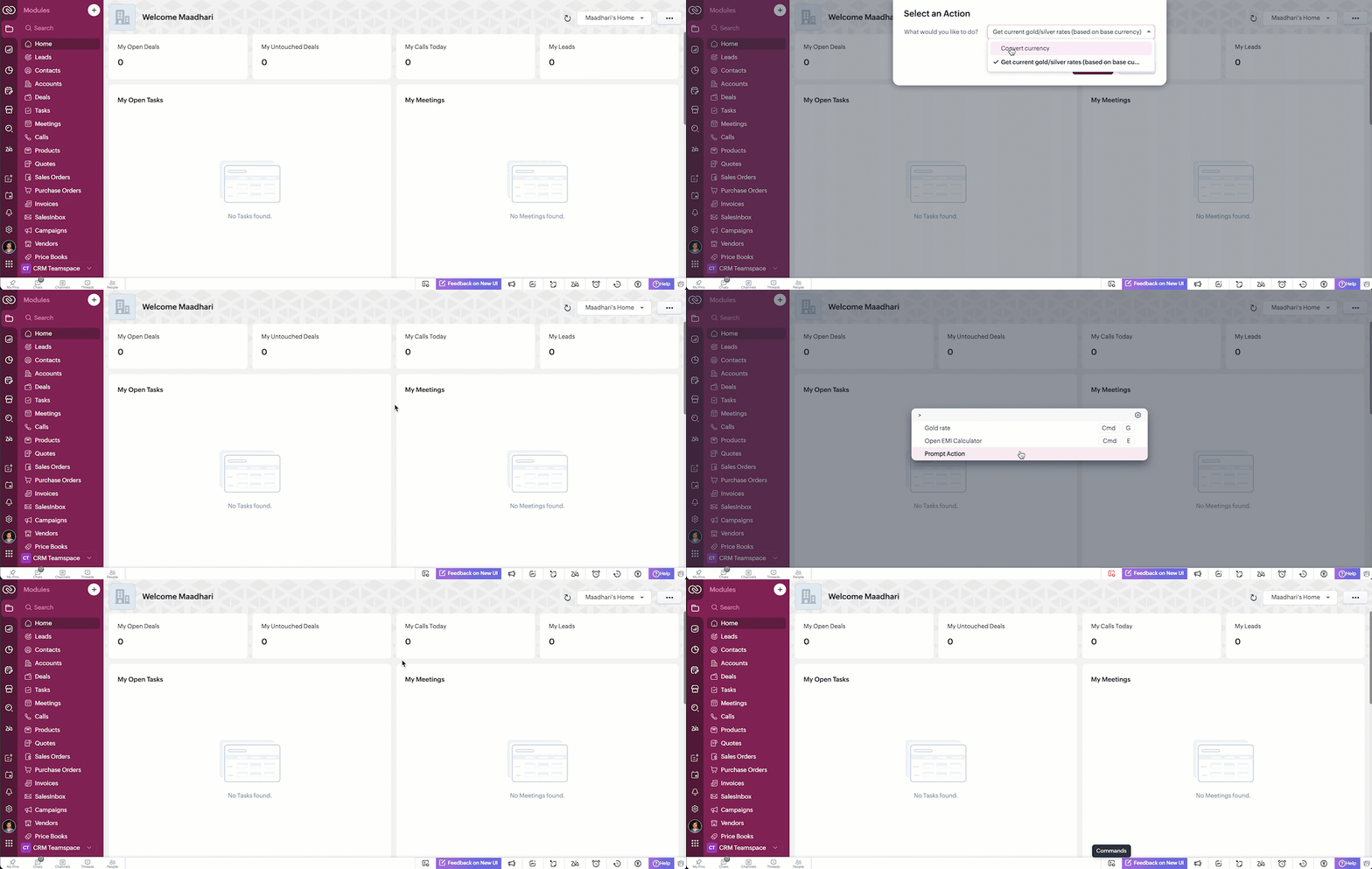

Click here to view source code.

Note :
- Now, all your API calls are made using one SDK, one format, and with full browser capabilities.
- No need to worry about authentication, domains, or response formats.
- Available now in Client Script. ZRC support in Mobile App will be available soon.
- Coming soon to Widgets
- Function Invoke APIs also follow the same fundamentals as ZRC.
From fetching CRM data to integrating with third-party tools, you can now achieve powerful customizations in Zoho CRM.
This feature is live across all DCs.
Go ahead. Try ZRC in your next Client Script, and feel the difference. Let us know your comments and feedback!
The help documentation of ZRC is available here.
Happy Coding!
Topic Participants
Maadhari M
Haiku Technical Support
Sticky Posts
Kaizen #198: Using Client Script for Custom Validation in Blueprint
Nearing 200th Kaizen Post – 1 More to the Big Two-Oh-Oh! Do you have any questions, suggestions, or topics you would like us to cover in future posts? Your insights and suggestions help us shape future content and make this series better for everyone.Kaizen #226: Using ZRC in Client Script
Hello everyone! Welcome to another week of Kaizen. In today's post, lets see what is ZRC (Zoho Request Client) and how we can use ZRC methods in Client Script to get inputs from a Salesperson and update the Lead status with a single button click. In thisKaizen #222 - Client Script Support for Notes Related List
Hello everyone! Welcome to another week of Kaizen. The final Kaizen post of the year 2025 is here! With the new Client Script support for the Notes Related List, you can validate, enrich, and manage notes across modules. In this post, we’ll explore howKaizen #217 - Actions APIs : Tasks
Welcome to another week of Kaizen! In last week's post we discussed Email Notifications APIs which act as the link between your Workflow automations and you. We have discussed how Zylker Cloud Services uses Email Notifications API in their custom dashboard.Kaizen #216 - Actions APIs : Email Notifications
Welcome to another week of Kaizen! For the last three weeks, we have been discussing Zylker's workflows. We successfully updated a dormant workflow, built a new one from the ground up and more. But our work is not finished—these automated processes are
Recent Topics
Show price book list price
When using price books, once you add products to the price book in the Products related list you can display the Unit price which is the default list price; however, there is no option to show the price book list price. To see the price book list priceAllow Attaching Quartz Recordings to Existing Zoho Support Tickets
Hi Zoho Team, We would like to request an enhancement to how Zoho Quartz recordings integrate with Zoho Support tickets. Current Behavior: At the moment, each Quartz recording automatically creates a new support ticket. However, in many real-world scenarios:Issue with open-rate reporting in Zoho Campaigns
Hello, Since yesterday I’ve been experiencing an issue with the open-rate reports in Zoho Campaigns. The campaigns I send appear in the reports as if none of the emails have been opened, even though I know they have. To verify this, I replicated the campaignCan I hide empty Contact fields from view?
Some contacts have a lot of empty fields, others are mostly filled. Is there a way I can hide/show empty fields without changing the actual Layout? I would like to de-clutter my view, and also be able to add information later as I am able. I would beManage user roles and profiles from the Bigin app (iOS and macOS)
Hello everyone! We're happy to announce that you can manage user roles and profiles from the Bigin mobile app. The Users & Controls section has three subsections: Users, Profiles, and Roles. Users Employees who belong to your Bigin organization are calledSupport Bots and Automations in External Channels
Hello Zoho Cliq Team, How are you? We actively use Zoho Cliq for collaboration, including with our external developers. For this purpose, external channels are a key tool since they work seamlessly within the same interface as all of our other channelsZoho Books Sandbox environment
Hello. Is there a free sandbox environment for the developers using Zoho Books API? I am working on the Zoho Books add-on and currently not ready to buy a premium service - maybe later when my add-on will start to bring money. Right now I just need aForm to PDF template
I am looking to create a Form and when information is inputted, it will merge it into a PDF template we already have. There could be multiple lines in the form and each line inputs information into a new page of a PDF template.Writing SQL Queries - After Comma Auto Suggesting Column
When writing SQL Queries, does anyone else get super annoyed that after you type a comma and try to return to a new line it is automatically suggest a new column, so hitting return just inputs this suggested column instead of going to a new line? AnyonePlease verify my account
Hi, We have just launched our website and received media coverage in our country. Hundreds of users are signing up for our platform every day. We would like to send them a welcome email, but we are unable to do so because our ZeptoMail account has notSubject character limit increase
We have an occasional user case where subject lines exceed 500 characters which is the ZeptoMail imposed limit. While I understand long subject lines are not "best practice", these are particular notification emails with specific information for clientAccount blocked
Yesterday I got my Zeptomail account blocked due to too many hard bounces. My account is used exclusively for sending transactional emails (eg. your order has been shipped, a form has been filled, etc) and the sudden blocking impacted hundreds of websitesNested notebooks
Dear Sir/Madam, I would like to know if it is possible to nest notebooks. It would be very helpful when there are too many, as it would improve organization. Thank you for your response. Best regards.Cannot see correct DNS config for mail after moving domain to another provider
I have moved my domain from one provider to another and after that zoho mail stopped working (expected). Problem is, zoho mail admin panel still shows (10 hours after move) that all records are correct while I haven't changed anything in my domain DNSProactive Alert for Existing Open Tickets per Contact / Account
Hello Zoho Desk Team, Greetings, and hope you’re doing well. We would like to submit a feature request aimed at improving agent awareness and efficiency when handling tickets in Zoho Desk. Use case When an agent opens a ticket (new or existing), it isAdd the ability to Hide Pages in Page Rules
Hi, We have Field Rules to show and hide fields and we have page Rules, but we can't hide a page in Page Rules so it isn't completed before the previous page (And then have the Deny Rules to prevent submitting without both pages completed), we can onlyTicket resolution field - can you add links, video, and images?
Seems like the ticket resolution fields is just a text field. Any plans to add the ability to add links, images...the same functionality in the problem description box? I would like to send the customer a link to a KB article, a link to our Wiki, embedTicket Resolution - Add rich formatting, screenshots and attachments
The resolution field only allows plain text at the moment. Many of our resolutions involve posting screenshots as evidence, it would be great for us to be able to have rich text formatting, be able to paste screenshots and add attachments in the solutionDeprecation Notice: OpenAI Assistants API will be shut down on August 26, 2026
I recieved this email from openAI what does it means for us that are using the integration and what should we do? Earlier this year, we shared our plan to deprecate the Assistants API once the Responses API reached feature parity. With the launch of Conversations,CRUD actions for Resources via API
Hello, is it possible to perform CRUD actions through the API for Resources? We want to create a sync from Zoho CRM Car record to Bookings resources to create availabilities for Car bookings. For Test drives, not only the sales person needs to be available,Kaizen #140 - Integrating Blog feed scraping service into Zoho CRM Dashboard
Howdy Tech Wizards! Welcome to a fresh week of kaizen. This week, we will look at how to create a dashboard widget that displays the most recent blog post of your preferred products/services, updated daily at a specific time. We will leverage the potentialConvert Lead Automation Trigger
Currently, there is only a convert lead action available in workflow rules and blueprints. Also, there is a Convert Lead button available but it doesn't trigger any automations. Once the lead is converted to a Contact/Account the dataset that can be fetchedI'm getting this error when I try to link an email to a deal inside the Zohomail Zoho CRM extension.
When I click "Yes, associate," the system displays an "Oops!! Something went wrong" error message. I have attached a screenshot of the issue for reference.Zoho Sheet - Desktop App or Offline
Since Zoho Docs is now available as a desktop app and offline, when is a realistic ETA for Sheet to have the same functionality?I am surprised this was not laucned at the same time as Docs.ZOHO add-in issue
I cannot connect ZOHO from my Outlook. I am getting this error.Marketing Automation
L.S. Marketing Automation is and has always been part of the Zoho One bundle - according to the information provided on the Zoho Website. Why when I open Marketing Automation do I get the following message?: "Your trial has expired. We hope you enjoyedWhat's New in Zoho Analytics - January 2026
Hello Users! We are starting the year with a strong lineup of updates, marking the beginning of many improvements planned to enhance your analytics experience. Explore the latest improvements built to boost performance, simplify analysis, and help youTranslation from Chinese (Simplified) to Chinese (Traditional) is not working. It randomly translated. Google Translate accurately but zoho translate is not working at all
Hi friends, The newly added language for translation. https://www.zoho.com/deluge/help/ai-tasks/translate.html "zh" - Chinese "zh-CN" - Chinese (Simplified) "zh-TW" - Chinese (Traditional) my original text: 郑这钻 (and it is zh-CN) translated traditionalThe Social Playbook - January edition: Getting started with content creation
Social media isn’t just about posting some random content. It’s about why certain content works, how brands stand out, and what makes people pause mid-scroll. The Social Playbook is a monthly community series where we break all of that down. Through realSupport for Custom Fonts in Zoho Recruit Career Site and Candidate Portal
Dear Zoho Recruit Team, I hope you're doing well. We would like to request the ability to use custom fonts in the Zoho Recruit Career Site and Candidate Portal. Currently only the default fonts (Roboto, Lato, and Montserrat) are available. While theseAdding bank details to the contact through API
How to add bank-related information to the contact while creating it using API? The account number needs to be encrypted before sending it through API but not sure how to encrypt and get those values. Please guide me in this.Font breakage in Zoho Mail Desktop Lite application for Mac
Dear Zoho Mail and Workplace Community, With the latest update of macOS Sequoia and macOS Tahoe, there has been font breakages in the email preview of Zoho Mail Desktop Lite application for Mac. This breakage is due to the corruption of the System fontsFeature request - image resizing on sales orders
I need to be able to show the items on the sales orders, currently the item image shows really small and no way to resize it, need the ability to make the image larger to showcase the product on the pdfsWhat's new in Zoho Sheet: Simplify data entry and collaboration
Hello, Zoho Sheet community! Last year, our team was focused on research and development so we could deliver updates that enhance your spreadsheet experience. This year, we’re excited to deliver those enhancements—but we'll be rolling them out incrementallyNueva edición de "Ask The Expert" en Español Zoho Community
¡Hola Comunidad! ¿Te gustaría obtener respuestas en directo sobre Zoho CRM, Zoho Desk u otra solución dentro de nuestro paquete de CX (Experiencia del Cliente? Uno de nuestros expertos estará disponible para responder a todas tus preguntas durante nuestraAutomation Series: Auto-Notify External Users on Issue Closure
Hello Folks! In Zoho Projects, you can notify external issue reporters via email when an issue is marked as Closed. This helps the users avoid manual follow-ups and keeps the reporter updated. In this post, we’ll walk through a simple setup using a WebTurn chat conversations into real action with Integration Blocks in Guided Conversations
When a Guided Conversation fails, it's usually not because the logic is wrong. They fail because the conversation stops moving. A customer starts a chat with a clear goal: report an issue, check a status, or confirm something. At first, the flow doesBasic Mass Update deluge schedule not working
I'm trying to create a schedule that will 'reset' a single field to 0 every morning - so that another schedule can repopulate with the day's calculation. I thought this would be fairly simple but I can't work out why this is failing : 1) I'm based inclick to call feature
I've Zoho CRM and in that i want click to call feature.We Asked, Zoho Delivered: The New Early Access Program is Here
For years, the Zoho Creator community has requested a more transparent and participatory approach to beta testing and feature previews. Today, I'm thrilled to highlight that Zoho has delivered exactly what we asked for with the launch of the Early AccessNext Page