Introducing AI Modeler—a no-code approach to adding AI to your business applications
Forward-thinking businesses today are embracing AI to make life easier for themselves, their employees, and their customers. But if you haven't started yet, you might be concerned that your business will be left behind. Or maybe you're worried because you don't know much about AI, machine learning, or data science. Well, you can now relax—we've got you covered on all counts!
We've been hard at work lately, incorporating AI into Creator without deviating from our long-held low-code philosophy. The result of this hard work is an exciting new feature we're announcing today: AI Modeler.
What do you mean by "AI"?
Artificial intelligence is the ability of software to replicate human intellect, such as learning from experience and applying lessons learned while making decisions. While sci-fi enthusiasts and media like to portray artificial intelligence as a scary thing that'll take over the world, the reality is that we haven't reached that stage (yet!).
Instead, the current generation of AI technologies has been adopted in many ways, like providing specific benefits to different industries. In general terms, an AI model provides specific intelligence based on trained data, and can be customized to automate or optimize your business process—all with minimal human interference.
What's in it for me?
Our AI modeler includes a no-code AI builder that helps you harness the power of AI without having knowledge of programming. The AI Modeler feature will be available under the
Microservices
section. From there, you can jump into the world of AI with our ready-to-use models, which we've prebuilt and rigorously tested for your use. You'll only have to choose the application name and the form name to deploy these models—it's that easy!
Custom models allow you to build customized AI models tailor-made for your business, by providing it with unique data based on which it can work. Here, you'll need to provide the model with sample datasets relevant to your business for it to get familiarized with—this is called training
—and then you can test whether it works as intended before deploying it.
Interesting. Tell me more!
While the uses of AI are endless, we've zeroed in on a handful of popularly used models, which we believe will add immense value to your business.
The key capabilities of our AI models are:
-
Prediction
-
OCR (optical character recognition)
-
Object detection
-
Keyword extraction
- Sentiment analysis
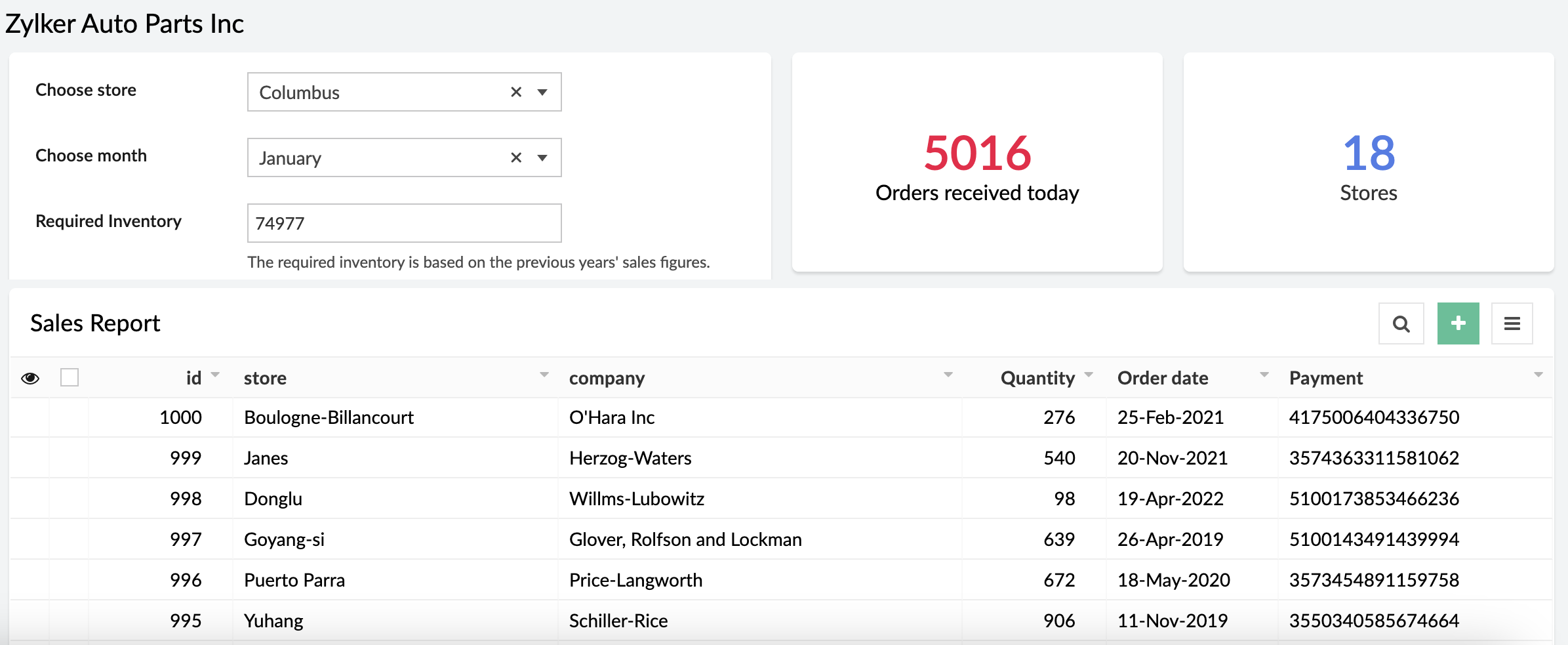
Prediction (Custom)
Prediction models process known results from historical data, and try to forecast future outcomes. It allows you to use data from an existing form or CSV file and predict future outcomes with just a few clicks.
Example:
A store can calculate how much inventory they need in order to meet demand during a particular sales period by providing previous years' sales data.
OCR (Ready-to-use and custom)
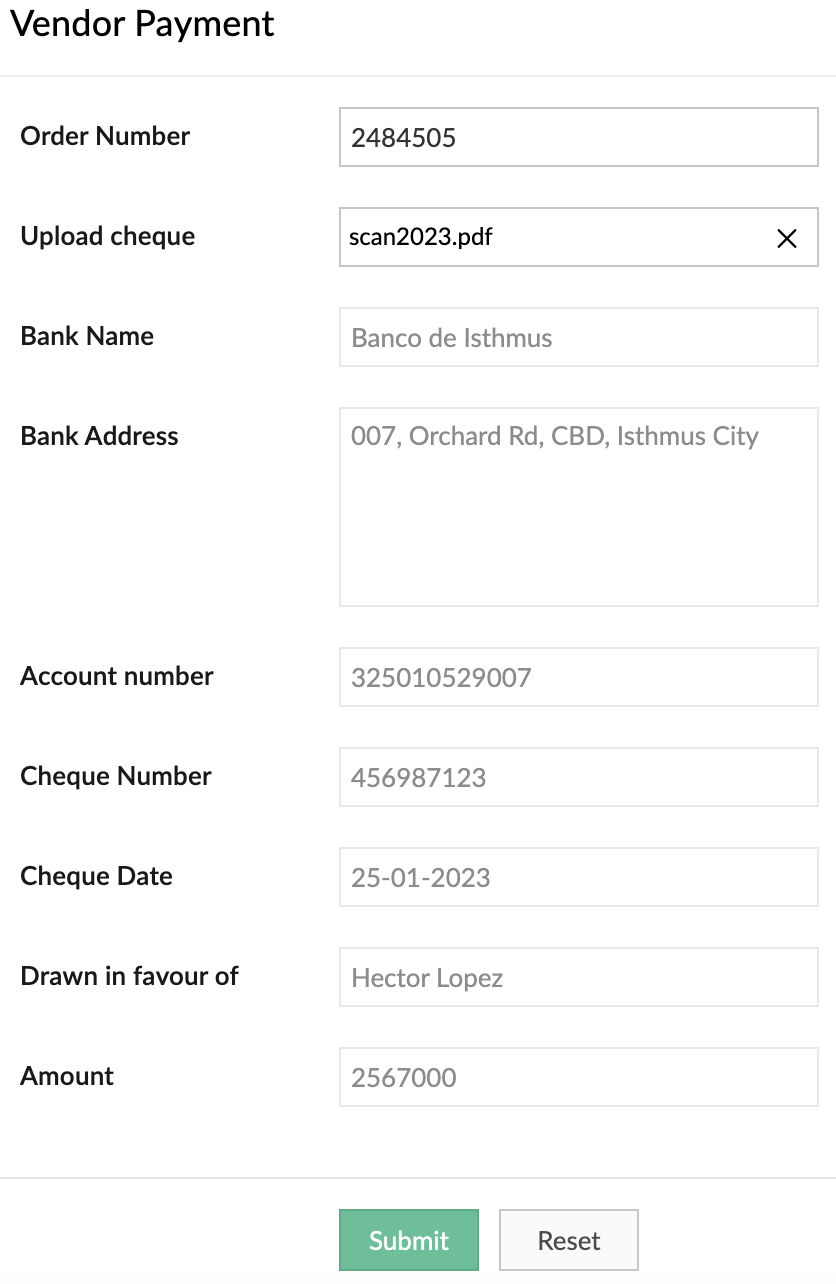
Optimize operations, eliminate repetitive manual tasks, and digitize your business by using our OCR model to extract text from images. The ready-to-use OCR model will extract all the text it identifies in the image, while you can build a custom OCR to extract specific text from images into fields in your forms. Tag the fields to the corresponding values once and eliminate manual data entry forever.
Example:
It's 2023, but many people still prefer to settle payments using checks. A business can use our custom OCR to extract details—like the bank name, check number, amount, date, and more—from the checks.
Object detection (Ready-to-use and custom)
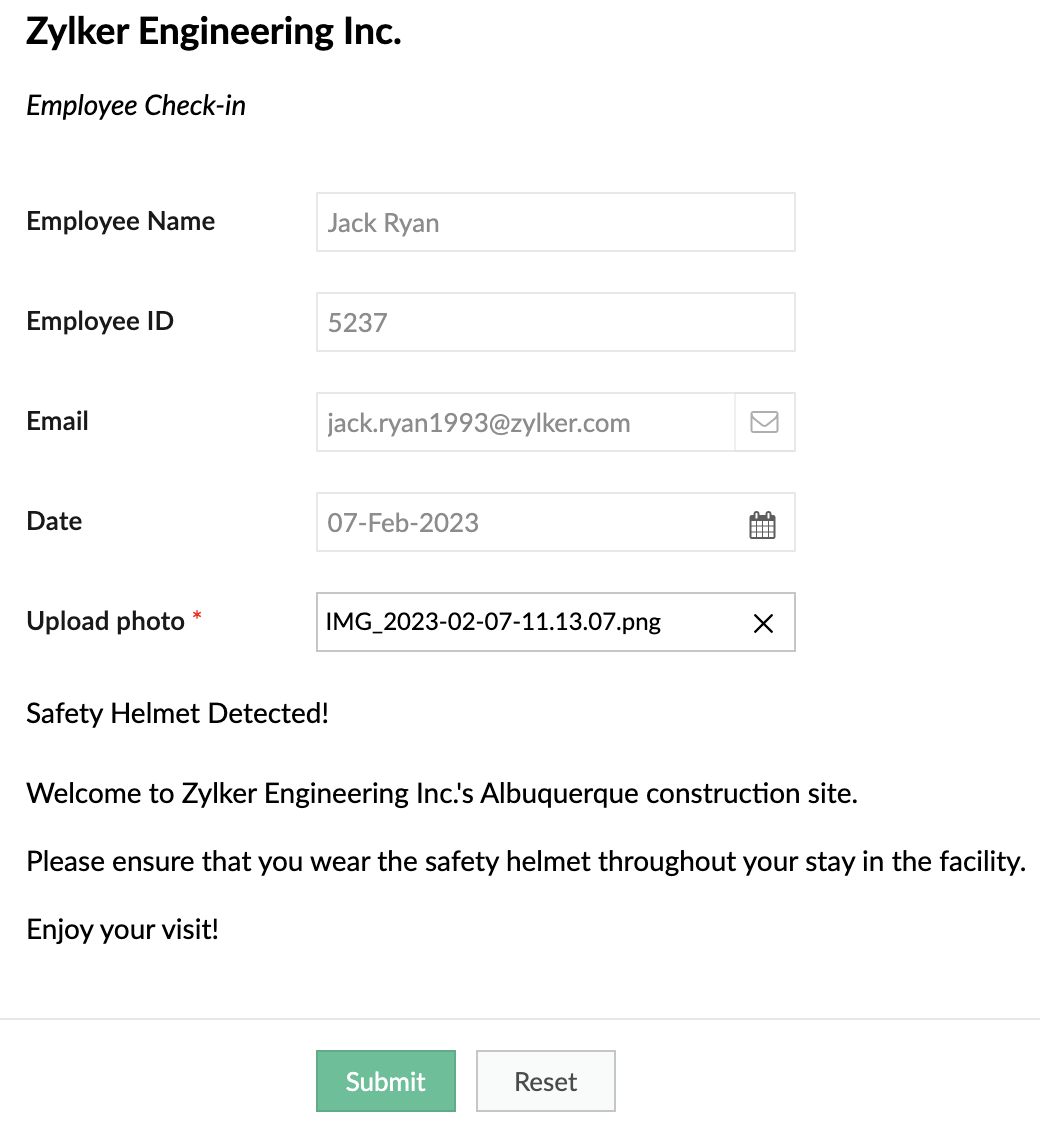
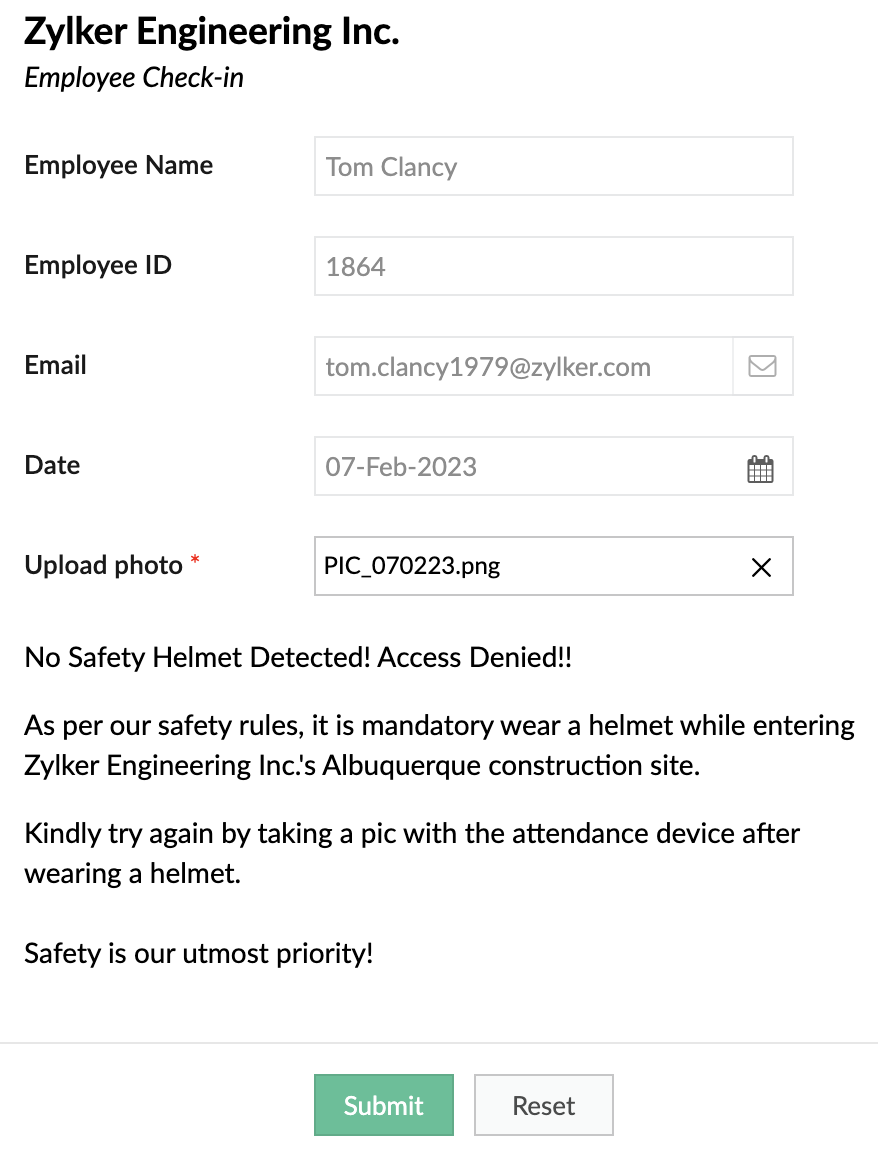
Object detection models are used to identify specific objects in images and use them to optimize business processes. Our ready-to-use model is trained to identify common objects (like people, dogs, cars, etc). Otherwise, you can build a custom model and provide it with the training data for the objects you want to identify.
Example:
A safety-focused company can use OD models to detect things like whether its employees are wearing a helmet while entering a construction site.
When helmet is detected
When helmet is detected
When helmet is not detected:
Keyword extraction (Ready-to-use)
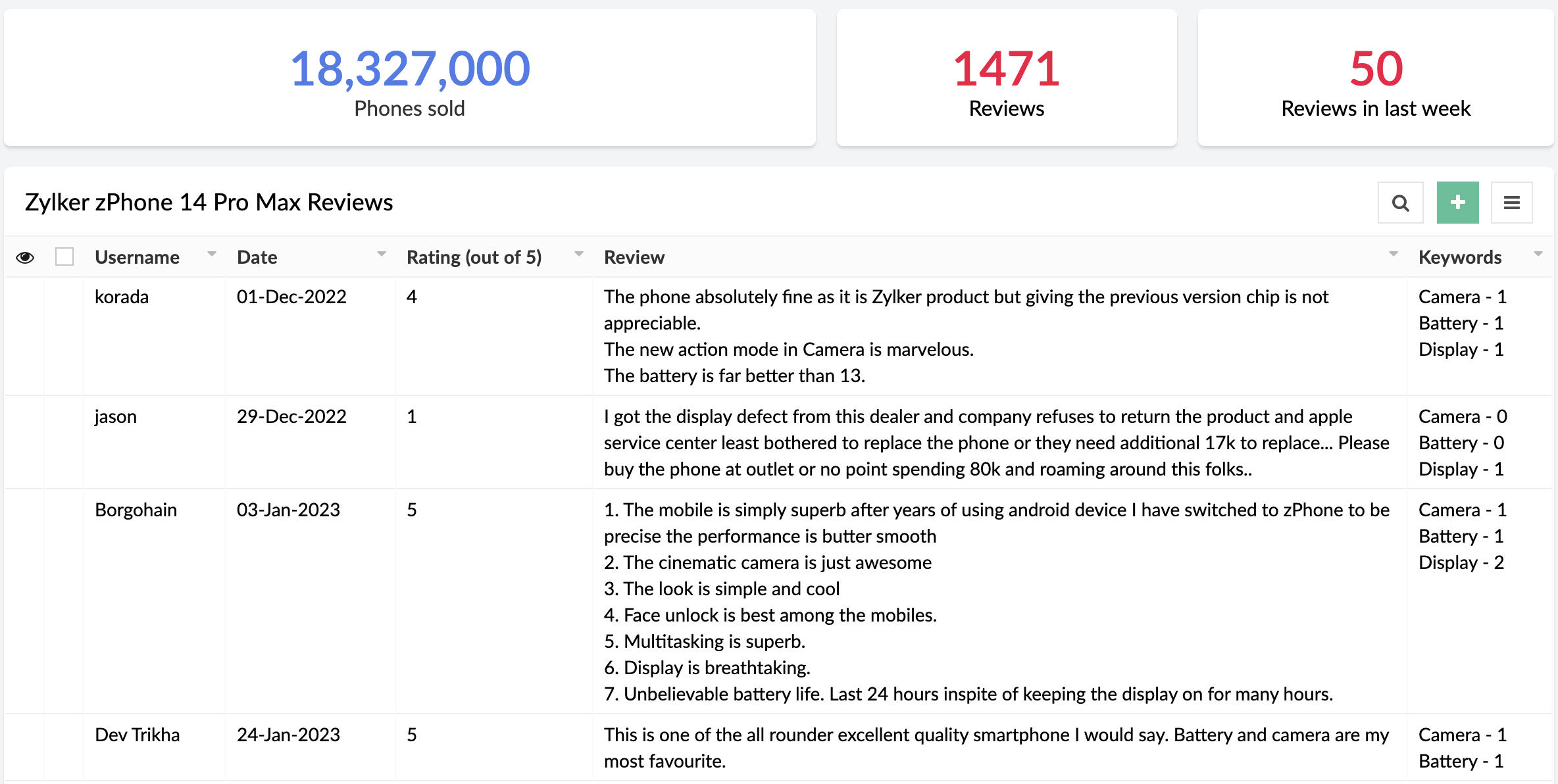
This functionality extracts the most important, representative words/phrases from large amounts of text data. In consumer facing industries, keyword extraction is quite helpful in analyzing customer responses, without having to go through each response manually.
Example:
An e-commerce site that sells mobile phones allows its customers to post reviews after purchase. Instead of manually going through each of the reviews, the site can use keyword extraction to gain insights automatically. They could choose to extract words like "camera", "battery", and "display" to learn more about the most discussed attributes of the product.
Sentiment analysis (Ready-to-use)
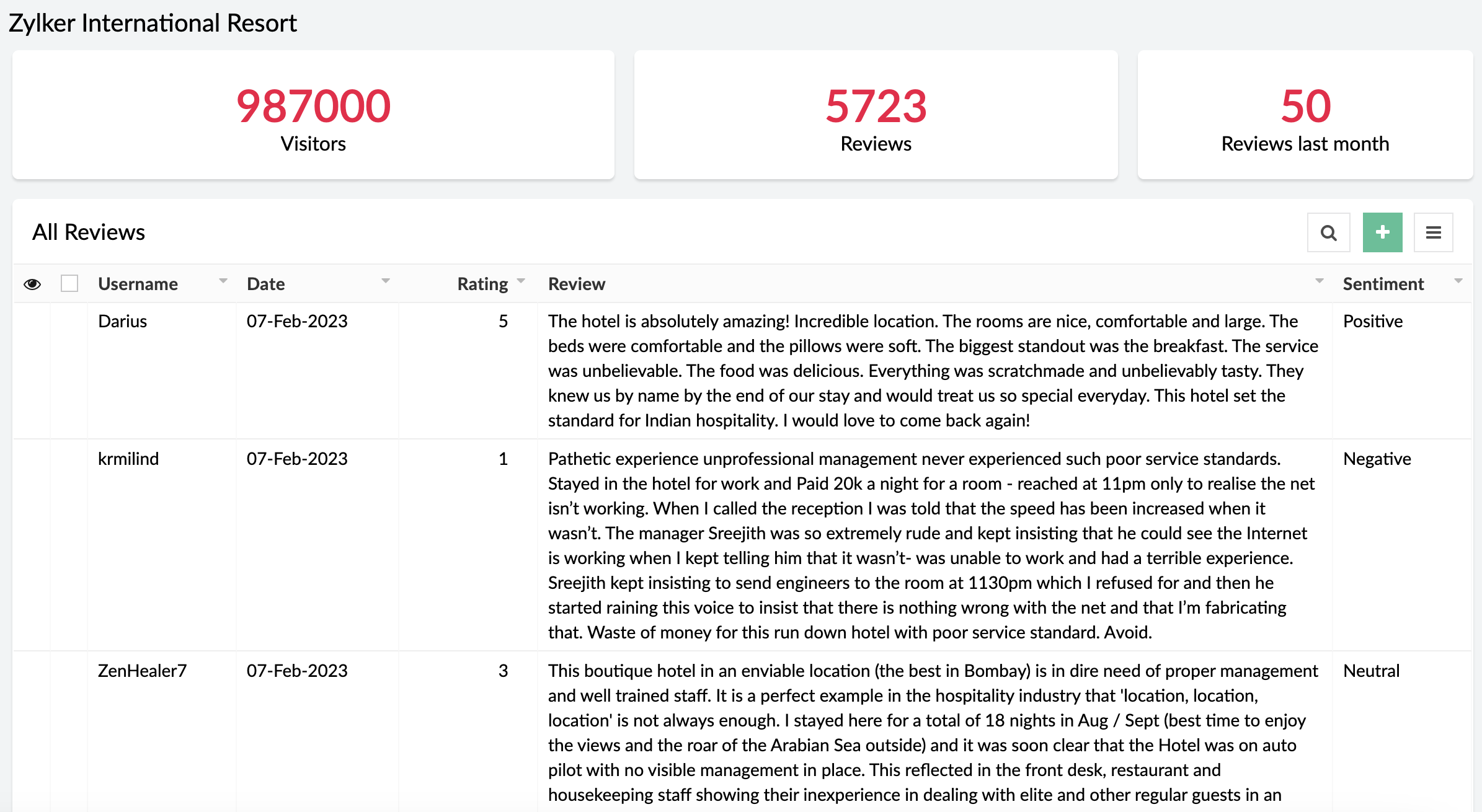
The sentiment analysis model analyzes text and predicts the sentiment expressed (positive, negative, or neutral). Sentiment analysis is widely used across industries to assist in analyzing customer feedback, customer support management, and social media monitoring.
Example:
A business receives a large amount of feedback on its products. It can use sentiment analysis to gather whether its products have been well-received or not.
When can I get my hands on it?
Pretty soon! We're as excited as you are and will be rolling out AI Modeler to C6 users on
February 20, 2023. Once live, we'll pop in a comment below this post and also update our
Release Notes page.
Versions
-
C5
(Ready-to-use models only. Use them via the AI fields in the form builder),
C6 (Both custom and ready-to-use models as Microservices)
C6 (Both custom and ready-to-use models as Microservices)
Pricing
- Ultimate & Professional
100 custom models & 250 ready-to-use with 1,000 free AI calls per month
After exhausting the free AI calls, you'll have to get monthly add-ons for more AI calls. You can choose from the $50(50000 AI Calls / Month), $100(120000 AI Calls / Month), and $200(250000 AI Calls / Month) add-ons based on your requirement.
100 custom models & 250 ready-to-use with 1,000 free AI calls per month
After exhausting the free AI calls, you'll have to get monthly add-ons for more AI calls. You can choose from the $50(50000 AI Calls / Month), $100(120000 AI Calls / Month), and $200(250000 AI Calls / Month) add-ons based on your requirement.
DCs
- US, EU, AU, IN, CN
Help documentation
In the meantime, you can go through our comprehensive set of help docs to learn the nitty-gritty of our AI models.
Our inbox is always open. Feel free to send your feedback to
support@zohocreator.com!
Regards,
Zoho Creator Team
Topic Participants
Ashwin Vishal R
Roberto Ríos
Ideal Calibrations
eminomartin61
Phillip Briski
Sticky Posts
Introducing Zoho Creator's 2025 Release Projection 2
Hello Creators! I'm Prakash, from the Creator product management team, and today I'm delighted to unveil our next set of features as part of Release Projection 2 for 2025. With thoughtful analysis and planning, we've curated powerful new capabilitiesZoho Creator - 2023 Release Projection 1
Hello everyone! A very Happy New Year to you and your family. Hope you're all good and having a great time using Zoho Creator to make your lives easier and your businesses prosper. 2022 was an action-packed year for us at Creator, and we hope to continueZoho Creator User Group meetups in a city near you! - Oct - Nov, 2023
Greetings from the Zoho Creator team! We're hosting a series of Zoho Creator meetups in various cities across the globe, and we'd love to meet you there! Our meetups are a great opportunity to network with industry peers, exchange ideas and best practices,Zoho Creator - 2023 Release Projection 2
Hello everyone! Time truly flies when you're having an incredible journey, and today we mark the completion of an eventful and action-packed six months. It feels like just yesterday when we embarked on this adventure together with the launch of our newUpcoming Updates - August 2022
Hi all, Greetings from the Zoho Creator team! Today we've got news for you on some exciting updates. And rest assured— there’s more to come! In this post, we'll be going over the upcoming features and improvements for this month as mentioned below. A
Recent Topics
IMPORTANT
Dear Zoho Support Team, I am currently experiencing an issue when trying to send emails from my Zoho Mail account. Each time I attempt to send a message, I receive the following error: "Unable to send message; Reason: 554 5.1.8 Email Outgoing Blocked."Able to Send Emails from Zoho but Not Receiving Emails from Gmail
Hello, I am experiencing an issue with my shopify domain email setup and would appreciate your help. Current situation: I can successfully send emails using Zoho. I can receive emails from some services (for example, Facebook). However, I cannot receiveAntispam validation failed for your domain in Accounts
I tried adding a domain to zeptomail.zoho.com, but the “add domain” operation failed. The front‑end error reads: “Domain could not be added. Please contact support@zeptomail.com.” The back‑end API returned: ``` { "error": { "code": "TM_3601", "details":Announcing new features in Trident for Windows (v.1.38.5.0)
Hello Community! Trident for Windows just received a major update, with a range of capabilities that focuses on strengthening and enhancing communication. Let’s dive into what’s new! View complete technical email details. For those who need deeper visibilityWindows Desktop App - request to add minimization/startup options
Support Team, Can you submit the following request to your development team? Here is what would be optimal in my opinion from UX perspective: 1) In the "Application Menu", add a menu item to Exit the app, as well as an alt-key shortcut for these menusAccounting of Amazon
I have recently started selling on Amazon.in and I am facing issues with different types of transactions: What entry to do in case of return? If I had sent two products and customer returned both the products but I had received only one and got the claimCompose Emails Faster Using Templates and Snippet
Hello everyone, We have made an enhancement to the Send as Email option in Tickets. Agents can use templates and snippets to draft their response, which helps save time and maintain consistency. The Send as Email page will display the available templatesCustomize Colors used on graphs and charts according to users desire.
It would be great if we could customize the graph's colors as we see fit. I hate that yellow is always the default color!Emails not integrating
My emails from Hubspot did not integrtate over. How do I fix that?Creating meetings from an email
Hi. Similar to Outlook, it would be helpful if a meeting can be scheduled from an email so that the attendees need not be manually entered every time it's created.Zoho Social API for generating draft posts from a third-party app ?
Hello everyone, I hope you are all well. I have a question regarding Zoho Social. I am developing an application that generates social media posts, and I would like to be able to incorporate a feature that allows saving these posts as drafts in Zoho Social.CRM Percent custom fields: When will it show the % symbol and behave like %?
1. Actually Percent custom fields fail to show the % symbol. 2. When in formulas Percent fields work like number: 100 x 5% = 5 ideal world 100 x 5% = 500 what happens actually 3. When importing Percent fields the % symbol has to be removed and the dataDeprecation of the Zoho OAuth connector
Hello everyone, At Zoho, we continuously evaluate our integrations to ensure they meet the highest standards of security, reliability, and compliance. As part of these ongoing efforts, we've made the decision to deprecate the Zoho OAuth default connectorRouteIQ for Zoho FSM
Beste, Zou wel top zijn dat we een RouteIQ hebben voor FSM aangezien we constant moeten zien wat de beste route is voor onze monteurs. Nu moeten we een speciale aparte programma hebben om de beste route te berrekenen voor onze monteurs aangezien de planningLet us view and export the full price books data from CRM
I quote out of CRM, some of my clients have specialised pricing for specific products - therefore we use Price Books to manage these special prices. I can only see the breakdown of the products listed in the price book and the specialised pricing forChanges to the send mail Deluge task in Zoho CRM
Hello everyone, At Zoho, we continuously enhance our security measures to ensure a safer experience for all users. As part of our ongoing security enhancements, we're making an important update on using the send mail Deluge task in Zoho CRM. What's changing?How to Invoice Based on Timesheet Hours Logged on a Zoho FSM Work Order
Hi everyone, We’re working on optimizing our invoicing process in Zoho FSM, and we’ve run into a bit of a roadblock. Here’s our goal: We want to invoice based on the actual number of hours logged by our technicians on a job, specifically using the timesheetsInclusion is the new engagement
When in a very challenging situation, you may have peers or friends around you saying, “Everything will be okay.” They speak to you in a way that they are connected or in a language or tone that feels close. But your inner voice comes to you in a trulyDKIM verification for Squarespace website - Corrections to instructions
Zoho Campaigns DKIM TXT record instructions for Squarespace show that Host field should show: 22111._domainkey.[domain name, e.g. mywebsite.com] However, after 72hrs, I had to reach out to Squarespace tech support, and they confirmed that the domain namePassing the image/file uploaded in form to openai api
I'm trying to use the OpenAI's new vision feature where we can send image through Api. What I want is the user to upload an image in the form and send this image to OpenAI. But I can't access this image properly in deluge script. There are also some constraintsMy client requires me to have custom pdf file names to except payment for invoices, how can I customize this before emailing.
Hello! I love the program so far but there are a few things that are standing in the way. I hope you guys can code them in so I can keep the program for years to come. My client requires I customize the pdf file names I send in for billing. Can you pleaseDisable All
I want to disable all the fields on the form when it loads. I know there is a way to do this by listing all the fields as follows: disable Name; disable Address; disable City; ... I have over 50 fields on my form and i am wondering if there is a single command or way to just disable all fields on load. On load = disable All Thank you for any help.Migrating my email from GMAIL to ZOHO MAIL..........
I am a long time GMAIL user and I really only understand how they operate, but after reviewing your tutorials and forums online, it is quite unbelievable how much more and how much more streamlined ZOHO mail is, not to mention ZOHO's wonderful, more advanced capabilities. I do have several questions about transitioning over to ZOHO. Primarily, where is the best place to start, what do I do first? And how hard is it actually to move all my business and personal accounts over here? When I sign upiOS Zoho Mail App Crashesruni
Whenever I trying to search emails via the Zoho Mail app on my iPhone the app crashes, I am running the latest version of the app and the latest iOS version. I have all set reset the app and deleted the app and still have the same issue. Thank you inAssessment Answered - Automation (Related List)
Hello everyone, We have linked a candidate assessment to our job posting. When someone applies, they are required to answer all the assessment questions. However, some candidates submit their applications without completing the questions. In such cases,Paid Support Plans with Automated Billing
We (like many others, I'm sure) are designing or have paid support plans. Our design involves a given number of support hours in each plan. Here are my questions: 1) Are there any plans to add time-based plans in the Zoho Desk Support Plans feature? TheCan't change form's original name in URL
Hi all, I have been duplicating + editing forms for jobs regarding the same department to maintain formatting + styling. The issue I've not run into is because I've duplicated it from an existing form, the URL doesn't seem to want to update with the newCalendar report with order options and more quick view templates
I think many of us regularly work with calendar-style reports. It would be great to be able to customize the quick view with new templates and have options to sort the entries for each day of the calendar by different criteria. I think this is an interestingShared Views
Hello, is there a way to prevent an agent from changing a shared table view? I have no issues with agents being able to create and customize their own view, but when I create a view and share it to my team -- the expectation is that they are viewing itUsing Zoho answer bot across departments (help center articles from another department)
Hi Zoho Community, I’ve run into a major issue and hope someone here has experience with this setup. We currently have a Help Center in the department A where all of our knowledge base articles are maintained. However, we would like to use a Zoho AnswerZoho Desk Partners with Microsoft's M365 Copilot for seamless customer service experiences
Hello Zoho Desk users, We are happy to announce that Zoho Desk has partnered with Microsoft's M365 to empower customer service teams with enhanced capabilities and seamless experiences for agents. Microsoft announced their partnership during their keynoteThe Social Wall: January 2026
Hello everyone, We’re back with the first edition of The Social Wall of 2026. There’s a lot planned for the year ahead, and we’re starting with a few useful features and improvements released in January to help you get started. Create a GBP in SocialPipeline: Copying rulesets from one data source to another
When creating and editing data pipelines, it would be really helpful to be able to copy the ruleset from one data source and 'paste' it to another. This would save time and reduce manual mistakes.Doubt about maximum email reach
Good morning, greetings. This is Bramdon García from EDULABS S.A.S ESP, located in Colombia. I'm writing to inquire about the possibility of sending an email to 35,000 people simultaneously. Our company has a Zoho account, but we'd like to know if there'sZoho calendar not working in browser
Hello, I am new to Zoho. I have two accounts for two separate businesses. In one of them, calendar loads in a browser no problem. However, if I use this account (sairfeetmusic.co.uk) calendar does not load. I also cannot add it to my Thunderbird LighteningAuthentication Failure when adding POP3 accounts
Hi everyone, I am a new user currently migrating from Gmail to Zoho Mail. I decided to make the switch following Google's decision to discontinue POP3 fetching. I previously used Gmail as my primary mail hub, and Zoho seems like the perfect alternativeTrident Application Folder
Hi, How to choose installation folder for Trident, by default it gets installed in C drive. How to change drive?Email disappeared to specific contact
Good afternoon, this morning I emailed somebody. This email isn’t showing up in my sent folder. They sent me a response which I clicked on and it disappeared immediately. Why could this be?Create an Eye-Catching Announcement Widget for Your Help Center
Hello Everyone! In this week’s edition, let’s explore how to keep your customers updated with exciting news in the Help Center. See how ZylkerMobile wowed their customers by bringing updates right to their portal. ZylkerMobile, the renowned brand forEnable Free External Collaboration on Notecards in Zoho Notebook
Hi Zoho Notebook Team, I would like to suggest a feature enhancement regarding external collaboration in Zoho Notebook. Currently, we can share notes with external users, and they are able to view the content without any issue. However, when these externalNext Page