Kaizen #115 :Customize Buttons using Client Script
Hello everyone!
Welcome back to another interesting Kaizen post. In this post, we can discuss how to customize buttons using Client Script.
In this kaizen post,
- Need for customizing buttons
- ZDKs related to Buttons
- Use Case to customize button using Client Script
- Solution
- Summary
- Related Links
1. Need for customizing buttons
- Enforcing Workflow Steps - By disabling certain buttons based on conditions, you can guide users through a predefined workflow. For example, if you want to notify the customer, when the order is in a particular stage, you can disable the button for other stages.
- Customize buttons based on your business - You can modify button labels using Client Script to match your company's specific terms.If a button is part of a step-by-step process, change the label to match each step, making it more intuitive for users.
2. ZDKs related to Buttons
Client Script empowers you to customize buttons and here is the list of ZDKs and Client Script functions to customize standard and custom buttons.
- getButtonByID(id) - You can get the Pages' Button by ID.
- getButton(api_name) - You can get the Pages' Button by api name.
- getButtons() - You can get the list of buttons in the Page as an array.
- getId() - Using this, you can get the id of button.
- getType() - Using this, you can get the type of button.
- getLabel() - Using this, you can get the name of the button.
- getApiName() - Using this, you can get the API name of the button.
3. Use Case for customizing buttons:
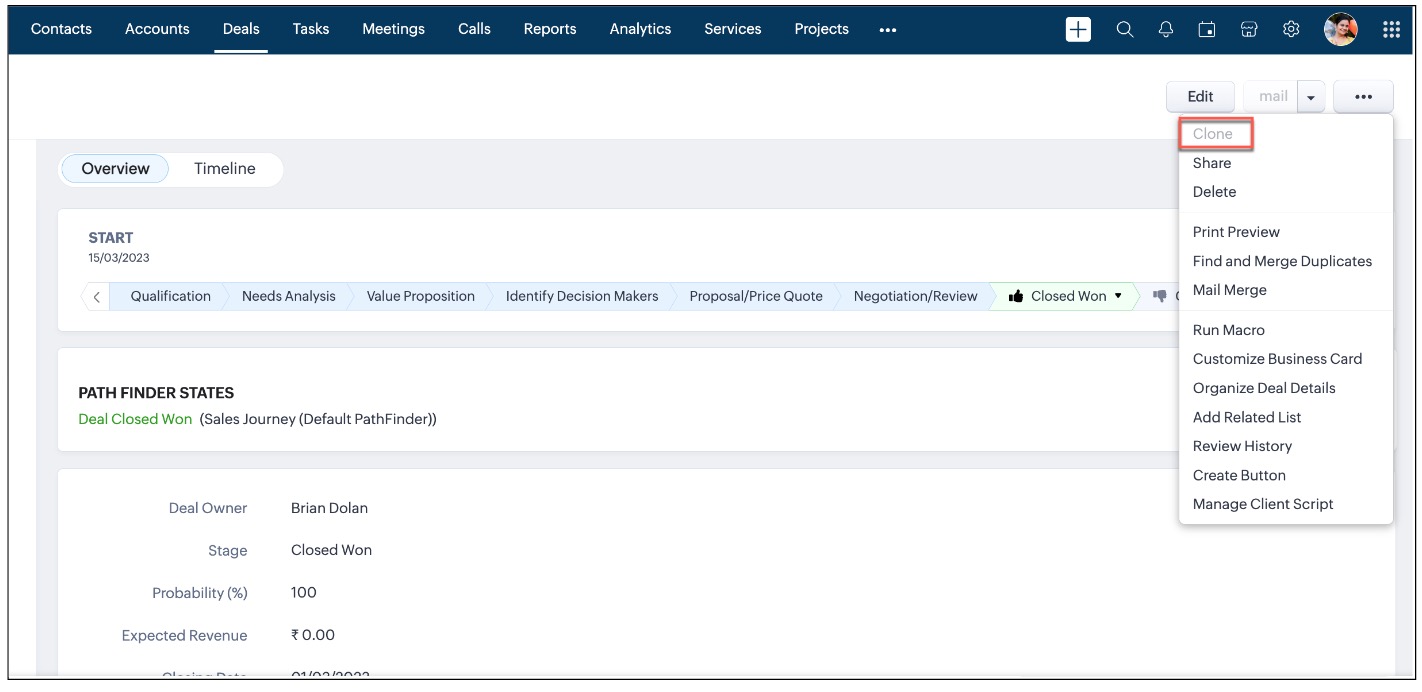
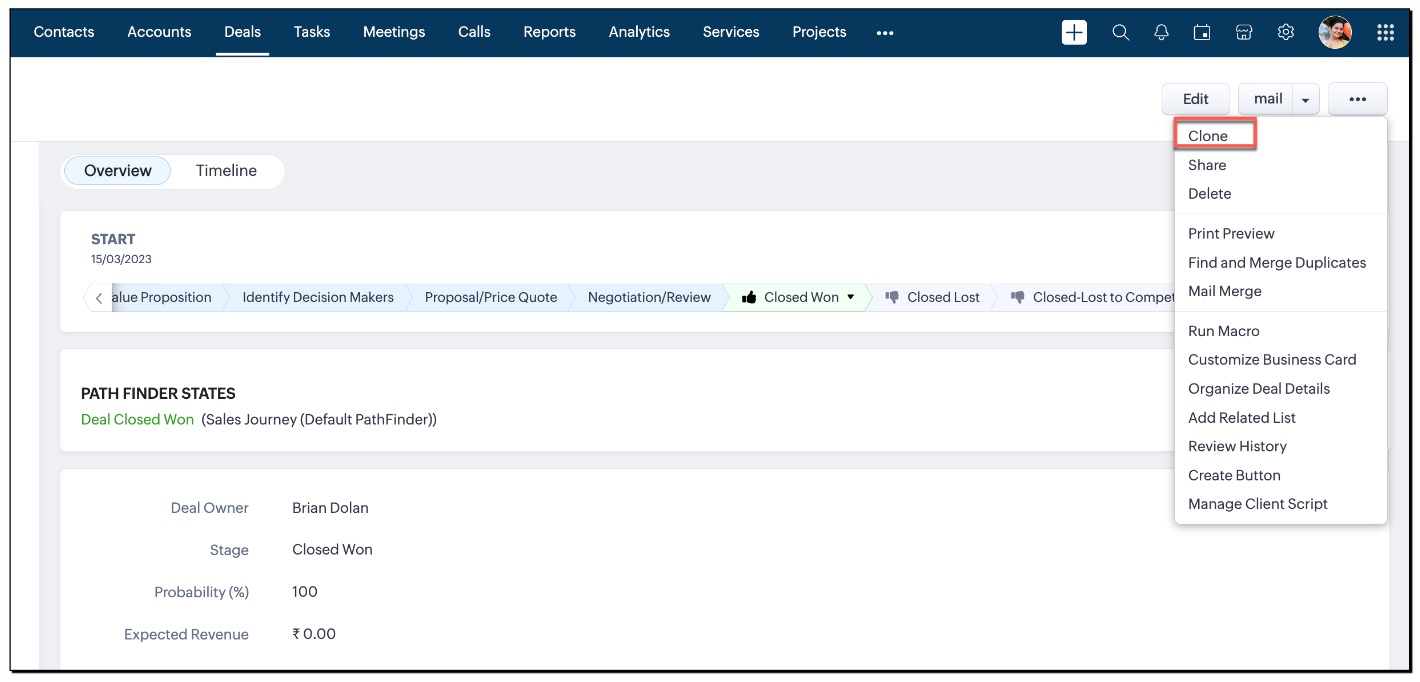
Zylker is a manufacturing company. The Sales representatives initiate the process by creating new deals in the CRM for potential customers or business opportunities. So they are given the "create" permission. But in real time, there are high chances for an approved record to get cloned, which cannot be permitted. So, Zylker wants to disable the "Clone" button for users having a "Sales" profile.
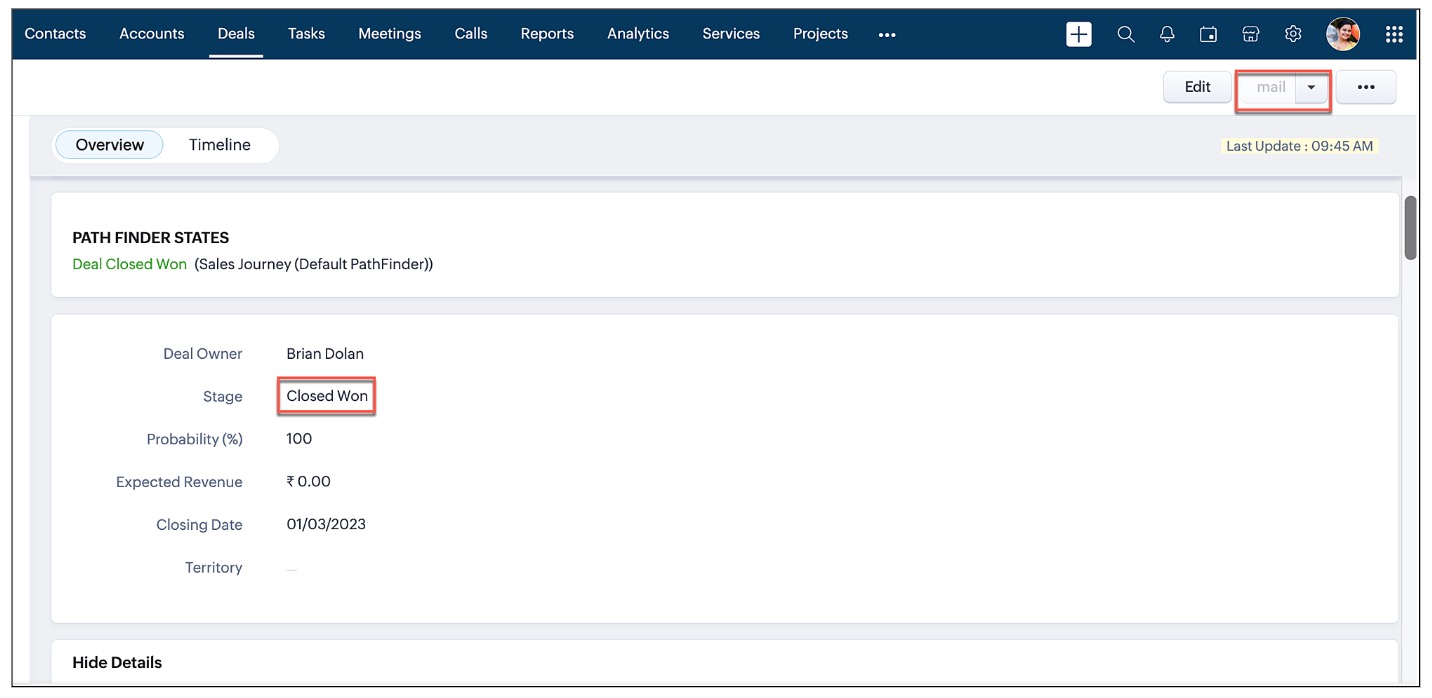
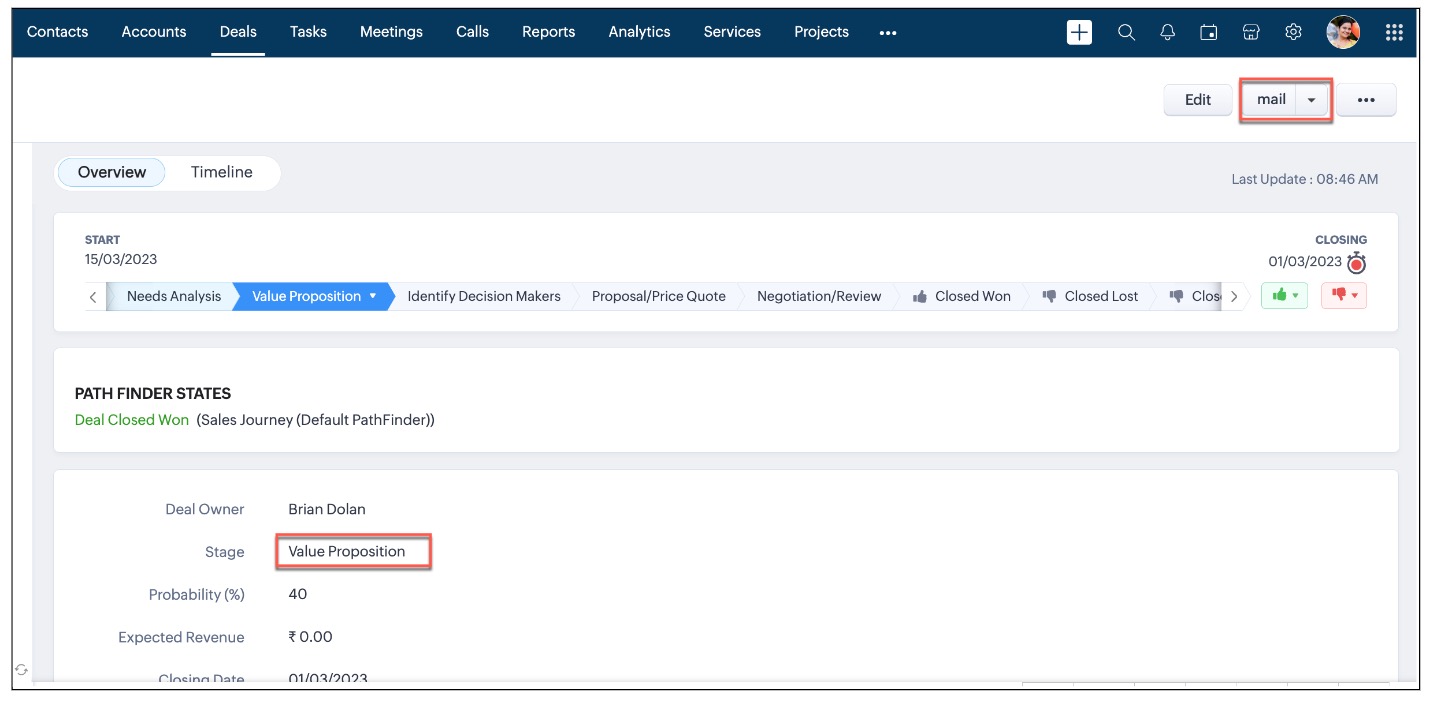
As per their workflow, once the deal's stage is "Closed Won" a mail should be sent to the Manager and the customer. For this they have a custom button named "mail". But this mail button should not be sent when the deal is in other stages. To ensure this, Zylker wants to disable this button for all other stages of the deal.
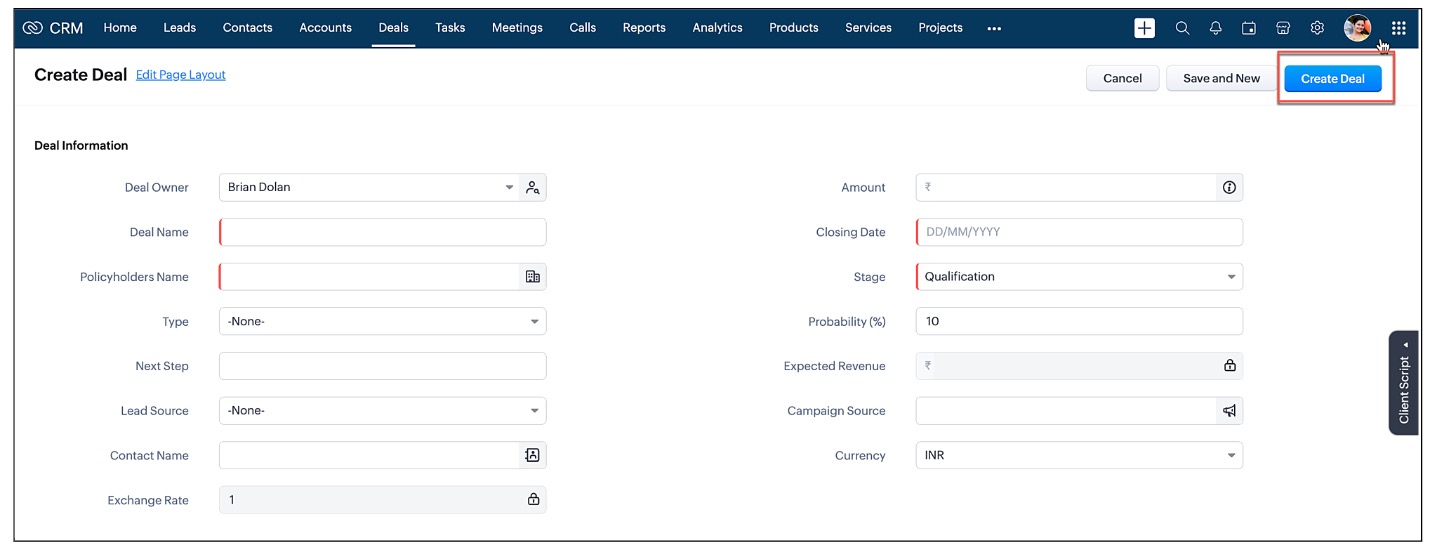
Also, for better clarity, Zylker wants to rename the "save" button as "Create Deal" in the Create Page (Standard).
4. Solution:
As per the requirement, you need to create three Client Scripts.
A. Disable "Clone" button Detail Page (Standard) when the page loads
B. Disable "Mail" button Detail Page (Standard) when the stage changes
C. Rename button in Create Page (Standard)
A. Disable Clone and mail buttons in Detail Page (Standard)
- Create a Client Script for Detail Page (Standard) with onLoad Page event.
- For details about how to create a Client Script, click here.
- Enter the following script and save.
// Disable the standard "clone" button var user = ZDK.Apps.CRM.Users.fetchById($Crm.user.id); if (user.profile.name !== 'Sales') { var clone_btn = ZDK.Page.getButton('clone'); clone_btn.disable(); } |
- In the above script, "clone" is the api name of the standard button.
- Here is the screenshot that shows the disabled "Clone" button for a user only with Sales Profile.
- Here is the screenshot that shows the "Clone" button for a user with a non-sales profile user. That is, "Clone" button is not disabled for users having profiles other than "Sales" profile.
B. Disable "Mail" button Detail Page (Standard) when the stage changes
- Create a Client Script for Detail Page (Standard) with onChange field event for the field Stage.
- For details about how to create a Client Script, click here.
- Enter the following script and save.
// Disable the custom "mail" button var stage_field = ZDK.Page.getField("Stage"); if (stage_field.getValue != 'Closed Won') { ZDK.Page.getButtons().find(a => a.getLabel() === 'mail').disable(); } |
- Here is the screenshot that shows the disabled "mail" button for a deal with the "Closed Won" stage.
- Here is the screenshot that shows that "mail" button is not disabled for the deal in the "Value Proposition" stage.
C. Change the label for "save" button in Create Page (Standard)
- Create a Client Script for Create Page (Standard) with onLoad Page event.
- For details about how to create a Client Script, click here.
- Enter the following script and save.
var save_btn = ZDK.Page.getButton('record_save'); save_btn.setLabel('Create Deal'); |
Here is the screenshot showing the "Create Deal" label instead of the "save" label.

Note:
Using Client Script, currently custom buttons can be disabled only in the Detail Page (Standard) and in the List Page (Standard).
5. Summary
In this post, we have discussed,
- How to fetch the label of buttons in Client Script
- How to disable standard and custom buttons based on conditions
- How to change the label of a button
- ZDKs and methods available to customize buttons

Kaizen Collection :
Click here to view our Kaizen Collection. Also, check our previous post - Kaizen#114 - Geocoding Leads' Addresses in ZOHO CRM
We hope you found this post useful. We will meet you next week with another interesting topic!
If you have any questions let us know in the comment section.
Cheers!
Topic Participants
Maadhari M
Subhash Kumar
Vigneshwaran K
Sam
PJ
Sticky Posts
Kaizen #198: Using Client Script for Custom Validation in Blueprint
Nearing 200th Kaizen Post – 1 More to the Big Two-Oh-Oh! Do you have any questions, suggestions, or topics you would like us to cover in future posts? Your insights and suggestions help us shape future content and make this series better for everyone.Kaizen #226: Using ZRC in Client Script
Hello everyone! Welcome to another week of Kaizen. In today's post, lets see what is ZRC (Zoho Request Client) and how we can use ZRC methods in Client Script to get inputs from a Salesperson and update the Lead status with a single button click. In thisKaizen #222 - Client Script Support for Notes Related List
Hello everyone! Welcome to another week of Kaizen. The final Kaizen post of the year 2025 is here! With the new Client Script support for the Notes Related List, you can validate, enrich, and manage notes across modules. In this post, we’ll explore howKaizen #217 - Actions APIs : Tasks
Welcome to another week of Kaizen! In last week's post we discussed Email Notifications APIs which act as the link between your Workflow automations and you. We have discussed how Zylker Cloud Services uses Email Notifications API in their custom dashboard.Kaizen #216 - Actions APIs : Email Notifications
Welcome to another week of Kaizen! For the last three weeks, we have been discussing Zylker's workflows. We successfully updated a dormant workflow, built a new one from the ground up and more. But our work is not finished—these automated processes are
Recent Topics
Deluge error on updating datetime field
Hi, while updating date-time field , i am getting this error {"code":"INVALID_DATA","details":{"expected_data_type":"datetime","api_name":"Date_Time_1"},"message":"invalid data","status":"error"} Here is the code , i have tried leads = zoho.crm.getRecordById("Leads",商談の特定ステージ選択時に、集計項目の入力を必須化したい
こんにちは。Zoho CRMの商談管理で以下を実現したいです。レイアウトルールでは、集計項目を条件に選択できず実現できておりません。よい方法があればご教示いただけると嬉しいです。 ■やりたいこと 商談で特定のステージに変更する場合に、特定の集計項目(同じ商談データ内の項目。以降、集計項目Aとする)を入力必須化したい。 ■概要、状況 ・集計項目Aは、別のオブジェクトで、商談に関連する月ごとの売上を集計している数値項目 ・見積を顧客に提示した際に、集計項目Aに見積金額と一致するようにデータ登録する運用をしているinventory based on bills and not physical stock
Hello, I have noticed a very annoying issue with zoho books/inventory. I use composite items. If I have an sub assembly item on back order, I am unable to make up the composite item, even when I have received the goods and it is in my stock. I have to convert the PO into a BILL in order for the item to show as 'Accounting Stock'. The problem is that the supplier Invoice is not shipped with the goods, but can follow even a week later. So I have to make the bill have a 'dummy name and number' untilZoho Inventory. Preventing Negative Stock in Sales Orders – Best Practices?
Dear Zoho Inventory Community, We’re a small business using Zoho Inventory with a team of sales managers. Unfortunately, some employees occasionally overlook stock levels during order processing, leading to negative inventory issues. Is there a way toNo option for pick up in Zoho Books / Inventory but yes on commerce
Is it planned to release soon on books/inventory?Update to CRM Custom Buttons: Collect Users' Location
Hello everyone! Buttons in Zoho CRM allow you to extend the default CRM capabilities for your bespoke business needs. It provides the flexibility to connect to any third-party application to perform necessary actions. Wouldn't it be better, if those buttonsSpeed (again!)
Same old story again: impossible to work at this "speed". Category NOTES!Client Script | Update - Client Script Support For Custom Buttons
Hello everyone! We are excited to announce one of the most requested features - Client Script support for Custom Buttons. This enhancement lets you run custom logic on button actions, giving you greater flexibility and control over your user interactions.Marketing Tip #27: Add a favicon and social preview image for your online store
Small branding details can make a big difference in how professional your store looks online. A favicon (the tiny icon shown in browser tabs) helps customers recognize your store instantly, especially when they have multiple tabs open. A social previewKnowledge base: The nitty-gritty of SEO tags
A well-optimized knowledge base with great SEO can benefit your company by allowing customers to find help articles and support resources using search engines. This enables customers to quickly and efficiently find the information they need without directZoho Social API for generating draft posts from a third-party app ?
Hello everyone, I hope you are all well. I have a question regarding Zoho Social. I am developing an application that generates social media posts, and I would like to be able to incorporate a feature that allows saving these posts as drafts in Zoho Social.How to list WorkDrive folder contents using API
I'm trying to read folder contents using a Deluge script. The code below returns {"errors":[{"id":"F6016","title":"URL Rule is not configured"}]}". I've tried using the search API and seen similar errors. I have proved that the connection works by creatingAdd Custom Fields only in Customer module and not on supplier module!? Is not there a way to do that!?
I am trying to create custom fields on clients module but it also gets created on suppliers module; which of course does not make sense at all as a lot of custom fields are client or supplier specific but never both. I am missing something? This seemsSolving the bug in Zoho Writer API for styling
So... the Zoho Writer APIs for programatically creating a document do not respect a template's style. The result is that any document you generate via API needs to be manually, paragraph by paragraph, reformatted. That bug alone is sufficient to renderhow-to insert a new within a cell
If I am in MS excel in a cell that I need to have multiple line, I would use ctrl-enter to create new line within a cell. How can do the same function in ZoHo Sheet?Zoho Books | Product updates | February 2026
Hello users, We’ve rolled out new features and enhancements in Zoho Books. From Advanced Reporting Tags to the ability to mark projects as completed, explore the latest updates designed to improve your bookkeeping experience. Introducing Advanced ReportingPartial payments for retainer invoices
When a customer does not pay the entire retainer invoice there is no way to apply a partial payment. PLEASE add this function.Need to set workflow or journey wait time (time delay) in minutes, not hours
Minimum wait time for both Campaigns workflows and Marketing Automation journeys is one hour. I need one or the other to be set to several minutes (fraction of the hour). I tried to solve this by entering a fraction but the wait time data type is an integerZoho Book - Banking Module - Cash Credit account
I have a CC account with a bank. I initially added the account as a 'Bank Account' under the banking module in Zoho Books. However, this CC Bank Account is showing as an asset instead of a liability. I have added the account as a credit card account butComments aren't visible in shared spreadsheet
I would like to send a spreadsheet to people who can use it to help solve a problem as a one off use unique to them. They will have to enter data in the sheet. I have comments attached to some of the cells to explain the purpose of the data being collected.Custom button for list page
Why is my 'List Page - Bulk Action Menu' button in the Packages module not autopopulating the List argument with selected record IDs?Invoice Import Error: "Either Tax or Tax Exemption Reason is required" - Recurring Across All Attempts
Issue Description: I'm experiencing a critical issue with invoice imports in Zoho Books. Every import attempt fails with the same error message, regardless of the tax data provided: Either Tax or Tax Exemption Reason is required. This error is blockingAsk the Experts - Live Q&A webinar
Hello Community, We’re excited to host our very first Ask the Experts session! Join us on 7 April 2026 from 11 a.m. to 12 p.m. (IST) for this live webinar Q&A session, where you will have an opportunity to connect directly with our product experts, gainDesigning Multi-Step Workflow System in Zoho Creator + Deluge (Startup Build – Exploring Advanced Architecture + Partnerships)
Hi everyone, I’m currently building a Zoho-based system as part of an early-stage startup, and I’m looking to connect with others who have experience designing more advanced workflows in Creator + Deluge. This started as a standard application, but it’sIs it possible to make tags "required"
We would like to be able to make the tag field a requirement for agents before they can close a ticket. This would help with monthly reporting, where a lot of tickets end up with no tag, causing manual work to go back and add the correct tag for eachPrevent Automatic Milestone Inheritance for Newly Created Task Lists
Hello Zoho Projects Team, We hope you are doing well. We would like to request an enhancement regarding how new task lists inherit Milestone association in Zoho Projects. Current Behavior: At the moment, when a new task list is created below an existingI would like to know wich person viewed the file
I have a franchise and my Operative Manual is in WorkdriveI, the user can´t download but despite I know How many views the file had, I would like to know wich person viewed the file Is it possible? thank youCan I write a check in Zoho Books with no associated bill?
This currently does not seem possible, and I have a client that desperately needs this function if I am able to convert them with Quickbooks. Thank you in advance for your reply.Ordering of Teams
Hi there, Currently, we cannot order Teams in Zoho Desk. Teams are ordered as they were created. It would be really helpful if we could customise the order of Teams. For example: We have the following Teams: Shipping Customer Service Sales ComplianceEstimate Module - Contact Field.
Hello Latha and Team, Is it possible to make the Contact field optional in the Estimate module? Best regards, Chethiya.Item with name in different languate
Hello, is there a way to have an item with its name in different languages? For example: I sell an item in different markets and I'd like to have a Proposal and the Invoice with the Item Name in a specific language. Rino Bertolotto Zoho Specialist, STESA srlWhat is a realistic turnaround time for account review for ZeptoMail?
On signing up it said 2-3 business days. I am on business-day 6 and have had zero contact of any kind. No follow-up questions, no approval or decline. Attempts to "leave a message" or use the "Contact Us" form have just vanished without a trace. It stillHow to keep track of bags, cans, drums of inventory?
We buy and sell products that are packaged in bags 🛍️, cans🥫, drums🛢️, etc. with batch numbers. When we get a shipment of one of the products, how do we track we received (say) 10 cans each of 5L of a product and maybe we received 10 cans of anotherThis version of app doesn't support this notecard type Error
So this problem is happening for any notes created within the last week, as well as any note recently edited on Android. I can open them on my phone fine, but they don't open on the website version. They DO work on the desktop app version. It's just webPDF's Give Unsupported Type Error Message
Many of the pdf files I add to Notebook work fine but in some cases when I try to open them on the Android App I get a message saying "Unsupported Type. Psst! You are using an older version of the app which does not support this note format. Please updateAccept credit card payment for multiple invoices
We have a problem with Zoho Books. While we can charge a customer's credit card for an individual customer invoice, we cannot charge a customer's credit card for more than one invoice. In our business, it is common for a client to phone up and say, "HereCliq iOS can't see shared screen
Hello, I had this morning a video call with a colleague. She is using Cliq Desktop MacOS and wanted to share her screen with me. I'm on iPad. I noticed, while she shared her screen, I could only see her video, but not the shared screen... Does Cliq iOS is able to display shared screen, or is it somewhere else to be found ? RegardsIs multiple invoice e-mailing possible?
I wonder if following is possible: When you are in the invoice view, assume you have five invoices to five different customers that are pending (you have just created them, but not sent them away yet by email.) To the left of every invoice in the overviewMultiple packages in one shipment
Guys we have been asking for this for years. we want to be able to ship multiple packages for one customer in the same shipment, so as to avoid entering shipping info repeatedly, and avoid customer getting multiple tracking emails. When does this arise?I can't add a new customer in Zoho invoice? Anyone had this issue before?
Ive been using Zoho invoice for over 6 years. Today I wanted to add a new customer to send an invoice to but it doesn't save when I try to access it from the pulldown menu when you go to send a new invoice.Next Page