Kaizen #199: FAQs on Multi-Select Lookup (MxN) Field in Zoho CRM
Nearing 200th Kaizen Post – We want to hear from you!
Do you have any questions, suggestions, or topics you would like us to cover in future posts? Your insights and suggestions help us shape future content and make this series better for everyone.
Hey everybody!!!
Welcome back to another post in the Kaizen series!
In this post, we will address some of the most frequently asked questions about the Multi-Select Lookup(MxN) field from the Zoho CRM developer community forum.
1. What is a Multi-select lookup field?
A multi-select lookup field in Zoho CRM lets you create a many-to-many relationship between two modules. This means a record in one module can be linked to multiple records in another module and vice versa.
For example, using an multi-select lookup field, you can associate multiple skills with an employee.
2. How does the Mutli-Select Lookup relationship work?
When you create a Multi-Select Lookup between two modules, for example, Employees and Skills, Zoho CRM automatically creates a hidden linking module, which is also known as an MxN module. This module stores the associations between records in the two modules, enabling you to track and manage many-to-many relationships.
For instance, if you link Employees and Skills, a linking module named EmpXSkills will be created.
This linking module is accessible only via API.
Backend Flow of multi-select lookup Relationship
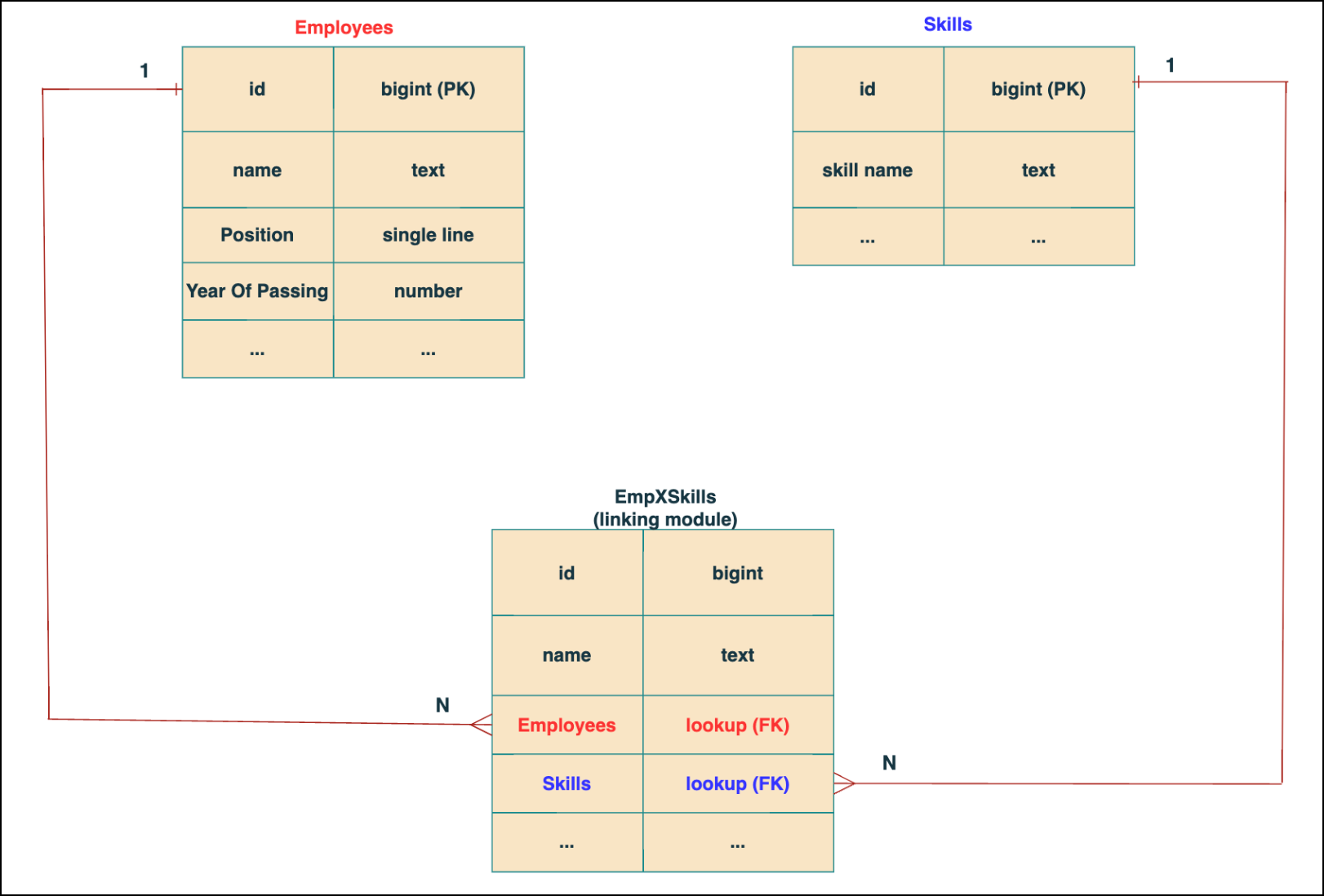
In the linking module, two lookup fields (lookup fields with api names - Employees and Skills) will be created. The lookup fields, one pointing to Employees and the other pointing to Skills from the linking module, establish a connection between the linking module and its associated module.
Why you cannot use a lookup field for this use case?
In Zoho CRM, a lookup field creates a one-to-many relationship between two modules i.e. one record in the source module can be linked to only one record in the target module.
Example :
If you create a lookup field for Skills in the Employees module, each employee can be linked to only one skill. So, use a multi-select lookup field instead of a lookup field when you need to represent complex relationships like one employee - many skills and one skill - many employees.
3. How to create a multi-select Lookup field using Zoho CRM APIs?
To create a Multi-Select lookup field between two modules using Zoho CRM APIs, follow these steps:
Step 1: Identify the Module API Name
Before creating the field, you should know the API names of the Employees and Skills modules. For that, use the Get Module Metadata API.
Request URL : {{api-domain}}/crm/v8/settings/modules
Request method : GET
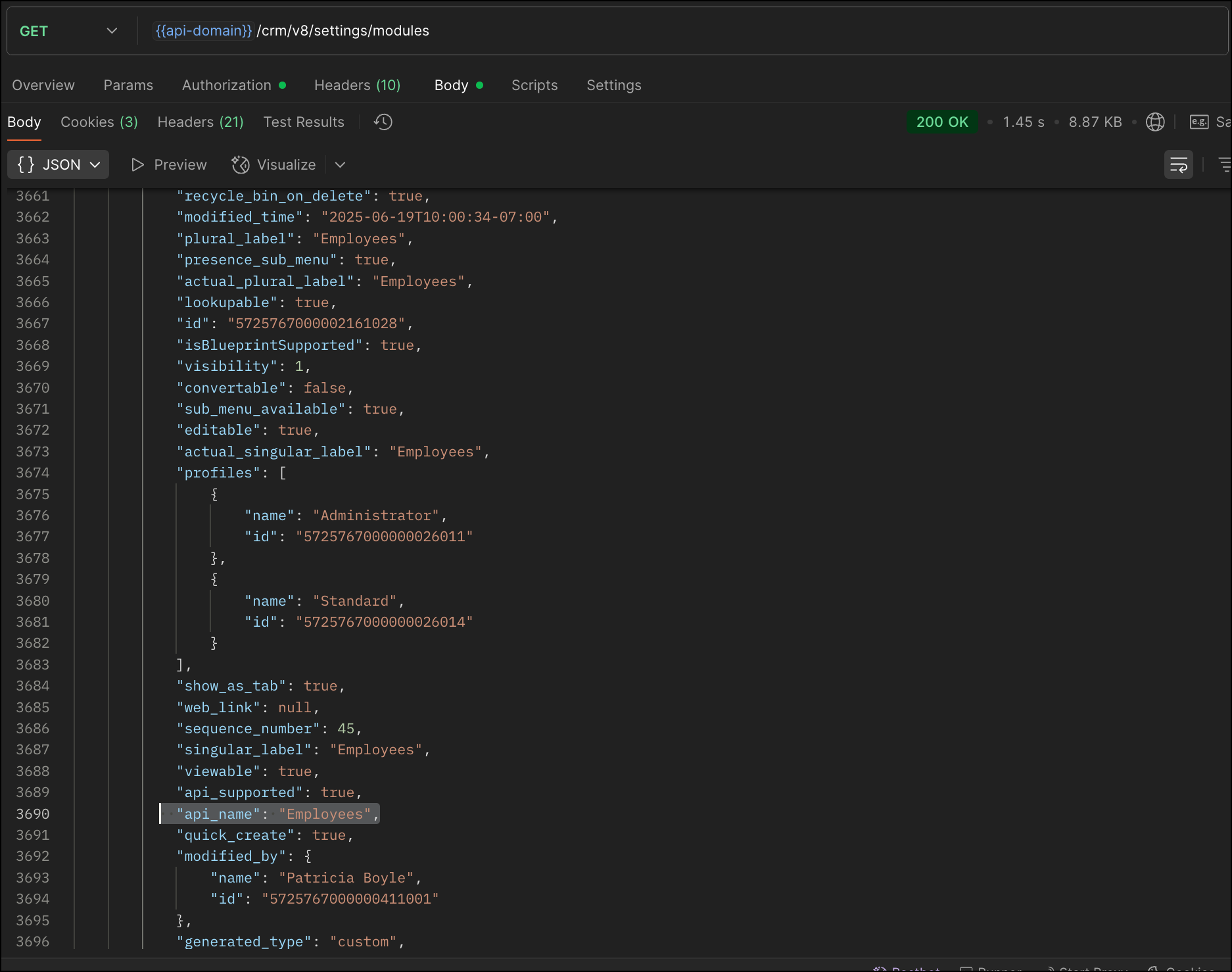
Now, search for the Employees module in the response and note its API name.
Step 2: Use the Create Custom Fields API
To establish a many-to-many relationship between two modules, in our case, Employees and Skills, you need to create a custom field of type multi-select lookup in the Employees module (parent module). Here, we will associate multiple skills to an employee.
This custom field requires:
- The related module you want to link to - Skills.
- A display field from the related module
- The linking module (EmpXSkills), which stores the actual associations.
Use the Create Custom Fields API to create custom fields.
Request URL : {{api_domain}}/crm/v8/settings/fields?module=Employees
Request method : POST
Sample input :
|
{
"fields": [
{
"field_label": "Skills", //Name of the field in your module
"data_type": "multiselectlookup", //Type of the field
"multiselectlookup": { //This JSON object contains the multi-select lookup relationship details
"connected_details": { //Details about the module and field you want to link
"module": {
"api_name": "Skills" //API name of the related module
},
"field": {
"field_label": "Skills" //The field in the related module to display
}
},
"linking_details": { //Details about the junction or linking module that manages the many-to-many relationship
"module": {
"plural_label": "EmpXSkills" //Plural label of the junction module
}
}
}
}
]
}
|
4. How Do You Find the Linking Module and Field API Names?
To know the API name of the linking module:
Use the Get Modules API and search for "generated_type" : "linking" in the response to identify MxN modules. In our case, EmpXSkills.
Request URL : {{api_domain}}/crm/v8/settings/modules
Request method : GET
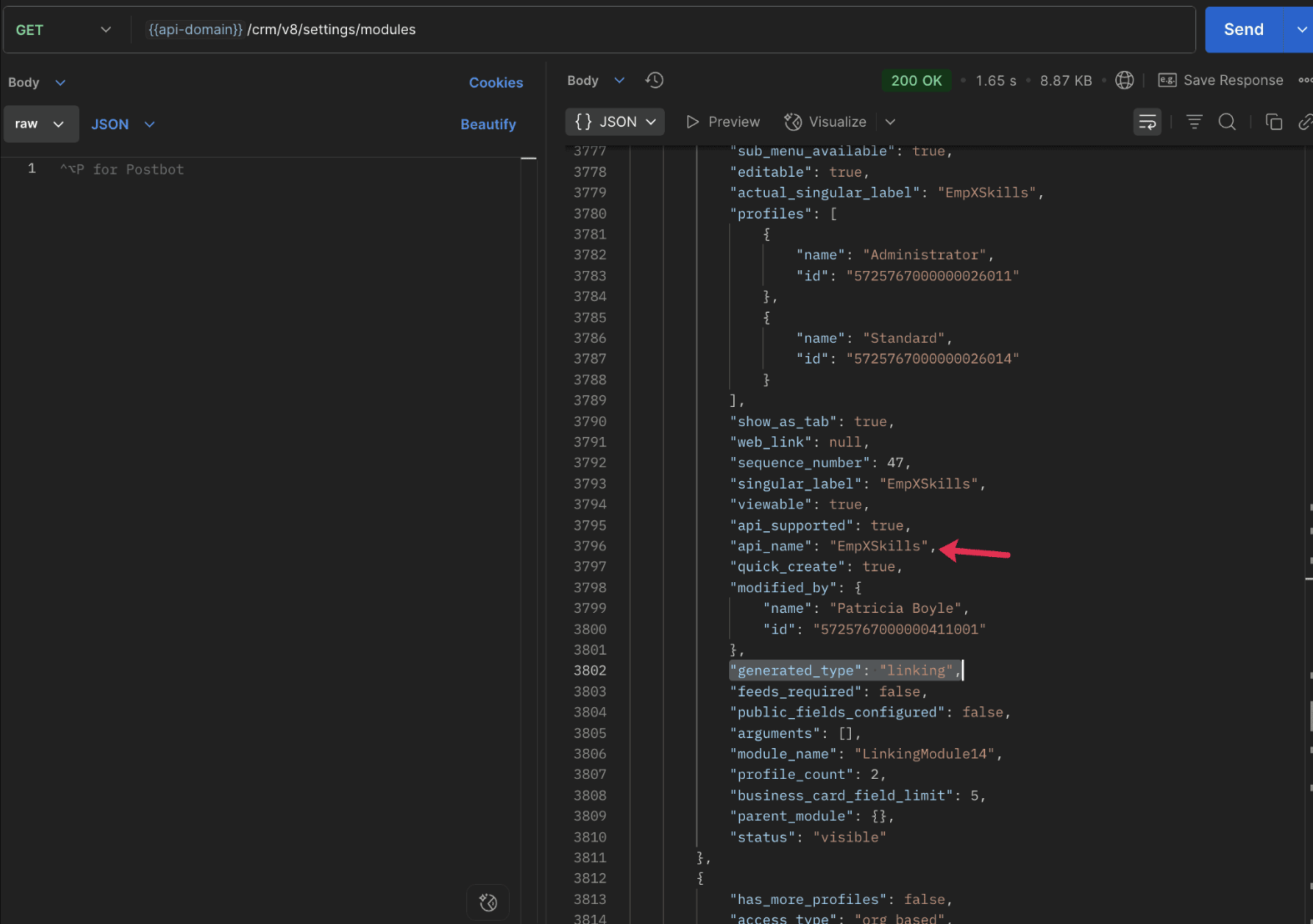
To know the field API names in the linking module:
Use the Get Fields Metadata API to retrieve the API names of lookup fields within the linking module.
Request URL : {{api_domain}}/crm/v8/settings/fields?module=EmpXSkills
Request method : GET
5. How do I associate records via a multi-select lookup field using the Insert Records API in Zoho CRM?
To associate records using a multi-select lookup field, you must provide the record IDs from the related module. The association is made through the linking module.
Example :
Associating multiple skills with an employee using the multi-select lookup field.
Request URL : {{api-domain}}/crm/v8/Employees
Request method : POST
Sample input :
|
{
"data": [
{
"Name": "Patricia",
"Email": "patricia@mail.com",
"Position": "Marketing Specialist",
"Year_of_Experience": 5,
"Skills": [ // API name of the multi-select lookup field in the Employees module
{
"Skills": { // API name of the lookup field in the linking module pointing to the Skills module
"name": "Marketing",
"id": "5725767000002149427" //ID from the Skills module are mandatory to establish the link
}
},
{
"Skills": {
"name": "Social Media Marketing",
"id": "5725767000002149476"
}
}
]
}
]
}
|
6. How do I associate an Employee's skills using the linking module in Zoho CRM?
To establish a relationship between the Employees and Skills modules through the linking module, use the Insert Records API to create a record in the linking module, EmpXSkills.
To do this,
- Use the appropriate lookup field API names to reference the parent module.
- You must need the record IDs from both the Employees and Skills modules to create the associations.
Request URL : {{api-domain}}/crm/v8/EmpXSkills
Request method : POST
Sample input :
|
{
"data": [
{
"Name": "Patricia",
"Employees": {
"id": "5725767000002161001" // Record ID from the Employees module
},
"Skills": {
"id": "5725767000002149476" // Record ID from the Skills module
}
}
]
}
|
7. When should I use create/update operations in the Employees module vs the EmpXSkills module?
|
Employees Module |
EmpXSkills (linking) Module |
|
Use when you want to create or update an Employee and associate Skills using the Multi-select Lookup field. |
Use when you want to create or remove associations between existing Employee and Skill records without modifying the actual Employee or Skill data. |
|
Creating a new employee and assigning their skills at once. |
Managing relationships between existing records i.e., linking and unlinking skills to employees. |
8. How to update a record in the linking module?
To update a record in the linking module, use the Update Records API.
Request URL : {{api-domain}}/crm/v8/EmpXSkills/5725767000006269044
Request method : PUT
Sample input :
|
{
"data": [
{
"Skills": {
"name": "Marketing",
"id": "5725767000002170035" //Associating another skill with the employee
}
}
]
} |
In the above sample, we have replaced an existing skill associated with an employee with another Skill in the linking module.This is done by updating the Skills lookup field in the EmpXSkills record.
Please note that in the linking module, Skills is a lookup field, so you can associate only one skill per linking record. But in the Employees module, Skills is a multi-select lookup field, so an employee can be associated with multiple skills.
9. How to unlink records from the parent module as well as the linking module?
Unlink the associated records from the parent module:
Using the Update records API, you can remove an associated skill from an employee, use the "_delete": null key within the multi-select lookup field in the Employee record update.
Request URL : {{api-domain}}/crm/v8/Employees/5725767000006269044
Request method : PUT
Sample input :
|
{
"data": [
{
"Skills": [
{
"Skills": {
"name": "Marketing",
"id": "5725767000002170035" // The Skill record you want to unlink
},
"id": "5725767000007228047", //record ID - The record created in the linking module for the employee with the Marketing skill
"_delete" : null
}
]
}
]
}
|
Replace an associated record from the linking module:
Use the Update Records API to replace an existing association in the linking module.
Request URL : {{api-domain}}/crm/v8/EmpXSkills/5725767000007228035
Request method : PUT
Sample input :
|
{
"data": [
{
"Skills": {
"name": "Java",
"id": "5725767000005259075" //replacing a new skill
}
}
]
}
|
In the above sample, we have replaced the existing skill with Java.
10. Why am I seeing the error "DUPLICATE_LINKING_DATA" in the Update Records API?
This error occurs when you try to associate records with the parent record that are already linked with the Multi-select lookup field. To resolve this, check the records you are trying to link and make sure your association is only with records that are not already linked.
Know your existing linked records:
Before the Update Records API, use the Get Related Records Data API and search for the multi-select lookup field. In our case, Skills is the multi-select lookup field created in the Employees module. This will return all records already associated.
Example :
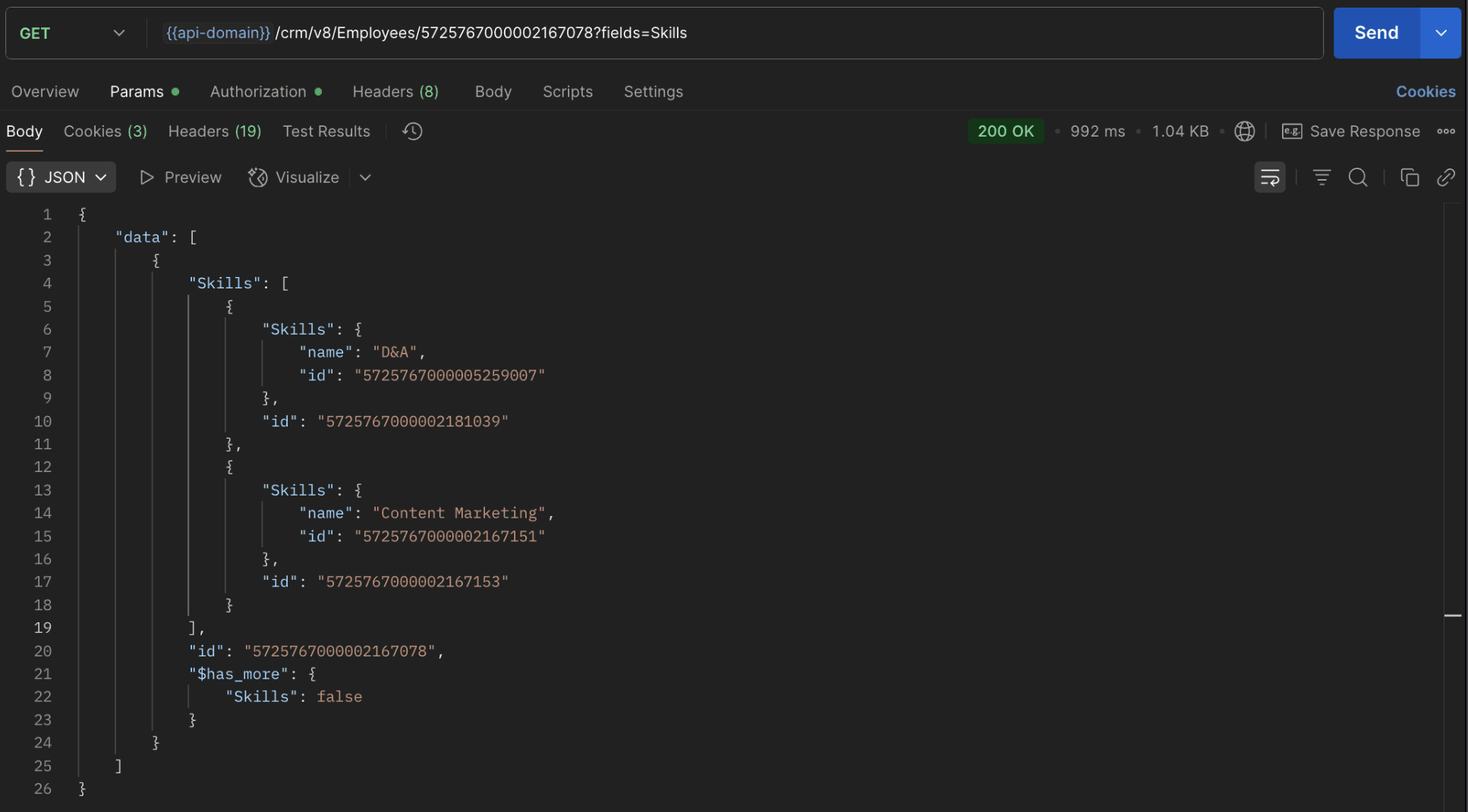
The response returns all Skills already linked with that Employee.
Using this way, compare the IDs from the API response with the new records you are about to link, and only proceed with non-duplicate IDs. This avoids duplicate entries and prevents the "DUPLICATE_LINKING_DATA" error.
11. What happens if I delete a record in the linking module?
When you delete a record in the linking module, it only removes the association between the related records in the Employees and Skills modules.
Note :
- Deleting a linking module record removes only the relationship between two records from the Employees and Skills modules.
- Deleting an Employee or Skill record deletes all corresponding entries in the linking module as well.
12. How do I query linked records?
Use the COQL API to query multi-select lookup data by specifying the corresponding linking module's API name directly in your query. The linking module is treated as a separate module in Zoho CRM, so you can retrieve associated records by querying it like any other module.
Sample query :
|
{
"select_query": "select Skills.Name as skill, Employees.Name as employee from EmpXSkills where Skills.Name like '%Marketing%'"
}
|
Use the Get Module Metadata API to know the linking module's API name.
13. How do I export multi-select lookup records using the Bulk Read API?
To export multi-select lookup data, linking module records efficiently, use the Bulk Read API with the linking module’s API name.
Request URL : https://www.zohoapis.com/crm/bulk/v8/read
Request method : POST
Sample Request :
|
{
"callback": {
"method": "post"
},
"query": {
"module": {
"api_name": "EmpXSkills" //API name of the linking module
},
"fields": [
"Employees.Name",
"Employees.Year_of_Experience",
"Skills.Name"
],
"criteria": {
"group": [
{
"field": {
"api_name": "Employees.Year_of_Experience"
},
"comparator": "greater_than",
"value": "4"
},
{
"field": {
"api_name": "Skills.Name"
},
"comparator": "contains",
"value": "Social"
}
],
"group_operator": "AND"
}
}
}
|
14. Can I import my linking module's data using the Bulk Write API?
Yes. Like the Leads and Contacts modules, you can also import linking module's data into Zoho CRM using the Bulk Write API by directly specifying the linking module’s API name.
If you are importing data that involves both a parent module, Employees and its associated MxN linking module, follow these steps:
1. Create separate CSV files:
- One for the parent module - Employees
- One for the linking module - EmpXSkills
2. Zip the files into a single ZIP file.
3. Upload the ZIP in a single Bulk Write API request.
4. Ensure accurate field mappings are provided in the API request body.
Refer to Kaizen #131 - Bulk Write for parent-child records using Scala SDK for more details on handling parent-child records.
15. Can I receive notifications if a multi-select lookup field in a module is modified or updated?
Yes, you can receive notifications when a MxN field is updated using the Notification API. To enable instant notifications for actions performed in a module, use the respective API names of the linking module in the input body.
Request URL : https://www.zohoapis.com/crm/bulk/v8/actions/watch
Request method : POST
Sample input :
|
{
"watch": [
{
"channel_id": "10000",
"events": [
"EmpXSkills.all" //EmpXSkills represents the API name of the linking module
],
"notify_url": "https://webhook.site/9f5ba227-ce5a-4709-814d-b044c003d605",
"return_affected_field_values": true
}
]
}
|
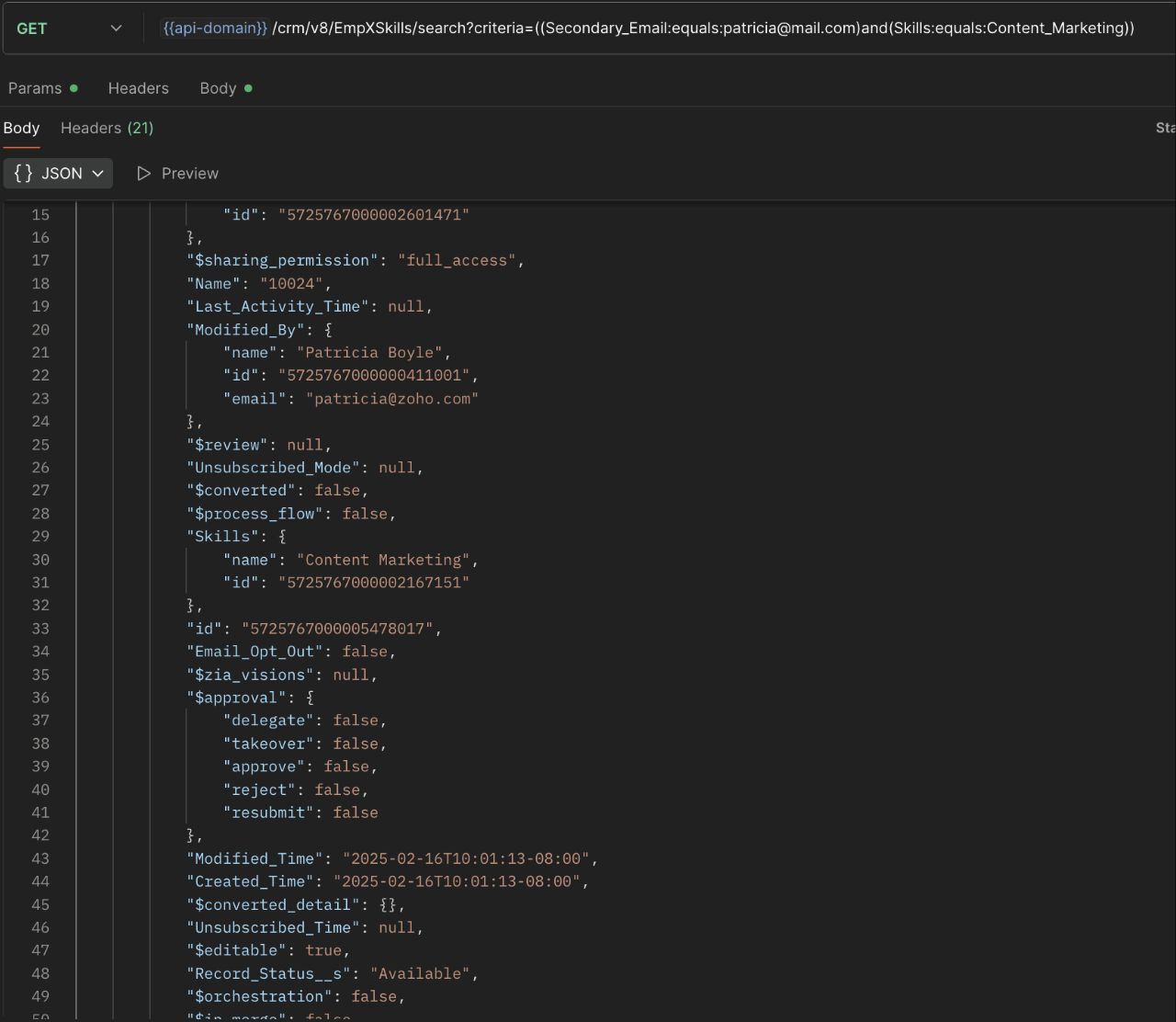
16. Can I use criteria-based filtering when accessing multi-select lookup data using the Search API?
Yes, you can filter multi-select lookup data using the criteria parameter in the Search API's URL.
Here is an example that fetches records from the EmpXSkills linking module.
Request URL : {{api-name}}/crm/v8/EmpXSkills/search?criteria=((Secondary_Email:equals:patricia@mail.com)and(Skills:equals:Content_Marketing))
Request method : GET
Sample response :
x-----------------------------x
We trust that this post meets your needs and is helpful. Let us know your thoughts in the comment section or reach out to us at support@zohocrm.com
Stay tuned for more insights in our upcoming Kaizen posts!

Previous Kaizen Post : Kaizen #198: Using Client Script for Custom Validation in Blueprint | Kaizen Directory
Other FAQs in the Kaizen series :
- Kaizen#75 - Frequently Asked Questions on Client Script
- Kaizen #147 - Frequently Asked Questions on Zoho CRM Widgets
- Kaizen #155 - Frequently Asked Questions on Subforms
- Kaizen #170 - Frequently Asked Questions on Notification APIs
- Kaizen #195: Frequently Asked Questions on Bulk Read API and Bulk Write API
Topic Participants
Subramanian K
Sticky Posts
Kaizen #198: Using Client Script for Custom Validation in Blueprint
Nearing 200th Kaizen Post – 1 More to the Big Two-Oh-Oh! Do you have any questions, suggestions, or topics you would like us to cover in future posts? Your insights and suggestions help us shape future content and make this series better for everyone.Kaizen #226: Using ZRC in Client Script
Hello everyone! Welcome to another week of Kaizen. In today's post, lets see what is ZRC (Zoho Request Client) and how we can use ZRC methods in Client Script to get inputs from a Salesperson and update the Lead status with a single button click. In thisKaizen #222 - Client Script Support for Notes Related List
Hello everyone! Welcome to another week of Kaizen. The final Kaizen post of the year 2025 is here! With the new Client Script support for the Notes Related List, you can validate, enrich, and manage notes across modules. In this post, we’ll explore howKaizen #217 - Actions APIs : Tasks
Welcome to another week of Kaizen! In last week's post we discussed Email Notifications APIs which act as the link between your Workflow automations and you. We have discussed how Zylker Cloud Services uses Email Notifications API in their custom dashboard.Kaizen #216 - Actions APIs : Email Notifications
Welcome to another week of Kaizen! For the last three weeks, we have been discussing Zylker's workflows. We successfully updated a dormant workflow, built a new one from the ground up and more. But our work is not finished—these automated processes are
Recent Topics
Zoho Cliq - Incident alert (Server outage - IN DC) | August 28
We've received server down alerts and are currently investigating the issue (IN DC) to find the root cause. Our team is actively working to restore normal operations at the earliest. Status: Under investigation Start time: 09:44:21 AM IST Affected location:How can I see content of system generated mails from zBooks?
System generated mails for offers or invices appear in the mail tab of the designated customer. How can I view the content? It also doesn't appear in zMail sent folder.Narrative 10: Assignment Rules - Streamlining Ticket Management
Behind the scenes of a successful ticketing system: BTS Series Narrative 10: Assignment Rules - Streamlining Ticket Management In the complex world of customer support, a flood of incoming tickets can hit the help desk in seconds. Businesses must do moreCustom form - Duplicate Value Present
I am new to Zoho People. I create a new form on Zoho People quite simple. A date (by default the current date) and a radio button with 3 options (Yes, No, Not applicable) I defined the date as ‘No duplicate’ as only one entry by date is allowed. I added:Zoho API connection issues
Hi, Today at around 1930 GMT our application started experiencing intermittent timeouts from the Zoho API. These intermittent timeouts are not enabling our app to work properly. The API connection was working just fine before. HTTPSConnectionPool(host='www.zohoapis.com',Query Regarding our Partnership between AIC-JKLU and Zoho
Dear Zoho Team, I am writing to raise a concern on behalf of AIC-JKLU, one of Zoho’s incubator partners. Recently, our startups have been facing difficulties while trying to get themselves onboarded on Zoho through our dedicated partner link. Unfortunately,Getting events in the future
Hi I am trying to get events in the future by calling this API Endpoint https://www.zohoapis.eu/crm/v8/Events?fields=Event_Title,Created_By,Created_Time,Start_DateTime But that gives me all events in the database. How do I make a query that returns allCreated Date/Invalid Fields
Since Saturday we have suddenly had issues with our webhooks and data retrieval from CRM. Specifically how Created Date is handled. It appears there was some sort of change within CRM that broke a lot of our code that has been in place for several years.Revenue Management: #9 Revenue Recognition in Media & Publishing
Media & Publishing industry has evolved in recent times. It offers subscriptions, bundles digital and print access, runs sponsored content, and sometimes even sells ad spaces. If you run a media or publishing business, you will always get into a situationZoho CRM Community Digest - July 2025 | Part 2
Hello, Everyone! We’re closing out July with a can’t-miss highlight: Zoholics Europe 2025! Happening from September to October, it’s your chance to level up your CRM skills, covering everything from automation and CPQ to dashboards and advanced workflows.How can I trigger a flow action only once while updating contact?
Hi, we have a trigger to merge&mail file when the field YYY is filled out. For this acion I used "Create or update module entry". But unfortunately we get tens of email on a day with this merged file, because the contact is being regularly updated. TheCopy a Record Template from one Form to another
I have a Creator application with several forms. I developed a record template for one of the reports/forms but want to use most of it for another of the form/report combinations in the application. Is there a way to copy the template (code or otherwise) to another form?Tip of the Week #70 – Create common team signatures for your shared inboxes
Did you know that a small detail, such as an email signature, can make a big difference in how your brand is perceived? One simple yet smart way to enhance your team’s communication is by creating common team signatures for your shared inboxes. InsteadEnhanced data export features: XLSX format, custom character encoding, and selective record export
Greetings all, Here are a few enhancements related to exporting CRM data, including the ability to export data in XLSX file format now. The Export feature under Data Administration now offers new options that expand its flexibility and enable users toTip #42 – How to manage data security with Privacy Settings – 'Insider Insights'
Data privacy is a cornerstone of trust in remote support. Through Privacy Settings in Zoho Assist, you can set up how data is gathered, stored, and handled in your organization. These settings ensure compliance, data protection for sensitive details,Ticketbai! en el Pais Vasco
Hola a todos, En enero de 2.022 se va a implantar en el país vasco un nuevo sistema de facturación, denominado ticketbai!, ¿hay alguna previsión de realizar las adaptaciones en zoho books o zoho invoices? Ignoro la cantidad de clientes que tienen estasZoho CRM mobile app feature update: home page widgets, field tooltips and user image upload
Hello everyone! Your business doesn't pause when you're on the move, and neither should your CRM. That's why in our latest update, we've introduced a few new features to make your mobile CRM experience smoother and more efficient. Let's take a quick lookZoho CRM Plain Text Template: Line Breaks and Formatting Issue
Hello, I'm following the instructions to create email templates in Zoho CRM, but I'm having a problem with the plain text version. https://help.zoho.com/portal/en/kb/zoho-sign/integrations/zoho-apps/zoho-crm/articles/zoho-crm-email-templates#Steps_to_create_a_custom_email_templateOptimizing Task Handling: Auto-Remove Recurrence for cancelled Tasks.
Hello Everyone, A Custom function is a user-written set of code to achieve a specific requirement. Set the required conditions needed as when to trigger using the Workflow rules (be it Tasks / Project) and associate the custom function to it. Requirement:Important updates to your connectors
Hello everyone, Greeting from Zoho Creator! We're excited to announce that we'll be rolling out significant backend updates to Zoho Creator's built-in connectors to enhance security by following the latest frameworks. The existing version of some of theCreate, collaborate, and manage agreements with Zoho Sign
Agreements drive business. We launched Zoho Sign in 2017 as a simple digital signature tool to sign agreements from anywhere, at any time. Over the years, we've learned that most agreements go through last-minute changes before they're signed. Our usersFunction #25: Automatically generate purchase orders from a sales order
We kicked off the "Function Fridays" series with the goal of helping you automate your everyday accounting tasks. As we delve into today's post, I'm delighted to announce that we're here to present the 25th custom function in this series. While it ishiding a topic from all but one segment (or list)
My organization sends out a number of newsletters using Zoho Campaigns. One of those newsletters is for volunteers. In order to become a volunteer, a person has to first go through our volunteer orientation (training). After that, they can receive newslettersHow do I set up this automation correctly?
When contacts enter my Subscribers list, I want it to reference a custom field to see if it is empty. Then I want it to do two things: If empty: Assign a tag based on a different custom field. If that custom field is empty, assign a different tag. IfFunction #62: Display associated Quote on Invoice details screen
Hello everyone! Today, we are sharing a Related List script that makes it easy to view and access the quote from which an invoice was created right from the invoice details screen. This Related List displays the Quote number and Amount, allowing you toDesk x CRM Integration
Howdy! We currently use SalesIQ but we are considering moving across to Desk as it seems to have more functionality that we want. One of the pulls is the ability for our customers to self serve. But, I might be getting over excited and not actually needIssue with Save & Share Link – Works for Others but Not Creator
I’ve enabled the "Save and Share" feature in Zoho Forms, and it works correctly for all users accessing the public link—except for me (the form creator). Issue Details: When I save and share the link, recipients see a “no permission” error. The form isSave the pdf report from a registration form in a Folder
Through Zoho Forms I created a registration form with quite a lot of rules to handle different variables (TEAM types, payment in installments, etc.), and the result is pretty good. The automatic PDF that is sent to the respondent upon submission is alreadyzoho forms integration to zoho work drive
Scenario: A user fills out a Zoho Form, entering details such as email, mobile number, and other required information, and uploads supporting documents like PAN, Aadhaar, etc. Upon submission, the data is available in Zoho Forms Reports. Requirement:Zoho Forms to Zoho CRM Integration failed - can I restart it?
The integration of Zoho Form to Zoho CRM has failed. Is there a way for me to restart it for the impacted entry?insert an equation, but in document, it shows an image not available.
I'm new to Zoho writer and used Zoho writer in desktop app version . When I inserted an equation, I got an image not available sign. Any help is appreciated. Thanks, CharlesZoho Desk Android app update - Swipe action customization
Hello everyone! We have brought in support for the swipe action customization in latest version(v2.9.13) of the Zoho Desk Android app update, enabling you to configure left and right swipe gestures on tickets to carry out the actions swiftly without openingArranging Ticket Templates
Is there any way to arrange our ticket templates? It doesn't look very organised when it's just arranged according to when they were created. We want the list to look more organised, by arranging/grouping them by topics, or even just by alphabeticalWhat they mean with "Portal"?
I just downloaded this app to take my personal notes on digital art studio because it seemed to me the most comfortable app to do it, I use it very often, what do they mean by “no activity on your portal”? I have about 1 year of work here and I don'tfavorites no longer listed
Hello, I can no longer navigate to my Favorites from the pulldown at the top of my grid view (see attached screenshot). I wasn't able to find it anywhere! Please help me display my Favorites. Thank you!Notecards Disappeared
Got a new phone. Downloaded and signed in Zoho Notebook. Not finding the Note cards. Just Empty Note books. Frustrating.Table Errors
Hello, I'm new to Zoho Notebook and using it on several Mac/Apple devices. My question is regarding tables: Why do they become broken, and how to fix the error without retyping all my data? (Please see the screenshot attached.)Online Calculator with Zoho Forms?
I'd like to build a custom calculator on my website. Zoho Forms seems to offer all the fields for basic calculations performed live without pressing any "Calculate" buttons. Unfortunately, there is still that "Submit" button at the bottom. There is nothingZoho Tables instead of Zoho Creator Spreadsheet reports <3
That would make my day for sure. Zoho Creator is create, but miss data entering as AirTable/Spreadsheet can. Seeing Zoho putting effort in this makes me think maybe one day we could see a similar interface for Zoho Creator spreadsheet reports. B.Notebook Stack
Hi Everyone I Hope you´re fine, I´m sorry if this idea was posted before (I made a search but I haven´t find anything related). So, Having the possibility of stacking notebooks would be an interesting way to order notebooks that correspond to the sameNext Page