Kaizen #199: FAQs on Multi-Select Lookup (MxN) Field in Zoho CRM
Nearing 200th Kaizen Post – We want to hear from you!
Do you have any questions, suggestions, or topics you would like us to cover in future posts? Your insights and suggestions help us shape future content and make this series better for everyone.
Hey everybody!!!
Welcome back to another post in the Kaizen series!
In this post, we will address some of the most frequently asked questions about the Multi-Select Lookup(MxN) field from the Zoho CRM developer community forum.
1. What is a Multi-select lookup field?
A multi-select lookup field in Zoho CRM lets you create a many-to-many relationship between two modules. This means a record in one module can be linked to multiple records in another module and vice versa.
For example, using an multi-select lookup field, you can associate multiple skills with an employee.
2. How does the Mutli-Select Lookup relationship work?
When you create a Multi-Select Lookup between two modules, for example, Employees and Skills, Zoho CRM automatically creates a hidden linking module, which is also known as an MxN module. This module stores the associations between records in the two modules, enabling you to track and manage many-to-many relationships.
For instance, if you link Employees and Skills, a linking module named EmpXSkills will be created.
This linking module is accessible only via API.
Backend Flow of multi-select lookup Relationship
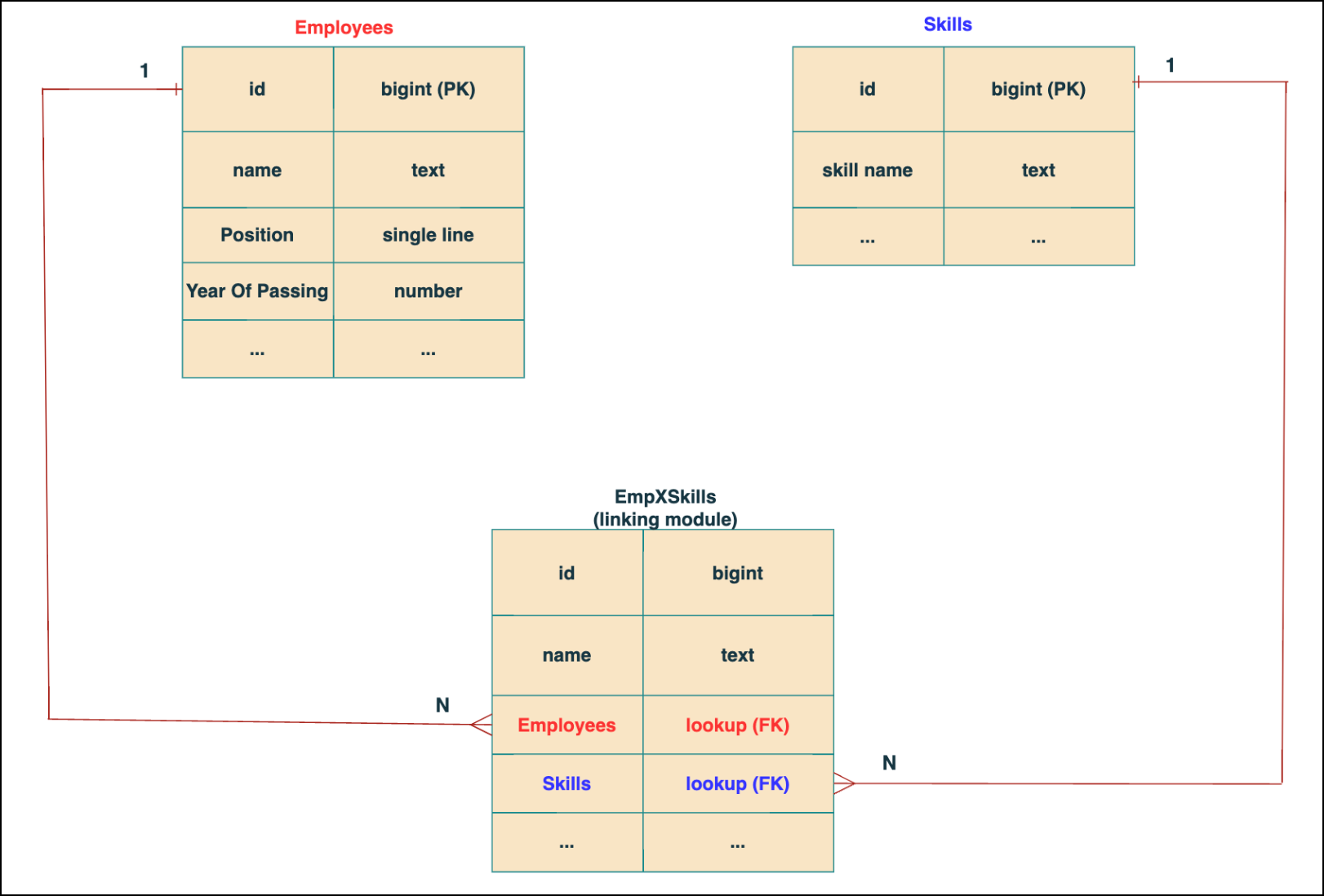
In the linking module, two lookup fields (lookup fields with api names - Employees and Skills) will be created. The lookup fields, one pointing to Employees and the other pointing to Skills from the linking module, establish a connection between the linking module and its associated module.
Why you cannot use a lookup field for this use case?
In Zoho CRM, a lookup field creates a one-to-many relationship between two modules i.e. one record in the source module can be linked to only one record in the target module.
Example :
If you create a lookup field for Skills in the Employees module, each employee can be linked to only one skill. So, use a multi-select lookup field instead of a lookup field when you need to represent complex relationships like one employee - many skills and one skill - many employees.
3. How to create a multi-select Lookup field using Zoho CRM APIs?
To create a Multi-Select lookup field between two modules using Zoho CRM APIs, follow these steps:
Step 1: Identify the Module API Name
Before creating the field, you should know the API names of the Employees and Skills modules. For that, use the Get Module Metadata API.
Request URL : {{api-domain}}/crm/v8/settings/modules
Request method : GET
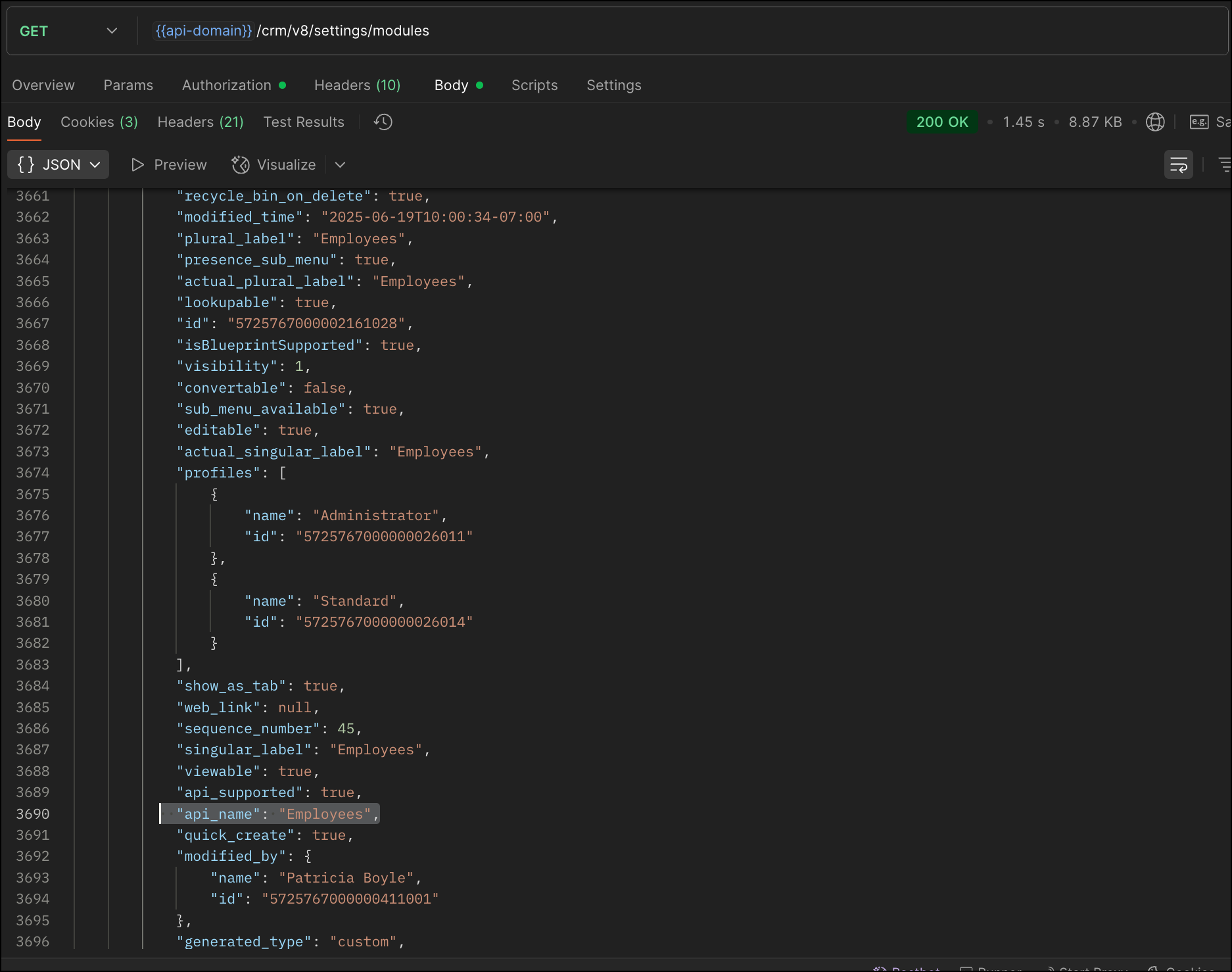
Now, search for the Employees module in the response and note its API name.
Step 2: Use the Create Custom Fields API
To establish a many-to-many relationship between two modules, in our case, Employees and Skills, you need to create a custom field of type multi-select lookup in the Employees module (parent module). Here, we will associate multiple skills to an employee.
This custom field requires:
- The related module you want to link to - Skills.
- A display field from the related module
- The linking module (EmpXSkills), which stores the actual associations.
Use the Create Custom Fields API to create custom fields.
Request URL : {{api_domain}}/crm/v8/settings/fields?module=Employees
Request method : POST
Sample input :
|
{
"fields": [
{
"field_label": "Skills", //Name of the field in your module
"data_type": "multiselectlookup", //Type of the field
"multiselectlookup": { //This JSON object contains the multi-select lookup relationship details
"connected_details": { //Details about the module and field you want to link
"module": {
"api_name": "Skills" //API name of the related module
},
"field": {
"field_label": "Skills" //The field in the related module to display
}
},
"linking_details": { //Details about the junction or linking module that manages the many-to-many relationship
"module": {
"plural_label": "EmpXSkills" //Plural label of the junction module
}
}
}
}
]
}
|
4. How Do You Find the Linking Module and Field API Names?
To know the API name of the linking module:
Use the Get Modules API and search for "generated_type" : "linking" in the response to identify MxN modules. In our case, EmpXSkills.
Request URL : {{api_domain}}/crm/v8/settings/modules
Request method : GET
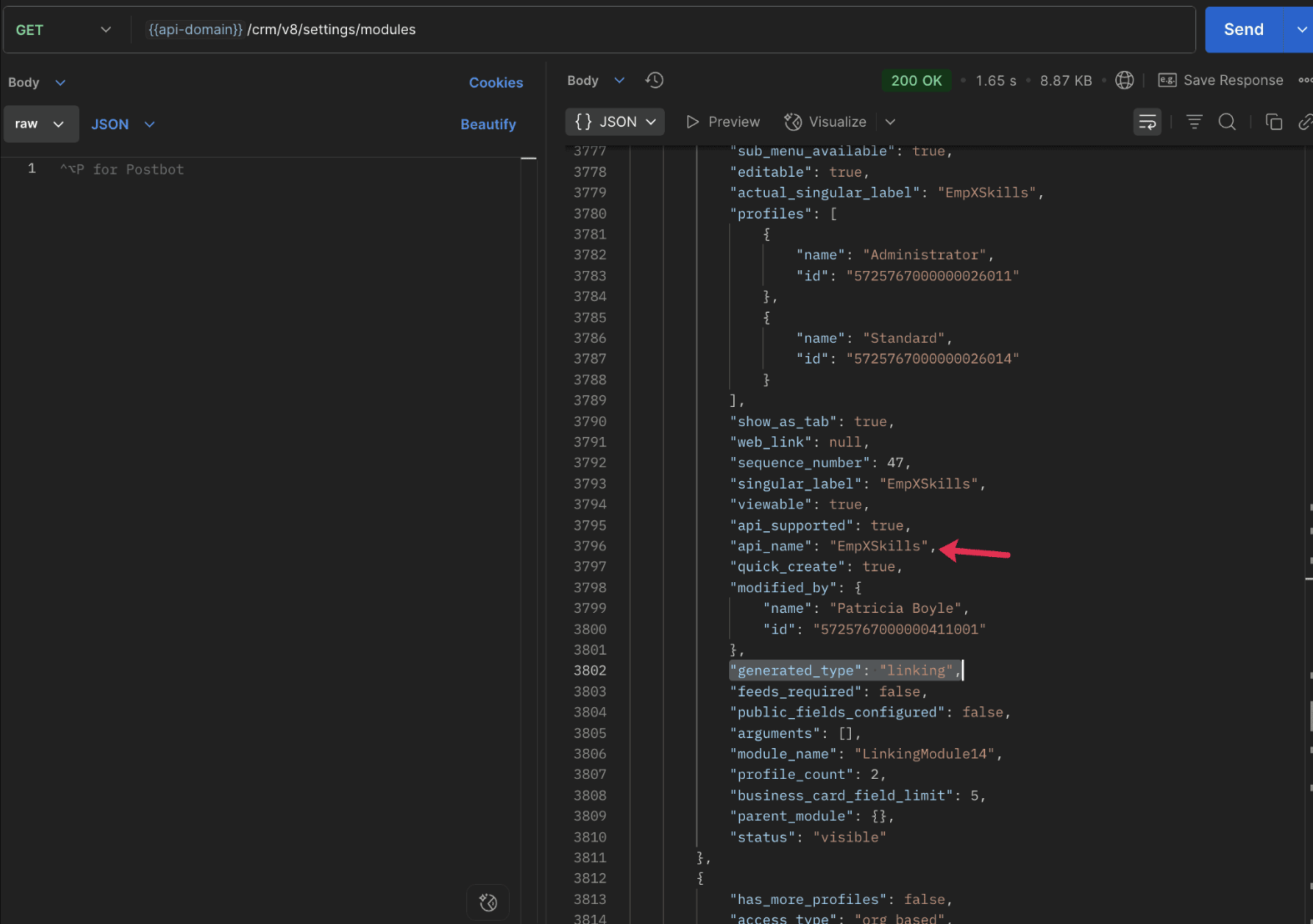
To know the field API names in the linking module:
Use the Get Fields Metadata API to retrieve the API names of lookup fields within the linking module.
Request URL : {{api_domain}}/crm/v8/settings/fields?module=EmpXSkills
Request method : GET
5. How do I associate records via a multi-select lookup field using the Insert Records API in Zoho CRM?
To associate records using a multi-select lookup field, you must provide the record IDs from the related module. The association is made through the linking module.
Example :
Associating multiple skills with an employee using the multi-select lookup field.
Request URL : {{api-domain}}/crm/v8/Employees
Request method : POST
Sample input :
|
{
"data": [
{
"Name": "Patricia",
"Email": "patricia@mail.com",
"Position": "Marketing Specialist",
"Year_of_Experience": 5,
"Skills": [ // API name of the multi-select lookup field in the Employees module
{
"Skills": { // API name of the lookup field in the linking module pointing to the Skills module
"name": "Marketing",
"id": "5725767000002149427" //ID from the Skills module are mandatory to establish the link
}
},
{
"Skills": {
"name": "Social Media Marketing",
"id": "5725767000002149476"
}
}
]
}
]
}
|
6. How do I associate an Employee's skills using the linking module in Zoho CRM?
To establish a relationship between the Employees and Skills modules through the linking module, use the Insert Records API to create a record in the linking module, EmpXSkills.
To do this,
- Use the appropriate lookup field API names to reference the parent module.
- You must need the record IDs from both the Employees and Skills modules to create the associations.
Request URL : {{api-domain}}/crm/v8/EmpXSkills
Request method : POST
Sample input :
|
{
"data": [
{
"Name": "Patricia",
"Employees": {
"id": "5725767000002161001" // Record ID from the Employees module
},
"Skills": {
"id": "5725767000002149476" // Record ID from the Skills module
}
}
]
}
|
7. When should I use create/update operations in the Employees module vs the EmpXSkills module?
|
Employees Module |
EmpXSkills (linking) Module |
|
Use when you want to create or update an Employee and associate Skills using the Multi-select Lookup field. |
Use when you want to create or remove associations between existing Employee and Skill records without modifying the actual Employee or Skill data. |
|
Creating a new employee and assigning their skills at once. |
Managing relationships between existing records i.e., linking and unlinking skills to employees. |
8. How to update a record in the linking module?
To update a record in the linking module, use the Update Records API.
Request URL : {{api-domain}}/crm/v8/EmpXSkills/5725767000006269044
Request method : PUT
Sample input :
|
{
"data": [
{
"Skills": {
"name": "Marketing",
"id": "5725767000002170035" //Associating another skill with the employee
}
}
]
} |
In the above sample, we have replaced an existing skill associated with an employee with another Skill in the linking module.This is done by updating the Skills lookup field in the EmpXSkills record.
Please note that in the linking module, Skills is a lookup field, so you can associate only one skill per linking record. But in the Employees module, Skills is a multi-select lookup field, so an employee can be associated with multiple skills.
9. How to unlink records from the parent module as well as the linking module?
Unlink the associated records from the parent module:
Using the Update records API, you can remove an associated skill from an employee, use the "_delete": null key within the multi-select lookup field in the Employee record update.
Request URL : {{api-domain}}/crm/v8/Employees/5725767000006269044
Request method : PUT
Sample input :
|
{
"data": [
{
"Skills": [
{
"Skills": {
"name": "Marketing",
"id": "5725767000002170035" // The Skill record you want to unlink
},
"id": "5725767000007228047", //record ID - The record created in the linking module for the employee with the Marketing skill
"_delete" : null
}
]
}
]
}
|
Replace an associated record from the linking module:
Use the Update Records API to replace an existing association in the linking module.
Request URL : {{api-domain}}/crm/v8/EmpXSkills/5725767000007228035
Request method : PUT
Sample input :
|
{
"data": [
{
"Skills": {
"name": "Java",
"id": "5725767000005259075" //replacing a new skill
}
}
]
}
|
In the above sample, we have replaced the existing skill with Java.
10. Why am I seeing the error "DUPLICATE_LINKING_DATA" in the Update Records API?
This error occurs when you try to associate records with the parent record that are already linked with the Multi-select lookup field. To resolve this, check the records you are trying to link and make sure your association is only with records that are not already linked.
Know your existing linked records:
Before the Update Records API, use the Get Related Records Data API and search for the multi-select lookup field. In our case, Skills is the multi-select lookup field created in the Employees module. This will return all records already associated.
Example :
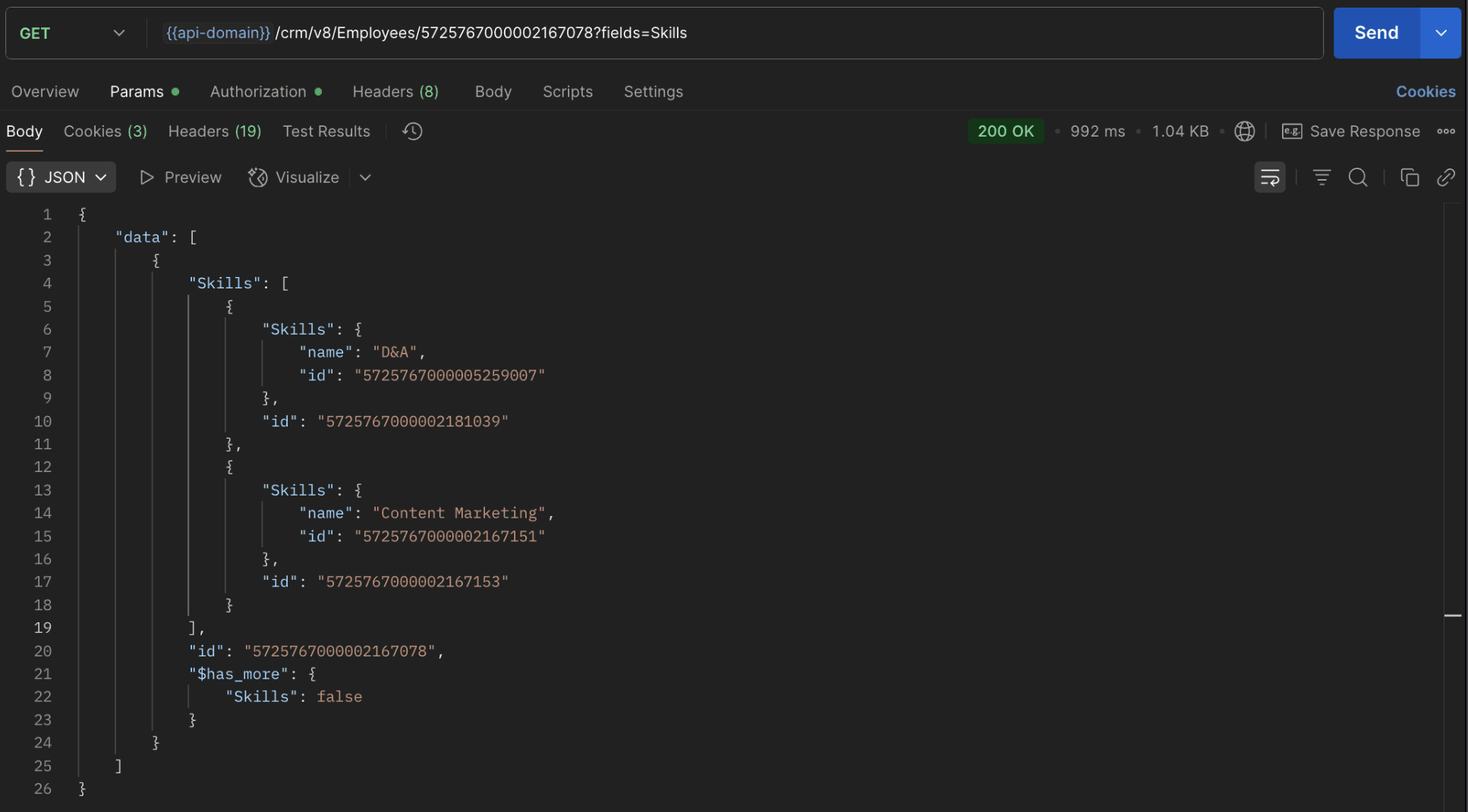
The response returns all Skills already linked with that Employee.
Using this way, compare the IDs from the API response with the new records you are about to link, and only proceed with non-duplicate IDs. This avoids duplicate entries and prevents the "DUPLICATE_LINKING_DATA" error.
11. What happens if I delete a record in the linking module?
When you delete a record in the linking module, it only removes the association between the related records in the Employees and Skills modules.
Note :
- Deleting a linking module record removes only the relationship between two records from the Employees and Skills modules.
- Deleting an Employee or Skill record deletes all corresponding entries in the linking module as well.
12. How do I query linked records?
Use the COQL API to query multi-select lookup data by specifying the corresponding linking module's API name directly in your query. The linking module is treated as a separate module in Zoho CRM, so you can retrieve associated records by querying it like any other module.
Sample query :
|
{
"select_query": "select Skills.Name as skill, Employees.Name as employee from EmpXSkills where Skills.Name like '%Marketing%'"
}
|
Use the Get Module Metadata API to know the linking module's API name.
13. How do I export multi-select lookup records using the Bulk Read API?
To export multi-select lookup data, linking module records efficiently, use the Bulk Read API with the linking module’s API name.
Request URL : https://www.zohoapis.com/crm/bulk/v8/read
Request method : POST
Sample Request :
|
{
"callback": {
"method": "post"
},
"query": {
"module": {
"api_name": "EmpXSkills" //API name of the linking module
},
"fields": [
"Employees.Name",
"Employees.Year_of_Experience",
"Skills.Name"
],
"criteria": {
"group": [
{
"field": {
"api_name": "Employees.Year_of_Experience"
},
"comparator": "greater_than",
"value": "4"
},
{
"field": {
"api_name": "Skills.Name"
},
"comparator": "contains",
"value": "Social"
}
],
"group_operator": "AND"
}
}
}
|
14. Can I import my linking module's data using the Bulk Write API?
Yes. Like the Leads and Contacts modules, you can also import linking module's data into Zoho CRM using the Bulk Write API by directly specifying the linking module’s API name.
If you are importing data that involves both a parent module, Employees and its associated MxN linking module, follow these steps:
1. Create separate CSV files:
- One for the parent module - Employees
- One for the linking module - EmpXSkills
2. Zip the files into a single ZIP file.
3. Upload the ZIP in a single Bulk Write API request.
4. Ensure accurate field mappings are provided in the API request body.
Refer to Kaizen #131 - Bulk Write for parent-child records using Scala SDK for more details on handling parent-child records.
15. Can I receive notifications if a multi-select lookup field in a module is modified or updated?
Yes, you can receive notifications when a MxN field is updated using the Notification API. To enable instant notifications for actions performed in a module, use the respective API names of the linking module in the input body.
Request URL : https://www.zohoapis.com/crm/bulk/v8/actions/watch
Request method : POST
Sample input :
|
{
"watch": [
{
"channel_id": "10000",
"events": [
"EmpXSkills.all" //EmpXSkills represents the API name of the linking module
],
"notify_url": "https://webhook.site/9f5ba227-ce5a-4709-814d-b044c003d605",
"return_affected_field_values": true
}
]
}
|
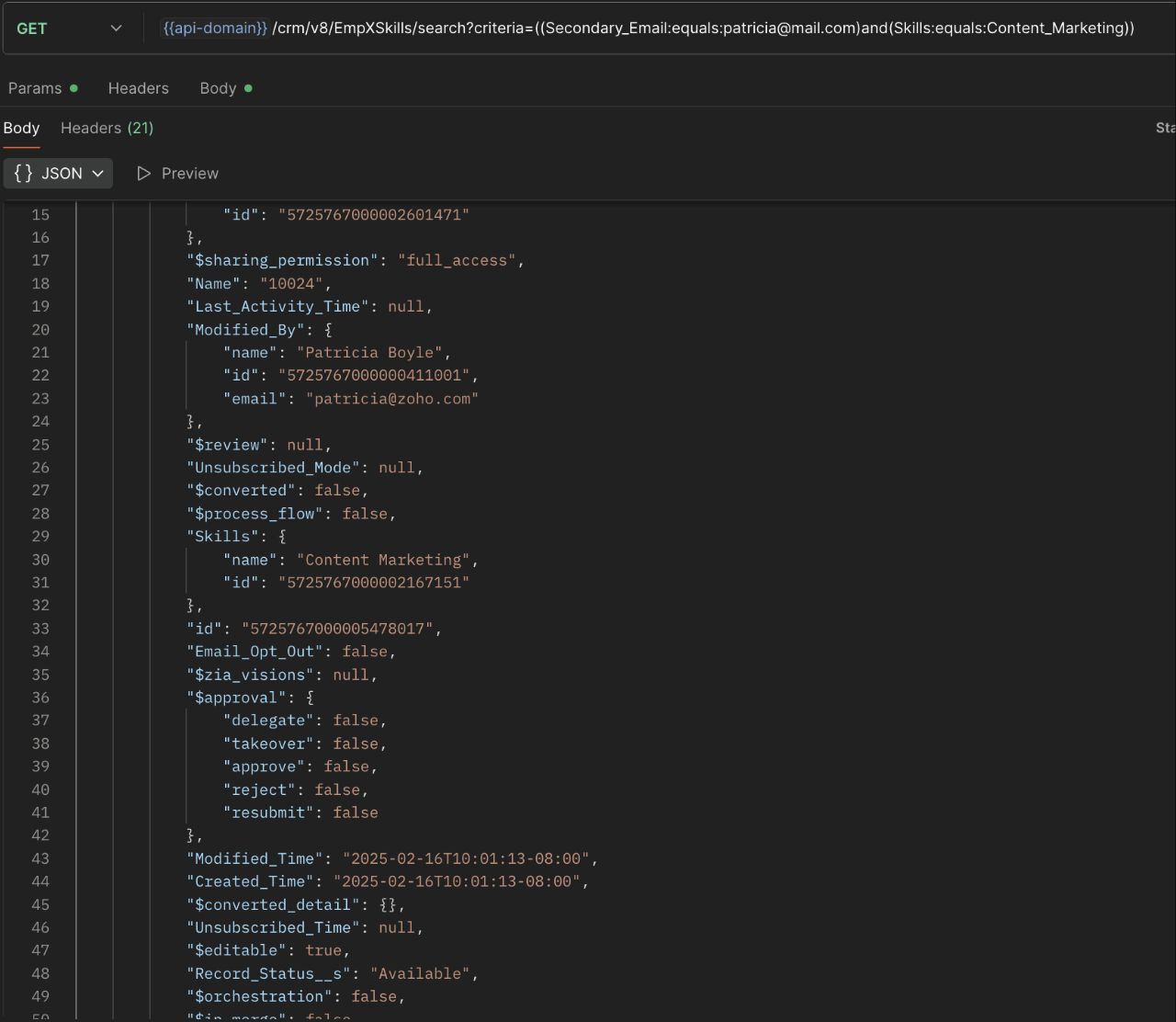
16. Can I use criteria-based filtering when accessing multi-select lookup data using the Search API?
Yes, you can filter multi-select lookup data using the criteria parameter in the Search API's URL.
Here is an example that fetches records from the EmpXSkills linking module.
Request URL : {{api-name}}/crm/v8/EmpXSkills/search?criteria=((Secondary_Email:equals:patricia@mail.com)and(Skills:equals:Content_Marketing))
Request method : GET
Sample response :
x-----------------------------x
We trust that this post meets your needs and is helpful. Let us know your thoughts in the comment section or reach out to us at support@zohocrm.com
Stay tuned for more insights in our upcoming Kaizen posts!

Previous Kaizen Post : Kaizen #198: Using Client Script for Custom Validation in Blueprint | Kaizen Directory
Other FAQs in the Kaizen series :
- Kaizen#75 - Frequently Asked Questions on Client Script
- Kaizen #147 - Frequently Asked Questions on Zoho CRM Widgets
- Kaizen #155 - Frequently Asked Questions on Subforms
- Kaizen #170 - Frequently Asked Questions on Notification APIs
- Kaizen #195: Frequently Asked Questions on Bulk Read API and Bulk Write API
Topic Participants
Subramanian K
Sticky Posts
Kaizen #198: Using Client Script for Custom Validation in Blueprint
Nearing 200th Kaizen Post – 1 More to the Big Two-Oh-Oh! Do you have any questions, suggestions, or topics you would like us to cover in future posts? Your insights and suggestions help us shape future content and make this series better for everyone.Kaizen #226: Using ZRC in Client Script
Hello everyone! Welcome to another week of Kaizen. In today's post, lets see what is ZRC (Zoho Request Client) and how we can use ZRC methods in Client Script to get inputs from a Salesperson and update the Lead status with a single button click. In thisKaizen #222 - Client Script Support for Notes Related List
Hello everyone! Welcome to another week of Kaizen. The final Kaizen post of the year 2025 is here! With the new Client Script support for the Notes Related List, you can validate, enrich, and manage notes across modules. In this post, we’ll explore howKaizen #217 - Actions APIs : Tasks
Welcome to another week of Kaizen! In last week's post we discussed Email Notifications APIs which act as the link between your Workflow automations and you. We have discussed how Zylker Cloud Services uses Email Notifications API in their custom dashboard.Kaizen #216 - Actions APIs : Email Notifications
Welcome to another week of Kaizen! For the last three weeks, we have been discussing Zylker's workflows. We successfully updated a dormant workflow, built a new one from the ground up and more. But our work is not finished—these automated processes are
Recent Topics
Numerical Rating for Interviewer Assessments
Introducing Numerical Rating, a powerful new addition to interviewer assessments that brings precision and flexibility to candidate evaluations. ✅ What is Numerical Rating? Numerical Rating lets interviewers assign a score for each question in the assessment,User Tips: Adding Multiple Products (Package) to a Quote v2.0 (with Client Script)
This solution is an improvement on the original idea which used deluge. My solution was posted in the comments are: https://help.zoho.com/portal/en/community/topic/adding-multiple-products-package-to-a-quote The updated version uses client script insteadAre downloadable product available in Zoho Commerce
Hi all. We're considering switching to Zoho Commerce for our shop, but we sell software and remote services. Is there a features for downloadable products? I can't find any information about this. Thank you very much AliceCustom image for each contact using merge tag
Hi, I'm wondering if it's possible to set up an email campaign to display a different image for each contact using a custom field for the image url. I tried inserting custom html: <img src='$[UD:APP_IMAGE_URL||]$'/> but the editor seemed to reject this and did not actually add anything to the email template. Has anyone got any ideas? cheers, JeremyComment Reactions like a Thumbs Up
Can we please have the ability to emoji react on comments or at the very least, thumbs a comment up? Literally every other project management system out there can support this and it is very much needed to just acknowledge a comment instead of completelyZoho Mail Search Engine Sucks
Hello There! I really like all the features of Zoho Mail and I believe is way better than Gmail except for the Search Function. I believe Zoho Mail has a very poor search function, if you misspelled a word in the search box, Zoho Mail won't display anyAllow Subtasks and Task Lists to have their own Layout
I'd like to have the ability for subtasks and task lists to have their own layout. A subtask for us doesn't require all the fields that a parent task has. The subtask seems cluttered with all the extra fields. Within a project Task List had different purposes. I'd like the task layout to be different for some task lists.How to update Customers in Zoho Books through Zoho Flow?
Updating customers in Zoho Flow using a "update customer" action is deleting contact persons in Zoho Books.How to transfer credit between customers?
Hi All, We have a slightly odd situation. It happens that we have two separate customers that are related to each other personally. One customer has an amount of credit, and would like to use that credit to pay the *other* customers invoice. How wouldZoho Books Reports: Basic report with total items sold and Cost of goods sold
How can books show a report with Item Name || Qty Sold || Total Revenue || Total Cost of Goods Sold || Margin I need to factor in also invoices that have been credited where customers returned good. This seems like such a basic report, I'm sure I'm missingThe amount entered is more than the balance due for the selected bills."
Hi Team i am trying to record payments for vendors using API and getting this error in response as { "code": 28011, "message": "The amount entered is more than the balance due for the selected bills." } JSON is prepared according to Documentation andVBA handling named ranges
In VBA I'm able to work with a single cell named range. E.g. Set Jr = Range ("Year").Value. Also other options are working fine, like Range("Year").Address shows $L$3. However a named range refering to multiple cells is not working for me. Eg. tbl_TestKaizen #176 - Optimizing the Use of Record ID Variables in Zoho CRM Queries
Hello everyone! Welcome to another week of Kaizen! Since the release of Queries, we have covered Handling Query Variables in Zoho CRM, Serialization and Schema Management, and Leveraging the 'crmAPIResponse' object in Queries in previous posts. Today,Unbilled Items Report?
Hello! Is there any way to display a list of items that remain unbilled, without creating an invoice for each customer to see if the unbilled items box is displayed? ;-) BenConsolidation of Multi currency
Would like to discuss on the possibility of consolidating the ZOHO companiesLanded Cost Allocation / Custom Duty manual data entry
My client is an import business. They must manually enter the duty for each item with landed cost allocation in Bill. This is because customs duties cannot be allocated based on Quantity, Value, Weight, and Dimensions. Manual data entry is highly time-consumingTerritories Just Don't Work
I have been on chat and screenshare support for the past 3 days and am getting no resolution so hopefully, someone here can help me. I am the Super Admin of my organization. We publish books globally. I want to break down the books into territories soNegative Opening Balance
How can I add Negative Opening balance - meaning a credit balance to a Customer or a debit balance to a vendor? If I go thru Sales-->Customers, and if the opening balance is Rs. 1000 (credit balance), it does not allow me to enter a "minus" sign or mentionSingle-Line Invoicing from Sales Order Despite Multiple SKUs Shipped
We deal mostly with Government Tenders And Lets say we got a tender that needs 125 XYZ Laptops Then we found 95 Laptops with a different SKUs and 30 Laptops with different SKUs We talk with the IT department of the government company and they approve📣📣 Zoho Bookings Schedulathon 2025 is here!
Hey Zoho Bookings fam, We're excited to invite you to our first-ever hackathon: Yes, Zoho Bookings Schedulathon 2025 is live now. This is a virtual event and you can participate anywhere from the world. Businesses should be able to set up meetings fromI want to send out a new newsletter each month
Without rebuilding a whole journey is there a way to create a new newsletter that is sent to an existing journey monthly?Reinstalling Workdrive Truesync client
Hi, I attempted to update to the beta version of TrueSync, but it was unstable and kept crashing, so I need to revert to the stable version. How do I properly reinstall TrueSync on a Windows PC? I couldn't install the 3.15.x version directly over theEvaluating Creator; yesterday fine; today connection times out
Yesterday I spent hours creating a new app, and it worked fine. Today I cannot access creator.zoho.com. Is this common? I'm in the evaluation mode, but I'm thinking I'm going to keep looking. It worked from my home computer, and now I'm checking it from my work computer. My work computer always works just fine, so I shouldn't htink there would be special settings or anything. If there are, how to find out what they could be? Using Chrome on Windows XP The error I get is: The webpage at https://creator.zoho.comPivot Chart seems to show "old" data - how do I make it update?
I wonder how to make a Pivot Chart "update" its data contents. Here is the background: I need to report a subset of data that is so complicated that it is easier to make a calculation and put the result in a "reporting form", and then display the data from that form. So, I get data from the "original form" GRANTS, make some calculations and put the result in the "reporting form" PERIOD. Now I can watch the result in a list called LIST, which works fine. The list LIST shows that form PERIOD containsUpcoming Changes to LinkedIn Parsing in Resume Extractor
Starting 31 July 2025, the Zoho Recruit Resume Extractor will no longer support direct parsing of candidate data from LinkedIn profiles. Why Is This Change Needed? In accordance with LinkedIn’s platform policies, extracting profile data through browserhow to create view in leads module to that will show all leads + converted leads?
is it possible to make custom view that combine all leads + converted leads? how to do thatAvalara Sales Tax integration - AVATAX
Just wondering if anyone else is having troubles with this integration? Seems as though Avalara changed their billing process, unbeknownst to Zoho, and now ALL transactions are counted by Avalara, not just transactions in a taxable jurisdiction. This caused a huge price adjustment billed to us by Avalara within a month of us signing up. And Avalara is not cheap to begin with! Avalara has been great in waiving that increase, but there seems to be no fix. Zoho is aware of the problem, but slowInvalid value passed for description
Dear Sir, When I am entering the purchase bill , the following message showing "Invalid value passed for description" what should I do ? I am attaching screenshot. With Regards, Harish harish@cracku.in 7978841636Zoho Creator - 2024 Release Projection 1
Hello everyone! As we enter 2024, we'd like to extend our warmest wishes for success and prosperity. Your fantastic response to our Product Roadmap page last year has been incredibly motivating. Continuing on this path, we're excited to share a glimpseAutomation Assistance for Zoho Form Integration and Workflow
Hi, We are currently using a Zoho Form to send out our Global Credit Application and would like to automate the process further. Specifically, we’d like the ABN number submitted through the form to automatically populate the GST/VAT Number field in ZohoCOQL does not return queryable value if the result set is empty
See linked video for running code illustration of the problem: https://workdrive.zohoexternal.com/external/d49bb40033b43b288d56fdf843095b7c65b28391d3ec5d09c854f416d853003d Moderation update: We are appending the comment that was removed, to add contextZoho CRMでの商談の管理のしかたについて初歩的な質問です。
先月からZoho CRMを試験的に導入して運用しています。 商談の管理(運用?)の仕方について教えてください。 商談の数が増えてくると、ダッシュボードの「ステージ別進捗状況」にどんどん過去の商談が蓄積されてくると思うのですが、 現在動きのあるものを中心に確認したくなる気がします。 そのあたりについては、どのように運用が一般的なのでしょうか? アドバイスいただけるととてもありがたいです。 よろしくお願いします。Composite Items & Purchase Orders
The Composite Item is great way to bundle different products and services into a single line and sell it as a single line item in Estimates, Sales Orders and Invoices. However, on the other side - i,e,. Purchasing - this item creates quite a bit of ausing custom function is it possible to update the created by field in Zoho Crm custom module
using custom function is it possible to update the created by field in Zoho Crm custom moduleSlow Sloww Slowwww Responses
Good day, Has anyone been experiencing slow responses from support? Since Thursday I migrated my Whats app to Sales Iq and I had to synch with Social to get the otp they were sending. Apparently What's app can't be automatically added so I reached outYou have exceeded the maximum number of attempts for this action. Please retry doing the same in 30 minutes.
When one of Zoho Books user tries to select a vendor, recording a new bill, these message appears: You have exceeded the maximum number of attempts for this action. Please retry doing the same in 30 minutes. Other user, at the same time, but differentEnable Conversation Context Retention for SalesIQ Answer Bots
Hello Zoho SalesIQ Team, We hope you are doing well. We have noticed that SalesIQ bots currently fail to maintain conversation context in Hebrew. For example, when we follow up on a previous answer or ask for clarification in Hebrew, the bot either providesAutomatic Hebrew Small Talk Setup Without Duplicate Term Errors & Manual Configuration
Dear Zoho SalesIQ Team, Greetings, We would like to request an enhancement to the Small Talk feature in Zoho SalesIQ, specifically for Hebrew language support. Current Challenge: When setting up Small Talk for Hebrew, we encounter multiple issues: SimpleTrouble fetching custom fields from Zoho Booking
I'm following the instructions from here : https://help.zoho.com/portal/en/kb/flow/user-guide/app-specific-documentation/articles/zoho-bookings#1_Problem_with_accessing_custom_fields But I can't get this to work. Here is the result of a test booking :Should I Add Leads in Bigin?
ok, first off I'm new here. I just started using Bigin. I'm debating if it's appropriate to enter leads. by leads I mean a list of contacts that I have not yet reached out to...it's a cold calling list. if I enter them I can track them (I understandNext Page