Kaizen #199: FAQs on Multi-Select Lookup (MxN) Field in Zoho CRM
Nearing 200th Kaizen Post – We want to hear from you!
Do you have any questions, suggestions, or topics you would like us to cover in future posts? Your insights and suggestions help us shape future content and make this series better for everyone.
Hey everybody!!!
Welcome back to another post in the Kaizen series!
In this post, we will address some of the most frequently asked questions about the Multi-Select Lookup(MxN) field from the Zoho CRM developer community forum.
1. What is a Multi-select lookup field?
A multi-select lookup field in Zoho CRM lets you create a many-to-many relationship between two modules. This means a record in one module can be linked to multiple records in another module and vice versa.
For example, using an multi-select lookup field, you can associate multiple skills with an employee.
2. How does the Mutli-Select Lookup relationship work?
When you create a Multi-Select Lookup between two modules, for example, Employees and Skills, Zoho CRM automatically creates a hidden linking module, which is also known as an MxN module. This module stores the associations between records in the two modules, enabling you to track and manage many-to-many relationships.
For instance, if you link Employees and Skills, a linking module named EmpXSkills will be created.
This linking module is accessible only via API.
Backend Flow of multi-select lookup Relationship
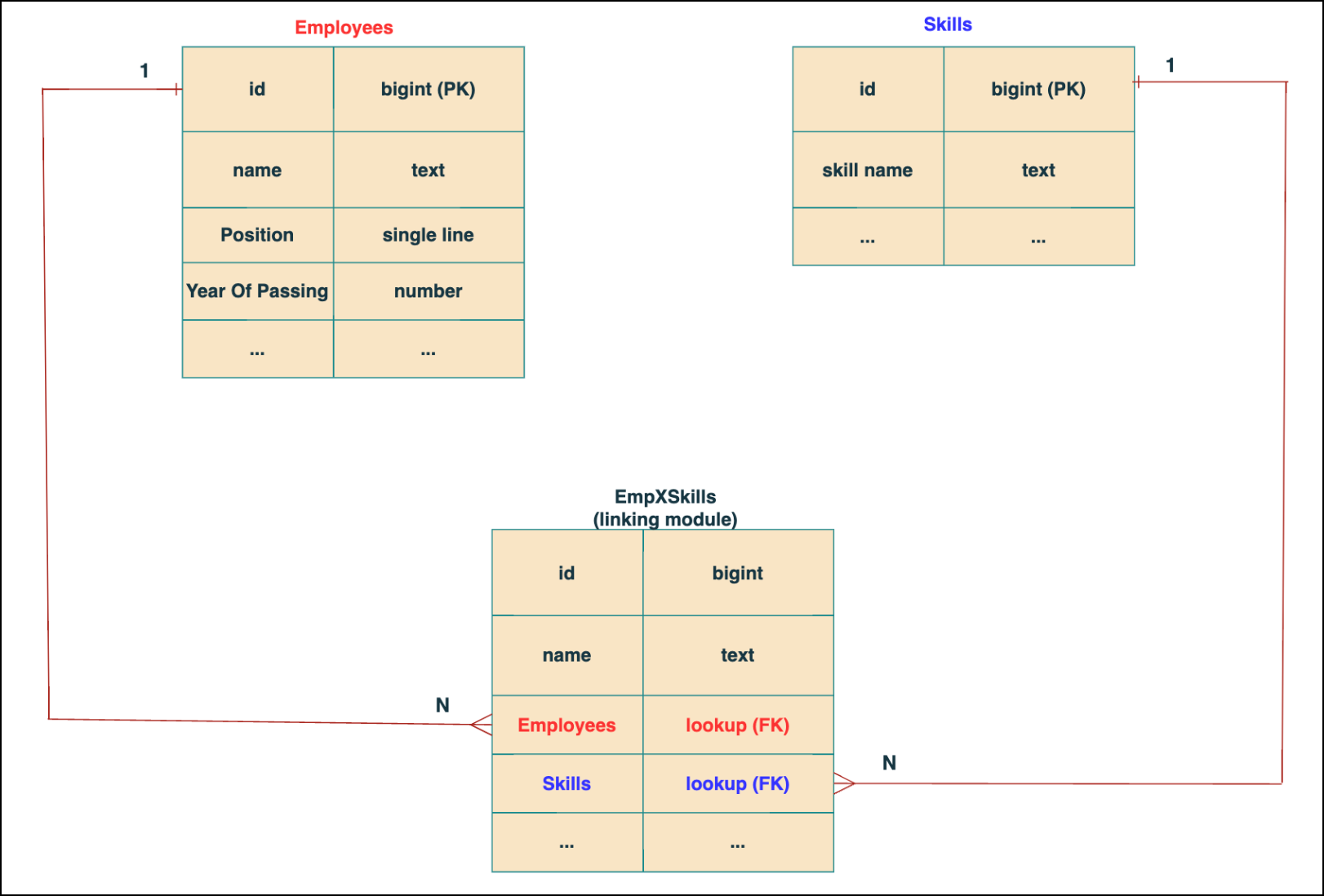
In the linking module, two lookup fields (lookup fields with api names - Employees and Skills) will be created. The lookup fields, one pointing to Employees and the other pointing to Skills from the linking module, establish a connection between the linking module and its associated module.
Why you cannot use a lookup field for this use case?
In Zoho CRM, a lookup field creates a one-to-many relationship between two modules i.e. one record in the source module can be linked to only one record in the target module.
Example :
If you create a lookup field for Skills in the Employees module, each employee can be linked to only one skill. So, use a multi-select lookup field instead of a lookup field when you need to represent complex relationships like one employee - many skills and one skill - many employees.
3. How to create a multi-select Lookup field using Zoho CRM APIs?
To create a Multi-Select lookup field between two modules using Zoho CRM APIs, follow these steps:
Step 1: Identify the Module API Name
Before creating the field, you should know the API names of the Employees and Skills modules. For that, use the Get Module Metadata API.
Request URL : {{api-domain}}/crm/v8/settings/modules
Request method : GET
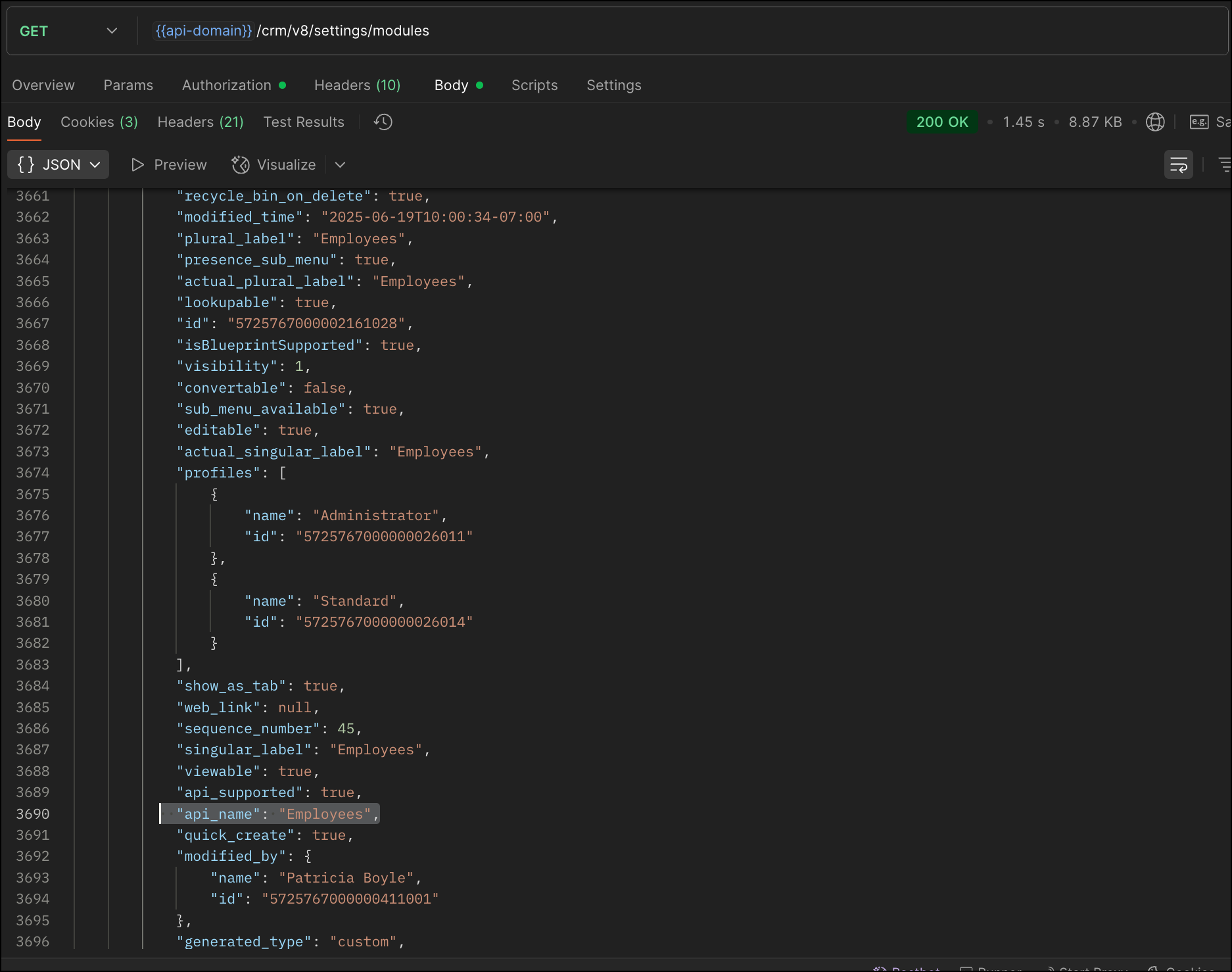
Now, search for the Employees module in the response and note its API name.
Step 2: Use the Create Custom Fields API
To establish a many-to-many relationship between two modules, in our case, Employees and Skills, you need to create a custom field of type multi-select lookup in the Employees module (parent module). Here, we will associate multiple skills to an employee.
This custom field requires:
- The related module you want to link to - Skills.
- A display field from the related module
- The linking module (EmpXSkills), which stores the actual associations.
Use the Create Custom Fields API to create custom fields.
Request URL : {{api_domain}}/crm/v8/settings/fields?module=Employees
Request method : POST
Sample input :
|
{
"fields": [
{
"field_label": "Skills", //Name of the field in your module
"data_type": "multiselectlookup", //Type of the field
"multiselectlookup": { //This JSON object contains the multi-select lookup relationship details
"connected_details": { //Details about the module and field you want to link
"module": {
"api_name": "Skills" //API name of the related module
},
"field": {
"field_label": "Skills" //The field in the related module to display
}
},
"linking_details": { //Details about the junction or linking module that manages the many-to-many relationship
"module": {
"plural_label": "EmpXSkills" //Plural label of the junction module
}
}
}
}
]
}
|
4. How Do You Find the Linking Module and Field API Names?
To know the API name of the linking module:
Use the Get Modules API and search for "generated_type" : "linking" in the response to identify MxN modules. In our case, EmpXSkills.
Request URL : {{api_domain}}/crm/v8/settings/modules
Request method : GET
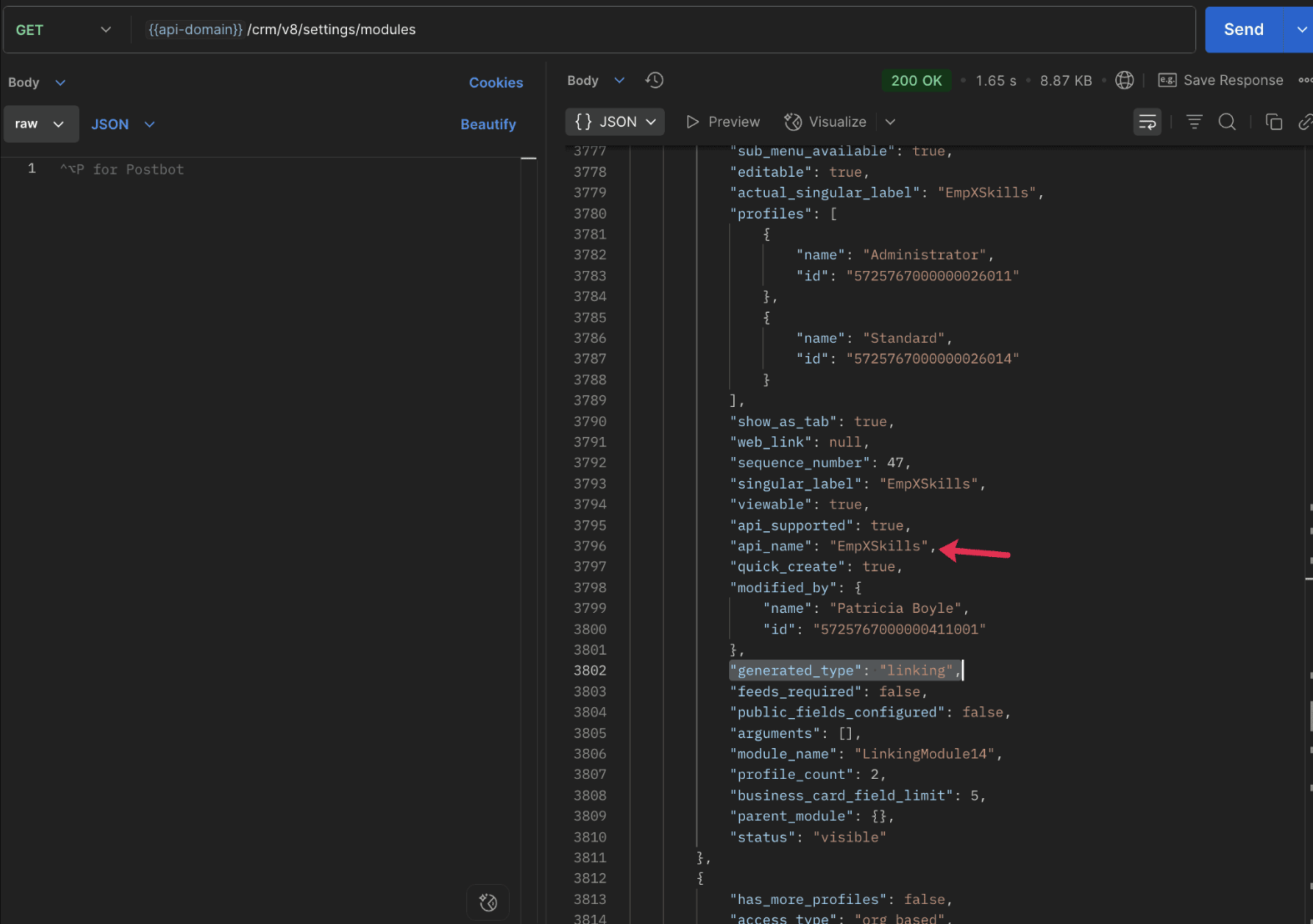
To know the field API names in the linking module:
Use the Get Fields Metadata API to retrieve the API names of lookup fields within the linking module.
Request URL : {{api_domain}}/crm/v8/settings/fields?module=EmpXSkills
Request method : GET
5. How do I associate records via a multi-select lookup field using the Insert Records API in Zoho CRM?
To associate records using a multi-select lookup field, you must provide the record IDs from the related module. The association is made through the linking module.
Example :
Associating multiple skills with an employee using the multi-select lookup field.
Request URL : {{api-domain}}/crm/v8/Employees
Request method : POST
Sample input :
|
{
"data": [
{
"Name": "Patricia",
"Email": "patricia@mail.com",
"Position": "Marketing Specialist",
"Year_of_Experience": 5,
"Skills": [ // API name of the multi-select lookup field in the Employees module
{
"Skills": { // API name of the lookup field in the linking module pointing to the Skills module
"name": "Marketing",
"id": "5725767000002149427" //ID from the Skills module are mandatory to establish the link
}
},
{
"Skills": {
"name": "Social Media Marketing",
"id": "5725767000002149476"
}
}
]
}
]
}
|
6. How do I associate an Employee's skills using the linking module in Zoho CRM?
To establish a relationship between the Employees and Skills modules through the linking module, use the Insert Records API to create a record in the linking module, EmpXSkills.
To do this,
- Use the appropriate lookup field API names to reference the parent module.
- You must need the record IDs from both the Employees and Skills modules to create the associations.
Request URL : {{api-domain}}/crm/v8/EmpXSkills
Request method : POST
Sample input :
|
{
"data": [
{
"Name": "Patricia",
"Employees": {
"id": "5725767000002161001" // Record ID from the Employees module
},
"Skills": {
"id": "5725767000002149476" // Record ID from the Skills module
}
}
]
}
|
7. When should I use create/update operations in the Employees module vs the EmpXSkills module?
|
Employees Module |
EmpXSkills (linking) Module |
|
Use when you want to create or update an Employee and associate Skills using the Multi-select Lookup field. |
Use when you want to create or remove associations between existing Employee and Skill records without modifying the actual Employee or Skill data. |
|
Creating a new employee and assigning their skills at once. |
Managing relationships between existing records i.e., linking and unlinking skills to employees. |
8. How to update a record in the linking module?
To update a record in the linking module, use the Update Records API.
Request URL : {{api-domain}}/crm/v8/EmpXSkills/5725767000006269044
Request method : PUT
Sample input :
|
{
"data": [
{
"Skills": {
"name": "Marketing",
"id": "5725767000002170035" //Associating another skill with the employee
}
}
]
} |
In the above sample, we have replaced an existing skill associated with an employee with another Skill in the linking module.This is done by updating the Skills lookup field in the EmpXSkills record.
Please note that in the linking module, Skills is a lookup field, so you can associate only one skill per linking record. But in the Employees module, Skills is a multi-select lookup field, so an employee can be associated with multiple skills.
9. How to unlink records from the parent module as well as the linking module?
Unlink the associated records from the parent module:
Using the Update records API, you can remove an associated skill from an employee, use the "_delete": null key within the multi-select lookup field in the Employee record update.
Request URL : {{api-domain}}/crm/v8/Employees/5725767000006269044
Request method : PUT
Sample input :
|
{
"data": [
{
"Skills": [
{
"Skills": {
"name": "Marketing",
"id": "5725767000002170035" // The Skill record you want to unlink
},
"id": "5725767000007228047", //record ID - The record created in the linking module for the employee with the Marketing skill
"_delete" : null
}
]
}
]
}
|
Replace an associated record from the linking module:
Use the Update Records API to replace an existing association in the linking module.
Request URL : {{api-domain}}/crm/v8/EmpXSkills/5725767000007228035
Request method : PUT
Sample input :
|
{
"data": [
{
"Skills": {
"name": "Java",
"id": "5725767000005259075" //replacing a new skill
}
}
]
}
|
In the above sample, we have replaced the existing skill with Java.
10. Why am I seeing the error "DUPLICATE_LINKING_DATA" in the Update Records API?
This error occurs when you try to associate records with the parent record that are already linked with the Multi-select lookup field. To resolve this, check the records you are trying to link and make sure your association is only with records that are not already linked.
Know your existing linked records:
Before the Update Records API, use the Get Related Records Data API and search for the multi-select lookup field. In our case, Skills is the multi-select lookup field created in the Employees module. This will return all records already associated.
Example :
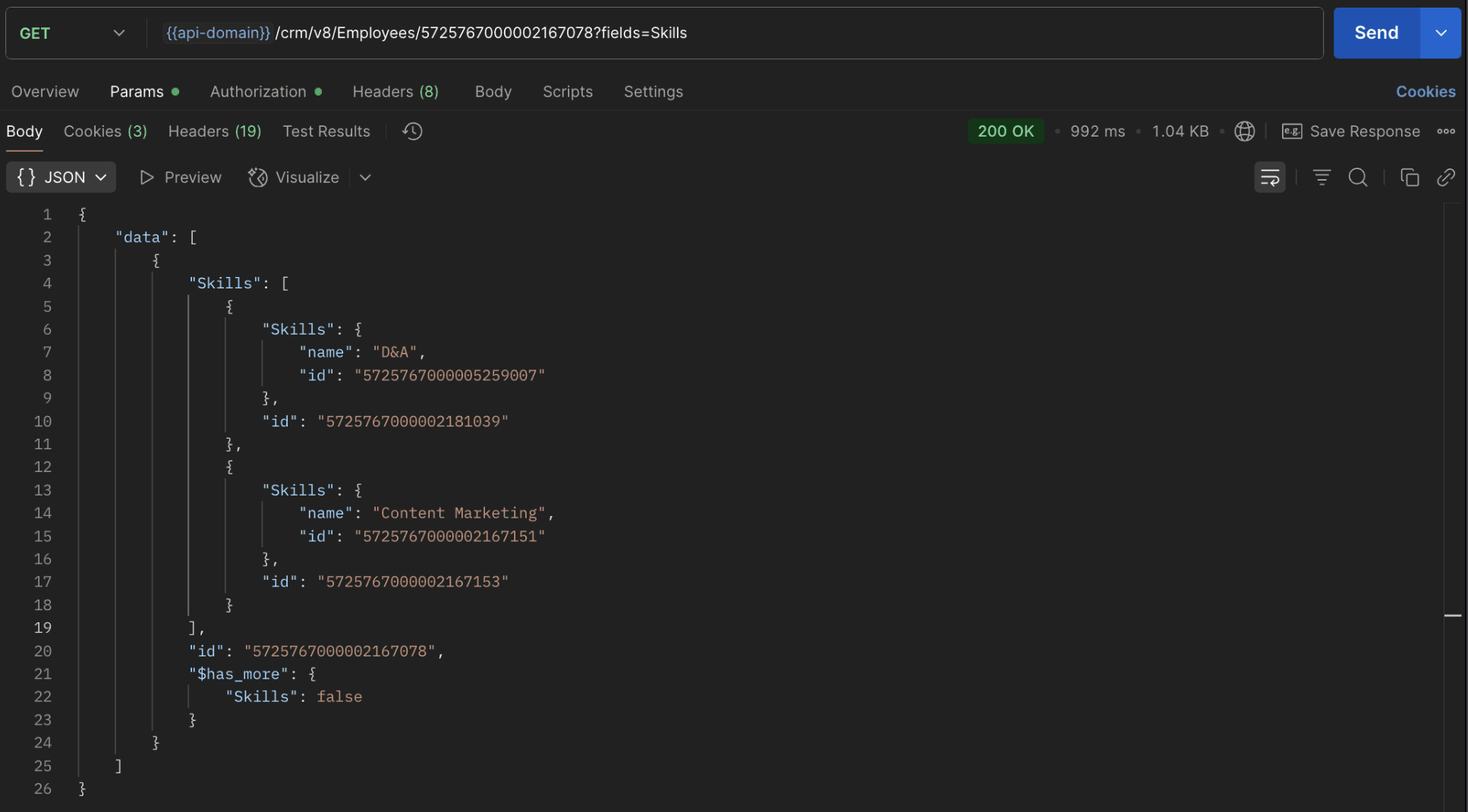
The response returns all Skills already linked with that Employee.
Using this way, compare the IDs from the API response with the new records you are about to link, and only proceed with non-duplicate IDs. This avoids duplicate entries and prevents the "DUPLICATE_LINKING_DATA" error.
11. What happens if I delete a record in the linking module?
When you delete a record in the linking module, it only removes the association between the related records in the Employees and Skills modules.
Note :
- Deleting a linking module record removes only the relationship between two records from the Employees and Skills modules.
- Deleting an Employee or Skill record deletes all corresponding entries in the linking module as well.
12. How do I query linked records?
Use the COQL API to query multi-select lookup data by specifying the corresponding linking module's API name directly in your query. The linking module is treated as a separate module in Zoho CRM, so you can retrieve associated records by querying it like any other module.
Sample query :
|
{
"select_query": "select Skills.Name as skill, Employees.Name as employee from EmpXSkills where Skills.Name like '%Marketing%'"
}
|
Use the Get Module Metadata API to know the linking module's API name.
13. How do I export multi-select lookup records using the Bulk Read API?
To export multi-select lookup data, linking module records efficiently, use the Bulk Read API with the linking module’s API name.
Request URL : https://www.zohoapis.com/crm/bulk/v8/read
Request method : POST
Sample Request :
|
{
"callback": {
"method": "post"
},
"query": {
"module": {
"api_name": "EmpXSkills" //API name of the linking module
},
"fields": [
"Employees.Name",
"Employees.Year_of_Experience",
"Skills.Name"
],
"criteria": {
"group": [
{
"field": {
"api_name": "Employees.Year_of_Experience"
},
"comparator": "greater_than",
"value": "4"
},
{
"field": {
"api_name": "Skills.Name"
},
"comparator": "contains",
"value": "Social"
}
],
"group_operator": "AND"
}
}
}
|
14. Can I import my linking module's data using the Bulk Write API?
Yes. Like the Leads and Contacts modules, you can also import linking module's data into Zoho CRM using the Bulk Write API by directly specifying the linking module’s API name.
If you are importing data that involves both a parent module, Employees and its associated MxN linking module, follow these steps:
1. Create separate CSV files:
- One for the parent module - Employees
- One for the linking module - EmpXSkills
2. Zip the files into a single ZIP file.
3. Upload the ZIP in a single Bulk Write API request.
4. Ensure accurate field mappings are provided in the API request body.
Refer to Kaizen #131 - Bulk Write for parent-child records using Scala SDK for more details on handling parent-child records.
15. Can I receive notifications if a multi-select lookup field in a module is modified or updated?
Yes, you can receive notifications when a MxN field is updated using the Notification API. To enable instant notifications for actions performed in a module, use the respective API names of the linking module in the input body.
Request URL : https://www.zohoapis.com/crm/bulk/v8/actions/watch
Request method : POST
Sample input :
|
{
"watch": [
{
"channel_id": "10000",
"events": [
"EmpXSkills.all" //EmpXSkills represents the API name of the linking module
],
"notify_url": "https://webhook.site/9f5ba227-ce5a-4709-814d-b044c003d605",
"return_affected_field_values": true
}
]
}
|
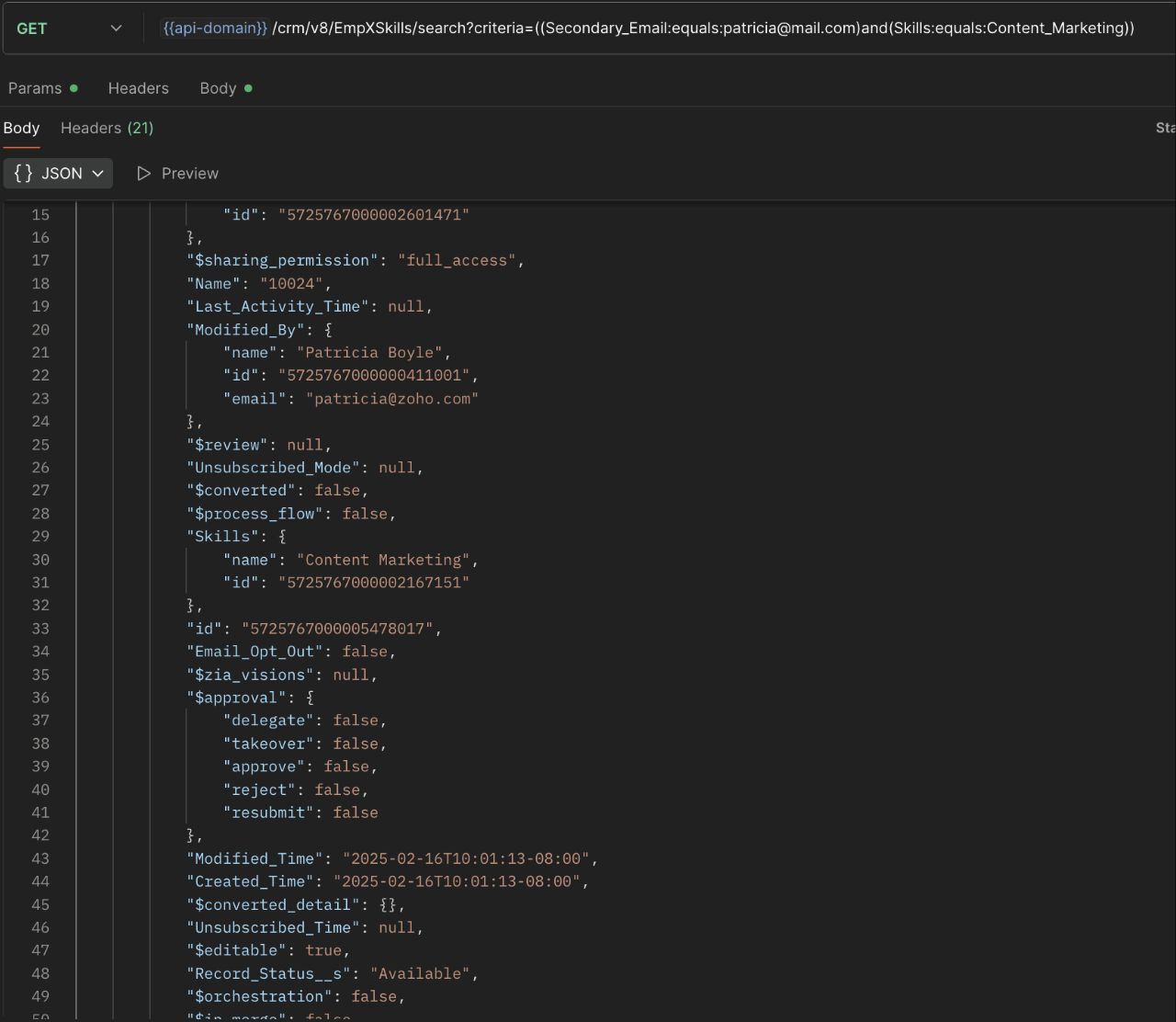
16. Can I use criteria-based filtering when accessing multi-select lookup data using the Search API?
Yes, you can filter multi-select lookup data using the criteria parameter in the Search API's URL.
Here is an example that fetches records from the EmpXSkills linking module.
Request URL : {{api-name}}/crm/v8/EmpXSkills/search?criteria=((Secondary_Email:equals:patricia@mail.com)and(Skills:equals:Content_Marketing))
Request method : GET
Sample response :
x-----------------------------x
We trust that this post meets your needs and is helpful. Let us know your thoughts in the comment section or reach out to us at support@zohocrm.com
Stay tuned for more insights in our upcoming Kaizen posts!

Previous Kaizen Post : Kaizen #198: Using Client Script for Custom Validation in Blueprint | Kaizen Directory
Other FAQs in the Kaizen series :
- Kaizen#75 - Frequently Asked Questions on Client Script
- Kaizen #147 - Frequently Asked Questions on Zoho CRM Widgets
- Kaizen #155 - Frequently Asked Questions on Subforms
- Kaizen #170 - Frequently Asked Questions on Notification APIs
- Kaizen #195: Frequently Asked Questions on Bulk Read API and Bulk Write API
Topic Participants
Subramanian K
Sticky Posts
Kaizen #198: Using Client Script for Custom Validation in Blueprint
Nearing 200th Kaizen Post – 1 More to the Big Two-Oh-Oh! Do you have any questions, suggestions, or topics you would like us to cover in future posts? Your insights and suggestions help us shape future content and make this series better for everyone.Kaizen #226: Using ZRC in Client Script
Hello everyone! Welcome to another week of Kaizen. In today's post, lets see what is ZRC (Zoho Request Client) and how we can use ZRC methods in Client Script to get inputs from a Salesperson and update the Lead status with a single button click. In thisKaizen #222 - Client Script Support for Notes Related List
Hello everyone! Welcome to another week of Kaizen. The final Kaizen post of the year 2025 is here! With the new Client Script support for the Notes Related List, you can validate, enrich, and manage notes across modules. In this post, we’ll explore howKaizen #217 - Actions APIs : Tasks
Welcome to another week of Kaizen! In last week's post we discussed Email Notifications APIs which act as the link between your Workflow automations and you. We have discussed how Zylker Cloud Services uses Email Notifications API in their custom dashboard.Kaizen #216 - Actions APIs : Email Notifications
Welcome to another week of Kaizen! For the last three weeks, we have been discussing Zylker's workflows. We successfully updated a dormant workflow, built a new one from the ground up and more. But our work is not finished—these automated processes are
Recent Topics
Customize your SalesIQ live chat with Custom CSS and blend it with your website design
Hi everyone. Hope you all are having a great day! SalesIQ offers various inbuilt customization choices for your chat widget and window like changes in colour, theme, font etc. Although these choices are many, sometimes they may not match with the designFrom Email Address When Replaying to Missed Chats
One of the most common things we do is follow up on every missed chat. Missed chats are like money in the bank, people just waiting for your response and to start a relationship with our companies. However, SalesIQ only lets you respond from 1 email address from your entire account?! We have happily paid for 4 subscriptions, but our users cannot reply from their own email address? How are we supposed to build customer relationships? The fix to this issue is so simple, just load in the logged inNarrative 6 - The impact of rebranding
Behind the scenes of a successful ticketing system - BTS Series Narrative 6 - The impact of rebranding Every organization has invested in branding to set itself apart, and that should be reflected in the help desk. Zoho Desk enables organizations to applycustom color palette for picklist in Sheet
Migrating over from Google Sheets and missing the ability to customize the individual item colors of my picklist/dropdown menus. Is this something that is possible? A search showed me creating a custom color palette in Analytics is possible but I am notWhat's New - July 2025 | Zoho Backstage
Start smart, end strong. From knowing who’s coming to celebrating who showed up, July’s updates help you run events that feel organized from the first invite to the final thank you. Planning an event used to be like writing a choose-your-own-adventureImage Upload Field API get encrypted ID and sequence number
Hello is there a way to extract the encrypted id and sequence number from image upload fields through the Zoho CRM API? I created a custom script with javascript within Zoho CRM, but I want to extract the encrypted id and sequence number for all my imagesAttention: Changes to 10DLC TCR pricing and new authentication requirements
Hi everyone, Starting August 1, 2025, The Campaign Registry (TCR) is introducing new pricing changes and a mandatory brand verification process called Authentication+ 2.0, which will affect how you register and manage your 10DLC messaging services. TheseBetter Time Tracking
We need better time tracking customization for IT MSPs. We also need reporting that is built in, rather than having to try and fumble with creating custom reports. We also need to be able to mark whether a ticket has been billed or not, I don't thinkScheduled Tickets Need Updated
There is a very clunky manual way to create reoccurring scheduled tickets. This should be created to be easy for the administrator to create. We create several (10 to 12) reoccurring tickets per account for biweekly and monthly auditing purposes.. TheTeam Feeds Improvements
Team Feeds needs to show a feed of every action within the department. Currently it seems that the feed will only show a ticket that I've personally commented on or interacted with/followed. A feed should be that, a feed. As a manager I would like toBetter Security, Better User Experience | Help Center Update | June'25
As part of our commitment to enhancing user experience and security, we are happy to announce updates to our authentication mechanism. This update introduces several key enhancements designed to improve the password recovery process and streamline theUpload Logo to Account Page
It would be nice to set a logo for an AccountView Agent Collision on Ticket List Page
It would be nice from the ticket listing page (views) to see what agents are working on what tickets rather than having to click into each ticket throughout the day to see what agents are working on what tickets. This functionality would also be desiredRestrict user from viewing the detail standard view
Is there any way to restrict a user(it can be user-field-based) from viewing the detail standard view? Basically, I have created a canvas detailed view so that on some conditions I can hide some data from the users but the standard view client scriptUpload Picture to Contact
It would be nice to upload a profile picture to a contact.Allowing Pictures for Client Contacts
Do you have any plans to allow us to add pictures of our client contacts? There is a silhouette of a person there now, but no way that I can see where I can actually add a picture of the individual.Agent name Alias
I am seeing that Full name of my staffs are written on every ticket response which is not good for some reasons. It is possible to user like this: Manny P. (First Name with Last Name's First Letter) or Manny (First Name) This is want we want to showUnable to add attachments to tickets through Desk API
I able to use the Desk API to generate tickets. However when I try to use the tickets/{ticketId}/attachments endpoint, I always get an Unauthorized error. My app has Desk.Tickets.ALL included in its scope so this should not be an issueWhat's wrong with this COQL?
What's wrong with this COQL? Code returns "invalid operator found". SELECT id, Name, Stage, Account, Created_Time, Tag FROM Production_Orders WHERE (Account = '4356038000072566002' AND Stage NOT LIKE '%customer%') ORDER BY Created_Time DESC LIMIT 200[Feature Request] Add support for internationalized top-level domains mail hosting
This is an important request to add support for internationalized domains mail hosting to https://www.zoho.com/mail/ In this case, that is only limited to domain name/mail address however currently it's already possible for us send mails etc using belowAdd Enable/Disable to Field Rules and other Rules
Hi, Sometimes I have rules setup for fields, and until I want to enable them for use, I can set the fields to Hidden but rules still show them, today you have to delete rules and then recreate them again, would be nice to have a toggle for Enabled/DisabledSyncing stuck for days
Hello when I made an account a few days ago and synced all my notes to it, it is still syncing. My app is only 400mb so I do not know why it is taking so long. Please helpWorkflow runs on every edit despite not ticking the field repeat this workflow whenever a parent is edited.....
Hi, It is my understanding that this workflow should only trigger once. Why is this triggering on every edit of the field? Based on another support query - directly from Zoho, If i tick the box 'repeat this workflow whenever a parent is edited' it shouldHow do you add or update tags on Zoho CRM records via n8n? (Workarounds or best practices?)
Hi all, I’m running into some limitations with the Zoho CRM node in n8n and was wondering how others have handled this: From what I see, the standard Zoho CRM node in n8n doesn’t allow you to add or update tags when creating or updating contacts/leads.API PARAMETER FOR TICKET CLOSED TIME
Hi, Is there a parameter for filtering tickets by closed time in zoho api, i can see closed time in the API response i get, but can't get tickets by that field while calling. Regards, Anvin AliasReply to email addresses wrong.
I have setup my Zoho mail account using my main domain and I also have an Alias setup from a different domain. In Settings - Mail - Compose I have selected to the option "For replies, send using The same email address to which the email was sent to".Meeting integration with Otter.ai
Would love for an integration with an AI transcription service like Otter.ai to be integrated with Zoho Meeting. ThanksHow to close/delete a free creator account?
I have a free zoho creator account associated with my email address that is not being used. I want to become a user of another paid zoho creator account but I can not associate with the paid account with the same email. I assume if I can close or delete the free account I will be able to use the paid account. I have emailed support but no response. Suggestions?Zoho books and zapier causes Invalid data provided
I have been using zoho books with zapier for over 2 years now, everything was working fine. On September 13th my zaps stopped working. Now on step create sales invoice in zoho books i get an error: Failed to create a create_invoice_v2 in Zoho Books TheCRM report
Is it possible to pull a contacts report that also includes the company industry, as well as the company name? I’m having trouble combining company and contact fields – any help is appreciated. Thank you, SamEnhancements to Client script?
Hi Zoho CRM, I've been extensively using Client Scripts to enhance our Deal form experience, particularly for real time validations and auto updating fields based on specific logic. However, I've encountered a challenge regarding permission boundaries.Add views to new CRM UI navigation + Unlimited Webtabs
Zoho CRM is so close now to being the ultimate business application with the new UI, as soon as this one feature is added. This is probably where Zoho is headed but if it's not I want to BEG for this to be incorporated. What we need is to be able to putE-Mail Distribution List
How do I create an e-mail distribution list in Zoho Mail?Custom "create meeting" button with more functionality than Zoho currently has?
I'm looking for a little help/direction in how to do this. Even just some general high level pointers on how this might be able to be done. The current Zoho Meeting Activity functionality is not ideal for my org's workflow. I'd like to try and createError Code 4: Invalid value passed for JSONString
Okay, I want to start by saying I know I'm a terrible scripter, so sorry if this is a dumb mistake. I just can't figure it out, even with LLM help. Here's my code: // --- Input Variables --- customer_id = salesorder.get("customer_id"); so_id = salesorder.get("salesorder_id");Organizing contacts/members by company
I work for a membership organization (representing businesses) and am trying to use Zoho CRM more effectively for managing the points of contact for our members. Currently, our members are listed in our CRM by the primary point of contact's name, butUnable to search in Zoho Email
I've started using Zoho Email (free version) recently and realized that it doesn't have email search functionality. Am I missing anything here? I've gone through the Zoho tutorial which does show the search bar on the right top of the Zoho UI. But inResponse Time Report
From data to decisions: A deep dive into ticketing system reports Every organization that interacts with its customers should have an established timeframe for how soon an agent is expected to send the first response and any reply to any follow-up messages.Zoho - Outlook plugin
Does anyone know if there is a way to modify the autofill in the Zoho plugin in outlook? When we create a contact, it enters the correct email address and name, but then pulls information from our own signature line to add phone number, address, etc.Zoho Books - Sales Person Information
Hi Team, On Invoices, Quotes, etc... I can include the Sales Person, but it only shows their name and not their email or phone number. It would be great to have place on invoice templates where we can manage what sales person information should be showsNext Page