Kaizen #199: FAQs on Multi-Select Lookup (MxN) Field in Zoho CRM
Nearing 200th Kaizen Post – We want to hear from you!
Do you have any questions, suggestions, or topics you would like us to cover in future posts? Your insights and suggestions help us shape future content and make this series better for everyone.
Hey everybody!!!
Welcome back to another post in the Kaizen series!
In this post, we will address some of the most frequently asked questions about the Multi-Select Lookup(MxN) field from the Zoho CRM developer community forum.
1. What is a Multi-select lookup field?
A multi-select lookup field in Zoho CRM lets you create a many-to-many relationship between two modules. This means a record in one module can be linked to multiple records in another module and vice versa.
For example, using an multi-select lookup field, you can associate multiple skills with an employee.
2. How does the Mutli-Select Lookup relationship work?
When you create a Multi-Select Lookup between two modules, for example, Employees and Skills, Zoho CRM automatically creates a hidden linking module, which is also known as an MxN module. This module stores the associations between records in the two modules, enabling you to track and manage many-to-many relationships.
For instance, if you link Employees and Skills, a linking module named EmpXSkills will be created.
This linking module is accessible only via API.
Backend Flow of multi-select lookup Relationship
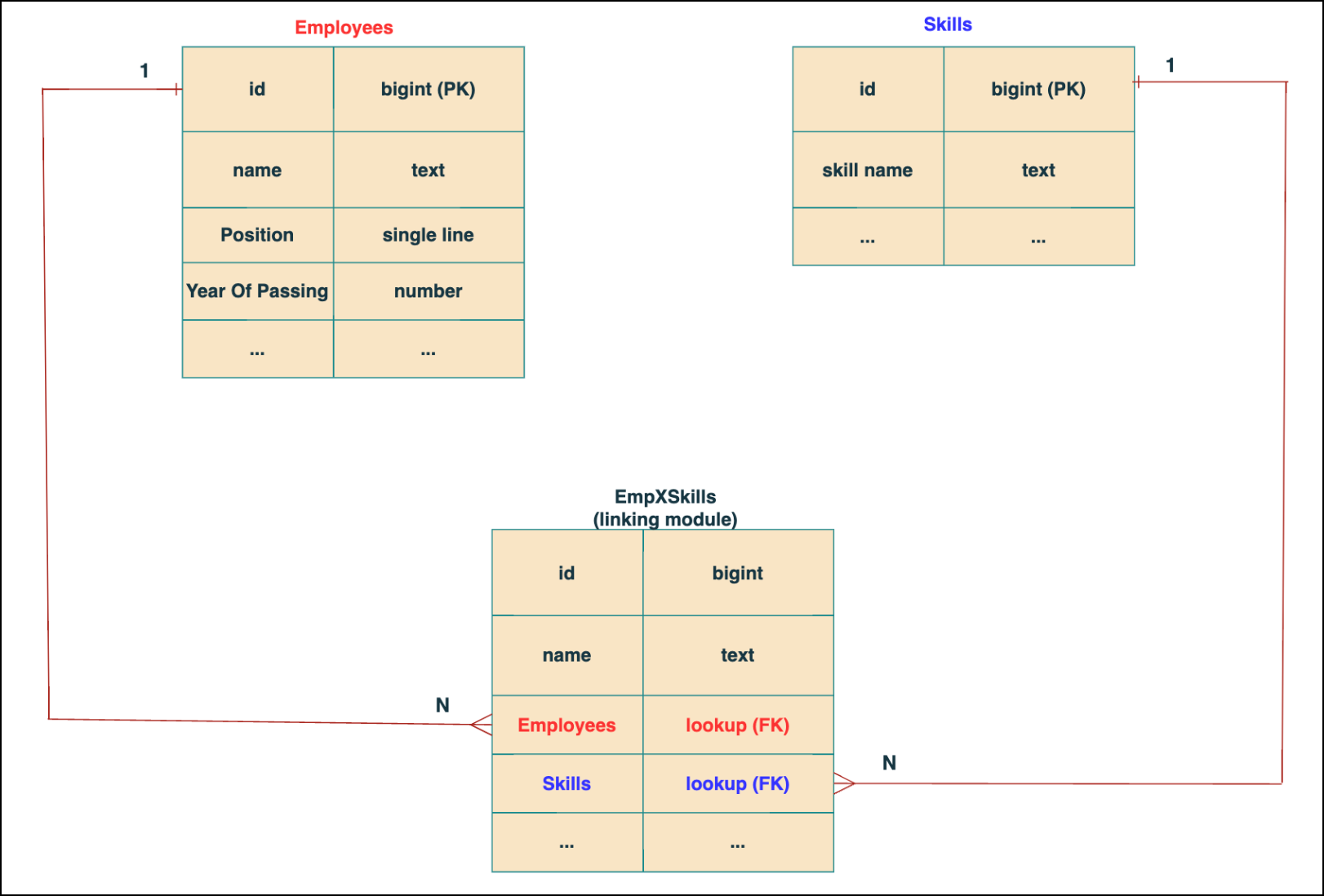
In the linking module, two lookup fields (lookup fields with api names - Employees and Skills) will be created. The lookup fields, one pointing to Employees and the other pointing to Skills from the linking module, establish a connection between the linking module and its associated module.
Why you cannot use a lookup field for this use case?
In Zoho CRM, a lookup field creates a one-to-many relationship between two modules i.e. one record in the source module can be linked to only one record in the target module.
Example :
If you create a lookup field for Skills in the Employees module, each employee can be linked to only one skill. So, use a multi-select lookup field instead of a lookup field when you need to represent complex relationships like one employee - many skills and one skill - many employees.
3. How to create a multi-select Lookup field using Zoho CRM APIs?
To create a Multi-Select lookup field between two modules using Zoho CRM APIs, follow these steps:
Step 1: Identify the Module API Name
Before creating the field, you should know the API names of the Employees and Skills modules. For that, use the Get Module Metadata API.
Request URL : {{api-domain}}/crm/v8/settings/modules
Request method : GET
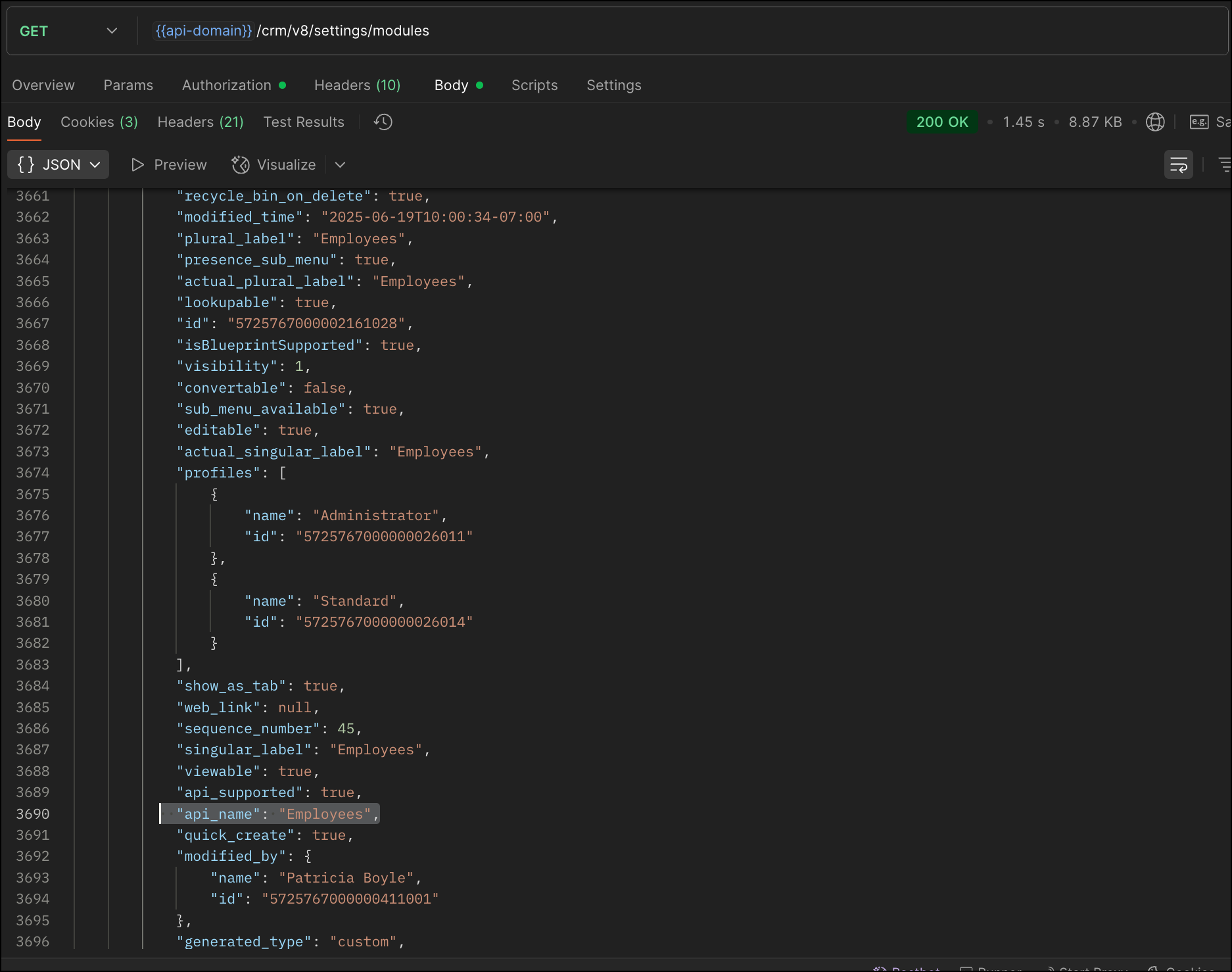
Now, search for the Employees module in the response and note its API name.
Step 2: Use the Create Custom Fields API
To establish a many-to-many relationship between two modules, in our case, Employees and Skills, you need to create a custom field of type multi-select lookup in the Employees module (parent module). Here, we will associate multiple skills to an employee.
This custom field requires:
- The related module you want to link to - Skills.
- A display field from the related module
- The linking module (EmpXSkills), which stores the actual associations.
Use the Create Custom Fields API to create custom fields.
Request URL : {{api_domain}}/crm/v8/settings/fields?module=Employees
Request method : POST
Sample input :
|
{
"fields": [
{
"field_label": "Skills", //Name of the field in your module
"data_type": "multiselectlookup", //Type of the field
"multiselectlookup": { //This JSON object contains the multi-select lookup relationship details
"connected_details": { //Details about the module and field you want to link
"module": {
"api_name": "Skills" //API name of the related module
},
"field": {
"field_label": "Skills" //The field in the related module to display
}
},
"linking_details": { //Details about the junction or linking module that manages the many-to-many relationship
"module": {
"plural_label": "EmpXSkills" //Plural label of the junction module
}
}
}
}
]
}
|
4. How Do You Find the Linking Module and Field API Names?
To know the API name of the linking module:
Use the Get Modules API and search for "generated_type" : "linking" in the response to identify MxN modules. In our case, EmpXSkills.
Request URL : {{api_domain}}/crm/v8/settings/modules
Request method : GET
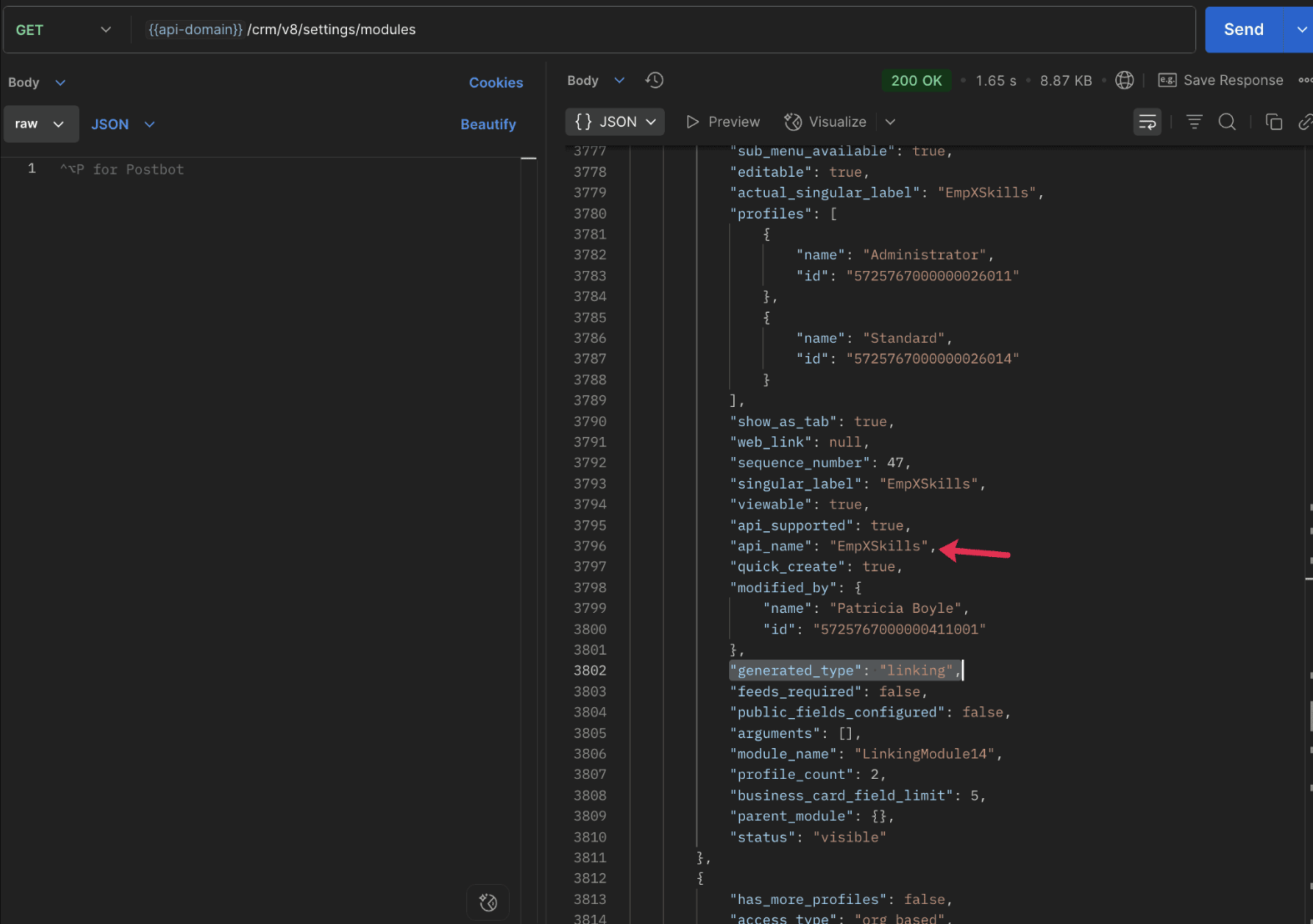
To know the field API names in the linking module:
Use the Get Fields Metadata API to retrieve the API names of lookup fields within the linking module.
Request URL : {{api_domain}}/crm/v8/settings/fields?module=EmpXSkills
Request method : GET
5. How do I associate records via a multi-select lookup field using the Insert Records API in Zoho CRM?
To associate records using a multi-select lookup field, you must provide the record IDs from the related module. The association is made through the linking module.
Example :
Associating multiple skills with an employee using the multi-select lookup field.
Request URL : {{api-domain}}/crm/v8/Employees
Request method : POST
Sample input :
|
{
"data": [
{
"Name": "Patricia",
"Email": "patricia@mail.com",
"Position": "Marketing Specialist",
"Year_of_Experience": 5,
"Skills": [ // API name of the multi-select lookup field in the Employees module
{
"Skills": { // API name of the lookup field in the linking module pointing to the Skills module
"name": "Marketing",
"id": "5725767000002149427" //ID from the Skills module are mandatory to establish the link
}
},
{
"Skills": {
"name": "Social Media Marketing",
"id": "5725767000002149476"
}
}
]
}
]
}
|
6. How do I associate an Employee's skills using the linking module in Zoho CRM?
To establish a relationship between the Employees and Skills modules through the linking module, use the Insert Records API to create a record in the linking module, EmpXSkills.
To do this,
- Use the appropriate lookup field API names to reference the parent module.
- You must need the record IDs from both the Employees and Skills modules to create the associations.
Request URL : {{api-domain}}/crm/v8/EmpXSkills
Request method : POST
Sample input :
|
{
"data": [
{
"Name": "Patricia",
"Employees": {
"id": "5725767000002161001" // Record ID from the Employees module
},
"Skills": {
"id": "5725767000002149476" // Record ID from the Skills module
}
}
]
}
|
7. When should I use create/update operations in the Employees module vs the EmpXSkills module?
|
Employees Module |
EmpXSkills (linking) Module |
|
Use when you want to create or update an Employee and associate Skills using the Multi-select Lookup field. |
Use when you want to create or remove associations between existing Employee and Skill records without modifying the actual Employee or Skill data. |
|
Creating a new employee and assigning their skills at once. |
Managing relationships between existing records i.e., linking and unlinking skills to employees. |
8. How to update a record in the linking module?
To update a record in the linking module, use the Update Records API.
Request URL : {{api-domain}}/crm/v8/EmpXSkills/5725767000006269044
Request method : PUT
Sample input :
|
{
"data": [
{
"Skills": {
"name": "Marketing",
"id": "5725767000002170035" //Associating another skill with the employee
}
}
]
} |
In the above sample, we have replaced an existing skill associated with an employee with another Skill in the linking module.This is done by updating the Skills lookup field in the EmpXSkills record.
Please note that in the linking module, Skills is a lookup field, so you can associate only one skill per linking record. But in the Employees module, Skills is a multi-select lookup field, so an employee can be associated with multiple skills.
9. How to unlink records from the parent module as well as the linking module?
Unlink the associated records from the parent module:
Using the Update records API, you can remove an associated skill from an employee, use the "_delete": null key within the multi-select lookup field in the Employee record update.
Request URL : {{api-domain}}/crm/v8/Employees/5725767000006269044
Request method : PUT
Sample input :
|
{
"data": [
{
"Skills": [
{
"Skills": {
"name": "Marketing",
"id": "5725767000002170035" // The Skill record you want to unlink
},
"id": "5725767000007228047", //record ID - The record created in the linking module for the employee with the Marketing skill
"_delete" : null
}
]
}
]
}
|
Replace an associated record from the linking module:
Use the Update Records API to replace an existing association in the linking module.
Request URL : {{api-domain}}/crm/v8/EmpXSkills/5725767000007228035
Request method : PUT
Sample input :
|
{
"data": [
{
"Skills": {
"name": "Java",
"id": "5725767000005259075" //replacing a new skill
}
}
]
}
|
In the above sample, we have replaced the existing skill with Java.
10. Why am I seeing the error "DUPLICATE_LINKING_DATA" in the Update Records API?
This error occurs when you try to associate records with the parent record that are already linked with the Multi-select lookup field. To resolve this, check the records you are trying to link and make sure your association is only with records that are not already linked.
Know your existing linked records:
Before the Update Records API, use the Get Related Records Data API and search for the multi-select lookup field. In our case, Skills is the multi-select lookup field created in the Employees module. This will return all records already associated.
Example :
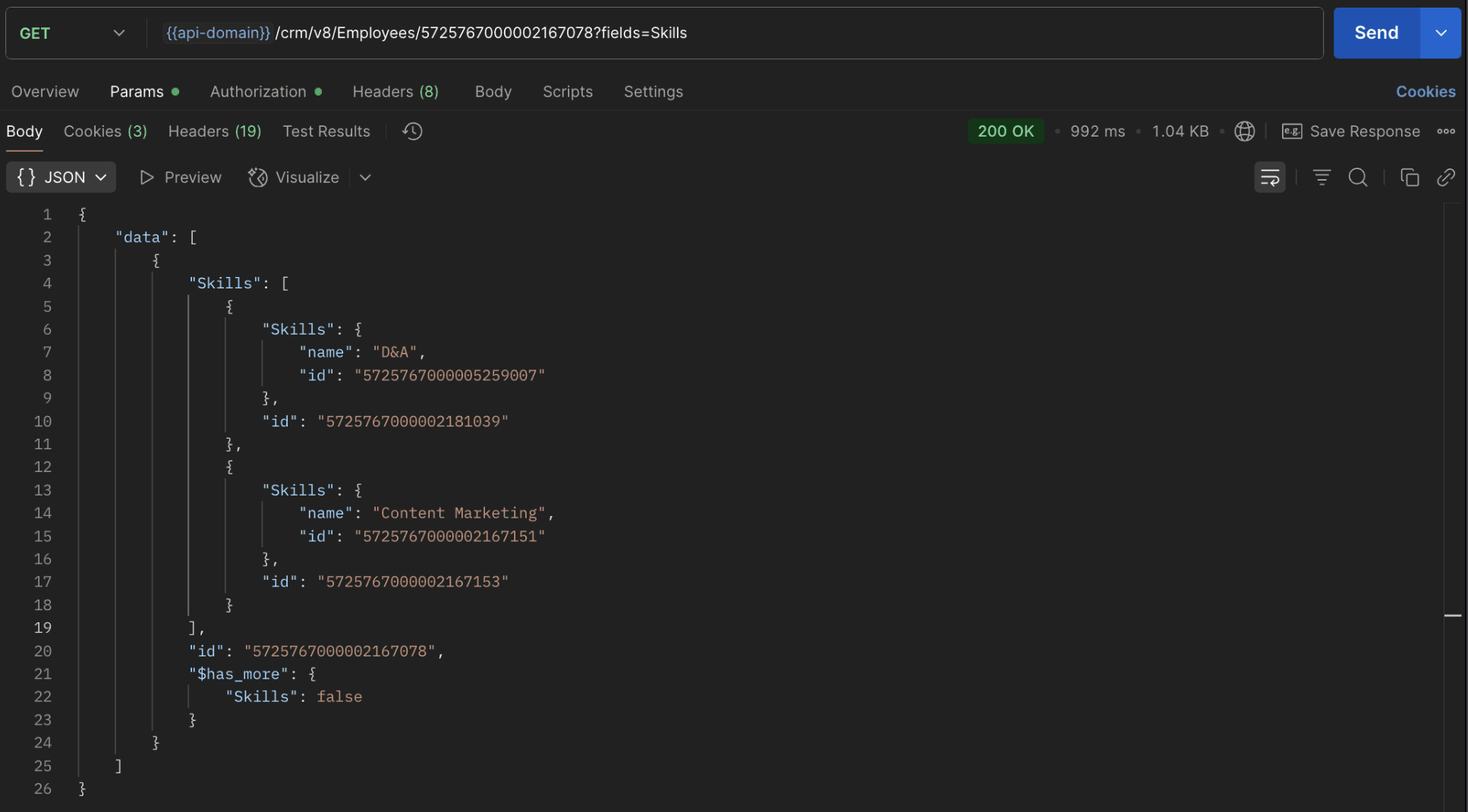
The response returns all Skills already linked with that Employee.
Using this way, compare the IDs from the API response with the new records you are about to link, and only proceed with non-duplicate IDs. This avoids duplicate entries and prevents the "DUPLICATE_LINKING_DATA" error.
11. What happens if I delete a record in the linking module?
When you delete a record in the linking module, it only removes the association between the related records in the Employees and Skills modules.
Note :
- Deleting a linking module record removes only the relationship between two records from the Employees and Skills modules.
- Deleting an Employee or Skill record deletes all corresponding entries in the linking module as well.
12. How do I query linked records?
Use the COQL API to query multi-select lookup data by specifying the corresponding linking module's API name directly in your query. The linking module is treated as a separate module in Zoho CRM, so you can retrieve associated records by querying it like any other module.
Sample query :
|
{
"select_query": "select Skills.Name as skill, Employees.Name as employee from EmpXSkills where Skills.Name like '%Marketing%'"
}
|
Use the Get Module Metadata API to know the linking module's API name.
13. How do I export multi-select lookup records using the Bulk Read API?
To export multi-select lookup data, linking module records efficiently, use the Bulk Read API with the linking module’s API name.
Request URL : https://www.zohoapis.com/crm/bulk/v8/read
Request method : POST
Sample Request :
|
{
"callback": {
"method": "post"
},
"query": {
"module": {
"api_name": "EmpXSkills" //API name of the linking module
},
"fields": [
"Employees.Name",
"Employees.Year_of_Experience",
"Skills.Name"
],
"criteria": {
"group": [
{
"field": {
"api_name": "Employees.Year_of_Experience"
},
"comparator": "greater_than",
"value": "4"
},
{
"field": {
"api_name": "Skills.Name"
},
"comparator": "contains",
"value": "Social"
}
],
"group_operator": "AND"
}
}
}
|
14. Can I import my linking module's data using the Bulk Write API?
Yes. Like the Leads and Contacts modules, you can also import linking module's data into Zoho CRM using the Bulk Write API by directly specifying the linking module’s API name.
If you are importing data that involves both a parent module, Employees and its associated MxN linking module, follow these steps:
1. Create separate CSV files:
- One for the parent module - Employees
- One for the linking module - EmpXSkills
2. Zip the files into a single ZIP file.
3. Upload the ZIP in a single Bulk Write API request.
4. Ensure accurate field mappings are provided in the API request body.
Refer to Kaizen #131 - Bulk Write for parent-child records using Scala SDK for more details on handling parent-child records.
15. Can I receive notifications if a multi-select lookup field in a module is modified or updated?
Yes, you can receive notifications when a MxN field is updated using the Notification API. To enable instant notifications for actions performed in a module, use the respective API names of the linking module in the input body.
Request URL : https://www.zohoapis.com/crm/bulk/v8/actions/watch
Request method : POST
Sample input :
|
{
"watch": [
{
"channel_id": "10000",
"events": [
"EmpXSkills.all" //EmpXSkills represents the API name of the linking module
],
"notify_url": "https://webhook.site/9f5ba227-ce5a-4709-814d-b044c003d605",
"return_affected_field_values": true
}
]
}
|
16. Can I use criteria-based filtering when accessing multi-select lookup data using the Search API?
Yes, you can filter multi-select lookup data using the criteria parameter in the Search API's URL.
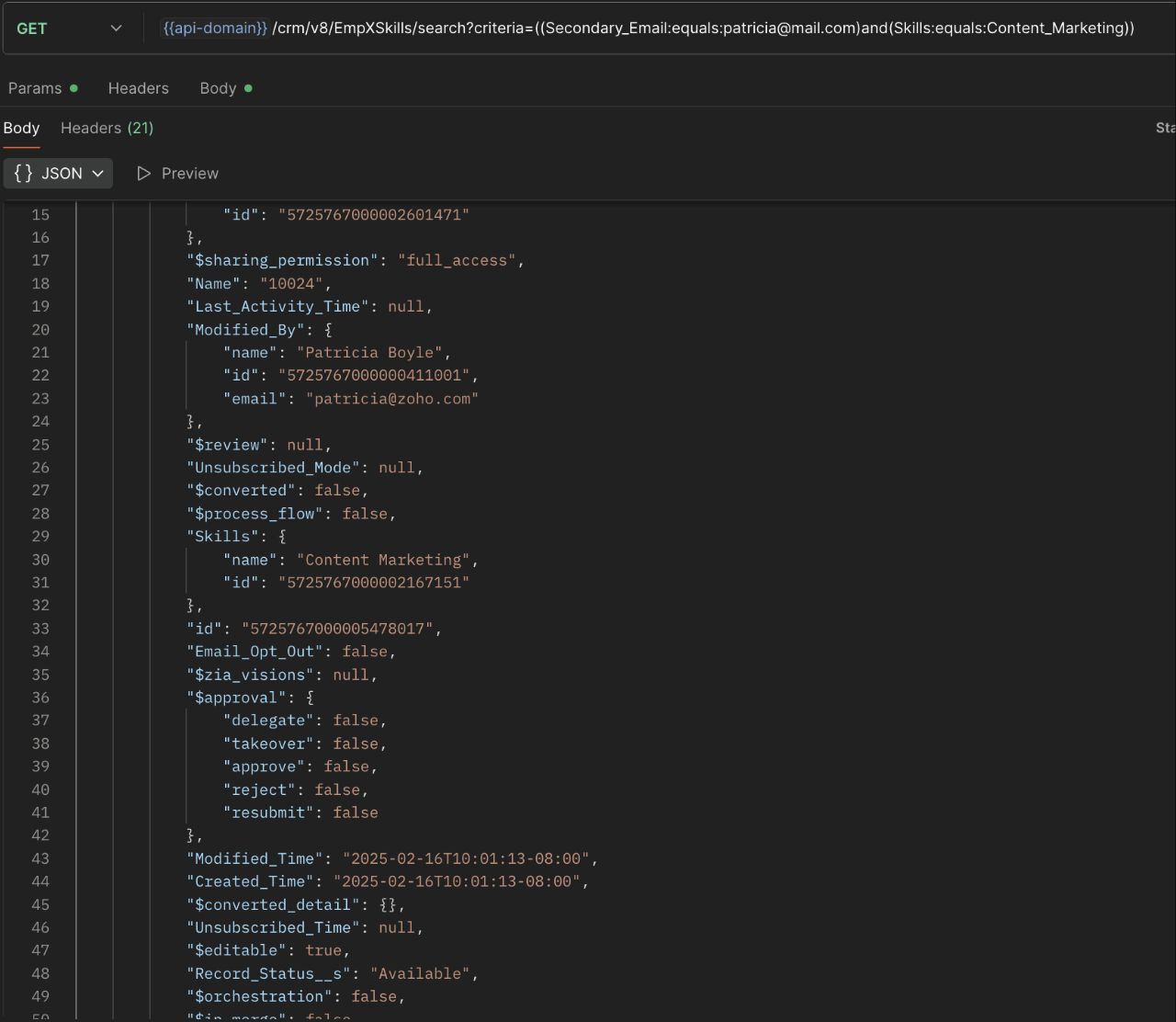
Here is an example that fetches records from the EmpXSkills linking module.
Request URL : {{api-name}}/crm/v8/EmpXSkills/search?criteria=((Secondary_Email:equals:patricia@mail.com)and(Skills:equals:Content_Marketing))
Request method : GET
Sample response :
x-----------------------------x
We trust that this post meets your needs and is helpful. Let us know your thoughts in the comment section or reach out to us at support@zohocrm.com
Stay tuned for more insights in our upcoming Kaizen posts!

Previous Kaizen Post : Kaizen #198: Using Client Script for Custom Validation in Blueprint | Kaizen Directory
Other FAQs in the Kaizen series :
- Kaizen#75 - Frequently Asked Questions on Client Script
- Kaizen #147 - Frequently Asked Questions on Zoho CRM Widgets
- Kaizen #155 - Frequently Asked Questions on Subforms
- Kaizen #170 - Frequently Asked Questions on Notification APIs
- Kaizen #195: Frequently Asked Questions on Bulk Read API and Bulk Write API
Topic Participants
Subramanian K
Sticky Posts
Kaizen #198: Using Client Script for Custom Validation in Blueprint
Nearing 200th Kaizen Post – 1 More to the Big Two-Oh-Oh! Do you have any questions, suggestions, or topics you would like us to cover in future posts? Your insights and suggestions help us shape future content and make this series better for everyone.Kaizen #226: Using ZRC in Client Script
Hello everyone! Welcome to another week of Kaizen. In today's post, lets see what is ZRC (Zoho Request Client) and how we can use ZRC methods in Client Script to get inputs from a Salesperson and update the Lead status with a single button click. In thisKaizen #222 - Client Script Support for Notes Related List
Hello everyone! Welcome to another week of Kaizen. The final Kaizen post of the year 2025 is here! With the new Client Script support for the Notes Related List, you can validate, enrich, and manage notes across modules. In this post, we’ll explore howKaizen #217 - Actions APIs : Tasks
Welcome to another week of Kaizen! In last week's post we discussed Email Notifications APIs which act as the link between your Workflow automations and you. We have discussed how Zylker Cloud Services uses Email Notifications API in their custom dashboard.Kaizen #216 - Actions APIs : Email Notifications
Welcome to another week of Kaizen! For the last three weeks, we have been discussing Zylker's workflows. We successfully updated a dormant workflow, built a new one from the ground up and more. But our work is not finished—these automated processes are
Recent Topics
Fetch Records using Dynamic Criteria
Hi, I have a form that builds a filter based on user input. I need to fetch the records based on dynamic criteria. How would I accomplish this as there is no eval function? For example: desiredRecord = Form1[dynamicCriteria];Url filter Report date (pivot chart)
Hello. Is it possible to filter the data in pivot char using parameters in the url? I'm trying but I should not doing very well. Something like: https://creator.zoho.com/.../....../#Report:MyPivotChartReport?MyDate=01-Jan-2012;31-Jun-2012;MyDate_op=58 SaludosSending gmail to a particular person fails because the address gets changed to "gmaill", with a second "l" typo somewhere
I send to bob@gmail.com (example) and get an error sending to bob@gmaill.com, only for this one person. Note the extra "l" in the email the system tried to send to, which was not in the address I entered. Can't find a typo in the contact or anywhere elseEmoji Support in Bigin CRM
We request the implementation of emoji support across Bigin CRM. This feature should allow users to seamlessly use emojis in text fields, headlines, and deals. It would enhance communication, improve the visual appeal of records, and bring more personalizationBigin Booking Pages enhancements
I would like to ask for several enhancements for the brand new (and promising) Booking feature. 1. Add "Contact/Mobile" Field to Booking form We use Mobile as key (id), but unfortunately it is missing from the Booking form, only Home Phone is available.Amount in words in Indian format
Hi, I had coded the following code to convert amount in words. But in the code in the format of US like million. But i need in Lakh and Crore. So pls suggest ideas r post corrected code string Num2Words(int val) { val_s = input.val.toString(); th = {"", "thousand", "million", "billion", "trillion"}; // uncomment this line for English Number System // th = {"","thousand","million", "milliard","billion"}; dg = {"zero", "one", "two", "three", "four", "five", "six", "seven", "eight",What are people using to send Service based emails?
Zoho Campaigns is for marketing. Users can unsubscribe from these emails. Service based emails need to be delivered and can without the worry of Can-spam act. What are people using to send service based emails? My mailing list is derived from a databaseStandalone LMS tool
Will Zoho release a standalone LMS (Learning management System) than can be used by external parties (guest)?Announcing Kiosk 1.1 - Customize screen titles, configure new fields & actions, use values from your Kiosk to update fields, and more.
Hello all We are back again with more enhancements to Kiosk. So what's new? Enhancements made to the Components Add titles for your Kiosk screens and adjust its width to suit your viewing preferences. Three new fields can be added to your screen: Percentage,An Overview of Dario Schiraldi Deutsche Bank Executive
Hello Community, Dario Schiraldi is an executive at Deutsche Bank, focused on advancing the firm’s financial services and crafting its global strategic vision. With 20 years of expertise in leadership roles, he has spearheaded successful market acquisitionsEmailing a document to WorkDrive
Does WorkDrive include the ability to upload a document by sending an attachment to an email address? (Books and Expenses include this functionality) If it doesn't is it under consideration? on the Road Map?Allow Changing Appointment Status from "Completed" to "No Show" or Other Valid States
Hi Zoho Bookings Team, We hope you're doing well. We would like to submit a feature request regarding appointment status management in Zoho Bookings. 🎯 Use Case Sometimes, an appointment is mistakenly marked as Completed, but later we realize that theZoho One and Tally Integration
Has Anyone in this forum done any implementation with Zoho CRM and Tally accounting software. If so who have you used and how easy was it?Microsoft PowerPoint files Extremely slow to save
I and others on my team have noticed that Microsoft PowerPoint documents are extremely slow to save when using WorkDrive. It always takes over 30 seconds to save a file. Word and Excel files seem to save in a typical length of time, but PowerPoint isHow can users unblock their blocked Zoho Mail accounts?
After the reason for the account block (storage exceeded, spam detection etc.) has been rectified, the user can unblock the account from the UnBlock Me page. Account support@edu2review.com Edu2Review is an education review platform, we rate the qualityAdding additional fields for batch information
Hello, I am looking at adding additional information into our inventory module. we would like to be able to see up to 8 attributes that will be individual & different for each batch (i.e. batch specific information) but currently I seem to only be ableDynamic Pickup List Values using Deluge and Client Script
I would like to dynamically show Pickup List Values For example we need to fetch some data from an on premise application and display it so they can choose and pick This can be done in Creator but I didn't find anything for CRMValidation Rule for Controlled Stage Movement in Deals Module (Deluge Script)
For keeping a control over module stage or status, you can use the below deluge script. The below deluge script defines validation control over deals module stages: // Function to validate allowed stage transitions in the Deals module map validation_rule.LeadStatustValidation1(StringPick List Issues
I have created a pick list that looks at a table in a sheet, it selects the column I want fine. Various issues have come along. The option to sort the pick list is simplistic, only allows an ascending alphabetical sort. Bad luck if you want it descending.Four types of task dependencies
"Nothing is particularly hard if you divide it into small jobs." - Henry Ford Projects, small or large, are driven by simple work units called tasks. Monitoring standalone tasks might look simple but as the workflow becomes elaborate, tasks may start relying on one another. In project management, this relationship between tasks is termed as "Task Dependencies". Dependency between tasks arise1099 tracking
Do zoho books offer feature of tracking for 1099's for contractors, etc? Quick books offers this feature and wondered when/if Zoho books will do sameVAT-type Taxes in US Edition?
I'm located in the US, and I use the Zoho One US edition of Books. We are in the process of registering with Canadian authorities for their GST / HST, which is a VAT-type of scheme. It is not immediately obvious to me how one would deal with input taxSchedule sms to be sent later
When will you make available an option to send sms's at a later time??? You finaly have this option available on emails, so it will be very useful to have it also with sms. Our sms provider, has already this available but we cannot use it because youEcommerce integration with prestashop
Development of campaigns integration with prestahop. When???How to create an article containing images and rich text via the api?
Hi, I'm trying to migrate our kb articles from our previous helpdesk service, and import them to ZohoDesk. Is there any way to create an article that contains images? Is it possible to add formatting to articles created via the API? Thanks, Adam.Number of statement execution limit exceeded on deluge scheduled function
I'm working on a send email functionality in creator that sends out crew work orders at the end of the day each day for the next day. I'm running into the issue that zoho is unable to handle the number of statements that I am doing to be able to successfullyZoho SignForm In Progress But Cannot Be Completed
If a person starts signing a document (via SignForm), but closes the window before submitting, Zoho marks the document "in progress", but how do they finish signing it?How to show Assemblies AND component items in a report
Hi Is there any way in Analytics to create a report that shows the Composite Item AND the Component Items with mapped quantity? It seems that the component item is not exposed in any table that I can find. Also, the same question but for Stock on Hand.....thisMandatory Messages for Specific Members in Zoho Cliq Channels
Hello Zoho Cliq Team, We hope you're doing well. We would like to request a feature enhancement to Zoho Cliq that would allow marking certain messages in a channel as mandatory for specific members — with built-in tracking and reminders. 🎯 Use Case:Admin Access to Message Read Statistics in Zoho Cliq
Hello Zoho Cliq Team, We hope you're doing well. We would like to request a feature enhancement that would allow admins or channel owners to view read/unread statistics for messages, even if they were not the original sender. 🎯 Use Case: Currently, inOnline Member Visibility in Channels (Similar to WhatsApp Group Presence)
Hello Zoho Cliq Team, We hope you're doing well. We’d like to request an enhancement to Zoho Cliq’s channel experience by introducing online presence indicators for channel members — similar to how WhatsApp shows how many people in a group are currentlyShow ticket field in Zoho Desk only if that same field is not empty (API‑created records)
Zoho Team , We have a ticket workflow where every ticket is created via API based on dynamic logic from an external form. That form has complex logic and already decides what’s relevant to ask, and the API only populates fields in Zoho Desk based on thatMultiple Products on Ticket
Good morning. We will classify all tickets based on the product. Users sometimes send different requests on the same ticket, so we are facing some challenges. Is there a way to add more than one product to the ticket, or is there a way to tie the productNão recebo Email de confirmação e validação de cadastro do PagSeguro
Olá, utilizei uma das minhas contas de email Zoho para criar um cadastro no PagSeguro, contigo o email com o link de confirmação da conta não chega no meu email Zoho (nem.ma caixa de spam, nem na lixeira, e nem em outras pastas). Outros emails do PagSeguroaccounts payable and receivable subaccounts
How to create accounts payable and receivable subaccounts? Being that I have several clients and in my balance sheet have to specify the accounts of each client and not only appear "accounts receivable or accounts payable" ??DUPLICATING WORKFLOWS IN CREATOR
Hi all, I want to duplicate and slightly amend 3 workflows in Creator so that I don't have to keep typing in all the rules and properties each time. I can see lots of videos on CRM with the 3 dots at the top of the workflow, but nothing like that in Creator.Add SKU to query options in `items` API endpoint
It would be very useful to be able to pull items by SKU in the API as this is a commonly used unique ID that tends to be consistent across systems.Estimates and invoices being sent from company-wide address, rather than individual
In our organization, team members send estimates and invoices through Zoho Books by using the "Send Email" function. However, for certain users, the system defaults to sending estimates and invoices from a shared organizational email address (e.g., company@example.com)Need profit margins for books in estimates & invoice
https://help.zoho.com/portal/en/community/topic/show-my-cost-or-profit-while-creating-estimateItem Level Notifications
I need to create a custom workflow based on the creation of an estimate that has a SKU/Item name that matches certain criteria. I can have it generated based on a total amount, but not at the item level. Is this possible?Next Page