Kaizen #199: FAQs on Multi-Select Lookup (MxN) Field in Zoho CRM
Nearing 200th Kaizen Post – We want to hear from you!
Do you have any questions, suggestions, or topics you would like us to cover in future posts? Your insights and suggestions help us shape future content and make this series better for everyone.
Hey everybody!!!
Welcome back to another post in the Kaizen series!
In this post, we will address some of the most frequently asked questions about the Multi-Select Lookup(MxN) field from the Zoho CRM developer community forum.
1. What is a Multi-select lookup field?
A multi-select lookup field in Zoho CRM lets you create a many-to-many relationship between two modules. This means a record in one module can be linked to multiple records in another module and vice versa.
For example, using an multi-select lookup field, you can associate multiple skills with an employee.
2. How does the Mutli-Select Lookup relationship work?
When you create a Multi-Select Lookup between two modules, for example, Employees and Skills, Zoho CRM automatically creates a hidden linking module, which is also known as an MxN module. This module stores the associations between records in the two modules, enabling you to track and manage many-to-many relationships.
For instance, if you link Employees and Skills, a linking module named EmpXSkills will be created.
This linking module is accessible only via API.
Backend Flow of multi-select lookup Relationship
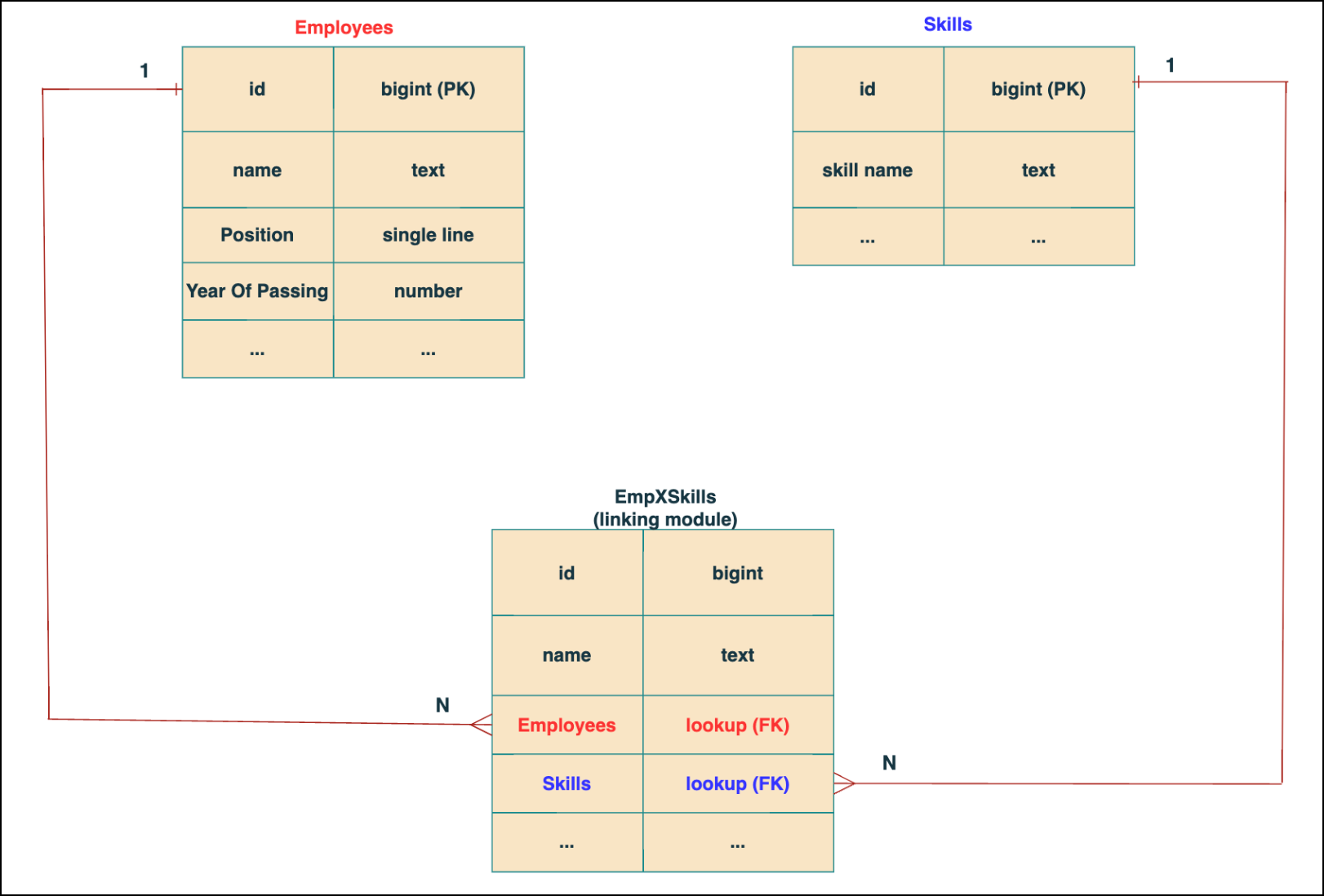
In the linking module, two lookup fields (lookup fields with api names - Employees and Skills) will be created. The lookup fields, one pointing to Employees and the other pointing to Skills from the linking module, establish a connection between the linking module and its associated module.
Why you cannot use a lookup field for this use case?
In Zoho CRM, a lookup field creates a one-to-many relationship between two modules i.e. one record in the source module can be linked to only one record in the target module.
Example :
If you create a lookup field for Skills in the Employees module, each employee can be linked to only one skill. So, use a multi-select lookup field instead of a lookup field when you need to represent complex relationships like one employee - many skills and one skill - many employees.
3. How to create a multi-select Lookup field using Zoho CRM APIs?
To create a Multi-Select lookup field between two modules using Zoho CRM APIs, follow these steps:
Step 1: Identify the Module API Name
Before creating the field, you should know the API names of the Employees and Skills modules. For that, use the Get Module Metadata API.
Request URL : {{api-domain}}/crm/v8/settings/modules
Request method : GET
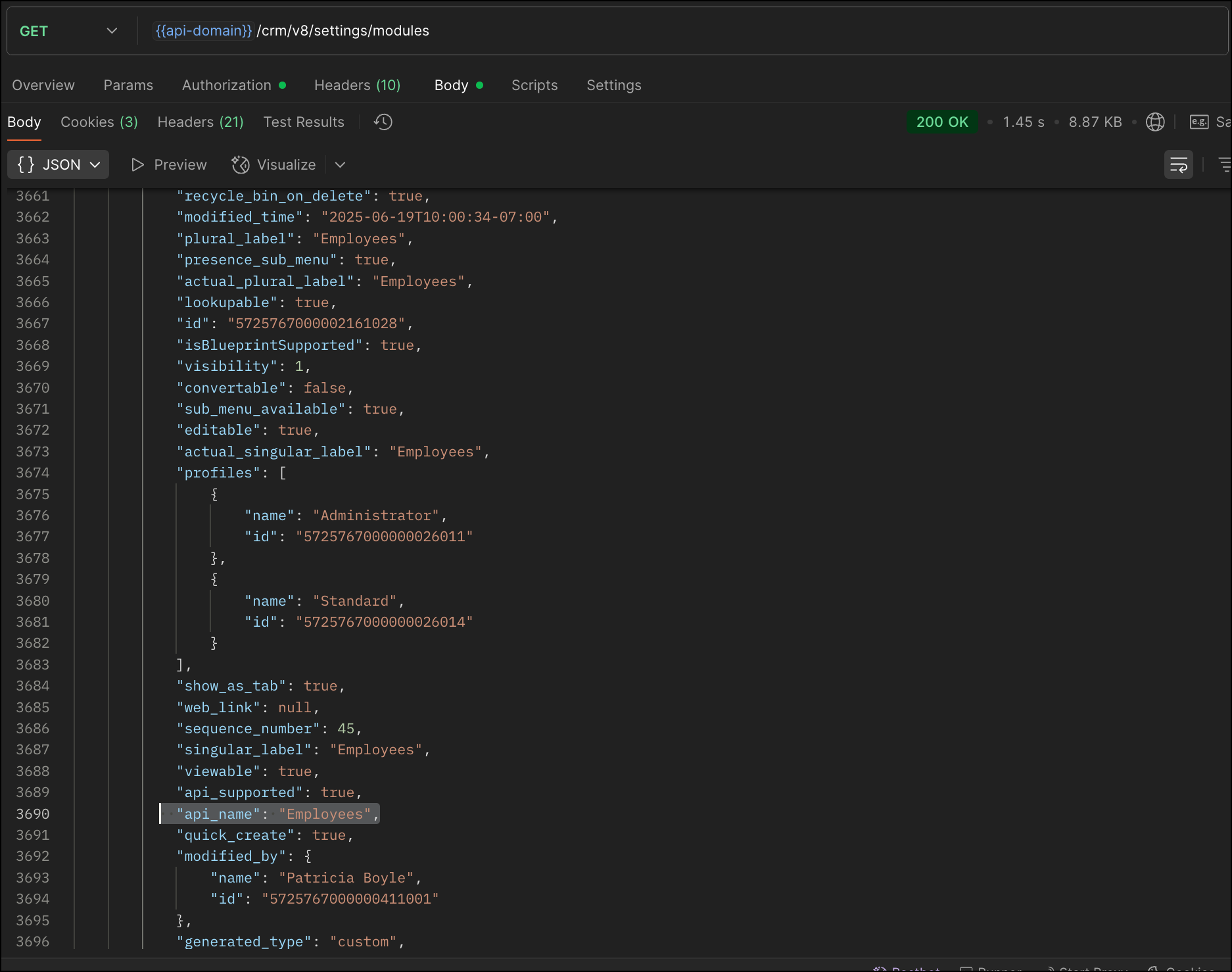
Now, search for the Employees module in the response and note its API name.
Step 2: Use the Create Custom Fields API
To establish a many-to-many relationship between two modules, in our case, Employees and Skills, you need to create a custom field of type multi-select lookup in the Employees module (parent module). Here, we will associate multiple skills to an employee.
This custom field requires:
- The related module you want to link to - Skills.
- A display field from the related module
- The linking module (EmpXSkills), which stores the actual associations.
Use the Create Custom Fields API to create custom fields.
Request URL : {{api_domain}}/crm/v8/settings/fields?module=Employees
Request method : POST
Sample input :
|
{
"fields": [
{
"field_label": "Skills", //Name of the field in your module
"data_type": "multiselectlookup", //Type of the field
"multiselectlookup": { //This JSON object contains the multi-select lookup relationship details
"connected_details": { //Details about the module and field you want to link
"module": {
"api_name": "Skills" //API name of the related module
},
"field": {
"field_label": "Skills" //The field in the related module to display
}
},
"linking_details": { //Details about the junction or linking module that manages the many-to-many relationship
"module": {
"plural_label": "EmpXSkills" //Plural label of the junction module
}
}
}
}
]
}
|
4. How Do You Find the Linking Module and Field API Names?
To know the API name of the linking module:
Use the Get Modules API and search for "generated_type" : "linking" in the response to identify MxN modules. In our case, EmpXSkills.
Request URL : {{api_domain}}/crm/v8/settings/modules
Request method : GET
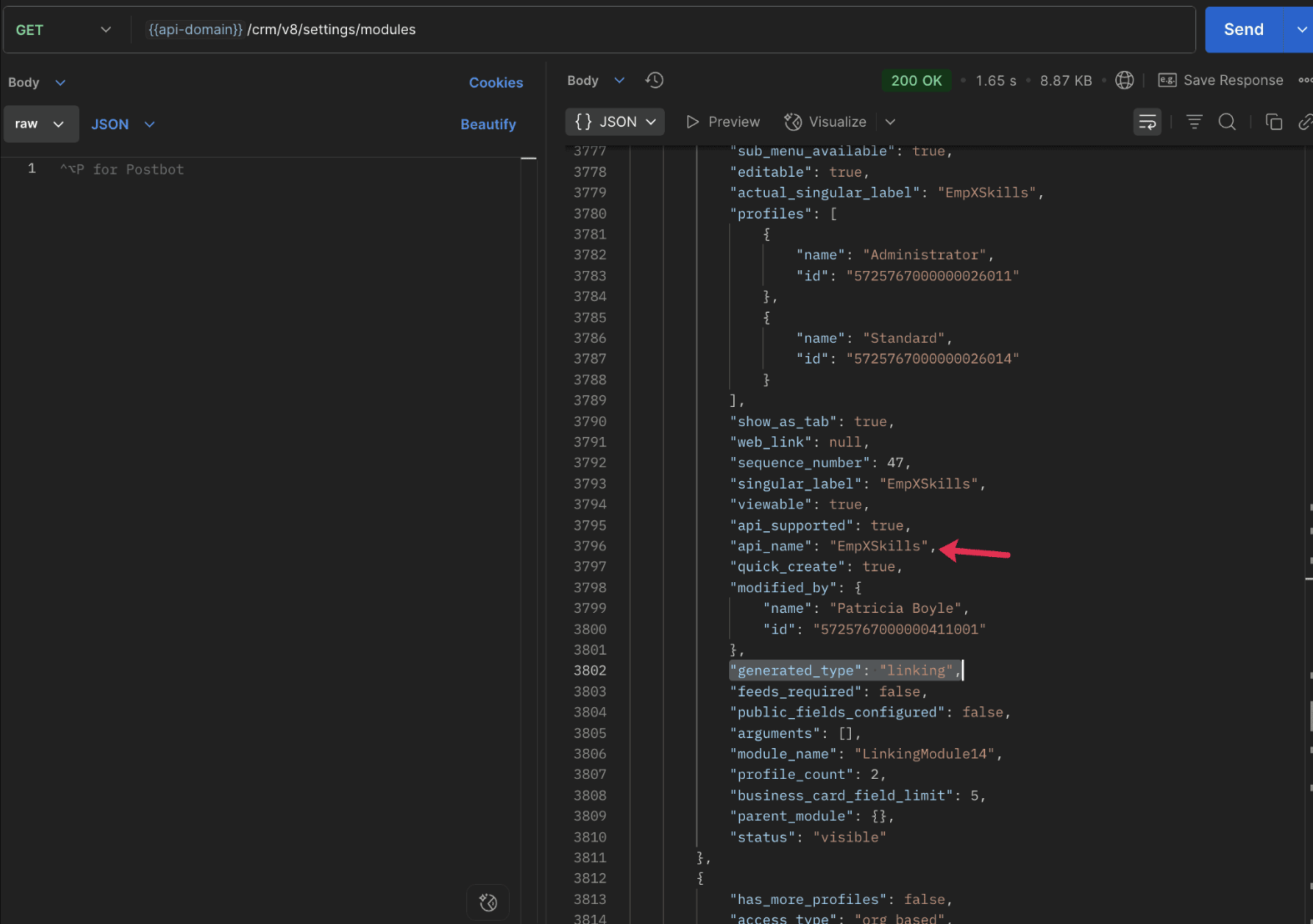
To know the field API names in the linking module:
Use the Get Fields Metadata API to retrieve the API names of lookup fields within the linking module.
Request URL : {{api_domain}}/crm/v8/settings/fields?module=EmpXSkills
Request method : GET
5. How do I associate records via a multi-select lookup field using the Insert Records API in Zoho CRM?
To associate records using a multi-select lookup field, you must provide the record IDs from the related module. The association is made through the linking module.
Example :
Associating multiple skills with an employee using the multi-select lookup field.
Request URL : {{api-domain}}/crm/v8/Employees
Request method : POST
Sample input :
|
{
"data": [
{
"Name": "Patricia",
"Email": "patricia@mail.com",
"Position": "Marketing Specialist",
"Year_of_Experience": 5,
"Skills": [ // API name of the multi-select lookup field in the Employees module
{
"Skills": { // API name of the lookup field in the linking module pointing to the Skills module
"name": "Marketing",
"id": "5725767000002149427" //ID from the Skills module are mandatory to establish the link
}
},
{
"Skills": {
"name": "Social Media Marketing",
"id": "5725767000002149476"
}
}
]
}
]
}
|
6. How do I associate an Employee's skills using the linking module in Zoho CRM?
To establish a relationship between the Employees and Skills modules through the linking module, use the Insert Records API to create a record in the linking module, EmpXSkills.
To do this,
- Use the appropriate lookup field API names to reference the parent module.
- You must need the record IDs from both the Employees and Skills modules to create the associations.
Request URL : {{api-domain}}/crm/v8/EmpXSkills
Request method : POST
Sample input :
|
{
"data": [
{
"Name": "Patricia",
"Employees": {
"id": "5725767000002161001" // Record ID from the Employees module
},
"Skills": {
"id": "5725767000002149476" // Record ID from the Skills module
}
}
]
}
|
7. When should I use create/update operations in the Employees module vs the EmpXSkills module?
|
Employees Module |
EmpXSkills (linking) Module |
|
Use when you want to create or update an Employee and associate Skills using the Multi-select Lookup field. |
Use when you want to create or remove associations between existing Employee and Skill records without modifying the actual Employee or Skill data. |
|
Creating a new employee and assigning their skills at once. |
Managing relationships between existing records i.e., linking and unlinking skills to employees. |
8. How to update a record in the linking module?
To update a record in the linking module, use the Update Records API.
Request URL : {{api-domain}}/crm/v8/EmpXSkills/5725767000006269044
Request method : PUT
Sample input :
|
{
"data": [
{
"Skills": {
"name": "Marketing",
"id": "5725767000002170035" //Associating another skill with the employee
}
}
]
} |
In the above sample, we have replaced an existing skill associated with an employee with another Skill in the linking module.This is done by updating the Skills lookup field in the EmpXSkills record.
Please note that in the linking module, Skills is a lookup field, so you can associate only one skill per linking record. But in the Employees module, Skills is a multi-select lookup field, so an employee can be associated with multiple skills.
9. How to unlink records from the parent module as well as the linking module?
Unlink the associated records from the parent module:
Using the Update records API, you can remove an associated skill from an employee, use the "_delete": null key within the multi-select lookup field in the Employee record update.
Request URL : {{api-domain}}/crm/v8/Employees/5725767000006269044
Request method : PUT
Sample input :
|
{
"data": [
{
"Skills": [
{
"Skills": {
"name": "Marketing",
"id": "5725767000002170035" // The Skill record you want to unlink
},
"id": "5725767000007228047", //record ID - The record created in the linking module for the employee with the Marketing skill
"_delete" : null
}
]
}
]
}
|
Replace an associated record from the linking module:
Use the Update Records API to replace an existing association in the linking module.
Request URL : {{api-domain}}/crm/v8/EmpXSkills/5725767000007228035
Request method : PUT
Sample input :
|
{
"data": [
{
"Skills": {
"name": "Java",
"id": "5725767000005259075" //replacing a new skill
}
}
]
}
|
In the above sample, we have replaced the existing skill with Java.
10. Why am I seeing the error "DUPLICATE_LINKING_DATA" in the Update Records API?
This error occurs when you try to associate records with the parent record that are already linked with the Multi-select lookup field. To resolve this, check the records you are trying to link and make sure your association is only with records that are not already linked.
Know your existing linked records:
Before the Update Records API, use the Get Related Records Data API and search for the multi-select lookup field. In our case, Skills is the multi-select lookup field created in the Employees module. This will return all records already associated.
Example :
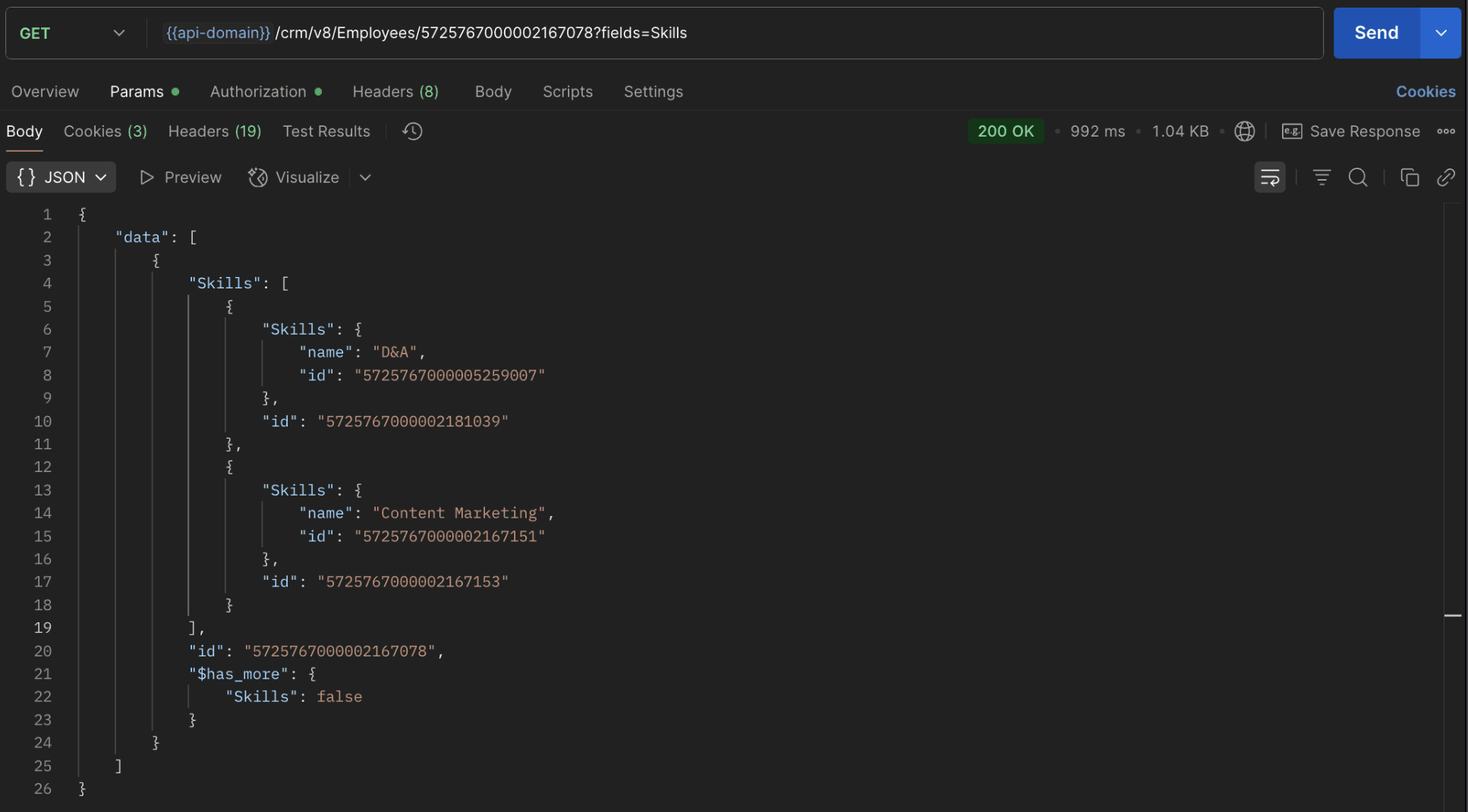
The response returns all Skills already linked with that Employee.
Using this way, compare the IDs from the API response with the new records you are about to link, and only proceed with non-duplicate IDs. This avoids duplicate entries and prevents the "DUPLICATE_LINKING_DATA" error.
11. What happens if I delete a record in the linking module?
When you delete a record in the linking module, it only removes the association between the related records in the Employees and Skills modules.
Note :
- Deleting a linking module record removes only the relationship between two records from the Employees and Skills modules.
- Deleting an Employee or Skill record deletes all corresponding entries in the linking module as well.
12. How do I query linked records?
Use the COQL API to query multi-select lookup data by specifying the corresponding linking module's API name directly in your query. The linking module is treated as a separate module in Zoho CRM, so you can retrieve associated records by querying it like any other module.
Sample query :
|
{
"select_query": "select Skills.Name as skill, Employees.Name as employee from EmpXSkills where Skills.Name like '%Marketing%'"
}
|
Use the Get Module Metadata API to know the linking module's API name.
13. How do I export multi-select lookup records using the Bulk Read API?
To export multi-select lookup data, linking module records efficiently, use the Bulk Read API with the linking module’s API name.
Request URL : https://www.zohoapis.com/crm/bulk/v8/read
Request method : POST
Sample Request :
|
{
"callback": {
"method": "post"
},
"query": {
"module": {
"api_name": "EmpXSkills" //API name of the linking module
},
"fields": [
"Employees.Name",
"Employees.Year_of_Experience",
"Skills.Name"
],
"criteria": {
"group": [
{
"field": {
"api_name": "Employees.Year_of_Experience"
},
"comparator": "greater_than",
"value": "4"
},
{
"field": {
"api_name": "Skills.Name"
},
"comparator": "contains",
"value": "Social"
}
],
"group_operator": "AND"
}
}
}
|
14. Can I import my linking module's data using the Bulk Write API?
Yes. Like the Leads and Contacts modules, you can also import linking module's data into Zoho CRM using the Bulk Write API by directly specifying the linking module’s API name.
If you are importing data that involves both a parent module, Employees and its associated MxN linking module, follow these steps:
1. Create separate CSV files:
- One for the parent module - Employees
- One for the linking module - EmpXSkills
2. Zip the files into a single ZIP file.
3. Upload the ZIP in a single Bulk Write API request.
4. Ensure accurate field mappings are provided in the API request body.
Refer to Kaizen #131 - Bulk Write for parent-child records using Scala SDK for more details on handling parent-child records.
15. Can I receive notifications if a multi-select lookup field in a module is modified or updated?
Yes, you can receive notifications when a MxN field is updated using the Notification API. To enable instant notifications for actions performed in a module, use the respective API names of the linking module in the input body.
Request URL : https://www.zohoapis.com/crm/bulk/v8/actions/watch
Request method : POST
Sample input :
|
{
"watch": [
{
"channel_id": "10000",
"events": [
"EmpXSkills.all" //EmpXSkills represents the API name of the linking module
],
"notify_url": "https://webhook.site/9f5ba227-ce5a-4709-814d-b044c003d605",
"return_affected_field_values": true
}
]
}
|
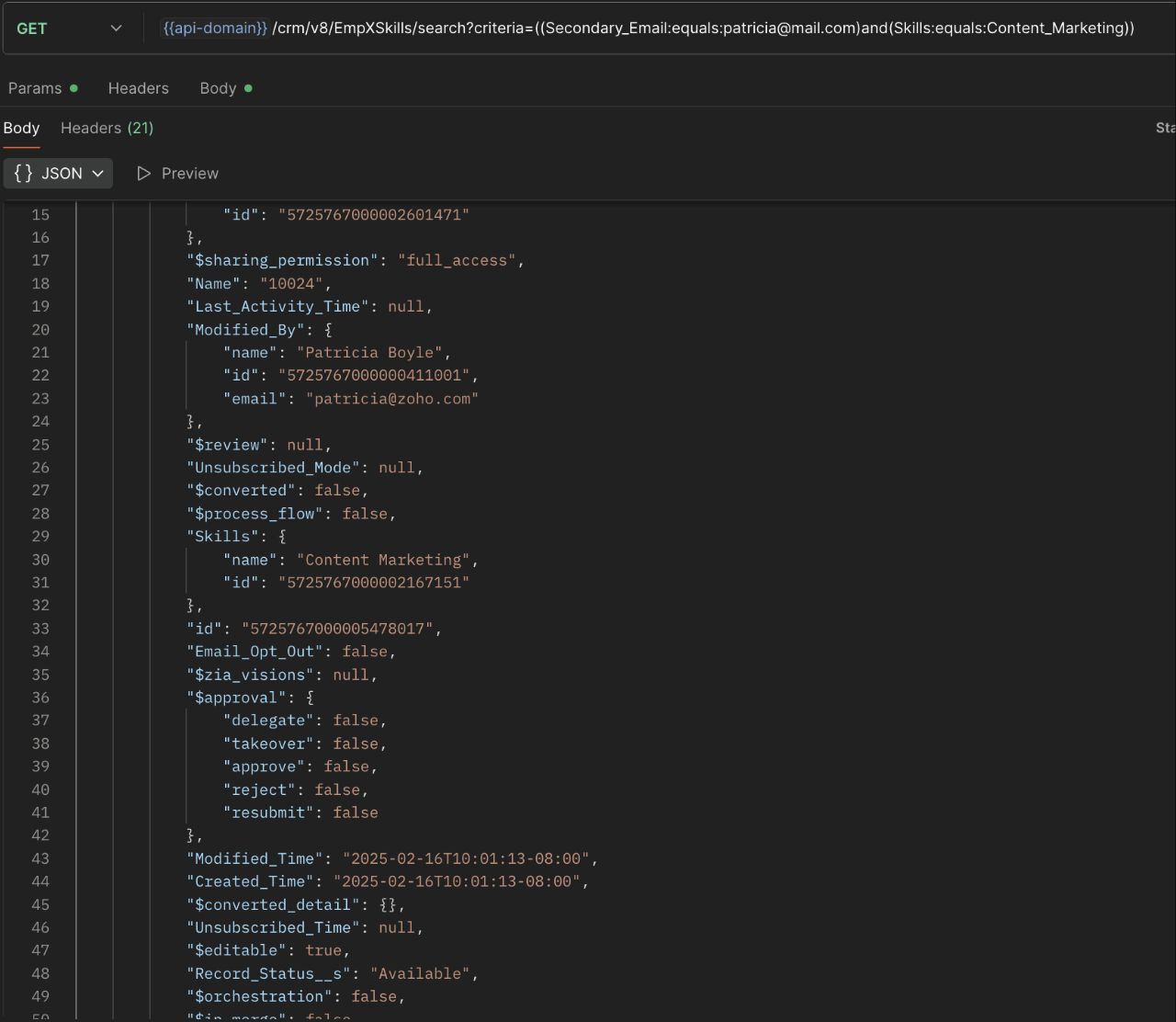
16. Can I use criteria-based filtering when accessing multi-select lookup data using the Search API?
Yes, you can filter multi-select lookup data using the criteria parameter in the Search API's URL.
Here is an example that fetches records from the EmpXSkills linking module.
Request URL : {{api-name}}/crm/v8/EmpXSkills/search?criteria=((Secondary_Email:equals:patricia@mail.com)and(Skills:equals:Content_Marketing))
Request method : GET
Sample response :
x-----------------------------x
We trust that this post meets your needs and is helpful. Let us know your thoughts in the comment section or reach out to us at support@zohocrm.com
Stay tuned for more insights in our upcoming Kaizen posts!

Previous Kaizen Post : Kaizen #198: Using Client Script for Custom Validation in Blueprint | Kaizen Directory
Other FAQs in the Kaizen series :
- Kaizen#75 - Frequently Asked Questions on Client Script
- Kaizen #147 - Frequently Asked Questions on Zoho CRM Widgets
- Kaizen #155 - Frequently Asked Questions on Subforms
- Kaizen #170 - Frequently Asked Questions on Notification APIs
- Kaizen #195: Frequently Asked Questions on Bulk Read API and Bulk Write API
Topic Participants
Subramanian K
Sticky Posts
Kaizen #198: Using Client Script for Custom Validation in Blueprint
Nearing 200th Kaizen Post – 1 More to the Big Two-Oh-Oh! Do you have any questions, suggestions, or topics you would like us to cover in future posts? Your insights and suggestions help us shape future content and make this series better for everyone.Kaizen #226: Using ZRC in Client Script
Hello everyone! Welcome to another week of Kaizen. In today's post, lets see what is ZRC (Zoho Request Client) and how we can use ZRC methods in Client Script to get inputs from a Salesperson and update the Lead status with a single button click. In thisKaizen #222 - Client Script Support for Notes Related List
Hello everyone! Welcome to another week of Kaizen. The final Kaizen post of the year 2025 is here! With the new Client Script support for the Notes Related List, you can validate, enrich, and manage notes across modules. In this post, we’ll explore howKaizen #217 - Actions APIs : Tasks
Welcome to another week of Kaizen! In last week's post we discussed Email Notifications APIs which act as the link between your Workflow automations and you. We have discussed how Zylker Cloud Services uses Email Notifications API in their custom dashboard.Kaizen #216 - Actions APIs : Email Notifications
Welcome to another week of Kaizen! For the last three weeks, we have been discussing Zylker's workflows. We successfully updated a dormant workflow, built a new one from the ground up and more. But our work is not finished—these automated processes are
Recent Topics
Estimates and invoices being sent from company-wide address, rather than individual
In our organization, team members send estimates and invoices through Zoho Books by using the "Send Email" function. However, for certain users, the system defaults to sending estimates and invoices from a shared organizational email address (e.g., company@example.com)Need profit margins for books in estimates & invoice
https://help.zoho.com/portal/en/community/topic/show-my-cost-or-profit-while-creating-estimateItem Level Notifications
I need to create a custom workflow based on the creation of an estimate that has a SKU/Item name that matches certain criteria. I can have it generated based on a total amount, but not at the item level. Is this possible?Cannot categorize a bank deposit to an income sub-account
When I go to categorize a bank deposit, I am not able to see any income sub-accounts. If I set up an income account without a parent, then I am able to categorize a transaction into that account, but as soon as I make it a child account, it disappearsZV Extension passkey changes in v5.7.0
Has there any changes to the how passkeys are managed in ZV - Chrome extensions v5.7.0? Namely, if the passkeys were already implemented/enforced as 2FA on a certain webpage, but ZV does not track them yet. Would that be the issue for my use case?What's New in Zoho Billing - August 2025
Hello everyone, We are excited to share the latest updates and enhancements made to Zoho Billing in August 2025 to improve your overall billing management experience. Keep reading to learn more. Notify Customers About Subscriptions via WhatsApp BusinessWhy are tasks not showing in Zoho Calendar?
Hi there, I updated the Zoho calendar preferences for Task records to show on the calendar together with Meetings and Calls - see attached screenshot. Despite of that, Task records still won't show on the calendar. Is there a specific reason why thisZoho Payroll: Product Updates - July 2025
Over the past month, we've focused on making Zoho Payroll more flexible, compliant, and easier to use—whether you're processing complex payouts, ensuring accurate calculations, or meeting local tax regulations. Here's what's new: One-Time Payments andDiscussion for “sub product”, “sub item” or “child products”
Hello everyone, In some CRM systems, there is the ability to associate products in a hierarchical manner within a quote. For example: Product A: Gold Plan Product B: Setup Product C: Connector Product D: Silver Plan Product B: Setup Product C: ConnectorRetrieve Accidental Deleted User
Is there a way to undelete a user who accidentally deleted themselves?Request for Support - CRM Integration Issues
I’m reaching out to request assistance with the following items: 1. Zoho Forms Integration with Zoho CRM We are currently using Zoho Forms to send the Global Credit Application form to our customers. The intended workflow is for the form submissions toKnowledge Base Module
How to enable the knowledge base module in zoho crm account. I saw this module in one crm account but unable to find it other zoho crm account. can anyone know about this?Zoho sign changed Indexing of signing_order
Because I missed this Announcement (is there even one?): when you work with the indexes of actions > signing_order. Previous those started with 0 now starts with 1. Changed somewhere between 15.07 and 23.07How to Invoice Based on Timesheet Hours Logged on a Zoho FSM Work Order
Hi everyone, We’re working on optimizing our invoicing process in Zoho FSM, and we’ve run into a bit of a roadblock. Here’s our goal: We want to invoice based on the actual number of hours logged by our technicians on a job, specifically using the timesheetsZoho CRM Community Digest - June 2025 | Part 2
Welcome back to the Zoho CRM Community Digest! We’re wrapping up June with more fresh updates, smart discussions, and clever workarounds shared by the community. Product Updates: Struggling to keep track of scattered customer interactions? Zoho CRM'sAllow Variable Insertion in Prebuilt "Update Record" Action in Schedules
Hi Zoho Creator Team, Hope you're doing well. We’d like to submit a feature request based on our experience using Zoho Creator schedules to manage workflows integrated with Zoho Desk. We currently have an app where Zoho Desk tickets create records inRich Text Field Editor in Form Builder is Too Small and Not Resizable
Hello, I am experiencing a significant usability issue with the rich text field in the Zoho Forms builder. The editor window for this field is fixed-size and extremely small. It does not adapt to the screen size, which makes it very difficult to managePublicar Formulário
Obs. Não consigo publicar meus formulários, pesquisei alguns artigos, mas me deixou perdido, fala de campo sensível, não consigo entender o que significa. Segue Imagem do problema. Todo formulário que faço sempre termina assim sem o botão de publicar..Anyone else unable to login to ZMA this weekend?
Hey Is anyone else unable to log into Zoho Marketing Automation at all this weekend? I've been trying on multiple devices - despot and mobile - and multiple browser. I've reset browsing data, gone incognito. Nothing - since Friday I've been unable toCustom Action for Subform row
Dears, As for now, we only have 2 actions for each subform row: Edit and Delete. I would suggest to have custom action here, instead of create a button with Fx field within the subform. For example, I would create Duplicate button, which duplicates theUrgent: Unable to Receive OTP Email for Portal User Registration in Zoho Creator
I paid to enable the Portal User feature on 2/25, and followed the official instructions (Youtube video: Customer Portals | Zoho Creator) to set up the Portal User using my Gmail account. However, I am not receiving the OTP email and am unable to successfullyDisplay multiple fields in lookup dropdown
I have a module called Technicians and a related module called submissions that registers technicians for different assignments. The lookup in Submissions to Technicians is the Technician ID (auto generated unique number). How do I display in the dropdownIntegrate with Power BI
Hi, How to connect Zoho CRM dashboards & reports with POWER BI ?No "Import Users" option in Zoho FSM
I recently noticed that there is no option to import Users into Zoho FSM, and this has become a serious challenge for us. When migrating data, especially technicians or other user profiles, we often have hundreds of users to bring into the system. Currently,Finding "like" projects
Hi Everyone! My team is running into several duplicating deals. I've been trying to get them all to name things the same way ex. State is 2 letters not spelled out. Things like that. What I am wondering if there is anything I can do as the superadminNão consigo localizar o Botão de Publicar Formulário no meu app
Depois que finalizar meus formulários, não consigo localizar o botão de publicar para concluir meu aplicativoDATEV-Export Erfahrungen?
Wir würden gern den DATEV-Export in Books nutzen, jedoch ist dieser nicht wirklich nutzbar. Gibt es positive Erfahrungen von Alternativ-Lösungen?Kaizen #191: Implementing "Login with Zoho" using Python SDK
Welcome back to another week of Kaizen!! This week, we are diving into how to implement secure user authentication using Login with Zoho and integrate it with Zoho CRM through our Python SDK. To ground this in a real-world scenario, we will look at howCustom modules not showing in developer console
I'm trying to create a custom summing function for a custom module I made in my CRM. When I go to create the function, my module isnt showing up. Do I need to share the custom moldule with my developer console or something of the like?Following retainer invoice for partial payment of a sales order
HI, We issue sales orders when a client buy a product from us. We also issue multiple retainer invoices for partial payment (2 to 4 depending of the client). Team wants to follow payment of these retainer invoices for this Sales Order. If they are paidZoho CommunitySpacesとzoho CRM連携について
お世話になっております。 いつもご質問に丁寧に回答いただき大変助かっております。 今、当団体ではZoho CommunitySpacesを利用しており、利用ユーザ一覧をzoho CRMに自動登録(連携)したいと考えております。 そもそも可能なのか、もしあれば具体的な手順や方法はあるのかをご教授いただきたいです。 上記がないのなら、ユーザ一覧のエクスポート方法(メールアドレスと姓を含む)でもよいです。 お手数となりますが、お願いいたします。Zoho Wiki or new Zoho Learn
We are currently evaluating if we should move off confluence. At present in Confluence we have multiple levels within our documentation but with learn it looks like you can only have Space - Manual - Chapter Is it possible to have levels below Chapter? Also the same question for the existing wiki, can I have more sub-levels?Sales without an invoice
Sales without an invoice is not included on the “payments received” report. Also, sales without an invoice is not listed in the transactions under the customer’s profile, also making it easy to do a double entry. Is there a way for me to see my salesZoho Sign API - Create a document from template.
1. I would like to create a document from a template and send the document to the customer for signing. Is this possible using the Zoho Sign API? If so, please share the api reference link. 2. Is there sand box for Zoho Sign to test the APIs without usingZoho Sign embedded iframe
Hello, we are looking for any of these options: a) some iframe that we can paste into our website for every signer, for onpage signing document. b) or get direct link for signers from Zoho sign API which we can redirect manually. Is any of these optionsGoods in transit
When creating a purchase order in Zoho Books, how can I properly reflect the inventory as "Goods in Transit" until it reaches its final destination?how to coming soon, holding site, or "under construction"
Hi! I was wandering if was possible to create a website with the simple sign of "Under construction or coming soon" while i work on the site. if possible, how? CheersAnnouncing Agentic AI - Ask Zia!
We are delighted to roll out the new agentic AI capabilities in Ask Zia, where every stage of the BI workflow is assisted by AI. With a human-in-the-loop approach, Ask Zia ensures that you’re in command of the decision, while AI handles the complexity.Zoho People LMS VS Zoho Connect Manuals VS Zoho Learn
in the past I came accross Zoho WIKI but did not like the platform because it could use a lot of upgrade. Over the time I have noticed Zoho People come out with a LMS module which allows us to created a shared knowledge for our internal team I also came across Zoho Connect which as a knowledge-based for internal team referred to as Manual Now I am seeing Zoho Learn which is a new and fine-tuned version of Zoho Wiki. All of these platforms are very similar but I am wondering what are the differencesMarketing Automation Activities in Zoho CRM
Hello, I've connected Zoho CRM and Marketing Automation, sent a campaign, but no data are displayed in CRM, neither in "campaigns" section inside contact profile. It is possible to display Marketing Automation activities in CRM? Also in CRM Timelines?Next Page