Hello everyone,
We are thrilled to announce the public release of CPQ (Configure, Price, Quote) for Zoho CRM, which is a fundamental block in sales management.
NOTE:
1. CPQ was a public early access feature from March 2023 — January 2024.
Since February 2024, this is a public feature.
2. Guided selling for custom modules was opened by Q1, 2025.
What is CPQ?
CPQ stands for Configure, Price, Quote. In simple words, CPQ is a software application designed to enable sales teams to create bespoke, accurate quotes for their customers, efficiently and quickly. CPQ is especially valuable when you have multiple product lines or service categories which involve dynamic pricing.
Why CPQ?
One of the biggest challenges sales teams face while navigating a sales process is the awfully long sales cycles for a specific deal. Now there could be many reasons for this length— the high value of the products could genuinely need that time. Or there are several stakeholders in the decision-making process, so that could consume a good amount of time. In such cases, having done their best, sales teams probably have to wait. But if the delays are attributed to delays or inefficiency with internal processes, then it is completely in the organization's control to identify and improve those systems.
Quote management is one such area where there could be undue delays due to which the sales process can take longer, or at times be unsuccessful. When you spend a lot of time and energy nurturing leads and converting them to opportunities, you need to ensure that when you reach a negotiation stage, the relevant quotes are also accurately drafted in a timely manner and sent for review, to close the deal promptly. Delays or inefficiency here could potentially cost you the entire deal.
Depending on the organization's processes, product lines, and pricing models, this stage can be very challenging and even complicated for some sales teams.
Consider cases of products sold along with specific accessories for free. Or the case of annual discounts and special offers. Every time a salesperson drafts a quote, they need to check the latest applicable offers, discounts, product combinations, and create an accurate quote for the customer, who is by the way still waiting for the quote after their deal was confirmed. In this process, manual error, red tape in processes, and lack of knowledge transfer within sales teams regarding updated prices and products could lead to serious delays in sales quotes and also make them inaccurate. As a result, the customers get frustrated, and this in turn prolongs your sales cycle.
In order to help this scenario, you need an effective CPQ engine, in other words, a solution called Configure, Price, Quote, in order to help you with bespoke quote management.
We are happy to announce the public release our own in-built CPQ system for CRM. With CPQ's line item automation, you can create timely, accurate quotes effectively. You can also upsell and cross sell with automated product suggestions in the CPQ engine and have all these data and possibilities inside your CRM system, contextually
Following are the rich feature sets of CPQ for Zoho CRM.

- Configure the auto-addition of associated products in a quote upon the selection of a primary product.
You can also mark a product as free while doing so.
- Invoke product suggestions to a sales rep while creating a quote for effective upsell/cross-sell.
- Apply direct or volume based list price/discounts on product line items automatically using price rules.
- Auto-update the quantity and price of secondary/associated products based on primary product.
- Build your own interactive product recommendation system using Guided Selling.
- Apply CPQ rules for any custom module or sub-form within a module. In case you are maintaining your quotes in a different module called Estimates, or you also want to apply CPQ for Invoices, you can do so.
Let's understand the capabilities of CPQ for Zoho CRM with the example of Zylker Watch Associates, an organization that sells a range of wall clocks, wrist watches and smart watches.
Product Configurator and Price Rules:
Here is a quick simple example to understand how price rules and product configurator can be applied for Zylker's scenarios.
— When a customer purchases a specific kind of expensive wall clock, a wristwatch set is offered for free.
— Besides, a year-end discount rule based on the purchase date will also apply a 20% discount on the list price of the wall clock.
Dynamic quantity update for automated line items.
When multiple products are sold together, regardless of whether the secondary products are for free or come with a price tag, you need to define how many units of the secondary product need to go with the primary product.
In the case of Zylker Watches, consider the same scenario where a wristwatch set is offered for free upon the purchase of a wall clock. Now what if in a single order, 5 wall clocks are placed? Then, according to this plan, five sets of wrist watches should be added for free.
So the free product's quantity should "dynamically" change in the quote, based on the primary product's quantity. In this case, the formula to calculate the same would be, "Primary product's quantity * 1".
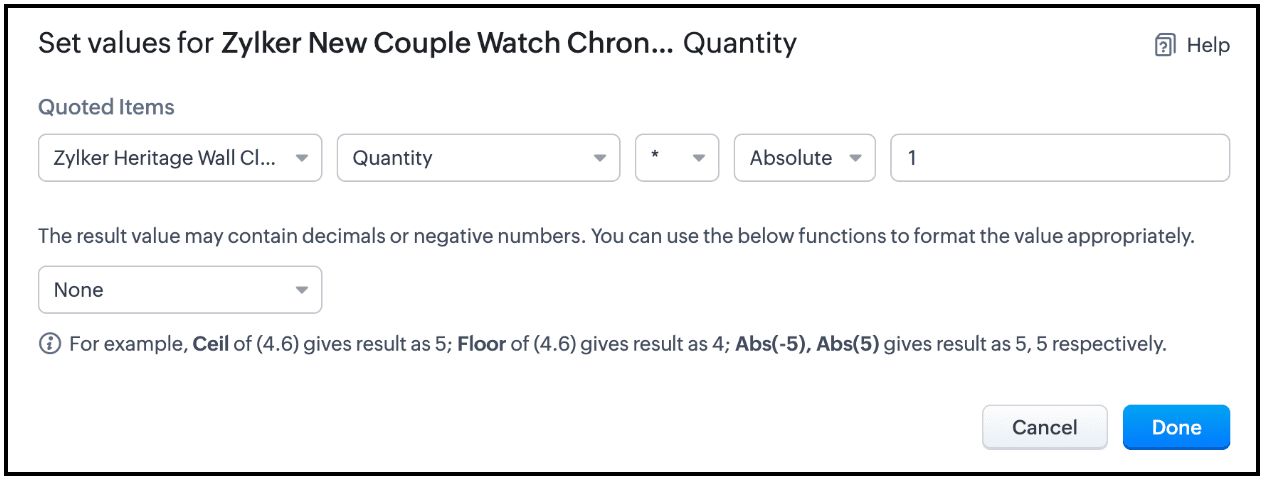
This is also possible in CPQ. You can also specify an absolute number or a dynamic value in the rule.
Building CPQ rules for custom modules and subforms
CPQ's product configurations and price rules can also be created for
custom modules and custom subforms. Assume that Zylker Watch Associates is maintaining their quotes in a custom module called Estimates. Also, consider that in a different scenario, their price quotes are structured to include Primary Product items as the first sub-form and the Accessories as the second sub-form.
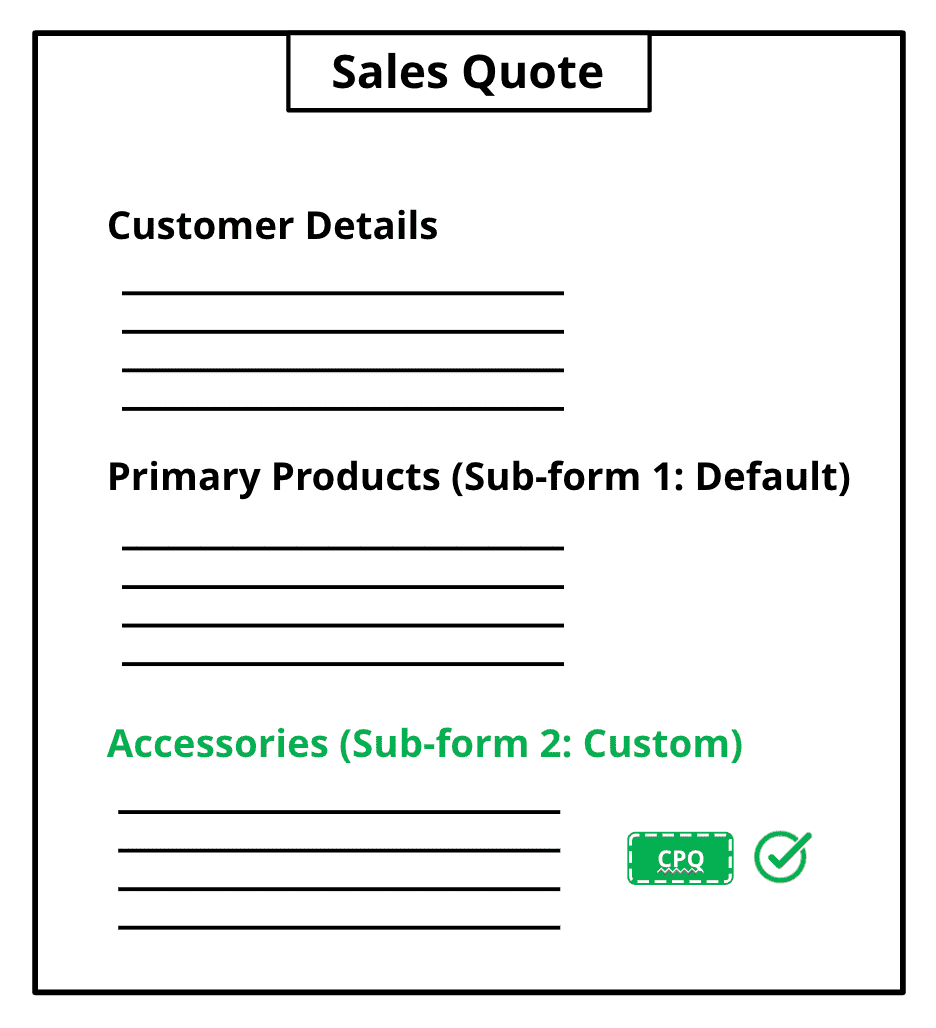
With CPQ's extended support for custom modules and sub-forms, they can now dictate automated product addition, suggestion, and price calculations on both these sub-forms in this custom module called Estimates.
Guided Selling
With CPQ's Guided Selling, you can create your own tailored and interactive product recommendations based on the unique needs and preferences of each customer, thereby enabling sales people to choose the most relevant products for them and create accurate, tailor-made quotes instantly.
In the case of Zylker Watch Associates, let's say a customer Leota is on the phone with a sales rep and is looking for a wristwatch for herself. Leota is quizzing the sales rep on the watches available, however the sales rep finds it difficult to narrow down to the particular product that would suit Leota's preferences. In this case, let's see how Guided Selling effectively helps the sales rep with recommendations based on the customer's preferences. Note that you can build this recommendation system yourself for your organization with
CPQ's Guided Selling.
So with CPQ's automated product addition, suggestion, price calculation, dynamic quantity update, guided selling setup, and flexibility to apply all these configurations to any custom module or custom subform, makes your quote management process greatly efficient and in turn accelerates your sales cycle and processes.
Roadmap:
We are constantly working on building the CPQ capability in Zoho CRM in order to maximize your experience. Here are a couple of key improvements that are on our roadmap for CPQ.
- Sandbox support — You will be able to setup product configurations and price rules in Sandbox before deploying them to the production environment.
Tentative ETA: End of Q2-2024 - You will also be able to build Guided Selling for custom modules aside from Quotes.
Tentative ETA: Q3-2024
To learn more, visit the following documents on CPQ:
Recent Topics
Analytics Dashboard User Filters Default Value
User Filters on Dashboard do not allow Unknown to be set as a default filter value. I have to include NULL values in my dashboard among other values but I can't include NULL/Unknown by default in Dashboard User Filters.
Microsoft is retiring Exchange Web Services (EWS): Here's what it means for Zoho Mail users
Microsoft has officially announced the retirement of Exchange Web Services (EWS) for Exchange Online. If your organization is planning to migrate from Microsoft 365 to Zoho Mail, you may be wondering what this change means for you. The good news is that
Zoho Writer page break in a merge repeating region always adds an unwanted blank page
Hi I'm merging a Zoho CRM record to a Zoho Writer document with a repeating region to display subform records on their own page within the document. When I try to insert a page break in a repeating region, the resulting merge always adds an unwanted blank
ZeptoMail account pending review, SMTP blocked with relaying-issues
Hi ZeptoMail team/community, Our ZeptoMail account has been pending review for more than 3 business days and still shows: “Your account is yet to be reviewed.” I already created a support ticket, but have not received an update yet. Ticket details: Request
Zoho ERP | Product updates | June 2026
Hello users, We launched Zoho ERP on January 23, and since then, our goal has been to help businesses streamline and manage their operations with greater efficiency, flexibility, and control. Since the launch, we've continued to enhance the platform every
Tip #83- Give Customers a Faster Way to Reach You with the Quick Support Plugin – 'Insider Insights'
Hello Zoho Assist Community! Think about the last time a customer needed urgent support. They emailed in, waited for a response, got a session link, couldn't find it in their inbox, called back, and by the time the session actually started, a good chunk
How to Open .mbox file in Gmail with Attachments?
Gmail offer users to backup INBOX folder in .mbox file format via Google Takeout Feature. Howver there is no such option to Restore Gmail MBOX. Thus I would like to suggest you to choose an alternate approach i.e. MBOX to Gmail Wizard. This utility will open .mbox file in Gmail with attachments. Steps to open MBOX file in Gmail are; Run MBOX to Gmail Wizard Click Add File and add .mbox file. Enter your Gmail login credentials. Click Convert button. Finished! This is how you can open MBOX file in
Seperate rating scales for KRA's and Competencies in appraisals
Is there a way to set-up different rating scales for KRA's and Competencies?? I would like to have; Met/Not met for KRA's and a 1-5 scale for the competencies I know how to set up custom ratings but it spans across both sections and I need them to be
Is there a CRM Deluge function available to convert an RTF (rich text field) to plain text (with no formatting tags)?
I know that we can run reports so that RTF fields can either show as plain text or the text or the text with the formatting fields included (which is wonderful, btw, as it helps me adjust tags when I need to troubleshoot and just see what I need to see
How do I set the value of a Lookup field in SlyteUI?
I am using the "crm-field" component in a SlyteUI project (code attached) https://www.zohocrm.dev/explore/slyteui/ui-components/crm-field/api#Properties The client would like to have this field pre-populated with a value. When I try to input the record
Mise à jour de Zoho Books – France
Chers clients, Merci pour votre patience et votre soutien continu. Avec les évolutions réglementaires à venir en France nous introduisons de nouvelles fonctionnalités dans Zoho Books pour les clients français. Ces mises à jour ont été conçues pour répondre
CRM Developer Update: Mandatory field behavior changes in Zoho CRM APIs
We are planning a few updates to Zoho CRM APIs that are expected to be rolled out by the end of October 2026. These changes are not live yet. We are sharing this early so developers and partners can review the impact and prepare in advance. What is changing?
Show Available Stock as a Column in Item Views (Including by Warehouse)
It would be very useful to have Available Stock as a standard column in the Items list view. Currently Stock On Hand does not show the real picture for businesses managing orders and inventory. Example: Stock on Hand: 100 Committed to Sales Orders: 80
What's New in Zoho POS - July 2026
Hello everyone, Welcome to Zoho POS’s monthly update, where we share our latest feature updates, enhancements, events, and more. Let’s take a look at how July went. Support for Saudi's ZATCA Phase 2 e-invoicing We have added support for ZATCA (Zakat,
How to make Contact a Help Center User
I see a "IsPortalUser" checkbox on each of the Customer account, but I am unable to check the checkbox. How is this configured?
Introducing the new Fields API
Hello everyone, Greetings from Zoho Desk's API corner! With the rising need for integrations to connect multiple tools in businesses, APIs need to be adaptive, reliable, consistent, and ready for dynamic operations. To support better performance, efficiency,
Service locations are tied to contacts?
Trying the system out. And what I discovered is that it seems that the whole logic of the app is, I'd say, backwards. There is a Customer - a company. The company has contact persons and service locations can be associated with different contact persons.
Zoho ResearchStudio Shutdown Notice
Hi ResearchStudio fam, We are writing to inform you that Zoho ResearchStudio will be discontinued from Oct 5, 2026. Thank you for being a part of our journey and for trusting us with your qualitative research work. What this means for your data: Your
SlideShare Downloader PDF not syncing in Zoho WorkDrive
Hi everyone, I use SlideShare Downloader for save study PPT and PDF files. After download I upload files in Zoho WorkDrive, but sometimes PDF preview not showing or sync take very long time. Small files work okay but some bigger presentation files have
メモの保存場所、見直しませんか?― Zoho Notebookで始める情報管理
ユーザーの皆様、こんにちは。ゾーホージャパンの朝香です。 AIを利用した業務が広がる中、AIによる情報漏洩対策を進めている組織も多いのではないでしょうか。 一方で、日常的に使っているメモの管理については、対策できていますか? 業務中のメモには、重要な情報が含まれていることがあります。 そのため、AIへの入力だけでなく、メモの保存先についても是非確認をおすすめしたいと思います。 そこで今回は、使いやすさだけでなく、セキュリティにも配慮して設計されたZohoのノートアプリ「Zoho Notebook」をご紹介します!
Zoho Sheet offline is now live on iPhone
Hello everyone, We've just rolled out offline support for Zoho Sheet on iOS—you can now create, edit, and analyze spreadsheets on your iPhone without an internet connection. Offline support has been a sustained priority for us. We're on the verge of bringing
You can now sync records from Custom Modules in Zoho CRM
p.MsoNormal, li.MsoNormal, div.MsoNormal { margin: 0.0cm; font-size: 12.0pt; font-family: Cambria; } p.MsoListParagraph, li.MsoListParagraph, div.MsoListParagraph { margin-top: 0.0cm; margin-right: 0.0cm; margin-bottom: 0.0cm; margin-left: 36.0pt; font-size: 12.0pt; font-family: Cambria; } p.MsoListParagraphCxSpFirst, li.MsoListParagraphCxSpFirst, div.MsoListParagraphCxSpFirst { margin-top: 0.0cm; margin-right: 0.0cm; margin-bottom: 0.0cm; margin-left: 36.0pt; font-size: 12.0pt; font-family: Cambria;
Zoho ERP | Product updates | July 2026
Hello users, We're back with another round of updates to help you streamline your operations. This month's release brings new features and enhancements designed to help you work more efficiently. Read on to discover everything that's new in Zoho ERP this
Fixed cost per task
Is there any way to assign a fixed cost per task, but track time for internal reporting? Don't see a way to do this currently.
Please critique my CRM design
I run a disability healthcare business with 2 business units. We run on Zoho One and are re-designing our CRM. We have developed the design concept ourselves, and I am hoping to get some critical feedback: 1) Noting that this is an early design of the
Set custom date creation for ticket using API in Desk
Hi. all.. I want know if is possible to add ticket with custom creation date via API... This would to be great because we are moving from another platform to Zoho and we have need to keep all statistics for old tickets also. In api docs i didnt see nothing about custom date in ticket creation but i would prefer a confirm from comunity/support. Thank you P.S.: Sorry for bad english language
Allow Shopify / marketplace orders to be cloned
Many businesses now use Shopify as a B2B ordering portal, not just a D2C ecommerce website. For B2B businesses, once these orders are imported into Zoho Inventory, Zoho often becomes the main system used to manage purchasing, stock, fulfilment and customer
How to Display a Logo Image on a Public Form?
I would like to display a logo image in the header of a form. To achieve this, I added an Add Notes field to the form. The code below works perfectly for Zoho users accessing the form. However, when the form is made public, the image does not load properly:
Possible to define default font and size in Zoho Campaigns?
Is it possible to define a default font (font, size and colour) for the text, H1 and H2 in Zoho Campaigns? For example: In a campaign, I add a text block, and the text is automatically century gothic, size 11, grey (6f6f6e) by default? Thank you!
Set Custom Colurs/Fonts/Style
I know I can save blocks as books marks but it would be nice to be able to define a custom colour pallet, the style of the H1, H2 etc to save me having to copy a previous block and set them manually over and over again. Since the colour picker doesn't
Stop Zoho Projects From Automatically Adding Client Users
I have a custom function that creates a Zoho Project for every Quote attached to a Deal when it moves to Closed Won. Everything works fine, except for the fact that connecting a Zoho Project to the CRM automatically takes the Contact associated with the
Zoho CRM - Kiosk Studio: Build Once, Execute Multiple Times with Loops
Hello Everyone, Introducing Loop Functionality in Kiosk Studio. If you've ever built a Kiosk that needed to perform the same action multiple times like updating a list of contacts, scheduling calls for a batch of leads, or processing multiple products
Switching from Notebook to another product, too unreliable
Not only is the spell check worse than useless, now there is a lag AFTER EVERY KEYSTROKE! This makes it impossible to use when there are innumerable products which provide this basic function. I made the mistake of relying on Notebook and have so many
Accidentally deleted a meeting recording -- can it be recovered?
Hi, I accidentally deleted the recording for a meeting I had today. Is there a way I can recover it?
Zoho Desk: A Estruturação do Atendimento ao Cliente na era da IA
O mercado de atendimento ao cliente vem passando por uma transformação que não é apenas tecnológica, é também comportamental. As empresas que antes mediam qualidade de suporte pelo tempo de resposta, hoje precisam medir pela experiência completa, unindo
API bookings/v1/json/appointment not adding additional fields he is returning this "customer_more_info": {"booking_form_type": "service"}
Hi, I'm trying to add additional fields inside zoho booking appointment api and I'm passing same data as you told inside your documentation. He is returning following response "customer_more_info": { "booking_form_type": "service" } I'm using this parameter
Basic report- open sales order by item, with filter for customer ..
HI, we really need a basic report that sorts all open sales orders by Item, so you can see which items in your inventory are awaiting invoicing. Then you need a filter by customer, so you can see all the items a particular customer is waiting for. daily,
Record sharing for Activities modules in CRM
Hello everyone, We've got a few quick enhancements to what we covered in this previous announcement: record sharing is now available for Activities modules. 1. Sharing Tasks, Meetings, and Calls Until now, activity records could only be shared indirectly
Stock Count
The stock count is a nice new feature, but we cannot figure out how to: 1. Use it without assigning to a person, we have a team or one of multiple do stock counts as do most any company. 2. Add any extra fields to what the "counter" sees. The most important
Action Required: Update your TLS configuration to ensure uninterrupted access to Zoho WorkDrive
Hi everyone, To further strengthen the security of Zoho WorkDrive, we’re updating the TLS cipher suites supported across our services. As part of this change, older and less secure cipher suites are being phased out. If your browser, API client, desktop
Next Page