Making the most of email notifications in Zoho Bookings
Email notifications are one of the most versatile tools in Zoho Bookings.
We've beautified and translated them. Now, let's see what other steps we can take to further stretch their use.
In this guide, we'll use email notifications to:
- Create product awareness
- Market other services
- Show social proof
- Thank customers
- Collect feedback
- Win repeat business and more
Check out the table below to see how you can pack more value into your outgoing emails.
Email Notifications
Booked | Rescheduled | Canceled | Completed | No-show | Reminders | |
| Agenda and meeting prerequisites | ✓ | ✓ | ✓ | |||
Case studies | ✓ | ✓ | ✓ | |||
Customer testimonials | ✓ | ✓ | ✓ | |||
Staff credentials | ✓ | ✓ | ✓ | |||
Post-appointment instructions | ✓ | |||||
Data gathering | ✓ | ✓ | ✓ | |||
"Book another appointment" button | ✓ | ✓ | ✓ | |||
Service promotions | ✓ | ✓ |
Yes, customer testimonials, case studies, and other value additions can be shared through social media. But think about this: Brands spend billions of dollars for customer attention, whereas on the other end, customers are overloaded with information. It's difficult to reach your customers amidst this chaos.
Even if you pack valuable content into your social posts, your customers are likely distracted and their attention fragmented.

But when you leverage email notifications in Zoho Bookings, you get more targeted customer attention with very little effort from your side. Above all, it is FREE.How?
Because even when faced with hundreds of emails, customers will open Zoho Bookings messages to view valuable information like appointment times and meeting links.

Plus, as customers often forget these details, they're likely to open your email notifications more than once. This means you get a customer's undivided attention on a recurring basis.
So why not leverage this?
You can double-down on the value you deliver to your customers during this attention window and let customers know more about what you have to offer.
This reinforces brand recall, strengthens customer trust, and increases repeat bookings, eventually leading to a boost in revenue.
Sending value packed emails
Let's explore different ways to deliver value to your customers.1. Agenda and prerequisites
An agenda helps you set clear expectations by giving a preview of the session. This way, customers can prepare for what's to come.
Prerequisites are beneficial for both you and the customer. Say, for example, you teach students programming languages online. Your prerequisites might be a laptop, a GitHub account, and an integrated development environment such as Visual Studio.
This helps your students prepare and makes your class time more effective. It's a win-win situation.
Two ways to send an agenda and prerequisites to your customers include visuals and text.
Visuals
For more detailed agendas, you can create a private page on your website with stunning designs and include the page's hyperlink in your email. This is easily done by creating a share link through Zoho WorkDrive or Google Drive.
Here's what a hyperlinked agenda will look like:
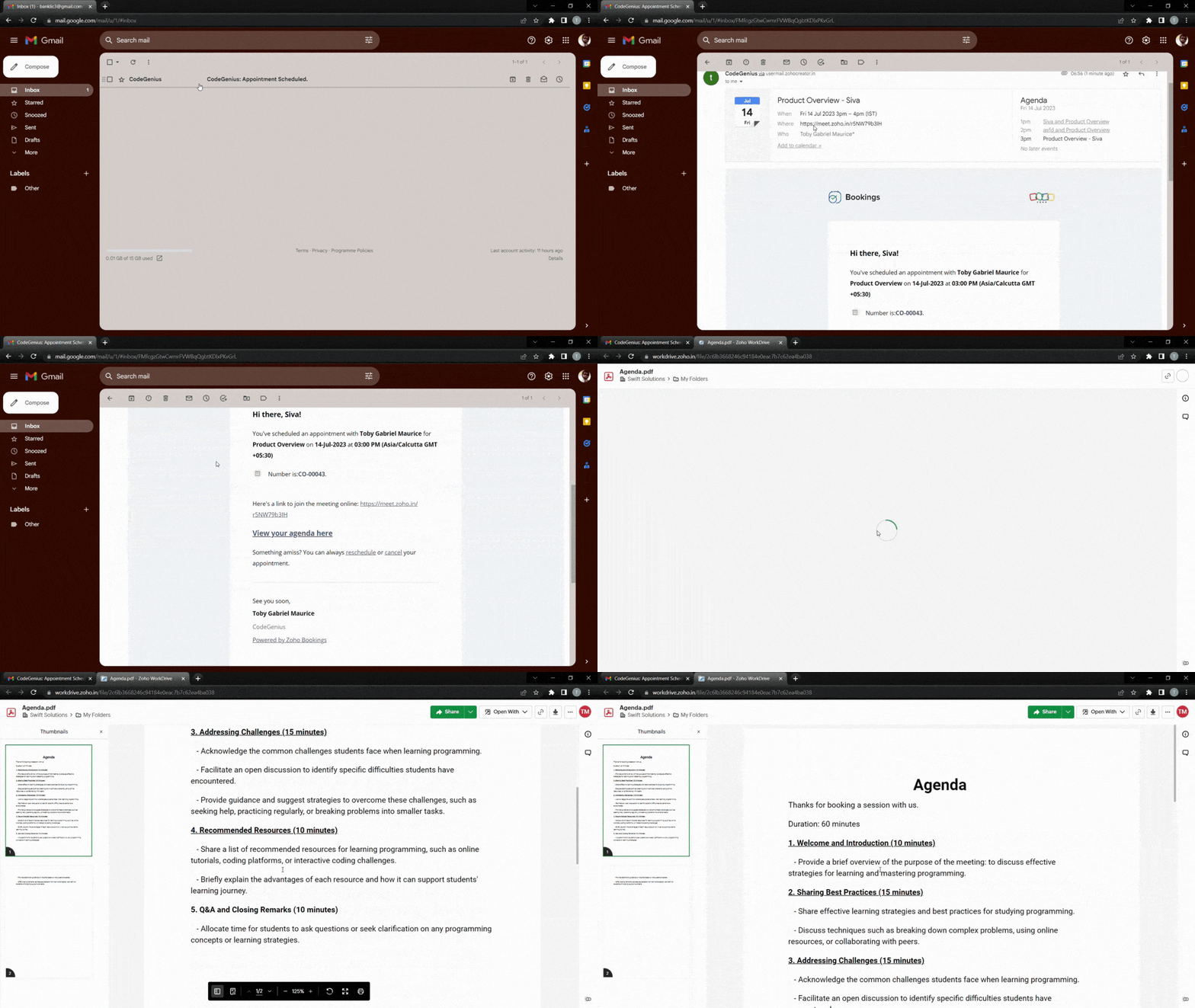
To make things even easier for customers, you can hyperlink a downloadable agenda. The following video demonstrates how to add a downloadable file to your outgoing emails.
Text
If your agenda is short, you can write it out using bullet points directly within your emails. We recommend having no more than six points to keep the message as concise as possible.
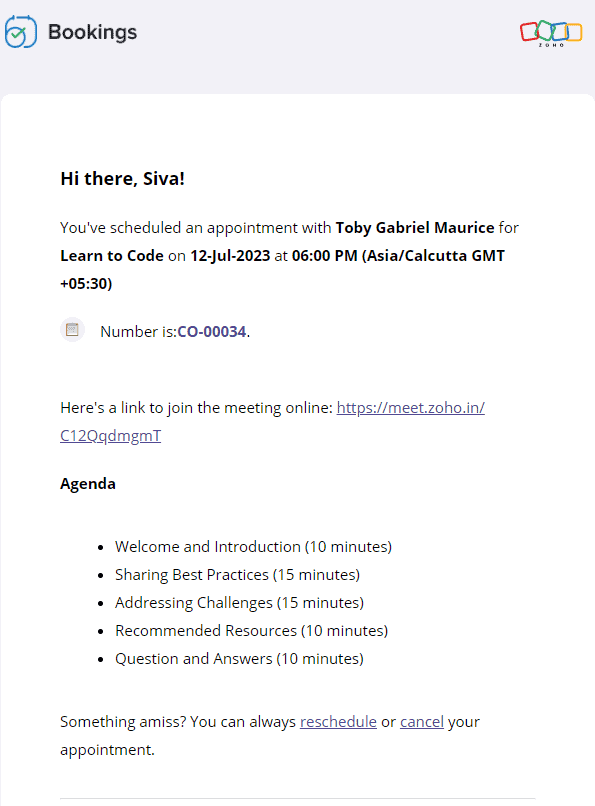
Text-based agenda

Text-based prerequisites
The following video shows how to add text-based agendas and pre-requisites to your emails.
2. Customer testimonials, case studies, and more
Customer testimonials and case studies help you showcase your credibility and gain trust. When your potential customers see highly rated testimonials and successful case studies, they'll put their faith in you.
It's also important to note that customers might have second thoughts about their appointment if it is far in advance. Sending these testimonials eliminates any such thought and reduces the possibility of a no-show.
Let's dive into some of the ways that you can send positive customer feedback along with your emails.
Landing pages and blog posts
Sometimes, the real estate in an email isn't sufficient enough. In those cases, you can hyperlink your testimonials or include buttons that lead to customer feedback forms.
Here's what the output will look like.
And here's how to add a button that links to any content of your choice.
Copy and paste the following code from the below snippet to add a button to your emails. In place of the blue "Button Text Here," you can add the text that you wish to see on your buttons.
- <button style="padding: 16px 32px; text-align: center; display: inline-block; font-size: 16px; margin: 4px 2px; background-color: rgb(80, 73, 127)">
- <a href="https://www.zoho.com/bookings/customers/loanstreet.html" style="color: white; text-decoration: none">
- <!-- Button Text Here -->
- </a>
- </button>
Videos
You can also embed your YouTube thumbnails as images in your emails and hyperlink them to the corresponding videos. We embed thumbnails rather than videos because most email clients cannot read video embeds.
We can use online image editors like Canva to create engaging thumbnails. This method intrigues your clients, increases click through rates, and enhances brand recall.
The following GIF shows how the output will look like:

Using the same technique, you can record videos of your staff speaking on camera about:
- The agenda, to give a preview of the session
- Any prerequisites, to prepare your customers for an engaging session
- Their own experience in the industry, to assure customers that they're under the guidance of an expert
Check out the following video to embed YouTube thumbnails in your outgoing emails.
- <a href="https://www.zoho.com/bookings/">
- <img src="https://i.imgur.com/JieK.png" alt="HTML tutorial" style="width:400px;height:250px;">
- </a>
4. Adding value after an appointment
It's best to go the extra mile and send thank you emails to your customers post-appointment. You can also send resources that may be helpful to them.
For example, a marketing team that does product demos could send out a PDF that contains help documents, support contacts, and other useful details. A solopreneur who teaches programming languages online might send a study plan and some words of encouragement.

All these steps show that you care about your customer's progress. This leads to increased trust, recurring bookings, and growth in revenue.
Depending upon the size of these instructions, you can choose to include them in the body of the email itself, or within a downloadable PDF, videos, hyperlink, or a button.
5. Collecting feedback
Both satisfied and dissatisfied customers add value to a business, and forms work well when you wish to gather their feedback. This comes in handy for cancellation and no-show emails as well because it allows us to find out why our customers have cancelled. You can also send forms along with your completed emails to find out what went well.
Here's what a hyperlinked form will look like:

Notes
1. Zoho Bookings offers five types of email notifications and three types of reminders. Not all content works with every email, and our table at the beginning of the article can help you decide on which to use. Depending upon your businesses, you can choose to stick with one or more value additions.
2. Be sure that your reminders are spaced out well. For example, if you have an appointment scheduled two weeks from now, you can send three reminders. However, if the appointment were just two days away, you would likely just want to send one reminder. This will also vary depending upon the industry you're in, so we recommend you use your best judgment.
Suggested flow ideas
So far, we've seen the content that works for different types of emails. But what should your ideal flow be?
Don't worry, we've got your back.
Here are some sample flows that you could emulate.
- Marketing team that offers product demo calls
- Booked email + agenda
- Reminder 1 + staff experience
- Reminder 2 + customer testimonial
- Completed email + post-appointment instructions
- Solopreneur who teaches programming languages
- Booked email + pre-requisites
- Reminder 1 + staff experience
- Reminder 2 + agenda
- Reminder 3 + case study
- Completed email + post-appointment instructions
In this article, we've pushed the boundaries of email templates in Zoho Bookings. We've also discussed different ways that we can group together email notifications and create flows that maximize value for your audience.
If you have any questions, drop them in the comments or email us at hello@zohobookings.com. We'll be happy to help you out.
Topic Participants
Siva
Sticky Posts
Zoho Bookings know-how: A hands-on workshop series
Hello! We’re conducting a hands-on workshop series to help simplify appointment scheduling for your business with Zoho Bookings. We’ll be covering various functionalities and showing how you can leverage them for your business across five different sessions.Announcing: custom color palette + free workshop
Hello everyone, We're excited to share new feature in Zoho Bookings—a color palette within booking page themes. You'll find this option under Manage Bookings > Workspaces > Booking Page Themes. You can customize the color of every element in your booking page and even alter the transparency of your background image. Please note that this is a paid feature included in the Basic and Premium plans. At the moment, it's available only under the Modern Web theme. This means you can create billions (7,Complete walk-through of Zoho Bookings (video)
Save time for both you and your customers. Use Zoho Bookings, the appointment scheduling app from Zoho, to free yourself from email and paper-based scheduling. Zoho Bookings can give you a common calendar by syncing multiple calendars, including yours and your staff's. Your customers can book a time convenient for them, and pay for services, through your website or the customizable webpage features available in Zoho Bookings. They'll also get emails reminding them about their appointments and anyNew Features: Service Availability and staff booking page themes!
Dear All, Want a dedicated schedule for your one-on-one services? How would it feel to have one-on-one services open for consultations only during certain times? You need a superpower to make that happen and we give it to you - Service Availability isZoho Bookings has a new pricing - Pay per user
Dear customers, Businesses around the world use Zoho Bookings. Customers have booked 1.5 million appointments and over 200K online meetings using Bookings. We are only set to cross more milestones, thanks to your support. We are excited to introduce to
Recent Topics
Writing by Hand in "Write" Notes
Hi there! I just downloaded this app a few moments ago, and I was wondering if there was a way to write things by hand in "Write" mode instead of just typing in the keyboard. It would make things a bit more efficient for me in this moment. Thanks!"Spreadsheet Mode" for Fast Bulk Edits
One of the challenges with using Zoho Inventory is when bulk edits need to be done via the UI, and each value that needs to be changed is different. A very common use case here is price changes. Often, a price increase will need to be implemented, andSAML in Zoho One vs Zoho Accounts
What is the difference between setting up SAML in Zoho Accounts: https://help.zoho.com/portal/en/kb/accounts/manage-your-organization/saml/articles/configure-saml-in-zoho-accounts ... vs SAML in Zoho One?: https://help.zoho.com/portal/en/kb/one/admin-guide/custom-authentication/setting-up-custom-authentication-with-popular-idps/articles/zohoone-customauthentication-azureZoho Inventory. Preventing Negative Stock in Sales Orders – Best Practices?
Dear Zoho Inventory Community, We’re a small business using Zoho Inventory with a team of sales managers. Unfortunately, some employees occasionally overlook stock levels during order processing, leading to negative inventory issues. Is there a way toDeactivated Zoho One account can sign in
I am concerned by the fact that deactivated users in Zoho One have the ability to sign in even after their account has been deactivated (not deleted). these inactive identities have no access to individual Zoho apps or data. based on my experience theyHow can I reset the password for a user in Zoho Projects
We need to reset the password for a user in Zoho Projects. I am the admin portal owner and there was nothing to be found to do this. very confusing.How can I add a comment to an existing ticket via API?
I need to add comments/notes to the history of an existing ticket using the API without overwriting the original ticket description. Thanks!Marketer's Space: Proven tips to improve open rates – Part III
Hello Marketers! Welcome back to another post in Marketer's Space! This is the final post in the "open rate series". In the first and second parts, we discussed topics ranging from sender domains to pre-headers—but we're not done yet. A few more importantMCP no longer works with Claude
Anyone else notice Zoho MCP no longer works with Claude? I'm unable to turn this on in the claude chat. When I try to toggle it on, it just does nothing at all. I've tried in incognito, new browsers, etc. - nothing seems to work.Zoho Social - Feature Request - Reviewer Role
Hi Social Team, I've come across this with a couple of clients, where they need a role which can review and comment on posts but who has no access to create content. This is a kind of reviewer role. They just need to be able to see what content is scheduledZoho Books/Inventory - Update Marketplace Sales Order via API
Hi everyone, Does anyone know if there is a way to update Sales Orders created from a marketplace intigration (Shopify in this case) via API? I'm trying to cover a scenario where an order is changed on the Shopify end and the changes must be reflectedZoho Inventory / Finance Suite - Add feature to prevent duplicate values in Item Unit field
I've noticed that a client has 2 values the same in the Unit field on edit/create Items. This surprised me as why would you have 2 units with the same name. Please consider adding a feature which prevents this as it seems to serve no purpose.Kaizen #224 - Quote-driven Deal Reconciliation Using Zoho CRM Functions and Automation
Hello everyone! Welcome back to another instalment in the Kaizen series. This post covers quote-driven deal reconciliation, emphasizing Functions and Automation to address practical sales challenges. Business Challenge Sales organizations often mark dealsBARCODE PICKLIST
Hello! Does anyone know how the Picklist module works? I tried scanning the barcode using the UPC and EAN codes I added to the item, but it doesn’t work. Which barcode format does this module use for scanning?Zoho Inventory - Allow Update of Marketplace Generated Sales Orders via API
Hi Inventory Team, I was recently asked by a client to create an automation which updated a Zoho Inventory Sales Order if a Shopify Order was updated. I have created the script but I found that the request is blocked as the Sales Order was generated byHow do I create an update to the Cost Price from landed costs?
Hi fellow Zoho Inventory battlers, I am new to Zoho inventory and was completely baffled to find that the cost price of products does not update when a new purchase order is received. The cost price is just made up numbers I start with when the productZoho OAuth Connector Deprecation and Its Impact on Zoho Desk
Hello everyone, Zoho believes in continuously refining its integrations to uphold the highest standards of security, reliability, and compliance. As part of this ongoing improvement, the Zoho OAuth default connector will be deprecated for all Zoho servicesVoC in Zoho CRM is now data savvy: Explore response drilldown, summary components and participation in CRM criteria
VoC has all the goods when it comes to customer intelligence—which is why we're constantly enhancing it. We recently added the following: A customer drilldown component that shows you the list of prospects and customers behind a chart's attribute ExpandedHow do I bulk archive my projects in ZOHO projects
Hi, I want to archive 50 Projects in one go. Can you please help me out , How can I do this? Thanks kapilPassing the CRM
Hi, I am hoping someone can help. I have a zoho form that has a CRM lookup field. I was hoping to send this to my publicly to clients via a text message and the form then attaches the signed form back to the custom module. This work absolutely fine whenCan I add Conditional merge tags on my Templates?
Hi I was wondering if I can use Conditional Mail Merge tags inside my Email templates/Quotes etc within the CRM? In spanish and in our business we use gender and academic degree salutations , ie: Dr., Dra., Sr., Srta., so the beginning of an email / letterZoho Browser??
hai guys, this sounds awkward but can v get a ZOHO BROWSER same as zoho writer, etc. where i can browse websites @ home and continue browsing the same websites @ my office, as v have the option in Firefox, once i save and close the browser and again when i open it i will be getting the same sites. If u people r not clear with my explanation, plz let me know. Thanks, SandeepLet’s Talk Recruit: LinkedIn Cheatsheet
Welcome to the first edition of Let’s Talk Recruit for 2026. We are kicking off the year by revisiting one of the most asked about topics in Zoho Recruit. How our LinkedIn integrations actually work and how recruiters can get the most value from them.Zoho Forms API
Is there any way to get all form entry list using API? Looking forward to hear from youAbility to Set Client Name During Portal Invitation
Hi Zoho Team, We would like to suggest an important enhancement to the Zoho Creator Client Portal functionality. Zoho Creator recently introduced the option to set a client’s display name in the Client Portal settings, which is very helpful for creatingMove email between inboxes?
Is it possible to move emails from one team inbox to another? We would like to be able to have a single "catch-all" inbox for incoming requests, and then move the email to the appropriate department inbox. I was hoping we would be able to accomplish thisPDF Attachment Option for Service Reports
Hello Team, I would like to check with you all if there is an option to attach PDF documents to the service reports. When I try to attach a file, the system only allows the following formats: JPEG, JPG, and PNG. Could you please confirm whether PDF attachments【Zoho CRM】データ一覧画面でのメモのバッジ機能リリースのお知らせ
ユーザーの皆さま、こんにちは。コミュニティチームの藤澤です。2026年度もゾーホーユーザーコミュニティをどうぞよろしくお願いいたします! 今回は「Zoho CRM アップデート情報」の中から、新機能のデータ一覧画面でのメモのバッジ機能をご紹介します。 目次 概要 メモのバッジ機能について メモの作成について メモに関する様々な処理について 最近追加したメモについて メモのバッジの非表示について クライアントスクリプトの対応 概要 メモのバッジ機能について 既存の活動バッジに加えて、すべてのタブのデータ一覧表示画面に、各データごとに利用できる「メモのバッジ」(キャプチャ内の赤枠部分)が新たに導入されました。is it possible to add more than one Whatsapp Phone Number to be integrated to Zoho CRM?
so I have successfully added one Whatsapp number like this from this User Interface it seems I can't add a new Whatsapp Number. I need to add a new Whatsapp Number so I can control the lead assignment if a chat sent to Whatsapp Phone Number 1 then assignCan’t find fsm in zoho one
Every other app is available to me in Zoho one except fsmPosibility to add Emoticons on the Email Subject of Templates
Hi I´ve tried to add Emoticons on the Subject line of Email templates, the emoticon image does show up before saving the template or if I add the Emoticon while sending an Individual email and placing it manually on the subject line. Emoticons also showTask Deletion Restriction & Strict Stage Control
Hello Zoho Community, We have the following two issues currently pending and under testing, for which we require a workable and reliable solution: 1. Task Deletion Restriction We are testing ways to ensure that staff users are not able to delete tasksUnable to mass update a picklist field
Hello, I have the records within our Accounts module divided between two account types: Parent Accounts & Member Accounts. I am attempting to mass update accounts from one picklist value to the other (within other specific criteria in our custom fields)Process checklist in CRM
Hi We've created a new sales process that I'm mapping into the CRM - issue I have is that some of the tasks / milestones I would like to capture require very simple tick box responses but there are quite a few under a variety of sub categories so I don'tCRM project association via deluge
I have created a workflow in my Zoho CRM for closing a deal. Part of this workflow leverages a deluge script to create a project for our delivery team. Creating the project works great however, after or during the project creation, I would like to associateHolidays - Cannot Enter Two Holidays on Same Day
I have a fairly common setup, where part-time employees receive 1/2 day's pay on a holiday and full-time employees receive a full day's pay. Historically, I've been able to accommodate this by entering two separate holidays, one that covers full-timeWhere is the settings option in zoho writer?
hi, my zoho writer on windows has menu fonts too large. where do i find the settings to change this option? my screen resolution is correct and other apps/softwares in windows have no issues. regardsFile emails in Shared email folder
Hi, I am unable to allow users to collaborate in Shared email folders: User 1 shares a folder let's say "SharedTopic" with full permissions Users 2 and 3 can see this folder but are unable to add emails to this folder or search in this folder. For example,This user is not allowed to add in Zoho. Please contact support-as@zohocorp.com for further details
Hi Team, when I,m trying to create a email account (imagixmidia.com.br) it's showing this error >> This user is not allowed to add in Zoho. Please contact support-as@zohocorp.com for further details plz help me thanksHow to manage task lists in Zoho Desk?
Hello, I use Zoho Desk for IT customer support. I have a list of standard operating procedures (SOPs), including SOPs for onboarding new users, offboarding users, losing a device, etc. These are lists of tasks to be performed depending on the situation.Next Page