Kaizen #134 Manipulating Rich Text Field (RTF) using Zoho CRM APIs
Hello everyone!
Last week, we discussed Deciding on the type of applications: Self-client or Server-based? This week, we will discuss the Rich Text Field (RTF) and how we can manipulate RTF using Zoho CRM APIs.
In this post,
- What is a Rich Text Field (RTF)?
- Use case
- Rich Text Field creation in a module using the Create Custom Field API
Adding values to the RTF using the Insert Records API
- Fetch complete data of RTF using the GET - Rich Text Field API
- Updating Rich Text Field using the Update Records API
- Deleting RTF using the Delete Custom Field API
- RTF using the COQL API
- RTF using Bulk APIs
1. What is a Rich Text Field?
The Rich Text field is the preferred choice when there is a need for formatted text and a larger character limit. It can accommodate up to 50,000 characters, including HTML elements that are generated when the text is formatted, making it ideal for entries that require styling and organization, such as product descriptions or detailed client communications. Although tooltips can be added to improve user interaction, the rich text field does not support encryption or mandatory input settings.
Using rich text can improve the visual appeal of your information by providing different font styles, colors, and highlights. This allows for effective communication of important details. Bullet points and numbered lists can enhance readability, while bold, italics, or underlined texts can emphasize crucial information. Increased and decreased indents can help organize data, and the strikethrough feature can easily indicate changes or updates.
2. Use case
Consider Zylker, an org that uses Zoho CRM as their sales management system to store reports or feedback on its employees' sales performance report, total revenue, sales breakdown by product, key achievement, challenges faced, action plan, and to-do lists. These are stored in the multi-line field's rich text format type for better visuals and to identify the important information easily.
Let us see how to create RTFs using APIs, and how to access or update RTF using different available APIs. Note that the Rich Text type of multi-line field is supported from version 6.
3. Rich Text Field creation in a module using the Create Custom Field API
To create a rich text field in a module, first know the module's API name using the GET - Modules Metadata API, then create a custom RTF field in that module.
Request URL to create Rich Text Field :
{api-domain}/crm/v6/settings/fields?module=Employees
Request Method : POST
Sample Input :
{ "fields": [ { "field_label": "Feedback", "data_type": "textarea", "length": 50000, "textarea": { "type": "rich_text" }, "tooltip": { "name": "static_text", "value": "employee's feedback" } } ] } |
4. Adding values to the RTF using the Insert Records API
To add values to the created rich text field, you should know its API name.
Using the api_name of the Employees module, make a GET - Fields metadata API call to get the list of fields (along with their api_name) in the Employees module. Search for the field in which you need to add values to the Rich Text Field. In our case, it is Feedback.
Request URL : {api-domain}/crm/v6/Employees
Request Method : POST
Sample Input :
{ "data": [ { "Company": "Zylker", "Name" : "Patricia Boyle", "State": "Texas", "Feedback": "<b>Sales Performance Report</b><br><br><span style=\"font-style:normal;\"><b>Salesperson Name: </b></span> Patricia<br><b>Reporting Period:</b> Q1 2024<br><br><b>Total Sales Revenue Generated:</b> <i><u>$250,000</u></i><br><br><b>Sales Breakdown:</b><br><br><ul style=\"list-style-type:disc;list-style-position:inside;padding-inline-start:20px;\"><li style=\"color:rgb(51, 51, 51);\"><p style=\"display:inline;\"><span style=\"color:rgb(51, 51, 51);font-weight:normal;font-style:normal;\">Product A:</span><span style=\"background-color:rgb(93, 195, 90);color:rgb(51, 51, 51);font-weight:normal;font-style:normal;\"> $100,000</span></p></li><li style=\"color:rgb(51, 51, 51);\"><p style=\"display:inline;\"><span style=\"color:rgb(51, 51, 51);font-weight:normal;font-style:normal;\">Product B:</span><span style=\"background-color:rgb(239, 177, 22);color:rgb(51, 51, 51);font-weight:normal;font-style:normal;\"> $80,000</span></p></li><li style=\"color:rgb(51, 51, 51);\"><p style=\"display:inline;\"><span style=\"color:rgb(51, 51, 51);font-weight:normal;font-style:normal;\">Product C: </span><span style=\"background-color:rgb(22, 208, 239);color:rgb(51, 51, 51);font-weight:normal;font-style:normal;\">$70,000</span></p></li></ul><br><b>Key Achievements:</b><br><br><ul style=\"list-style-type:disc;list-style-position:inside;padding-inline-start:20px;\"><li><p style=\"display:inline;\"><span style=\"color:rgb(51, 51, 51);font-weight:normal;font-style:normal;\">Exceeded sales targets for Product A by</span><span style=\"background-color:rgb(255, 255, 255);color:rgb(51, 51, 51);font-weight:normal;font-style:normal;\"> </span><span style=\"background-color:rgb(0, 176, 80);color:rgb(51, 51, 51);font-weight:normal;font-style:normal;\">20%.</span></p></li><li style=\"color:rgb(51, 51, 51);\"><p style=\"display:inline;\"><span style=\"color:rgb(51, 51, 51);font-weight:normal;font-style:normal;\">Secured </span><span style=\"background-color:rgb(125, 207, 123);color:rgb(51, 51, 51);font-weight:normal;font-style:normal;\">5 new clients for Product B</span><span style=\"color:rgb(51, 51, 51);font-weight:normal;font-style:normal;\">, contributing to a </span><span style=\"background-color:rgb(93, 195, 90);color:rgb(51, 51, 51);font-weight:normal;font-style:normal;\">25% increase </span><span style=\"color:rgb(51, 51, 51);font-weight:normal;font-style:normal;\">in sales.</span></p></li><li style=\"color:rgb(51, 51, 51);\"><p style=\"display:inline;\"><span style=\"background-color:rgb(93, 195, 90);color:rgb(51, 51, 51);font-weight:normal;font-style:normal;\">Closed a high-value deal for Product C with a revenue of $50,000.</span></p></li></ul><br><b>Challenges Faced:</b><span></span><br><ul style=\"list-style-type:disc;list-style-position:inside;padding-inline-start:20px;\"><li style=\"color:rgb(51, 51, 51);\"><p style=\"display:inline;\"><span style=\"color:rgb(51, 51, 51);font-weight:normal;font-style:normal;\">Market competition intensified, resulting in</span><span style=\"background-color:rgb(242, 69, 69);color:rgb(51, 51, 51);font-weight:normal;font-style:normal;\"> longer sales cycles</span><span style=\"color:rgb(51, 51, 51);font-weight:normal;font-style:normal;\">.</span></p></li><li style=\"color:rgb(51, 51, 51);\"><p style=\"display:inline;\"><span style=\"color:rgb(51, 51, 51);font-weight:normal;font-style:normal;\">Difficulty in accessing decision-makers for key accounts,</span><span style=\"background-color:rgb(242, 69, 69);color:rgb(51, 51, 51);font-weight:normal;font-style:normal;\"> leading to delays in closing deals</span><span style=\"color:rgb(51, 51, 51);font-weight:normal;font-style:normal;\">.</span></p></li><li style=\"color:rgb(51, 51, 51);\"><p style=\"display:inline;\"><span style=\"color:rgb(51, 51, 51);font-weight:normal;font-style:normal;\">Some clients expressed concerns about pricing,</span><span style=\"background-color:rgb(242, 69, 69);color:rgb(51, 51, 51);font-weight:normal;font-style:normal;\"> requiring additional negotiation efforts</span><span style=\"color:rgb(51, 51, 51);font-weight:normal;font-style:normal;\">.</span></p></li></ul><br><b>Action Plan:</b><br><ol style=\"list-style-type:decimal;list-style-position:inside;padding-inline-start:20px;\"><li style=\"color:rgb(51, 51, 51);\"><p style=\"display:inline;\"><span style=\"color:rgb(51, 51, 51);font-style:normal;\"><b>Targeted Marketing Campaigns:</b></span><span style=\"color:rgb(51, 51, 51);font-weight:normal;font-style:normal;\"> Launch targeted marketing campaigns to increase brand visibility and attract potential clients.</span></p></li><li style=\"color:rgb(51, 51, 51);\"><p style=\"display:inline;\"><span style=\"color:rgb(51, 51, 51);font-style:normal;\"><b>Enhanced Networking:</b></span><span style=\"color:rgb(51, 51, 51);font-weight:normal;font-style:normal;\"> Strengthen networking efforts to establish connections with decision-makers and key stakeholders.</span></p></li><li style=\"color:rgb(51, 51, 51);\"><p style=\"display:inline;\"><span style=\"color:rgb(51, 51, 51);font-style:normal;\"><b>Client Retention Strategy: </b></span><span style=\"color:rgb(51, 51, 51);font-weight:normal;font-style:normal;\">Implement a client retention strategy to address pricing concerns and ensure customer satisfaction.</span></p></li></ol><br><b>To-Do Lists :</b><br>Continued focus on building strong<span style=\"background-color:rgb(255, 255, 0);\"> client relationships</span>, identifying <span style=\"background-color:rgb(255, 255, 0);\">new opportunities</span>, and leveraging resources effectively to<span style=\"background-color:rgb(255, 255, 0);\"> drive further sales growth in the upcoming quarters</span>." } ] } |
Notes:
- If you enter incorrect API names for fields, the system will skip them and the record will be created successfully, but the values won't be added. This rule applies to RTF too.
- When using the Insert Records API for bulk records creation and the Update Records API for bulk records update, you can add up to 50,000 characters to RTFs in each record.
- For details on supported HTML tags and their attributes, refer to the help document.
The below GIF shows the result of the above input in the UI.
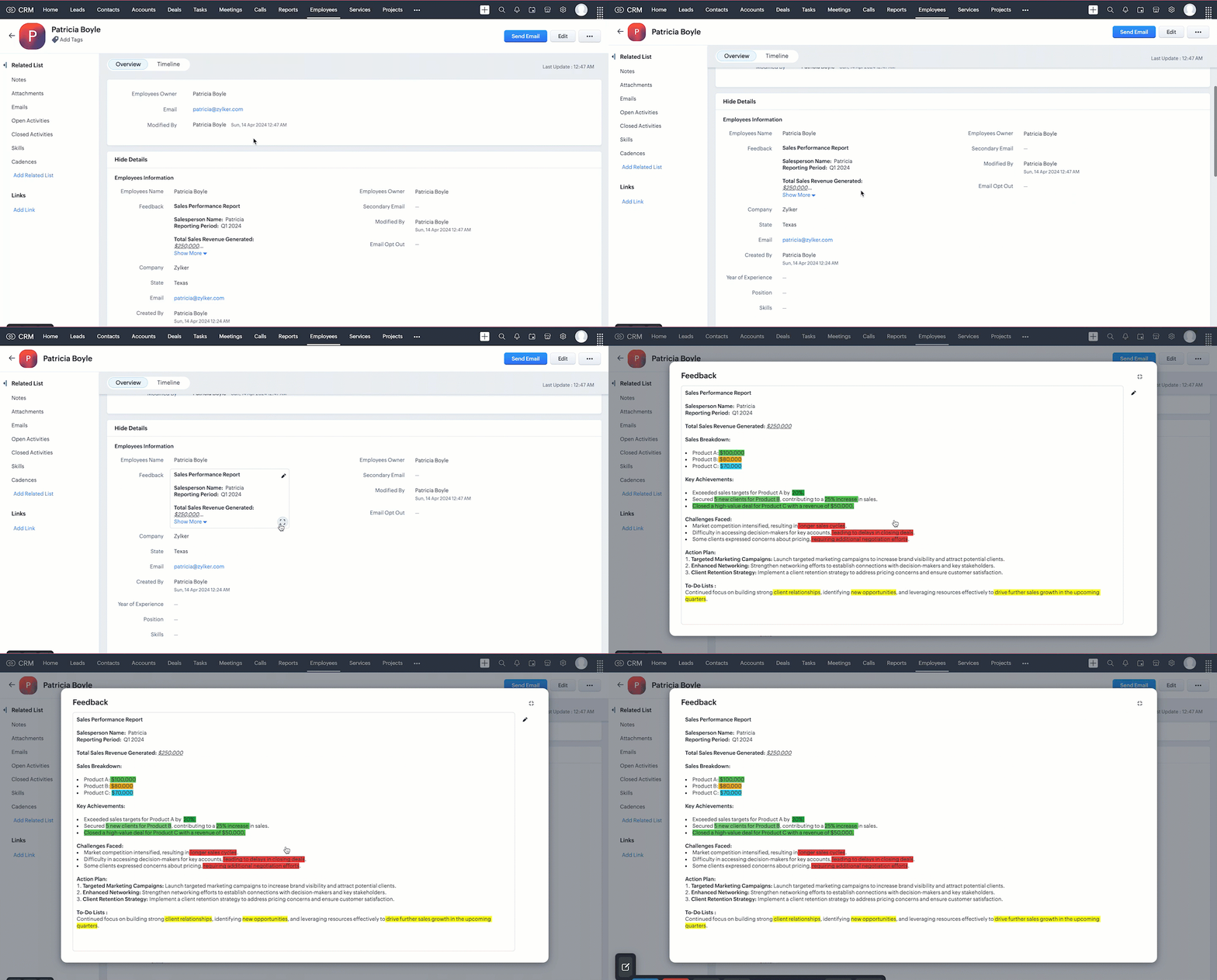
When you add values using HTML tags to the RTF via API, the input will be transformed into formatted data.
5. Fetch complete data of RTF using the Rich Text Field API
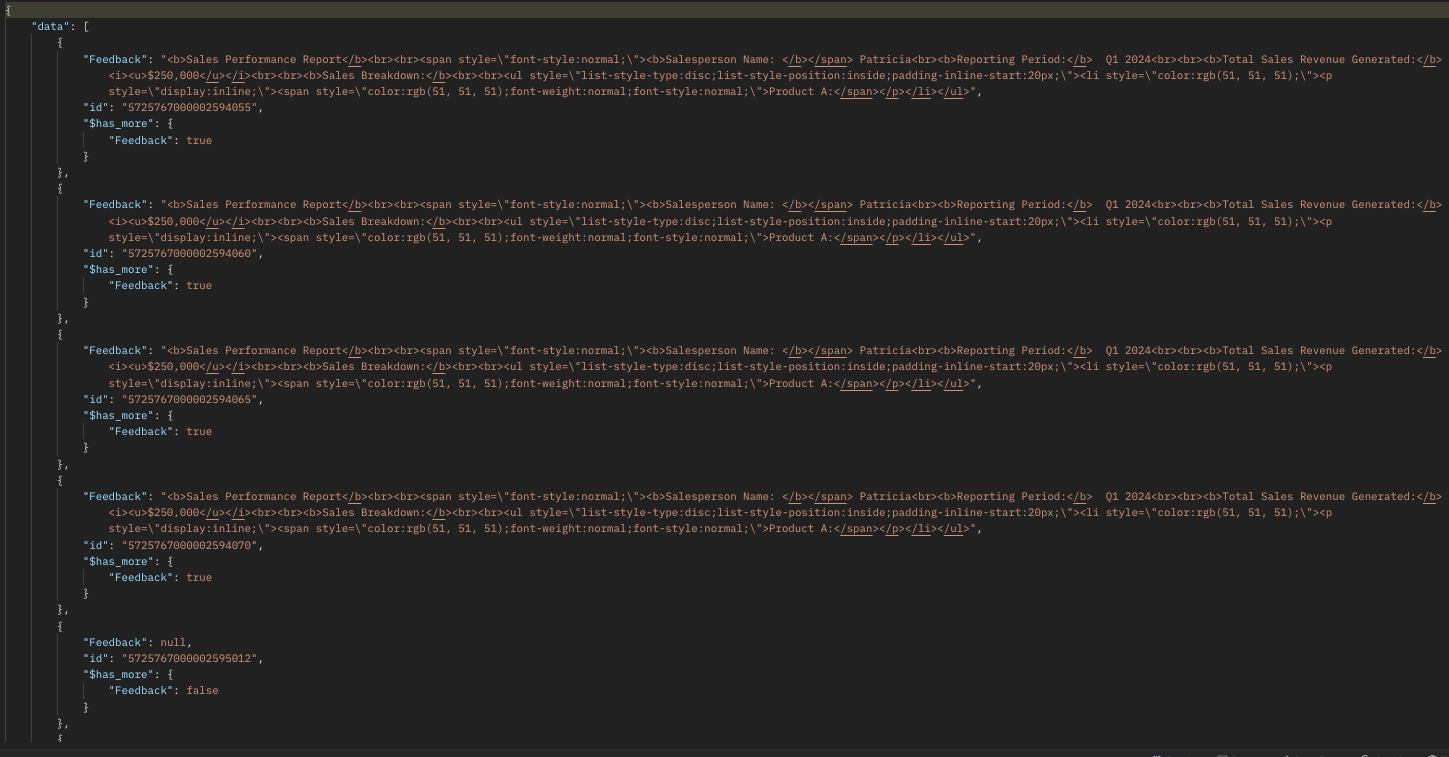
The Rich Text Field supports up to 50000 characters. Using the GET - Records API, you can fetch only the first 500 characters of the rich text field ('Feedback' in our case) in the response. If the @has_more property in the GET- Records response is true for the Rich Text Field (RTF) value, it indicates that the RTF contains more than 500 characters.
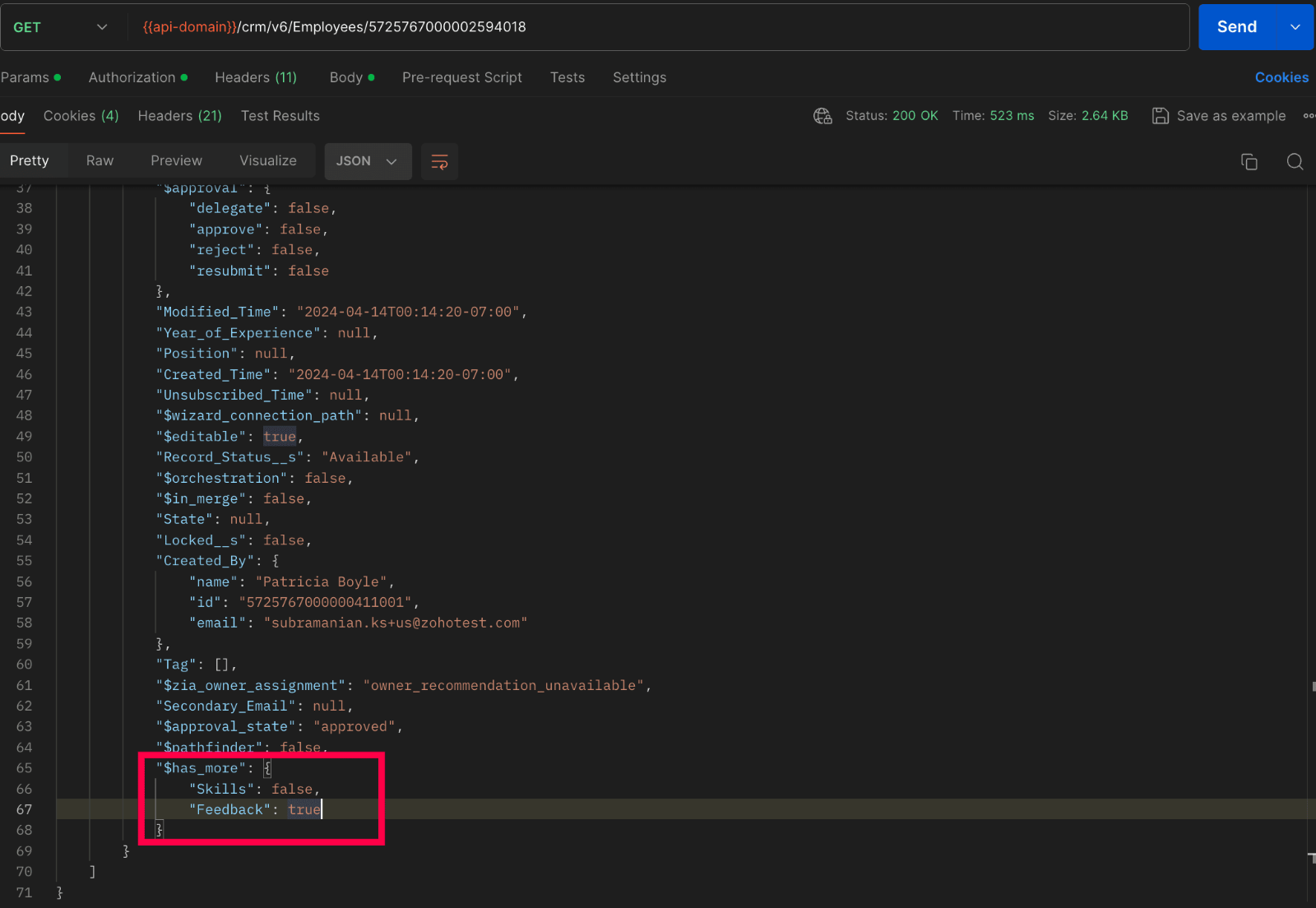
To fetch the entire data, we have introduced the GET - Rich Text Field API in V6, enabling the retrieval of complete data from rich text fields.
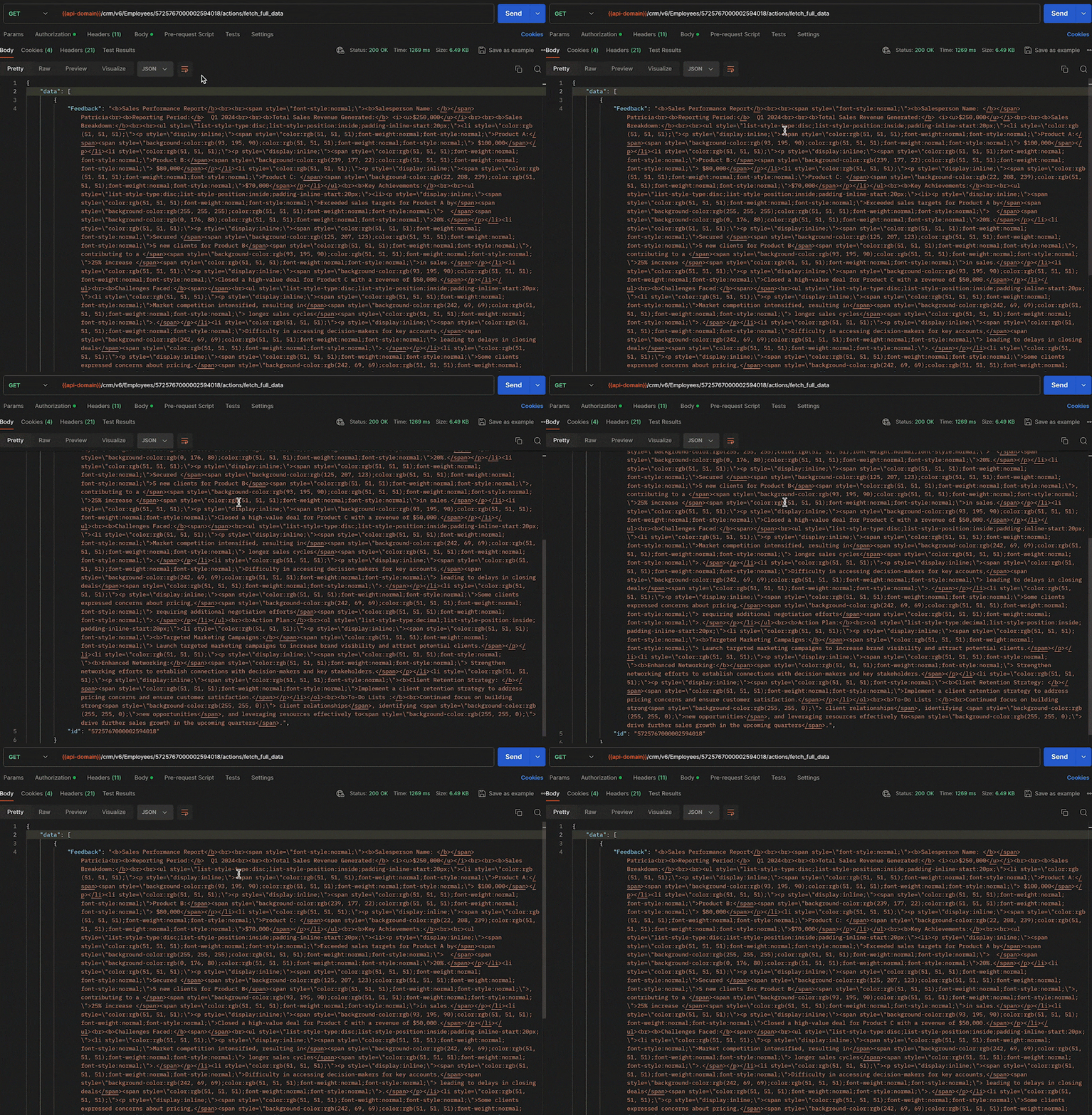
Below Sample shows how to fetch full data :
Request URL : {api-domain}/crm/v6/Employees/5725767000002594018/actions/fetch_full_data
Request Method : GET
Response :
6. Updating Rich Text Field using the Update Records API
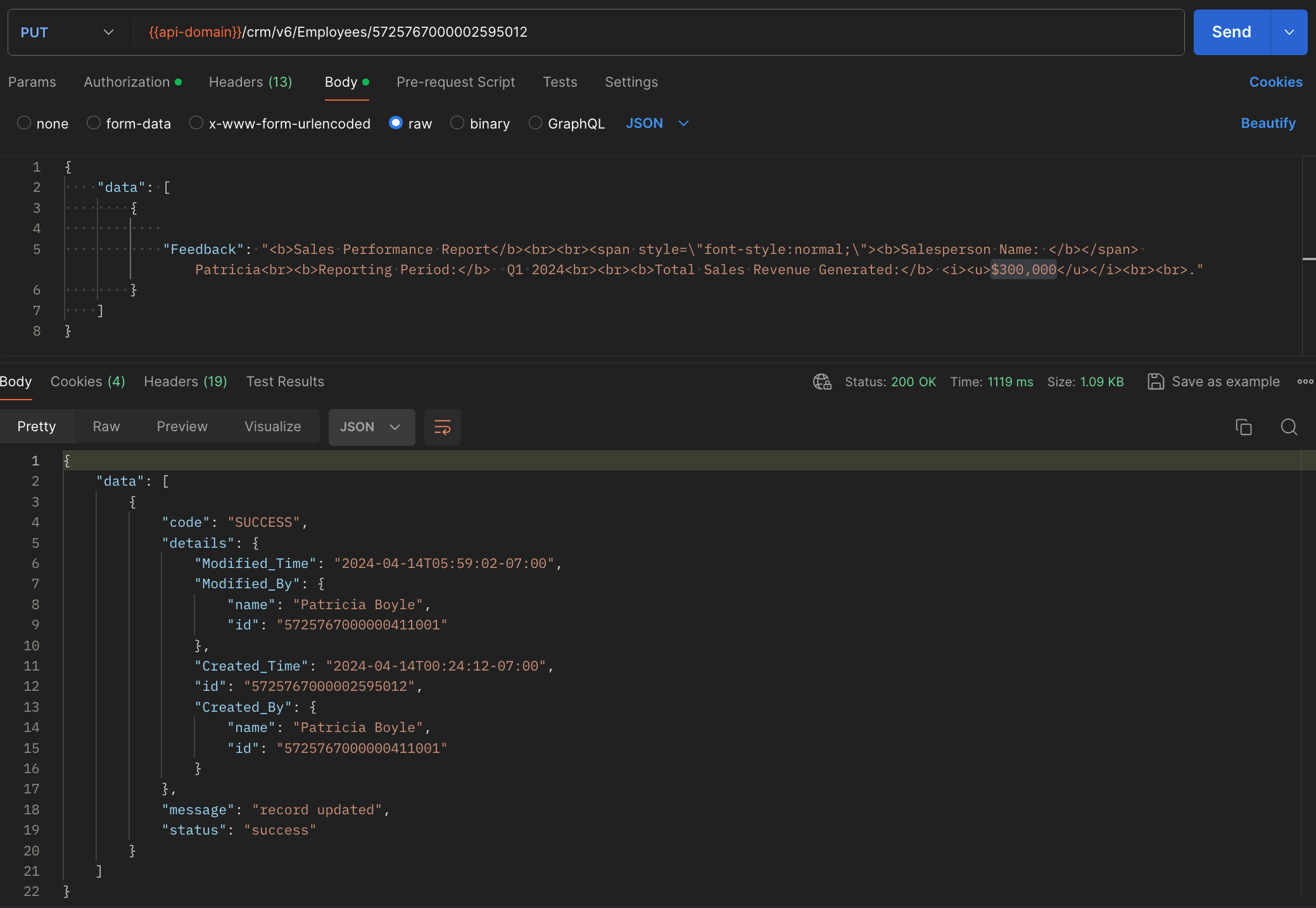
Updating a rich text field doesn't require any special steps. It is similar to the process how we update other fields in a record, using the Update Records API.
7. Deleting RTF using the Delete Custom Field API
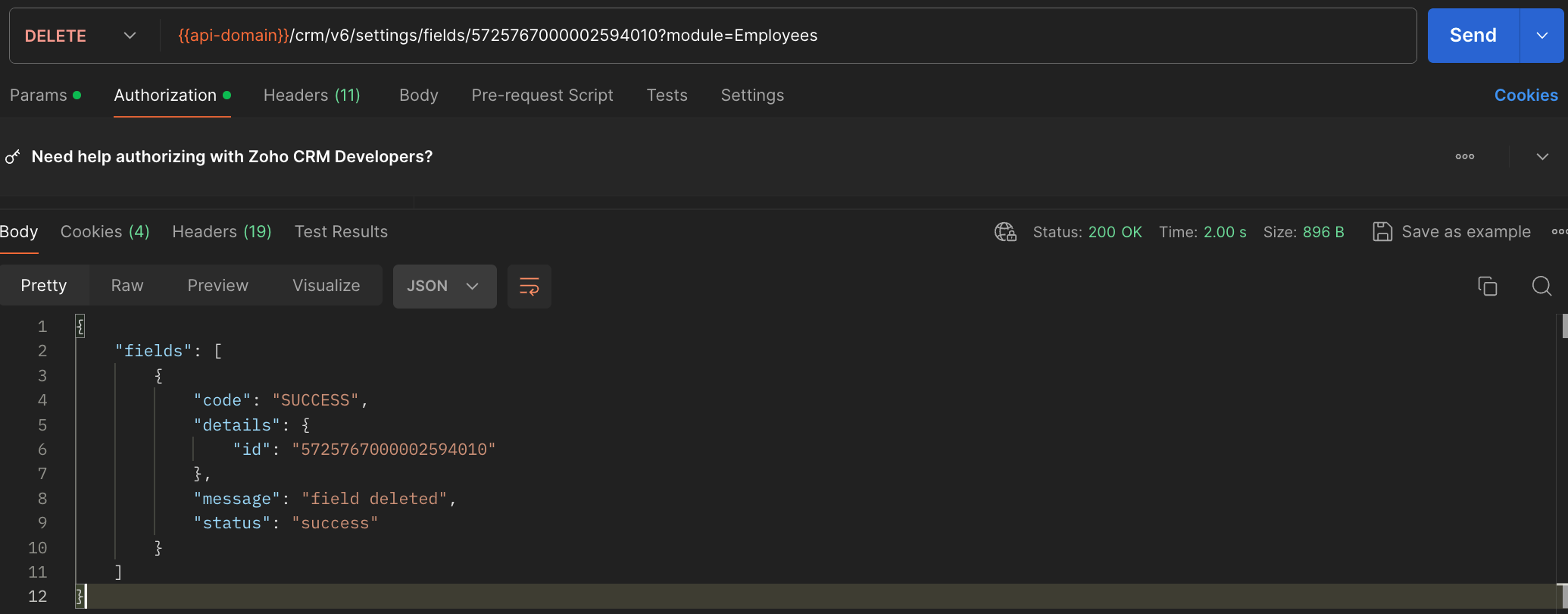
General notes :
- Rich text fields are not supported in subforms, List View, Kanban View, Canvas View, Sheet View, Related Lists, Lookup popup, global search, filters and criteria, formula fields, report export, and integrations.
- Rich text fields are not supported in the Search API.
- Rich text fields are supported for importing and exporting records, using the Bulk APIs. The data will be exported as HTML content. For example, Patricia will be exported as <b>Patricia</b>.
8. Rich Text Field using the COQL API
Retrieve the Rich Text Fields from a module through a COQL query. Note that RTFs cannot be used in the criteria. Similar to the GET - Records API, the COQL API response fetches up to 500 characters of the RTFs. To fetch its complete data, use the GET - Rich Text Field API.
Request URL : https://www.zohoapis.com/crm/v6/coql
Request Method : POST
Sample Input :
{ "select_query":"select 'Feedback' from Employees where Company is not null" } |
Response :
9. Rich Text Field using Bulk APIs
Bulk Read API allows you to fetch a large set of data i.e., you can fetch a maximum of 200,000 records in a single API call. You can export complete data of rich text fields in a module. Note that RTFs cannot be specified in the criteria.
Request URL: https://www.zohoapis.com/crm/bulk/v6/read
Request Method: POST
Sample input :
{ "callback": { "method": "post" }, "query": { "module": { "api_name": "Employees" }, "file_type": "ics" } } |
The Bulk Read API is an asynchronous API, the response will not be available instantly; the bulk read job is scheduled. Once the job is completed, it'll be notified in the callback URL. The records are available in a downloadable CSV file or ICS file (for events).
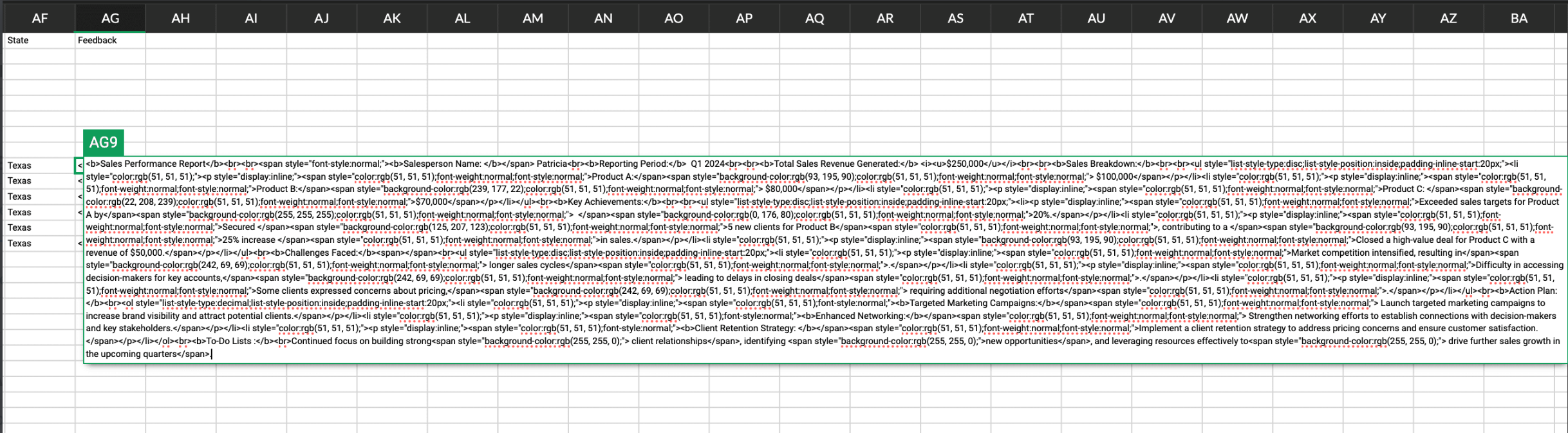
Below is a sample downloaded CSV file:
Unlike the GET - Records API, the Bulk Read API fetched the RTF's complete data.
See our Bulk Read API documentation to know how to view the status of the scheduled job and download the file in detail, along with more sample requests and responses.
Bulk Write API allows you to insert, update, or upsert a large set of data. In the CSV file module, using the Bulk Write API, you can add up to 50000 characters to the RTFs for each record in a row.
Prepare your CSV file
The Bulk Write API only accepts a CSV file compressed into a ZIP file as input.
Below picture represents values added to the rich text field:
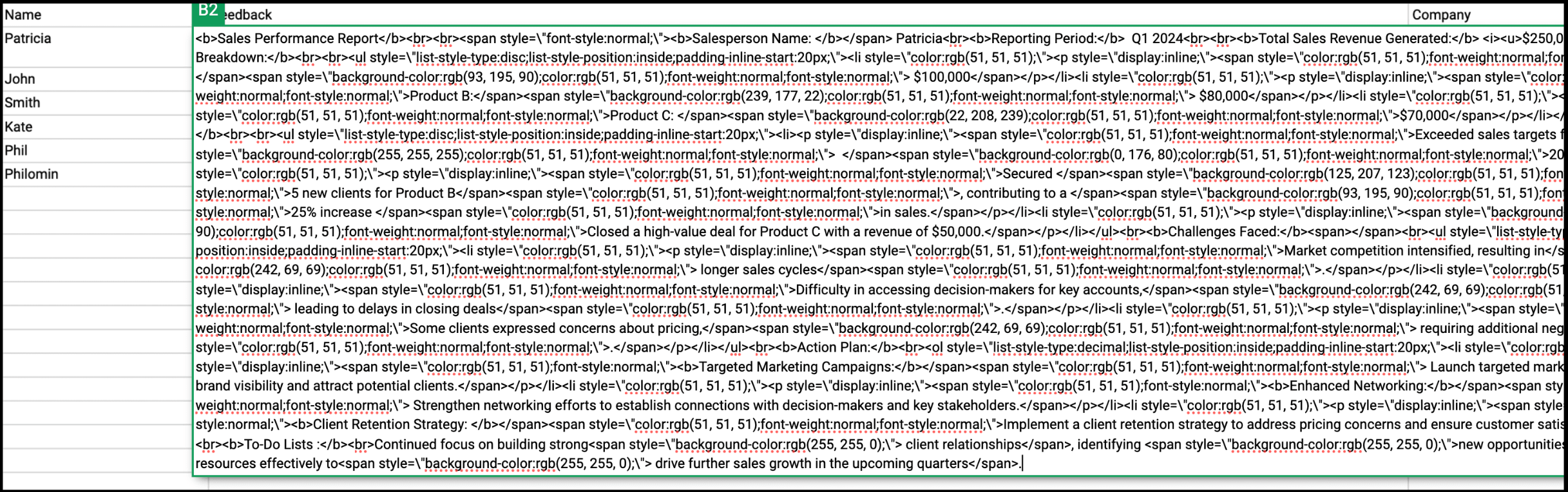
Please ZIP the CSV file once you add values to the Rich Text Field.
Upload your CSV file :
This involves making a POST API call, with the ZIP file containing the required data.
Headers
Header Name | Description |
feature | bulk-write |
X-CRM-ORG | Your zgid which you get from the Organization API |
Request URL: https://content.zohoapis.com/crm/v6/upload
Request Method: POST
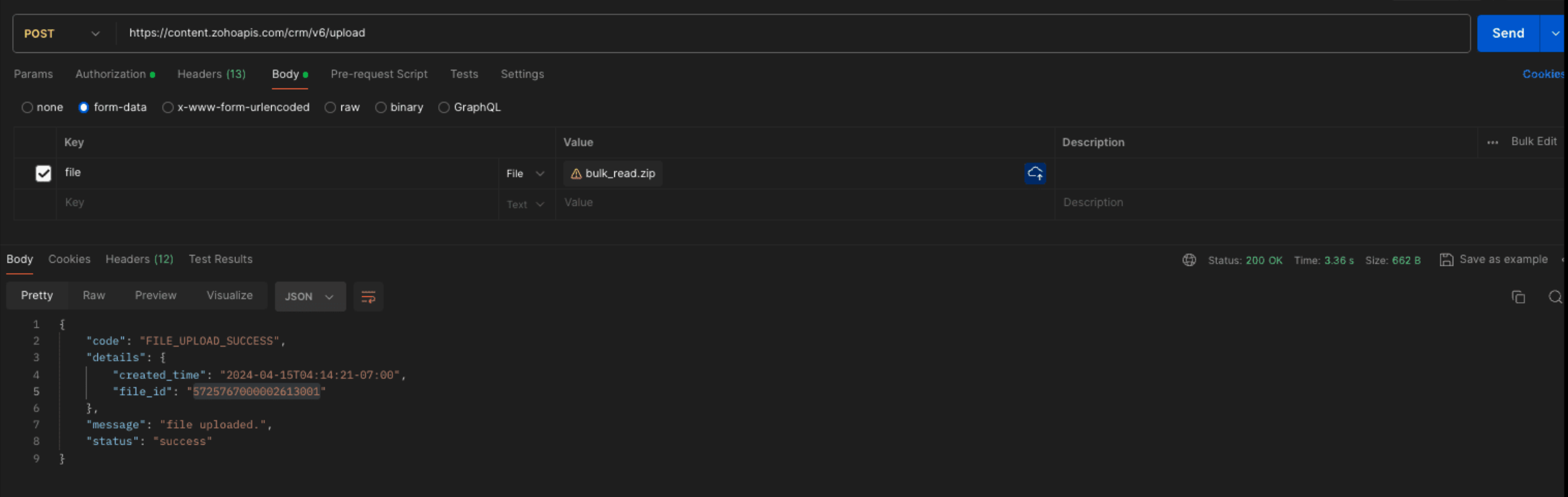
Create a bulk write job :
Request URL : {{api-domain}}/crm/bulk/v6/write
Request Method : POST
Sample Input for bulk insert :
{ "operation": "insert", "ignore_empty": true, "callback": { "url": "https://example.zoho.com/test", "method": "post" }, "resource": [ { "type": "data", "module": { "api_name": "Employees" }, "file_id": "5725767000002613001", "file_names": [ "Rich.csv" ], "field_mappings": [ { "api_name": "Name", "index": 0 }, { "api_name": "Feedback", "index": 1 }, { "api_name": "Company", "index": 2 } ] } ] } |
Refer to our Bulk Write API help document and get more information on how the Bulk Write API works, how to prepare your CSV file, and how to upload your CSV file, and how to check the job status.
We trust that this post meets your needs and is helpful. Let us know your thoughts in the comment section or reach out to us at support@zohocrm.com
Stay tuned for more insights in our upcoming Kaizen posts!
Cheers!

Previous Kaizen Post :
Additional Reading :
- API Help Documentation : Rich Text Field API
- Kaizen Series
- Knowledge Base Documentation

Join us for our upcoming Zoho CRM Developer Series: Zoho CRM APIs, where you can explore more about Zoho CRM APIs. Register Now!
Topic Participants
Subramanian K
Vigneshwaran K
Sticky Posts
Kaizen #217 - Actions APIs : Tasks
Welcome to another week of Kaizen! In last week's post we discussed Email Notifications APIs which act as the link between your Workflow automations and you. We have discussed how Zylker Cloud Services uses Email Notifications API in their custom dashboard.Kaizen #216 - Actions APIs : Email Notifications
Welcome to another week of Kaizen! For the last three weeks, we have been discussing Zylker's workflows. We successfully updated a dormant workflow, built a new one from the ground up and more. But our work is not finished—these automated processes areKaizen #152 - Client Script Support for the new Canvas Record Forms
Hello everyone! Have you ever wanted to trigger actions on click of a canvas button, icon, or text mandatory forms in Create/Edit and Clone Pages? Have you ever wanted to control how elements behave on the new Canvas Record Forms? This can be achievedKaizen #142: How to Navigate to Another Page in Zoho CRM using Client Script
Hello everyone! Welcome back to another exciting Kaizen post. In this post, let us see how you can you navigate to different Pages using Client Script. In this Kaizen post, Need to Navigate to different Pages Client Script ZDKs related to navigation A.Kaizen #210 - Answering your Questions | Event Management System using ZDK CLI
Hello Everyone, Welcome back to yet another post in the Kaizen Series! As you already may know, for the Kaizen #200 milestone, we asked for your feedback and many of you suggested topics for us to discuss. We have been writing on these topics over the
Recent Topics
Important Update: Facebook Metrics Deprecation & Impact on Zoho Analytics
Dear Zoho Analytics users, Facebook has deprecated a set of metrics from the Facebook Pages Insights API, effective November 15, 2025. As a result, these changes will affect any reports and dashboards in Zoho Analytics that rely on Facebook Pages data.Quick Copy Column Name
Please add the ability to quickly copy the name of a column in a Table or Query View. When you right-click the column there should be an option to copy the name, or if you left-click the column and use the Ctrl+C keyboard shortcut it should copy theConditional Field Visibility in Bigin CRM
I would like to request support for conditional field visibility within Bigin CRM. This feature should allow administrators to configure show/hide rules for fields based on predefined criteria (e.g., field values, picklist selections, stage changes,Introducing Zoho MCP for Bigin
Hello Biginners! We're excited to introduce Zoho MCP for Bigin, a completely new way of interacting with Bigin data using AI. With Zoho MCP, you can securely connect your Bigin account with popular AI agents like Claude, Cursor, Windsurf, and VS Code,Introducing the Zoho Projects Learning Space
Every product has its learning curve, and sometimes having a guided path makes the learning experience smoother. With that goal, we introduce a dedicated learning space for Zoho Projects, a platform where you can explore lessons, learn at your own pace,MCP > Creator connection failing with Claude
I'm trying to get claude to access any of my Zoho Creator apps and it keeps failing. I have enabled all tools for creator and ensured in claude settings that everything is authorised. Here is what claude says : Unfortunately, the error messages I'm receivingIs it possible to sync data every 5–10 minutes in Zoho Analytics (CRM or Excel imports)?
Hello Team, I want to know if Zoho Analytics supports near real-time syncing of data from different sources. My requirements: I am importing data from Zoho CRM → Zoho Analytics I also have some datasets maintained in Excel/CSV I want both data sourcesFeature Request: Dynamic Dimension Control for zc_LoadIn Popups
As detailed in this community discussion, Zoho Creator's zc_LoadIn parameter is a vital tool for opening components (forms, reports, or pages) in modal dialogs via HTML snippets, Notes, or Rich Text Fields. While powerful, this feature suffers from aSubforms in stateless forms
I think the title says it all. We need to be able to add subforms to stateless forms. Currently the only workaround is to create a Form and delete each record upon submission of the form. I need to build an interface to update our inventory. BasicallyText wrap column headers in reports?
Is it possible to auto wrap column headers so that a longer multi-word header displays as two lines when the column is narrower than the width of the header title?What’s New in Zoho Inventory — Latest Features, Integrations & Updates | December 2025
Zoho Inventory has evolved significantly over the past months, bringing you smarter, faster, and more connected tools to streamline your operations. Whether you’re managing multichannel sales, complex fulfillment workflows, or fast-moving stock, our newestMarketer’s Space - Multi-Channel Campaigns for the Biggest Shopping Week with Zoho Marketing Automation
Hello marketers, Welcome back to another post in Marketers Space! The biggest shopping week of the year is almost here, and it’s your moment to shine without the stress. With Black Friday and Cyber Monday just around the corner, being present across email,Auto-Invite Users to Portals in Zoho CRM based on Conditions
Hello Everyone, You can now automate portal invitations in Zoho CRM with the new Auto-Invite users feature in Portal management. No more manually enabling portal access one by one. With this enhancement, you can automatically send invites for users toPricing Strategies: #5 Stay local, Price & Sell Global
Arun had always dreamed of taking his handmade craft business beyond his hometown. For years, he sold locally. Most of his customers are familiar faces, in our usual currency and with the exact expectations. But one day, a traveller visited his workshopBest practice to structure reporting to include events covering multiple months / quarters.
Hi, I'm new to Zoho, have some experience of more "enterprise" tools, looking for some input from the community. I'm looking to create a report that includes events that cover a long period, each event has a start / end date and I'm struggling undertandingIncorrect Email Notifications for Product Reviews
Dear Zoho Commerce Support Team, I am writing to report a technical issue that occurs frequently on our platform. Problem Description: We regularly receive email notifications informing us of new product reviews awaiting approval. However, when we accessZoho CRM for Everyone's NextGen UI Gets an Upgrade
Hello Everyone We've made improvements to Zoho CRM for Everyone's Nextgen UI. These changes are the result of valuable feedback from you where we’ve focused on improving usability, providing wider screen space, and making navigation smoother so everythingWhat is the easiest way to move Hotmail emails to an IMAP server?
The easiest way to move Hotmail (Outlook.com) emails to an IMAP server is to add your Hotmail account directly to any email client that supports IMAP, then copy the messages across. This avoids paid tools and keeps the process simple. Fastest free method:No feedback from Zoho Books regarding Yodlee feeds for Investec
I reported on 6 Feb 2025 that the Bank Feeds for Investec bank via Yodlee are not working. To date there has been no resolution. You are charging us for a suite of products where the functionality does not work. Please advise how you will refund me forTurn off Knowlege Base Follow options and Follower lists
Is there a way to hide or turn off the option in the Knowledge Base for users to follow specific departments/categories/sections/articles? If not, is there a way to turn off the public list of followers for each of those things? Otherwise, customer namesCustom validation in CRM schema
Validation rules in CRM layouts work nicely, good docs by @Kiran Karthik P https://help.zoho.com/portal/en/kb/crm/customize-crm-account/validation-rules/articles/create-validation-rules I'd prefer validating data input 'closer to the schema'Meet Canvas' Grid component: Your easiest way to build responsive record templates
Visual design can be exciting—until you're knee-deep in the details. Whether it's aligning text boxes to prevent overlaps, fixing negative space, or simply making sure the right data stands out, just ironing out inconsistencies takes a lot of moving parts.Text snippet
There is a nice feature in Zoho Desk called Text Snippet. It allows you to insert a bit of text anywhere in a reply that you are typing. That would be nice to have that option in Zoho CRM as well when we compose an email. Moderation Update: We agree thatZoho Books "Update" Trigger for Zapier?
Hi Zoho Team, I've been in talks with Zapier about using their services to connect my Zoho Books account to various apps, but I require an additional trigger beyond the "New" trigger. I require an "Update" trigger, which will allow me to filter and create Zaps only when certain conditions are fulfilled on the Zoho Books end before I automate a separate app. Specifically this will help me create invoices in QuickBooks Online only when payments are recorded in Zoho Books, rather than when a new invoiceService One. Bill Another. Zero Hassle.
In field service operations, one challenge often comes up: the person who needs the service isn’t always the one who pays for it. Think about tenants vs. property managers, corporate offices vs. their finance departments, or school buildings vs. centralTime Tracking on Iphone doesn't stop
When I start a time tracking session the timer starts as expected. However when I hit stop, the timer remains on that project. The only buttons available are discard and start. Start runs the timer more and discard says it will throw away the data fromPresenting ABM for Zoho CRM: Expand and retain your customers with precision
Picture this scenario: You're a growing SaaS company ready to launch a powerful business suite, and are looking to gain traction and momentum. But as a business with a tight budget, you know acquiring new customers is slow, expensive, and often deliversCan we do Image swatches for color variants?
We want to do something like the attached screenshot on our new zoho store. We need image swatches instead of normal text selection. We want to user to select an image as color option. Is this doable? I don't see any option on zoho backend. Please hCan Zoho Flows repeat Actions more than once?
I'm attempting to make an intentional Zoho Flow loop using the below layout. However, when "WithinLimit" condition is met, the program fails to execute the action "Get & Add Request Co..." again. Is this by design? Is Zoho Flows unable to repeat actionsVideo interviews not compatible on mobile
Hi Zoho, The 2-way video interview feature you have added to Recruit would be great if the candidate was able to use the link to the video on a mobile phone, it doesn't work on Samsung browser, it doesn't work on chrome/firefox mobile version of browser,What is the difference between Zoho Campaigns and marketing hub?
Zoho Campaigns is a permission-based email marketing tool for sending marketing emails and mass emails. Marketing Automation is a multichannel marketing automation tool that caters to organizations looking for tools to engage their users across multipleZoho Desk View Open Tickets and Open Shared Tickets
Hi, I would like to create a custom view so that an agent can view all the open tickets he has access to, including the shared tickets created by a different department. Currently my team has to swich between two views (Open Tickets and Shared Open Tickets).Enviro Recycling EHF Fee's
I'm in Canada and each province has it's own recycling program with it's own fee's. There are numerous categories that electronics fall into and each category has a taxable rate applied to it. I need a way to be able to apply the correct rate dependingChange of Blog Author
Hi, I am creating the blog post on behalf of my colleague. When I publish the post, it is showing my name as author of the post which is not intended and needs to be changed to my colleague's name. How can I change the name of the author in the blogs?? Thanks, RamananZoho Desk API - Influence which layout is used
Hello, how can the ticket layout be changed using the API? I would like to choose the layout directly when creating the ticket. If this is not possible, my question would be how can I change it afterwards? Best regards, SvenHas CSS Changed for Common Elements?
I noticed today that the standard title headings on my Forms and Reports display smaller in size than before. Google Dev Tools (attached), seems to confirm my suspicion. Something appears to be overriding the 1.375rem to 1.125rem. The font size on theText field alignment
Is it possible to align text in the text field? Or even better, is there a possibility to have a field which accepts only numbers?email moderation issue when email is sent in the name of a mail group
Symptom: an email that is sent by a mail group moderator in the name of a moderated mail group is held back for approval. Reproduction: Create a moderated mail group with members and moderators. Allow that mails can be sent in the name of the group (extendedPipeline in Custom Modules
I love the way the Sales Pipeline looks and functions with reports. I would like to add the save pipeline features and visualization to a custom module, however, I only see that these pipelines are only available for the Deals module. Is there a way to add pipelines to custom modules?Duplicate customers being created in Desk
Hi I've trying to work out why I've getting duplicated customers being created in my desk. I have an external booking system that generates an email when I get a customer booking a job. A booking email gets sent to Desk where I manage the booking andNext Page