Kaizen #134 Manipulating Rich Text Field (RTF) using Zoho CRM APIs
Hello everyone!
Last week, we discussed Deciding on the type of applications: Self-client or Server-based? This week, we will discuss the Rich Text Field (RTF) and how we can manipulate RTF using Zoho CRM APIs.
In this post,
- What is a Rich Text Field (RTF)?
- Use case
- Rich Text Field creation in a module using the Create Custom Field API
Adding values to the RTF using the Insert Records API
- Fetch complete data of RTF using the GET - Rich Text Field API
- Updating Rich Text Field using the Update Records API
- Deleting RTF using the Delete Custom Field API
- RTF using the COQL API
- RTF using Bulk APIs
1. What is a Rich Text Field?
The Rich Text field is the preferred choice when there is a need for formatted text and a larger character limit. It can accommodate up to 50,000 characters, including HTML elements that are generated when the text is formatted, making it ideal for entries that require styling and organization, such as product descriptions or detailed client communications. Although tooltips can be added to improve user interaction, the rich text field does not support encryption or mandatory input settings.
Using rich text can improve the visual appeal of your information by providing different font styles, colors, and highlights. This allows for effective communication of important details. Bullet points and numbered lists can enhance readability, while bold, italics, or underlined texts can emphasize crucial information. Increased and decreased indents can help organize data, and the strikethrough feature can easily indicate changes or updates.
2. Use case
Consider Zylker, an org that uses Zoho CRM as their sales management system to store reports or feedback on its employees' sales performance report, total revenue, sales breakdown by product, key achievement, challenges faced, action plan, and to-do lists. These are stored in the multi-line field's rich text format type for better visuals and to identify the important information easily.
Let us see how to create RTFs using APIs, and how to access or update RTF using different available APIs. Note that the Rich Text type of multi-line field is supported from version 6.
3. Rich Text Field creation in a module using the Create Custom Field API
To create a rich text field in a module, first know the module's API name using the GET - Modules Metadata API, then create a custom RTF field in that module.
Request URL to create Rich Text Field :
{api-domain}/crm/v6/settings/fields?module=Employees
Request Method : POST
Sample Input :
{ "fields": [ { "field_label": "Feedback", "data_type": "textarea", "length": 50000, "textarea": { "type": "rich_text" }, "tooltip": { "name": "static_text", "value": "employee's feedback" } } ] } |
4. Adding values to the RTF using the Insert Records API
To add values to the created rich text field, you should know its API name.
Using the api_name of the Employees module, make a GET - Fields metadata API call to get the list of fields (along with their api_name) in the Employees module. Search for the field in which you need to add values to the Rich Text Field. In our case, it is Feedback.
Request URL : {api-domain}/crm/v6/Employees
Request Method : POST
Sample Input :
{ "data": [ { "Company": "Zylker", "Name" : "Patricia Boyle", "State": "Texas", "Feedback": "<b>Sales Performance Report</b><br><br><span style=\"font-style:normal;\"><b>Salesperson Name: </b></span> Patricia<br><b>Reporting Period:</b> Q1 2024<br><br><b>Total Sales Revenue Generated:</b> <i><u>$250,000</u></i><br><br><b>Sales Breakdown:</b><br><br><ul style=\"list-style-type:disc;list-style-position:inside;padding-inline-start:20px;\"><li style=\"color:rgb(51, 51, 51);\"><p style=\"display:inline;\"><span style=\"color:rgb(51, 51, 51);font-weight:normal;font-style:normal;\">Product A:</span><span style=\"background-color:rgb(93, 195, 90);color:rgb(51, 51, 51);font-weight:normal;font-style:normal;\"> $100,000</span></p></li><li style=\"color:rgb(51, 51, 51);\"><p style=\"display:inline;\"><span style=\"color:rgb(51, 51, 51);font-weight:normal;font-style:normal;\">Product B:</span><span style=\"background-color:rgb(239, 177, 22);color:rgb(51, 51, 51);font-weight:normal;font-style:normal;\"> $80,000</span></p></li><li style=\"color:rgb(51, 51, 51);\"><p style=\"display:inline;\"><span style=\"color:rgb(51, 51, 51);font-weight:normal;font-style:normal;\">Product C: </span><span style=\"background-color:rgb(22, 208, 239);color:rgb(51, 51, 51);font-weight:normal;font-style:normal;\">$70,000</span></p></li></ul><br><b>Key Achievements:</b><br><br><ul style=\"list-style-type:disc;list-style-position:inside;padding-inline-start:20px;\"><li><p style=\"display:inline;\"><span style=\"color:rgb(51, 51, 51);font-weight:normal;font-style:normal;\">Exceeded sales targets for Product A by</span><span style=\"background-color:rgb(255, 255, 255);color:rgb(51, 51, 51);font-weight:normal;font-style:normal;\"> </span><span style=\"background-color:rgb(0, 176, 80);color:rgb(51, 51, 51);font-weight:normal;font-style:normal;\">20%.</span></p></li><li style=\"color:rgb(51, 51, 51);\"><p style=\"display:inline;\"><span style=\"color:rgb(51, 51, 51);font-weight:normal;font-style:normal;\">Secured </span><span style=\"background-color:rgb(125, 207, 123);color:rgb(51, 51, 51);font-weight:normal;font-style:normal;\">5 new clients for Product B</span><span style=\"color:rgb(51, 51, 51);font-weight:normal;font-style:normal;\">, contributing to a </span><span style=\"background-color:rgb(93, 195, 90);color:rgb(51, 51, 51);font-weight:normal;font-style:normal;\">25% increase </span><span style=\"color:rgb(51, 51, 51);font-weight:normal;font-style:normal;\">in sales.</span></p></li><li style=\"color:rgb(51, 51, 51);\"><p style=\"display:inline;\"><span style=\"background-color:rgb(93, 195, 90);color:rgb(51, 51, 51);font-weight:normal;font-style:normal;\">Closed a high-value deal for Product C with a revenue of $50,000.</span></p></li></ul><br><b>Challenges Faced:</b><span></span><br><ul style=\"list-style-type:disc;list-style-position:inside;padding-inline-start:20px;\"><li style=\"color:rgb(51, 51, 51);\"><p style=\"display:inline;\"><span style=\"color:rgb(51, 51, 51);font-weight:normal;font-style:normal;\">Market competition intensified, resulting in</span><span style=\"background-color:rgb(242, 69, 69);color:rgb(51, 51, 51);font-weight:normal;font-style:normal;\"> longer sales cycles</span><span style=\"color:rgb(51, 51, 51);font-weight:normal;font-style:normal;\">.</span></p></li><li style=\"color:rgb(51, 51, 51);\"><p style=\"display:inline;\"><span style=\"color:rgb(51, 51, 51);font-weight:normal;font-style:normal;\">Difficulty in accessing decision-makers for key accounts,</span><span style=\"background-color:rgb(242, 69, 69);color:rgb(51, 51, 51);font-weight:normal;font-style:normal;\"> leading to delays in closing deals</span><span style=\"color:rgb(51, 51, 51);font-weight:normal;font-style:normal;\">.</span></p></li><li style=\"color:rgb(51, 51, 51);\"><p style=\"display:inline;\"><span style=\"color:rgb(51, 51, 51);font-weight:normal;font-style:normal;\">Some clients expressed concerns about pricing,</span><span style=\"background-color:rgb(242, 69, 69);color:rgb(51, 51, 51);font-weight:normal;font-style:normal;\"> requiring additional negotiation efforts</span><span style=\"color:rgb(51, 51, 51);font-weight:normal;font-style:normal;\">.</span></p></li></ul><br><b>Action Plan:</b><br><ol style=\"list-style-type:decimal;list-style-position:inside;padding-inline-start:20px;\"><li style=\"color:rgb(51, 51, 51);\"><p style=\"display:inline;\"><span style=\"color:rgb(51, 51, 51);font-style:normal;\"><b>Targeted Marketing Campaigns:</b></span><span style=\"color:rgb(51, 51, 51);font-weight:normal;font-style:normal;\"> Launch targeted marketing campaigns to increase brand visibility and attract potential clients.</span></p></li><li style=\"color:rgb(51, 51, 51);\"><p style=\"display:inline;\"><span style=\"color:rgb(51, 51, 51);font-style:normal;\"><b>Enhanced Networking:</b></span><span style=\"color:rgb(51, 51, 51);font-weight:normal;font-style:normal;\"> Strengthen networking efforts to establish connections with decision-makers and key stakeholders.</span></p></li><li style=\"color:rgb(51, 51, 51);\"><p style=\"display:inline;\"><span style=\"color:rgb(51, 51, 51);font-style:normal;\"><b>Client Retention Strategy: </b></span><span style=\"color:rgb(51, 51, 51);font-weight:normal;font-style:normal;\">Implement a client retention strategy to address pricing concerns and ensure customer satisfaction.</span></p></li></ol><br><b>To-Do Lists :</b><br>Continued focus on building strong<span style=\"background-color:rgb(255, 255, 0);\"> client relationships</span>, identifying <span style=\"background-color:rgb(255, 255, 0);\">new opportunities</span>, and leveraging resources effectively to<span style=\"background-color:rgb(255, 255, 0);\"> drive further sales growth in the upcoming quarters</span>." } ] } |
Notes:
- If you enter incorrect API names for fields, the system will skip them and the record will be created successfully, but the values won't be added. This rule applies to RTF too.
- When using the Insert Records API for bulk records creation and the Update Records API for bulk records update, you can add up to 50,000 characters to RTFs in each record.
- For details on supported HTML tags and their attributes, refer to the help document.
The below GIF shows the result of the above input in the UI.
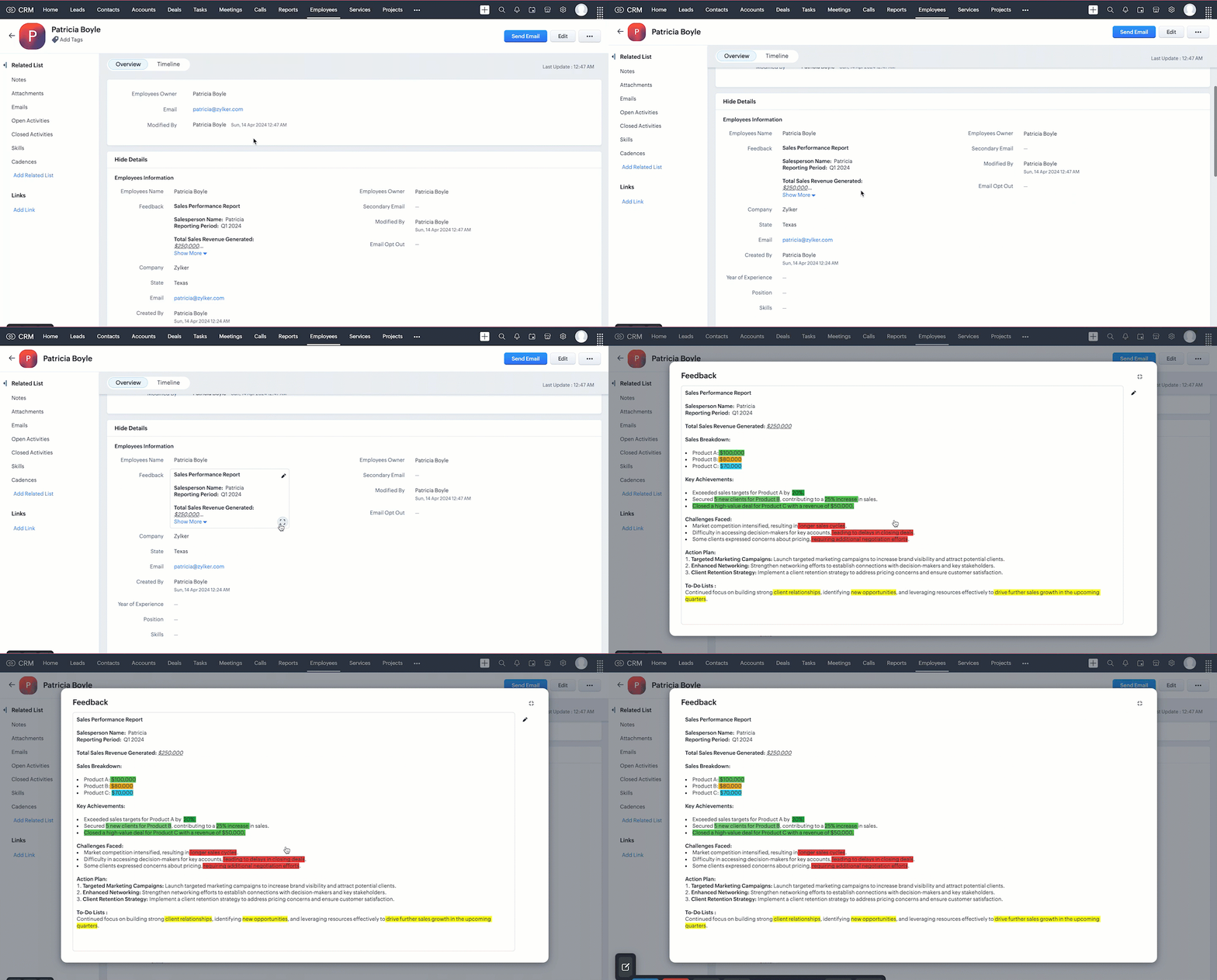
When you add values using HTML tags to the RTF via API, the input will be transformed into formatted data.
5. Fetch complete data of RTF using the Rich Text Field API
The Rich Text Field supports up to 50000 characters. Using the GET - Records API, you can fetch only the first 500 characters of the rich text field ('Feedback' in our case) in the response. If the @has_more property in the GET- Records response is true for the Rich Text Field (RTF) value, it indicates that the RTF contains more than 500 characters.
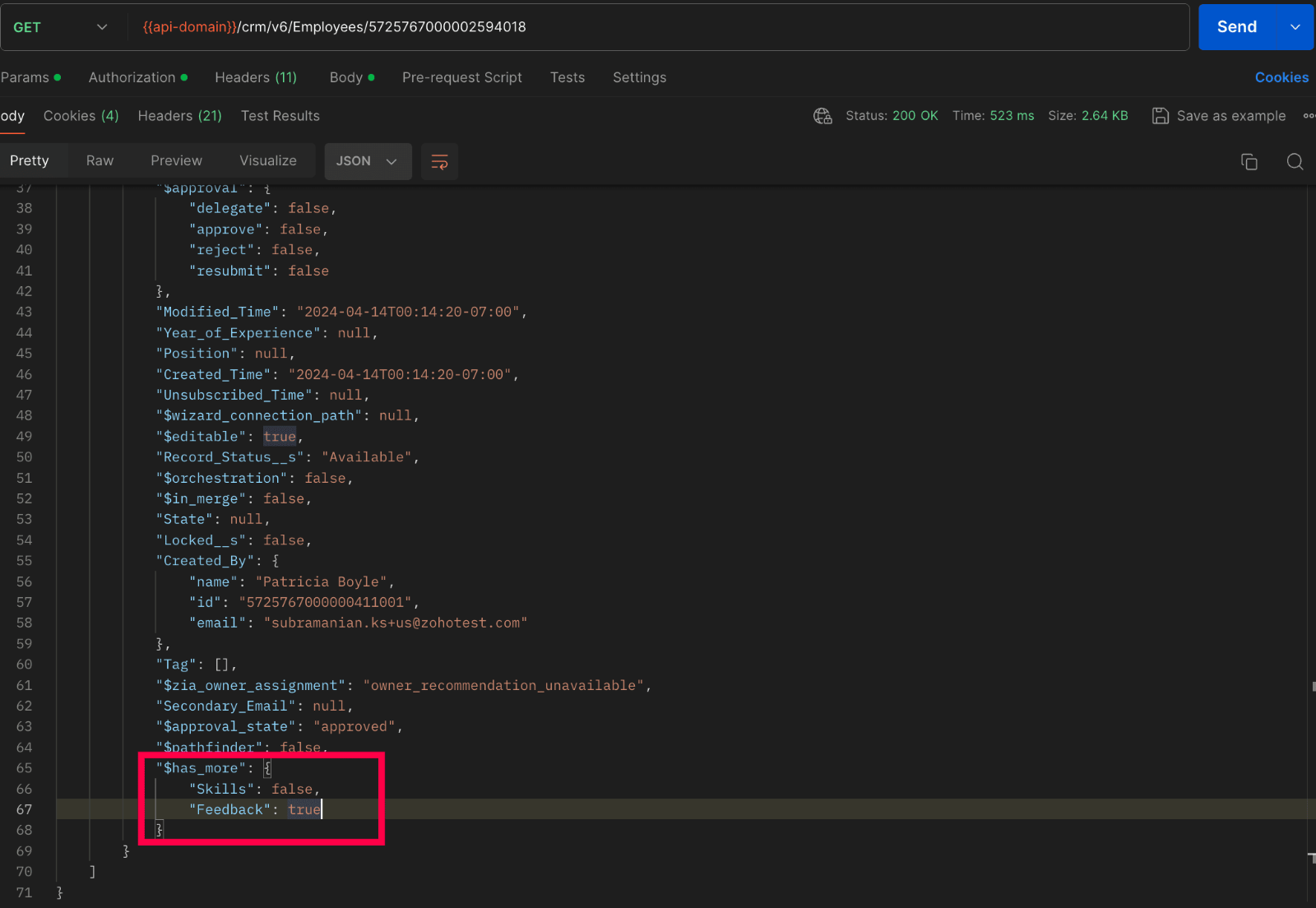
To fetch the entire data, we have introduced the GET - Rich Text Field API in V6, enabling the retrieval of complete data from rich text fields.
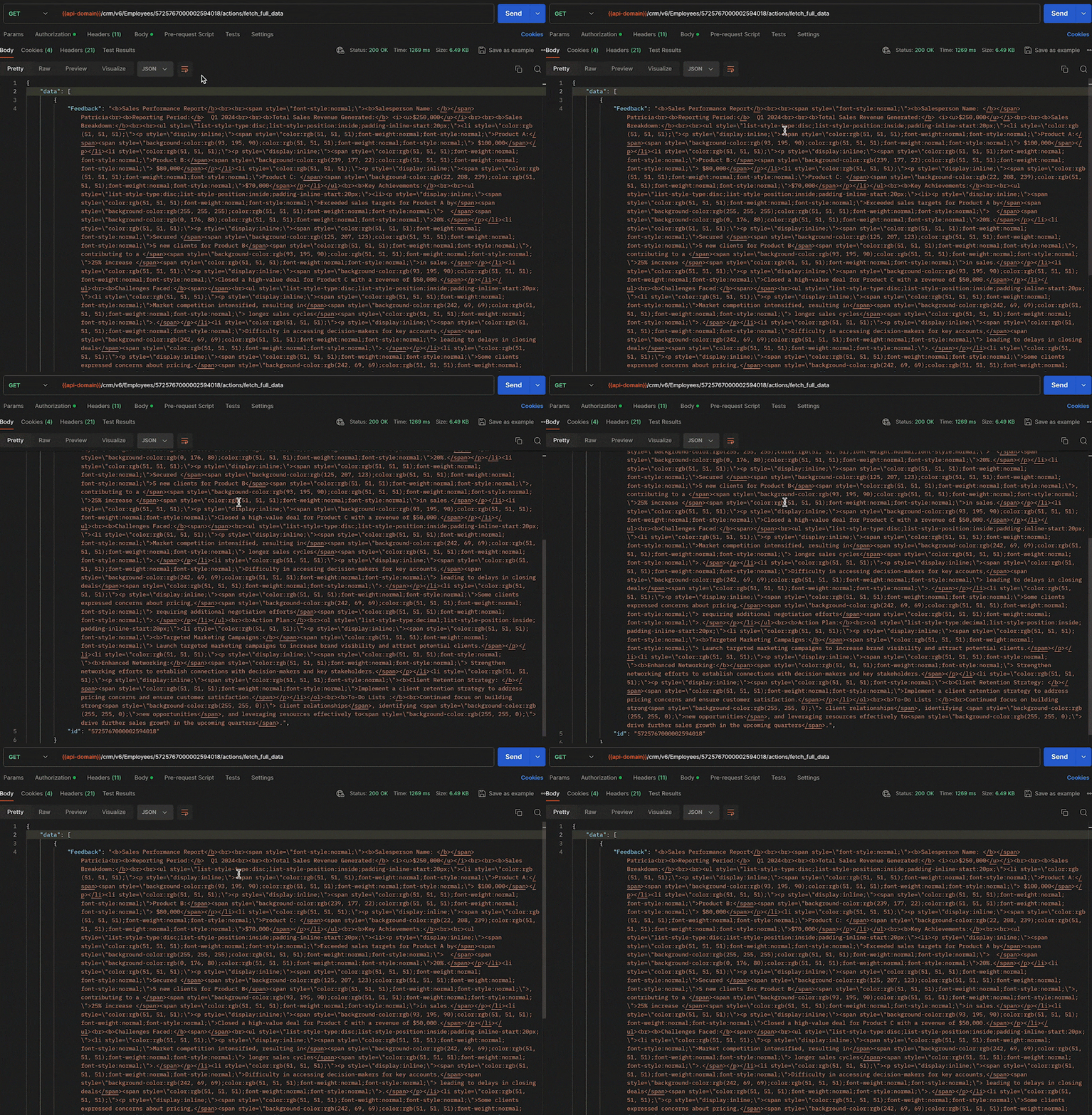
Below Sample shows how to fetch full data :
Request URL : {api-domain}/crm/v6/Employees/5725767000002594018/actions/fetch_full_data
Request Method : GET
Response :
6. Updating Rich Text Field using the Update Records API
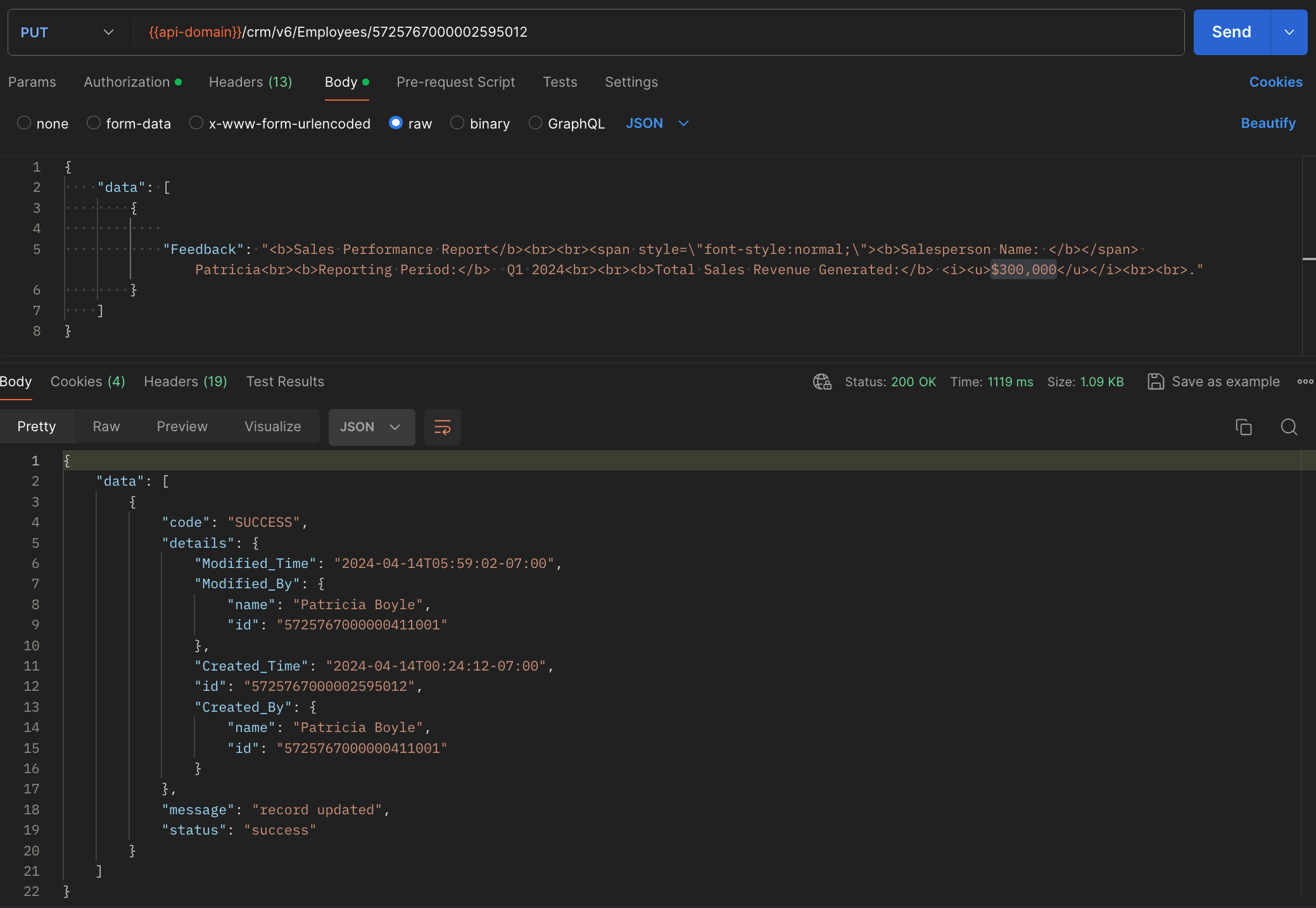
Updating a rich text field doesn't require any special steps. It is similar to the process how we update other fields in a record, using the Update Records API.
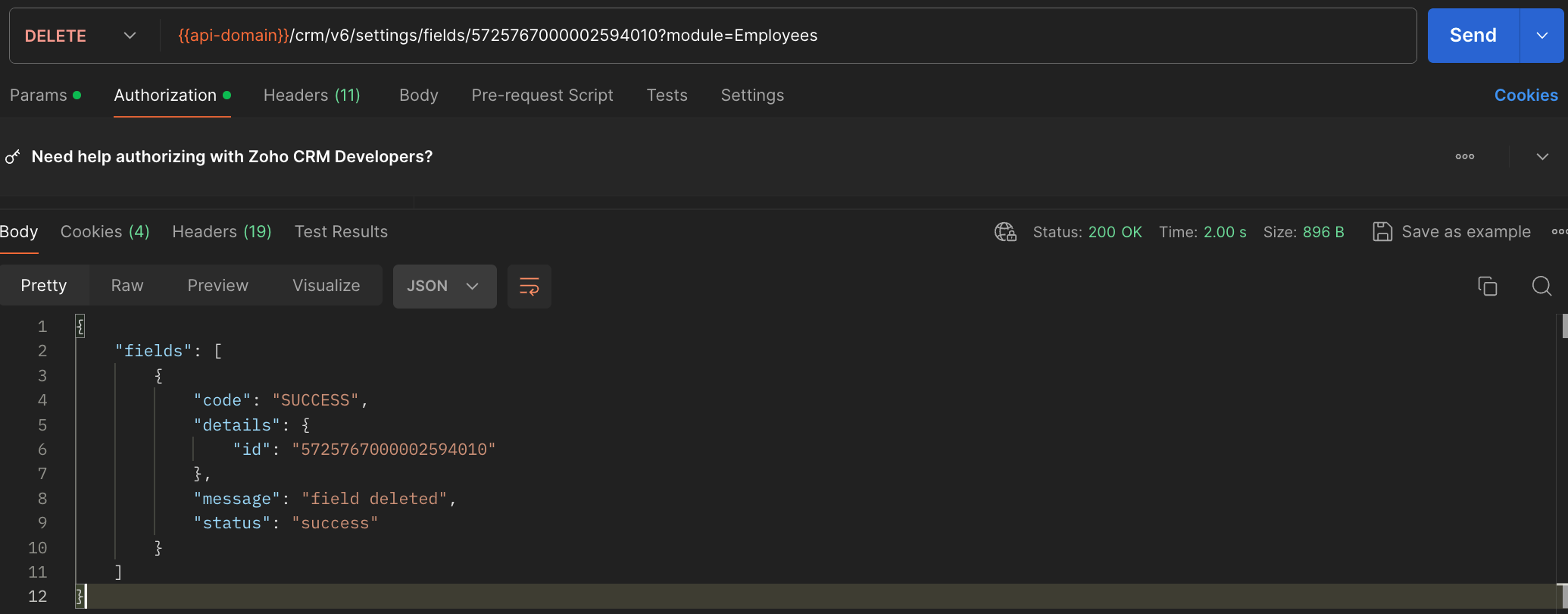
7. Deleting RTF using the Delete Custom Field API
General notes :
- Rich text fields are not supported in subforms, List View, Kanban View, Canvas View, Sheet View, Related Lists, Lookup popup, global search, filters and criteria, formula fields, report export, and integrations.
- Rich text fields are not supported in the Search API.
- Rich text fields are supported for importing and exporting records, using the Bulk APIs. The data will be exported as HTML content. For example, Patricia will be exported as <b>Patricia</b>.
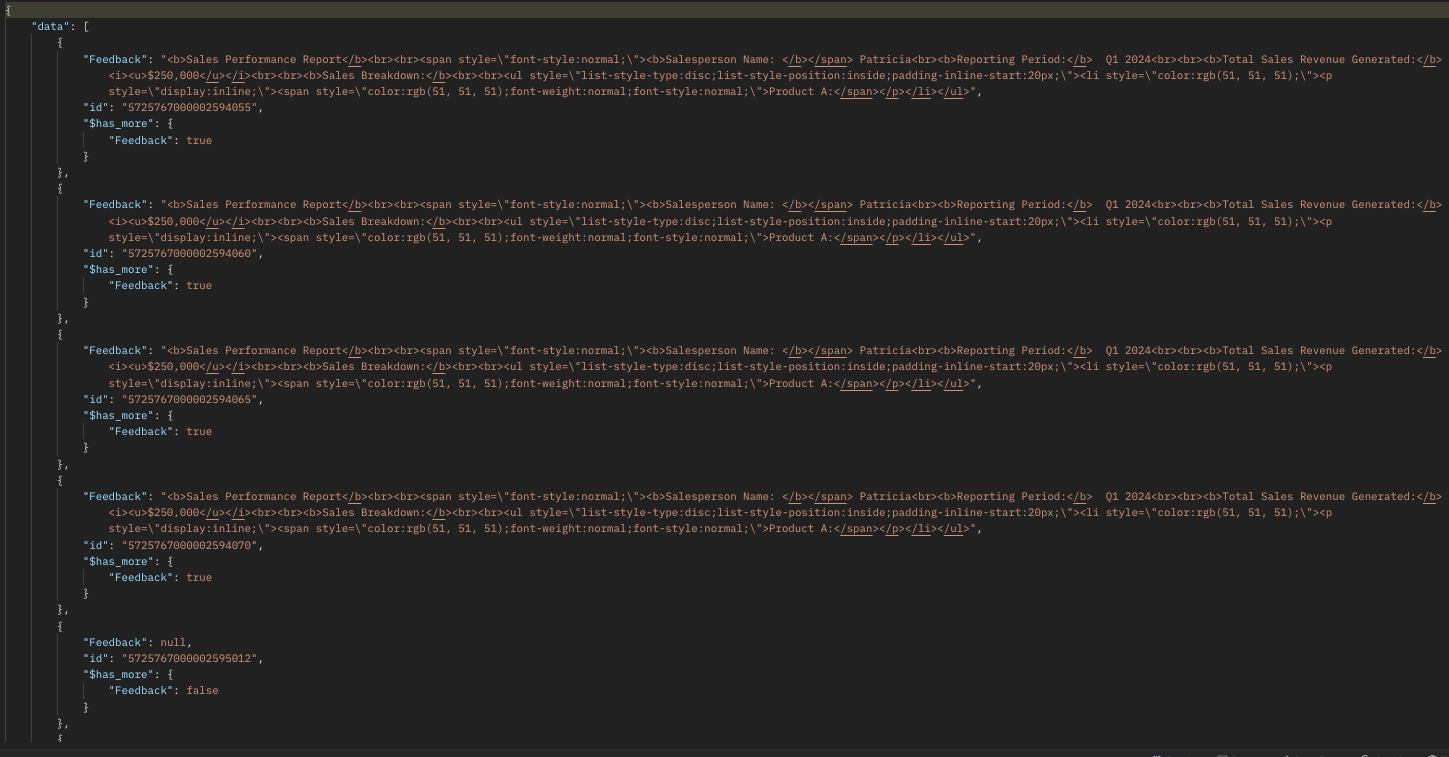
8. Rich Text Field using the COQL API
Retrieve the Rich Text Fields from a module through a COQL query. Note that RTFs cannot be used in the criteria. Similar to the GET - Records API, the COQL API response fetches up to 500 characters of the RTFs. To fetch its complete data, use the GET - Rich Text Field API.
Request URL : https://www.zohoapis.com/crm/v6/coql
Request Method : POST
Sample Input :
{ "select_query":"select 'Feedback' from Employees where Company is not null" } |
Response :
9. Rich Text Field using Bulk APIs
Bulk Read API allows you to fetch a large set of data i.e., you can fetch a maximum of 200,000 records in a single API call. You can export complete data of rich text fields in a module. Note that RTFs cannot be specified in the criteria.
Request URL: https://www.zohoapis.com/crm/bulk/v6/read
Request Method: POST
Sample input :
{ "callback": { "method": "post" }, "query": { "module": { "api_name": "Employees" }, "file_type": "ics" } } |
The Bulk Read API is an asynchronous API, the response will not be available instantly; the bulk read job is scheduled. Once the job is completed, it'll be notified in the callback URL. The records are available in a downloadable CSV file or ICS file (for events).
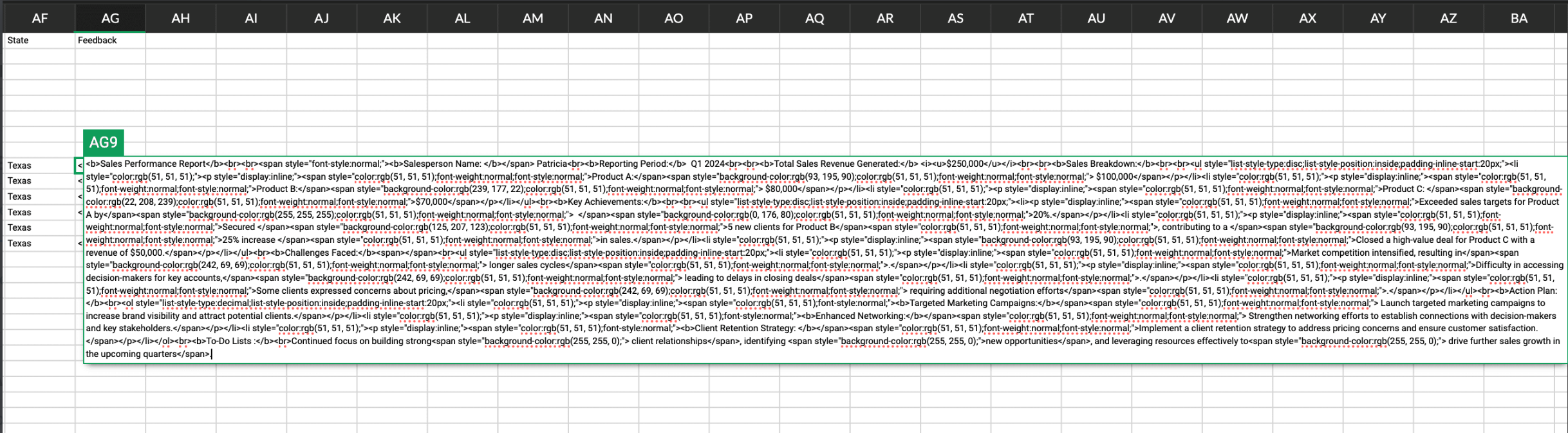
Below is a sample downloaded CSV file:
Unlike the GET - Records API, the Bulk Read API fetched the RTF's complete data.
See our Bulk Read API documentation to know how to view the status of the scheduled job and download the file in detail, along with more sample requests and responses.
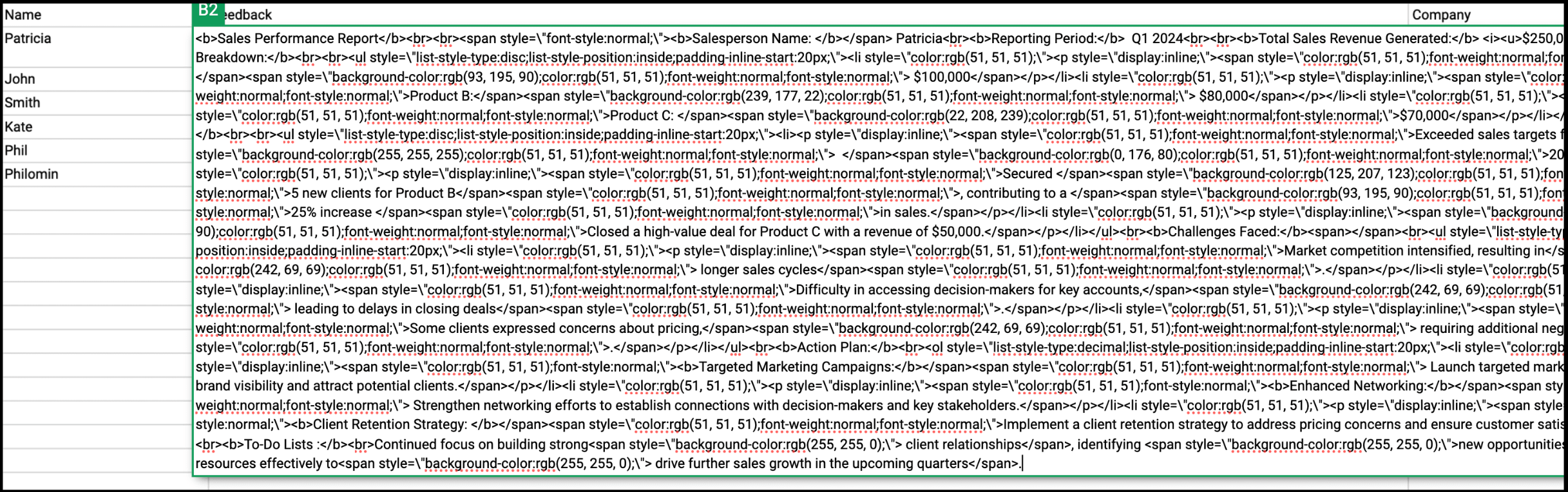
Bulk Write API allows you to insert, update, or upsert a large set of data. In the CSV file module, using the Bulk Write API, you can add up to 50000 characters to the RTFs for each record in a row.
Prepare your CSV file
The Bulk Write API only accepts a CSV file compressed into a ZIP file as input.
Below picture represents values added to the rich text field:
Please ZIP the CSV file once you add values to the Rich Text Field.
Upload your CSV file :
This involves making a POST API call, with the ZIP file containing the required data.
Headers
Header Name | Description |
feature | bulk-write |
X-CRM-ORG | Your zgid which you get from the Organization API |
Request URL: https://content.zohoapis.com/crm/v6/upload
Request Method: POST
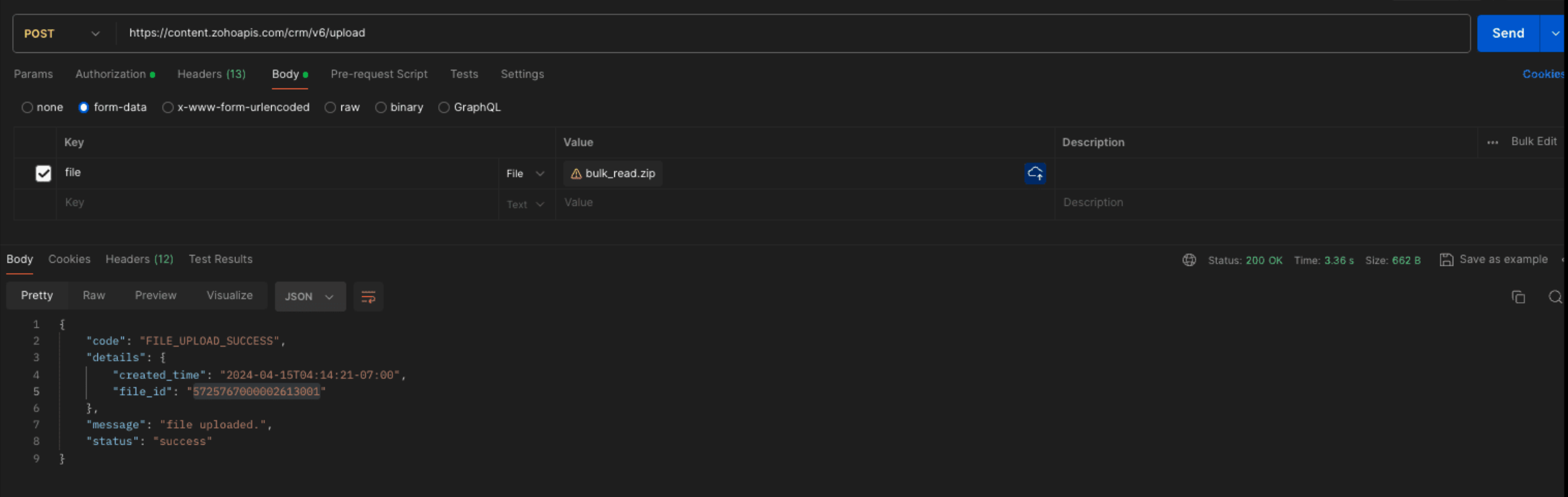
Create a bulk write job :
Request URL : {{api-domain}}/crm/bulk/v6/write
Request Method : POST
Sample Input for bulk insert :
{ "operation": "insert", "ignore_empty": true, "callback": { "url": "https://example.zoho.com/test", "method": "post" }, "resource": [ { "type": "data", "module": { "api_name": "Employees" }, "file_id": "5725767000002613001", "file_names": [ "Rich.csv" ], "field_mappings": [ { "api_name": "Name", "index": 0 }, { "api_name": "Feedback", "index": 1 }, { "api_name": "Company", "index": 2 } ] } ] } |
Refer to our Bulk Write API help document and get more information on how the Bulk Write API works, how to prepare your CSV file, and how to upload your CSV file, and how to check the job status.
We trust that this post meets your needs and is helpful. Let us know your thoughts in the comment section or reach out to us at support@zohocrm.com
Stay tuned for more insights in our upcoming Kaizen posts!
Cheers!

Previous Kaizen Post :
Additional Reading :
- API Help Documentation : Rich Text Field API
- Kaizen Series
- Knowledge Base Documentation

Join us for our upcoming Zoho CRM Developer Series: Zoho CRM APIs, where you can explore more about Zoho CRM APIs. Register Now!
Topic Participants
Subramanian K
Vigneshwaran K
Sticky Posts
Kaizen #217 - Actions APIs : Tasks
Welcome to another week of Kaizen! In last week's post we discussed Email Notifications APIs which act as the link between your Workflow automations and you. We have discussed how Zylker Cloud Services uses Email Notifications API in their custom dashboard.Kaizen #216 - Actions APIs : Email Notifications
Welcome to another week of Kaizen! For the last three weeks, we have been discussing Zylker's workflows. We successfully updated a dormant workflow, built a new one from the ground up and more. But our work is not finished—these automated processes areKaizen #152 - Client Script Support for the new Canvas Record Forms
Hello everyone! Have you ever wanted to trigger actions on click of a canvas button, icon, or text mandatory forms in Create/Edit and Clone Pages? Have you ever wanted to control how elements behave on the new Canvas Record Forms? This can be achievedKaizen #142: How to Navigate to Another Page in Zoho CRM using Client Script
Hello everyone! Welcome back to another exciting Kaizen post. In this post, let us see how you can you navigate to different Pages using Client Script. In this Kaizen post, Need to Navigate to different Pages Client Script ZDKs related to navigation A.Kaizen #210 - Answering your Questions | Event Management System using ZDK CLI
Hello Everyone, Welcome back to yet another post in the Kaizen Series! As you already may know, for the Kaizen #200 milestone, we asked for your feedback and many of you suggested topics for us to discuss. We have been writing on these topics over the
Recent Topics
Arattai App Features Update
1. Offline Messaging & Sync Enable users to compose messages without internet and deliver them automatically via peer-to-peer methods (Bluetooth/WiFi Direct) when nearby users are available. This would be a game-changer for rural India with unreliableHow to add Product Add-Ons, Mandatory Forms, and Auto-Save Address in Zoho Commerce
Hi all, I need help setting up several behaviors in Zoho Commerce. I can’t find the correct configuration options, so I want to confirm whether these are supported or if there is a workaround. 1. Product-Specific Add-Ons (Example: GWB Subscription) WhenZohomail
Im trying to setup email address zohoPROBLEMA
Salve, non riesco a inviare email, e mi esce una tabela errore temporaneo. come posso risolvere il problema ?Forever FREE Business Email with Zoho Mail
Forever FREE Business Email with Zoho Mail: is it available?Weekly Tips : Make collaboration effortless with Whiteboard in Zoho Mail
Working with your team often means switching between emails, notes, and other applications just to explain an idea. Maybe you are trying to sketch a layout, plan a workflow, or quickly brainstorm ideas—with text alone, things can get confusing. So howFormula field number of days between 2 dates
Hi, I want to have a formula field which calculates the following: IF EndDate < TODAY and Oproep is true (this is a checkbox field) than EndDate - StartDate, otherwise TODAY - StartDate It should calculate the number of days How can I write this for'email address already exists'
I deleted a user from my organization and want to use the same email address that user had, but the email address seems to still exist somewhere as I get 'email address already exists' when I try and create it. I have deleted the entire organization andZOHO reporting DKIM entries are not configured, when they have been configured and verified by 3rd parties
Why is ZOHO reporting to my organisation users the following: "The DKIM entries in your domain's DNS records are not configured. Please contact your administrator for configuring DKIM to ensure optimal RSVP invite delivery." When I have configured theManage Bookings directly from Zoho Mail
Greetings from the Zoho Bookings team! We’re introducing the new Zoho Bookings extension for Zoho Mail, designed to help you view appointments, copy time slots and share booking links without leaving your inbox. This integration brings scheduling rightMy notes from the past 2 months have disappeared
Hola, necesito ayuda urgente. Hoy, al iniciar sesión en mi Zoho Notebook como todos los días, me llevé una gran sorpresa al descubrir que todas mis notas de los últimos dos meses habían desaparecido. Estas notas son muy importantes para mí, ya que usoHow can I load a network into the cliq desktop app?
I have both the standard cliq log in for my org and I am part of a cliq network. In the browser I can choose which I log in to. However, in teh desktop app if I log in it will alwasy load my org's cliq. Can I switch this to the network I have createAbility to modify what displays in calendar invite?
I am a long time calendly user and want to make the switch to bookings. I understand that there is not currently a meets/hangouts integration, is one on the roadmap? Is there anyway I can modify the calendar invite to include the meet link? I can add it to the emails no problem, but I would also like it to display on their calendar. Is there some work around I can do to get it on the calendar? Also am I able to modify the calendar event title?Issue with Booking Confirmation Page Not Displaying, Leading to Customer Anxiety and Unnecessary Support Calls
I am writing to express my growing concern regarding the confirmation process in Zoho Bookings, particularly the inconsistent display of the confirmation page after a successful payment. As a mobile service provider, I rely on Zoho Bookings platform forIs it possible to turn off all capabilities for a customer to schedule, reschedule or cancel an appointment?
Is it possible to turn off all capabilities for a customer to schedule, reschedule or cancel an appointment? I would like to set it up so only staff can schedule appointments. Is this possible?Is there a way to generate a virtual meeting for a group service in Zoho Bookings?
Are virtual meetings not supported for group services/meetings? I have integrated Zoom with one-on-one services, but I need a way to create an online group meeting. ThanksWhere we can change the icon in social preview
Hi, we changed our logo, and the image that appear in preview (ex : when we post a appointment link somewhere) is still our old logo. I did change our logo in the org setting. https://bookings.zoho.com/app/#/home/dashboard/settings/basic-info?clview=falseZoho Bookings changes Lead Source
Hi. i would like to know if there's a way for Zoho Bookings to not change the lead source when booking a lead for an appointment as the lead source will be used in a report. Scenario: Lead source: Website after booking an appointment Lead source: Zoho Bookings Thanks. DanNeed to set workflow or journey wait time (time delay) in minutes, not hours
Minimum wait time for both Campaigns workflows and Marketing Automation journeys is one hour. I need one or the other to be set to several minutes (fraction of the hour). I tried to solve this by entering a fraction but the wait time data type is an integerSuggestion: Associating Assets with Company in Zoho FSM
Hello Team, I would like to share an idea based on practical experience. Currently, all assets in the Zoho FSM Asset module are linked to a specific contact person. I would like to know if it is possible to associate assets with a company instead. ThisZoho Inventory / Finance Suite - Extend Visibility of File Names on Attachment Fields
Hi Inventory / Finance Suite team, I noticed recently that when you add an attachment field to a module in Inventory, only the first 8 characters of the file name are visible on the details view. 8 characters is not a useful amount and there is plentyMany Notes Becoming Unusable
Hello. The Notebook app is becoming unusable. I'm getting odd-looking results from my searches. Some of the notes, after clicking on them, show an update button that does absolutely nothing. Not sure what has happened, but it would be nice to get thisKaizen #218: Actions APIs - Field Updates
Hello all!! Welcome back to a fresh Kaizen week. In the previous weeks, we covered Workflow Rules APIs, Actions APIs - Email Notification APIs, and Tasks Update APIs. This week, we will continue with another Actions API - the Field Update API in ZohoHow Contract Types and Templates Form the Backbone of Zoho Contracts
Every contract in Zoho Contracts starts with two essential elements: Contract Type and Template. These are not just administrative steps. They define how every contract in your organization is created, governed, and managed over time. Let us look at theZoho Books Finance Modules Not Accessible in Zoho CRM Mobile App
We have integrated Zoho CRM with Zoho Books using the Zoho Finance Suite integration. In the CRM web version, we can see the Finance modules (Estimates/Quotes, Invoices, Sales Orders, Items, Payments) and are able to create invoices and quotes directlyCRM Related list table in Zoho analytics
In Zoho Analytics, where can I view the tables created from zoho crm related lists? For example, in my Zoho CRM setup, I have added the Product module as a related list in the Lead module, and also the Lead module as a related list in the Product module.Zoho learn Custom portal - networkurl & CustomPortalId
I want to get my individual account’s networkurl and customportalId to use in this API: https://learn.zoho.com/learn/api/v1/portal/<networkurl>/customportal/<customportalId>/manual How can I retrieve the networkurl and customportalId using the API? IConnecting zoho creator to zoho writer to send prefilled documents
i will paste the worflow below // Get user's submitted data from the form userSalary = input.Current_Salary; userCIBIL = input.CIBIL_Score; userEmail = input.Email; userName = input.Name; // You need to get the Document ID from the URL of your Zoho WriterZoho Creator to Zoho Writer for prefilled documents...
In response to the question about connecting Zoho Creator to Zoho Writer for prefilled documents, I wanted to share a working implementation that demonstrates how to use the record_id parameter with the Zoho Writer Merge API. This allows Writer to automaticallyIntroducing our latest privacy enhancement - Hiding email IDs in Zoho Cliq Networks
Hello everyone, Zoho Cliq Networks offers a powerful collaboration platform that allows businesses to create dedicated digital workspaces for external vendors, partners, or individuals you want to communicate with professionally without adding them tozoho performance
OVERALL CONFIGURATION OF ZOHO PERFORMANCE Quarterly performance review Self rating and scoring Manager rating and scoringWhen will it be possible to edit Subform records via either views or tabular reports?
Hey there, data maintenance often requires mass update of quite a lot of records. While this is a piece of cake via either List view or Zoho sheet view, the same cannot be carried out for subform records yet. When one of the two options will be made available?Onboarding
Hello Team, Im yuktha working as HR at Ossisto Technologies. We are currently utilizing zoho for onboarding candidate. right now facing issue with onboarding Attaching the screenshots for your referenceArchiving Contacts
How do I archive a list of contacts, or individual contacts?How do I change a form's name? Why isn't this more intuitive?
Can someone please let me know how to change a form's name?Control Over Zia Generative AI Reply Assistance Behavior
Hello, I would like to request an enhancement to the Zia Generative AI feature, specifically concerning the Reply Assistance within Zoho Desk. Current Issue: When replying to a ticket, the Ticket Properties section is automatically replaced by the ZiaZia now integrated with Open AI in Zoho Desk
The powerful integration of Zia with OpenAI, has empowered Zoho Desk reach a new level of efficiency and performance. With contextual self-service capabilities, Zia enables agents to boost their productivity and delivers superior customer experiences.Zoho Desk Partners with Microsoft's M365 Copilot for seamless customer service experiences
Hello Zoho Desk users, We are happy to announce that Zoho Desk has partnered with Microsoft's M365 to empower customer service teams with enhanced capabilities and seamless experiences for agents. Microsoft announced their partnership during their keynoteEmployee self-service portal: Onboarding and continuous learning platform for support reps
Hello everyone, In any organization, employees must go through multiple courses to learn about the product, their organization's standards, and how to respond to customer queries using the knowledge base articles available. This typically requires completing2024 Email Authentication Standards: Elevating Security with Google and Yahoo
In contemporary email communication, email authentication plays a pivotal role in mitigating email fraud, spam, and phishing attacks. Brace yourself for a new level of security. Starting February 2024, Gmail and Yahoo will be implementing robust emailNext Page