[New] Target Meter component in Dashboards and the "Create Record" action in Workflows
Greetings,
I hope all of you are doing well. We're happy to announce a few recent enhancements we've made to Bigin. We'll go over each one in detail.
Target meter component in dashboards
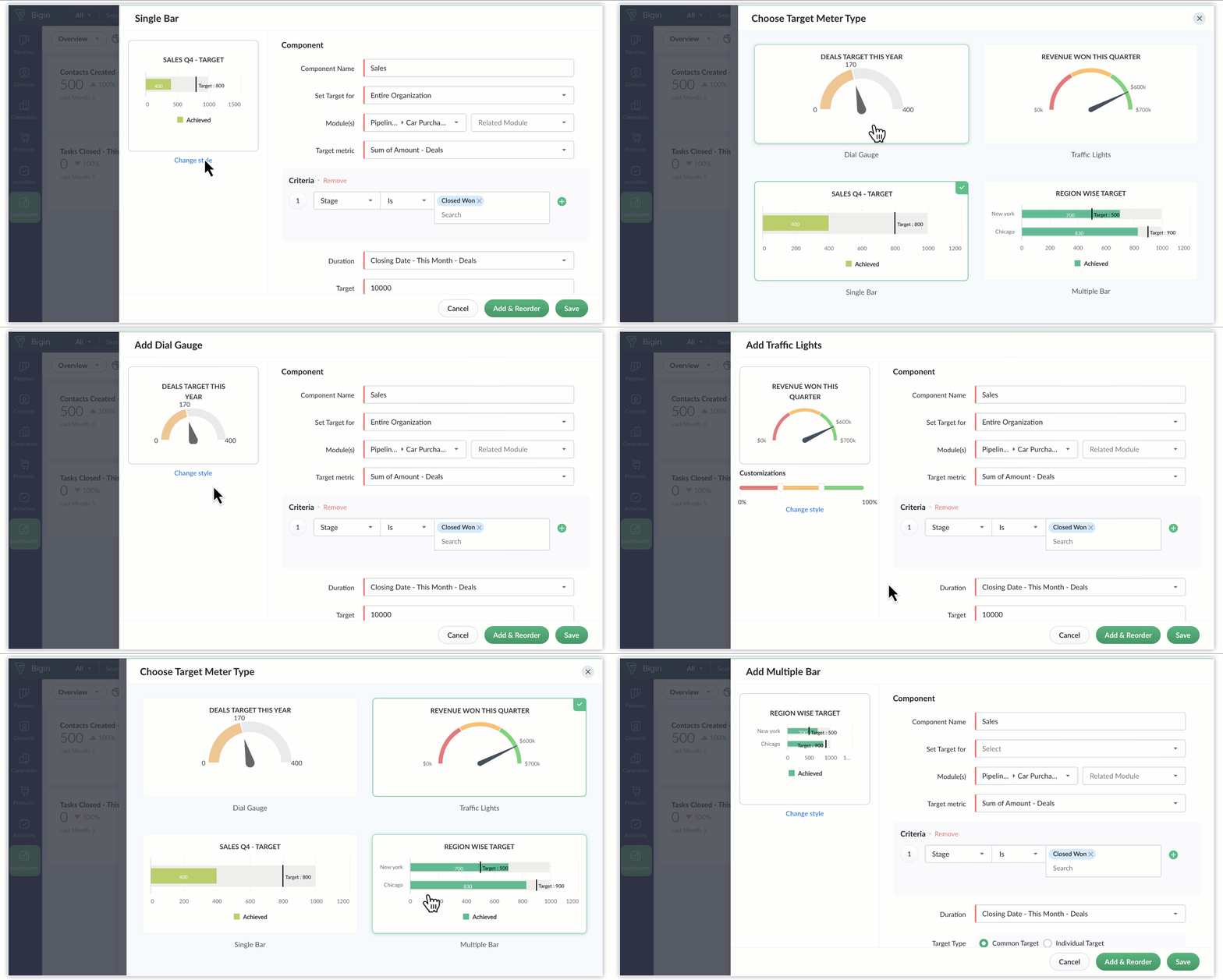
Currently, when creating dashboards in Bigin, you can create two types of components—KPIs and charts—to visualize various business metrics. Last week, we've introduced target meters: a new type of component that serves to strengthen data visualization in Bigin.
Let's say you want to set a goal for your team and monitor their progress periodically. In such scenarios, you can create a target meter component in Bigin's dashboards to set a goal for your team. These components provide a convenient way to visualize critical metrics in relation to the goal you set—such as this year's count of closed deals, last quarter's revenue, or this month's ticket resolution milestones—without the need to delve into exhaustive reports. You can set up target meters effortlessly, define the relevant parameters, and promptly obtain the desired data for analysis and tracking purposes.
The different types of target meters available are as follow:
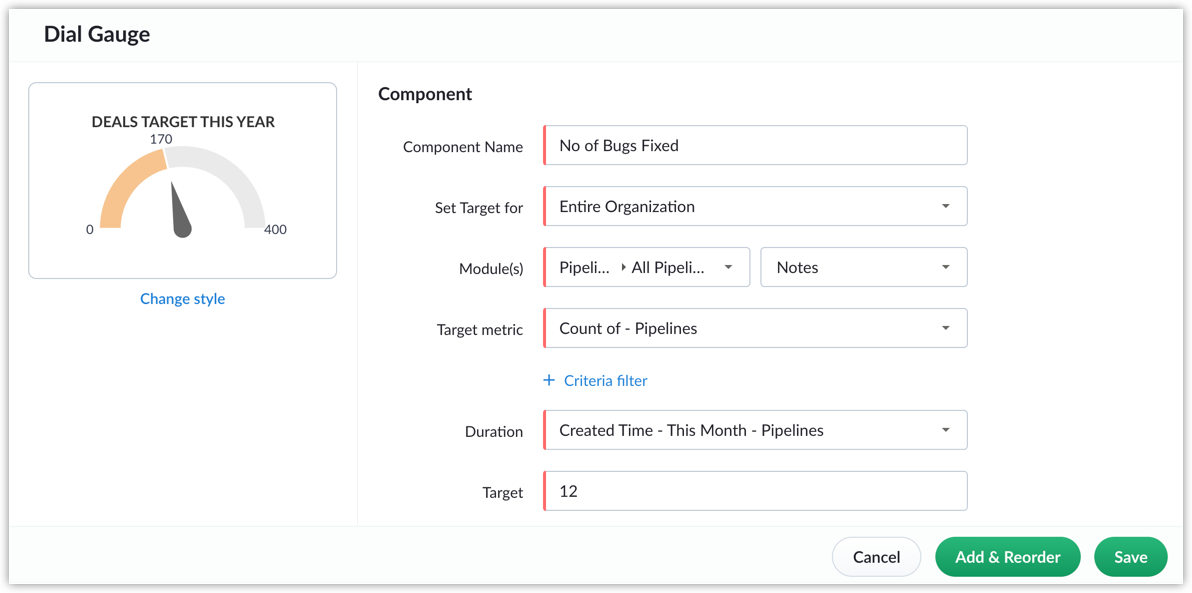
- Dial gauge: A dial gauge, as the name indicates, is a graphical depiction of progress that resembles a dial. It displays the goal at the curve's end, while an arrow indicates the current progress towards that goal.
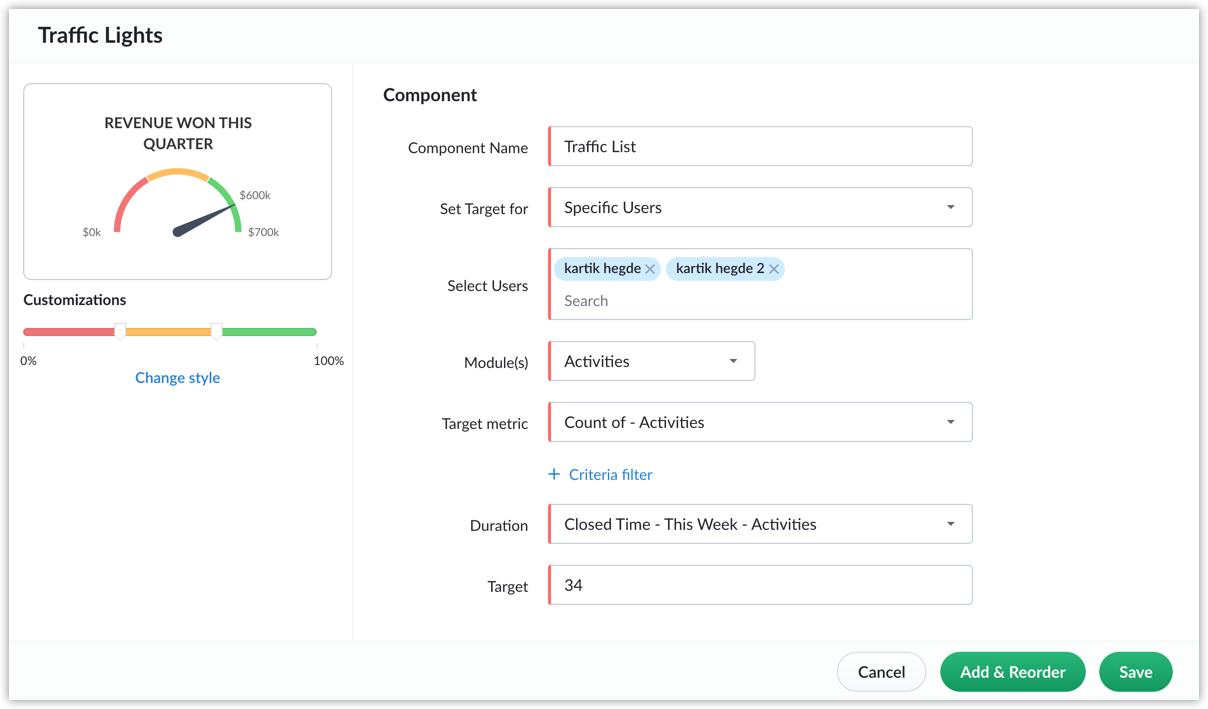
- Traffic light: Traffic lights share similarities with dial gauges, but offer enhanced visual progress tracking via colored indicators. Red (meaning well below target), orange (meaning mid-way to target), and green (meaning close to target) serve to signify different levels of target achievement, and these color categories can be configured manually. Employing color-coded target meters streamlines progress monitoring through visual cues, ensuring that you maintain alignment with your objectives.
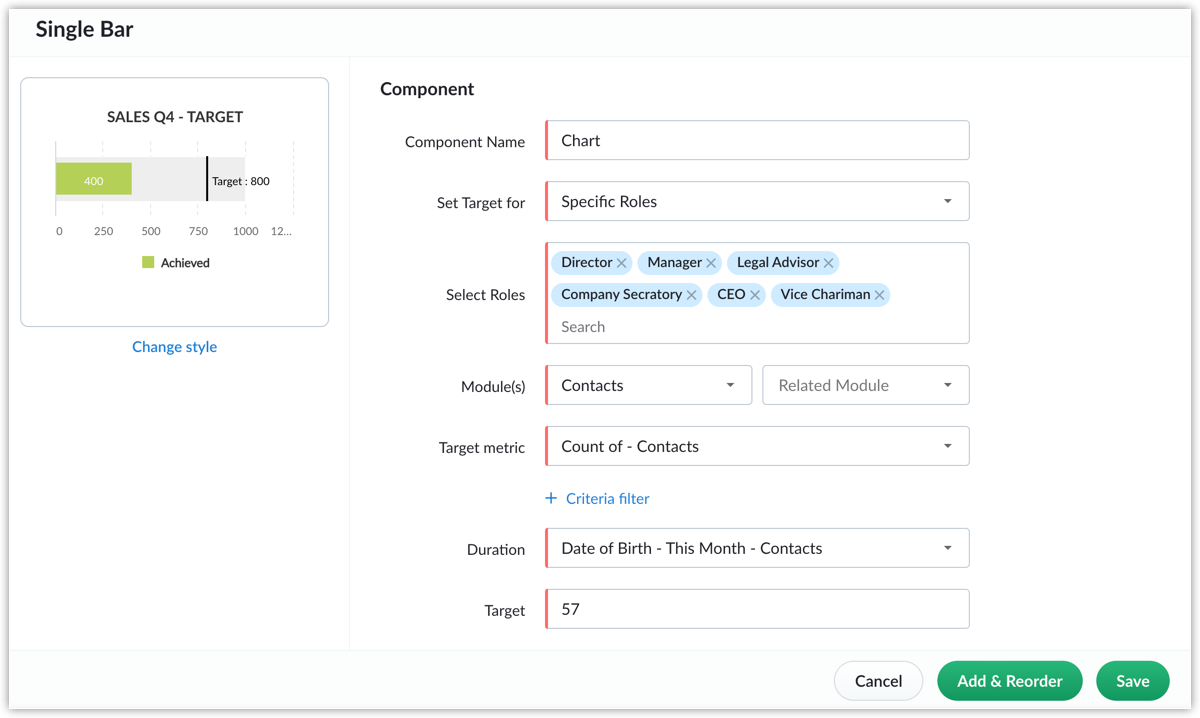
- Single bar: Bar meters consist of a main bar that represents the overall target and a secondary, smaller bar that indicates the current progress toward that target. These meters can be subdivided into various levels to enhance visual comprehension of the target's progress. Additionally, you can use the bar's color to signify the extent of a target's achievement up to now.
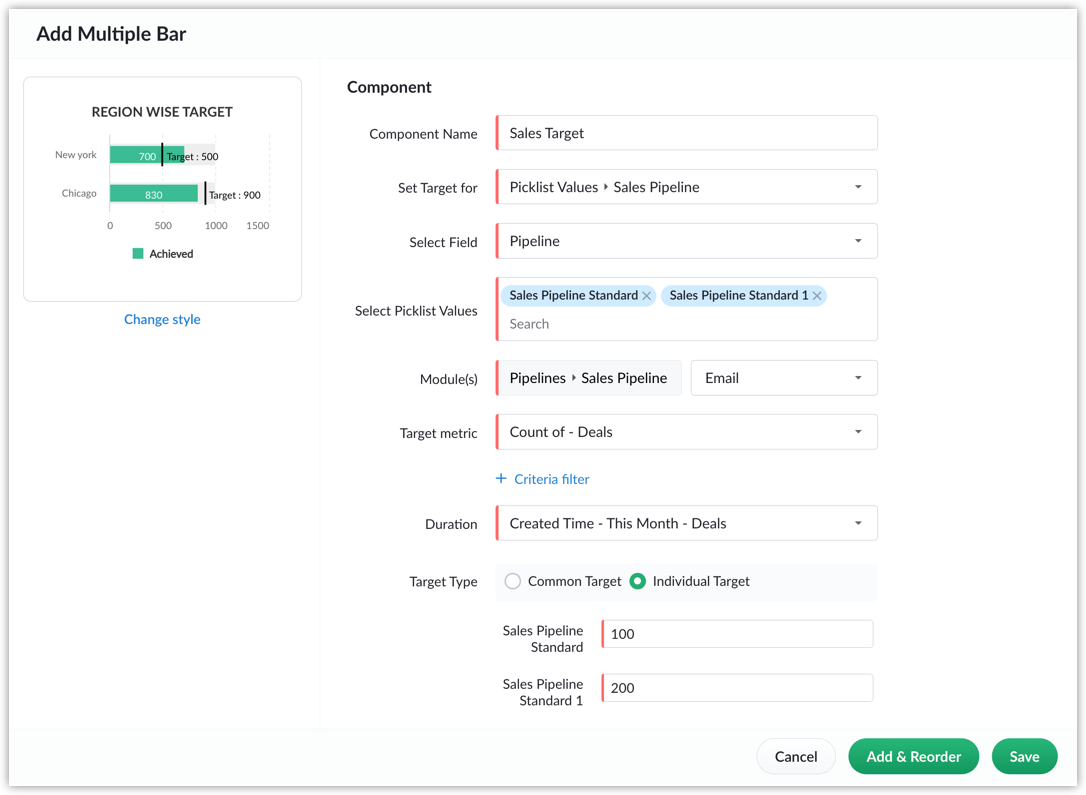
- Multiple bars: Multi-bar target meters serve as effective visual tools for comparing progress among multiple individuals in your team or other entities. You can set targets individually for each user/entity or set a common target for all users/entities. You can use multi-bar meters to track the progress of various metrics like sales reps' sales targets, the number of tickets agents have closed, and so on.
Notes
- This feature is available in Premier and Zoho One editions.
- Click on "Change Style" to alter the target meter type. All previously made configurations will remain unchanged.
"Create record" action in workflows
Let's say you want to create a new deal automatically every time you add a new contact. You can achieve this using the newly launched "create record" action in workflows. This feature enables you to automatically generate records in one module when an update occurs in another module, simplifying your tasks within Bigin. By setting up this automation, you can establish a workflow that automatically generates records in any module so that you don't have to do it manually each time.

Note
- You can add only one "create record" action per workflow. This ensures that the automation remains focused and doesn't create redundancies or conflicts within the workflow.
- Only workflows created in the Companies, Contacts, Tasks, and Events modules support the "create record" action. For the Pipelines module, you can use Connected Records.
Availability
- This feature is available for users in the Express, Premier, and Zoho One editions.
That's all for these enhancements. We sincerely hope you find these improvements useful. Please give them a try and provide us with feedback in the comments section below. Watch this space for future announcements.
Thanks and have a good day.
Topic Participants
Saishree T K
Sticky Posts
Schedule mass emails, view mass emails status and more!
Hello everyone, Mass emails help you communicate with multiple customers in a couple of clicks. We have introduced a Mass Emails dashboard in Bigin so that users can see the status of the mass emails like how many emails were opened, clicked and bounced.Introducing Bigin 360: Our new pricing edition with increased feature limits and pre-installed toppings
Dear Biginners Club, Today, we're pleased to launch a brand-new pricing edition called Bigin 360, our highest pricing edition that will sit on top of Express and Premier editions. It's been over four years since our launch, and we're receiving some great[New] Create invoices and contracts in minutes with Zoho Writer's Merge Templates for Bigin!
Do you often find yourself manually entering customer information in your business documents like invoices and contracts? This can be a time-consuming process that can take up valuable time from your business operations. With Zoho Writer's Merge TemplatesAnnouncing #BiginnersClub meetups in US, Middle East, India & UK (Free Event)
Exciting news, Bigin enthusiasts! #BiginnersClub meetups are back, and we're hitting some major cities this time, starting from October. Here's what you can expect: Meet our experts face-to-face Deep dive into Bigin and its advanced features PersonalisedIntroducing Forms: Streamline data collection with Bigin's new form builder.
Hello everyone, Bigin's web forms just got a makeover! We are excited to introduce Forms: an online form builder designed to meet all your data collection need. This revamp was inspired by your feedback, resulting in an upgraded and versatile version
Recent Topics
Kaizen #157: Flyouts in Client Script
Hello everyone! Welcome back to another exciting edition of our Kaizen series, where we explore fresh insights and innovative ideas to help you discover more and expand your knowledge!In this post, we'll walk through how to display Flyouts in Client ScriptHow get stock name from other column ?
How get stock name from other column ? e.g. =STOCK(C12;"price") where C12 is the code of the stockAdding a developer for editing the client application with a single user license
Hi, I want to know that I as a developer I developed one application and handed over to the customer who is using the application on a single user license. Now after6 months customer came back to me and needs some changes in the application. Can a customerDownload an email template in html code
Hello everyone, I have created an email template and I want to download it as html. How can i do that? I know you can do it via the campaigns-first create a campaign add the template and download it as html from there. But what if i don't want to createAttachment is not included in e-mails sent through Wordpress
I have a Wordpress site with Zeptomail Wordpress plugin installed and configured. E-mails are sent ok through Zeptomail but without the included attachment (.pdf file) Zeptomail is used to send tickets to customers through Zeptomail. E-Mails are generatedUpcoming Changes to the Timesheet Module
The Timesheet module will undergo a significant change in the upcoming weeks. To start with, we will be renaming Timesheet module to Time Logs. This update will go live early next week. Significance of this change This change will facilitate our nextBest way to schedule bill payments to vendors
I've integrated Forte so that I can convert POs to bills and make payments to my vendors all through Books. Is there a way to schedule the bill payments as some of my vendors are net 30, net 60 and even net 90 days. If I can't get this to work, I'll haveCant update image field after uploading image to ZFS
Hello i recently made an application in zoho creator for customer service where customers could upload their complaints every field has been mapped from creator into crm and works fine except for the image upload field i have tried every method to makeBilling Management: #4 Negate Risk Free with Advances
In the last post, we explored how unbilled charges accumulate before being invoiced. But what happens when businesses need money before service begins? Picture this: A construction company takes on a $500,000 commercial building project expected to lastIs there an equivalent to the radius search in RECRUIT available in the CRM
We have a need to find all Leads and/or Contacts within a given radius of a given location (most likely postcode) but also possibly an address. I was wondering whether anyone has found a way to achieve this in the CRM much as the radius search in RECRUITZoho CRM Inventory Management
What’s the difference between Zoho CRM’s inventory management features and Zoho Inventory? When is it better to use each one?Cannot Enable Picklist Field Dependency in Products or Custom Modules – Real Estate Setup
Hello Zoho Support, I am configuring Zoho CRM for real estate property management and need picklist field dependency: What I’ve tried: I started by customizing the Products module (Setup > Modules & Fields) to create “Property Type” (Housing, Land, Commercial)How to add application logo
I'm creating an application which i do not want it to show my organization logo so i have changed the setting but i cannot find where to upload/select the logo i wish to use for my application. I have seen something online about using Deluge and writingGet Workflow Metadata via API
Is there a way to get metadata on workflows and/or custom functions via API? I would like to automatically pull this information. I couldn't find it in the documentations, but I'm curious if there is an undocumented endpoint that could do this. ModerationZoho Projects - Q2 Updates | 2025
Hello Users, With this year's second quarter behind us, Zoho Projects is marching towards expanding its usability with a user-centered, more collaborative, customizable, and automated attribute. But before we chart out plans for what’s next, it’s worthFSM setup
So we have been tinkering with FSM to see if it is going to be for us. Now is the time to bite the bullet and link it to our zoho books and zoho crm. The help guides are good but it would really help if they were a bit more in depth on the intergrations.Upcoming Updates to the Employees Module in Zoho Payroll (US)
We've made a couple of updates to the Employees module in Zoho Payroll (latest version of the US edition). These changes will go live today. While creating an employee Currently, the Compensation Details section is part of the Basic Details step, wherePossible to Turn Off Automatic Notifications for Approvals?
Hello, This is another question regarding the approval process. First a bit of background: Each of our accounts is assigned a rank based on potential sales. In Zoho, the account rank field is a drop-down with the 5 rank levels and is located on the accountZOHO Creator subform link
Dear Community Support, I am looking for some guidance on how to add a clickable link within a Zoho Creator subform. The goal is for this link to redirect users to another Creator form where they can edit the data related to the specific row they clickedAllow Resource to Accept or Reject an Appointment
I have heard that this can be done, is there any documentation on how?Create new Account with contact
Hi I can create a new Account and, as part of that process, add a primary contact (First name, last name) and Email. But THIS contact does NOT appear in Contacts. How can I make sure the Contact added when creating an Account is also listed as a Contact?Custom Fonts in Zoho CRM Template Builder
Hi, I am currently creating a new template for our quotes using the Zoho CRM template builder. However, I noticed that there is no option to add custom fonts to the template builder. It would greatly enhance the flexibility and branding capabilities ifPython - code studio
Hi, I see the code studio is "coming soon". We have some files that will require some more complex transformation, is this feature far off? It appears to have been released in Zoho Analytics alreadySync desktop folders instantly with WorkDrive TrueSync (Beta)
Keeping your important files backed up and accessible has never been easier! With WorkDrive desktop app (TrueSync), you can now automatically sync specific desktop folders to WorkDrive Web, ensuring seamless, real-time updates across devices. Important:How To Insert Data into Zoho CRM Organization
Hi Team I have this organization - https://crm.zoho.com/crm/org83259xxxx/tab/Leads I want to insert data into this Leads module, what is the correct endpoint for doing so ? Also I have using ZohoCRM.modules.ALL scope and generated necessary tokens.Where can I get Equation Editor por Zoho Writer?
I need to use Math Formulas in my document. Thank you.How can I get base64 string from filecontent in widget
Hi, I have a react js widget which has the signature pad. Now, I am saving the signature in signature field in zoho creator form. If I open the edit report record in widget then I want to display the Signature back in signature field. I am using readFileCreator roadmap for the rest of 2022
Hi everyone, Hope you're all good! Thanks for continuing to make this community engaging and informative. Today we'd like to share with you our plans for the near future of Creator. We always strive to strike a good balance of features and enhancementsFiltering repport for portal users
Salut, I have a weird problem that I just cannot figure out : When I enter information as administrator on behalf of a "supplier" portal user (in his "inventory" in a shared inventory system), I can see it, "customer" portal users can see it, but theZoho Inventory. Preventing Negative Stock in Sales Orders – Best Practices?
Dear Zoho Inventory Community, We’re a small business using Zoho Inventory with a team of sales managers. Unfortunately, some employees occasionally overlook stock levels during order processing, leading to negative inventory issues. Is there a way toIntegración Books para cumplir la ley Crea y Crece y Ley Antifraude (VeriFactu)
Hola: En principio, en julio de 2025, entra en vigor la ley Crea y Crece y Ley Antifraude (VeriFactu). ¿Sabéis si Zoho va a cumplir con la ley para cumplir con la facturación electrónica conectada a Hacienda? GraciasZoho One - Syncing Merchants and Vendors Between Zoho Expense and Zoho Books
Hi, I'm exploring the features of Zoho One under the trial subscription and have encountered an issue with syncing Merchant information between Zoho Expense and Zoho Books. While utilizing Zoho Expense to capture receipts, I noticed that when I submitIs Zoho Sheet available for Linux ?
Is Zoho Sheet available for Linux ?Offline support for mobile app
Accessing your files and folders from your mobile devices is now quicker and simpler, thanks to the power of offline support. Whether on an Android or iOS device, you can use the Offline function to save files and folders, so you can review them evenZoho Sheet for Desktop
Does Zoho plans to develop a Desktop version of Sheet that installs on the computer like was done with Writer?Create static subforms in Zoho CRM: streamline data entry with pre-defined values
Last modified on (9 July, 2025): This feature was available in early access and is currently being rolled out to customers in phases. Currently available for users in the the AU, CA, and SA DCs. It will be enabled for the remaining DCs in the next coupleBUTTONS SHOWN AS AN ICON ON A REPORT
Hi Is there any way to create an action button but show it as an icon on a report please? As per the attached example? So if the user clicks the icon, it triggers an action?Dropshipping Address - Does Not Show on Invoice Correctly
When a dropshipping address is used for a customer, the correct ship-to address does not seem to show on the Invoice. It shows correctly on the Sales Order, Shipment Order, and Package, just not the Invoice. This is a problem, because the company beingRFQ MODEL
A Request for quotation model is used for Purchase Inquiries to multiple vendors. The Item is Created and then selected to send it to various vendors , once the Prices are received , a comparative chart is made for the user. this will help Zoho booksWill zoho thrive be integrated with Zoho Books?
titleNext Page