Spotlight 34: Handle event engagement in one space
Having one place where you can run sessions, promote networking, and drive attention to exhibitor booths can help increase engagement at events.
In Zoho Backstage's Virtual Space, you can provide event participants with a unified experience to join sessions, participate in discussions using networking tables, and interact with exhibitors, all from one place.
Set up the Virtual Space
Every time you open a session, visit a booth, or join a networking table, you will be redirected to the Virtual Space. Once you have entered the Virtual Space through any of the above options, you can easily switch between these options inside the Virtual Space itself. Event participants also get to experience the same thing when they do this from the event microsite.
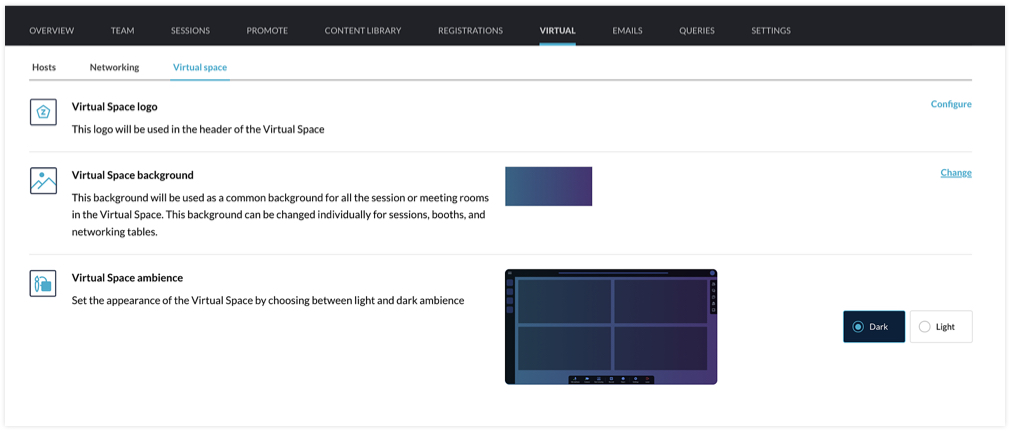
You can customize the Virtual Space to reflect your brand or event's theme by choosing a logo, a background, and the ambience. The logo you've set for the event will be chosen for the Virtual Space by default, but you can select a different one if needed. For the background, the option that you choose will be applied for all sessions, tables, and meeting rooms in exhibitor booths. You can even modify the background scheme at a granular level by selecting a different background for individual booths, sessions, or tables. The Virtual Space ambience can either be set to Dark or Light.
Set the stage for sessions
When hosting a session, you can go to the event microsite and visit the Agenda page. There you can click the Start session button. Alternatively, you can also do this from Backstage. Go to the Conduct Dashboard and click the Present sessions tab. Next, click a session in the timeline on the left and click the Start session button. You can then broadcast the session with the help of the webcasting service that you've selected.
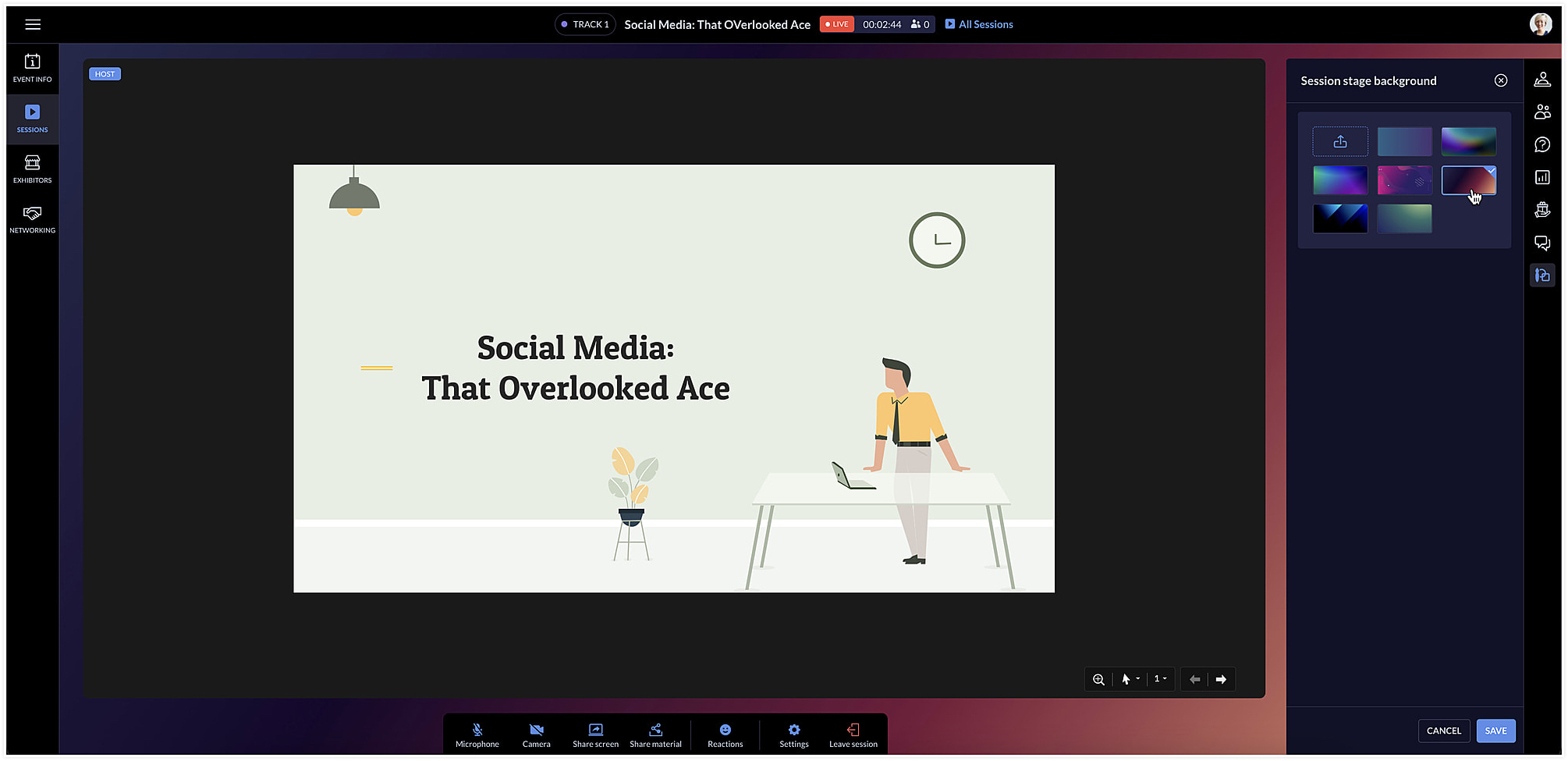
The session area will be designed based on the Virtual Space settings you've chosen. To change the background color for a specific session, click the Session stage background icon [ ] at the right and choose a background option from the list.
] at the right and choose a background option from the list.Facilitate communication with networking tables
Networking tables can be an opportunity for event participants to make important connections. Think of them as similar to round table discussions that take place at a physical event. Attendees can take a seat at a virtual networking table and interact with others there. Networking tables can be used by anyone who is a part of the event such as speakers, attendees, sponsors, or event exhibitors.
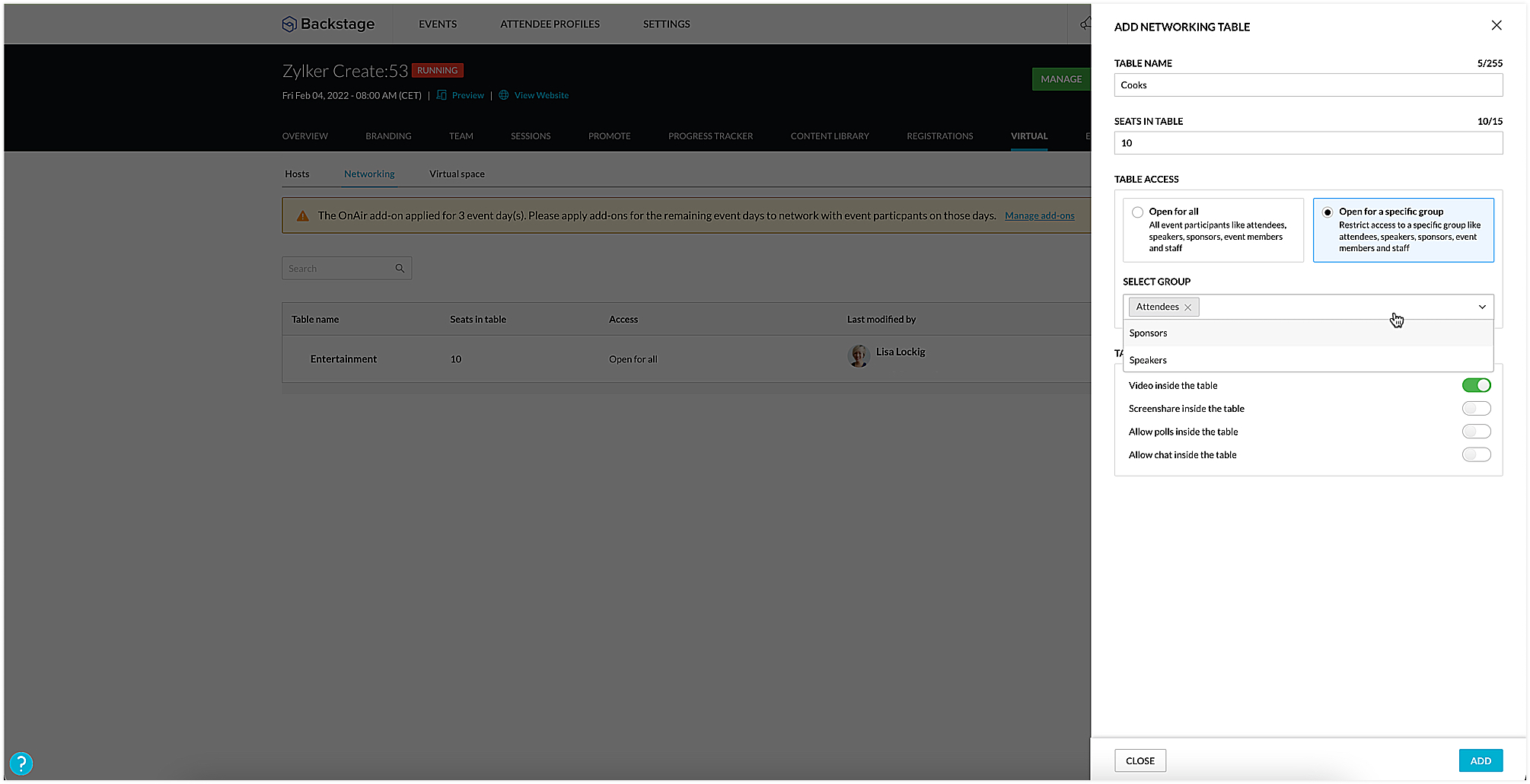
To create a networking table, go to the Manage Dashboard and click the Virtual tab, then click the Networking tab. Here you can say how many seats must be available and enable options such as chat, video stream, polls, or screen sharing for everyone at the table, if necessary. You could also choose to make tables exclusive so that they will be available only to certain participants. To do this, select the Open for a specific group radio button, and select the group you want to make them available to.
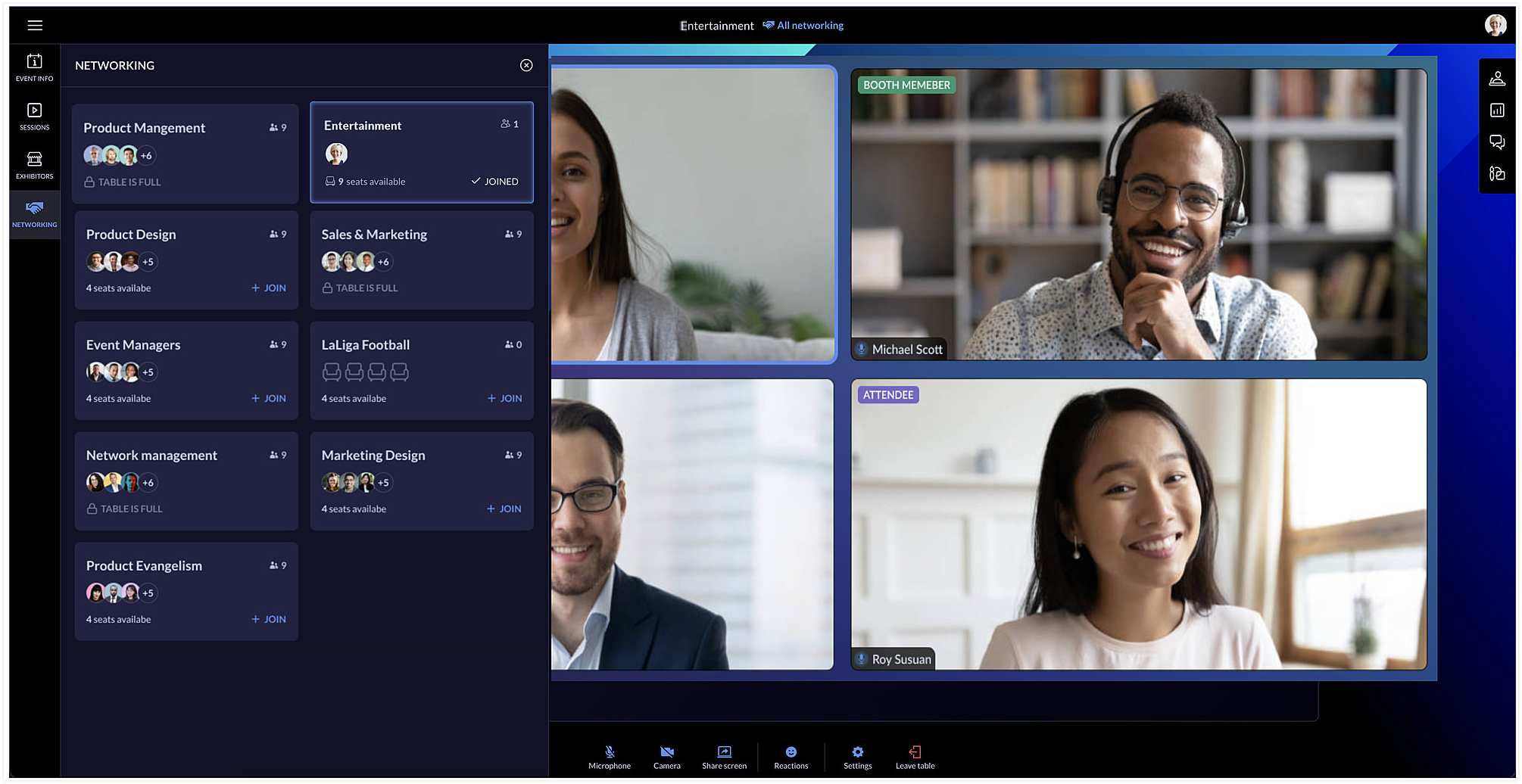
Event team members can join networking tables to take part in the discussion or just observe the conversation. Event members who join networking tables can manage ongoing interactions by muting or unmuting the mics or pausing the video stream of participants.
Each table can have a background of its own too. You can do this by clicking the Networking tab in the Virtual Space and clicking the Table background icon [ ].
].
].Showcase exhibitors to interest attendees
The Virtual Space also includes the Exhibitors tab, which lists all the exhibitors who are associated with your event. Exhibitors can send a request to the event team through the event microsite. Once the request is approved, they can conduct meetings with interested booth visitors during the virtual event.
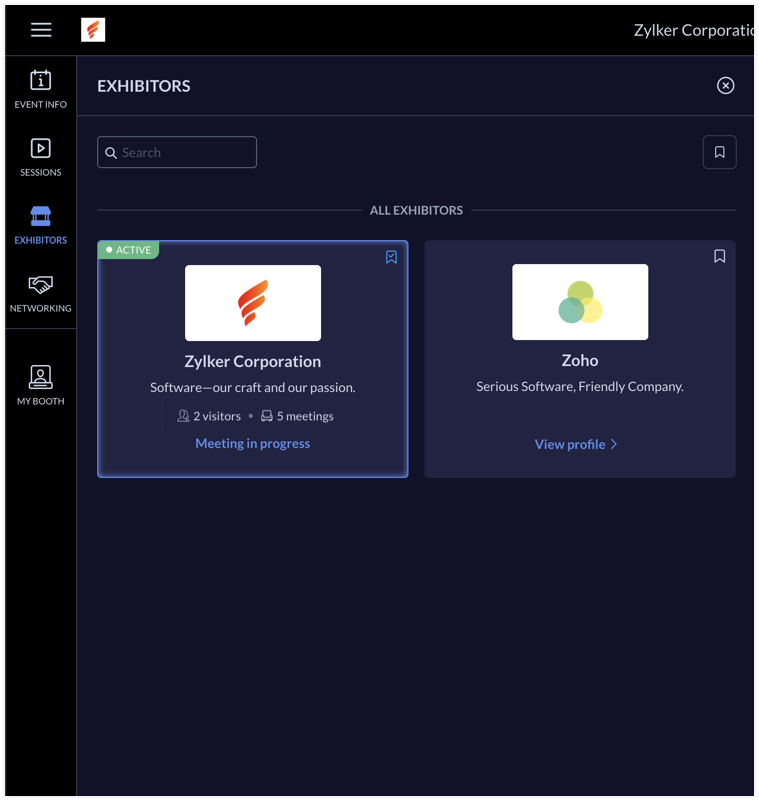
Exhibitors can use the rehearsal option before the event to practice meeting flow with test participants. During the event, the My Booth tab in the Virtual Space gives an overview of the exhibitor's information and also the members who are available in the booth. The number of ongoing meetings and visitors who are in the waiting room will be visible here. An exhibitor's booth background scheme can also be modified in the Virtual Space using the Expo meeting background icon [ ].
].
].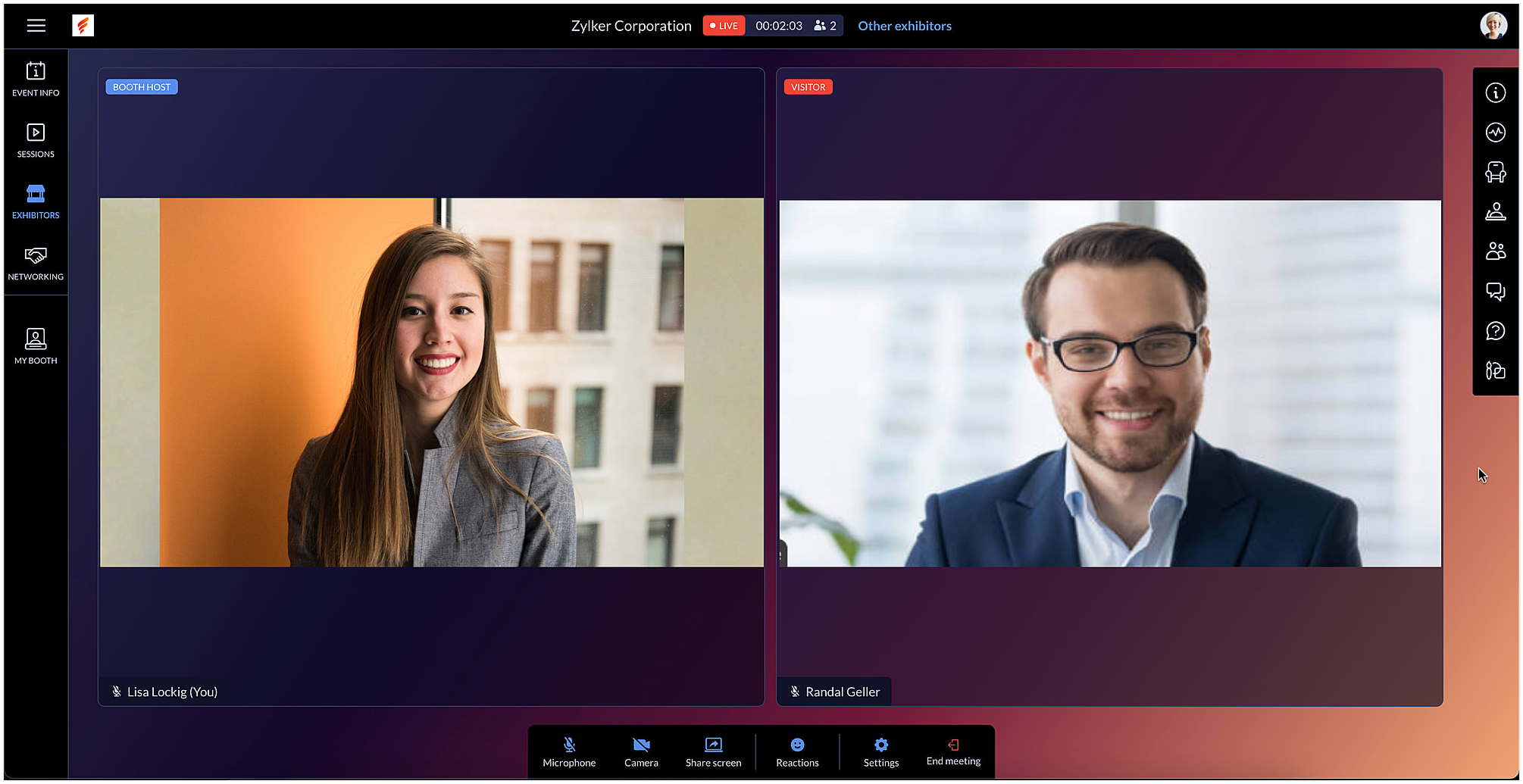
Exhibitors can also use the chat and questions option to interact with visitors when meeting with them. When viewing information for other exhibitors in the Exhibitors tab, you can do this without leaving an ongoing meeting, if you're a part of one.
After the event is over, exhibitors can export chat messages from the event microsite and, based on the permission given, they can also view and export the lead list from the Leads tab.
In Backstage, you can see an overview for details regarding exhibitors and their booths. To view this, go to the Overview tab in the Manage Dashboard and click the Exhibitors tile. Here you can keep track of booth purchases, view the sales overview for booths, and also examine analytics for meetings in booths.
Engage event participants in the Virtual Space and customize it to match your event's style. You can also start a discussion about this in our community or write to us at support@zohobackstage.com with your thoughts or questions.
Happy organizing!
Topic Participants
Tina Samuel
Sticky Posts
Spotlight 26: Host interactive virtual sessions with Backstage OnAir
According to a recent survey by Markletic, two of the biggest challenges organizers face when hosting online events are attendee engagement and interaction. Where in-person events bank on the impact of face-to-face communication to engage attendees, virtual
Recent Topics
Prevent Unapproved Quotes from Exporting to Zoho CRM Finance Module
Is it possible to prevent unapproved quotes in Zoho Books from being exported from Zoho Finance module inside Zoho CRM?Default font size for printing is too big
A recent issue in printing e mails is that the default font size is huge. This happens in both Edge and Firefox. In order to get what I would call a "normal" printout of an e mail it is necessary to go into the printer preferences / options and set the scale to 75%, otherwise a short e mail with signature and logos etc printed at 100% can take 3 or 4 pages. The annoying thing is that it is necessary to do this each time a printout is to be made as a change in scale only applies to that particularRequest for Auto PO - Min–Max based Automated Purchase Feature
Dear Zoho POS Team, I’m writing to request a feature enhancement that would significantly streamline inventory management for businesses using Zoho POS — particularly supermarkets, FMCG retail, and multi-store operations like ours. Feature Requested:Export Invoices to XML file
Namaste! ZOHO suite of Apps is awesome and we as Partner, would like to use and implement the app´s from the Financial suite like ZOHO Invoice, but, in Portugal, we can only use certified Invoice Software and for this reason, we need to develop/customize on top of ZOHO Invoice to create an XML file with specific information and after this, go to the government and certified the software. As soon as we have for example, ZOHO CRM integrated with ZOHO Invoice up and running, our business opportunitiesissue with deluge script
i used chat gpt to build this script and I am getting 2 errors which I cannot figure out how to fix: void monthly_sales_order_generation() { try { // ---------------- CONFIG ------------------- analytics_url_1 = "https://analytics.zoho.com/api/<workspaceID>/report/<reportID1>/data";Introducing LinkedIn Apply Connect for Zoho Recruit
Attract up to 3x more qualified candidates and hire more efficiently with LinkedIn Apply Connect. Let candidates fill-in job applications without any redirections, gain deeper insights with applicant highlights within Zoho Recruit, and keep candidatesRecruit paid support?
Hi all, Could anyone who has paid support package advise if it provides value for money with regards to support response times? Exploring the idea as unfortunately when we have faced issues with Recruit it has been a 7+ day timescale from reporting toTicket Status email
Good day, This was discussed in the past, but it would be helpful if we could have the system assign a custom response to a status. We have various statuses for tickets, e.g. "closed due to no response", or "Pending Status", it would be helpful for theFuture Orders - Due Date
Hi In my role, I can receive tickets where the work required is requested months in advance. Using a Future Orders option, which I believe was setup under the On Hold status type, hides the Due Date, in all views/ticket etc. Whilst I understand the reasoningIntroducing Withdrawal Reasons for Offers
We’re excited to introduce a new enhancement to the Offer module that brings more clarity and accountability to every withdrawn offer. The Withdrawal Reason update ensures that each withdrawal — manual or automatic — is backed by a clear explanation,Zoho Creator customer portal users
Hi, I'm in a Zoho One subscription with our company. I'm running a project now that involves creating a Zoho Creater application and using the Zoho Creator Customer Portal. At most we need 25 customer portal users. In our Zoho One plan we only get 3GPS tracking only or Check out facility
Dear Team, Zoho CRM is quite robust CRM but till date i was waiting for the feature of having GPS tracking of Sales employees which is a common demand by all customers for thier field sales executives. We cover them by saying that CRM provides CheckinAppraisals on Employee Information Profile
Is it possible to show completed appraisals on each employee's "Employee Information" page? I would presume at the bottom - similar to the "Related Lists" concept in Zoho CRM. Obviously view access would be limited to employee and appropriate other rolesKaizen #220: Actions API - Webhooks APIs - Part 2
Hello all!! Welcome back to the follow-up Kaizen post of Kaizen #219: Actions API - Webhooks APIs - Part 1. In the previous week, we covered how to configure a basic Webhook and how to include Headers, Body, and URL Parameters using both the POST WebhookStandard Payment Term is not pulled from account to quotation
Hey Team There seems to be something off. I do have "Net 30" as my default payment term in Zoho Books for my customers. If, from the customer overview or quote section, I create a new Quotation, the payment terms field stays blank and doesn't get theManage your invoices from Bigin's mobile app (iOS)
Hello everyone! We're happy to announce that users can now integrate Zoho Books with the latest version of Bigin's iOS app. Zoho Books can be integrated with Bigin only via the web application. Users can view the Zoho Books tab in the detail pages ofSystematic SPF alignment issues with Zoho subdomains
Analysis Period: August 19 - September 1, 2025 PROBLEM SUMMARY Multiple Zoho services are causing systematic SPF authentication failures in DMARC reports from major email providers (Google, Microsoft, Zoho). While emails are successfully delivered dueAccessibility controls and multilingual captcha authorization for Help Center users
Hello everyone, As part of our ongoing effort to improve user experience, we are excited about the accessibility controls and predefined accessibility personas added in the Help Center, similar to what is already available in Zoho Desk. Help Center usersZoho Sign + Zoho CRM : la solution pour simplifier vos accords de vente
La conclusion d’un contrat de vente nécessite de nombreuses étapes : préparation de documents, validations successives et collecte des signatures. Les équipes commerciales passent souvent par plusieurs cycles de collaboration et de révision, tout en assurantItem/service subtotal
Just discovered & really pleased that we can drag to re-order the line items in Sales orders & Invoices, a very nice feature which doesn't seem to be documented? It would be nice to be able to insert a subtotal as a line item to complete this great featureSend email template "permission denied to access the api"
Hello, Per the title, I'm trying to send a Zoho CRM Email template based on the advice given here: https://help.zoho.com/portal/en/community/topic/specify-an-email-template-when-sending-emails-in-custom-functions (I'd prefer to send right from Delugehow to Solve Conflict Invoices in Zoho POS
Hello Team, I am facing a repeated issue in Zoho POS while saving a sale that contains service-based items. My products are intentionally created as Service (Non-Inventory) items because I do not want to track stock for them. However, every time I tryCopy, Paste, Highlighted text
when i copy paste text it gets highlighted. Fix this. WTF is with this black highlight ? Fix copy pasting. Some people pay for using this mail service.Pricing Strategies: #6 Common Mistakes while Configuring Pricing
"Why does this month's billing feel messy again?" That was the exact line Priya muttered while staring at the spreadsheet full of edited pricing, one-off discounts and mismatched subscription details. Her business was growing, but the pricing machinePublish to LinkedIn via API
Hi, Is it possible to publish a job opening to LinkedIn (paid job slots) if creating a job opening via api / deluge function? Or is the user required to manually publish via the job boards process? Many Thanks AdrianFSM - Associating and selecting Contacts based on Service Addresses
Hi FSM team, I've come across an FSM limitation I wanted to share for improvement. I'm currently configuring FSM for a client who provides heating system install and maintenance services. The are often sub contracted by building management companies toDo Unpublished Products in Shopify Sync to Zoho POS?
Will an unpublished product in Shopify sync to Zoho POS? I would like to know how Zoho POS handles products that are in draft/unpublished status in Shopify.Problem in Zoho POS frontend ERP.
We are facing some difficulties in our billing and inventory processes and require your support to resolve them at the earliest. Customer Advance Payments We receive advance payments from customers for upcoming sales. Please guide us on how to recordCategorize Items with Item Headers
Hello customers, Did you ever want to classify items based on specific categories to help your customers understand your invoice better? With the new Item Header feature, you can easily categorize items in your invoices and estimates and give them a common title. Item Headers are available in the Invoices, the Recurring Invoices and the Estimates module. It can be carried forward from estimates to invoices at the time of converting the estimates. To add an item header: Go to the Estimates, InvoicesDiscount on the transaction level in POS
"Is it possible to apply a discount on the total bill before tax in Zoho POS?" I want to apply a discount on the total transaction amount in Zoho POS, but the discount should be calculated before the taxes are applied. Is there an option to do this inCreate Tasklist with Tasklist Template using API v3
In the old API, we could mention the parameter 'task_template_id' when creating a tasklist via API to apply a tasklist template: https://www.zoho.com/projects/help/rest-api/tasklists-api.html#create-tasklist In API v3 there does not seem to be a way toSend Automated WhatsApp Messages and Leverage the Improved WhatsApp Templates
Greetings, I hope all of you are doing well. We're excited to announce a major upgrade to Bigin's WhatsApp integration that brings more flexibility, interactivity, and automation to your customer messaging. WhatsApp message automation You can now useJobs at multiple locations
Hi A lot of times we have same job open at multiple locations. So I would like an option where we can create a job and choose multiple locations. Currently we have to create individual jobs for each location. If we can create one job and mention multipleTag Adding Option in Kanban Card Customization Bigin CRM Mobile App
I would like to request an option to add and display tags on Kanban cards in the Bigin CRM mobile app. This feature would make it easier to categorize deals and quickly identify priorities while working on the go.Empowered Custom Views: Cross-Module Criteria Now Supported in Zoho CRM
Hello everyone, We’re excited to introduce cross-module criteria support in custom views! Custom views provide personalized perspectives on your data and that you can save for future use. You can share these views with all users or specific individualsAssociating a Candidate to a Job Listing
Hello, I am trying to use Zoho Forms embedded on my website for candidates to apply for a job opening. I want the form then to tie directly with zoho recruit and have the candidate be automatically inputed into Recruit as well as associated with the specificWhatsApp Voice Message Sending Option in Bigin CRM
I would like to request a feature that allows users to send WhatsApp voice messages directly from Bigin CRM. This would help improve communication efficiency and make it easier for teams to respond quickly to customer inquiries.CRM: hosting a single html file in Zoho and displaying it as a widget
I have seen that CRM offers the option of uploading a web project to Zoho itself and displaying it as a widget in CRM. The instructions then talk about setting a development environment with Node and developing an application to upload to Zoho. But IHow to change position button transtition of Blueprint?
Hi Everyone, Look at my screenshoot, it is possible move the reject button to the right? I couldn't find that setting in the blueprint. Thank you.Multi file upload
Hi, I just wonder if one could upload multiple files in one shot, say between one and three files, without adding multiple File Upload fields? Thanks, AlalbanyNext Page