Heads-up: The OpenAI integration is currently available only for users in (US, IN EU, AU and JP region). We will be rolling it out to other regions soon.
From complex neuroscience to simple note-taking, AI has seeped through every part of human lives, and we can only assume it is to stay with us and become a part of our lives moving forward. AI has revolutionized how businesses operate; many companies have already implemented AI in their core operations, saving hundreds of hours and tens of thousands of dollars due to its effectiveness and efficiency.
When we implemented AI features in Zoho SalesIQ, we had to prioritize functionality and reliability over features that are merely trendy. So, for this first phase, our focus was customer support.
Here are the features that have been enhanced by AI:
Become a better scriber with AI
We have introduced a new module in the operator chat window called Writing Assistant powered by OpenAI. Using this, your operators can send better responses to customers. Proofreading is one of the most tiresome jobs, but with the Writing Assistant, you can quickly proofread for spelling, grammar, and tone.
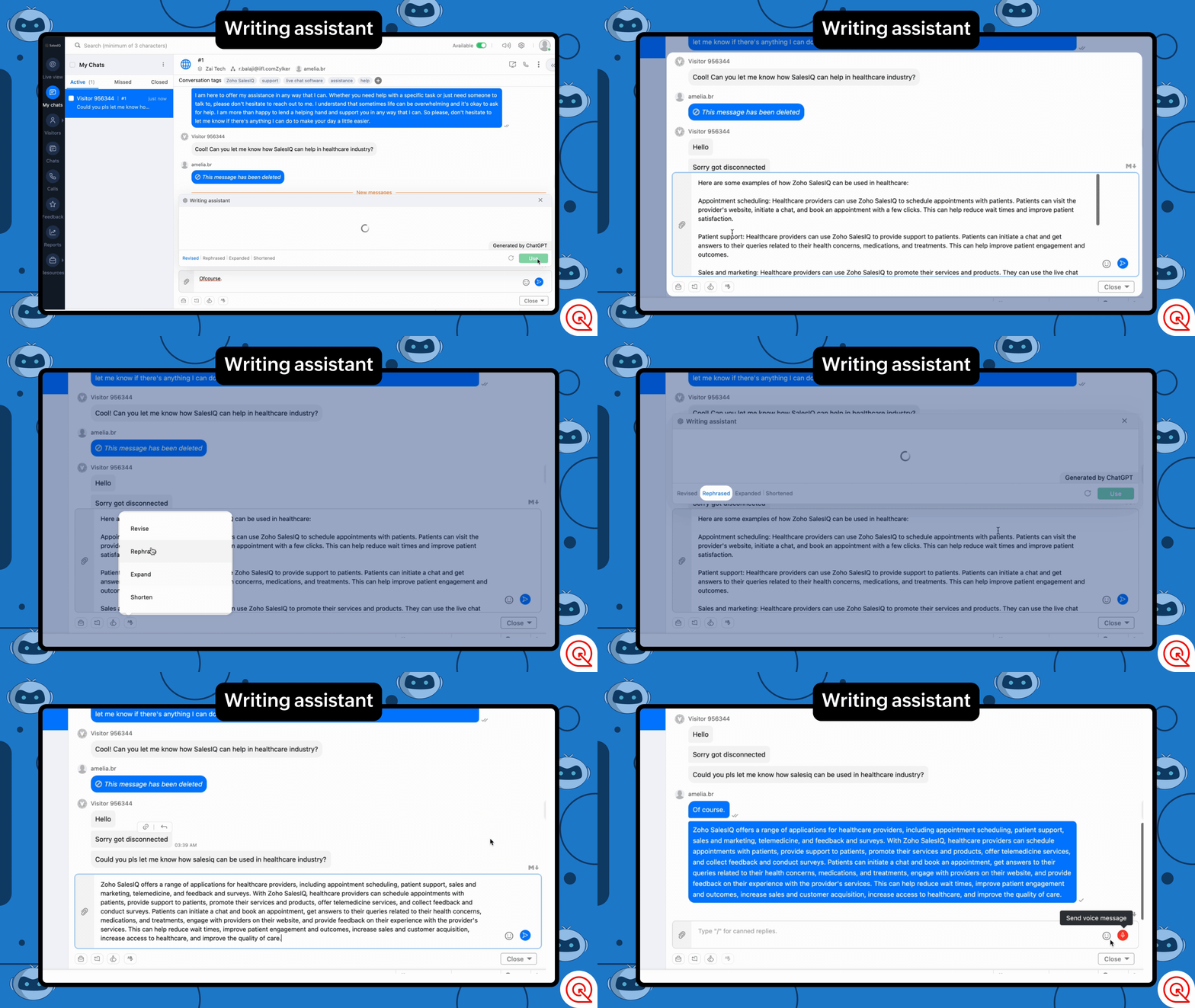
- Rephrase - Paraphrase to enrich the message.
- Shorten - Shorten the message to make the content crisp.
- Expand - Make the message longer to offer a more comprehensive explanation.
- Revise - Checks of grammar and spelling errors in the message.
Conversation summary for quick understanding and recap
Our new feature Summarize powered by OpenAI, will help you get a condensed overview of the entire conversation in actionable points.
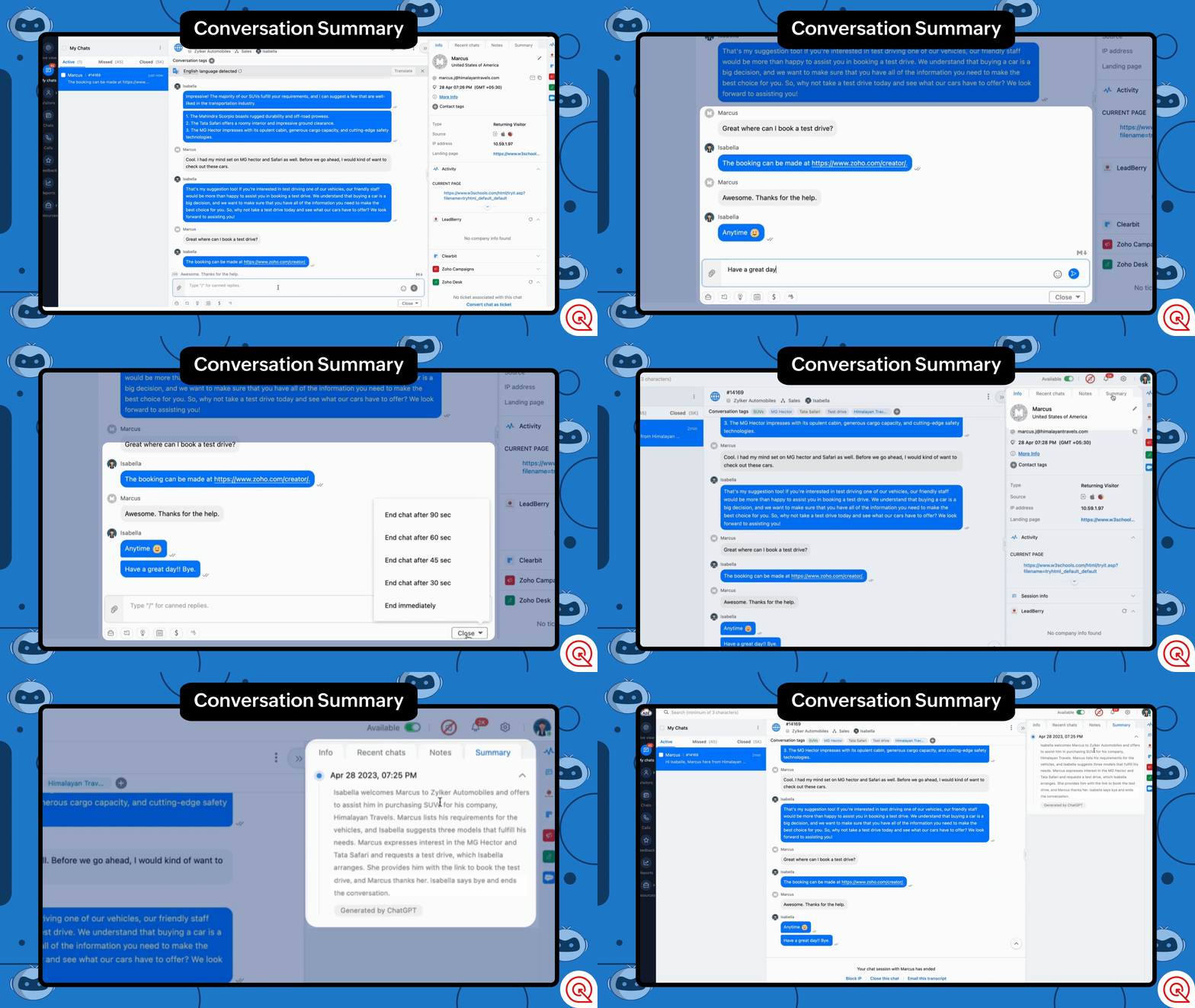
How can this help?
- Get a quick overview or recap of the conversation. Operators can skim through previous conversations to contextual assistance.
- Admins and analysts can now skim through customer chats 10 times faster.
- It can mitigate the need for operators to make conversation overview notes for admins, allowing them to focus on noting down critical drivers.
Quick Tag Suggestions for Better Classification
Tagging can be one of the most compelling features of Zoho SalesIQ when categorizing your conversations. Using Tags, analysts and admins can get in-depth insights into the conversation; it can also be used to understand customer behaviors and trends at a glance.
But manually tagging all the conversations can be tiresome, even more so if you have many untagged chats and want to add tags.
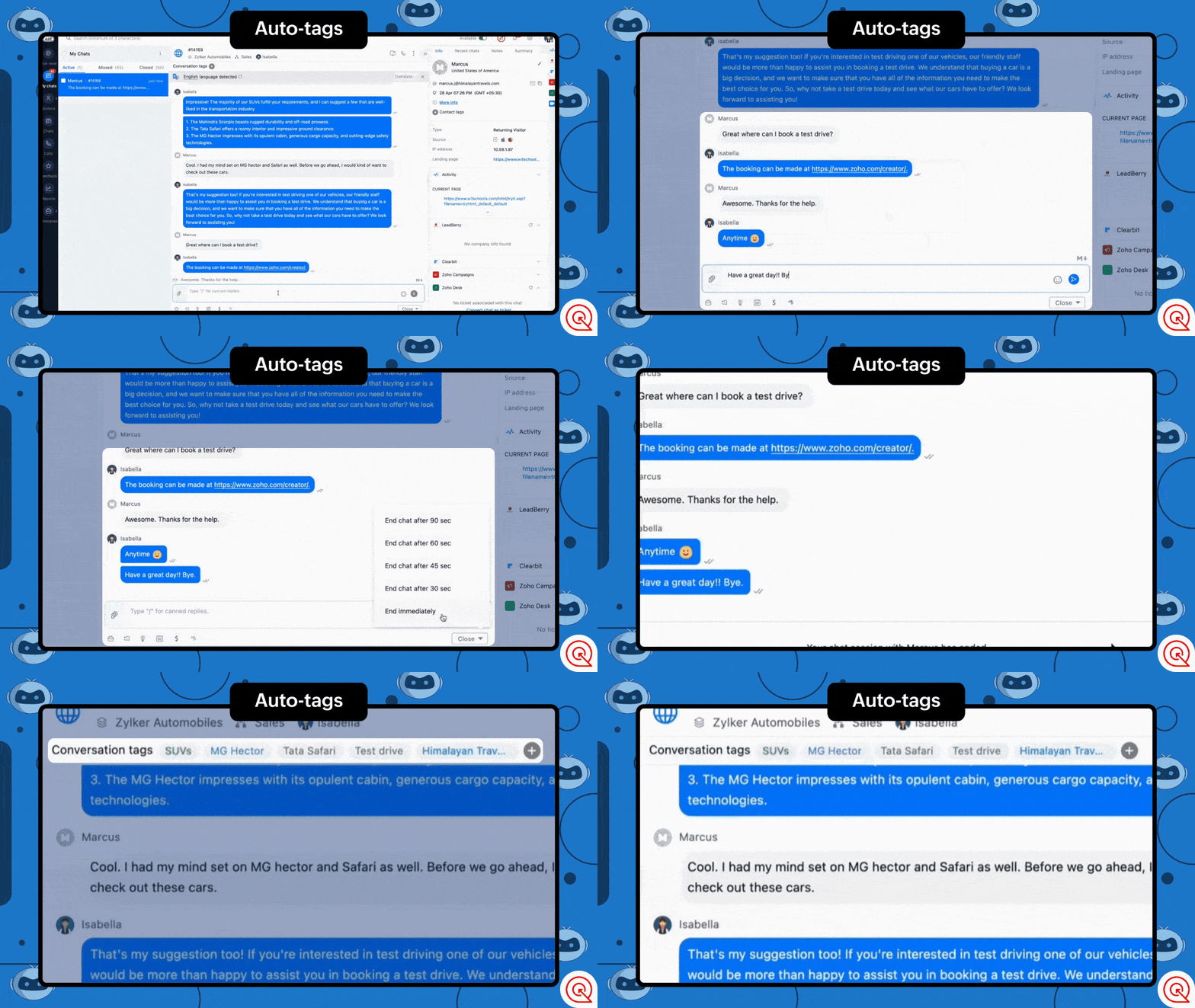
With the tags generation feature, OpenAI can analyze conversations and assign tags to them. You can choose one or both of these options for tag generation.
- Generate and suggest tags - This option allows you to generate new tags or assign existing based on the conversation and assign them with the help of OpenAI.
- Auto-assign tags - This option automatically assigns tags based on the conversation once ended.
Power Up Your Chatbots with ChatGPT
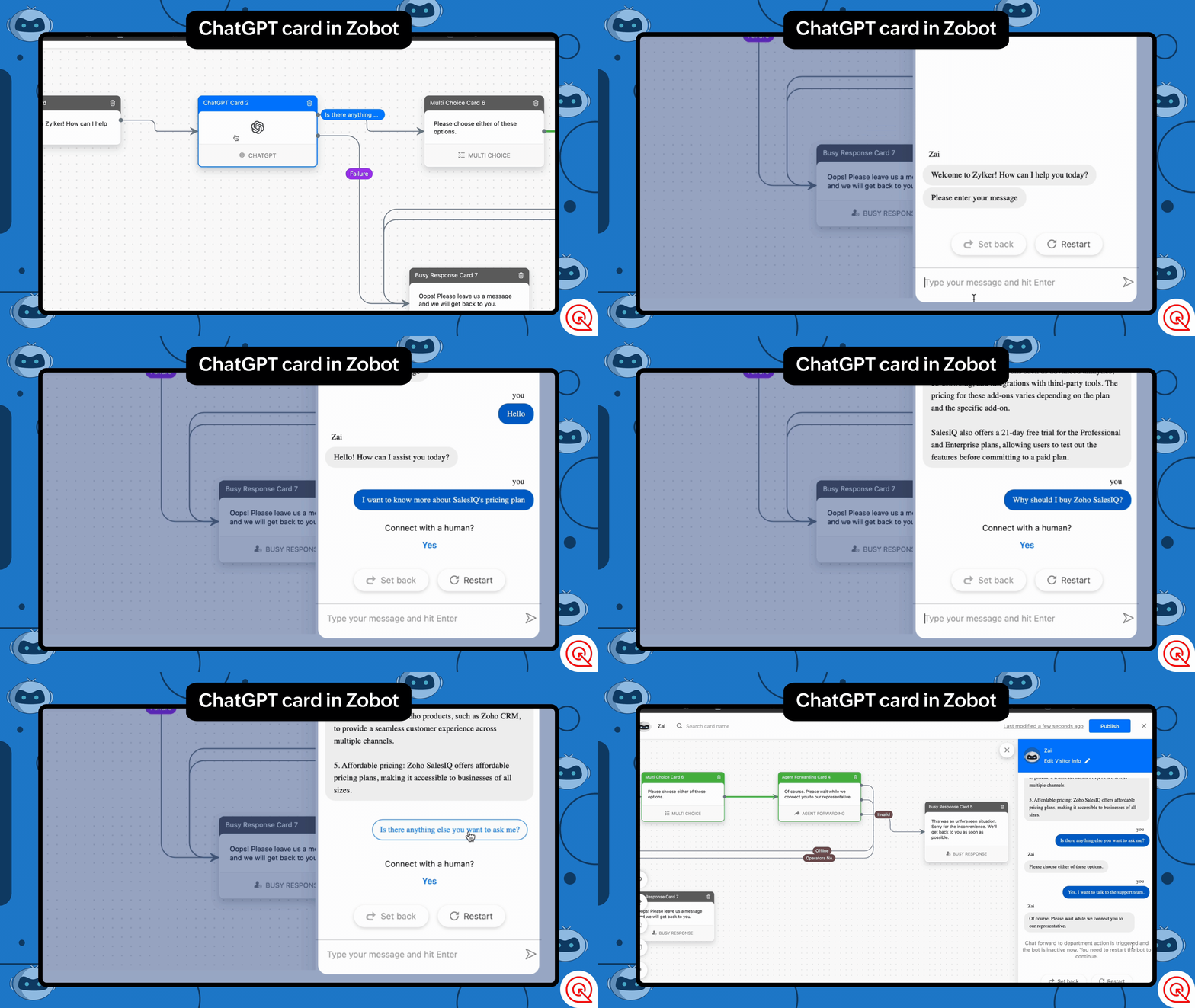
Take your chatbots to the next level and give them a boost by connecting them directly with ChatGPT, allowing your users to communicate directly with the AI. This feature can enrich your automated conversations by allowing users to ask general questions about your business domain or questions that are outside your area of expertise. With AI in the picture, your chatbots can become smart assistants that keep your visitors engaged.
Here is an example on how you can use the block in your chatbot:
Assuming you run a car retail business, you can set up the this block to help visitors with general questions about cars or how they work. ChatGPT can intuitively assist your visitors with these questions.
With features like the Writing Assistant, Summarize, and Tag generation, businesses can improve efficiency, accuracy, and personalization. As AI technology improves and becomes more reliable, we will be looking forward to further automating features of Zoho SalesIQ.
We hope that these features would add great value to operators and admins and to provide optimal support for your users. We are not stopping with this, as AI evolves and becomes more reliable we will be adding more AI based features or core functions of Zoho SalesIQ. Until then, please use this integration and let us know your suggestions. We are happy to hear back from you.
Caution: Please be aware of the privacy concerns of using OpenAI. We prioritize protecting user data and encourage users to read more about OpenAI privacy policies.
Read More.
Regards,
Naveen
Recent Topics
Can we do Image swatches for color variants?
We want to do something like the attached screenshot on our new zoho store. We need image swatches instead of normal text selection. We want to user to select an image as color option. Is this doable? I don't see any option on zoho backend. Please h
Can Zoho Flows repeat Actions more than once?
I'm attempting to make an intentional Zoho Flow loop using the below layout. However, when "WithinLimit" condition is met, the program fails to execute the action "Get & Add Request Co..." again. Is this by design? Is Zoho Flows unable to repeat actions
Video interviews not compatible on mobile
Hi Zoho, The 2-way video interview feature you have added to Recruit would be great if the candidate was able to use the link to the video on a mobile phone, it doesn't work on Samsung browser, it doesn't work on chrome/firefox mobile version of browser,
Converting Sales Order to Purchase Order
Hi All, Firstly, this code works to convert a sales order(SO) to a purchase order (PO) via a button, however I am running into an issue when I convert the SO where the values from the line items are not pulled across from the SO to the PO. The ones in
What is the difference between Zoho Campaigns and marketing hub?
Zoho Campaigns is a permission-based email marketing tool for sending marketing emails and mass emails. Marketing Automation is a multichannel marketing automation tool that caters to organizations looking for tools to engage their users across multiple
Can I use a Standalone CRM Function as the Callback URL For Async Export Data API?
I am creating an export job using this API https://www.zoho.com/analytics/api/v2/bulk-api/export-data-async/create-export/view-id.html There is a "callbackUrl" key in the CONFIG object. I tried copying the URL for a standalone function in CRM which can
Zoho Desk View Open Tickets and Open Shared Tickets
Hi, I would like to create a custom view so that an agent can view all the open tickets he has access to, including the shared tickets created by a different department. Currently my team has to swich between two views (Open Tickets and Shared Open Tickets).
Future Orders - Due Date
Hi In my role, I can receive tickets where the work required is requested months in advance. Using a Future Orders option, which I believe was setup under the On Hold status type, hides the Due Date, in all views/ticket etc. Whilst I understand the reasoning
Sorting Descending in a lookup
I have a case number lookup on multiple forms. I need the most recent added to appear at the top of the lookup or as the list of cases grom it's too much to scroll. Is there a way to have a look up sort descending?
Unable to sort as Descending order
Trying to change the sort order for a lookup field (checkboxes) from Ascending to Descending and keep getting an error in Deluge that the order must be Ascending Did anyone ran into this? Thanks Eyal
Change of Blog Author
Hi, I am creating the blog post on behalf of my colleague. When I publish the post, it is showing my name as author of the post which is not intended and needs to be changed to my colleague's name. How can I change the name of the author in the blogs?? Thanks, Ramanan
Consultant-Only Booking Page
Zoho Bookings does not allow for Meeting Type OR Workspace-Wide booking pages to be turned off. This is detrimental to organizations that have territory-based or assigned accounts, because if prospects can go to these booking pages and either select the
Zoho Desk API - Influence which layout is used
Hello, how can the ticket layout be changed using the API? I would like to choose the layout directly when creating the ticket. If this is not possible, my question would be how can I change it afterwards? Best regards, Sven
Auto-Invite Users to Portals in Zoho CRM based on Conditions
Hello Everyone, You can now automate portal invitations in Zoho CRM with the new Auto-Invite users feature in Portal management. No more manually enabling portal access one by one. With this enhancement, you can automatically send invites for users to
Ticket Status email
Good day, This was discussed in the past, but it would be helpful if we could have the system assign a custom response to a status. We have various statuses for tickets, e.g. "closed due to no response", or "Pending Status", it would be helpful for the
Has CSS Changed for Common Elements?
I noticed today that the standard title headings on my Forms and Reports display smaller in size than before. Google Dev Tools (attached), seems to confirm my suspicion. Something appears to be overriding the 1.375rem to 1.125rem. The font size on the
Text field alignment
Is it possible to align text in the text field? Or even better, is there a possibility to have a field which accepts only numbers?
email moderation issue when email is sent in the name of a mail group
Symptom: an email that is sent by a mail group moderator in the name of a moderated mail group is held back for approval. Reproduction: Create a moderated mail group with members and moderators. Allow that mails can be sent in the name of the group (extended
Pipeline in Custom Modules
I love the way the Sales Pipeline looks and functions with reports. I would like to add the save pipeline features and visualization to a custom module, however, I only see that these pipelines are only available for the Deals module. Is there a way to add pipelines to custom modules?
Duplicate customers being created in Desk
Hi I've trying to work out why I've getting duplicated customers being created in my desk. I have an external booking system that generates an email when I get a customer booking a job. A booking email gets sent to Desk where I manage the booking and
Turn off Knowlege Base Follow options and Follower lists
Is there a way to hide or turn off the option in the Knowledge Base for users to follow specific departments/categories/sections/articles? If not, is there a way to turn off the public list of followers for each of those things? Otherwise, customer names
Tip #53- Remote Billing: Your End-to-End Billing Solution in Zoho Assist- 'Insider Insights'
Manual invoicing, after every remote support session, can be time-consuming and often error-prone. As an MSP, IT admin, or even a freelance support technician, it may become overwhelming to keep track of session time, service rates, and client invoices.
Record history and ticket interaction tab in contacts and accounts
Hello everyone! We have improved the History tab to help users trace updates in the interaction activity logs of the Contacts and Accounts detail pages in the Customer Module. This enhancement make it easier to get clear details about who made each update,
issue with deluge script
i used chat gpt to build this script and I am getting 2 errors which I cannot figure out how to fix: void monthly_sales_order_generation() { try { // ---------------- CONFIG ------------------- analytics_url_1 = "https://analytics.zoho.com/api/<workspaceID>/report/<reportID1>/data";
Is there an API to "File a Ticket" in Desk
Hi, Is there an API to "File a Ticket" in Desk to zoho projects?
Keyboard UX for Assemblies
The new Assembly module has a counter-intuitive behavior that ought to be corrected. When an Assembly is ready to be entered, there are two options given, the blue-highlighted "Assemble" and the gray "Save as Draft". This correctly implies that the normal
Mapping a new Ticket in Zoho Desk to an Account or Deal in Zoho CRM manually
Is there any way for me to map an existing ticket in Zoho desk to an account or Deal within Zoho CRM? Sometimes people use different email to put in a ticket than the one that we have in the CRM, but it's still the same person. We would like to be able
Cliq iOS can't see shared screen
Hello, I had this morning a video call with a colleague. She is using Cliq Desktop MacOS and wanted to share her screen with me. I'm on iPad. I noticed, while she shared her screen, I could only see her video, but not the shared screen... Does Cliq iOS is able to display shared screen, or is it somewhere else to be found ? Regards
How to Move Behavior, Acquisition, Polls & Forms Data from Zoho PageSense to Zoho Analytics?
Hi Zoho Community, I'm looking for a way to transfer data from Zoho PageSense to Zoho Analytics, specifically: Behavioral data (clicks, scrolls, heatmaps, etc.) Acquisition data (traffic sources, campaigns, etc.) Polls and forms data As far as I can tell:
Why can't I see images uploaded by other users in the Library for Campaigns
We are several users of zoho Campaign. I have uploaded visuals of our company, but my team members can't see them.
zoho sheet stuck
I Need help. ZOHO sheets stuck on the loading screen. I've already deleted the system cache and cookies of my browser (google chrome) but it's still not opening.
Tip of the Week #78 – Cut response time with multichannel shared inboxes
If you’ve ever felt your team juggling between multiple email accounts, social pages, and chat apps just to reply to customers, you’re not alone. Managing conversations in multiple channels can quickly turn messy. Important messages across inboxes, replies
Need a way to run a client script longet than 10 seconds
By The Grace of G-D. Hi, Currently, Client Scripts are Timing out at 10 seconds. We have complex logics that needs more time. Can you add a feature request to increase the timeout?
FSM - Associating and selecting Contacts based on Service Addresses
Hi FSM team, I've come across an FSM limitation I wanted to share for improvement. I'm currently configuring FSM for a client who provides heating system install and maintenance services. The are often sub contracted by building management companies to
Exciting Updates to the Kiosk Studio Feature in Zoho CRM!
Hello Everyone, We are here again with a series of new enhancements to Kiosk Studio, designed to elevate your experience and bring even greater efficiency to your business processes. These updates build upon our ongoing commitment to making Kiosk a powerful
FSM Improvement Idea - Show an Import button when there is no data
I am setting up FSM for a client and I noticed that there is no option to import data, see screenshot below. Even when you click Create Contact there is only an option to Import from Zoho Invoice. It is only after you add at lease 1 record that the Import
Unable to Send Different Email Templates for Different Documents in Zoho Sign
Hello Zoho Community, I am facing a limitation with Zoho Sign regarding email notifications sent to customers when a document is sent for signing. Currently, whenever I send any template/document for signing, the email notification that goes to the customer
Timeline Tracking Support for records updates via module import and bulk write api
Note: This update is currently available in Early Access and will soon be rolled out across all data centers (DCs) and for all editions of Zoho CRM. The update will be available to all users within your organization, regardless of their profiles or roles.
How to change position button transtition of Blueprint?
Hi Everyone, Look at my screenshoot, it is possible move the reject button to the right? I couldn't find that setting in the blueprint. Thank you.
UI Improvement - Ability to Collapse Flow
The UI for Flow is generally pretty good. However, when multiple decision trees are used, the layout can get pretty convoluted and hard-to-follow (see one of my Flows below): In these cases, even the auto-arrange fails to make this something that a normal
Next Page